Why are you still paying a monthly “rent” for software that has already been perfected by the open-source and independent developer communities? Most professionals feel tethered to the Creative Cloud because they fear losing PSD compatibility or facing a steep learning curve with non-standard interfaces. Finding a professional photoshop alternative for photo retouching shouldn’t mean compromising on industry standards or file compatibility. It’s frustrating to watch a significant portion of your project budget disappear into a recurring subscription just to maintain basic design capabilities.
You don’t have to sacrifice high-res output or advanced layer management to eliminate these costs. This guide identifies the most effective free software available in 2026, focusing on tools that offer a familiar UI and full file support. We’ve done the testing so you don’t have to. You’ll discover which platforms provide the best balance of speed and precision, whether you need a browser-based quick fix or a desktop-native powerhouse for print-ready projects. We’ve filtered the market to find the software that respects both your time and your resources.
Key Takeaways
- Identify why the “Adobe Tax” is no longer mandatory for professional results by leveraging the 2026 software subscription tipping point.
- Evaluate the best photoshop alternative for photo retouching based on its ability to handle complex PSD layers and masks without data loss.
- Compare browser-based UI clones that require zero installation against powerful desktop-native open-source software for deep technical manipulation.
- Learn how to maintain high-resolution output and color accuracy for print-ready projects using professional-grade free alternatives.
- Understand our rigorous vetting process for software security and performance to ensure your creative workflow remains stable and efficient.
Why Millions are Switching to Photoshop-Like Free Tools in 2026
The year 2026 marks a clear tipping point in the design industry. Subscription fatigue has reached a peak as users realize they’ve spent thousands of dollars over the last decade on software they don’t actually own. This financial “Adobe Tax” is driving a mass migration toward more efficient, cost-effective models. Finding a capable photoshop alternative for photo retouching is now a strategic move for professionals looking to optimize their overhead. Modern hardware has leveled the playing field; high-performance processors and optimized web engines mean that free tools can now handle multi-gigabyte files that previously required a heavy local installation.
The Real Cost of Creative Cloud Subscriptions
Renting your creative tools creates a cycle of dependency. If you miss a payment, your project files often become inaccessible or uneditable. This psychological and financial burden is pushing independent creators and small studios to adopt software that offers true ownership or open-source freedom. Free tools are no longer seen as “lite” versions. They’ve become stable, production-ready environments that can handle the rigorous demands of professional workflows without the recurring invoice. Reliability is no longer exclusive to paid platforms; it’s now a standard feature of the top-tier free market.
Essential Features of a True Photoshop Equivalent
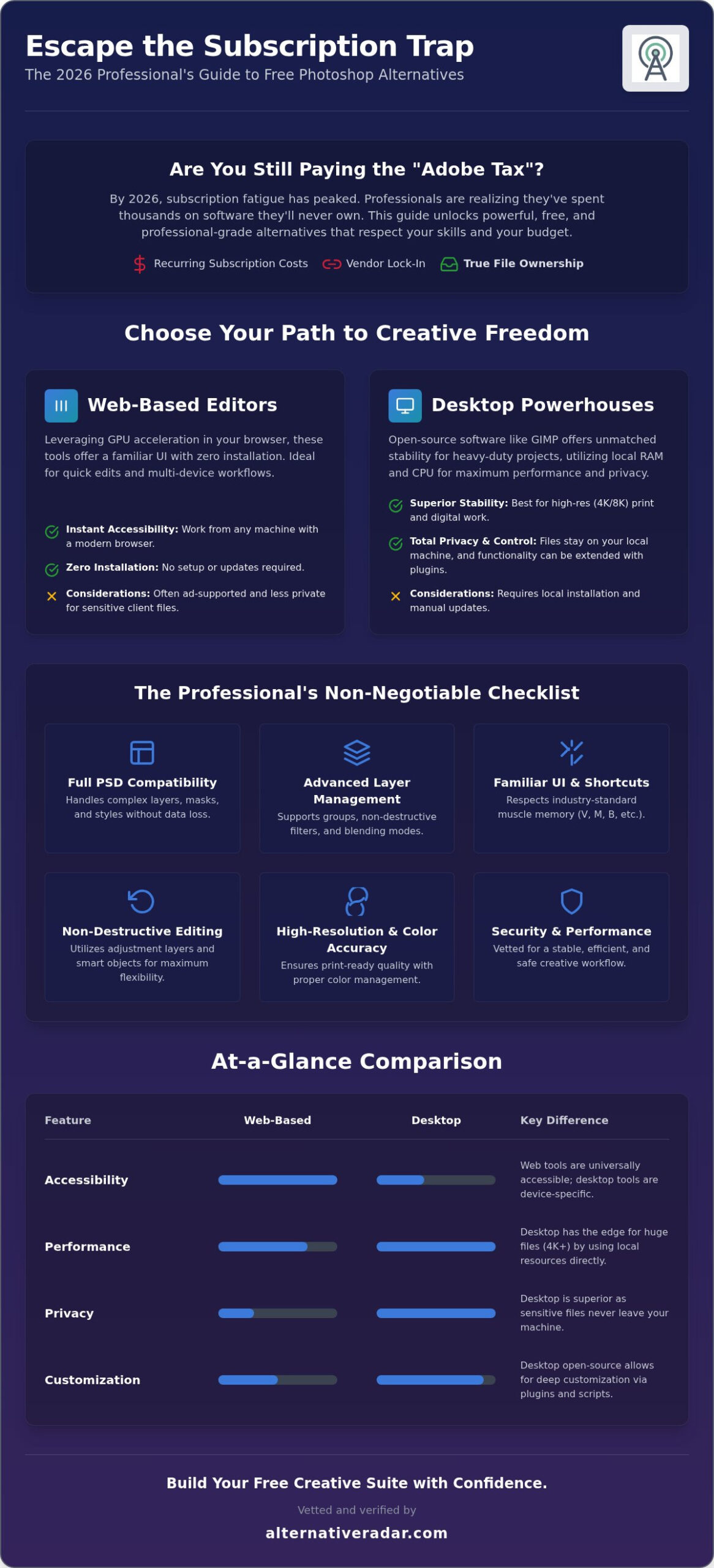
A true Photoshop equivalent must go beyond a similar color scheme or layout. It needs to support non-destructive editing, complex layer hierarchies, and advanced masking. Professionals require standard keyboard shortcuts like V for move, M for marquee, and B for brush to maintain their speed. Muscle memory is a valuable asset that shouldn’t be wasted on learning non-standard UIs.
Native PSD support remains the non-negotiable standard for client collaboration. You can find a comprehensive comparison of raster graphics editors that details which tools offer the specific technical features needed for high-end work. When you choose a photoshop alternative for photo retouching, you aren’t just looking for a $0 price tag. You’re looking for a tool that respects your existing skills and meets the technical requirements of modern print and digital output. True feature parity is now available without the monthly fee.
Categorizing the Best Free Software Like Photoshop
Choosing a photoshop alternative for photo retouching depends largely on your hardware constraints and privacy requirements. We categorize these tools into two distinct tiers: browser-based accessibility and desktop-native power. This technical division helps you decide whether you need an immediate solution for a single social media post or a robust environment for high-resolution print work. Many users find that a mix of both types provides the most efficient workflow for different project scales. Efficiency comes from matching the right tool to the specific task at hand.
Web-Based Editors (The Photopea Model)
Modern browser editors have evolved significantly by 2026. They now leverage hardware-accelerated GPU processing directly through your browser, allowing for smooth performance on complex files with dozens of layers. These tools are ideal for Chromebook users or designers who frequently switch between different workstations. While the “Photopea model” provides an interface nearly identical to Adobe’s, it often relies on an ad-supported freemium structure. You get professional features for free, but you trade some screen real estate for the service. For a deeper look at specific rankings, you can consult this guide on top Photoshop alternatives for 2026 to see how these web tools stack up against traditional software.
Desktop Open-Source Powerhouses (GIMP and Beyond)
Desktop-native open-source software remains the gold standard for heavy-duty manipulation. Programs like GIMP provide superior stability when working with 4K or 8K resolution projects; they utilize your local RAM and CPU without the overhead of a browser wrapper. Privacy is a major advantage here. Your sensitive client files stay on your machine rather than being uploaded to a third-party server. These tools also allow for deep customization through community-developed scripts and plugins. You can automate repetitive tasks or add specialized filters that web tools simply cannot match due to browser security limitations.
Emerging hybrid solutions now offer a middle ground by running local code within a browser environment. This ensures your data remains private while providing the convenience of a web link. When selecting a photoshop alternative for photo retouching, consider how much local control your workflow actually requires. If you’re overwhelmed by the technical options, Alternative Radar can help you filter these tools based on your specific hardware specs. We’ve mapped out the best path for every type of creator, ensuring you don’t waste time on software that can’t handle your specific file sizes or layer counts.
Head-to-Head: Top 5 Free Photoshop Alternatives Reviewed
Selecting a photoshop alternative for photo retouching requires balancing interface familiarity with technical depth. We’ve vetted these five tools based on their 2026 performance and their ability to replace Adobe’s core functions. At Alternative Radar, our role as a digital scout is to filter through the noise, ensuring you only spend time on software that actually delivers professional results. Efficiency is our priority; we’ve tested these so you don’t have to waste your project hours on trial and error.
- Photopea: The definitive UI clone. It runs in your browser and mimics the Photoshop layout so closely that you won’t need to relearn your workflow. Its 2026 AI feature set now includes advanced generative fill and one-click object removal.
- GIMP: The veteran choice for deep technical manipulation. With the stability of GIMP 3.0, it offers a robust desktop environment for those who need high-resolution output without browser limitations.
- Krita: While designed for digital painters, its brush engine technology far exceeds Photoshop’s native capabilities for texture and blending.
- Darktable: The premier choice for professional RAW processing. It serves as a non-destructive hybrid solution for photographers who need Lightroom-style development alongside retouching.
- Alternative Radar: Your centralized discovery hub. While not an editor itself, it’s the essential tool for vetting new 2026 software releases and ensuring your creative suite remains cost-effective and secure.
Photopea vs. GIMP: Which Interface Wins for Retouching?
The choice between these two often comes down to your tolerance for learning new menus. Photopea wins on familiarity; it’s an Adobe clone that supports almost every standard keyboard shortcut. If you’re a long-time Photoshop user, you can start working immediately. GIMP 3.0 has significantly improved its workflow, but it still requires a mental shift in how layers and tools are organized. In terms of performance on mid-range 2026 hardware, GIMP’s local execution is generally faster for massive files, while Photopea is more convenient for agile, multi-device projects.
Specialized Picks: Krita for Art and Darktable for Photography
Don’t assume a general-purpose editor is always the best photoshop alternative for photo retouching. Krita offers specialized tools for artists that make skin retouching and texture blending feel more natural than standard mouse-and-click editors. For photographers, Darktable provides a non-destructive environment that protects your original pixels while offering advanced color grading. Your specific creative output should dictate your tool. If you’re unsure which fits your current project, Alternative Radar provides detailed comparisons to help you make an efficiency-driven choice.
Solving the Compatibility Crisis: PSD Support and Layer Management
The biggest hurdle when adopting a photoshop alternative for photo retouching isn’t the price; it’s the fear of losing years of archived work. Professional projects rely on complex hierarchies of adjustment layers, vector masks, and smart objects. If your new software flattens these elements upon import, the tool is useless for collaborative environments. By 2026, the gap in file reconstruction has narrowed significantly. Most high-end alternatives now treat the PSD format as a native language rather than a foreign file type, ensuring your creative intent remains intact across different platforms.
Importing and Exporting PSD Files Safely
Photopea remains the gold standard for PSD reconstruction because it was built specifically to parse Adobe’s proprietary data structures. It successfully maintains editable text layers and layer styles that often break in other free tools. GIMP 3.0 has also made massive strides in handling large file sizes without the memory leaks that plagued previous versions. When you’re managing 2GB project files, local application stability is vital. You should always verify that your chosen tool supports non-destructive smart objects; otherwise, you’ll lose the ability to scale elements without quality degradation. If you’re dealing with frequent hand-offs to Adobe users, stick to tools that prioritize “round-trip” compatibility to avoid friction during the export process.
Replicating the Adobe Ecosystem Workflow
Efficiency depends on muscle memory. Transitioning to a photoshop alternative for photo retouching is faster when you map your environment to match your old habits. Most professional alternatives allow you to import custom keyboard shortcut profiles or come with an “Adobe Mode” pre-installed. This ensures that Ctrl+T still triggers your transform tool and B remains your brush.
The font crisis is another reality of moving away from the Creative Cloud. Since you’ll lose access to Adobe Fonts, you must source open-license equivalents from libraries like Google Fonts or Font Squirrel to maintain your branding. For proprietary features like Content-Aware Fill, look for “Inpainting” or “Healing” brushes within these free tools. These features often use similar algorithmic logic to remove objects or fill gaps seamlessly. To find the exact technical match for your specific hardware and file needs, compare professional software alternatives on our platform. We’ve mapped the transition steps so you can focus on the design work rather than the technical troubleshooting.
Finally, ensure your export settings are ready for professional use. High-end retouching requires more than just a JPEG output. You need software that supports CMYK color profiles for print and 16-bit color depth for high-dynamic-range digital displays. Without these technical foundations, even the best retouching won’t survive the transition from screen to physical media.
How Alternative Radar Helps You Build a Free Creative Suite
Most creators start by looking for a single photoshop alternative for photo retouching, but the real efficiency gains happen when you replace the entire subscription model. Alternative Radar acts as your digital scout. We’ve pre-tested these tools to ensure they meet 2026 performance standards and security protocols. Our platform provides a high-quality filter for information, allowing you to bypass marketing hype and focus on utility. We categorize software by license type and technical capability so you can make informed decisions quickly. You don’t have to follow market leaders when better, more efficient options exist for your specific workflow.
Discovering Professional-Grade Free Software
A production pipeline is only as strong as its weakest link. If you’ve replaced Photoshop but still pay for vector or layout tools, you haven’t fully escaped the subscription loop. Our research focuses on finding the best alternative to popular software like Illustrator and InDesign to help you bridge those gaps. For professional teams, we also provide a specialized open source business software 2026 guide. This helps organizations scale their creative departments without linear cost increases. We verify that these tools support collaborative workflows and enterprise-level security before recommending them. Building a complete, zero-cost production pipeline is now a viable reality for studios of any size.
Your Next Steps to Creative Freedom
The transition to a new photoshop alternative for photo retouching should be measured. Start by running a non-critical project through one of our recommended tools to test your specific hardware limits. This sandbox approach identifies potential friction points in your layer management or file export before you hit a deadline. We also encourage joining open-source community forums. These groups provide peer-to-peer technical support that often rivals paid help desks. You’ll find that the community-driven model often addresses bugs and feature requests faster than traditional corporate structures.
If you need more technical details, check out our best free alternatives to photoshop for deeper feature dives. We keep our database updated with every major 2026 software release, ensuring you always have access to the latest performance benchmarks. Managing your software choices shouldn’t be a full-time job. We provide the centralized discovery hub you need to maintain a professional, zero-cost production pipeline. Empowerment comes from having options; we ensure those options are reliable and production-ready. Stop following the market and start leading your own creative process.
Achieve Professional Design Freedom in 2026
Transitioning away from recurring subscriptions is no longer a compromise on quality. You now have access to high-performance tools that offer genuine feature parity, from browser-based UI clones to stable desktop powerhouses. Selecting the right photoshop alternative for photo retouching is simply a matter of identifying your specific hardware needs and project scale. Whether you prioritize the familiarity of an Adobe-style interface or the deep technical manipulation of open-source software, the tools to maintain a professional workflow are ready for deployment.
Don’t waste project hours on trial and error. You can Find your perfect Photoshop alternative on Alternative Radar using our objective comparisons of 500+ software tools. We provide expert-vetted pros and cons alongside daily updates on free and open-source releases to ensure your creative suite remains efficient and secure. We’ve done the heavy lifting so you can focus on the design work that matters. Take control of your resources and start building a more sustainable production pipeline today.
Frequently Asked Questions
What is the best free program that is exactly like Photoshop?
Photopea is currently the closest match to the Photoshop experience. It replicates the interface, menu structure, and keyboard shortcuts with remarkable precision. Unlike desktop apps, it runs directly in your browser while offering advanced layer management and mask support. It’s the ideal photoshop alternative for photo retouching if you want to avoid a steep learning curve. Most users can transition their existing skills immediately without needing to study entirely new manual layouts or tool icons.
Can I open and save PSD files in free Photoshop alternatives?
Yes, you can reliably open and export PSD files using tools like Photopea and GIMP. Photopea is particularly effective at maintaining complex layer styles and editable text during the import process. While most alternatives support the format, you should always check for “round-trip” compatibility. This ensures that smart objects and adjustment layers remain intact when you send files back to Adobe users. It’s a critical requirement for professional collaborative environments in 2026.
Is GIMP still the best free alternative to Photoshop in 2026?
GIMP remains the premier desktop-native choice, especially following the stability improvements in version 3.0. It excels in deep technical manipulation and offline privacy. While it doesn’t mimic the Adobe UI like Photopea, its power for high-resolution 8K projects is unmatched in the open-source world. It’s a robust photoshop alternative for photo retouching if you require local processing power and extensive plugin customization for complex, multi-gigabyte project files that browser tools might struggle to handle.
Are there free online editors that don’t require a user account?
Several professional-grade editors allow you to work without creating a profile. Photopea and Pixlr both offer immediate access to their full toolsets directly through a web link. This approach prioritizes speed and efficiency for users who need a quick edit without the friction of a signup process. Your files are processed locally in your browser’s memory, which also provides an additional layer of privacy for sensitive client assets during the retouching phase.
Do free alternatives support AI-powered features like Generative Fill?
Yes, free alternatives have integrated advanced AI features by 2026. Photopea now includes its own version of generative fill and one-click object removal tools. These features leverage cloud-based processing to match the speed and accuracy of paid software. While some tools might limit the number of AI operations per day on a free plan, the underlying technology is now a standard part of the independent developer ecosystem for high-end image editing and background reconstruction.
Is Krita better than Photoshop for digital painting and illustration?
Krita is widely considered superior to Photoshop for illustration and digital painting. Its brush engine is built specifically for artists, offering better stabilization and more natural blending than Adobe’s general-purpose tools. It includes specialized features like a wrap-around mode for seamless textures and a pop-up palette for quick color selection. If your workflow focuses on creative art rather than standard photo manipulation, Krita provides a more tailored and efficient environment for your tablet-based projects.
Will my Photoshop keyboard shortcuts work in these free alternatives?
Most professional alternatives allow you to maintain your muscle memory by using Adobe-standard shortcuts. Photopea uses them by default, while GIMP and Krita offer customizable shortcut profiles that you can map to match Photoshop. This feature is essential for maintaining productivity during a software transition. You won’t have to waste time relearning basic commands like transform (Ctrl+T) or brush size adjustments, allowing you to focus entirely on the quality of your creative output.
How do these free tools handle CMYK color profiles for professional printing?
Handling CMYK is a technical requirement for print-ready projects. GIMP 3.0 and Krita both offer robust support for ICC color profiles and CMYK conversion. While some browser-based tools are primarily RGB-focused, desktop open-source software provides the color management depth needed for professional offset printing. Always verify your color profile settings before exporting to ensure that the physical output matches your screen’s representation. This technical precision is what separates professional tools from casual web editors.