
Paying a premium for enterprise scheduling software is no longer a requirement for high-level project management. While Microsoft Project remains an industry standard, its steep licensing fees and complex interface often create more friction than efficiency for growing teams. Many managers now seek free microsoft project alternatives to avoid the frustration of sharing critical .mpp files with stakeholders who lack expensive subscriptions. It is a common bottleneck that slows down momentum and drains your department’s budget.
You can reclaim your resources without sacrificing professional-grade Gantt charts or resource leveling capabilities. We have done the heavy lifting by scouting the market to identify tools that offer zero-cost entry points and seamless file compatibility. This article compares the most powerful replacements available in 2026, focusing on ease of use, technical depth, and how well they bridge the gap for non-technical team members. You will discover exactly which platform matches your specific workflow needs and helps you move away from the Microsoft ecosystem for good.
Key Takeaways
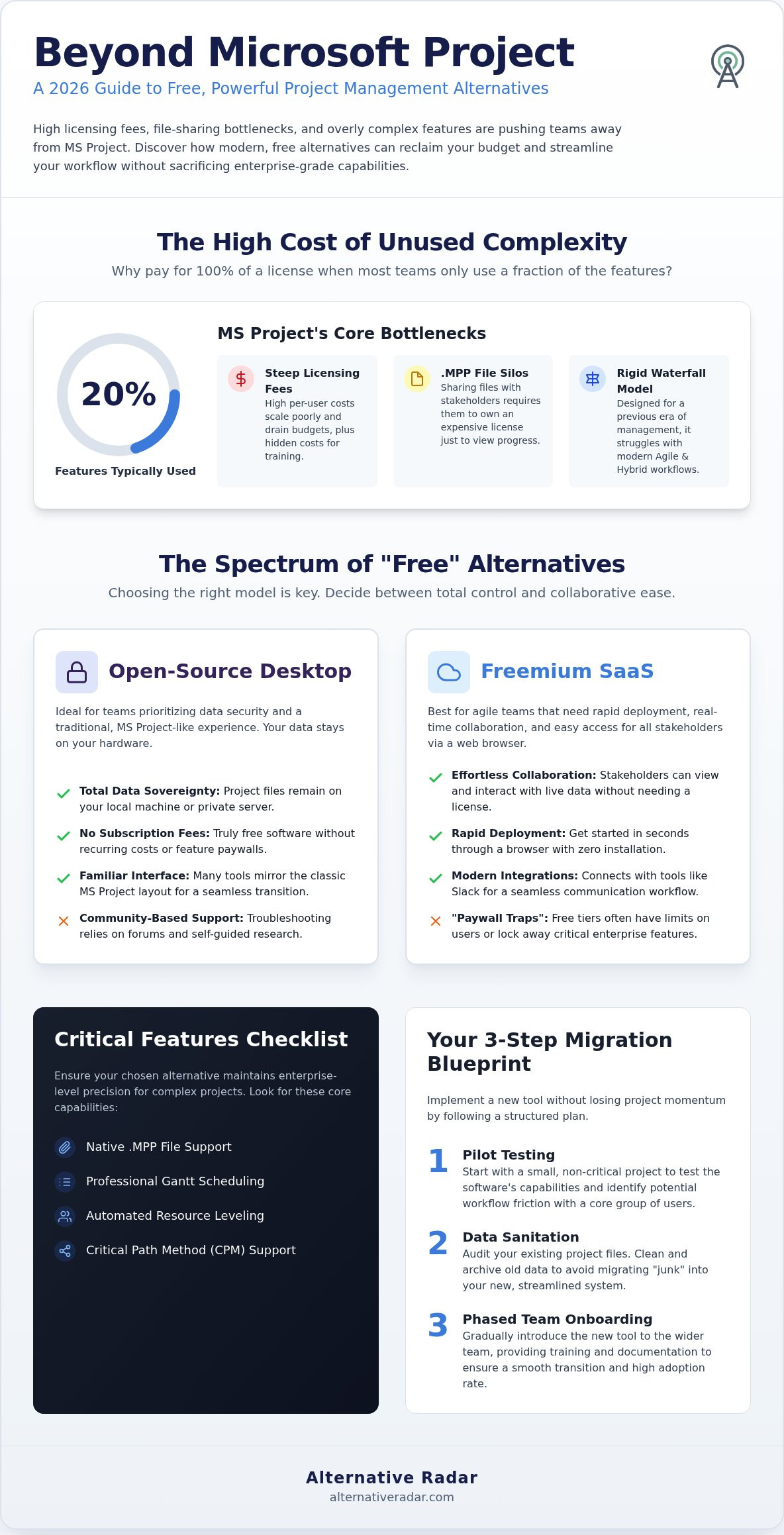
- Analyze the “overkill” factor to see why most teams only use 20% of Microsoft Project features while paying for 100% of the license.
- Compare the top free microsoft project alternatives for 2026, focusing on those that offer native .mpp file support and professional Gantt scheduling.
- Distinguish between open-source tools for total data control and freemium SaaS options for easier stakeholder collaboration.
- Audit critical technical requirements like automated resource leveling and Critical Path Method (CPM) support to maintain enterprise-level precision.
- Follow a structured migration plan that includes pilot testing and data sanitation to prevent transferring “junk” data into your new workflow.
Why Teams are Moving Away from Microsoft Project in 2026
Microsoft Project has long served as the backbone of enterprise scheduling, yet its dominance is fading. The tool was designed for a rigid, Waterfall-era of management that doesn’t always align with the fast-paced, iterative nature of modern business. Most teams find that 80% of the platform’s advanced features, such as complex macro-based automation or deep sub-project nesting, go entirely unused. This “overkill” factor creates a cluttered interface that slows down non-technical users and complicates simple task tracking.
The reliance on the proprietary .mpp file format has also become a significant bottleneck. Sharing a project plan with external stakeholders or different departments often requires them to have their own expensive licenses just to view the timeline. In a world that prizes speed and accessibility, these technical silos are no longer acceptable. Consequently, many organizations are migrating toward free microsoft project alternatives to gain flexibility and eliminate unnecessary friction in their daily operations.
The High Cost of Proprietary Complexity
The financial argument for switching is hard to ignore. Microsoft 365 Project Plan 3 carries a heavy monthly per-user subscription fee that scales poorly as teams grow. When you calculate the true Total Cost of Ownership (TCO), the license fee is only the beginning. Companies often incur hidden costs through specialized training sessions or the need to hire dedicated “Project Schedulers” whose sole job is to manage the software’s complexity. Small and mid-sized businesses, in particular, find themselves priced out of the ecosystem, realizing they can achieve the same professional-grade scheduling with leaner, cost-effective tools.
The Shift Toward Collaborative Project Environments
Static status reports are losing ground to real-time transparency. Stakeholders in 2026 expect to see live progress updates rather than waiting for a weekly PDF export or a manual file transfer. Modern project management has shifted toward collaborative hubs that integrate directly with communication platforms like Slack. This integration ensures that updates happen where the work actually occurs, rather than in a disconnected scheduling silo. High-performing teams now prioritize tools that offer:
- Instant stakeholder access without requiring additional seat licenses.
- Cross-platform compatibility that works across Windows, macOS, and Linux.
- Agile and Hybrid support to accommodate both Gantt-based planning and Kanban-style execution.
Transitioning away from a legacy system isn’t just about saving money; it’s about empowering every team member to contribute to the project’s success. By adopting free microsoft project alternatives, you remove the barriers of high entry costs and technical complexity, allowing your team to focus on delivery rather than software maintenance.
Understanding the Spectrum of Free Project Management Software
Selecting from the available free microsoft project alternatives requires more than a feature checklist. You must first decide which software delivery model aligns with your organizational infrastructure. “Free” software typically falls into two distinct categories: open-source desktop applications and freemium Software-as-a-Service (SaaS) platforms. Each offers a different balance of control, accessibility, and long-term scalability. You aren’t just picking a tool; you’re picking a maintenance philosophy.
Open Source: The True Successors to MS Project
Open-source tools provide the highest level of data sovereignty. Platforms like ProjectLibre are designed specifically to mirror the classic Microsoft Project interface, making the transition seamless for veteran schedulers. Since these are often desktop-based, your project data stays on your local machine or private server. This makes them ideal for sensitive projects where cloud security is a primary concern. You don’t have to worry about sudden subscription changes or feature removals. However, support relies on community forums rather than a dedicated help desk, so your team should be comfortable with self-guided troubleshooting.
Freemium SaaS: Low Friction, High Velocity
Freemium cloud tools prioritize rapid deployment and team collaboration. These are “entry point” solutions that allow you to start managing tasks in seconds through a browser. While they offer high velocity and modern integrations, they often come with “paywall traps.” You might find that the free tier limits you to a specific number of users or locks away critical features like automated Gantt charts. Before committing, verify the security standards and data export options. If you find the SaaS landscape overwhelming, you can explore other software categories to see how different delivery models impact your workflow.
The choice between offline power and online accessibility usually dictates your workflow rhythm. Desktop tools handle heavy resource leveling and complex dependencies better than many free cloud tiers. Regarding corporate compliance, pay close attention to licensing. GPL-licensed software ensures the tool remains free forever, while proprietary-free tools might change their terms or feature sets at any time. Understanding these distinctions prevents you from outgrowing your chosen tool within the first six months of implementation.
Top 5 Free Microsoft Project Alternatives: A 2026 Comparison
Identifying the right tool requires a clear understanding of your team’s technical maturity and scheduling needs. We have scouted the current landscape to find free microsoft project alternatives that provide enterprise-level logic without the associated costs. Whether you need a direct clone of the Microsoft interface or a complete shift toward visual boards, these five options represent the best of 2026 software efficiency.
Deep Dive: ProjectLibre vs. Microsoft Project
ProjectLibre remains the most robust open-source replacement for veteran project managers. It achieves nearly total feature parity by offering Gantt charts, PERT charts, and both Resource Breakdown Structures (RBS) and Work Breakdown Structures (WBS). Its primary strength lies in its compatibility; it handles importing and exporting legacy .mpp files with minimal formatting loss. The user interface utilizes a familiar ribbon layout, which significantly reduces the training time for teams already comfortable with the Microsoft ecosystem. It’s the logical choice for those who need professional scheduling power on a zero-dollar budget.
GanttProject: Simple, Reliable, and Free
For teams that find Microsoft Project’s deep menu system overwhelming, GanttProject offers a refreshing, lightweight alternative. This Java-based tool focuses strictly on the essentials of scheduling: dependency linking, milestone tracking, and resource management. It avoids the bloat of modern SaaS platforms, providing a zero-clutter interface that prioritizes the timeline. Managers can quickly generate PDF or HTML reports for stakeholders, ensuring everyone stays aligned without needing to install complex software. It’s a reliable workhorse for straightforward projects that require clear visualization rather than deep data mining.
Visual Alternatives: Trello and the Kanban Revolution
Sometimes the best way to streamline a workflow is to ditch the Gantt chart entirely. Trello and the free tier of Asana cater to teams moving toward non-linear, task-oriented tracking. While Trello uses a visual Kanban board to manage flow, Asana provides a hybrid approach for those who still want basic list views. These tools are excellent for managing simple projects without the overhead of complex dependencies. They integrate communication directly into the project cards, ensuring that feedback and updates happen in real-time.
If you find yourself struggling to choose between these technical and visual paths, Alternative Radar serves as your dedicated comparison hub. We provide the objective filters you need to sort through licensing classifications and feature sets, helping you select the tool that matches your specific operational rhythm. For power users who prefer logic-based scheduling, TaskJuggler remains the top choice for resource leveling via code, though it requires a steeper learning curve than the other entries on this list.
Critical Features to Verify Before Switching from MS Project
Transitioning to a new system requires a rigorous verification process. You don’t want to realize midway through a project that your tool lacks automated Critical Path Method (CPM) support. Many free microsoft project alternatives offer basic Gantt visualization but fail at enterprise-grade resource leveling. You must verify if the tool can handle over-allocations across multiple projects simultaneously or if it only looks at tasks in a vacuum. Baseline tracking is another “make or break” feature. Without the ability to compare “Planned vs. Actual” performance, you lose the historical data needed to improve future estimates. Evaluate whether the reporting engine can generate stakeholder-ready dashboards, including:
- Resource usage heatmaps to identify potential team burnout.
- Milestone trend analysis for more accurate long-term forecasting.
- Cost-to-completion trackers to maintain budget transparency.
Technical Compatibility and Data Migration
The .mpp import test is your first hurdle. Proprietary formulas, custom fields, and complex dependency types often break during the transition from Microsoft’s ecosystem. Test your most complex file first. If the logic fails, you might need to rebuild the schedule from scratch. Moving from SQL-backed enterprise systems to local-file-based tools also poses a risk to data integrity. Ensure the software supports robust CSV or Excel exports. This acts as your ultimate safety net, allowing you to move data between platforms if your chosen alternative doesn’t meet long-term needs.
User Adoption and the “Learning Curve” Audit
Software is only effective if your team actually uses it. Assess the UI/UX through the lens of a non-technical stakeholder. If the interface feels dated or requires extensive manual entry, adoption will stall. Check for the availability of community documentation and video tutorials. Since many open-source tools lack a 24/7 help desk, a thriving user forum is essential for troubleshooting. Finally, audit the mobile experience. In 2026, managing projects on the go is a standard requirement. If the mobile version is just a stripped-down task list, it won’t suffice for field-based teams.
Before you commit to a migration, compare technical specifications on our platform to ensure your chosen tool supports your specific scheduling logic.
How to Implement a Free Alternative Without Losing Momentum
Adopting free microsoft project alternatives requires a structured transition to maintain operational stability. It is a strategic shift, not a simple software swap. You should begin with a pilot program by selecting a single, non-critical project to serve as a test case. This approach allows you to identify technical friction points and workflow gaps without risking enterprise-level deadlines. Testing the tool in a live but controlled environment provides the empirical data needed to convince stakeholders of the tool’s viability.
Data sanitation is the next critical step. Avoid the temptation to migrate every legacy file. Years of “junk” data, outdated resource names, and broken dependencies in MS Project shouldn’t clutter your new environment. Use this migration as a sanitation phase. Audit your active schedules and only transfer essential, cleaned data. This ensures that your new system remains lean and efficient from day one.
Step-by-Step Migration Strategy
A successful cutover depends on clear communication and defined boundaries. You don’t want your team guessing which system holds the “source of truth.” Follow this sequence to ensure a smooth transition:
- Inventory active projects: Rank them by complexity and identify which ones are suitable for immediate migration.
- Set a hard cutover date: Running two systems simultaneously leads to version control errors and team confusion. Pick a date and stick to it.
- Document new SOPs: Standard Operating Procedures must be updated to reflect the new tool’s interface. Define how status updates, resource requests, and baseline changes are handled.
Scaling Beyond the Free Tier
Free tools are excellent for growth, but they possess inherent ceilings. You must monitor for signs that your team has outgrown the current solution. Common indicators include hitting user seat limits, requiring advanced cross-project portfolio reporting, or needing deep API integrations that are locked behind paywalls. When these bottlenecks begin to impact your delivery speed, it’s time to evaluate the next level of your tech stack.
Planning for future budget allocations based on the performance of your free tool allows for a logical progression rather than a panicked purchase. To ensure you stay ahead of these shifts, use Alternative Radar’s complete guide to find the next step in your software evolution. This proactive scouting ensures your team always has the right tools for the job without overpaying for unused features.
Choose Your Path to Project Efficiency
Transitioning to a leaner management infrastructure doesn’t mean compromising on technical power. You now have access to a sophisticated range of free microsoft project alternatives that rival enterprise software in both scheduling logic and resource management. Success depends on matching the tool to your team’s specific maturity level while ensuring your legacy data is cleaned before migration. By prioritizing features like automated Critical Path Method support and .mpp compatibility, you can maintain professional standards without the burden of high licensing fees.
Finding the right fit in a crowded market shouldn’t be a full-time job. We have updated our research for the 2026 software market to include expert analysis on open-source versus proprietary licensing. You can find your perfect software match on Alternative Radar, where we provide unbiased comparisons of over 500+ software tools. Reclaiming your productivity and your budget is entirely within reach.
Frequently Asked Questions
Is there a 100% free version of Microsoft Project?
No, Microsoft doesn’t offer a permanent free version of Project. It’s a premium enterprise tool that requires a monthly subscription or a significant one-time purchase. While you can access a limited-time trial, teams looking for a long-term zero-cost solution should explore free microsoft project alternatives like ProjectLibre or GanttProject to avoid recurring fees.
Can I open .mpp files in free software like ProjectLibre?
Yes, ProjectLibre is specifically engineered to open and edit .mpp files created in Microsoft Project. It maintains most scheduling data, including task dependencies and resource assignments. You should be aware that highly complex custom macros or proprietary formulas from the latest MS Project versions might require minor manual adjustments after the import is complete.
What is the best open-source alternative to Microsoft Project in 2026?
ProjectLibre remains the leading open-source choice in 2026 because it offers the closest feature parity to the Microsoft ecosystem. It provides a familiar ribbon-style interface and supports advanced structures like Work Breakdown Structures (WBS). For managers who prefer a lightweight, desktop-only tool without cloud requirements, GanttProject is the most reliable secondary option for pure scheduling.
Do free project management tools support Gantt charts and Critical Path?
Professional-grade free microsoft project alternatives definitely support these features, though basic task managers often do not. Tools like TaskJuggler and ProjectLibre include automated Critical Path Method (CPM) calculations and interactive Gantt charts. You must verify these technical capabilities during your pilot program, as some freemium SaaS providers lock these specific features behind a paywall.
Are free project management tools secure for corporate data?
Security varies based on the software’s delivery model. Open-source desktop applications provide high data sovereignty since your files remain on your local hardware or private server. Cloud-based freemium tools require you to evaluate the provider’s specific encryption standards. Always review the licensing agreement and privacy policy to ensure the tool meets your organization’s internal compliance and data protection standards.
How does the free version of Asana compare to Microsoft Project?
Asana’s free tier is far more intuitive but lacks the deep mathematical scheduling logic found in Microsoft Project. It’s built for team collaboration and task tracking rather than complex resource leveling or sub-project nesting. It’s an ideal choice for Agile teams that prioritize a modern, visual workflow over the rigid, Waterfall-style planning that Microsoft’s tool traditionally enforces.
Can I use Google Sheets as a Microsoft Project alternative?
You can use Google Sheets for basic task lists, but it isn’t a functional replacement for professional scheduling software. It lacks automated dependency logic and the ability to handle resource over-allocations across multiple projects. While Gantt templates are available, managing a complex timeline in a spreadsheet often leads to manual errors and version control issues as the project scales.
What happens to my data if a free software project is discontinued?
Your data’s longevity depends on the file formats you use. If you use an open-source desktop tool, you retain the software version and the local files indefinitely. To protect your work, always choose tools that allow you to export data in universal formats like CSV or XML. This ensures you can migrate your schedules to a new platform if the original project stops receiving updates.