
The best AOL alternative may be a new inbox, but switching before you know what you’re replacing can create more problems than it solves. AOL Mail is still operating, while AOL’s dial-up internet service ended on September 30, 2025. Your next step depends on whether you need a different email provider or are moving on from another AOL service.
If you’ve used the same address for years, it’s reasonable to worry about losing saved messages, contacts, or access to accounts tied to it. You don’t have to choose based on familiarity or popularity alone. This guide compares email options for different needs, including everyday convenience, privacy, cost, and workflow, then explains what to prepare before switching.
Start by identifying the AOL feature you rely on and what must carry over. Then compare options such as Gmail, Outlook, Yahoo Mail, Proton Mail, and Zoho Mail, checking current features and account-import options before deciding. Alternative Radar helps you compare software and online services, including free, open-source, and premium options, so you can narrow the field and plan a careful transition without rushing to close your AOL account.
Key Takeaways
- Pinpoint which AOL service or feature you want to replace before choosing a new provider.
- Compare each aol alternative against your needs for storage, ads, privacy controls, and access, then verify current plan details.
- Research mainstream and privacy-focused email candidates by their features and fit, not brand popularity alone.
- Check AOL’s current export and forwarding options, and create and test your new inbox before changing important account logins.
- Use Alternative Radar to compare services, then review provider details and any relevant sponsorship or affiliate disclosures before deciding.
What Does “AOL Alternative” Mean? Identify the Service You Want to Replace
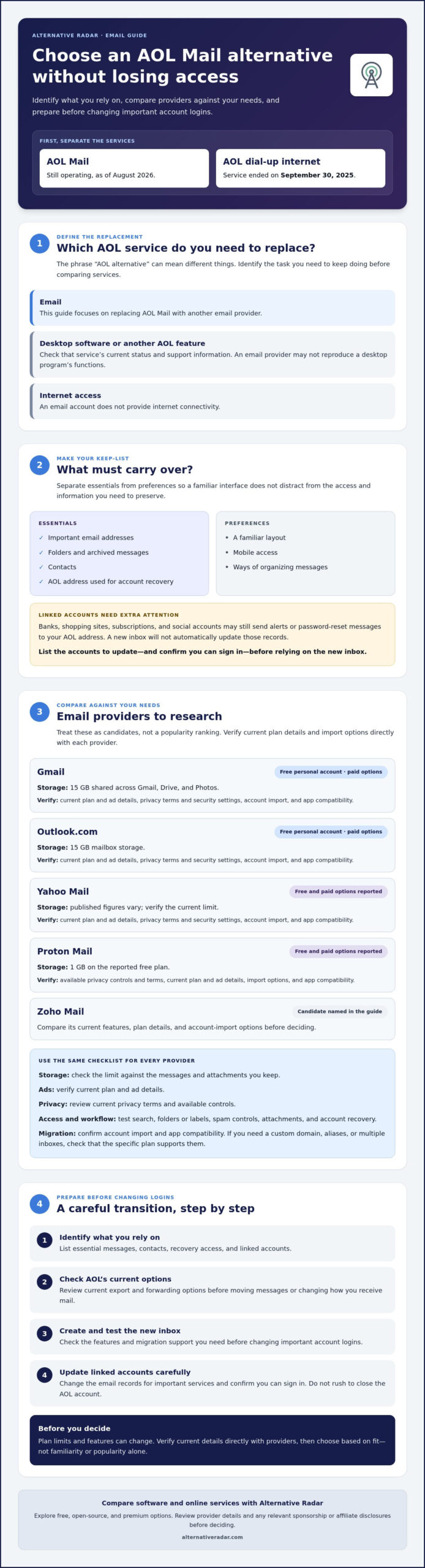
Most people searching for an AOL alternative want a replacement for AOL Mail: another email provider they can use instead of their AOL account. But the phrase can also refer to AOL desktop software or internet access. Those are different needs, and each calls for a different comparison.
Identify the specific AOL service before comparing replacements. As of August 2026, AOL Mail remains operational, while AOL’s dial-up internet service ended on September 30, 2025. If you’re asking about desktop software or another AOL feature, check its current status and support information rather than assuming an email provider will replace it.
Are you replacing AOL Mail, desktop software, or internet access?
Write down the task you need to keep doing: sending and receiving email, managing contacts, using desktop access, or connecting to the internet. This guide focuses on AOL Mail alternatives. If you need a different kind of replacement, look for information specific to that service. An email account won’t provide internet connectivity or necessarily reproduce a desktop program’s functions.
What should an AOL Mail replacement preserve?
Before comparing providers, list the parts of your AOL setup you rely on. Mark essentials separately from preferences so a familiar interface doesn’t distract from access you need to keep.
- Must-haves: important email addresses, folders or archived messages, contacts, and any use of your AOL address for account recovery.
- Preferences: a familiar layout, mobile access, or particular ways of organizing messages.
Linked accounts need special attention. Banks, shopping sites, subscriptions, and social accounts may still send alerts or password-reset messages to your AOL address. Changing providers won’t automatically update those records, even if you can continue viewing older AOL messages. Make a list of accounts to update and confirm you can sign in to them before relying on a new inbox.
When you’re ready to compare providers, review practical differences such as storage, features, and supported protocols. Wikipedia’s comparison of webmail providers offers a broad reference point, but verify current details directly with each provider before deciding. Keep your shortlist focused on what you need to preserve, not just what looks familiar.
How to Compare AOL Mail Alternatives by Features, Privacy, and Access
Compare providers against the work your inbox needs to do, not just the sign-up page. Use the table to build a shortlist, then confirm current limits and features directly with each provider. Plan details below are a September 2026 research snapshot and require date-specific verification before you switch.
| Provider | Free or paid access | Storage | Ads | Privacy controls | Migration support |
|---|---|---|---|---|---|
| Gmail | Free personal account; paid options also exist | 15 GB shared across Gmail, Drive, and Photos | Verify current plan and ad details | Review current privacy terms and security settings | Verify account import and app compatibility |
| Outlook.com | Free personal account; paid options also exist | 15 GB mailbox storage | Verify current plan and ad details | Review current privacy terms and security settings | Verify account import and app compatibility |
| Yahoo Mail | Free and paid options reported | Published figures vary; verify current limit | Verify current plan and ad details | Review current privacy terms and security settings | Verify account import and app compatibility |
| Proton Mail | Free and paid options reported | 1 GB on the reported free plan | Verify current plan and ad details | Check available controls and privacy terms | Verify import options and app compatibility |
Storage figures and plan details can change. Confirm them, along with any paid upgrade terms, before deciding. Ads can affect daily inbox use, while storage limits matter if you keep large attachments or years of messages.
Which email features matter most in an AOL alternative?
Test the basics you use: search, folders or labels, spam controls, attachment handling, and account recovery. If you need a custom domain, aliases, or multiple inboxes, check that the specific plan supports them. Compare access too: confirm the provider works in the browser, mobile app, or desktop email client you prefer. Don’t assume every provider supports every setup.
How should you compare privacy and compatibility?
Read each provider’s current privacy policy and check its security options and data practices. NIST’s NIST Trustworthy Email guidelines offer technical context for evaluating email security. If you use a separate email app, verify whether the provider supports IMAP or POP3 and what setup is required. Avoid calling a service “most private” unless the comparison uses current evidence and clear criteria.
Decision rule: Choose according to the privacy controls you require, how you use email each day, and how reliably you can move messages and contacts. To narrow options by features and trade-offs, explore email service comparisons, then confirm details with the provider.
Which AOL Email Alternatives Fit Different Types of Users?
No provider is the right fit for everyone. Treat Gmail, Outlook, Yahoo Mail, and Proton Mail as candidates to investigate, then match their current features to your devices, inbox habits, and privacy priorities. The figures below are a September 2026 research snapshot. Verify plan limits, security details, and account-transfer options directly with each provider before choosing an aol alternative.
| Candidate | May suit users who… | Details to verify |
|---|---|---|
| Gmail | Want to research a mainstream email service and already use related Google services. | Personal storage is reported as 15 GB shared across Gmail, Drive, and Photos. Check current features, account recovery, ads, and import options. |
| Outlook.com | Prefer to investigate Microsoft’s email service or use other Microsoft tools. | Free personal accounts are reported with 15 GB of mailbox storage. Verify current mobile and desktop access, security settings, and migration support. |
| Yahoo Mail | Want to compare another established webmail option. | Storage figures conflict across 2026 sources. Confirm the current limit, ads, paid options, privacy terms, and import tools. |
| Proton Mail | Want to research an option associated with privacy-focused email. | The reported free plan includes 1 GB. Review current encryption details, recovery process, app compatibility, and migration options. |
This is a shortlist, not a ranking. Familiarity with a company’s other services doesn’t mean its email interface, contact handling, or recovery process will match your AOL routine. Test the features you depend on and check whether the provider works with your preferred phone, browser, or desktop app.
What should you compare if familiarity matters most?
Prioritize the learning curve. Compare the inbox layout, search, contact management, mobile app, and account-recovery steps. A mainstream ecosystem may feel convenient if you already use its tools, but confirm how those services connect and what data or settings you’ll need to manage. Familiar names don’t guarantee interchangeable features.
What should you compare if privacy or control matters most?
Separate the provider’s privacy policy from technical protections and settings you control, such as two-step verification. Check current security documentation instead of relying on broad labels like “private.” Also weigh setup effort: a service’s protections may come with different recovery steps or compatibility limits for your preferred email apps. Confirm those trade-offs before moving important accounts.
Choose according to your priorities: lean toward familiar workflows if ease of adjustment matters most, investigate privacy documentation if data handling is your priority, and verify migration and device support if continuity comes first. Compare the details that affect your own use, not popularity alone.
How to Switch from AOL Mail Without Missing Important Messages
A safe move to an aol alternative is a staged handoff, not an instant break. AOL’s export, import, and forwarding options can vary, so check current AOL account settings and official instructions before relying on a transfer method. Keep access to your existing inbox while you test the replacement.
Prepare your AOL account and new inbox
Start with an inventory of important messages, folders, contacts, and services tied to your AOL address. Check AOL’s current instructions for exporting or forwarding mail, and save copies of information you can’t afford to lose. Create the new account, set a strong, unique password, and enable available multifactor authentication. Don’t change critical recovery details yet.
Use this transition checklist
- Set up the new inbox. Add it to your preferred browser, phone, or email app, and confirm you can sign in again.
- Test basic email tasks. Send a message to another address and reply. Check incoming mail, sent mail, spam handling, and mobile access before depending on the account.
- Transfer what you can. Follow current provider instructions for moving messages and contacts. Verify whether AOL supports forwarding or export for your account, and confirm what the destination provider can import.
- Update high-priority accounts. Change recovery addresses first, then update financial accounts, healthcare portals, work contacts, and essential subscriptions. Follow each service’s confirmation steps.
- Notify people and organizations. Share the new address with personal and professional contacts. If forwarding is available and you choose to use it, verify that it works and understand its limits.
- Monitor both inboxes. Check the old and new accounts for messages from senders you may have missed, and update accounts as they surface.
Decide when to stop checking AOL
There’s no universal waiting period. Continue checking the old inbox while important senders, recovery processes, or forwarding still depend on it. Before closing or abandoning the account, confirm that key messages arrive at the new address and account recovery no longer points to AOL. Review AOL’s current retention, closure, and inactivity policies first. Don’t assume old messages or access will remain available indefinitely.
Still comparing providers before you begin? Compare email service options against your migration and access needs, then verify provider details before making changes.
Find an AOL Alternative That Fits Your Needs with Alternative Radar
Choosing a replacement is easier when you follow a clear sequence: identify which AOL service you use, rank what matters in an email account, compare providers against those priorities, then plan the move. This keeps a familiar brand name or one appealing feature from outweighing essentials such as account access, privacy preferences, or migration support.
Alternative Radar is a discovery and comparison resource for software, apps, and online services, including free, open-source, and premium options. Its comparison content can help you review features, pricing, and trade-offs as you research an aol alternative. It doesn’t provide email accounts or technical support, so check provider guidance for setup, migration, and account questions.
How can Alternative Radar help narrow the options?
Start with a short list of requirements. For example, note whether you prioritize privacy controls, predictable costs, compatibility with your devices, or a straightforward way to move messages and contacts. Use those criteria to assess comparison information where available, and check the provider’s own documentation for details that can change, such as plan terms, storage, import tools, and security features.
Alternative Radar earns revenue through advertising, sponsored placements, and affiliate referrals. Review any sponsorship or affiliate disclosures shown alongside recommendations, and consider those relationships as part of your evaluation. Don’t assume every placement is independent or that a listed option suits your needs without checking its details.
What is the next step after choosing an AOL replacement?
Before signing up or moving data, confirm the provider’s current account terms, privacy information, and migration instructions. Check that its features match your priorities and that you understand any relevant limits or setup requirements. Create the account and test sending, receiving, recovery, and device access before updating essential logins. Then make the transition in stages so you can catch missed messages or account dependencies.
Use comparison information to narrow your choices, not to skip verification. The right replacement depends on your workflow and what you need to preserve, so make the final call only after confirming the details directly with the provider.
Compare software and service alternatives as a starting point for your search, then check provider terms and migration steps before you switch.
Make Your Next Email Move With Confidence
The right aol alternative depends on what you need to preserve and how you use email. Identify the AOL service you’re replacing, compare providers by everyday features, privacy, and device compatibility, then verify current terms and migration options before making changes.
Protect continuity by setting up and testing the new inbox first. Update important recovery details and linked accounts in stages, and keep checking your AOL inbox until essential messages and account access no longer depend on it.
Alternative Radar helps you compare features, pricing, and pros and cons across services, including free, open-source, and premium alternatives. Use it to narrow your options, then confirm provider details directly before signing up or moving messages. Compare email and software alternatives to find options that fit your priorities.
A careful comparison and gradual transition can make the switch more manageable. Choose the next step that works for you, and move at your own pace.
Frequently Asked Questions
What is the best alternative to AOL Mail?
There’s no single best replacement for every AOL Mail user. Gmail and Outlook are mainstream candidates to research, while Proton Mail may interest readers prioritizing privacy controls. Compare current features, storage, privacy terms, device compatibility, and migration support against your needs. The best aol alternative is the one that fits your daily workflow and lets you move important messages and account access with confidence.
Is AOL Mail still available in 2026?
Yes, AOL Mail was operational as of August 2026, according to current research. AOL’s dial-up internet service is separate and was discontinued on September 30, 2025. If you’re concerned about account access or a specific AOL feature, check AOL’s current service information directly. Back up important messages and confirm current account terms rather than assuming a service will remain available indefinitely.
Can I transfer my AOL emails and contacts to another provider?
Possibly, but the available methods depend on AOL’s current account options and the destination provider’s import tools. Check AOL’s official instructions for exporting or forwarding messages and contacts, then review the new provider’s migration guidance. Test any transfer with a small set of messages or contacts first, if the tools allow it. Keep access to your AOL inbox until you’ve confirmed important data arrived.
Can I keep my AOL email address if I switch providers?
You may be able to keep using your AOL address while setting up a separate inbox with another provider, but switching doesn’t turn the AOL address into the new provider’s address. Continued access depends on AOL’s current account terms and availability. If you keep the old address active, monitor it and update important contacts and linked accounts gradually. Verify AOL’s policies before relying on long-term access.
Is there a free alternative to AOL Mail?
Yes. Gmail and Outlook offer free personal email accounts, and Yahoo Mail and Proton Mail also have free options reported in current research. Features, storage limits, ads, and privacy terms differ, and providers can change their plans. Confirm current details directly before signing up. Compare what each free option includes with the functions you use, such as mobile access, search, and account recovery.
How do I change my email address on accounts linked to AOL?
Sign in to each service and replace the AOL address in its profile, contact, or security settings. Start with account recovery, financial services, healthcare portals, and essential subscriptions. Follow each service’s verification steps, then test that notifications or recovery messages reach the new inbox. Keep a checklist and continue monitoring AOL for messages from accounts you haven’t updated yet, including less frequently used services.
What should I check before closing my AOL account?
Before closing it, confirm that important messages, folders, and contacts are backed up or transferred, and that essential services no longer use the AOL address for login or recovery. Check whether forwarding is active and whether key senders have your new address. Review AOL’s current closure, retention, and inactivity policies before taking action. Keep access during the transition if you still need to catch missed messages.