The best software for a one-person business may be a few focused tools, not one all-in-one platform. A single suite can look simpler, but it may bundle features you won’t use while leaving gaps in the work that matters most. When you’re handling clients, projects, money, and marketing alone, choose tools around the tasks that take the most time or are easiest to mishandle.
Choosing can be difficult: software features overlap, free plans have limits, and subscriptions can add up before revenue is steady. You don’t need to adopt every category at once. Start by naming a specific bottleneck, such as late follow-ups or scattered project notes. Then test a tool against that task before adding another subscription.
This comparison organizes options by job, including accounting and invoicing, project management, CRM, communication, and marketing. You’ll see how practical tools compare on fit, trade-offs, and plan limitations, with free, open-source, and paid alternatives where relevant. Use the guide to build a lean toolkit for the way you work now, without making it harder to grow later.
Key Takeaways
- Start with the work that’s slowing you down, then prioritize the software category that addresses it.
- Compare the best software for a one-person business by fit, essential features, integrations, scalability, and plan limits.
- Look beyond the feature list: free, freemium, open-source, and paid plans come with different trade-offs.
- Test one tool against a real workflow before adding more software to your stack.
- Choose your first priority based on your business model, and defer capabilities you don’t need yet.
Best software for a one-person business: start with the work you need to manage
Running a one-person business means switching between delivering work, handling administration, and following up with customers, sometimes within the same day. The best software for a one-person business is the set of tools that makes those recurring jobs easier to track and complete, not necessarily a single platform with the longest feature list.
Business software includes tools that organize tasks, records, finances, or customer communication. Many are delivered through software as a service (SaaS), so you access them online rather than managing software on your own servers. But access to a tool doesn’t make it essential. Let your business model, workload, and current pain points determine what earns a place in your setup.
A lean solo-business software stack is the smallest set of tools that reliably handles essential work without adding unnecessary cost, setup, or maintenance.
Which jobs should business software handle first?
Start by listing the work you repeat each week, then match each task to a tool function. Customer management tracks leads, client details, and follow-ups. Scheduling coordinates appointments or deadlines. Project tools organize tasks and progress. Accounting records income and expenses, while communication tools keep client conversations accessible.
Priorities vary by business. A freelance designer may need project tracking and client communication before inventory tools. A product business may prioritize orders, stock records, and customer questions. Look for work that is repetitive or error-prone: missed follow-ups, scattered project notes, or manually re-entered financial records are practical signs that a tool could help. If a task happens rarely and causes little friction, software for it may not be a priority.
When does an all-in-one platform make sense?
An all-in-one platform can bring customer records, projects, billing, and communication into one workspace. Fewer logins and connected records can reduce handoffs and make routine information easier to find. It may suit an owner whose workflow crosses several functions and who prefers a simpler vendor list over assembling separate tools.
The trade-off is fit. A broad platform may offer less depth in a specialist function, fewer customization options, or workflows that don’t match how you serve customers. It can also make switching harder if your records and processes become tied to one system. Compare the capabilities you’ll use with the plan’s limits, and consider whether separate tools connect well enough to cover any gaps.
Choose based on the work, not the label. A freelancer with straightforward projects may need only a few focused tools; an online seller may benefit from connected sales and customer records. Neither setup is universally better. Let recurring workload, not the promise of “everything in one place,” set the starting point.
How to compare software for a one-person business
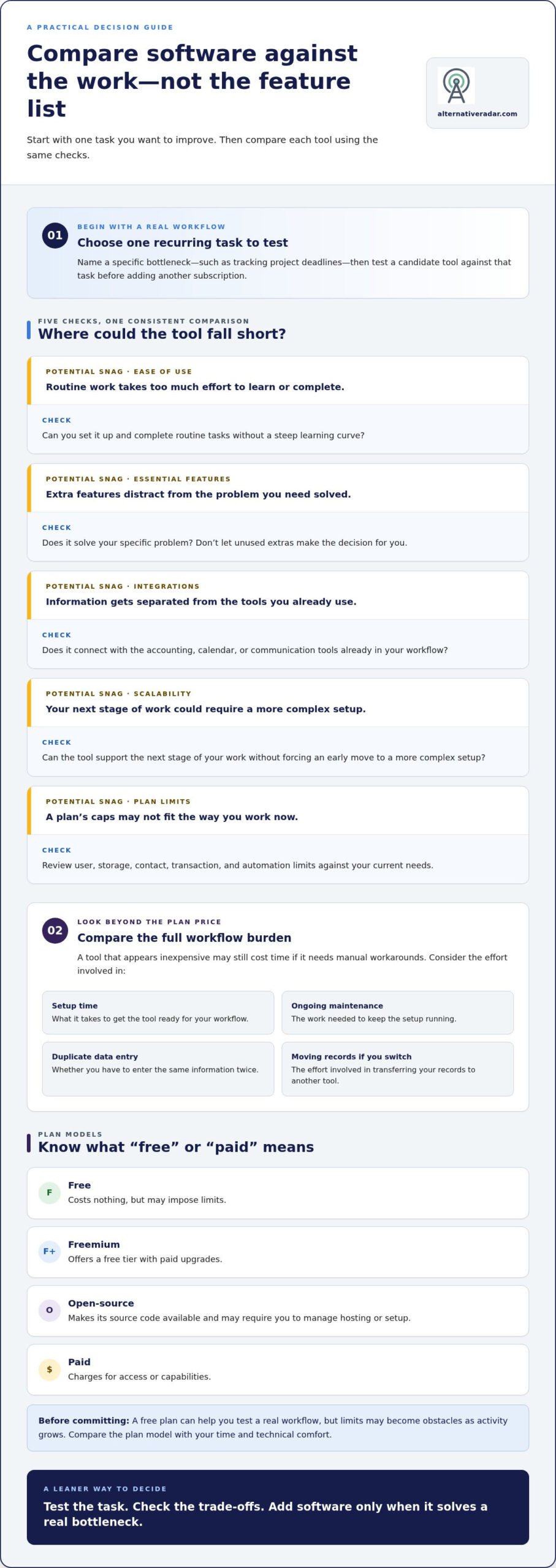
A useful comparison starts with your actual workflow, not the longest feature list. Write down one task you want to improve, such as tracking project deadlines, then compare each candidate against the same criteria. The SBA’s checklist for choosing software is another practical reference for evaluating business tools.
| Criterion | What to check |
|---|---|
| Ease of use | Can you set it up and complete routine tasks without a steep learning curve? |
| Essential features | Does it solve the specific problem you have, without making unused extras the deciding factor? |
| Integrations | Does it connect with the accounting, calendar, or communication tools already in your workflow? |
| Scalability | Can it support the next stage of your work without forcing an early move to a more complex setup? |
| Plan limits | Do user, storage, contact, transaction, and automation limits fit your current needs? |
Then compare the full workflow burden: setup time, ongoing maintenance, duplicate data entry, and the effort of moving your records if you switch. A tool that appears inexpensive may still cost time if it needs manual workarounds. To narrow your shortlist, compare software alternatives by features, pricing, and trade-offs.
Which features matter most when you work alone?
Prioritize reliable task completion, simple automation, and an interface that works smoothly in your browser or on mobile. Test a typical task, such as recording an expense, booking an appointment, or tracking a client deliverable. Note how many steps it takes, whether you have to enter the same information twice, and whether you can find the result later. Check that the tool fits your existing accounting, calendar, or communication workflow. Advanced permissions and team controls can wait unless you have a clear use for them, such as sharing access with a contractor.
How should you compare free and paid plans?
Separate the plan model from the feature comparison. A free plan costs nothing but may impose limits; freemium offers a free tier with paid upgrades; open-source software makes its source code available and may require you to manage hosting or setup; paid plans charge for access or capabilities. These models have different trade-offs, so compare the one that matches your time and technical comfort.
A free plan can be a useful way to test a real workflow, but limits may become obstacles as activity grows. Review the current plan page for user, storage, transaction, contact, and automation caps before committing. Features and availability can change, so verify 2026 details for your market, then compare the cost of upgrading with the time or friction the tool removes. That gives you a more useful measure of the best software for a one-person business than a feature count alone.
Best software categories for a one-person business: compare the practical options
Choose software by job, not by popularity. The table separates plan facts from editorial fit judgments. A free plan or starting plan doesn’t mean every feature is available in every country, so review the current product page when comparing options for your market.
| Job | Option | Best fit and standout | Main limitation and plan model |
|---|---|---|---|
| Customer management | HubSpot CRM | Worth considering if you need a place to organize customer relationships. A free CRM is available, a plan fact verified in July 2026. | It addresses customer management, not every business task. Free plan; review its current limits and regional availability. |
| Accounting | QuickBooks | Potential fit for solo owners prioritizing financial records. A QuickBooks Free plan is available, verified in September 2026. | Plan features and availability vary. Free and paid plans; compare the current options for your country. |
| Project tracking | Spreadsheet or task list | A practical starting point if you manage a small number of projects and can see deadlines and next steps at a glance. | Manual updates can become cumbersome as work grows. No software plan required; move to a dedicated tool when tracking becomes a bottleneck. |
| Invoicing and marketing | Choose by workflow | Prioritize invoicing that fits your accounting process, or email marketing that matches your audience and campaign needs. | Product features, contact limits, automation, plan terms, and country availability differ. Review current details before selecting a paid or free plan. |
The products’ plan facts above are distinct from the fit judgments, which are editorial guidance rather than a claim that either tool suits every business. Before shortlisting more options, use the SBA’s software selection checklist to structure your evaluation.
Which customer and project tools suit solo operators?
A CRM can help if leads and follow-ups are slipping through the cracks; if you have few customers and a simple sales process, a spreadsheet may be enough. Compare CRM options by the sales workflow you need, not by team controls you won’t use. Apply the same test to project planning: a basic list may suit short, predictable jobs, while overlapping projects can call for clearer status tracking and deadlines. Before choosing, check that you can record the details you rely on and review upcoming tasks without extra manual work.
Which tools can simplify money and marketing tasks?
Accounting and invoicing needs depend on how you bill, record transactions, and manage finances in your market. QuickBooks is one option with a current free-plan fact available; don’t assume every plan or feature is offered in every country. For email marketing, compare contact caps, automation, and setup effort against the campaigns you actually send. For either category, make a short list of must-have tasks first, then compare plans against that list. The best software for a one-person business is the option that fits the workflow without creating extra administration.
Do you really need several tools? Build a lean software stack
Every extra app adds a decision: set it up, learn it, maintain it, and keep its records aligned. More software can also mean more recurring subscriptions. Start with the minimum that covers your current workflow, then add tools only when they solve a specific problem.
Use this four-step process:
- Identify a bottleneck. Name the repeated task that causes delays, missed steps, or manual errors.
- Choose one tool. Compare options for that job rather than adopting a suite to cover hypothetical future needs.
- Test the workflow. Use it for real work and check whether it reduces effort without creating duplicate data entry.
- Review its value. Keep it if you use it and it improves the process. Reconsider it if the friction remains or your needs have changed.
A minimum viable stack depends on the business. A client-service freelancer might begin with project tracking and invoicing; an online seller may prioritize order records and accounting. Add customer management or marketing only if those tasks need a more reliable process. If CRM flexibility matters, an open-source CRM software comparison can help you explore that category before choosing.
When is one all-in-one product better than separate tools?
An all-in-one product can simplify onboarding and connect customer, project, and billing records in one place. That can help if separate tools create duplicate entry or integrations fail to pass information reliably. The trade-off may be less depth in a specialist feature or fewer ways to customize a workflow. Compare the overlap between your actual tasks and the platform’s functions. Don’t migrate just to reduce your app count if the current setup works.
When should a solo owner add or replace a tool?
Add software when a repeated task regularly consumes time or causes preventable mistakes. Set a review point based on actual use: are you completing the task more smoothly, missing fewer steps, or adapting the tool to a new business need? The best software for a one-person business should earn its place in your workflow.
Before switching, account for what the feature list leaves out: exporting records, transferring data, maintaining two systems during the change, and any recurring commitments. A replacement may be a better fit, but migration takes effort and can disrupt routine work. Make the switch when the expected workflow improvement justifies that effort, not just because another product looks simpler.
Ready to compare options by fit and trade-offs? Explore software alternatives before adding your next tool.
Choose the best software for your one-person business and take the next step
The right starting point depends on what your business does each day. A client-service freelancer may prioritize project management to track deliverables, then defer advanced marketing automation. A consultant may start with customer management for leads and follow-ups, while postponing team permissions they don’t need. A small online business may prioritize accounting or order management, then defer complex sales forecasting until its volume calls for it.
These are starting points, not fixed formulas. The best software for a one-person business is the option that supports your current workflow and can adapt as it changes. Use this short checklist before committing:
- Workflow fit: Does it handle a real, recurring task?
- Plan limits: Do user, storage, contact, or automation limits fit your needs?
- Integrations: Does it work with the tools you already rely on?
- Privacy: Are the data controls and account settings suitable for your business records?
- Exit options: Can you export your data, and what effort would switching take?
What should you test before committing?
Test one real task, such as preparing an invoice, tracking a client project, or recording an order. Try the initial setup, everyday use, reporting, and data export. Review current plan restrictions and identify how you’d move your records later. A short, realistic trial of one workflow can reveal friction without requiring you to transfer every business record upfront.
How can your software stack grow with the business?
Add a tool when workload or customer volume exposes a repeatable gap, not just because a new feature looks useful. As your stack expands, check that integrations still work and records aren’t being duplicated across apps. If open-source flexibility is a priority, explore the popular open-source business software guide as a next step.
Compare software options on Alternative Radar to weigh features, plan details, and trade-offs before choosing your next tool.
Build a toolkit that works for you
The best software for a one-person business isn’t necessarily the platform with the most features. Start with the task that takes too much time or causes avoidable errors, then choose a tool that fits your workflow, plan limits, and budget. A small, well-matched stack can be easier to manage than a suite packed with features you don’t need.
Compare practical trade-offs before committing. Alternative Radar helps you weigh software features, pricing, and pros and cons, with free, open-source, and premium alternatives to explore. Recheck plan details as your needs change, and add tools only when your workflow calls for them.
Compare software alternatives on Alternative Radar to find options that fit the way you work. Start with one useful improvement, test it in your day-to-day business, and build from there.
Frequently Asked Questions
What is the best software for a one-person business?
There isn’t one best option for every solo owner. Choose software that solves your most persistent workflow problem, whether that’s tracking client follow-ups, managing projects, or keeping financial records. Compare ease of use, essential features, integrations, and current plan limits. A focused tool may be a better fit than an all-in-one platform if you only need one function. Test it with real work before moving more tasks into it.
What software does a one-person business need?
Start with tools for the tasks your business must handle reliably. Depending on your work, that may include accounting and invoicing, customer management, project tracking, scheduling, communication, or marketing. A freelancer may need project and client tools first, while an online seller may prioritize orders and financial records. You don’t need software for every category from day one. Add a tool when a repeated task becomes difficult to manage manually.
Can one platform run an entire one-person business?
One platform can cover several business functions, such as customer records, projects, and billing, if its features match your workflow. It can reduce logins and repeated data entry, but broad coverage doesn’t guarantee enough depth in every area. A specialist tool may handle accounting or marketing better. Compare the platform’s capabilities and limits against the work you actually do, and avoid paying for complexity you won’t use.
Is free software enough to run a one-person business?
Free software can be enough if its features and limits support your current workload. It can also help you test a workflow before committing to a paid plan. Check caps on users, storage, contacts, transactions, and automation, since a free tier may become restrictive as activity grows. Free and open-source options have different trade-offs, including setup and maintenance. Review current regional availability and plan terms before relying on a tool.
How much does software for a one-person business cost?
The total depends on which categories you use and whether free plans meet your needs. Current plan information lists Wave as offering free accounting and invoicing, while QuickBooks Simple Start is listed at $9.50 per month. These are examples, not a required budget or a complete stack cost. Prices, features, and availability can vary by market, so check regional plan details and add up the tools you expect to use.
Do I need CRM software if I work alone?
You need a CRM only if it makes customer tracking or follow-up more reliable than your current process. If you manage a small number of clients and rarely miss a next step, a spreadsheet or calendar may be sufficient. Consider a CRM when leads, conversations, or reminders become difficult to keep organized. Compare its setup effort and plan limits with the time it could save in your actual sales workflow.
How do I choose between all-in-one software and separate apps?
Choose an all-in-one platform if its connected records and simpler setup cover the functions you use without sacrificing capabilities you rely on. Choose separate apps when you need stronger features in specific areas and the tools integrate reliably. Compare duplicate data entry, maintenance, customization, and the effort of switching later. Test one workflow first, then decide whether consolidation or a focused tool makes your work easier to manage.