
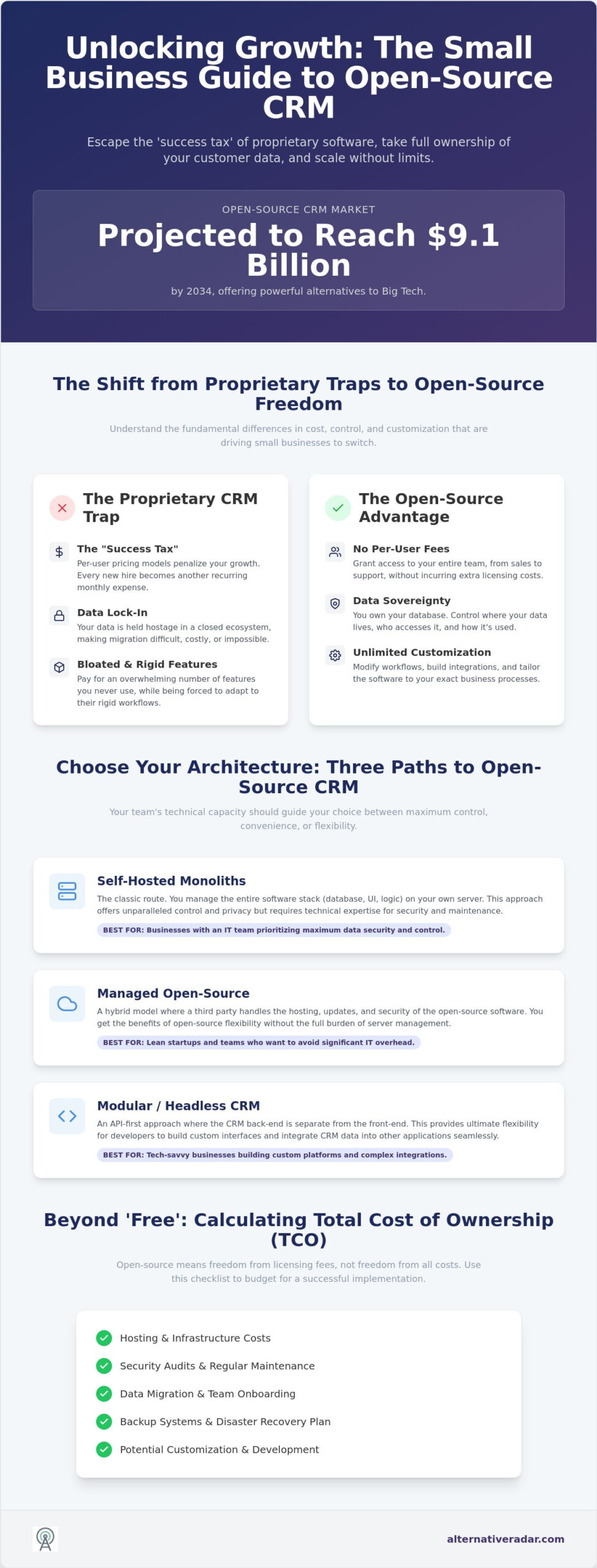
Why are you still paying a “success tax” to Salesforce or HubSpot for features your team never touches? Most small business owners feel trapped by rising subscription fees and the frustrating reality of data lock-in. Finding the best open source CRM for small business isn’t just about saving money; it’s about owning your database and scaling without artificial limits. With the open-source CRM market projected to reach 9.1 billion dollars by 2034, these platforms now offer the same AI-driven power as their proprietary rivals without the “Big Tech” price tag.
We understand that you need a tool that works immediately, not a complex project that drains your time. This guide identifies the most reliable, scalable, and cost-effective solutions available in 2026 to help you reclaim your data and streamline your sales. We’ve done the testing so you don’t have to. You will get a clear comparison of top-tier options like the modern, TypeScript-based Twenty CRM and the highly stable EspoCRM 10.0.2 to determine which one fits your specific workflow.
Key Takeaways
- Stop overpaying for bloated features and learn how open source models eliminate the “per-user” success tax that limits growth.
- Compare different software architectures to identify the best open source crm for small business that fits your team’s technical capacity.
- Evaluate enterprise-grade options like SuiteCRM to manage complex sales cycles without sacrificing data sovereignty or ownership.
- Use our implementation checklist to accurately calculate total cost of ownership, including hosting, security audits, and data migration.
- Streamline your decision-making process by using objective filters to match specific CRM capabilities with your unique business size and goals.
Beyond the Subscription: Why Small Businesses are Switching to Open Source CRMs
Open source CRM refers to software where the source code is accessible, modifiable, and redistributable. This transparency allows your developers to audit the code for security or tailor features to fit specific needs. In a market dominated by closed ecosystems, identifying the best open source crm for small business provides a level of control that proprietary platforms simply cannot match. You aren’t just buying a tool; you’re gaining an asset that stays with your company regardless of a vendor’s future decisions.
The concept of Customer Relationship Management (CRM) has evolved from simple contact lists to complex data ecosystems. By 2026, “SaaS Fatigue” has reached a breaking point for many founders. Per-user pricing models often penalize growth by turning every new hire into an added monthly expense. This “success tax” drains resources that could be better spent on product development or lead generation. Open source alternatives break this cycle by offering flat-rate or self-hosted models that don’t scale in cost just because your team scales in size.
Data sovereignty is another critical driver for this shift. As AI becomes a standard component of business operations, the importance of owning your database is paramount. When you host your own CRM, you ensure that sensitive customer information isn’t being used to train a third party’s large language model. You maintain full control over where your data lives and who accesses it. This is a strategic advantage for businesses operating in regulated industries or those with strict privacy requirements.
It’s vital to address the myth of “free” software. Open source is about freedom of choice, not necessarily zero cost. While you won’t pay recurring licensing fees, you’ll still invest in hosting, security audits, and regular backups. The difference is that you’re paying for infrastructure and actual value rather than a permission slip to access your own records. You own the engine; you just need to provide the fuel.
The Problem with Proprietary “Big CRM”
Proprietary platforms often lure users in with low entry prices, only to implement aggressive upselling tactics once your data is integrated. These “Big CRM” solutions frequently use rigid structures that force your business to adapt to their software, rather than the other way around. Exporting your data often involves complex hurdles or “read-only” formats, making it difficult to migrate if the service no longer meets your needs. This lock-in creates a dependency that can be expensive to break.
The Open Source Advantage for Growth
Choosing the best open source crm for small business unlocks unlimited customization. You can modify workflows to match your specific sales cycle without waiting for a vendor’s annual update. Because there are no per-seat licensing fees, you can grant access to your entire team, from marketing to support, fostering better collaboration. Additionally, community-driven development ensures rapid feature deployment and transparent security patches that benefit everyone, keeping your system resilient against modern threats.
Evaluating the Architecture: Three Types of Open Source CRM
Selecting the best open source crm for small business requires more than a feature list comparison. You must first evaluate the underlying architecture. By 2026, the market has split into three distinct categories based on deployment and flexibility. While cloud-based deployments now account for nearly 60% of the open-source CRM market, the choice between a monolithic system and a modular, API-first structure remains a critical decision for data-sensitive organizations.
Your internal technical resources should be the primary factor in this decision. If you have a dedicated IT team, a self-hosted monolith provides the ultimate control. If you’re a lean startup, managed open source or a modular “headless” CRM might be more efficient. Most modern deployments now rely on Docker containers to simplify installation. This allows you to run identical environments on a local developer machine and a production server, reducing the technical friction that once made open source difficult to manage.
Self-Hosted Monoliths (The Classic Route)
Self-hosted monoliths like SuiteCRM 8.10.1 and EspoCRM 10.0.2 are ideal for businesses prioritizing maximum privacy. These systems package the database, user interface, and logic into a single codebase. Managing your own server environment requires expertise in security patches and backups, but it eliminates per-user fees entirely. It’s the “full-control” option where you own every byte of data on your own hardware or private cloud. You don’t want to pay for a Ferrari if you only have the resources to maintain a bicycle, so ensure your team can handle the maintenance.
Managed Open Source (The SaaS Hybrid)
Managed open source is the middle ground for teams who want the benefits of open code without the burden of server maintenance. Many vendors now offer “Cloud Editions,” such as Odoo 19.2 or the EspoCRM cloud plans. These provide a SaaS-like experience with the ability to “eject” your data and move to your own server later. This hybrid approach balances ease of use with long-term flexibility. If you’re unsure which path fits your budget, you can compare these hybrid solutions using our objective filters.
Modern Modular & AI-Native CRMs
For tech-forward startups, modern modular CRMs like Twenty are the new standard. Built with modern stacks like TypeScript and React, Twenty has gained over 53,100 GitHub stars by July 2026. These platforms use an API-first design, allowing you to treat the CRM as a set of building blocks. They often integrate Large Language Models (LLMs) directly into the core, enabling autonomous data entry and lead scoring. This modular approach is perfect for developer-led teams who want to build custom customer experiences on top of a robust, open-source engine while maintaining the title of the best open source crm for small business for their specific niche.
The 5 Best Open Source CRMs for Small Business in 2026
Identifying the best open source crm for small business requires looking past marketing slogans to evaluate community health, UI modernism, and AI readiness. In 2026, the gap between “legacy” open source and modern “building block” tools has widened. Alternative Radar acts as your digital scout, filtering through hundreds of repositories to find the solutions that offer genuine utility without the technical debt. We prioritize platforms that offer active maintenance and clear documentation over abandoned projects.
SuiteCRM 8.10.1 remains the enterprise-grade powerhouse for businesses with complex sales cycles. Released in May 2026, this version refines the user experience while maintaining the deep functionality required for intricate lead management and reporting. It’s the most direct alternative to Salesforce, providing a familiar environment for teams moving away from proprietary giants. If your workflow involves multiple approval stages and detailed forecasting, SuiteCRM is the logical choice.
Twenty represents the shift toward AI-native tools. With approximately 53,100 GitHub stars as of July 2026, it is currently the most popular modern choice for high-velocity teams. Built on TypeScript and React, it offers a sleek interface that sales reps actually want to use. Its modular design allows developers to integrate Large Language Models (LLMs) directly into the core, automating lead enrichment and communication summaries. This makes it a top contender for the best open source crm for small business in the tech-forward startup sector.
Deep Dive: SuiteCRM vs. Twenty
The choice between SuiteCRM and Twenty often comes down to your team’s culture. SuiteCRM offers a comprehensive, “everything-included” approach that suits traditional sales departments. Its extensibility is proven, though adding custom modules requires PHP expertise. Twenty, by contrast, is a developer-led building block. Its UI/UX is significantly more modern, mimicking the feel of Notion or Linear. While it lacks some of SuiteCRM’s legacy reporting depth, its API-first architecture makes it easier to connect to modern marketing stacks.
Niche Winners: Odoo and Corteza
- Odoo 19.2: Best for businesses requiring integrated ERP features. Since its March 2026 update, the CRM module talks seamlessly to inventory and accounting, making it ideal for e-commerce and manufacturing.
- Corteza: The premier low-code platform for building custom business apps. It’s perfect for organizations that need a CRM to function as a broader operational dashboard.
- EspoCRM 10.0.2: A lightweight, highly flexible tool released in July 2026. It’s particularly effective for service-based businesses—such as the roofing specialists at Fladderak Dakbeheer—that need a clean interface to manage client projects without unnecessary bloat.
- Vtiger: A reliable middle-ground that integrates marketing and support modules into a single open-source package.
Alternative Radar provides detailed pros and cons for each of these listings, ensuring you make a decision based on objective data rather than biased sales pitches. Whether you need a monolith like Odoo or a modular tool like Twenty, matching the software to your team’s technical capacity is the key to a successful implementation.
The Implementation Checklist: Managing Total Cost of Ownership (TCO)
While identifying the best open source crm for small business focuses on features, the implementation phase determines your long-term ROI. You must look beyond the “free” price tag to calculate the total cost of ownership. This includes server hosting fees, automated backup services, and periodic security audits. If you choose to self-host, you’re trading a monthly subscription for the responsibility of system uptime and data integrity. Don’t let the lack of a license fee blind you to the operational labor required to keep the system running efficiently.
Data migration is the first major hurdle. Moving from Excel sheets or a legacy HubSpot account requires careful field mapping to ensure you don’t lose customer history or communication logs. Most open-source tools provide CSV import wizards, but complex relational data often requires custom scripts. You also need to account for the “User Adoption” gap. Open-source interfaces can sometimes feel less polished than high-priced proprietary alternatives. Budgeting time for team training is essential to prevent your staff from reverting to old, fragmented habits. To avoid these common pitfalls, you can compare CRM implementation requirements on our platform to see which tools offer the smoothest transition.
Hidden Costs to Budget For
Labor is your biggest expense. Even with the best open source crm for small business, you’ll likely need professional services for the initial setup and custom module development. Partnering with a custom software development firm like API Pilot can help you build these tailored extensions while ensuring the core system remains stable and scalable. Ongoing maintenance isn’t a one-time event; it’s a recurring task. You must also budget for third-party integration connectors. While the CRM itself is open, connecting it to tools like Gmail or Slack often requires paid middleware like Zapier or Make. These small monthly costs can add up, so track them as part of your overall software spend.
A 5-Step Rollout Plan for Small Teams
- Step 1: Audit data and integrations. Identify exactly which fields you need and which external tools must talk to your new CRM.
- Step 2: Choose your hosting environment. Decide between a private cloud (like AWS or DigitalOcean) or a vendor-managed cloud edition for easier maintenance.
- Step 3: Build a Minimum Viable CRM (MVC). Start with core contact and deal fields only. Avoid over-complicating the UI on day one.
- Step 4: Pilot with a single sales rep. Gather feedback from one power user before rolling the system out to the entire company.
- Step 5: Full deployment and iteration. Launch company-wide and schedule a review session after 30 days to refine workflows and custom modules.
Security is the final piece of the checklist. For self-hosted customer data, you must implement SSL certificates, set up a robust firewall, and schedule regular database backups. Modern versions like SuiteCRM 8.10.1 or EspoCRM 10.0.2 include significant security patches, but they only work if you actually install the updates. Treat your customer database as your most valuable asset, because in 2026, data sovereignty is your strongest competitive advantage.
Finding Your Perfect Match: How Alternative Radar Simplifies Software Discovery
The search for the best open source crm for small business often reveals that “best” is entirely subjective. A tool that excels for a five-person marketing agency might fail a fifty-person manufacturing firm. We don’t believe in one-size-fits-all rankings. Instead, Alternative Radar acts as an objective filter, categorizing software by licensing, technical requirements, and specific utility. We’ve done the heavy lifting of testing and auditing so you can focus on making a decision that aligns with your specific resources.
Our methodology focuses on transparency and logic. We provide detailed pros and cons for every listing, ensuring you see the technical debt alongside the shiny features. By using our open source crm software comparison, you can save weeks of manual research. You’ll find consolidated data on community health, update frequency, and real-world scalability. This data-driven approach removes the marketing hype and places the power back in your hands, allowing you to choose based on utility rather than brand recognition.
Leveraging Comparison Tools
Efficiency is our priority. Use our “Alternative to” database to find direct competitors to proprietary giants like Salesforce or Zendesk. You can filter results by license type, hosting option, and core features like AI integration or ERP connectivity. Staying updated on the 2026 software landscape is difficult, but our platform serves as a knowledgeable curator. We monitor repository updates and community shifts so you don’t have to scroll through endless forum threads to find a consensus. We provide the clarity you need to move from discovery to implementation quickly.
Your Next Steps
The final verdict depends on your team’s technical DNA. If you need a modern, AI-first building block, download a demo of Twenty. If you require an enterprise-grade powerhouse for complex sales cycles, sign up for a cloud trial of SuiteCRM. Don’t commit to a full company-wide deployment until you’ve tested the UI with your actual sales reps. For a broader view of how these tools fit into your overall tech stack, read our related guide on popular open source business software 2026. Subscribe to Alternative Radar today to receive the latest updates on software alternatives and maintain your competitive edge with the best open source crm for small business.
Take Control of Your Customer Data Today
Transitioning away from expensive proprietary systems is a strategic move for data sovereignty and long-term scalability. By 2026, the shift toward open-source architectures allows your team to own its database and bypass the per-user pricing models that stall growth. You’ve learned that selecting the best open source crm for small business depends on matching your internal technical resources with the right software structure, whether that’s a classic monolith or a modern AI-native building block.
Don’t let the complexity of implementation slow your progress. Success requires a clear understanding of the total cost of ownership and a phased rollout plan that prioritizes user adoption. We’ve done the testing to ensure you have the most accurate data at your fingertips. Explore our full Open Source CRM Software Comparison for 2026 for detailed feature-by-feature breakdowns and neutral, commission-transparent reviews updated for the 2026 software market.
Reclaiming your data is the first step toward building a more resilient business. Start with a pilot program today and watch your sales operations transform without the Big Tech price tag.
Frequently Asked Questions
Is open source CRM really free for small businesses?
The software license for the Community Edition is typically free to download and use. However, you’ll still incur costs for server hosting, security certificates, and data backups. If you need advanced features or technical support, you might pay for a “Pro” cloud version or professional implementation services. Think of it as owning a house without a mortgage; you don’t pay rent, but you’re still responsible for the taxes and repairs.
How do I host an open source CRM if I am not a developer?
You don’t need to be a developer to use open source software in 2026. Many providers offer managed hosting where the CRM is pre-installed and updated automatically. Alternatively, you can choose the “Cloud Edition” offered by vendors like EspoCRM or Odoo. This gives you the benefits of open source code with the ease of a standard subscription, allowing you to focus on sales rather than server configurations.
Can I integrate my email (Gmail/Outlook) with an open source CRM?
Yes, most modern platforms support native email integration through IMAP and SMTP protocols. This allows you to sync your inbox and track customer communications directly within the CRM interface. For more complex workflows, you can use third-party automation tools like Zapier or Make to connect your email provider with your chosen database. This ensures your sales team has a unified view of every customer interaction without manual data entry.
What is the most user-friendly open source CRM in 2026?
Twenty CRM is widely considered the most user-friendly option for modern teams due to its sleek, Notion-like interface. It’s built on a modern tech stack that prioritizes speed and intuitive navigation. If you prefer a more traditional layout, EspoCRM 10.0.2 offers a clean, lightweight experience that’s easy for non-technical users to master. Finding the best open source crm for small business often involves testing the UI to see which platform your team will actually adopt.
Is my data safer in a self-hosted CRM than in the cloud?
Self-hosting provides maximum data sovereignty because you control the physical location of the server and the access logs. This is ideal for businesses with strict privacy requirements. However, your data is only as safe as your security practices. You must stay disciplined with software updates, such as the May 2026 patches for SuiteCRM 8.10.1, and maintain robust firewalls to prevent unauthorized access. For many, a managed cloud version offers a safer middle ground.
Can I migrate my data from HubSpot or Salesforce to an open source alternative?
Yes, migrating data is a standard process that involves exporting your records into CSV or JSON formats and importing them into your new system. Most open source CRMs include built-in import wizards that help you map fields like contact names, deal stages, and activity history. For large databases with complex relationships, you may need a developer to write a custom migration script to ensure no data is lost during the transition.
Do open source CRMs have mobile apps for sales teams on the go?
Many leading projects offer native mobile apps for iOS and Android to support remote sales teams. Odoo and SuiteCRM have established mobile ecosystems that allow reps to update leads and view calendars from the field. Other platforms use responsive web designs that function like an app when accessed through a mobile browser. This flexibility ensures your team remains productive whether they’re in the office or traveling for client meetings.
What happens if the community stops supporting an open source CRM?
One of the core benefits of open source is that you own the source code. If the original developers stop providing updates, you can still run the software on your own servers indefinitely. You also have the option to hire a developer to maintain the code or add new features specifically for your business. This prevents the “forced migration” often seen with proprietary SaaS companies that shut down products or change their terms of service.