In 2026, the real cost of your collaboration stack isn’t the base subscription fee. It is the hidden productivity tax paid every time a team member toggles between disconnected AI agents or struggles to manage external contractors across siloed channels. You’re likely facing significant app fatigue while trying to justify high AI seat licenses that don’t always align with your actual output requirements.
The slack vs microsoft teams landscape has shifted from simple messaging to a high-stakes battle of agentic ecosystems. This comparison cuts through the marketing hype to provide a clear ROI framework for AI productivity. You’ll discover how Slack’s new Big Mode and Claude-powered AI teammates stack up against Microsoft’s GPT-5.6 Copilot integrations. We analyze the 2026 licensing changes, including the global M365 unbundling status, to help you make a definitive choice based on your team size and existing technical debt.
Key Takeaways
- Evaluate the transition from standard messaging to agentic workflows where AI participants execute complex tasks without manual oversight.
- Understand the 2026 licensing reality, specifically how global Microsoft 365 unbundling affects your total cost of ownership.
- Use our decision matrix to settle the slack vs microsoft teams debate based on your existing technical debt and team communication style.
- Compare the specific ROI of Slack AI agents against Microsoft Copilot’s ability to leverage the full Microsoft Graph for context.
- Identify which platform better mitigates app fatigue by centralizing external guest management and cross-tool workflows.
The 2026 Collaboration Landscape: Beyond Simple Messaging
The collaboration environment in 2026 has moved far beyond the basic exchange of text messages. We’ve transitioned from the era of “Chat Ops” into a period defined by agentic workflows. In this new reality, AI agents don’t just summarize conversations; they execute procurement requests, update CRM records, and manage project timelines autonomously within the chat interface. The slack vs microsoft teams rivalry is no longer a battle over which app has better emojis. It’s a fundamental war between competing software ecosystems for control over your company’s automated logic.
A modern digital headquarters now acts as the central nervous system for an organization. It’s the place where human intuition meets machine execution. However, this shift has intensified the conflict between shadow IT and corporate governance. While employees often gravitate toward tools that offer the least friction, IT departments are doubling down on platforms that provide centralized security and data residency. Choosing a winner requires looking past the interface and evaluating which platform’s “gravity” will pull your team toward higher productivity rather than administrative bloat.
The Death of the ‘Chat-First’ Era
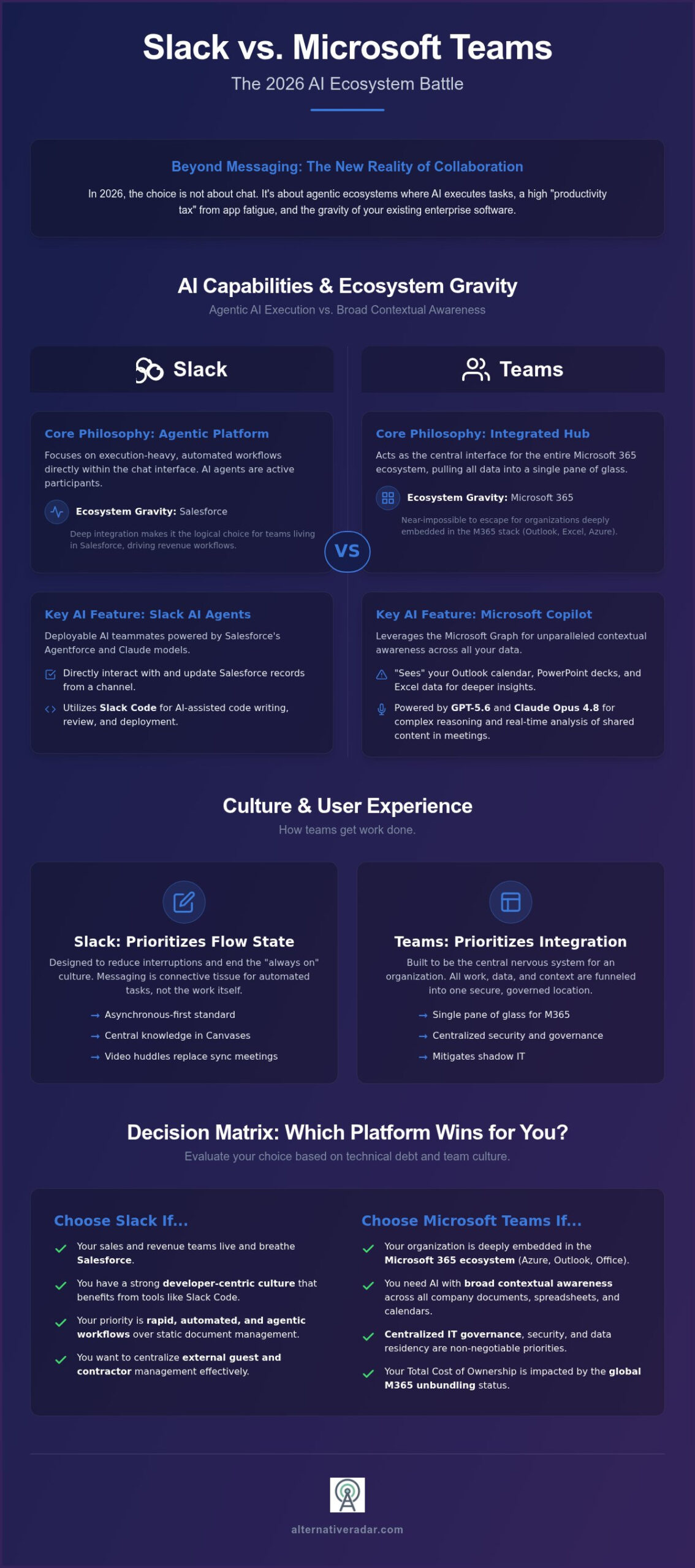
The “always-on” culture of 2024 has largely collapsed under the weight of its own inefficiency. By 2026, asynchronous communication is the standard. Tools like Slack Canvases and Microsoft Lists have transformed from optional features into central knowledge repositories where work actually happens. Messaging now serves as the connective tissue for automated tasks rather than the primary method of work. AI-generated summaries allow team members to skip the scroll and jump straight into action items, effectively ending the era of the 100-message unread notification. Video huddles and clips have replaced the need for constant synchronous meetings, allowing teams to maintain a flow state without the interruption of a ringing call.
Ecosystem Gravity: Salesforce vs. Microsoft 365
Your choice of a collaboration platform is now heavily dictated by your existing enterprise infrastructure. If your sales team lives in Salesforce, Slack’s deep integration with its agentic platform makes it the logical choice for driving revenue workflows. Conversely, organizations deeply embedded in the Microsoft 365 stack find the “gravity” of Teams nearly impossible to escape. Examining the Microsoft Teams history reveals a platform designed to be the interface for the entire Microsoft Graph, pulling data from Excel, Outlook, and Azure into a single pane of glass.
Switching costs in 2026 are at an all-time high because these tools are no longer standalone apps; they’re the operating systems for your business. At Alternative Radar, we act as the filter for this complexity. We analyze these ecosystem dependencies to ensure you aren’t just following a market leader by default. Our goal is to help you identify which platform’s integration path offers the best ROI for your specific technical debt and team size.
AI Capabilities: Slack AI Agents vs. Microsoft Copilot
The 2026 slack vs microsoft teams competition is no longer about which app has better search filters. It’s about the “intelligence gap” between simple text summarization and proactive task execution. We’ve moved into the era of agentic AI, where your collaboration tool doesn’t just record what you said; it performs the work you discussed. While both platforms utilize large language models, their approaches to context and execution are fundamentally different.
Slack’s Agentforce Integration
Slack has pivoted into an “Agentic Platform” by deeply integrating Salesforce’s Agentforce. This allows teams to deploy AI agents that interact directly with Salesforce data within a channel. Instead of switching tabs to update a lead, you can instruct the Slackbot teammate to pull a record, analyze the latest interaction, and draft a follow-up. For technical teams, Slack Code provides a sandboxed environment where AI agents help write, review, and ship code collaboratively. This execution-heavy focus makes Slack a powerhouse for teams that prioritize rapid, automated workflows over static document management. If you find these ecosystem-locked tools too restrictive, you can use Alternative Radar to explore niche AI-first collaboration platforms that offer more flexibility.
The Microsoft Copilot Advantage
Microsoft Copilot takes a different route by leveraging the Microsoft Graph. It possesses a broader contextual awareness because it sees your Outlook calendar, PowerPoint decks, and Excel spreadsheets. In a Teams meeting, Copilot doesn’t just provide minutes; it uses GPT-5.6 models to analyze shared screen content in real-time, answering specific questions about a slide or document being presented. Since July 2026, Copilot has also incorporated Anthropic’s Claude Opus 4.8 to handle more complex reasoning tasks. This cross-functional capability makes Teams the superior choice for finding documents and connecting dots across the entire Microsoft 365 suite.
The decision often hinges on your primary AI use case. Consider these key differentiators:
- Search vs. Execution: Teams excels at finding information across a vast corporate archive; Slack excels at executing actions within third-party apps.
- Cost of Intelligence: Slack AI features are bundled into Business+ plans, whereas Microsoft requires a separate $21 per user monthly add-on for full Copilot functionality.
- Privacy: Both platforms now offer robust data sovereignty, ensuring that your proprietary data isn’t used to train public models, though Microsoft’s enterprise-grade governance remains the gold standard for regulated industries.
Choosing between these two requires an honest look at where your data lives. If your “truth” is in a CRM, Slack’s agents are more effective. If your “truth” is scattered across documents and emails, Copilot’s graph-based intelligence wins.
User Experience and Culture: Flow State vs. Integration
Digital friction isn’t just an annoyance; it’s a measurable drain on productivity. The slack vs microsoft teams debate often centers on how these platforms manage “context switching” costs. Slack is designed to preserve the flow state by acting as a lightweight communication layer that stays out of the way. Microsoft Teams takes the opposite approach, positioning itself as the central operating system where all work occurs. For decision-makers, the choice depends on whether your team values a specialized, high-velocity interface or a consolidated, all-in-one workspace.
The psychology of interaction also differs significantly between the two. Slack’s “Huddle” feature encourages spontaneous, low-pressure audio chats that mimic office drive-bys. In contrast, a “Teams Meeting” often feels more formal and structured, reflecting its origins as a communication layer for enterprise document collaboration. This cultural nuance explains why Slack maintains a slightly higher user satisfaction rating of 4.5/5 on G2, compared to 4.4/5 for Teams, particularly among creative and developer-centric teams that prioritize “identity” and customization.
Slack’s UX Philosophy: The Power of the API
Startups and technical teams still prioritize Slack because of its superior signal-to-noise ratio. With over 2,600 third-party integrations, Slack doesn’t try to replace your existing tools; it makes them more accessible. Key UX advantages include:
- Slack Connect: Simplifies external collaboration by allowing you to share channels with vendors and contractors without switching workspaces.
- Advanced Filtering: Uses AI triaging to highlight urgent messages while suppressing non-essential notifications.
- Developer Experience: A clean, API-first interface that allows engineers to build custom workflows without the bloat of a traditional enterprise suite.
Teams as the ‘Operating System’ for Business
Microsoft Teams wins on convenience. By 2026, its “Tab” system has evolved to create a unified workspace where files, PowerBI dashboards, and project calendars live in a single window. This reduces the need to hunt for documents across different browser tabs. However, this “all-in-one” approach comes with a trade-off. Many users report that the interface feels cluttered or “heavy,” leading to higher app fatigue when managing complex projects. Teams is the logical choice for organizations that want to enforce a standardized workflow, but it requires more rigorous administrative governance to prevent the workspace from becoming a chaotic digital junk drawer.
Pricing and Licensing: The True Cost of ‘Free’
The financial comparison between slack vs microsoft teams has become significantly more complex following the 2026 global unbundling of Microsoft 365. For years, Teams was perceived as “free” because it was bundled with legacy Office suites. Today, that perception is a liability. Regulatory shifts have forced Microsoft to offer standalone Teams pricing, such as Teams Essentials at $4.00 per user per month, while also increasing rates for Business Basic to $7.00 and Business Standard to $14.00 as of July 1, 2026.
Slack maintains a transparent tiered model but comes with its own premium. The Pro plan starts at $7.25 per user per month when billed annually, but most enterprises find it insufficient once they require advanced AI-powered search or compliance exports. Upgrading to Business+ at $15.00 per user per month is often necessary to unlock the platform’s full potential. This tiering ensures you only pay for the scale you need, yet it requires careful auditing to avoid over-provisioning licenses for casual users.
AI seat licenses are the new hidden tax. Slack bundles its core AI features, including daily recaps and workflow generation, into its higher-tier paid plans. Microsoft takes a different approach. To match Slack’s integrated intelligence, you must purchase a Microsoft 365 Copilot for Business license at an additional $21 per user per month. In 2026, the average total cost for a fully AI-enabled enterprise seat ranges between $35 and $40 per month across both platforms.
Enterprise Licensing Pitfalls
Organizations often fall into the “Salesforce Tax” trap. While Slack integrates natively with Salesforce, the most powerful agentic features often require specific Salesforce licenses that aren’t included in the base Slack subscription. On the Microsoft side, the E3 vs. E5 debate continues. While Teams is “included,” the advanced security and analytics required by large corporations often push buyers into the more expensive E5 tier. IT overhead also eats into the ROI of “free” tools; managing complex guest access and unbundled licenses can require more administrative hours than a streamlined Slack deployment.
Finding Value in Alternatives
If the pricing structures of these giants don’t align with your budget, you aren’t alone. Many teams are now looking for the best Slack alternatives for 2026 to avoid ecosystem lock-in. Open-source and privacy-first tools are rising as viable options for teams that don’t need a full CRM or ERP integration. You can use Alternative Radar to audit your SaaS spend and ensure you aren’t overpaying for features your team never uses.
Before committing to a multi-year contract, compare these platforms against niche competitors to find the best fit for your specific budget.
Decision Matrix: Which Platform Wins for You?
Selecting a winner in the slack vs microsoft teams debate requires a cold analysis of your existing technical debt and your team’s operational DNA. In 2026, you’re no longer choosing a chat app; you’re choosing the primary interface for your company’s AI agents and automated logic. To make the right choice, you must apply three specific filters: the tech stack test, the culture test, and the budget test.
The tech stack test is the most influential. If your company’s “source of truth” lives within the Microsoft Graph, fighting the gravity of Teams is often an exercise in futility. However, if your workflows are distributed across a best-of-breed stack including Salesforce, AWS, and Jira, Slack’s superior integration layer prevents the fragmentation that often plagues Microsoft-centric environments. The culture test evaluates how you communicate. Teams that favor structured, synchronous meetings and formal document co-authoring thrive in Teams, while high-velocity teams that prioritize asynchronous “flow state” and spontaneous collaboration find Slack more intuitive.
Finally, the budget test determines if you’re ready for the AI license era. While Slack bundles its intelligence into the Business+ tier, the $21 per user monthly premium for Microsoft Copilot creates a significant cost disparity. If you don’t need the full cross-app reasoning of the Microsoft Graph, paying for Copilot might result in a poor ROI compared to Slack’s bundled agentic features.
Choose Slack If…
Slack is the definitive choice for organizations that value agility and multi-vendor flexibility. You should prioritize this platform if:
- You rely on external partnerships: Slack Connect remains the industry gold standard for secure, cross-org collaboration with vendors and contractors.
- You are a Salesforce-first organization: The native integration with Agentforce allows your sales and support teams to execute CRM actions without leaving their conversation.
- Developer experience is a priority: Features like Slack Code and a robust API make it the preferred environment for engineering teams that build custom internal tools.
Choose Microsoft Teams If…
Microsoft Teams is the logical choice for enterprises that prioritize consolidation and standardized governance. It is the right fit if:
- You are deep in the Microsoft 365 ecosystem: If your team lives in SharePoint, Excel, and Azure, Teams provides a seamless “single pane of glass” experience.
- Security is non-negotiable: Teams offers the most robust corporate governance tools, making it the safer bet for highly regulated industries like finance or healthcare.
- You want unified telephony: Organizations looking to replace legacy phone systems with a single video, chat, and voice solution will find the best value in Teams’ integrated calling plans.
The final verdict remains clear: Choose Slack for innovation and high-velocity workflows; choose Teams for infrastructure and enterprise-wide standardization. If neither giant fits your niche, use Alternative Radar to explore the rising class of specialized collaboration tools entering the 2026 market.
Future-Proofing Your Collaboration Strategy
The 2026 slack vs microsoft teams landscape is defined by agentic autonomy and ecosystem gravity. You’ve seen how Slack prioritizes high-velocity execution through Agentforce, while Microsoft Teams leverages the full power of the Microsoft Graph to provide cross-app context. Licensing is no longer a simple flat fee; the global unbundling of M365 and the rise of premium AI seat licenses require a rigorous audit of your actual productivity needs. Choosing the right platform means aligning your technical debt with your team’s communication DNA.
If your workflows demand deep CRM integration and a focus on flow state, Slack remains the leader. If your organization requires standardized corporate governance and a unified telephony solution, Teams is the logical choice. However, neither giant is a universal solution. If you’re still undecided or find the current market leaders too bloated for your specific niche, you can explore the best Slack alternatives for 2026 on Alternative Radar. We provide objective software comparisons and efficiency-driven discovery frameworks without the marketing fluff. Take control of your SaaS spend and empower your team with a tool that actually fits your workflow.
Frequently Asked Questions
Is Microsoft Teams still free with Office 365 in 2026?
No, Microsoft Teams is no longer a default free inclusion in all Microsoft 365 subscriptions. Following global regulatory mandates and unbundling shifts, organizations now pay for Teams as a standalone service or a specific add-on. As of 2026, Teams Essentials is priced at $4.00 per user monthly. This change requires buyers to audit their actual software needs rather than accepting the platform as a complimentary suite component.
Can Slack and Microsoft Teams work together?
Slack and Microsoft Teams can work together through third-party bridges and API connectors. While they don’t offer a native, seamless interface, tools like Mio allow messages and files to sync across both platforms in real-time. This is essential for companies managing a slow migration or collaborating with external vendors who use a different tool. However, these bridges often require additional configuration to maintain security and data residency standards.
Which tool has better AI: Slack or Teams?
The “better” AI depends entirely on your primary data source. Microsoft Copilot is superior for document synthesis because it accesses the entire Microsoft Graph, including Excel and PowerPoint files. Slack’s AI agents excel at task execution, specifically for teams that prioritize Salesforce integration and automated channel workflows. In the slack vs microsoft teams AI comparison, Teams offers broader context while Slack provides faster, agentic execution for developers.
Is Slack more secure than Microsoft Teams for enterprise use?
Both platforms provide enterprise-grade security, but Microsoft Teams offers deeper corporate governance for organizations already embedded in the Azure ecosystem. Microsoft’s centralized administrative model simplifies compliance and data residency for highly regulated industries like finance. Slack provides robust security through Enterprise Grid and Slack Connect, but it often requires more manual oversight to achieve the same level of out-of-the-box governance found in the Microsoft 365 suite.
What are the best free alternatives to Slack and Teams in 2026?
For teams seeking free alternatives, open-source platforms like Mattermost or privacy-centric tools like Element are top contenders in 2026. These platforms provide full control over data residency without the high seat costs associated with market leaders. Alternative Radar helps you filter these choices by analyzing feature parity and self-hosting requirements. Exploring niche tools is often the most efficient way to avoid the “AI tax” now bundled into major collaboration suites.
Does Slack still have a message limit on the free plan?
Yes, Slack’s free plan maintains a 90-day message history limit rather than a specific numerical count. After 90 days, older messages and files are hidden and become inaccessible unless you upgrade to a paid tier like Pro or Business+. This limitation makes the free version suitable for short-term projects but creates significant knowledge silos for growing organizations that require a searchable, long-term archive for compliance and history.
How do AI agents in Slack differ from Microsoft Copilot?
AI agents in Slack function as proactive “teammates” that can execute specific workflows, such as updating CRM records or reviewing code, directly within a channel. Microsoft Copilot acts more as a personal assistant that synthesizes information, summarizes meetings, and drafts content based on your existing documents. While Copilot focuses on information retrieval across the Microsoft 365 suite, Slack’s agentic platform focuses on performing autonomous actions within third-party applications.
Which platform is better for small businesses on a budget?
Microsoft Teams Essentials is generally more cost-effective for small businesses, starting at $4.00 per user monthly. Slack Pro enters at a higher price point of $7.25 per user when billed annually. However, if your business relies on a diverse range of non-Microsoft tools, Slack’s superior third-party integrations might save you money by preventing the need for custom middleware. Small businesses should choose based on their existing ecosystem to avoid hidden integration costs.