
A useful free keyword research setup isn’t a single tool. Even free SEO tools for keyword research can show different volumes, suggestions, and limits, so relying on one platform may leave gaps in your research.
Free access can cap searches or reports, and a keyword’s volume estimate is directional, not a guarantee of traffic. You don’t need to pay upfront to find worthwhile ideas, but you do need to compare evidence before choosing what to write about.
This guide compares practical options, including Google Keyword Planner, Google Search Console, Ahrefs, Semrush, Moz, AnswerSocrates, and KWFinder. You’ll see what each can help you uncover and where free access or data has limits. Then you’ll follow a simple workflow to combine suggestions with your site’s search performance, assess intent, and prioritize realistic topics, including natural-language questions relevant to AI-powered search.
Key Takeaways
- Use free SEO tools for keyword research as sources of useful signals, not guarantees of rankings or exact search demand.
- Choose tools by the question you need to answer, from search performance and trend shifts to autocomplete ideas and live results.
- Compare keyword suggestions with your site’s data and search results before deciding whether a topic fits your audience.
- Follow a repeatable process: start with a seed topic, expand ideas, classify intent, inspect results, and prioritize realistic opportunities.
- Match your setup to your goal, and consider paid capabilities only when free sources no longer meet your research or workflow needs.
What Free SEO Tools for Keyword Research Can, and Cannot, Tell You
Keyword research is more than collecting phrases with a high volume estimate. It helps you identify what people search for, understand the intent behind those searches, and find content opportunities your site can realistically serve. The Wikipedia article on Keyword Research outlines the broader concept. In practice, the goal is to connect search terms with useful answers and a credible chance to compete.
Keyword research turns search phrases into content decisions: if people search “how to clean a coffee grinder,” the opportunity is a practical cleaning guide, not a page selling coffee beans. Free SEO tools for keyword research can help uncover that phrase and related questions, but they can’t guarantee rankings, traffic, or a perfect estimate of demand. Treat their outputs as evidence to assess, not instructions to follow.
Keep the signals separate. Keyword suggestions reveal related wording, not necessarily how often people search it. Search-volume estimates approximate demand, but don’t predict visits to your page. Competition indicators may describe paid-ad competition or an SEO provider’s estimate of ranking difficulty, so identify what the metric measures before using it. Live search results show the pages currently competing for a query and the kind of answer searchers can see. That context helps you interpret the numbers.
What counts as a free keyword research tool?
“Free” can mean several things. A permanently free tool offers ongoing access to some features, while a freemium plan gives you a limited slice of a larger product. A trial may provide temporary access before restrictions or payment begin. Some providers also allow limited free checks without offering a full account or workflow.
Those differences affect how useful a tool is for regular work. Free access may restrict the number of searches, data depth, historical information, or exports. Account for those limits when deciding whether a tool can support your process. Providers can change what’s included, so access and features may differ over time.
Why can free keyword tools show different results?
Providers can draw on different data sources, apply different estimation models, and refresh their databases on different schedules. They may also define metrics differently. One tool might group close variations together, while another reports them separately. As a result, the same phrase can have different volume estimates or difficulty scores across platforms, and neither number represents guaranteed traffic.
Compare direction, not false precision. If several sources suggest a topic has interest, and the live results show pages addressing the same need, that combined evidence is more useful than treating one volume figure as definitive. Check whether the wording signals the same intent, too: “coffee grinder cleaning” could call for a how-to, while a product-focused query may suggest comparison or purchase research. Use metrics to shortlist ideas, then use intent and search results to judge whether your content can satisfy the search.
Free Keyword Research Tool Types: Match the Source to Your Question
Different sources answer different research questions. Search-platform data shows what people already searched or how a site performs. Suggestion tools surface possible wording. Trend tools show how interest shifts, while third-party estimates help compare and filter ideas. Treat each output according to its source: a generated phrase is a lead to investigate, not proof of demand.
This source-first approach makes free SEO tools for keyword research more useful. Rather than asking which tool is best overall, start with the decision you need to make: find queries your site already appears for, generate topics you haven’t covered, compare seasonal interest, or understand what kind of page searchers expect. The University of Georgia’s guide to keyword research also connects keyword discovery with content planning, a useful reminder that a list of phrases is only valuable when it informs what you publish.
Search-platform data versus keyword suggestion tools
Google Search Console answers, “What queries bring people to my site?” Its performance data is first-party evidence from your own site’s appearances in Google Search. Use it to find queries where you already receive impressions, then assess whether the page answers that search well. It can’t reveal the full opportunity for topics your site hasn’t earned visibility for.
Google Keyword Planner answers, “What related terms could I investigate, and how does Google Ads classify them?” It can generate ideas from a phrase or webpage and offers search-volume estimates, paid-ad competition, and cost-per-click information. Access requires a Google Ads account, but an active campaign isn’t required. Its advertising context matters: the competition indicator concerns ads, not organic ranking difficulty. By contrast, third-party suggestion tools can offer additional ideas and SEO-oriented estimates, but those outputs are modeled rather than observed performance for your site.
Use observed queries to improve or extend existing content. Use generated suggestions to build a shortlist for untested topics. When research leads you to evaluate software, software comparison resources can help you weigh features, pricing, and pros and cons.
Autocomplete, trends, and SERP research
Autocomplete answers, “How might people phrase this search?” Start typing a broad topic into Google and note the completions and question-style wording. These suggestions are useful for language and angle discovery, but they don’t confirm search volume or prove that a phrase deserves its own page.
Google Trends answers, “When and where does interest change?” Compare related topics over a selected period to spot relative shifts or recurring seasonality. Trends uses a relative scale, not absolute search volume, so use it to compare patterns rather than forecast visits.
A manual Google results-page review answers, “What does Google appear to consider relevant?” Search the exact phrase and note whether results are guides, product pages, videos, or comparison pages. If the leading results mostly answer a how-to question, a sales page may not fit the intent. In short: use Search Console for site-specific queries, suggestions for new phrasing, Trends for relative interest, estimates for rough comparison, and live results to judge intent and page format.
Compare Free SEO Tools for Keyword Research by Use Case
No single source covers every research task. Use the comparison below to match the tool to the question, then combine sources when one leaves gaps. Access terms and product features can change, so factor possible changes in free-plan limits into your workflow.
Which free tool fits a new website or an existing site?
For an existing site, start with Search Console. Its query and impression data can reveal pages already appearing for relevant searches, though the amount of useful data depends on the site’s history and setup. For a new site or an untested topic, first-party query data may be sparse or absent. Combine keyword suggestions with a manual SERP review to discover possible angles and see what kind of content appears to satisfy the search.
Which free source helps with volume, trends, or competition?
Use Keyword Planner for advertising-oriented volume estimates and paid competition, not as a direct measure of organic difficulty. Use Trends to compare relative interest and seasonality, not to claim a precise monthly demand figure. Then inspect the SERP: the pages and formats ranking for a phrase offer direct context about intent and visible competition. The best free SEO tools for keyword research depend on whether you’re validating demand, tracking your own site, or evaluating the results you’ll need to compete with.
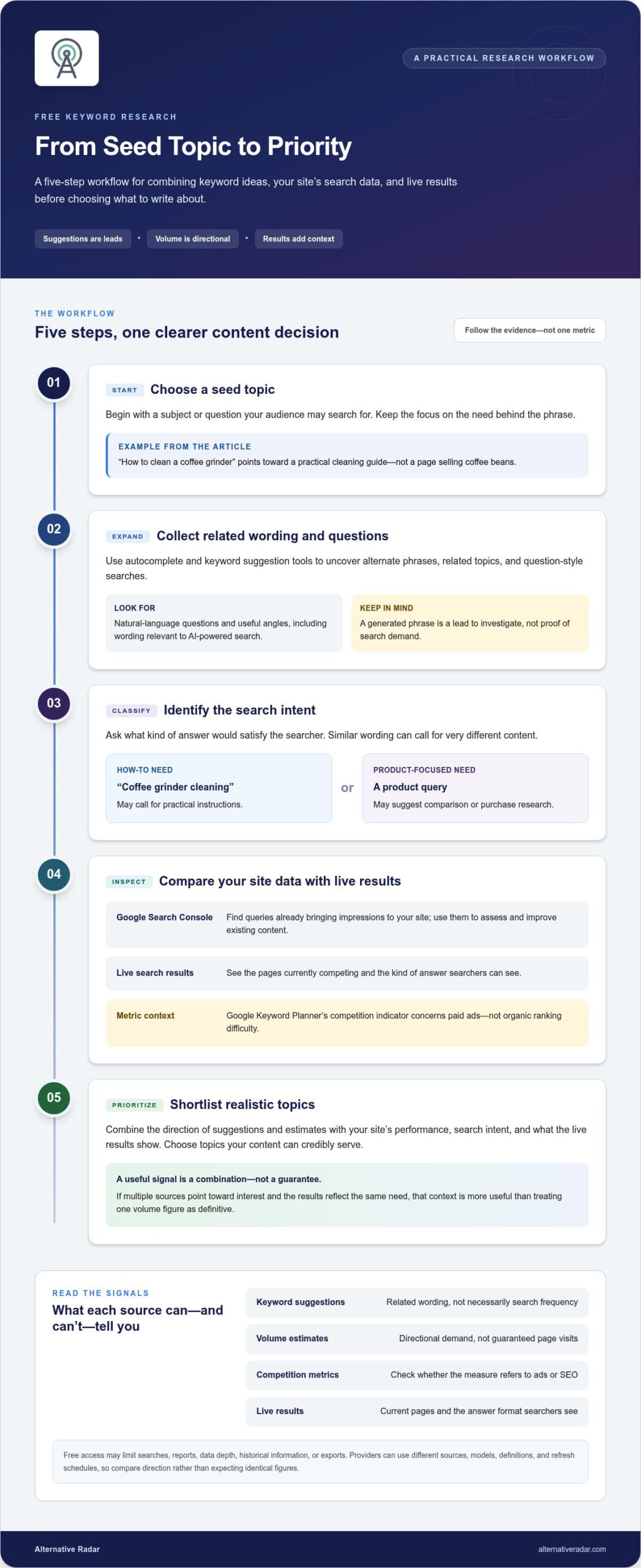
A Five-Step Workflow for Free Keyword Research
Use a consistent process to turn scattered suggestions into a focused content decision. The example below uses the topic “project management software for small teams.” Sample phrases and judgments are hypothetical, not measured search data. Record each idea in a simple spreadsheet so you can see where it came from and why it made the shortlist.
- Choose a seed topic. Start with a clear audience need, product category, or question. For this example, the audience is a small team comparing ways to organize projects. Keep the seed broad enough to generate related searches, but specific enough to reflect the people you want to reach.
- Expand the ideas. Search the seed in autocomplete, review related searches, and check Search Console if your site already has relevant query data. You might collect phrases such as “project management for small teams” or “how to manage team projects.” Treat these as possible directions, not verified demand. Record the source beside every phrase so you can return to the evidence.
- Classify intent and group similar queries. Label each phrase informational, commercial, or transactional based on what the searcher appears to want. Group close variations that share the same goal. For example, hypothetical searches about organizing small-team projects could fit one practical guide, rather than separate pages for every wording variation.
- Inspect the search results. Search each shortlisted phrase and note the formats and topics on the results page. A mix of how-to guides and templates may signal an informational need; product comparisons may indicate evaluation. Keyword discovery gives you candidates; SERP validation shows whether your planned page matches the answers searchers already see. If the results point to a different need, revise the topic or page format before drafting.
- Prioritize realistic opportunities. Compare relevance to your audience, clarity of intent, trend direction, and the effort needed to create a useful page. Consider whether your site has the expertise, authority, and resources to compete with current results. Don’t let a large volume estimate outweigh a weak audience fit or a mismatch with the results page.
Keep the spreadsheet practical. Add columns for keyword, source, intent, trend, relevance, SERP notes, and uncertainty. For the hypothetical project-management example, a row might record “how to manage team projects,” autocomplete as the source, informational intent, “trend not checked,” high audience relevance, and “SERP needs review” as uncertainty. Mark unknowns plainly rather than filling them with guesses. This makes it easier to compare ideas and revisit decisions when new evidence appears.
Use free SEO tools for keyword research to build the evidence, then apply editorial judgment to decide what deserves a page. If your research also leads you to assess software options, compare software alternatives by features and trade-offs to support a more informed evaluation.
Choose a Free Keyword Research Setup That Fits Your Goals
Your research setup should match the decision you need to make, not the largest feature list. If you’re learning SEO, start with a few core sources and practice interpreting their outputs. If you’re validating a topic, combine suggestions with a search-results review. If you manage an established site, use its own performance data to identify opportunities. Free access can be enough until its limits create a practical bottleneck.
When are free tools enough for keyword research?
For occasional research, use a lean mix: Search Console for queries your site already appears for, Google Trends for relative interest over time, and manual SERP checks for intent and page formats. Add a suggestion source when you need more phrasing ideas. Small projects often gain more from choosing relevant topics and matching search intent than from tracking a large dashboard of metrics.
Reassess when repeated manual steps make it hard to publish consistently. A paid capability may be worth evaluating if you regularly need larger-scale research, bulk exports, deeper historical data, or a shared workflow. Compare the feature limits and plan terms with the work you need to do. Don’t upgrade for a metric you won’t use, and don’t assume a paid tool will improve results on its own.
How to explore software alternatives beyond keyword metrics
Keyword research tools answer a specific SEO question. Choosing software for a wider business workflow requires a different comparison: consider features, pricing, and pros and cons in the context of your needs. If a familiar product no longer fits, identify the functions you rely on and compare possible replacements. This guide to finding alternatives to popular software can help organize that evaluation without treating one tool as the default choice.
Licensing and hosting preferences can also shape the shortlist. Open-source software may give teams different options for access and deployment, but the right fit depends on technical resources and operational requirements. Explore popular open-source business software when comparing licensing models or considering self-hosting, and weigh those trade-offs alongside the features you need.
Alternative Radar helps readers discover and compare software alternatives. If you’re weighing options beyond keyword metrics, its software comparisons bring together feature, pricing, and pros-and-cons details to help you build a considered shortlist.
Build a Research Habit That Scales With You
Make your next step small and repeatable: choose one topic, record why it matters to your audience, and decide what evidence would change your mind. Over time, this turns free SEO tools for keyword research from a collection of occasional checks into a practical input for editorial decisions. Review what happens after publishing, then use that learning to sharpen your next round of research.
As your software needs evolve, compare options on more than a feature checklist. Alternative Radar helps you assess software features, pricing, and pros and cons while exploring free, open-source, and premium alternatives. That broader view can help you make a considered shortlist without assuming the most familiar product is automatically the right fit.
Explore software comparisons on Alternative Radar to evaluate alternatives for your needs and build a more informed shortlist.
Frequently Asked Questions
Are free SEO tools for keyword research accurate enough to use?
Yes, free SEO tools for keyword research can guide decisions, but accuracy depends on the data source and metric. A search-volume figure is an estimate; Search Console impressions are observed data for your own site, not a measure of every search. Check the live results to see what searchers expect, then compare several signals. Use them to choose what to investigate, not to predict rankings or guaranteed traffic.
Can I do keyword research without paying for an SEO tool?
Yes. You can combine Search Console data, autocomplete suggestions, trend tools, and manual search-result reviews to identify and assess topics. For example, a local service business can use its own query data for existing visibility, then review suggested phrases and current results before planning a new page. Paid platforms may help with scale or reduce repetitive work, but useful research depends more on audience relevance and intent than on a large metric dashboard.
How much search volume do free keyword tools show?
There isn’t one standard level of detail. Some tools provide estimated volumes or broad ranges, while others focus on relative trends, suggested phrases, or impressions from your own site. What you can see may depend on the provider, account, region, and current plan. Treat volume as an estimate, not a forecast of visits.
What is the best free SEO tool for finding keyword ideas?
It depends on what you already know. Search Console can surface queries that are generating impressions for an existing site, while autocomplete and keyword planners can suggest phrases for a new topic. A small online shop, for instance, might use existing query data to refine a category page and autocomplete to explore product-related questions. Review the actual results and check whether the ideas fit your audience. Free access and feature limits vary, so there’s no universal winner.
Is Google Trends a keyword research tool?
Yes. Google Trends can support keyword research by showing relative interest over time, related queries, and possible seasonal patterns. For example, comparing interest in two gardening topics may help you see whether one tends to rise at a particular time of year. Trends doesn’t give exact monthly search volume, so don’t use its scale as a traffic forecast. Pair its patterns with keyword suggestions and a live results review before choosing a topic or publishing schedule.
What happens if free keyword tools give different results?
Different figures are expected because providers may use different datasets, estimation models, update schedules, and metric definitions. First identify what each result represents: an estimate, a trend signal, or observed performance for your site. Then compare whether the sources point in a similar direction instead of trying to make their numbers match. If they disagree, assess the search results and audience need; those can help determine whether the topic is still a good fit.