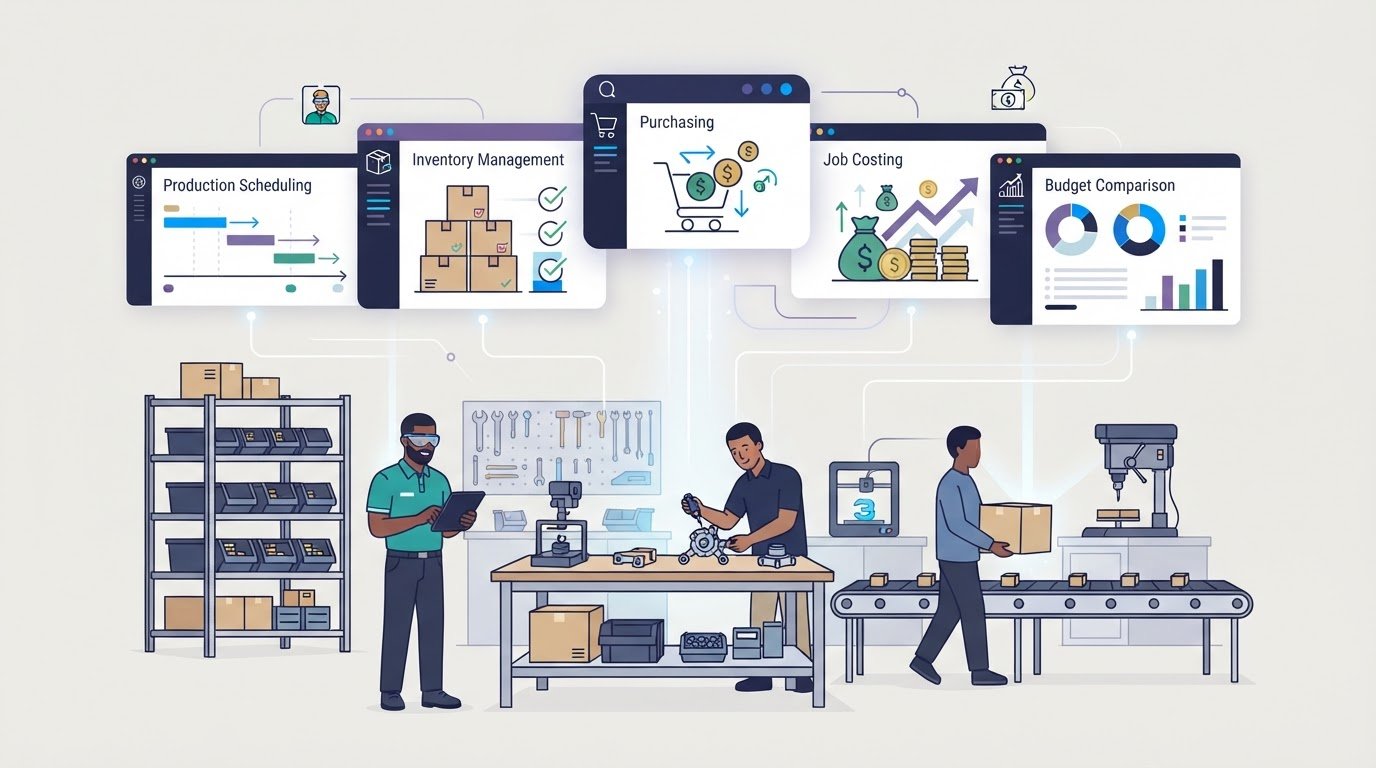
A small operation doesn’t necessarily need the simplest ERP; it needs a system that fits how work actually moves. Manufacturing ERP for small operations connects production, inventory, sales, purchasing, and finance, helping teams share information and track materials throughout production. The right fit depends on your workflows, essential features, and plans for growth, not simply the length of a feature list.
It’s reasonable to focus on cost and ease of use, especially when a small team can’t afford a system that adds more work than it removes. This guide explains core ERP functions, compares about ten options by practical fit, and outlines the requirements to weigh, from production planning and job costing to usability and scalability, so you can narrow your choices with a clearer view of value.
Key Takeaways
- Trace how inventory and material requirements affect production decisions, and identify where shared data could prevent planning blind spots.
- Compare systems by how they schedule work and capture job progress on the shop floor, not just by their feature lists.
- Build a realistic implementation budget by separating software, setup, training, and ongoing costs.
- Prioritize requirements that match your workflows today while leaving room for growth, system compatibility, and industry needs.
What is ERP for Small Manufacturing Businesses?
Manufacturing ERP brings production, inventory, sales, purchasing, and finance together in one system. Cloud-based and on-premise systems support these connected workflows through different hosting models: cloud software is hosted online, while on-premise software runs on the manufacturer’s own infrastructure.
Cloud-Based Manufacturing ERP
Cloud-based manufacturing ERP gives authorized teams access to shared records online. Compared with on-premise systems, it shifts hosting away from the manufacturer’s infrastructure, which can suit a small team without dedicated IT resources. Evaluate how each option supports inventory visibility, production updates, and purchasing coordination. For example, a stock change recorded during a shift should be available to the people planning the next production run.
Inventory and Production Planning
Inventory and production planning connect material requirements planning, or MRP, with production needs. MRP uses bills of materials, demand, open orders, and available stock to estimate what materials production requires. Manufacturers began using early MRP systems in the 1960s to calculate material requirements and manage inventory. ERP can extend this view by tracking raw materials, work-in-progress, and finished goods, then linking shortages to purchasing decisions.
Use the system to align production schedules with available materials, workers, and machinery. If a component is in short supply, for example, planners can see the constraint before assigning work. This connection helps manufacturing teams coordinate scheduling with inventory instead of treating them as separate records.
Inventory and Supplier Management
Supplier management connects purchasing plans with material availability. A manufacturing ERP can link inventory data to demand, open orders, and purchasing, helping buyers anticipate potential shortages. Supplier records and purchase activity show which materials are due and which orders remain open. This gives teams a clearer view of the supply chain, so purchasing decisions reflect production requirements rather than isolated stock counts.
Compare options by how clearly they connect inventory, purchasing, and production records. When a system updates stock after materials are received, planners have a more current basis for scheduling than they would with disconnected spreadsheets.
| Option | Hosting | Inventory and planning fit | Evaluate |
|---|---|---|---|
| Cloud ERP | Hosted online | Shared inventory and production records | Access and workflow coordination |
| On-premise ERP | Manufacturer’s infrastructure | Connected records within the local system | Internal IT capacity and control |
Choose the option that connects material records, purchasing, and production scheduling while meeting your team’s hosting needs.
Production planning, scheduling, and shop floor workflows
Production planning turns orders into work the team can schedule and complete. ERP software connects those decisions to available capacity, materials, and job costs.
Production Planning and Scheduling
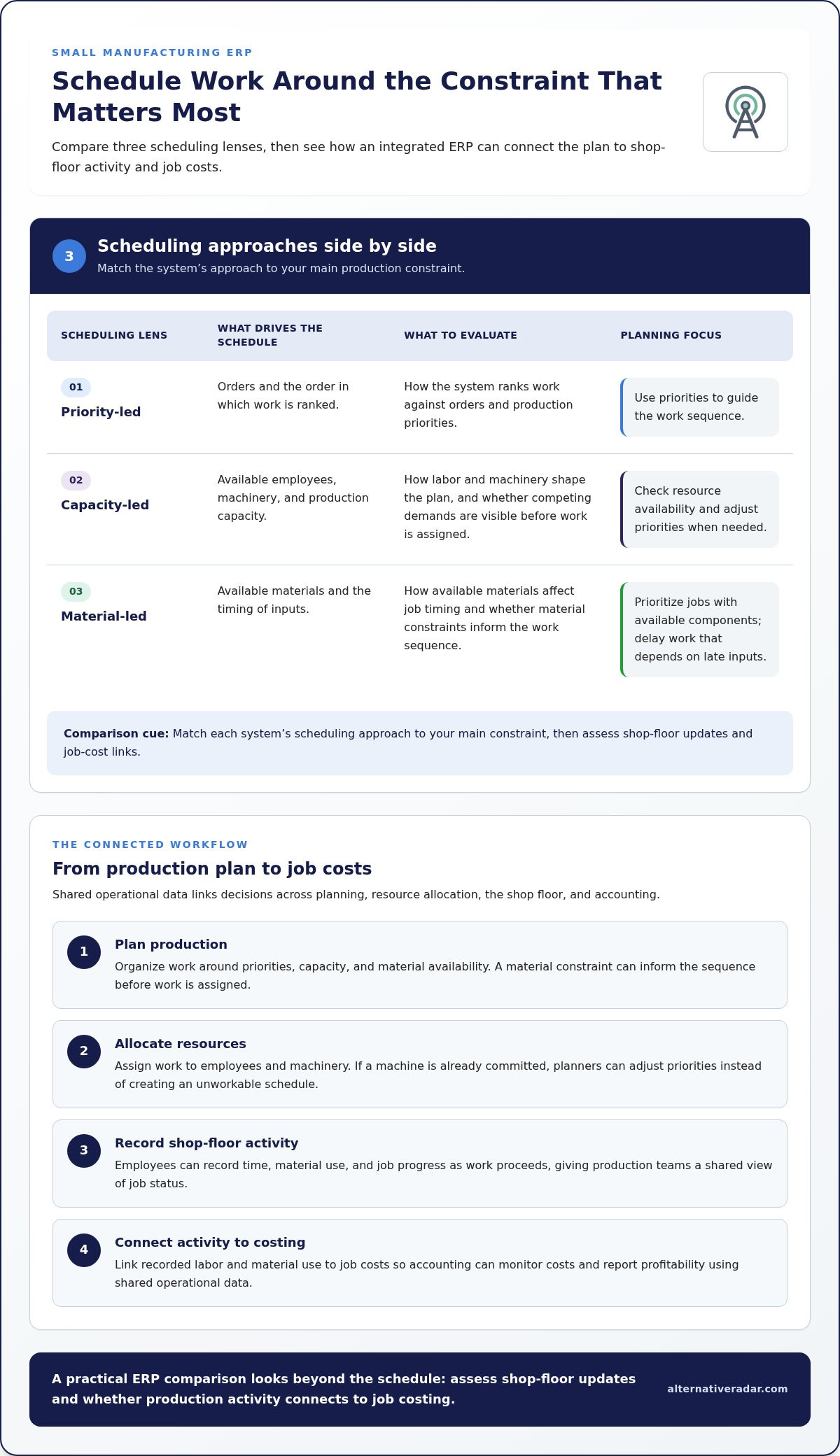
ERP-supported planning organizes production around priorities, capacity, and material availability. Unlike a standalone schedule, an integrated plan draws on shared operational data, so material constraints can inform the work sequence. Planners might prioritize an order with available components and delay a job that depends on a late-arriving input. The result is a schedule that is more practical to execute.
Scheduling and Resource Allocation
Scheduling assigns work to resources such as employees and machinery. ERP systems can align production plans with workforce, equipment, and inventory, helping managers spot competing demands before assigning a job. Resource allocation focuses on the sequence and capacity of specific work, rather than the high-level plan. If a machine is already committed, planners can adjust priorities instead of creating an unworkable schedule.
On the shop floor, employees can record time, material use, and job progress as work proceeds. These updates give production teams a shared view of job status and connect actual activity with the plan. Recording material use against a job, for example, keeps its progress and consumption visible in the same workflow.
Financial integration matters, too. Check whether production activity connects to costing, so recorded labor and material use inform job costs. This link helps accounting monitor costs and report profitability using shared operational data, rather than reconciling separate production records later.
| Workflow option | Best comparison criterion |
|---|---|
| Priority-led scheduling | How work is ranked against orders |
| Capacity-led scheduling | How labor and machinery shape the plan |
| Material-led scheduling | How available inputs affect job timing |
For a quick comparison, match each system’s scheduling approach to your main constraint, then assess its shop-floor updates and job-cost links.
ERP pricing and implementation costs
ERP budgets depend on deployment, user count, implementation scope, and the functions a manufacturer needs. Compare the total rollout cost, not just the software subscription.
Small-business ERP implementation often takes 3-6 months from purchase to go-live. Plan for staff time, a process owner, data preparation, training, and input from production and accounting.
Before choosing, ask vendors about manufacturing expertise, implementation approach, historical data uploads, equipment compatibility, integrations, training, and ongoing support. According to the National Institute of Standards and Technology (NIST), ask whether historical data can be uploaded. The Centers for Disease Control and Prevention (CDC) advises assessing compatibility with existing systems and equipment, including products from different vendors.
Pilots, Go-Live, and Ongoing Support
A pilot tests selected workflows before wider adoption, while go-live moves the system into daily use. Compared with a full rollout, a pilot can reveal data, accounting, or production issues earlier. Use vendor demos to test realistic tasks, then define training and support needs. Include post-implementation support in the rollout plan so staff can resolve workflow questions after launch.
Implementation Timeline and Resources
A small-business ERP implementation often takes 3-6 months from purchase to go-live. The timeline depends on project scope, data preparation, integrations, and how quickly staff can make decisions. Assign a process owner and involve employees who understand production, inventory, and accounting. Compared with choosing software alone, implementation requires time for configuration, training, testing, and moving from manual processes.
Budget estimates vary by cost scope.
Compare scalability, integrations, and support alongside price. A system with the right core functions can reduce manual work, while complex customization can add implementation demands. Assess whether the system supports your current workflows and future growth without introducing unnecessary enterprise-level complexity.
Manufacturing ERP requirements for small operations
For a small manufacturer, a good fit connects essential work without adding unnecessary complexity. Assess whether an ERP links sales, estimating, engineering, inventory, production, shop-floor management, project management, quality control, accounting, and job costing. Connected functions give teams shared operational records instead of separate spreadsheets.
Start with the workflows that affect orders and delivery. ERP can connect order processing from sales through shipping and support accurate delivery schedules. Trace a customer order from entry to shipment, for example, and identify where product details, production status, and delivery information need to update. Include Electronic Data Interchange (EDI) in your evaluation if customers require it for orders or invoices.
Next, compare reporting and accounting capabilities. Shared operational data can help accounting invoice customers, monitor costs, and report profitability. Review a sample job-cost report: it should connect recorded production activity with costs, rather than require manual reconciliation across files. Manufacturing ERP for small operations should support the records your team uses to make decisions.
Deployment and compatibility also shape practical fit. The Centers for Disease Control and Prevention (CDC) advises assessing compatibility with existing systems and equipment, including products from different vendors. Map the systems and machines involved in a typical production run, then identify where information must pass between them. According to the National Institute of Standards and Technology (NIST), manufacturers should ask whether historical data can be uploaded into the system.
Finally, weigh ease of use, scalability, customization, cloud deployment, and affordability against industry-specific requirements. ERP can automate documentation, reporting, and audit trails to help manufacturers address standards and local regulations. Compare these capabilities with your actual workflows, such as recording quality checks or retrieving production records for an audit. Prioritize what staff need now, then assess whether the system can accommodate future operational changes.
Use these requirements to compare ERP systems against a real order, from sales entry through production, accounting, and shipping.
Alternative Radar: Programmatic display advertising
Once you’ve defined your production, integration, and reporting requirements, Alternative Radar can help you compare software options. Its recommendations cover features, pricing, pros, and cons, making it easier to assess options against your priorities. Sponsored placements and affiliate-linked recommendations can also help bring relevant software choices into view as you research.
For software businesses looking to reach audiences, Alternative Radar offers programmatic display advertising. For manufacturers evaluating ERP, the platform is a discovery and comparison resource, not a substitute for matching a system to your workflows and budget.
Explore software comparison resources at Alternative Radar.
Turn your ERP shortlist into an operating decision
Manufacturing ERP for small operations should support how your team expects to work next, not simply reproduce today’s routines in new software. Before committing, define who owns key workflows, which decisions need shared data, and how the team will review whether the system still fits as production changes. This gives your evaluation a practical reference point beyond a feature checklist.
Alternative Radar helps readers discover and compare software through recommendations, sponsored placements, and affiliate links, and offers programmatic display advertising. If you’re exploring software options or ways to reach people comparing software, visit Alternative Radar to see how the platform can support your next step.
Contact Alternative Radar to start a conversation, and move forward with a clearer basis for your decision.
Frequently Asked Questions
What is Manufacturing ERP Software?
Manufacturing ERP software helps manufacturers coordinate business processes through connected digital records. When a customer order changes, for example, teams can use the system to assess the effect on production plans, purchasing, and accounting. The key distinction is manufacturing focus: evaluate whether the workflows reflect how your operation handles orders, production steps, materials, and finished goods.
Back To Basics: What Is an ERP?
An ERP, or enterprise resource planning system, brings information from multiple business functions into a shared system. Instead of maintaining separate records for each team, employees work with connected data. A sales order, for instance, can inform production planning, while accounting uses the same order information to support invoicing and cost tracking.
How Does an ERP Help Improve Manufacturing Operations?
An ERP can improve coordination by making operational information available across departments. When a customer revises an order, connected records help sales, production, and purchasing see the change and respond consistently. To assess the potential value, identify a recurring handoff that causes delays or duplicate entry, then consider whether shared data could clarify that workflow.
How Does an ERP Work?
An ERP stores business data in a shared system and connects it to workflows used by different teams. Employees enter or update information as tasks happen, making relevant records available across functions. For example, completing a production step can update a job’s status, giving customer service a clearer basis for answering an order inquiry.
What Is a Full-Suite ERP?
A full-suite ERP brings multiple business functions together in one coordinated platform rather than focusing on a single task. Depending on the system, these may include finance, sales, inventory, purchasing, and production. For a smaller manufacturer, the practical test is whether the suite connects essential workflows without requiring the team to adopt modules it won’t use.
What Is the Best ERP?
The best ERP is the one that fits your operation’s workflows, priorities, and capacity for change. Start by listing essential tasks, such as processing orders or reviewing job costs, then compare how candidate systems handle them. A small team with straightforward processes may prioritize ease of use, while more complex production needs may call for broader manufacturing capabilities.