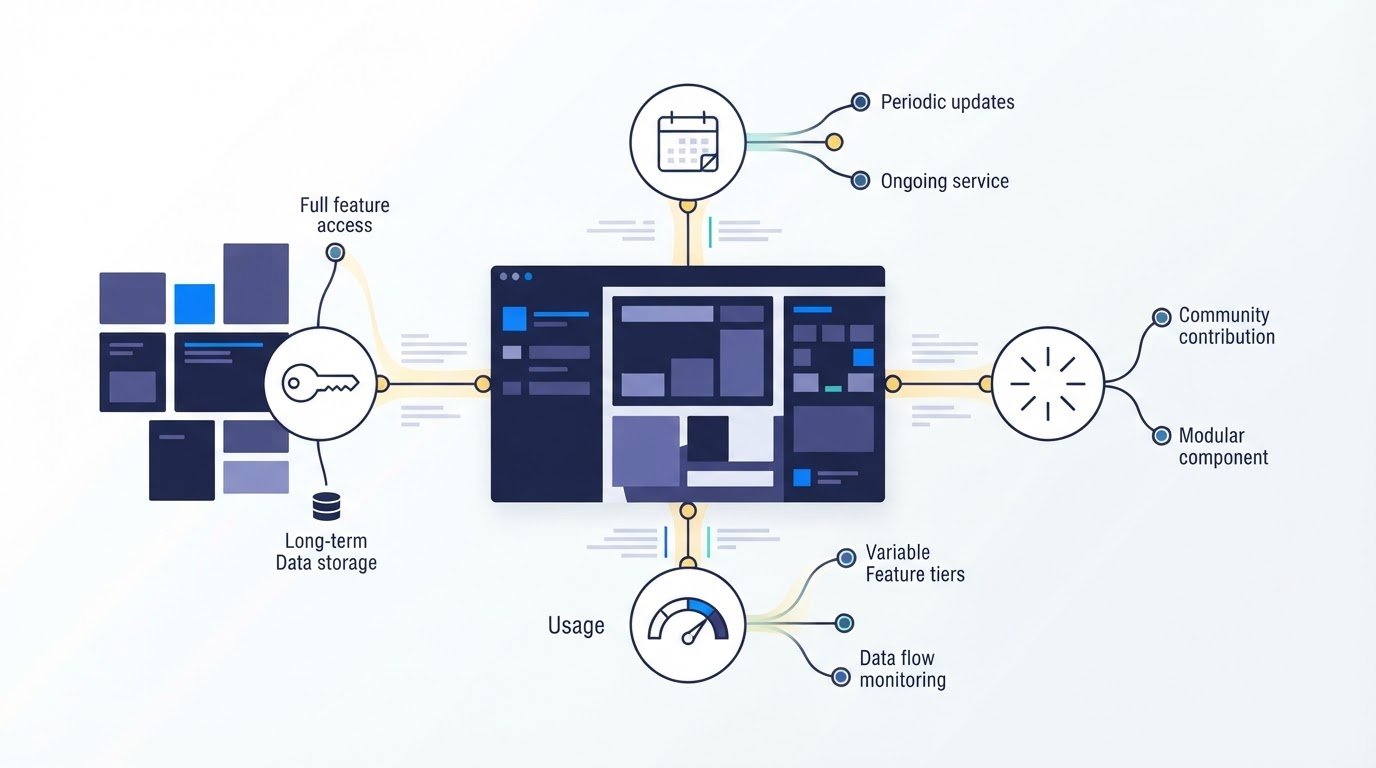
The cheapest license can become the costliest choice when its access rights don’t match how you use the software. Understanding software licensing models means comparing access rules, duration, usage limits, and costs. Common options include perpetual, subscription-based, usage-based, and open-source licenses, each with different rights and ongoing obligations.
It’s easy to focus on price and miss the terms that shape what you can do with software, from accessing specific features to modifying or sharing code. This guide explains how licensing models work, compares subscription and perpetual access and costs, and outlines what to consider in open-source and proprietary terms. It also compares AI model licenses with traditional software licenses, including terms that can affect training data, fine-tuning, and generated outputs.
Key Takeaways
- Compare access duration, user or device limits, features, and usage rules alongside the price.
- Weigh recurring subscription payments against a perpetual license’s upfront cost and version-specific access.
- Distinguish proprietary, open-source, freeware, and shareware terms; free access doesn’t automatically mean unrestricted use.
- For AI models, look beyond the core license to terms on training data, generated outputs, fine-tuning, and permitted uses.
How do software licensing models work?
A software license defines who may use an application, how long access lasts, and what limits apply. Subscription, feature-based, usage-based, token-based, and capacity-based terms shape access and payment in different ways. Understanding software licensing models starts with matching those rules to your actual work, such as assigning named users or measuring requests.
Subscription and Feature-Based Licensing
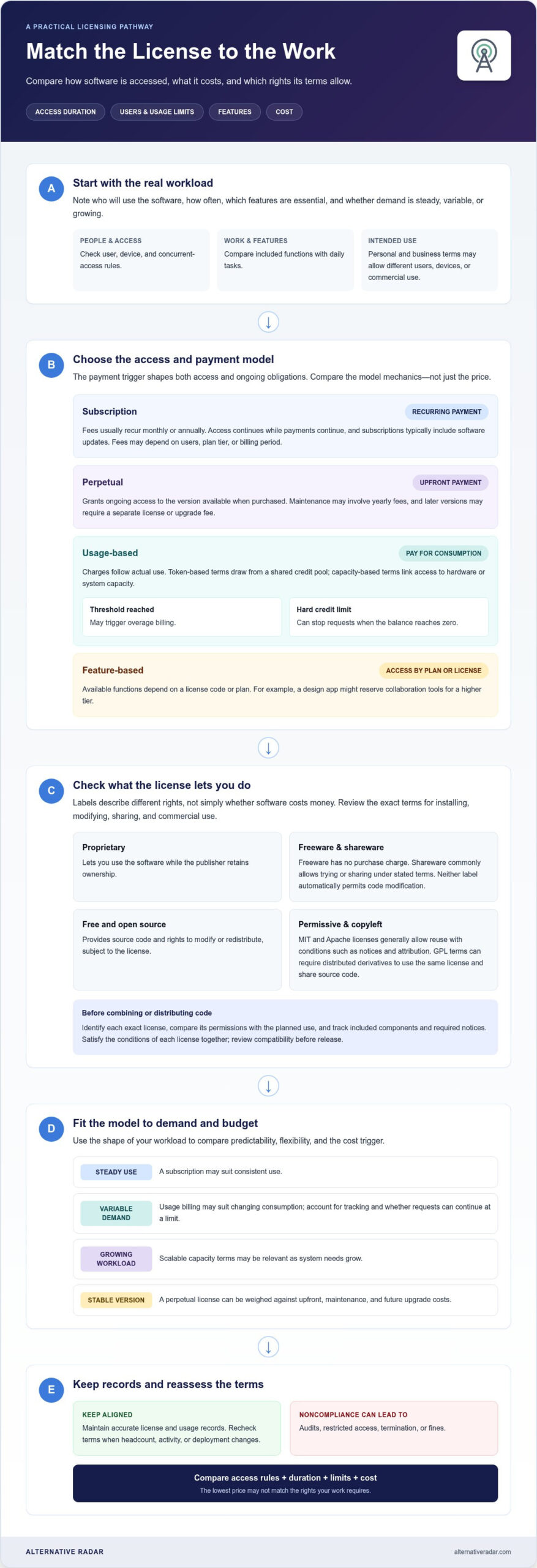
Subscription-based licensing charges recurring fees, usually monthly or annually, for continued access and updates. Fees may depend on the number of users, plan tier, or billing period. A perpetual license typically grants access to the version available when purchased. Feature-based licensing ties available functions to a license code or plan. For example, a design app might reserve collaboration tools for a higher tier. Compare included features with daily tasks to avoid choosing a plan that blocks essential workflows.
Usage-Based Licensing Models
Usage-based licensing charges according to actual software consumption. Token-based licensing draws from a shared pool of credits, while capacity-based licensing links access to hardware or system capacity, such as server capacity. Usage-based billing can involve tracking consumption and deciding whether further requests are allowed. A threshold may trigger overage billing; a hard credit limit can stop requests when the balance reaches zero. These mechanics show how activity can change the total charge.
Choosing a Licensing Model
Choose by matching expected use with budget predictability and growth. Steady use may suit a subscription, while variable demand may suit usage billing. A growing workload may call for scalable capacity terms. Compare user, device, and concurrent-access rules before assigning licenses. Understanding software licensing models also means accounting for the intended use: personal terms may differ from business terms in permitted users, devices, or commercial use. In the United States, clickwrap and browsewrap software licenses have often been held binding since 1996.
Fees depend on the model: subscriptions recur, usage-based charges follow consumption, and perpetual licenses usually require an upfront payment. Noncompliance can lead to audits, restricted access, termination, or fines. Keep license and usage records accurate, then reassess the terms when headcount, activity, or deployment changes.
Proprietary, open-source, freeware, and shareware licenses
License labels describe different rights, not just whether software costs money. Compare the terms for installing, changing, sharing, and using each program commercially.
License Types and Open-Source Approaches
A proprietary license lets you use software while its publisher retains ownership; freeware and shareware describe access or distribution, not automatic permission to modify code. Freeware is offered without a purchase charge, while shareware commonly lets users try or share software under stated terms. Free and open-source software gives users access to source code and rights to modify or redistribute it, subject to its license. For example, a free download may still be proprietary, so check its terms before adapting it.
Permissive and Copyleft Conditions
Permissive licenses, such as the MIT License and Apache License, generally allow reuse with conditions such as keeping copyright notices and attribution. Copyleft licenses, including the GNU General Public License (GPL), can require distributed derivative works to use the same license and share source code. According to the Free Software Foundation, GPL distributors must pass on the same freedoms, ensure recipients can get the source code, and show them the license terms. These conditions shape how much flexibility you have when combining code or distributing a modified program.
License Rights and Compatibility
License rights define what users may do; restrictions can cover redistribution, modification, commercial use, or required notices. To check compliance, identify the exact license, compare its permissions with your planned use, then track included components and required notices. For example, a team that installs MIT-licensed code in a product should preserve the required copyright notice. Compatibility matters when combining components: each license’s conditions must be satisfied together, especially when distributing modified software. GPL terms can require derivative works to carry the same license, which may conflict with another component’s terms. Review licenses before combining or releasing code, not just after development.
How do subscription licensing models differ from perpetual licenses?
Perpetual licenses trade a larger upfront commitment for ongoing rights to a purchased version. Subscriptions and usage-based agreements instead tie access or charges to a recurring period or actual consumption.
Perpetual License Terms
A perpetual license grants ongoing access to the software version available when purchased, making long-term use less dependent on recurring payments. The agreement may still include yearly maintenance fees, while access to later versions can require a separate license or upgrade fee. Customers often host perpetual-license software on their own servers. For example, a team that needs a stable version can weigh the upfront payment against future maintenance and upgrade costs.
Updates, Support, and Renewals
A subscription typically provides access while payments continue and includes the latest software updates. Renewal terms determine when recurring charges resume; cancellation terms explain how access changes when a subscription ends. Perpetual licenses generally preserve access to the purchased version, while optional maintenance and support may be separate. Read the agreement for update eligibility, support coverage, renewal dates, and cancellation effects before choosing.
Perpetual, subscription, and usage-based licenses differ in what triggers payment: a one-time purchase, a recurring term, or actual consumption. A usage-based agreement may charge by requests or another measured activity, so demand can affect the total. Compare a predictable subscription and variable usage charges with the cost of keeping a perpetual version current.
To compare options, estimate the software’s expected lifespan and usage pattern, then account for maintenance, upgrades, and renewal terms. A steady workload may make recurring subscription costs easier to plan. Variable demand may make usage-based billing attractive, but the bill can change with consumption. For software used over a long period, calculate the full cost of ownership, including maintenance and access to later versions, rather than comparing only the initial payment.
AI model licenses compared with traditional software licenses
Traditional software licenses usually define rights to install, access, copy, modify, or distribute code. AI model terms must also address how a model was trained, what users can do with it, and how generated outputs may be used. That difference matters when an AI feature moves from internal testing to a customer-facing product.
Review the model license alongside its platform terms, model card, and acceptable-use policy. Together, these documents can set limits on commercial use, fine-tuning, and handling model weights. For example, a model licensed for internal use only can’t power a customer-facing service under that license. A non-commercial research license also doesn’t grant permission to generate revenue.
Check data and output rights separately. The agreement may address training-data provenance, customer-data retention, and whether submitted data can be used to improve the model. It may also determine who owns generated text, images, or other outputs. If output ownership is unclear or not addressed, a company monetizing generated content can face uncertainty about its rights. Some providers allow fine-tuning but retain rights over adapted models, so distinguish permission to customize from ownership of the result.
Liability is another key difference. AI providers commonly disclaim responsibility for outputs, while the company deploying a model may face downstream risks from harmful, discriminatory, or legally problematic results. Align customer-facing promises and disclaimers with upstream license obligations and acceptable-use rules. For a product team, the practical review is clear: confirm the use case, commercial permissions, data terms, output rights, fine-tuning rights, and liability allocation before launch. Compare traditional software terms with AI model options as carefully as you compare other software choices. Compare software options to support your next evaluation.
Alternative Radar: Programmatic display advertising
Alternative Radar helps readers compare software options once they’ve identified the licensing terms that matter. Its platform provides insights into product features, pricing, and pros and cons, helping you weigh alternatives against your access and usage needs. Use these comparisons when narrowing a shortlist or looking beyond a familiar tool.
Alternative Radar also features programmatic display advertising, sponsored software placements, and affiliate-linked software recommendations. These placements help software publishers reach readers exploring relevant tools, while product comparisons help readers inform their own evaluations. Compare the available details with your licensing priorities, such as permitted use, renewal structure, and feature access.
Visit Alternative Radar to explore software comparisons.
Make your next software choice with confidence
Make licensing review part of every software decision, not a task reserved for procurement or renewal season. A new workflow, a change in how a team uses a tool, or a plan to build with AI can alter which terms matter. Understanding software licensing models gives you a clearer basis for comparing options; the next step is applying that knowledge to the software your work actually requires.
Before committing, write down the essential use case and the limits your team can accept. Then compare candidate tools against those needs, including how each fits your existing workflows. If your shortlist needs a fresh look, explore software options with Alternative Radar.
Choose deliberately and keep the decision tied to your real needs, so you’re better prepared for what comes next.
Frequently Asked Questions
What are the deployment methods of software licensing?
Software can be accessed through a cloud service or installed on infrastructure an organization hosts itself. With SaaS, the provider typically handles access, updates, and maintenance; on-premise software runs on the organization’s systems. Deployment and license model are separate choices: a cloud product may use recurring subscription terms, while on-premise software may use a perpetual license. Compare both dimensions for each tool.
What are the main software licensing models?
Common models include perpetual, subscription, usage-based, and open-source licenses. These labels describe different parts of the decision: how long access lasts, how payment is triggered, or what rights users receive. For example, a team could compare an ongoing subscription with a usage-based option for a tool whose activity varies between busy and quiet periods. Review the actual agreement, since a license can combine multiple terms.
What is the difference between proprietary, open-source, and freeware licenses?
Proprietary software keeps its source code under the publisher’s control, while open-source software provides source access under terms that govern changes and sharing. Freeware describes software offered without a purchase charge, but that label alone doesn’t grant source access or modification rights. For example, a free app may still be proprietary. Separate the cost question from the permissions question before adopting software for a team.
What are per-user, per-device, concurrent-user, and site licenses?
These licenses set different boundaries for access. A per-user license assigns access to a named individual; a per-device license ties it to hardware. Concurrent-user licensing limits simultaneous use, allowing eligible users to share access rather than assigning every seat permanently. A site license defines the permitted organization or location scope in its terms. For a hybrid team, compare who needs access, which devices they use, and how often sessions overlap.
What should you review before buying or choosing a software license?
Before committing, map the planned users, devices, deployment environment, and intended uses against the license terms. Look for limits on commercial use, account sharing, redistribution, modification, and access to specific features. Then note renewal, cancellation, update, and support conditions, along with any usage thresholds or overage rules. For software that includes third-party components or AI models, review their terms separately and record the obligations that apply to your product.
How do software licensing terms differ for businesses and personal use in the United States?
Personal and business licenses may differ in permitted users, devices, and commercial use, so check the terms against your intended use. In the United States, clickwrap and browsewrap licenses have often been held binding since 1996.