
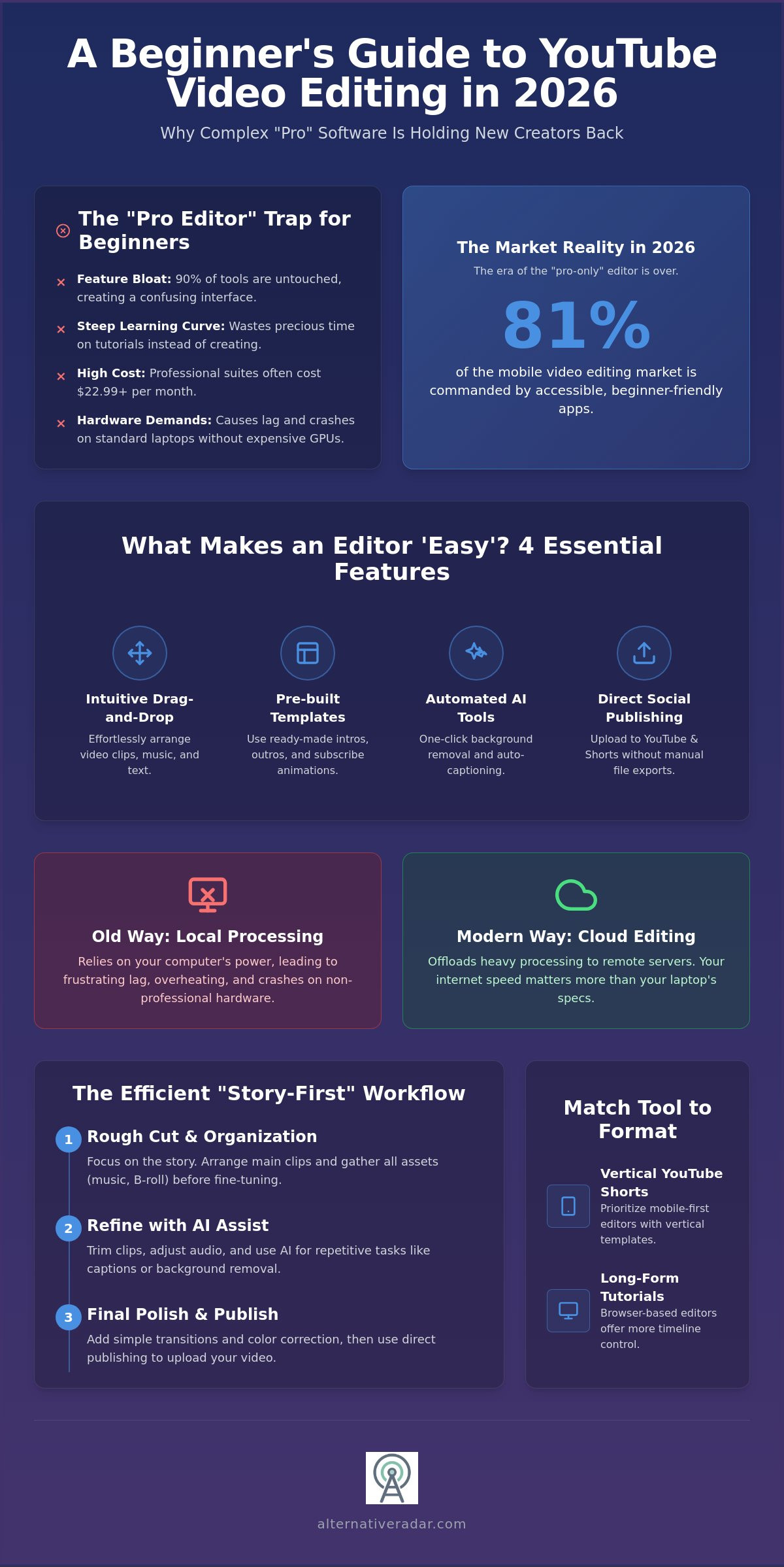
With CapCut now commanding 81% of the mobile video editing market in 2026, it’s clear that the era of the “pro-only” editor is officially over. You shouldn’t have to pay $22.99 a month for a complex suite just to trim a few clips, especially when high-end software often causes frustrating lag on standard laptops. Most new creators feel overwhelmed by the “bloatware” found in professional tools, wasting precious hours on tutorials instead of actually building their channels.
Finding the easiest video editor for youtube beginners means prioritizing utility over unnecessary features. This guide identifies the most intuitive platforms that eliminate the steep learning curve, allowing you to move from raw footage to your first YouTube upload in minutes. We’ve acted as your digital scout to filter the market, focusing on tools that offer drag-and-drop interfaces, fast rendering, and direct-to-YouTube publishing. You’ll discover how to access royalty-free transitions and AI-powered tools without the trial-and-error fatigue typical of traditional editing software.
Key Takeaways
- Eliminate hardware lag by selecting cloud-based or browser-optimized editors that perform reliably on standard laptops without requiring expensive GPU upgrades.
- Identify the easiest video editor for youtube beginners by prioritizing tools with drag-and-drop interfaces and pre-built templates for intros and “Subscribe” animations.
- Reduce production time by leveraging AI-assisted features like automated captioning and background removal, which are now standard in 2026 entry-level software.
- Adopt a “story-first” editing workflow that focuses on the rough cut and asset organization before applying transitions or complex visual effects.
- Choose a platform based on your specific content niche, matching your software to your primary format, whether it is vertical YouTube Shorts or long-form tutorials.
Why Professional Video Editors Often Fail YouTube Beginners
Professional suites like Adobe Premiere Pro hold a 35% market share for a reason; they’re incredibly powerful. However, for someone looking for the easiest video editor for youtube beginners, that power often translates into “feature bloat.” Most new creators only need to cut clips, add text, and adjust audio levels. Instead, they’re met with hundreds of buttons and complex keyframing menus that remain untouched 90% of the time. This creates a massive psychological barrier. When the interface looks like a cockpit, the creative process stops before it starts.
The Steep Learning Curve of Industry Standards
Industry standards prioritize precision over speed. If you choose a professional tool, you’re often committing to weeks of YouTube tutorials just to understand the non-linear timeline. This is a form of creative friction. While a comprehensive list of video editing software shows dozens of high-end options, most of them aren’t built for the fast-paced needs of a 2026 creator. You shouldn’t have to learn the physics of color grading just to post a vlog. Every hour spent troubleshooting a “pro” feature is an hour not spent filming your next video.
Hardware Limitations and the Rise of Cloud Editing
Hardware remains the silent killer of creative momentum. Professional editors require high-end GPUs and significant RAM to function without crashing. If you’re working on a standard laptop or a Chromebook, trying to render 4K footage in a heavy desktop application will lead to constant lag and overheating. This technical friction is why many beginners quit before their first upload.
By 2026, the shift toward cloud-based editing has solved this “hardware hurdle.” Browser-based tools handle the heavy processing on remote servers, meaning your internet speed matters more than your laptop’s specs. This hybrid environment allows for a smoother experience. You can edit on one device and finish on another without moving massive files. It’s a pragmatic shift that favors efficiency over raw, local processing power.
A true “beginner-first” editor isn’t just a stripped-down version of a pro tool. It’s software designed with a different logic entirely. It prioritizes automated workflows and intuitive drag-and-drop actions. Finding the easiest video editor for youtube beginners means choosing a platform that rewards your curiosity rather than punishing your lack of technical training. Efficiency comes from tools that match your current skill level while providing the shortest path to a finished export.
What Makes an Editor the ‘Easiest’ to Use? 4 Essential Criteria
Identifying the easiest video editor for youtube beginners requires moving past subjective opinions. To find a tool that actually saves time, you must look for specific functional benchmarks. Simplicity in 2026 is defined by how well a program anticipates your next move and automates repetitive tasks. If you find yourself hunting through sub-menus for basic functions, the software has already failed the “ease of use” test. An ideal beginner platform should meet these four essential criteria:
- Intuitive Drag-and-Drop Interface: Moving video clips, music, and text should feel as natural as arranging slides in a presentation.
- Pre-built YouTube Templates: Access to ready-made intros, outros, and “Like & Subscribe” animations eliminates the need for graphic design skills.
- Automated AI Tools: Features like one-click background removal and auto-captioning should be standard, not hidden behind a paywall.
- Direct Social Integration: The software must allow for one-click publishing to YouTube and YouTube Shorts, bypassing the need for manual file exports and uploads.
The Importance of a Clean User Interface (UI)
A well-designed UI reduces decision fatigue by employing a clear visual hierarchy. Beginner-first editors use “contextual menus” that only show relevant tools when a specific element is selected. For example, clicking a text box should only bring up font and color options. This keeps the workspace uncluttered. A simplified timeline is the secret to building confidence; it allows you to see the structure of your story without being overwhelmed by technical metadata. If you’re still undecided on a platform, you can explore curated software alternatives that match your specific hardware and skill level.
AI Assistance: The Beginner’s Secret Weapon in 2026
AI has fundamentally changed the entry requirements for video creation. “Smart cuts” now automatically scan your footage to remove silence and filler words like “um” and “ah,” instantly tightening your edit. Text-based editing is another breakthrough, allowing you to edit your video by simply deleting words in a generated transcript. This is often much faster than manual trimming on a timeline. Additionally, automated AI leveling of audio ensures your voice remains clear and consistent across different recording environments, saving hours of manual gain adjustment. While some users eventually graduate to more complex systems using a Beginner’s Guide to DaVinci Resolve, most 2026 creators find that AI-driven tools provide the fastest path to a professional-looking result. Choosing the easiest video editor for youtube beginners is about finding the tool that does the heavy lifting for you.
Top 5 Easiest Video Editors for YouTube Beginners in 2026
The market in 2026 offers distinct paths depending on your hardware. If you’re looking for the easiest video editor for youtube beginners, you need to decide between browser-based speed and desktop-lite stability. We’ve filtered the options down to the most efficient tools for new creators, ensuring that you don’t waste time on software that outpaces your current needs or hardware specs.
Best Online Editors for Instant Creation
Online editors like Adobe Express and Canva are the primary choice for creators using Chromebooks or older laptops. Since these tools run entirely in a browser, they bypass the local processing lag mentioned in earlier sections. Adobe Express Premium costs $9.99 per month and provides a template-heavy workflow that’s ideal for YouTube Shorts and simple vlogs. A free version is also available for those just starting out.
The main advantage here is accessibility. You don’t need to install large files or worry about system compatibility. However, the trade-off is a reliance on your internet connection. If your upload speed is slow, working with high-resolution 4K files can become tedious. Choose these online tools if you value speed and pre-made design elements over deep, frame-by-frame timeline control.
Best Desktop-Lite Software for Windows and Mac
CapCut and Microsoft Clipchamp have become the new entry-level standards for desktop users. CapCut, which dominates 81% of the mobile editing market, offers a desktop version that mirrors its intuitive mobile interface. This makes it the perfect hybrid for creators who film on their phones but want the precision of a mouse and keyboard. While it has a robust free version, CapCut Pro rates vary from $7.99 to $19.99 per month depending on your region and subscription plan.
Clipchamp is built directly into Windows, making it a zero-cost entry point for many. These tools bridge the gap between “too simple” and “too hard” by providing a traditional timeline that isn’t cluttered with professional metadata. For those who prefer a one-time purchase, Filmora remains a strong contender with a perpetual plan available for $79.99. It offers more advanced features than browser tools without the steep learning curve of a professional suite.
When searching for the best free video editing software, prioritize tools that don’t force intrusive watermarks on your final export. Open-source options or the free tiers of CapCut and Clipchamp are often the best long-term choices because they allow you to grow your skills without immediate financial pressure. Finding the easiest video editor for youtube beginners is ultimately about matching the software’s logic to your specific hardware and content style.
Step-by-Step: Editing Your First YouTube Video Without Stress
Choosing the easiest video editor for youtube beginners is only the first step toward a successful channel. The second step is establishing a repeatable workflow that prevents burnout. Efficiency in 2026 depends on your ability to move through the technical stages of production without getting bogged down in minor details. Before you even open your software, you must organize your assets. Create a dedicated folder for each project with sub-folders for raw footage, audio, and graphics. This simple habit ensures that your editor doesn’t lose track of files, which is a common cause of software crashes and “missing file” errors.
Mastering the “Rough Cut” Mentality
Beginners often make the mistake of “editing as they go,” trying to perfect the color and transitions of the first ten seconds before the rest of the video is even on the timeline. This approach leads to frustration. Instead, focus on the rough cut. Your only goal during this phase is to arrange your clips in a logical order and remove “dead air” or filler words. A successful YouTube intro must deliver a clear hook within the first five seconds to ensure high retention rates. By focusing strictly on the story first, you maintain momentum and complete the backbone of your video much faster.
Enhancing Engagement with Simple Effects
Once the story is set, you can add polish to keep viewers engaged. Use B-roll and stock footage to cover up “jump cuts” or mistakes in your main talking-head clip. This visual variety prevents the video from feeling static. When it comes to transitions, remember that less is more. Stick to simple cuts or cross-dissolves; overusing flashy animations can make your content look like a dated slideshow. Finally, add royalty-free background music at a low volume. Using the easiest video editor for youtube beginners usually gives you access to a built-in library of tracks that won’t trigger copyright strikes.
The final stage is exporting your work. While 4K is the standard for high-quality channels, 1080p is often sufficient for beginners and allows for much faster upload speeds. Ensure you select the “High Quality” or “YouTube” preset in your export settings to balance file size with visual clarity. If you are still searching for the perfect platform to implement this workflow, compare the latest video editing alternatives to find a tool that matches your specific hardware and skill level.
Finding the Right Fit: Beyond the Most Popular Options
Selecting the easiest video editor for youtube beginners requires a strategic look at your specific content goals. A tool that excels at editing a fast-paced gaming montage might struggle with the subtle color grading required for a cinematic travel vlog. Your choice should act as a force multiplier for your productivity. It shouldn’t be a technical bottleneck that you outgrow by next season. Simplicity is valuable, but it must be matched with the specific utility required for your chosen niche.
Niche-Specific Tool Selection
Different types of content demand different software strengths. Gamers prioritize software that supports high-frame-rate playback to maintain the visual fidelity of their gameplay recordings. If you’re a gamer, you need an editor that won’t stutter when handling 60fps or 120fps footage. Vloggers, however, benefit more from intuitive skin-tone filters and automated lighting adjustments that make on-camera appearances look professional with minimal effort. For those creating educational tutorials, the priority shifts toward built-in screen recording and clear callout graphics.
Beyond the video itself, your workflow likely includes static assets. Your video editor choice often dictates how easily you can import graphics or export frames for promotional use. Finding the best free alternatives to photoshop is vital for YouTube thumbnails, as a high-quality thumbnail is the primary driver of your click-through rate. Many modern editors now offer integrated design tools to streamline this process, allowing you to create a cohesive brand look across both your video and your channel art.
The Long-Term Creator Strategy
The best software for you today should offer enough room to grow for tomorrow. While a browser-based tool might be the easiest video editor for youtube beginners right now, your creative needs will evolve. You may eventually require multi-track audio, advanced masking, or complex color wheels. When you reach those limits, refer to our guide on finding the best alternative to popular software to ensure a smooth transition without losing your creative momentum.
Alternative Radar acts as your digital scout, filtering out the marketing fluff to present you with pure utility. We’ve done the testing so you can avoid trial-and-error fatigue. Before you commit to a download, use this final checklist to ensure a perfect fit:
- Verify that the software supports your camera’s specific file format and frame rate.
- Check if the tool includes a built-in library for royalty-free music and sound effects.
- Ensure the editor offers direct-to-YouTube publishing to save time on manual exports.
- Confirm that the interface remains responsive on your current laptop hardware.
Start Building Your YouTube Channel Today
You now have a clear path to bypass the technical friction that stops most new creators. By prioritizing utility over “feature bloat,” you can significantly reduce the time spent in tutorials and increase the time spent producing content. The easiest video editor for youtube beginners is the tool that matches your current hardware and niche, allowing you to focus on storytelling rather than troubleshooting complex keyframes or non-linear timelines.
Remember that your choice of software isn’t permanent. As your skills grow, your tools can evolve with you. For now, focus on establishing a rough cut workflow and leveraging AI-powered automation to handle repetitive tasks like audio leveling and captioning. This pragmatic approach ensures you maintain the momentum needed for long term success on the platform.
If you’re ready to skip the marketing hype and get straight to the tools that work, find the perfect alternative to complex video software on Alternative Radar. We provide objective software comparisons and expert-vetted tool lists to ensure you receive efficiency-first recommendations. Don’t let technical barriers stand in the way of your creative potential. Choose your tool, start your first project, and upload with confidence.
Frequently Asked Questions
Is there a truly free video editor for YouTube with no watermark?
Yes, Microsoft Clipchamp and the free version of CapCut are the primary options in 2026 that allow for watermark-free exports. While some advanced AI features are locked behind a Pro subscription, these tools allow you to export high-definition videos without intrusive branding. This makes them ideal for new creators who want to maintain a professional look without any initial financial investment.
Can I edit YouTube videos on a low-end laptop or Chromebook?
You can edit effectively on low-end hardware by choosing browser-based editors like Adobe Express or Canva. These platforms process your video on remote cloud servers, which prevents the hardware lag and overheating common with desktop software. This cloud-based approach makes them the easiest video editor for youtube beginners who don’t own an expensive gaming laptop or a dedicated workstation.
What is the best video editor for YouTube Shorts and TikTok?
CapCut is the dominant choice for vertical short-form content, currently holding 81% of the mobile editing market. Its interface is specifically optimized for the fast-paced style of Shorts and TikTok, offering one-tap trending effects and automated audio syncing. It allows you to move projects seamlessly between your phone and desktop, ensuring you can post content quickly regardless of your location—making it easy to share your latest video on Tallinnan ravintolat while you are still on the go.
Do I need a 4K video editor as a beginner?
No, you don’t strictly need to edit in 4K when you are just starting your channel. While most modern tools support 4K, editing in 1080p is often better for beginners because it requires less processing power and results in much faster upload speeds. Focus on the quality of your lighting and audio first, as these factors impact viewer retention more than ultra-high resolution.
How long does it take to learn basic video editing for YouTube?
You can master the basics of video editing in under an hour if you use a tool designed for simplicity. By focusing on the essential skills of trimming clips, adding text overlays, and inserting background music, you can go from raw footage to a finished export very quickly. Avoiding professional-grade suites in the beginning helps you bypass the steep learning curve that causes many new creators to quit.
Can AI edit my YouTube videos for me automatically?
AI can automate the most tedious parts of editing, such as removing silent gaps, generating captions, and balancing audio levels, but it cannot yet replace your creative storytelling. Using these automated features helps you find the easiest video editor for youtube beginners by cutting down on hours of manual work. AI acts as a highly efficient assistant that handles the technical cleanup while you focus on the content. To explore how these shifts are impacting the broader workforce, you can visit AI Took Our Job for community support and resources.
What is the difference between an online video editor and a desktop app?
Online editors run entirely in your web browser and rely on an internet connection to process video in the cloud. Desktop apps are installed directly on your computer and use your local RAM and GPU for rendering. Online tools are generally easier for those with older hardware, while desktop applications provide more stability and precision for long-form videos or complex projects with many layers.
Which video editor do most famous YouTubers use when they start?
Many famous creators began their journey with free, accessible software like iMovie or CapCut before eventually graduating to professional suites. They prioritize consistency and speed over advanced technical features during their first year. Once their channel grows and requires more cinematic effects, they typically transition to industry standards like Adobe Premiere Pro or DaVinci Resolve to access advanced color grading tools.