
What if the “free” CRM you’re using today is actually a high-interest loan on your future growth? It’s a common trap in 2026 where businesses realize their initial setup lacks the flexibility of professional free hubspot alternatives, leading to expensive paywalls just as they begin to scale. You’re likely feeling the strain of HubSpot’s steep pricing tiers or the frustration of managing data silos across multiple disconnected apps. You shouldn’t have to sacrifice power just to keep your overhead low.
This guide cuts through the marketing noise to identify the most effective tools available right now. We’ve acted as your digital scout, testing platforms that provide genuine marketing automation and lead management without the enterprise price tag. You’ll discover which tools offer the highest contact limits and which ones bridge the gap between simple spreadsheets and expensive suites. We’ll compare the top-rated models, from all-in-one environments to modular open-source stacks, so you can stop paying for potential and start using tools that prioritize your bottom line.
Key Takeaways
- Identify the “HubSpot Trap” and learn how to recognize the specific feature walls that trigger expensive enterprise upgrades.
- Compare the pros and cons of all-in-one suites versus modular stacks to determine which architecture fits your team’s workflow.
- Evaluate the most generous free hubspot alternatives in 2026, focusing on platforms that offer permanent free tiers for contact management and automation.
- Master a risk-free migration strategy to audit, clean, and export your HubSpot data into a new platform without losing critical deal history.
- Get a definitive recommendation based on your specific business type to ensure your chosen tool scales alongside your growth.
Why Businesses Are Searching for Free HubSpot Alternatives in 2026
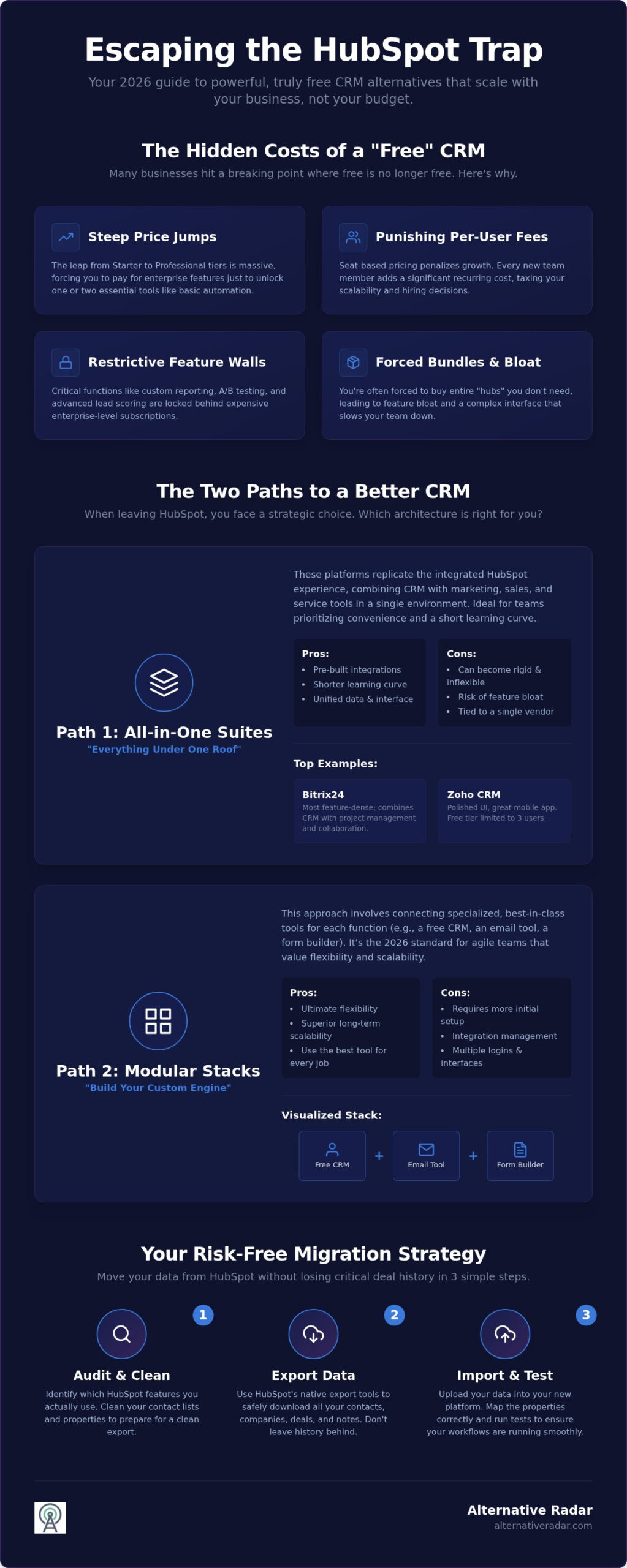
Many growth-focused companies start with HubSpot because the entry price is zero. However, this often leads to what industry insiders call the “HubSpot Trap.” The free version serves as a functional introduction to Customer relationship management (CRM), but it’s designed to create dependency. With cloud-based CRMs now accounting for 87% of the market in 2026, the competition for free hubspot alternatives is fierce. As your database grows, you hit invisible walls. Features like automated workflows, custom reporting, or advanced lead scoring are locked behind premium tiers. New competitors are aggressively launching “HubSpot-killer” free tiers to capture market share from businesses tired of the “all-in-one” promise that actually delivers feature bloat they’ll never use. Small teams often find that the very tools meant to simplify their work actually create unnecessary complexity.
The Escalating Cost of HubSpot Paid Tiers
The financial leap from HubSpot’s Starter tier to the Professional level is notoriously steep. Small teams often find themselves paying for enterprise-grade tools just to access basic automation. Seat-based pricing further penalizes growth; every new hire adds a recurring monthly tax to your tech stack. Beyond the subscription, mandatory hub bundles and high onboarding fees for the Professional tier can drain a startup’s capital before they’ve even sent their first automated campaign. This pricing model forces a choice: stop growing your team or accept a massive hit to your margins. It’s a binary outcome that doesn’t suit the fluid nature of modern business.
When “Free” Isn’t Enough: Identifying Your Breaking Point
Searching for free hubspot alternatives usually begins when the “HubSpot” branding on your emails starts to look unprofessional or your contact limits expire. You should audit your usage monthly to identify which features are actually driving revenue. If you only use 20% of the available tools but are being pushed toward a 500% price increase to unlock one specific automation, you’ve reached the breaking point. Many users feel a sense of “lock-in” due to the perceived complexity of moving data. However, staying out of fear is an expensive mistake. The emotional weight of feeling stuck often clouds the logical reality that more flexible, cost-effective options exist. Recognizing that your current tool no longer aligns with your budget is the first step toward a more efficient operation. By 2026, switching is no longer the technical nightmare it once was, making the search for a better fit a high-priority task for any efficiency-driven manager.
The Two Paths: All-in-One Suites vs. Modular Free Stacks
When you move away from the HubSpot ecosystem, you face a strategic choice. You can either replicate the “everything under one roof” experience with a different provider or build a custom engine from specialized components. Selecting the right free hubspot alternatives requires you to weigh immediate convenience against long-term flexibility. Monolithic suites offer a familiar interface and pre-built integrations, which shortens the learning curve for your team. However, these suites often suffer from “feature gravity,” where you’re forced into their specific workflow regardless of its efficiency.
The alternative is the modular approach. This involves picking the best tool for each specific function and linking them together. While this path requires more initial setup, it offers superior scalability because you aren’t tied to a single vendor’s roadmap. Modular SaaS is the 2026 standard for agile startups.
The All-in-One Free Suite: Bitrix24 and Zoho CRM
Bitrix24 is currently the most feature-dense option on the market for teams that want a direct replacement for HubSpot’s interface. It combines CRM with project management and internal collaboration tools in a single environment. It’s an excellent choice if you want to avoid the complexity of managing multiple logins. However, the sheer volume of features can feel overwhelming for small teams that only need a simple lead tracker.
Zoho CRM provides a more polished, user-friendly experience but restricts its free tier to 3 users. It’s ideal for tiny teams that value a clean UI and a robust mobile app. While these suites reduce integration headaches, they can become rigid as your needs evolve. If you’re looking for a specific balance of features, you can explore our curated software categories to find a match for your niche.
Building a Modular Stack with Free Tools
A modular approach involves connecting specialized services to create a high-performance engine. You might use Freshsales for its 3-user free contact management and pair it with Brevo for its generous free daily email limits. This strategy ensures you aren’t paying for “bloat” features you don’t use. If you need total control over your database, consult our open source crm software comparison to find tools you can host yourself for maximum privacy.
The “glue” for this path is the free tier of automation platforms like Make or Zapier. These tools allow data to flow between your CRM and marketing apps without manual entry. This path has a steeper learning curve, but it prevents the “lock-in” associated with larger suites. By using free automation tiers, you can build a sophisticated marketing machine that rivals enterprise setups at zero cost.
Top 5 Free HubSpot Alternatives for 2026
Finding a tool that matches HubSpot’s utility without its restrictive pricing requires a strict filter. We’ve selected these free hubspot alternatives based on one non-negotiable criterion: they must offer a permanent free tier with no expiry date. While many “freemium” models are just glorified trials, the following platforms provide enough core functionality to run a growing business. Two standout options for smaller teams are Zoho CRM and Freshsales. Zoho CRM supports up to 3 users with professional sales pipelines and custom fields, making it ideal for structured sales processes. Freshsales also allows for 3 users and is best for those who want ease of use with built-in phone and email capabilities right out of the box.
Bitrix24: The Powerhouse of Free Features
Bitrix24 is the most aggressive competitor in the all-in-one space. It offers 5GB of cloud storage and robust task management tools that rival dedicated project management software. Unlike many other platforms, it includes built-in telephony and collaboration tools like video conferencing in its free version. The trade-off is a steeper learning curve. You’ll spend more time configuring the interface compared to HubSpot’s plug-and-play style. However, if your team needs a centralized hub for both customer data and internal projects, the feature density here is unmatched.
Brevo: The Best Free Marketing Automation Alternative
Brevo, formerly Sendinblue, solves the biggest pain point of HubSpot: contact-based pricing. It allows you to store unlimited contacts on its free plan, which is a massive advantage for businesses with large lead lists that don’t convert immediately. You’re limited to sending 300 emails per day, but for many small to mid-sized firms, this is plenty. It also includes transactional email capabilities and basic automation workflows. It’s the logical choice for companies that prioritize email marketing reach over high-frequency daily blasts.
Mautic: The Open Source Alternative for Technical Teams
If you have the technical resources to self-host, Mautic is the ultimate popular open source business software 2026 for marketing automation. Think of it as the “WordPress of marketing automation.” It gives you total control over your data privacy and eliminates licensing fees entirely. You can build complex, multi-stage campaigns and lead scoring models that HubSpot typically reserves for its Professional and Enterprise tiers. Mautic empowers you to own your marketing stack, though you’ll be responsible for your own server maintenance and security updates. It’s a high-effort, high-reward path for teams that refuse to be locked into a vendor’s ecosystem.
Migration Strategy: Moving Your Data from HubSpot for Free
Many businesses hesitate to switch to free hubspot alternatives because they fear data loss or a technical “nightmare.” This fear is usually rooted in a lack of a structured plan rather than actual software limitations. By following a logical sequence, you can transition your entire database without hiring an expensive consultant. A successful migration requires a systematic approach to ensure your sales and marketing operations don’t skip a beat during the move.
- Step 1: Data Audit. Clean your database before moving. Delete duplicate leads, bounce-prone email addresses, and inactive contacts that haven’t engaged in over a year.
- Step 2: Exporting Objects. HubSpot requires you to export contacts, companies, and deals as separate CSV files. Do not try to bundle them into one document.
- Step 3: Mapping Fields. Your new tool might use different names for HubSpot’s custom properties. Create matching fields in your destination CRM before you start the import process.
- Step 4: Testing the Import. Run a pilot import with a small batch of 50 records. Verify that contacts are correctly linked to their respective companies and deal stages.
- Step 5: Redirecting Lead Flows. Once the data is live, update your website forms and API keys. This ensures new leads flow directly into your new system instead of a dead HubSpot account.
Preserving Your Sales History
One common mistake is failing to export “Notes” and “Activities.” These timeline events are often buried in HubSpot’s architecture and don’t always appear in a standard contact CSV export. You may need to use a specialized migration tool that offers a limited free trial to handle these complex data relationships. Always maintain a full backup of your original HubSpot data for at least 90 days after the transition. This provides a safety net if you realize a specific custom property didn’t transfer correctly. If you’re feeling overwhelmed, you can find more expert software guides on Alternative Radar to simplify your decision-making.
Updating Your Marketing Workflows
Marketing automation doesn’t transfer between platforms automatically. You’ll need to recreate your email sequences and lead scoring triggers manually in your new environment. This is an ideal time to audit your alternative to forms and landing pages to ensure they’re optimized for your 2026 goals. Don’t forget to swap out tracking pixels and analytics scripts on your website. Transitioning these scripts correctly ensures you maintain a continuous view of your customer journey without losing valuable historical data.
Final Verdict: Which Free Alternative Should You Choose?
Selecting the right platform from the many free hubspot alternatives requires an honest assessment of your operational needs. There’s no universal “best” tool; there’s only the best tool for your specific workflow. If you prioritize feature density and internal collaboration, Bitrix24 is the superior choice. If you value a clean interface and a low learning curve for a small sales team, Zoho CRM or Freshsales will serve you better. Don’t fall for the “Free Forever” myth without a plan. Every free tier has a ceiling, whether it’s a 3-user limit or a cap on daily emails. The goal is to choose a tool that empowers your current growth without creating a technical debt you can’t afford to pay later.
Our scout’s recommendation is clear: Bitrix24 wins for businesses that need a wide range of integrated features, while Zoho CRM wins for those who prioritize a polished, professional user experience. Decision-making shouldn’t be based on what’s popular, but on what’s functional for your team’s daily habits.
Decision Framework by Business Goal
Your business model dictates your tech stack requirements. Match your goals to these specific recommendations to ensure a high return on your time investment:
- Best for “I just want it to work”: Freshsales. Its built-in communication tools and straightforward contact management make it the most accessible option for B2B service providers.
- Best for “I want to build my own system”: Mautic + Open Source Stack. This is the choice for ecommerce brands and technical teams that want unlimited automation without recurring licensing fees.
- Best for “I need a full office suite”: Bitrix24. Agencies that need to manage both client relationships and complex internal projects will benefit from its integrated task management and telephony.
Next Steps: Launching Your New CRM
Transitioning your CRM is just the first step in optimizing your business costs for 2026. If you’re looking to reduce your monthly overhead even further, check out our guide on the best free alternatives to photoshop to cut your creative software expenses. Tools should serve your growth, not tax it. We encourage you to use Alternative Radar as your digital scout. We’ll keep testing and comparing the latest tools so you don’t have to. Explore our full comparison library to find the next high-utility addition to your tech stack and stay ahead of the “enterprise pricing” trap.
Take Control of Your CRM Strategy in 2026
Your search for free hubspot alternatives shouldn’t end with a simple download. You’ve identified the “HubSpot Trap” and learned that a strategic choice between all-in-one suites and modular stacks is the only way to maintain long-term efficiency. Whether you choose the feature-dense environment of Bitrix24 or the professional polish of Zoho, your tools must align with your specific business architecture. Remember that a clean migration is just as important as the software itself; don’t leave your valuable sales history behind.
Alternative Radar acts as your unbiased software curator, providing objective comparison data to help you cut through marketing hype. We focus on expert-led software discovery so you can find high-utility tools that serve your growth instead of taxing it. Stop following market leaders blindly and start making smarter choices for your bottom line. Explore the full list of CRM alternatives on Alternative Radar to find your next productivity engine. Every business deserves a tech stack that scales without financial friction. You have the knowledge to switch; now it’s time to execute your plan.
Frequently Asked Questions
Is there a truly 100% free HubSpot alternative?
Yes, several platforms offer permanent free tiers that don’t expire. Bitrix24, Freshsales, and Zoho CRM all provide “free forever” plans that allow you to manage contacts and deals without a monthly subscription. While these plans are functional, they often limit the number of users or the total storage available. If you want zero restrictions, open-source options are the only way to avoid paywalls entirely. Most free hubspot alternatives act as a solid base for small operations.
Can I migrate my HubSpot data to another CRM for free?
You can manually migrate your data for free using standard CSV exports. HubSpot allows you to export your contacts, companies, and deals into separate files at no cost. You then map these fields into your new CRM’s import tool to reconstruct your database. While this process is manual, it avoids the high fees associated with third-party migration services. Always perform a thorough data audit first to ensure you aren’t importing outdated or duplicate records.
Which free CRM has the best mobile app?
Zoho CRM is widely recognized for having the most polished mobile application in its free tier. It offers a clean interface that allows sales reps to manage leads, view deal pipelines, and log calls while on the move. Freshsales also provides a robust mobile experience with built-in communication tools for 3 users. If your team operates primarily from smartphones, Zoho’s app stability and offline data access make it a top contender for field-based work.
Does Zoho CRM’s free tier allow for marketing automation?
No, Zoho CRM’s free tier is strictly focused on sales force automation. It includes lead and contact management but excludes the workflow automation and email marketing features found in their paid tiers. To get marketing automation for free, you should look at Brevo or EngageBay. These tools specialize in automated sequences and email campaigns, making them better free hubspot alternatives for users who prioritize marketing reach over pure sales tracking.
Is Bitrix24 safe for storing sensitive customer data?
Bitrix24 employs industry-standard encryption and offers data center locations in multiple regions to comply with local regulations. It provides two-factor authentication and detailed access permissions even on the free tier to keep your records secure. While it’s safe for standard business operations, organizations with extreme security requirements often prefer self-hosted open-source stacks. This allows for total control over the server environment and data residency without relying on any third-party cloud provider’s infrastructure.
What happens to my HubSpot data if I stop paying?
If you downgrade from a paid tier to the free version, your data remains accessible, but you’ll lose access to premium features like advanced reporting. However, if you cancel your account entirely, HubSpot typically deletes your data after a specific retention period. Always export your entire database before closing an account. Maintaining a local backup ensures you have a historical record of your customer interactions before your cloud access is permanently revoked by the provider.
Can I use a free alternative for a team of more than 10 people?
Bitrix24 is one of the few platforms that supports more than 10 users on its free tier, though specific feature limits still apply to the group. Most other providers, like Zoho and Freshsales, cap their free plans at 3 users to encourage upgrades. For larger teams that refuse to pay per-seat licenses, an open-source solution like Mautic is the most viable path. It allows for unlimited users because you aren’t restricted by a vendor’s licensing model.
Which free tool is best for email marketing specifically?
Brevo is the strongest choice for email marketing because it allows for unlimited contact storage on its free plan. While it limits you to 300 emails per day, this is often sufficient for small businesses building a long-term nurturing list. Unlike HubSpot, which charges based on the number of contacts you store, Brevo focuses on your actual daily sending volume. This makes it a highly cost-effective option for brands with large audiences that send infrequent updates.