
Client confidentiality depends on more than a meeting password. Secure video conferencing for client meetings combines multi-factor authentication, participant checks, access controls, and encryption to reduce the risk of unauthorized access or exposure. Use these safeguards together rather than relying on a single setting.
A private link can still reach the wrong person, and encryption alone cannot control who joins, shares content, or records a call. Confidential conversations need safeguards for both access and the data exchanged. This guide explains how to verify participants, configure meeting controls, and understand encryption, including how recording can affect end-to-end protection. Use these practical steps to assess whether a video meeting setup suits the sensitivity of your client conversations.
Key Takeaways
- Use waiting rooms and meeting locks to control who gets in, then limit sharing and recording permissions to the people who need them.
- Assess conferencing platforms by comparing their authentication, encryption and meeting-control options against the sensitivity of your client discussions.
- Understand how recording and transcription can affect data protection, and set clear rules for access, storage and retention.
- Protect confidentiality beyond the meeting link by considering the devices and networks participants use to join.
1. Meeting access controls and participant verification
Start with a unique meeting link, a password or PIN, and multi-factor authentication for host accounts. Each control addresses a different risk: a password gates entry, while a second authentication step helps protect an account if its password is exposed. Send invitations through appropriate secure channels, not public forums. For confidential client calls, avoid reusing a standing meeting room when a unique invitation gives participants clearer access boundaries.
Use a waiting room to hold participants until the host verifies their names and expected organizations. Admit invited guests individually, then lock the meeting after everyone has joined. If an unfamiliar device or display name appears, keep that participant waiting while confirming their identity through a trusted channel. Remove unexpected guests rather than relying on the meeting link alone to establish who they are.
Set host controls before the call, then review them again when participants arrive. Hosts can manage who starts or joins meetings, receives invitations, records, shares content, or uses a camera. Restrict screen sharing to approved participants, disable it for others, and mute participants when needed. If someone shares sensitive details accidentally, stop sharing or remove that participant promptly.
- For a client review, allow only the presenter to share the screen.
- For a discussion, keep participant video and microphones under host control.
Send invitations directly to named participants, and keep links out of public posts and unrelated group chats. Ask attendees not to forward invitations. If a link reaches the wrong person, create a replacement meeting with a new link and PIN. During calls, share files through an approved secure channel and limit access to intended recipients. Show only the necessary screen or document, close unrelated windows, and remove access when the exchange ends. These steps reduce exposure if a link is shared or someone targets meeting access.
2. Why is it important to have a secure video conferencing solution?
A client call can include legal advice, financial reviews, healthcare consultations, hiring decisions, or sensitive internal discussions. In 2026, organizations use video meetings for all these purposes, so a platform’s security settings affect more than the call itself. Weak access or recording controls can expose confidential details to unintended participants.
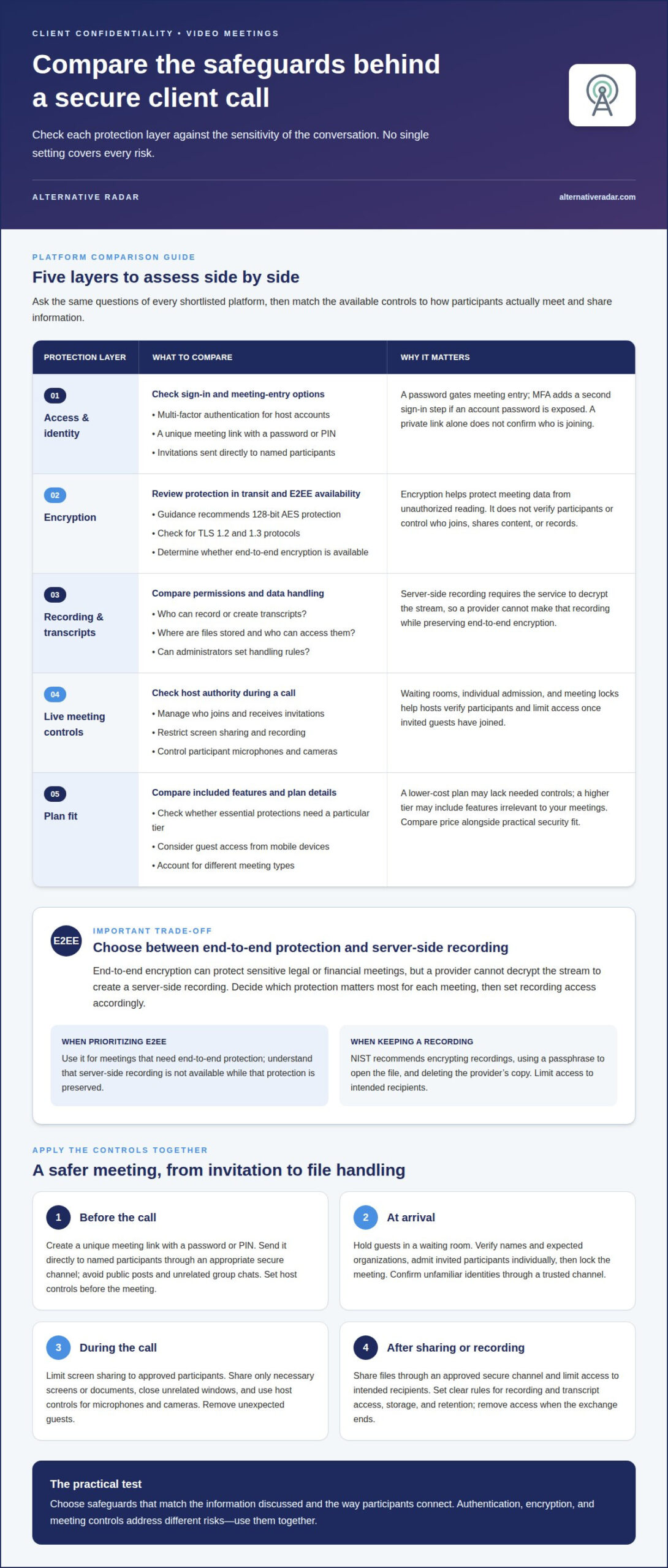
No single conferencing platform is automatically the most secure choice for every client meeting. Compare shortlisted platforms by checking their authentication options, encryption, participant controls, recording safeguards, and meeting-specific security settings.
Ask the same questions about each platform. Does it offer multi-factor authentication for accounts? Can hosts control who joins, shares content, or records? Does it support end-to-end encryption for meetings that need it? Can administrators set rules for recordings and transcripts? These differences matter more than a familiar name or polished interface.
- Access: Identify the sign-in and meeting-entry controls available to hosts and guests.
- Encryption: Review how the platform protects meeting data in transit and whether end-to-end encryption is available.
- Recording: Compare who can record, where files are stored, and how access is managed.
- Controls: Check whether hosts can restrict sharing and manage participants during a call.
- Plans: Compare the features included in each plan and whether essential protections require a particular tier.
Compare prices alongside these feature checks. A lower-cost plan may not include the controls your organization needs, while a higher tier may add features irrelevant to your meetings. Check plan details against how you actually use the platform, including whether guests join from mobile devices and whether a public presentation needs different controls from a private client call.
Choose a platform whose available safeguards match the information discussed and the way participants connect. For secure video conferencing for client meetings, that practical fit matters more than a broad claim of security.
Authentication, encryption, and data-protection features
Authentication confirms who is signing in; encryption protects meeting data from being read by unauthorized parties. Add multi-factor authentication (MFA) to account access so a password alone cannot complete sign-in. Common one-time codes arrive through a key fob, mobile application, SMS, or phone call. Account controls and encryption address different risks, so assess both.
Encryption settings also differ. The guidance recommends 128-bit Advanced Encryption Standard (AES) protection for conferencing software and hardware, alongside TLS 1.2 and 1.3 protocols for data encryption. These labels help frame a platform comparison, but don’t confuse encryption with participant verification: protected data does not establish who is on the call.
End-to-end encryption can protect sensitive legal or financial meetings when available. It protects the stream so the service provider cannot decrypt it during transmission. This creates a recording trade-off: a provider cannot make a server-side recording while preserving end-to-end encryption, because server-side recording requires the service to decrypt the stream. Decide which protection matters most for each meeting, then set recording access accordingly.
For recordings, NIST recommends encryption, a passphrase to open the file, and deletion of the provider’s copy. Limit access to intended recipients, and define how recordings and transcripts will be handled before collaboration begins.
In the US, HIPAA is relevant to protecting patient data during telehealth sessions, according to the U.S. Department of Health and Human Services. US laws governing consent to record calls vary by state, so recording practices should account for applicable rules.
Some platforms offer end-to-end encryption, but availability and recording capabilities vary. Compare a platform’s encryption options with the meeting’s confidentiality needs, and explain the recording trade-off to participants before sensitive discussions begin.
4. Why secure video conferencing matters for client confidentiality
Client confidentiality covers more than spoken words. A virtual meeting can reveal a contract draft, customer account, legal strategy, or financial forecast through screen sharing. Protecting only the audio stream leaves other points of exposure untouched. Treat the meeting as a flow of information, from preparation through follow-up, and limit each stage to what the client discussion requires.
Match meeting controls to the information involved. A routine project update may need a different setup from a discussion about a pending legal matter. Before inviting participants, remove unrelated documents from the presentation, close windows showing customer records, and decide whether to record the meeting. A clear purpose helps prevent oversharing and guides your choice of software settings.
Confidentiality also depends on each participant’s surroundings. A client joining from a shared office may be overheard, while an unlocked laptop can expose an open meeting or document. For sensitive calls, use a private room, position the camera to avoid showing confidential material, and lock the device when stepping away. Avoid public Wi-Fi for sensitive meetings; use encrypted cellular data or a business VPN instead.
After a call, treat its records as a separate data-protection decision. Recordings, transcripts, summaries, and shared files can preserve details beyond the conversation. Define who can access these materials, where they belong, and when to delete them. If a client needs a follow-up document, share only the relevant file with its intended recipients rather than distributing a complete recording.
Build these steps into a repeatable workflow, then compare software options against the confidentiality needs of your client conversations. Explore conferencing software recommendations to assess options and make a more informed choice.
Alternative Radar
Alternative Radar helps readers discover and compare software through comparative guides, affiliate-linked recommendations, and sponsored software placements. If you’re assessing conferencing tools for confidential client discussions, use these resources to compare features with your organization’s security needs. Focus on authentication, encryption, recording controls, and participant management, then consider how each platform fits your meeting workflows. Recommendations and placements can help you explore options, but evaluate each platform’s safeguards against your needs. Alternative Radar also offers programmatic display advertising. Contact Alternative Radar to discuss software placement and advertising options.
Make confidentiality part of your meeting routine
Client expectations can change, and meeting practices should adapt. Treat confidentiality as an ongoing part of how your organization works, not a setting chosen once and forgotten. When new collaboration tools enter your workflow, consider how they handle sensitive conversations and whether their controls fit the information your team shares.
For secure video conferencing for client meetings, turn your priorities into a practical software decision. Identify which conversations need stronger protections, decide how recordings should be handled, and compare available options against those needs. A focused review keeps tool selection tied to client confidentiality rather than convenience alone.
Alternative Radar offers sponsored software placements, affiliate-linked software recommendations, and programmatic display advertising. Contact Alternative Radar today to discuss its offerings. A clear, considered approach can help your team choose its next steps with confidence.
Frequently Asked Questions
Why is it important to have a secure video conferencing solution?
A secure setup helps limit client information to the people and systems authorized to handle it. For example, a virtual meeting about a contract may reveal negotiation positions that should not reach other clients or internal teams. Set access and data-handling rules that match the meeting’s purpose, then apply them consistently. This makes confidentiality part of the working process, rather than an assumption based on a familiar platform.
Can you record an end-to-end encrypted meeting?
A provider cannot make a server-side recording while preserving end-to-end encryption, because recording requires the service to decrypt the stream. Before a meeting, decide whether end-to-end protection or a provider-hosted recording is the priority. If recording is necessary, define who may access it and how it will be protected. Tell participants whether the meeting will be recorded before confidential topics begin.
Do client video calls need end-to-end encryption?
Not every client call has the same confidentiality needs, so assess the information being discussed. A routine scheduling conversation differs from a legal or financial review involving sensitive details. End-to-end encryption can suit sensitive legal or financial meetings when available. Also consider whether the call needs a provider-hosted recording, since that function can conflict with end-to-end encryption.
Does a GDPR-compliant video tool have to be hosted in the EU?
No. Hosting outside the EU does not automatically make a video tool incompatible with GDPR. International transfers of EU personal data can be lawful when a valid transfer mechanism and documented safeguards are in place. For a client call involving EU personal data, consider where the data is processed and whether the relevant transfer arrangements and safeguards apply.
Is a browser-based video call less secure than a desktop app?
Not inherently. Security depends on the platform’s controls and how the device and software are managed, not on browser or desktop access alone. Compare how each option receives updates, handles camera and microphone permissions, and fits your organization’s device policies. Use managed devices for confidential calls, install software updates, and grant only the permissions the meeting requires.
Step 2: Who Can Actually Get Into the Room?
Only people permitted by the meeting’s access settings should enter. The host decides whether participants can join directly or must wait for approval, and can remove anyone who does not belong. A display name alone may not identify a guest, so check unexpected attendees against the invitation or confirm their identity through a trusted channel before admitting them to a confidential discussion.