
Your team’s institutional knowledge shouldn’t have an expiration date, yet Slack’s free plan currently forces a 90-day limit on your message history. If you’re part of the 32 million daily active users relying on this platform, you’ve likely felt the sting of losing a critical project decision simply because it was made three months ago. It’s a frustrating barrier that often forces small teams into expensive subscriptions they aren’t ready for. Finding the right free slack alternatives for teams isn’t just about saving money; it’s about ensuring your data remains searchable and secure without a $7.25 per user monthly fee.
You don’t have to settle for disappearing data or complex setups. We’ve done the heavy lifting to identify the top-rated tools that prioritize data longevity and ease of use. This guide explores high-quality options like Pumble, which offers unlimited history for free, and Chanty, which provides 20 GB of team storage. You’ll discover how to transition to a communication hub that offers unlimited message history, seamless integrations, and a functional interface that won’t require a technical degree to manage.
Key Takeaways
- Identify the hidden risks of Slack’s 90-day message history limit and why it’s a critical liability for modern business data.
- Compare top-rated free slack alternatives for teams that provide unlimited message archives without the high per-user cost.
- Evaluate open-source and self-hosted options that offer superior privacy and customization for tech-savvy or security-conscious teams.
- Select the most efficient tool for your specific organization size, from small groups of five to rapidly growing startups.
- Master the migration process with a parallel run strategy that ensures your team stays productive while switching platforms.
Why Teams are Ditching Slack’s Free Tier in 2026
The workplace communication market shifted significantly by early 2026. While Slack remains a dominant force, its free tier has become a bottleneck for operational efficiency. The primary driver for this exodus is the 90-day message history limit. For a fast-moving startup, three months of data represents a tiny fraction of their institutional knowledge. When critical project specs or client feedback vanish, teams lose more than just text; they lose the context of their growth. This “history trap” turns a supposedly free tool into a ticking clock that eventually forces a paid upgrade or a painful migration.
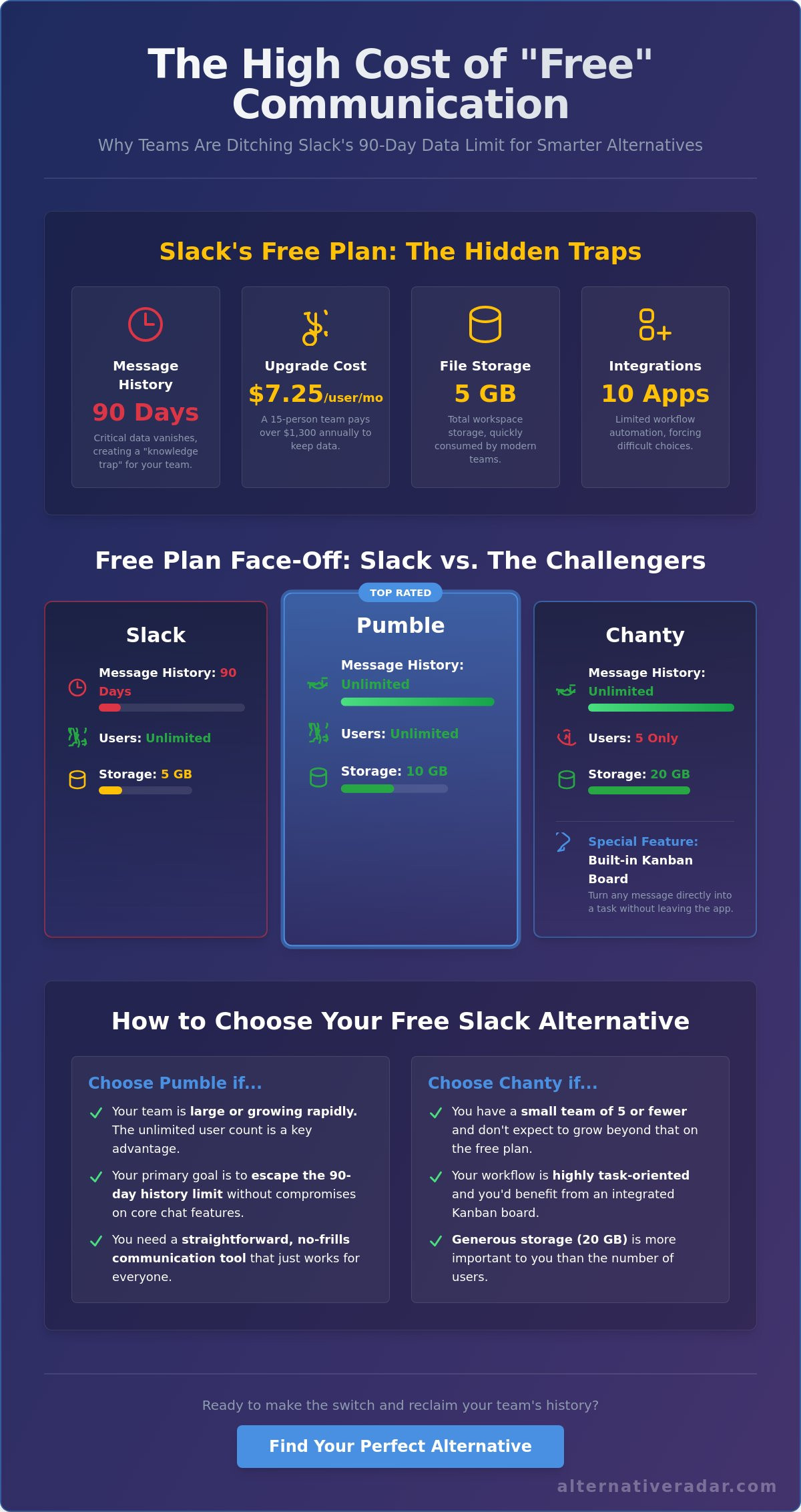
Cost is the second major factor. Slack Pro currently costs $7.25 per user monthly when billed annually. For a 15-person team, that’s an annual bill exceeding $1,300. In 2026, the rising value of free slack alternatives for teams makes this expense difficult to justify. Competitors now offer unlimited archives and higher storage caps without the per-user “seat tax” that eats into small business margins. Additionally, the 10-app integration limit on Slack’s free plan creates an “integration ceiling.” Modern workflows often require a comprehensive list of collaborative software to function effectively, and a 10-app cap forces teams to choose between essential security bots and basic file-sharing tools.
The Problem with “Freemium” Communication
Relying on a tool that deletes your data creates constant psychological friction. Teams hesitate to document important processes in chat because they know the information won’t exist in 90 days. This impact is most visible during employee onboarding. When a new hire joins in June, they can’t see the strategic discussions from February that shaped their current projects. They’re forced to ask repetitive questions, which stalls productivity for everyone involved. Message retention is the primary currency of team collaboration. Without it, your chat platform is just a temporary whiteboard rather than a reliable knowledge base.
Identifying Your Team’s “Deal-Breakers”
Choosing the right tool requires a clear understanding of your specific needs. For some, the total number of users is the priority. For others, it’s the length of the searchable history or the availability of advanced features. In 2026, teams increasingly expect AI-summarization to be included in their communication stacks. Even free slack alternatives for teams are starting to offer basic AI thread summaries to help users catch up on long conversations quickly. If your current tool lacks these capabilities or hides them behind a paywall, it’s likely a deal-breaker for your long-term efficiency. For a deeper dive into how these restrictions compare across the market, explore our free slack guide which details the specific limits you’ll face this year.
Top SaaS-Based Free Slack Competitors for Instant Setup
Instant setup is a priority for teams escaping Slack’s restrictive free tier. In 2026, the market for free slack alternatives for teams is defined by two distinct philosophies: pure communication or deep ecosystem integration. If you need a tool that works immediately without a complex server configuration, SaaS (Software as a Service) platforms offer the most efficient path forward. These tools provide the familiar channel-based structure you’re used to, but they remove the 90-day history barrier that makes Slack’s free plan so difficult for growing businesses to use long-term.
Pumble has emerged as a top-rated choice because it offers unlimited message history and unlimited users at no cost. This is a significant departure from the market average. While Slack limits you to 5 GB of total storage, Pumble provides 10 GB per workspace on its free plan. It’s an ideal scout for teams that don’t want to worry about hitting a “paywall” as they add new members. For those who need more detail, you can find an in-depth review of Slack alternatives that breaks down how these features perform in real-world testing.
Pumble vs. Chanty: The Battle for Unlimited History
The choice between Pumble and Chanty often comes down to team size versus feature depth. Pumble allows for an unlimited number of users, making it the better fit for large communities or expanding startups. Chanty, however, limits its free plan to 5 users. What Chanty lacks in user capacity, it makes up for in utility. It features a built-in Kanban task management system that allows you to turn messages into tasks without leaving the app. While Pumble provides 10 GB of storage, Chanty doubles that with 20 GB per team. While Pumble’s 2026 AI focuses on summarizing long discussion threads to save time, Chanty’s AI assistant specializes in converting casual chat messages into actionable task tickets automatically.
Ecosystem-Locked Options: Zoho and Google
Zoho Cliq and Google Chat offer a different value proposition. Zoho Cliq is a powerhouse for security, providing enterprise-grade encryption even on its free tier. It offers a massive 100 GB of storage per organization, though it does limit searchable history to the most recent 10,000 messages. This is a different constraint than Slack’s time-based limit, which might suit teams that communicate less frequently but share large files. Google Chat is another strong contender, especially since it’s already included for teams using Google Workspace. It consolidates your tech stack by linking directly with Drive, Docs, and Calendar. Check out our slack alternative in brief to see how these ecosystem tools stack up against standalone competitors. If you’re ready to explore smarter software choices, these platforms provide a reliable foundation for your team’s future.
The Best Open Source and Self-Hosted Slack Alternatives
Teams that require absolute control over their communication infrastructure often look toward self-hosted solutions. While SaaS tools are easy to launch, they still host your data on their hardware. Open source free slack alternatives for teams provide a different path by giving you the keys to the server. This approach ensures that your message history isn’t just “unlimited” by a vendor’s promise, but truly permanent because you own the database. It’s the ultimate solution for privacy-conscious organizations that cannot risk their data being subject to a third party’s changing terms of service.
Zulip and Matrix represent two innovative ways to handle team chat. Zulip uses a unique topic-based threading model that eliminates the chaotic scroll of traditional chat; it’s designed specifically to solve the chat fatigue that plagues many remote teams. Matrix, often accessed through the Element client, offers a decentralized approach. It uses end-to-end encryption by default, ensuring that even the server admin cannot read the messages without authorization. These tools don’t just mimic Slack; they improve upon its core architecture to provide better security and organization.
Why Open Source Matters in 2026
Data sovereignty is the primary reason to choose open source. You aren’t just using a tool; you’re building a private communication asset. Explore our guide on popular open source business software 2025 to see how these tools fit into a broader corporate strategy. However, you must realize that “free” here refers to the software license, not the total cost of ownership. You’ll still need to pay for a server on a platform like AWS or DigitalOcean. A basic setup for a small team usually costs between $5 and $20 per month, which is still significantly cheaper than Slack’s Pro tier for 10 or more users.
Mattermost vs. Rocket.Chat: Which Developer Tool Wins?
Mattermost is the clear winner for developers who need deep API flexibility and seamless GitLab integration. It’s built for technical environments where security and workflow automation are the highest priorities. Rocket.Chat offers a more polished user interface that feels closer to the Slack experience. This makes it a better free slack alternatives for teams that include non-technical staff who might struggle with a more utilitarian interface. Both platforms support robust mobile apps, but Rocket.Chat’s deployment process is generally more straightforward for admins using Docker or Snap packages. If you have the technical resources to manage a server, Mattermost provides the most enterprise-ready features for $0 in licensing fees.
How to Choose the Right Free Tool for Your Team Size
Selecting the right platform depends heavily on your current headcount and your hiring roadmap for the next 12 months. For small teams with fewer than 10 members, the priority is usually immediate utility. You don’t want to spend 40 hours configuring a server when you could be shipping code or closing sales. SaaS options like Pumble or Chanty provide the fastest path to productivity. However, if you’re a growing startup, you must look past the “free for now” label. Many free slack alternatives for teams use a limited user cap to force an upgrade once you reach a certain size.
Technical teams often find that the upfront investment in setting up Mattermost or Rocket.Chat pays off in the long run. These tools allow for deep integration into development pipelines that standard SaaS tools might not support on their free tiers. For non-profits, the focus shifts toward community-driven tools or platforms that offer specialized discounts. Leveraging these resources ensures that every dollar goes toward your mission rather than software licenses. If you’re ready to compare top-rated communication tools, start by mapping your growth projections against the user limits of each platform.
The “Seat Tax” Calculation
The “seat tax” is a common strategy where software providers offer a generous feature set that suddenly becomes expensive once you add your 11th user. Slack’s current pricing of $7.25 per user per month can quickly become a significant overhead for a team of 15. To avoid this, prioritize tools that offer unlimited users on their free plans:
- Pumble: Offers unlimited users and unlimited history.
- Zulip: Provides unlimited users with its unique threading model.
- Rocket.Chat (Self-hosted): Supports unlimited users, limited only by your own server capacity.
Scalability in the context of free software is the capacity to expand your workforce without triggering a mandatory billing event that disrupts your budget.
Feature Prioritization Matrix
Before committing, evaluate whether your team relies more on real-time video conferencing or asynchronous chat. While some tools offer robust video features, others prioritize message organization and searchability. Mobile parity is another non-negotiable factor; your team needs a consistent experience across iOS and Android to stay connected in the field. To help you decide, we’ve developed a full evaluation framework in our slack alternatives pillar. Use this matrix to rank your “must-have” features against the available free tiers to ensure a smooth transition.
Transitioning Your Team: Migration and Implementation
Moving your operations to one of the top-rated free slack alternatives for teams is a strategic move that requires a technical roadmap. You aren’t just changing software; you’re migrating your team’s collective memory. A successful transition ensures that the 90 days of history you currently have in Slack isn’t lost during the move. By following a structured migration framework, you can minimize productivity dips and ensure your team stays focused on their core tasks. It’s vital to treat the migration as a project with a clear start and end date to avoid confusion.
A 7-day parallel run is the most effective way to manage this change. During this week, your team should keep Slack open for reference only, while all active communication happens in the new platform. This allows everyone to get comfortable with the new interface while having a safety net if they need to find an old file or contact. On day 8, set the Slack workspace to “Read Only” or archive it entirely. This hard cut-off prevents fragmented conversations across two apps and forces a complete adoption of the new free slack alternatives for teams you’ve selected.
Technical Migration Steps
The technical process starts with Slack’s native export tool. Admins can generate a ZIP file containing message history in JSON format from the Workspace Settings menu. While public channels move over easily, be aware that private messages and specific file attachments may require more manual effort depending on your Slack plan’s permissions as of May 2026. Platforms like Rocket.Chat and Mattermost offer dedicated import scripts that can process these files in under 30 minutes for most small workspaces. Always verify your channel structures and user permissions immediately after the import to ensure sensitive data remains restricted to the right personnel.
Cultural Implementation
Expect some pushback from team members who are used to Slack’s specific shortcuts or interface. Address this by focusing on the long-term value of data longevity. Remind the team that they’ll no longer lose access to critical project decisions every three months. Establishing new communication boundaries, such as how to use threads or when to use “all-hands” notifications, helps create a fresh start. Clear boundaries prevent the “notification fatigue” that often drives teams away from chat tools. If you’re still weighing your options, Explore more comparisons on Alternative Radar to find your perfect software fit and ensure your next communication tool scales with your team’s ambitions.
Secure Your Team’s Future Beyond the 90-Day Limit
By mid-2026, the shift away from restrictive communication tiers has become a necessity for data-driven organizations. You’ve seen how Pumble offers unlimited message history and how self-hosted tools like Rocket.Chat provide total data sovereignty. Transitioning to free slack alternatives for teams isn’t just about cutting the $7.25 per-user monthly cost; it’s about protecting your institutional knowledge from arbitrary expiration dates. Whether you prioritize the instant setup of a SaaS platform or the deep customization of an open-source tool, the right choice depends on your specific growth roadmap and technical resources.
Stop wasting time searching through fragmented reviews and outdated feature lists. Alternative Radar acts as a neutral software scout to provide you with objective, data-driven comparisons that cut through the marketing hype. We focus on providing 2026-updated insights so you can make an empowered decision without the noise. Discover the perfect fit for your team on Alternative Radar and take the first step toward a more transparent, permanent communication strategy. Your team’s history is too valuable to be temporary.
Frequently Asked Questions
Is there a truly free Slack alternative with unlimited message history?
Yes, Pumble and Chanty are the most prominent examples as of May 2026. Pumble allows an unlimited number of users and messages without a subscription fee. Chanty also provides unlimited history, though it restricts its free tier to 5 users. These platforms effectively remove the 90-day visibility barrier that currently limits the functionality of Slack’s free plan.
Can I import my Slack chat history into a free alternative?
Most modern platforms support JSON or CSV imports to facilitate a smooth transition. Rocket.Chat and Mattermost offer dedicated import wizards that process Slack’s standard export ZIP file. While public channels usually move over seamlessly, you should manually verify private messages and specific file attachments after the upload is complete to ensure no data was missed during the process.
What is the best open-source Slack alternative for privacy?
Rocket.Chat and Matrix/Element are top-rated for privacy-conscious organizations. Rocket.Chat provides full data sovereignty when you host it on your own hardware. Matrix goes a step further by offering end-to-end encryption by default. This ensures that even your server administrator cannot read private communications without the specific authorization keys held by the users.
Does Microsoft Teams have a free version for small businesses?
Yes, Microsoft offers a specific free version designed for small businesses and personal use. This tier includes unlimited 1:1 meetings for up to 30 hours and group meetings for up to 60 minutes. It also provides 5 GB of cloud storage per user, though it doesn’t include the deep integration with desktop Office apps found in the paid Microsoft 365 subscriptions.
Are free Slack alternatives safe and secure for company data?
Security depends heavily on the platform’s encryption standards and your chosen hosting model. Most free slack alternatives for teams utilize TLS encryption for data in transit and AES-256 for data at rest. Self-hosted options like Mattermost offer the highest security because your data never leaves your internal network; this reduces your exposure to third-party data breaches significantly.
Which free tool has the best mobile app for remote teams?
Rocket.Chat and Chanty consistently receive the highest ratings for mobile performance and reliability. Rocket.Chat’s mobile app mirrors the desktop experience with high fidelity, which is critical for the 70% of remote workers who rely on mobile notifications. Chanty’s app is frequently praised for its speed and low battery consumption on both iOS and Android devices during long workdays.
What happens to my data if a free alternative goes out of business?
Your data is at higher risk with SaaS providers, but self-hosted data remains entirely under your control. If a SaaS provider shuts down, they typically provide a 30-day window to export your history before their servers are wiped. With open-source tools, the software continues to run on your local server even if the original developers stop providing updates, which gives you ample time to plan a migration.
How do I know if my team is ready to move away from Slack?
You’re ready to switch when the 90-day history limit starts impacting your project deadlines or decision-making. If your team spends more than 2 hours a week re-explaining past decisions because the original chat logs vanished, the tool is costing you too much in lost productivity. Reaching the 10-app integration limit is another clear signal that your workflow has outgrown Slack’s free constraints.