

For teams with fewer than 10 people, free or low-cost bug tracking software can provide sufficient functionality. The right bug tracking software for small dev teams captures reproducible reports, fits the team’s existing workflow, and makes ownership and status clear. Start with a lightweight setup, then add complexity only when the team needs it.
A small team doesn’t need a heavyweight process to keep bugs from disappearing into chat threads or scattered task lists. It needs a reliable way to record issues, decide what matters, and connect fixes to development work.
This guide explains how to choose bug tracking software for small dev teams without adding busywork. Learn which features to prioritize, which integrations help, and how to compare tools for a startup or compact engineering team. A practical setup path will help you find a tool that fits your current workflow and can adapt as it changes.
Key Takeaways
- Prioritize clear bug reports, flexible workflows, and the features your team will actually use. Compare total cost by looking beyond the initial plan price.
- Fit bug triage into your sprint rhythm with clear ownership and a regular review process, keeping the workflow light enough to maintain.
- Connect your tracker to development and project tools where useful, and link bugs to commits when possible to make fixes easier to follow.
- For a very small team, async triage in a Slack thread can be a practical alternative to scheduling a meeting.
What are the key features of an effective bug tracking tool?
For teams with fewer than 10 people, free or low-cost options can provide sufficient functionality. Compare reporting, workflow fit, security, and total cost before choosing.
Ease of Use for Nontechnical Users
Tools with a visual board, clear status labels, and a short reporting form are usually easiest for nontechnical users. A customer support teammate, for example, can describe a defect without learning technical fields or navigating a complicated workflow. Compared with highly configurable systems, simpler boards offer less customization but make reporting quicker. Keep required fields focused on the title, reproduction steps, expected result, and actual result.
Security and Data Privacy Risks
Bug reports can include customer details, screenshots, or information about unreleased features. Check how a tracker handles account access, permissions, data retention, and exported reports. Set roles so people can submit issues without seeing sensitive projects. These controls affect who can view stored information, just as much as pricing and board design affect other parts of the decision. Remove personal details from examples and attachments when they aren’t needed to reproduce a bug.
How much do popular bug tracking tools cost per user? There’s no single comparable rate: pricing can depend on the plan, billing model, included features, and team size. Compare the full plan terms, including seat limits and paid features, rather than judging a tool by its free tier alone. A free plan may suit a small team, but additional reporting or permission needs can change the total cost.
Price the workflow, not just the user count. Include the time needed to configure fields, maintain boards, and move reports from chat into the tracker. For example, a low-cost tool can still create extra work if developers must duplicate issues across systems. Free or low-cost options can be sufficient for teams under 10 people, provided their reporting and resolution needs fit the available features.
| Option | Pricing model | Best fit | Trade-off to assess |
|---|---|---|---|
| Free plan | No-cost entry tier | Small teams testing a basic workflow | Feature or seat limits |
| Per-user plan | Cost scales with seats | Teams tracking membership closely | New users may raise total spend |
| Tiered plan | Features grouped by plan | Teams needing specific controls | Required features may sit in a higher tier |
Choose a tool whose reporting, access controls, and resolution workflow meet your needs without paying for unused complexity.
How do I start with the bug reporting tools?
Start with an issue-tracking workflow that fits your sprint rhythm. Keep statuses and required actions clear, then adjust the process as developers identify where requests stall.
Workflow Automation and Customization
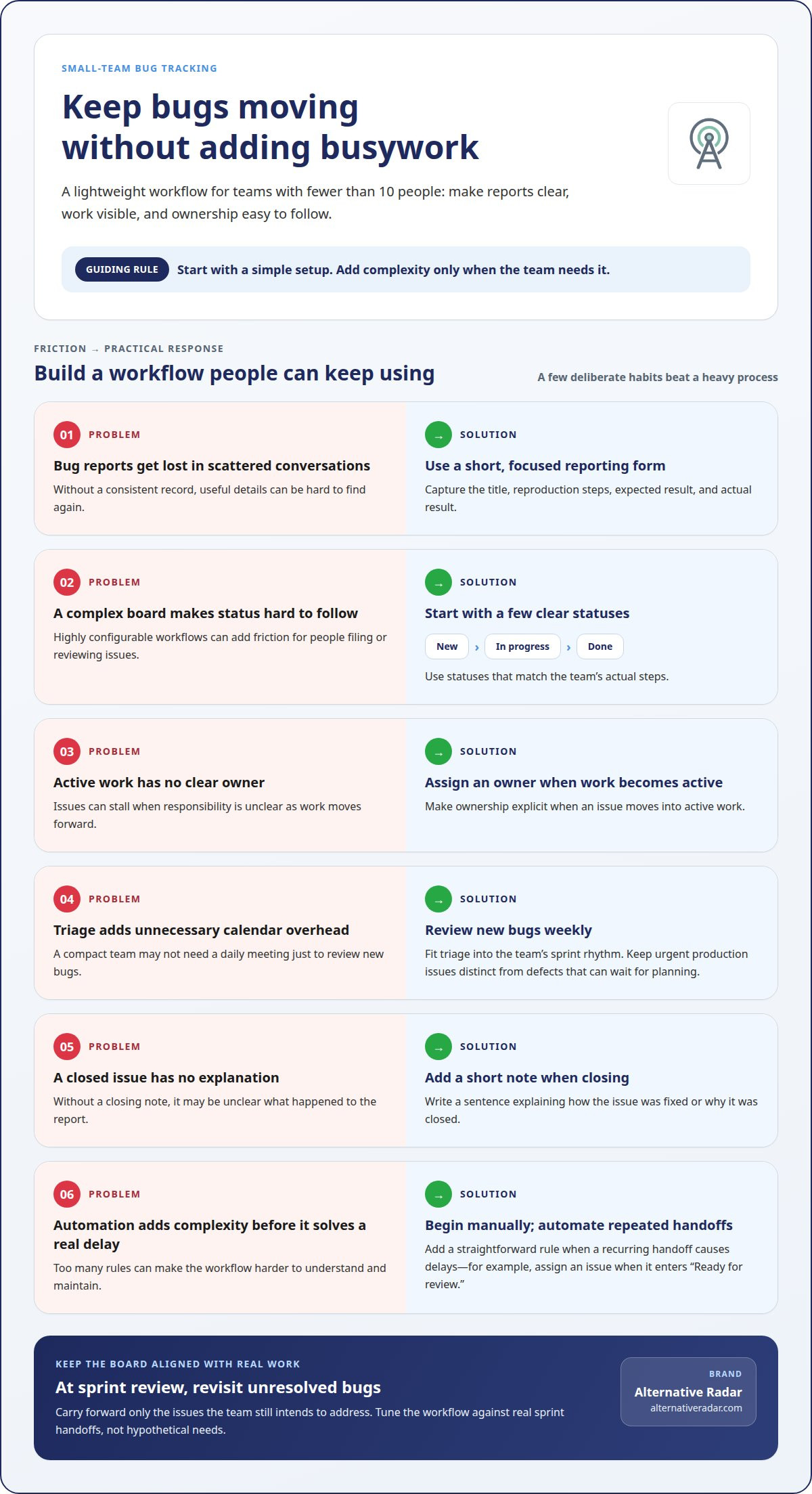
Automation applies a rule when an issue changes, while customization defines the statuses and fields behind that change. For example, a tracker could assign an issue when it enters “Ready for review.” A straightforward workflow with a few deliberate rules is easier to follow than a heavily customized board. Start manually, then automate repeated handoffs that cause delays.
Tool Selection and Workflow Fit
Choose a tracker that fits your team’s existing sprint process, rather than a workflow built for a different team. If developers plan work on a board, issue tracking should make it easy to move a bug from backlog to sprint and resolution. Compare how each option handles requests, ownership, and status changes. Keyboard shortcuts can also make filing issues easier for developers who report them while coding.
For an agile workflow, decide when bugs enter a sprint and who can prioritize them. Keep urgent production issues distinct from defects that can wait for planning. During sprint review, examine unresolved bugs and carry forward only the issues the team still intends to address. This keeps the board aligned with active work instead of turning it into an unfiltered backlog.
Use a small setup sequence:
- Create a few statuses that match the team’s actual steps, such as “New,” “In progress,” and “Done.”
- Assign each issue to an owner when it moves into active work.
- Review new bugs weekly, rather than adding a daily meeting to a compact team’s calendar.
- When closing an issue, add a sentence explaining how it was fixed or why it was closed.
Keep the workflow lightweight, then tune it against real sprint handoffs. For a broader shortlist, explore software comparison resources.
Integrations with development and project tools
Choose integrations that bring a bug’s context into the tools developers already use. When possible, linking bugs to commits helps connect reported behavior with code changes.
Start with the repository. For example, connect issue tracking with GitHub so developers can associate a bug with relevant code work. A useful integration preserves the issue reference and makes the fix easier to trace. Keep the bug report as the source of truth, rather than copying descriptions across projects.
Next, map the tracker to project management. In a Jira workflow, decide how a bug moves from backlog to active work, review, and resolution. Keep statuses aligned across Jira and the bug tracker to avoid conflicting progress updates. Test one sample issue first, including its owner, priority, and links, before moving existing requests.
CI/CD and chat integrations address different handoff needs. A CI/CD connection can bring build or test context into issue review, while a chat integration can route a new report to the team. For example, send an alert when a critical bug is created, not for every routine status change. This keeps notifications useful instead of adding noise.
Compare integrations by the work they remove, not by the number of available connections. Check whether each connection preserves project context, fits the team’s existing workflow, and avoids duplicate updates. Use this setup sequence:
- List where bugs are reported, prioritized, fixed, and discussed.
- Connect the repository and project tool used for active work.
- Link bugs to commits when possible, then test the full path with one issue.
- Add chat or CI/CD connections only when they improve a specific handoff.
A useful integration connects the backlog with code work without forcing developers to switch tools for every update.
Bug-tracking software for startups and small teams
Self-hosted tools offer more control over where a tracker runs, while cloud platforms move infrastructure management outside the team. For startups, the right choice depends on operational capacity, access needs, and how quickly the team wants to get started.
Self-Hosted Bug Tracking
A self-hosted tracking tool runs on infrastructure the team manages. This can suit a startup with specific hosting requirements and people available to maintain the platform. The trade-off is operational responsibility: the team handles setup, upkeep, and access. Weigh that workload against the control you gain, especially if the same people already manage development infrastructure.
Cloud Bug Tracking
A cloud tracker runs on a hosted platform that the team accesses through its interface. It can simplify onboarding for teammates working from different locations because the team doesn’t need to operate the tracker’s infrastructure. The trade-off is greater reliance on the provider. Include access controls, data handling, and export options in your tool-selection decision.
What are the pros and cons of self-hosted versus cloud bug tracking software? Self-hosting gives a team more control but also requires it to manage the environment. Cloud tools reduce that infrastructure workload, while making the team more dependent on the provider’s platform and data-handling practices.
When assessing bug tracking software for small dev teams, match the tool to your team’s ability to manage its workflow. Assign a clear owner for incoming reports and give each one a consistent route to prioritization. For example, a rotating triage owner can group duplicate customer reports before developers decide which issues belong in active work. This keeps responsibility visible without creating a separate process for every project.
Teams with limited overlap can handle triage asynchronously in a Slack thread. Capture the decision and relevant context in the tracker, so teammates who missed the conversation can follow the issue later. Choose bug tracking software for small dev teams that supports this working style, whether the team needs self-hosting control or cloud convenience. Explore bug tracking software comparisons to assess options against those priorities.
Alternative Radar
Alternative Radar helps small teams explore software options through product insights and comparisons. Once you’ve defined your workflow, use its guides to assess potential tools by features, pricing information, and pros and cons. Sponsored placements and affiliate-linked recommendations can help surface options, while your team’s needs remain central to the decision.
Use those comparisons to shortlist tracking platforms that fit your team’s reporting habits, integrations, and hosting preferences. Alternative Radar also offers programmatic display advertising for software companies seeking to reach relevant audiences.
For questions about Alternative Radar, contact the team.
Make your next tracking decision with confidence
Treat your tracker as a team agreement, not a permanent configuration. As projects, roles, and release habits change, revisit whether the workflow still helps people report issues and act on them. Make changes deliberately: adjust one part of the process, observe how it affects daily work, then decide whether more customization is useful.
The same principle applies when choosing a platform. The right fit is one your team can use consistently, with a workflow that supports its priorities rather than adding process for its own sake. Use bug tracking software for small dev teams to make issue ownership visible and keep development decisions connected.
If you’re still weighing options, Alternative Radar can help you explore software choices and compare what may fit your needs. Contact Alternative Radar today to discuss your software discovery goals, and take the next step with a clearer view of your options.
Frequently Asked Questions
What is Bug Tracking?
Bug tracking means recording software defects and following them through investigation and resolution. A useful record helps a team connect recurring reports to a particular feature or release. For example, if several users report a checkout failure after an update, the history helps developers determine whether the reports describe one underlying defect or separate problems.
What are the best bug tracking tools for small development teams?
The right fit depends on whether your team needs a dedicated defect tracker, an issue board within its project-management platform, or a simple shared queue. For a team already organizing work in one project system, built-in issue tracking may reduce context switching. A team that separates customer reports from engineering tasks may prefer a dedicated tool with distinct views for each audience.
Which bug tracking tools offer free plans for small teams?
Some tools have free entry plans, but the useful comparison is what those plans let your team do as its workflow develops. Review limits on seats, issue history, storage, and connections to other tools. Then test a representative issue from intake through closure. A plan that supports your real process is more useful than one that simply has a free tier.
What features should a small team look for in bug tracking software?
Look for search and filtering that help teammates find existing issues before creating duplicates. Labels or categories can separate product areas, while saved views show each person the work relevant to them. Notifications should make changes in ownership visible without flooding every channel. These features help keep a growing issue queue usable as more projects share the same tracker.
Which bug trackers integrate with GitHub, GitLab, Slack, and CI/CD tools?
Choose a tracker with a supported connection to the specific GitHub or GitLab repository, Slack workspace, and CI/CD system your team uses. Integration availability can vary by tool and plan, so assess the exact workflow, not just the platform name. For example, decide whether a pull request should reference an issue or whether a failed build should create a new report.
How can a small team set up an effective bug reporting workflow?
Start by deciding who reviews incoming reports and how the team handles incomplete or duplicate submissions. Use a “needs information” status when a report lacks details, and link duplicates to one primary issue instead of splitting the discussion. Keep categories consistent, such as interface, performance, and data problems. These choices make recurring patterns easier to spot during product planning.