Why are you still paying monthly rent for a digital canvas that slows down your hardware and locks away your files? You’ve likely spent years mastering Adobe’s ecosystem, but the combination of high recurring costs and increasing software bloat makes it harder to justify the investment. Finding the best photoshop alternative for illustrators isn’t just about saving money; it’s about reclaiming ownership of your digital assets and finding a tool that actually prioritizes brush physics over unnecessary darkroom filters.
We agree that a professional workflow requires more than just a basic painting app. You need high-resolution capabilities, seamless plugin support, and a responsive interface that doesn’t lag on modern stylus hardware. This article promises to help you identify software that matches Photoshop’s power while offering a one-time purchase or open-source model. We’ve scouted the current market to preview the top contenders for 2026, including the latest AI-assisted features in Krita 6.0 and the disruptive shift of Affinity Photo 2 into a free core software. You’ll discover how these tools handle complex layer management and professional file formats without the subscription fatigue.
Key Takeaways
- Identify why the “subscription economy” is failing professional illustrators and how legacy code bloat impacts modern hardware performance.
- Evaluate the technical benchmarks for brush physics and non-destructive layer management to ensure your new software meets professional standards.
- Compare the industry’s top-tier options to find the best photoshop alternative for illustrators, including the disruptive free model of Affinity Photo and the specialized features of Clip Studio Paint.
- Explore powerful open-source solutions like Krita that provide high-end painting tools and HDR support for concept artists without any licensing fees.
- Learn a step-by-step migration strategy to preserve your .PSD archives and .ABR brush libraries when transitioning away from the Adobe ecosystem.
Beyond the Creative Cloud: Why Illustrators are Switching in 2026
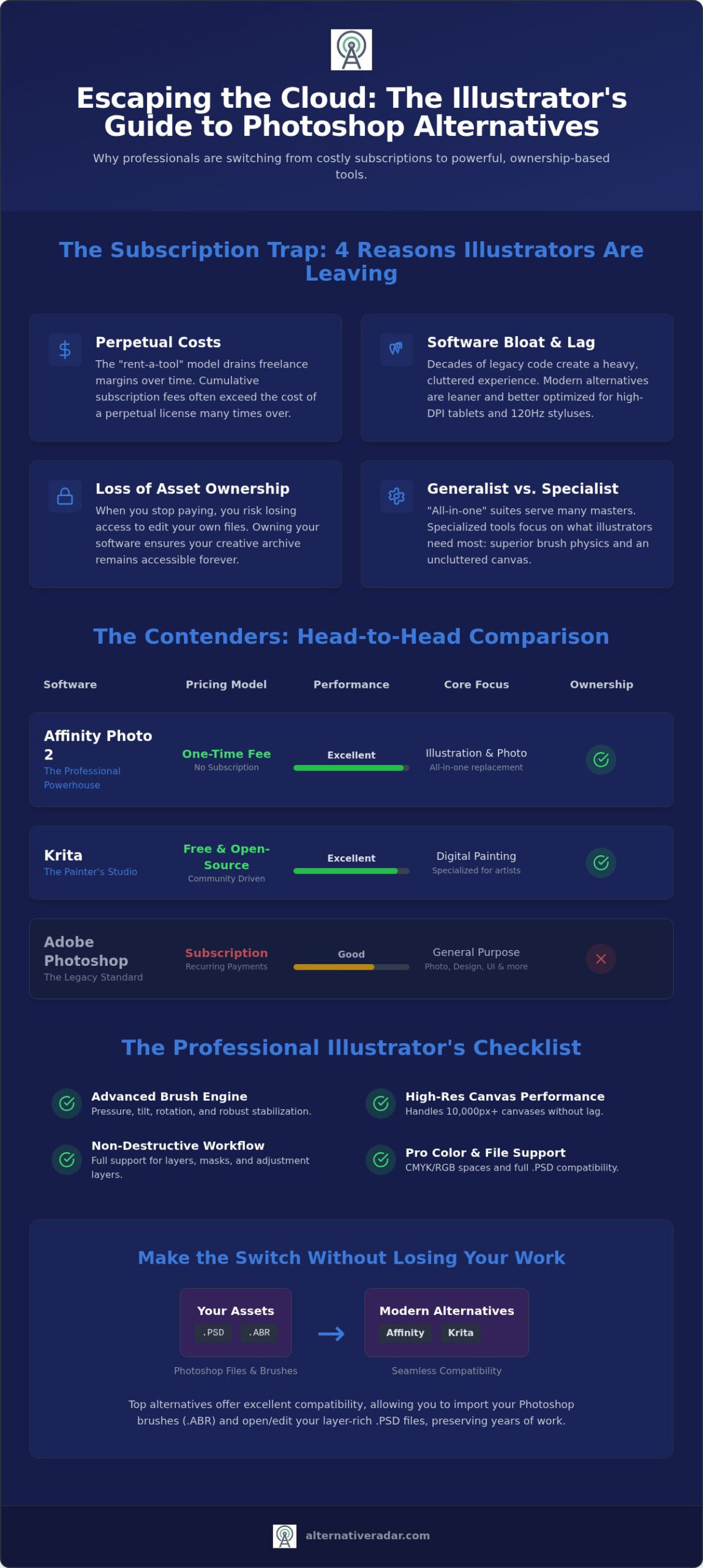
The subscription economy has reached a saturation point for creative professionals. For years, the monthly fee was viewed as a necessary business expense, but by 2026, the cumulative cost of “renting” your tools has become a significant drain on freelance margins. While Adobe still maintains over 81% of the graphic design software market share, a growing segment of the $6.69 billion digital art industry is migrating toward more sustainable models. Many artists have realized that the best photoshop alternative for illustrators isn’t just about price; it’s about escaping a cycle of perpetual payments for features they rarely use.
Performance is the other primary driver for this shift. Photoshop’s legacy code, which spans several decades, often feels heavy when paired with modern high-DPI hardware. If you’re working on a 4K OLED tablet with a high-refresh-rate stylus, you need software that can keep up with 120Hz input speeds. Leaner alternatives are built on modern architectures that utilize GPU acceleration more efficiently, providing a fluid brush response that legacy suites struggle to replicate on large, high-resolution canvases. Permanent licensing has returned as a major competitive advantage, allowing artists to buy a tool once and own it forever.
The Problem with “All-in-One” Creative Suites
Specialized tools are increasingly outperforming Photoshop’s generalist approach. Because Photoshop must serve photographers, web designers, and video editors, its interface is cluttered with “bloat” that painters don’t need. This generalist focus often results in a compromised experience for illustrators who prioritize brush physics and layer efficiency. Furthermore, the mandatory cloud-dependency of the Creative Cloud can be a liability for remote illustrators working in areas with unstable internet. Alternative Radar functions as a digital scout in this environment, filtering for “utility first” software that works offline and focuses strictly on the needs of the digital painter.
The Ownership Revolution in Digital Art
We’re witnessing a fundamental shift from “Software as a Service” back to “Software as a Tool.” When you stop paying a subscription, you often lose the ability to edit your own archives. This creates a dangerous dependency on a single provider for long-term project access. Owning your software license is crucial for archiving, ensuring that a file created today can be opened and modified ten years from now without a monthly fee. Identifying the best photoshop alternative for illustrators involves looking for programs that respect your ownership of both the tool and the output, avoiding the proprietary traps that keep your portfolio behind a paywall.
Essential Technical Criteria for a Professional Photoshop Replacement
Most software reviews fail to distinguish between a general photo editor and a dedicated digital canvas. While many apps can crop an image or apply a filter, the best photoshop alternative for illustrators must excel in technical categories that directly impact the drawing experience. Professional workflows demand high-fidelity brush engines that support pressure, tilt, and rotation sensitivity. If the software can’t translate your physical stylus movements into a digital stroke without jitter, it’s not a viable tool for high-end production.
Performance benchmarks are non-negotiable when working on high-resolution projects. You need software that handles 10,000px+ canvases at 300 DPI without cursor lag or rendering delays. This is especially important for artists using 120Hz OLED tablets, where any latency becomes immediately visible to the human eye. If you’re tired of guessing which tools meet these professional standards, you can use a curated software comparison platform to filter options by specific hardware compatibility and feature sets.
Layer management and non-destructive editing are the backbone of a professional pipeline. Your chosen software must support masks, adjustment layers, and smart objects to allow for rapid iteration without destroying underlying data. Color space accuracy is equally vital. You need the ability to switch between CMYK for print-ready deliverables and wide-gamut RGB for vibrant digital displays. Without these controls, your work may look inconsistent across different screens and physical media.
Brush Physics and Stabilization
Line stabilization is a non-negotiable feature for digital inking. It compensates for the micro-jitters inherent in tablet hardware, ensuring smooth, professional lines. When evaluating a replacement, check if it allows you to import your existing Photoshop .ABR brush library. This saves hours of recreating custom textures and presets. You should also decide between a pure raster engine, which excels at organic blending, and a hybrid vector engine that keeps lines crisp at any scale.
Hybrid Workflow Capabilities
Modern illustration often requires a mix of media. The ability to use vector shapes within a raster environment is essential for layout design and character turnarounds. Typography tools are also crucial for comic and cover artists who need precise control over kerning and leading. Top-tier alternatives now integrate with 3D modeling tools, allowing you to import 3D references directly onto your canvas to assist with complex perspective and lighting. The best photoshop alternative for illustrators should bridge the gap between artistic expression and technical precision without forcing you to switch between multiple heavy applications.
The Heavy Hitters: Professional Raster and Hybrid Alternatives
Selecting the best photoshop alternative for illustrators requires moving beyond basic image editors. You need a platform that matches Adobe’s power but optimizes the workflow for digital painting rather than photo retouching. In 2026, the market has split into two camps: high-performance generalists and specialized illustration engines. Both offer a way out of the subscription cycle while delivering superior brush performance on modern hardware.
Affinity Photo: The Professional’s Choice
Affinity Photo 2 has become a primary disruptor in the creative industry. Following its acquisition by Canva, the core software is now free, making it a powerful entry point for professionals looking to cut costs without losing functionality. Its unique “Persona” workflow is a major efficiency booster. Instead of digging through cluttered menus, you can switch between the Photo, Liquify, and Develop personas to access specific toolsets instantly. This modular approach keeps the interface clean and responsive.
Performance benchmarks on M4 MacBooks and high-end Windows workstations show that Affinity often outpaces Photoshop in rendering complex brush strokes on 10,000px canvases. It utilizes the latest neural engines to handle non-destructive filters in real-time. For artists who are just beginning to explore non-Adobe options, our guide on the best free alternatives to photoshop provides a deeper look at entry-level tools that bridge the gap between hobbyist and pro.
Clip Studio Paint: The Illustration Specialist
If your work centers on character design, comics, or manga, Clip Studio Paint remains the industry standard. It’s frequently cited as the best photoshop alternative for illustrators because its engine was built specifically for drawing. The vector layer system is particularly impressive. Unlike traditional vector programs, you can use raster-style brushes on these layers. This allows you to adjust line weight or move individual strokes after they’ve been drawn without any loss in quality. It’s a level of control Photoshop simply doesn’t offer.
The 2026 version (v5.0.4) continues to integrate advanced 3D model support. You can drag and drop poseable figures directly onto your canvas to solve perspective and anatomy challenges in seconds. While Clip Studio has introduced subscription options, it maintains a perpetual license model for desktop users ($49.99 for Pro), providing the “ownership” that many artists crave. For those who need ultra-realistic simulation, Rebelle offers specialized watercolor and oil physics that mimic physical media with startling accuracy. Meanwhile, Procreate Dreams has brought iPad-to-desktop parity closer than ever, proving that a mobile tablet is now a viable primary workstation for professional illustration and animation.
Free and Open-Source Gems for Aspiring Artists
Community-driven development has transformed the software landscape by 2026. Unlike corporate suites that prioritize shareholder returns, open-source projects focus on the specific technical demands of their user base. For many, the best photoshop alternative for illustrators is found within these transparent ecosystems where features like HDR support and specialized brush engines are developed through direct user feedback. These tools aren’t just “free versions” of paid software; they’re professional-grade platforms that offer complete ownership of your creative pipeline.
Krita: More Than Just a Free Tool
Krita has evolved into the definitive choice for concept artists and matte painters. The 2026 builds, including version 5.3.2 and the 6.0.2 testing release, introduce sophisticated AI-assisted sketching and colorizing tools. These updates align with current trends where 70% of digital artists now use AI to speed up their initial ideation phases. Krita also leads the market in HDR support on Linux, providing a level of color depth that legacy programs often struggle to maintain. If you’re exploring how these tools fit into a broader professional strategy, check out our guide on Popular Open Source Business Software 2026.
Beyond static painting, Krita offers robust frame-by-frame animation tools. This makes it a hybrid powerhouse for creators who need to move between illustration and micro-animations without switching applications. The software’s brush engine is highly customizable, allowing you to simulate everything from charcoal to digital airbrushes with precise pressure and tilt sensitivity. It’s a lean, efficient environment that respects your hardware’s resources.
Browser-Based Illustration: Is it Viable?
Browser-based tools have matured significantly, though they still face specific hardware limitations. Photopea serves as a reliable emergency editor, offering an interface nearly identical to Photoshop for those who need to make quick edits on the go. For studio environments, Magma has become a favorite for collaborative painting, allowing multiple artists to work on the same canvas in real-time. While these cloud tools aren’t usually the best photoshop alternative for illustrators dealing with high-resolution 600 DPI print files, they’re unbeatable for social media assets or team brainstorming sessions.
GIMP remains a staple for those who require deep image manipulation capabilities. With the release of version 3.2.4 in April 2026, the software has improved its non-destructive editing workflow and UI consistency. Artists often use “PhotoGIMP” skins to rearrange the interface into a familiar Adobe-style layout, easing the transition for long-time Photoshop users. For those on older hardware, lightweight options like FireAlpaca and MediBang Paint provide essential features like cloud saving and brush stabilization without the heavy CPU overhead of modern suites. You can compare open-source and paid software side-by-side to identify which licensing model actually fits your production needs.
Transitioning Your Workflow: How to Ditch Adobe Without Losing Your Work
Breaking away from the Adobe ecosystem requires a structured migration plan to protect your existing portfolio. You don’t have to sacrifice years of archived work or custom assets when switching platforms. By following a logical transition process, you can maintain your productivity while moving to a more efficient, non-subscription environment. The goal is to ensure that your new setup feels like a tool you own rather than a service you rent.
Your first priority should be migrating your asset library. Most professional programs like Affinity Photo and Krita allow you to import .ABR brush files directly, preserving your favorite textures and stroke dynamics. However, .TPL tool presets are often proprietary and may require manual recreation in your new software. For your project archives, export critical files as layered .PSDs. While this format is widely supported, it’s wise to keep a high-resolution .TIFF or .PNG as a visual backup for every major piece of work.
Re-learning muscle memory is often the most significant hurdle. Most tools that qualify as the best photoshop alternative for illustrators allow you to remap keyboard shortcuts to match the Adobe layout. This simple step can reduce your transition time from weeks to days. Finally, you must standardize your color management. Set up identical ICC profiles across your new software and your operating system to ensure that your colors remain consistent from the digital canvas to the final print.
The .PSD Compatibility Reality Check
While many programs open Photoshop files, compatibility isn’t always perfect. Complex features like Smart Objects, certain layer styles, and specific adjustment filters may flatten or behave differently when opened in a different program. This is where Alternative Radar helps you by providing technical breakdowns of file support across different vendors. If you find that layers aren’t transferring correctly, the .TIFF format is your best fallback for preserving high-fidelity, non-proprietary data during the move.
Final Verdict: Which Alternative Fits Your Style?
There is no single “correct” choice; the right tool depends on your specific output. For concept artists who require advanced brush physics and animation tools, Krita is often the best photoshop alternative for illustrators. Editorial artists who need a mix of vector and raster tools will find more utility in the Affinity suite. Often, the most effective alternative to Photoshop is a combination of two specialized tools that handle different parts of your workflow. Start by auditing your current creative expenses and testing these alternatives on a single project to see which interface aligns with your professional needs.
Reclaiming Your Creative Independence
The shift toward specialized digital canvases marks a significant turning point for the illustration industry. By 2026, the best photoshop alternative for illustrators is no longer a single program but a choice based on specific production needs. Whether you require the vector flexibility of Clip Studio Paint or the open-source power of Krita, you don’t have to remain tethered to high recurring costs. These modern tools prove that you can achieve professional results while escaping the bloat of legacy software that isn’t optimized for your specific drawing style.
Transitioning your workflow involves more than just swapping applications; it’s about auditing your creative expenses and reclaiming ownership of your digital assets. You can maintain high-resolution performance and brush fidelity without the subscription fatigue that has dominated the last decade. To simplify your search and skip the marketing noise, you can find your perfect Photoshop alternative on Alternative Radar. We offer objective software comparisons and no-fluff professional reviews to help you identify the tool that fits your specific production requirements. Take control of your toolkit today and build a workflow that prioritizes your productivity over a corporate bottom line.
Frequently Asked Questions
Can I open Photoshop .PSD files in Affinity Photo or Krita?
Yes, you can open .PSD files in both Affinity Photo and Krita. Affinity Photo provides the most consistent layer-for-layer compatibility, though some proprietary Adobe filters may flatten during the import. Krita supports standard .PSD structures but performs most reliably with its own .KRA format for high-resolution project stability.
Do these Photoshop alternatives support Wacom and Huion pen pressure?
These programs fully support professional stylus hardware from major manufacturers. Whether you use Wacom, Huion, or XP-Pen, you’ll maintain access to pressure, tilt, and rotation sensitivity. Most alternatives include dedicated calibration settings to fine-tune your tablet’s response curve for a more natural drawing feel.
Which free Photoshop alternative is best for digital painting?
Krita is widely considered the best photoshop alternative for illustrators who need a free, professional-grade tool. It offers specialized brush engines and frame-by-frame animation that surpass generalist photo editors. While GIMP is a secondary option, it lacks the artistic focus found in Krita’s dedicated painting engine.
Is there a one-time purchase alternative that supports CMYK for printing?
Affinity Photo 2 and Clip Studio Paint both offer full CMYK support for print-ready deliverables. Affinity is the benchmark for one-time purchase software in this category. It provides professional color management and ICC profile support that mirrors the Photoshop experience without requiring a monthly subscription fee.
Can I use Photoshop brushes (.ABR) in other illustration programs?
You can import .ABR brush files into almost all major alternatives. Affinity Photo and Krita allow you to drag and drop your existing Photoshop libraries directly into their interfaces. This ensures you don’t lose the custom textures and stroke dynamics you’ve developed throughout your professional career.
Is Clip Studio Paint better than Photoshop for drawing comics?
Clip Studio Paint is often more efficient than Photoshop for comic and manga creation. It features specialized vector layers that allow you to resize strokes without pixelation and includes 3D poseable models for reference. These features are built specifically for illustrators rather than photographers or general designers.
Are these alternatives compatible with Windows, Mac, and Linux?
Platform support varies depending on the specific application you choose. Affinity Photo and Clip Studio Paint are compatible with Windows and Mac. Krita and GIMP provide full support for Windows, Mac, and Linux. If you prefer a mobile workflow, Procreate remains exclusive to the iPad hardware ecosystem.
How much can I save annually by switching from Adobe Creative Cloud?
Switching from an Adobe Creative Cloud “All Apps” plan can save you over $600 annually. Even moving from a single-app Photoshop plan saves roughly $250 per year. Moving to a one-time purchase like Clip Studio ($49.99) or a free tool like Krita eliminates these recurring costs entirely, improving your long-term freelance margins.