

The fastest route to a useful app isn’t always handing every request to a developer. Low-code development platforms for business users provide visual tools to build applications with little or no code, while giving professional developers room to add integrations and custom logic. The key is collaboration: business users understand the process, and developers help shape a solution that can be maintained and governed.
The appeal is clear: teams want to build internal tools faster, and business users often know where existing workflows slow them down. But speed alone is not enough. Without clear roles and oversight, quickly built apps can become disconnected tools or introduce security risks.
This guide explains what low-code platforms do, how they differ from no-code tools, and how business users, citizen developers, and professional developers can work together. It also covers where low-code fits, what to consider for flexibility and governance, and when traditional development may be a better match.
Key Takeaways
- Identify which workflow or industry-specific task could benefit from a purpose-built application.
- Clarify how business users and developers can divide process knowledge, design, and technical decisions.
- Weigh delivery speed and flexibility against the governance needed to manage apps responsibly.
- Distinguish when low-code tools suit citizen developers and when professional development is the better fit.
What Are Low Code Development Platforms?
Low-code development platforms for business users let teams build applications with visual development tools, reusable components, and workflow automation. They are useful for internal processes that need tailored tools, such as onboarding, sales reporting, or leave management.
Typical platforms combine an application development environment with APIs, code templates, plug-in modules, and graphical connectors. Many are delivered as cloud-based Platform-as-a-Service solutions. These building blocks help teams accelerate development without creating every workflow from scratch.
Platform Features and Ease of Use
Platform features and ease of use describe how readily users can design, connect, and adapt an application. The best low-code development platforms for business users in 2026 depend on the task: compare visual builders, workflow automation, reusable components, API access, and options to extend an app with code. Ease matters because business users need to model processes clearly, while developers need room to handle custom logic. Costs and tiers vary by platform and depend on features, usage, and deployment; free plans or trials are platform-specific, and their limits shape what teams can evaluate.
Integrations and User Skills
Integrations connect an app with existing software and data, while user skills determine how effectively teams can build and maintain it. APIs and graphical connectors can link workflows to business systems, and reusable modules can reduce repeated work. According to Wikimedia Foundation, low-code platforms typically use graphical interfaces and require little or no code writing. Users still need to map a process, define its data, and test its steps. For example, a sales team could model lead qualification before developers refine system connections and custom logic.
Collaboration between technical and non-technical teams
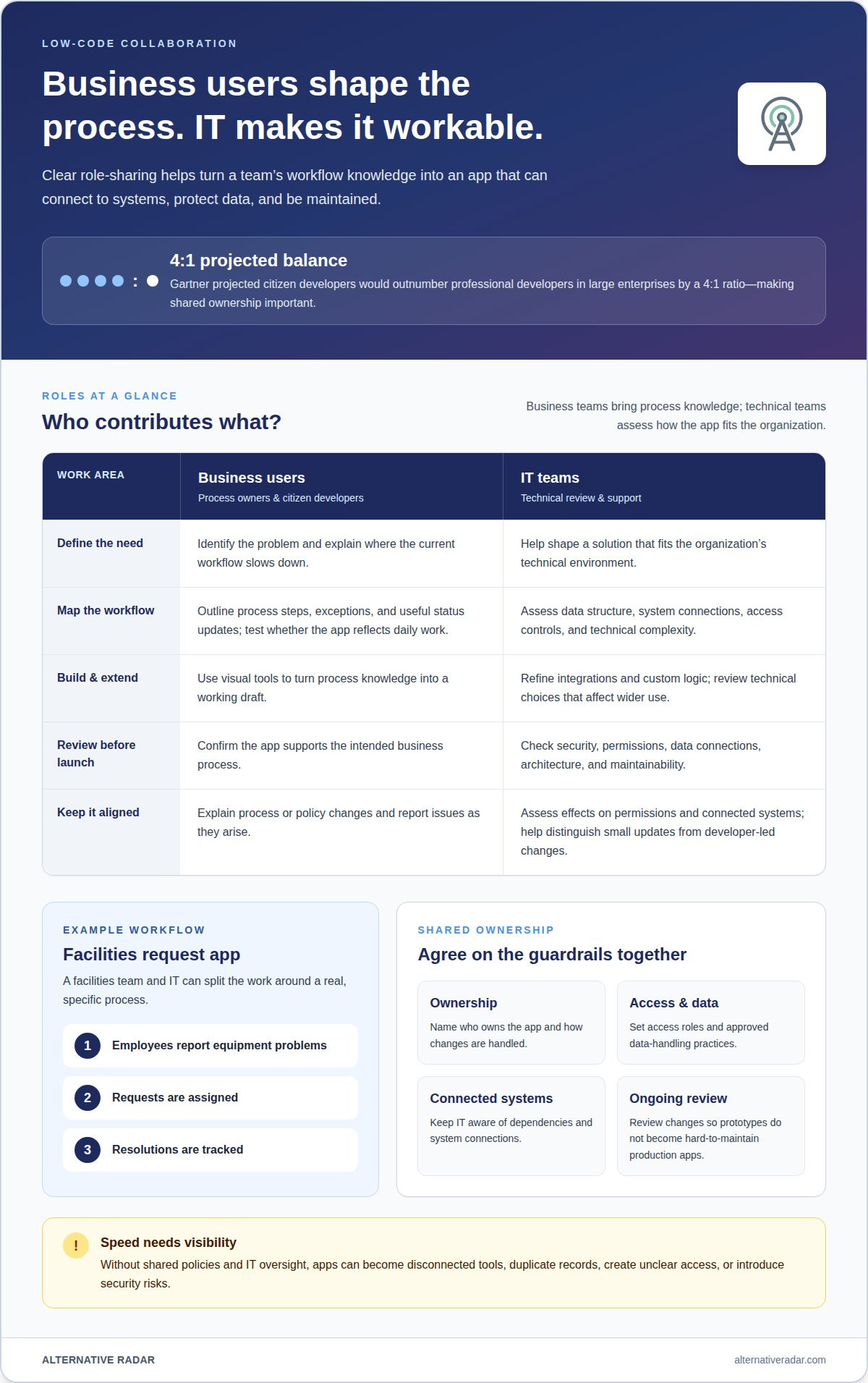
Low-code collaboration combines business knowledge with technical judgment to build applications around real processes. A department knows where approvals stall or information gets duplicated. IT can assess how an app should connect to existing systems and fit the organization’s technical environment.
Start with a specific workflow. For example, a facilities team can outline how employees report equipment problems, how requests are assigned, and how resolutions are tracked. Business users clarify the steps, exceptions, and useful status updates. IT can then help shape the app’s data structure, integrations, and access controls. This division keeps the process accurate without asking nontechnical users to take on complex coding.
Citizen developers are employees who build applications for their teams using visual tools. They can turn process knowledge into a working draft, then collaborate with IT on design choices that affect wider use. Gartner projected that citizen developers would outnumber professional developers in large enterprises by a 4:1 ratio. That projected balance makes shared ownership important: business teams know the need, but technical teams help manage dependencies and ongoing maintenance.
- Business users: define the problem, map process steps, and test whether the app reflects daily work.
- IT teams: assess data connections, security, architecture, and technical complexity.
- Both teams: agree on ownership, changes, and how users report issues.
Collaboration should continue after launch. If a policy change adds an approval step, the business owner can explain the process change while IT assesses its effect on permissions and connected systems. A shared review process helps teams distinguish a small workflow adjustment from a change that needs developer-led work. This keeps application development aligned with business needs and gives IT visibility into the tools employees rely on.
Speed, flexibility, scalability, and governance
Visual builders can speed up routine projects, and reusable components can make process changes easier to apply. In an enterprise, that speed needs governance to keep each app manageable as its use expands.
Governance, Compliance, and Security
Governance defines how applications align with internal policies, external rules, and business goals. It matters because a workflow may handle sensitive data or influence decisions across teams. For example, an employee onboarding app needs defined access roles, approved data handling, and a clear owner. These controls help manage security and compliance while keeping the app focused on its intended business outcome.
AI-assisted building can help create or adapt app components, but it does not replace review. Before deployment, teams should assess generated workflows, data connections, and permissions. For a recruitment pipeline, that means checking who can view candidate records and whether each automated step matches the organization’s process. Technical review also helps prevent quick prototypes from becoming difficult-to-maintain production applications.
Shadow IT and Governance
Shadow IT occurs when teams create or adopt tools without sufficient IT oversight. Low-code can increase this risk if employees build apps without shared policies for security, data handling, or approvals. A leave-management app, for example, could duplicate employee records or create unclear access if it sits outside established systems. Clear approval workflows let business users develop useful tools while IT retains visibility into data and app ownership.
Consider scalability and technical debt before an app spreads beyond its original team. Evaluate platform capabilities early, including permissions, version history, deployment options, and support for connected systems. If a visual prototype later needs organization-wide access or complex integrations, reassess its architecture instead of adding workarounds. A hybrid approach can leave simpler workflows with business teams while professional developers handle growing complexity. Regularly review owners, dependencies, and process changes so projects remain adaptable and maintenance is not overlooked.
Business users, citizen developers, and professional developers
Business users, citizen developers, and professional developers bring different strengths to application development. A procurement manager understands why purchase approvals stall; a professional developer knows how to connect approval steps with finance systems. Low-code works best when these perspectives come together, rather than treating app creation as business-only or IT-only work.
Business users are closest to the daily process. They can map what happens when a request is submitted, returned for edits, or routed to another manager. Citizen developers translate that process knowledge into a visual development environment to create a working application. For example, a regional operations team could build an exception-tracking tool, then ask colleagues to test whether its status labels reflect the work.
Professional developers add technical depth when an app needs custom logic, integrations, or wider deployment. They can extend an initial application with connections to existing data sources, review its architecture, and address performance needs. This partnership lets business teams focus on the process without taking on every technical decision. It also gives developers a clearer starting point than a request that only describes a problem.
- Business users define the process, required information, and useful outcomes.
- Citizen developers configure screens and workflow rules, then gather feedback from users.
- Professional developers assess integrations, custom code, and technical complexity.
Choose the right mix based on complexity, not job title. A single-team request tracker may remain manageable with business-led configuration and IT review. An application that combines finance, customer, and operational data needs deeper technical involvement. The same principle applies as an app grows: reuse and refine it while the process remains simple, but involve developers when integrations or dependencies expand its scope. Clear ownership helps each role contribute without duplicating work.
Compare software options that support your team’s development approach through software recommendations.
Alternative Radar
Alternative Radar helps readers discover and compare software, apps, and online services when assessing tools for business workflows. Its listings provide information such as features, pricing, and pros and cons, helping you evaluate options against your team’s needs. Sponsored software placements and affiliate-linked software recommendations are part of the platform, alongside programmatic display advertising. Use the comparisons to narrow your research, then weigh each option against your required integrations, user roles, and governance approach. This is useful when you understand what your application needs to do but are still exploring which software tools may fit. For questions about Alternative Radar, contact Alternative Radar.
Choose a platform with the next stage in mind
Before selecting a tool, define what would make its first application useful beyond launch. Assign a clear owner, identify who will provide feedback, and decide how the team will handle changes as the process evolves. These steps help prevent a successful pilot from becoming an unowned application.
When comparing low-code development platforms for business users, assess how well each fits the work ahead, not just its first screen or prototype. Consider who will maintain workflows, how new integrations might affect the app, and when a developer should take the lead. A platform suited to a contained team process may not suit a more connected application. Base the decision on your actual requirements.
Alternative Radar can help you explore software options as you narrow your shortlist. Use its comparisons to continue your research, then align your choice with your team’s development approach and governance needs.
Explore software options with Alternative Radar and take the next step with a clearer view of what fits.
Frequently Asked Questions
How can I build an app without coding?
Use a visual app builder to assemble screens, fields, and workflow steps rather than writing code manually. Start with one task, such as collecting equipment requests, then define what information users enter and what should happen next. Preview the app with realistic entries and revise confusing steps before wider use. In low-code tools, developers can add code if the process needs custom functionality.
What can you build with low-code?
Low-code can support internal applications for operational tasks, including performance reviews, training records, and recruitment pipelines. A training-record app, for example, could organize course details and employee completion information. The right scope depends on the process and its technical requirements. Large consumer apps, operating systems, and real-time financial trading systems are examples where traditional development may be preferable.
What’s the difference between low code and no code?
No-code relies entirely on visual tools to generate an application, while low-code allows developers to add code, custom plugins, or data connectors. That difference matters as requirements grow. A simple standalone form may suit no-code; a workflow that needs custom integrations may benefit from low-code’s extension options. Choose based on the complexity the app must handle, not just who starts building it.
How do low-code and no-code tools work?
Both approaches let users configure application behavior through visual interfaces instead of manually writing every part of the code. Builders select components, connect workflow steps, and define how information moves through the app. For example, submitting a training request might trigger a review step. The platform turns those configured elements into an application, while low-code also allows developer-written extensions.
How does low-code reduce the IT backlog and total cost?
Low-code can let business teams handle simpler operational tools, leaving developers more time for complex work. For example, a department could configure an internal review tracker instead of waiting for a custom-built tool. Reusable components and automation can also reduce repeated maintenance work. Overall cost depends on integrations, governance, and ongoing upkeep, so include those needs when assessing value.
Is low-code secure and governable for enterprise IT?
Organizations can govern low-code for enterprise use by setting clear policies for security, data handling, and approvals. Define who can build, access, and maintain each app, then review its data connections and permissions before broader deployment. Keep IT involved as an application expands across teams. These controls help manage risk and align development with internal rules, external requirements, and business goals.