

The most feature-packed option isn’t automatically the best practice management software for therapists. The right fit supports your billing and payment workflows while making scheduling easier to manage. A polished feature list matters less if essential tasks still require workarounds.
Choosing software can feel like balancing clinical work with the administration that keeps a practice running. Compare tools against the tasks you need to handle, rather than choosing based on popularity or an impressive feature list.
This guide explains how to assess insurance billing, payments, scheduling, calendar sync, and appointment reminders. You’ll also learn how to weigh usability and team needs, so you can narrow your options to the way your practice operates.
Key Takeaways
- Compare client portals, intake forms, and secure messaging by how well they support your existing client workflow.
- Assess claims, payments, invoices, and superbills as separate tasks so you can identify where billing work could be simpler.
- Look beyond appointment booking: calendar sync and reminders also shape how smoothly you manage a schedule.
- Match software capabilities to your practice’s size and needs, then use Alternative Radar’s software recommendations to explore options.
So, which is the best practice management software for therapists?
The best practice management software for therapists fits clinical workflows, not just feature checklists. Compare portal and record tools, communication safeguards, and team controls before you decide.
Client Portals and Intake Forms
Look for a portal where clients can complete intake forms, update contact details, and review upcoming sessions. Check whether forms can be tailored to your treatment workflows, signed digitally, and added to the clinical record. For example, a new-client packet might combine history, consent, and payment details, saving staff from re-entering information.
Teletherapy and Secure Communication
Telehealth tools should connect session links with the calendar and client record, while secure messaging keeps routine coordination separate from clinical notes. HIPAA compliance depends on how the vendor and practice handle protected information. Prioritize role-based access, encryption, audit logs, and a business associate agreement where applicable. Confirm that the workflow suits your teletherapy format.
Client Management and Clinical Records
Client management should make treatment plans, progress notes, and documents easy to find, with permissions that limit staff access. State privacy and recordkeeping rules vary, so configure retention, access, consent, and telehealth workflows for each state where you practice. Before migration, map fields and confirm that forms, assessments, upcoming appointments, and billing data transfer.
Solo and Group Practice Fit
With 1 clinician, prioritize ease of use and price. Practices with 2 to 4 clinicians should ask about permissions; those with 5 to 15 need supervision and permissions. At 15 to 50 clinicians, payroll-aware reporting and per-seat economics shape total cost. Group software is commonly billed per clinician per month. Compare subscription scope, processing charges, setup fees, export terms, cancellation notice, and post-cancellation data access. Cost depends on seats and included functions.
Insurance claims, payments, invoices, and superbills
Compare billing workflows from service documentation through claim status and payment posting. A useful system reduces duplicate entry and makes unresolved balances easier to spot.
Payments and Insurance Authorizations
Check whether the software tracks authorization dates, remaining visits, payer details, and renewal tasks alongside each client record. For example, a dashboard flag can prompt follow-up before an authorization period ends. Payment tools should support clear invoices and card processing, then connect each transaction to the correct session and balance. Review how the system handles declined payments, refunds, and outstanding invoices.
For insurance billing, assess claim creation, submission, and denial tracking as distinct steps. Confirm that staff can see which claims need correction, resubmission, or follow-up. Superbills should organize the information clients need for reimbursement requests. CPT codes such as 90791 for psychiatric diagnostic evaluation, 90853 for group therapy, and 96127 for assessment work illustrate why accurate coding fields matter.
Connections to EHRs and Payment Tools
Practice management platforms may combine records and billing or connect with separate EHR, accounting, and payment processor tools. Integrations can reduce repeated entry, but only if fields and updates flow where staff need them. Map a sample workflow: record a session, create a claim, post a payment, and reconcile the transaction in accounting.
Ask what each connection transfers, such as invoices, payment status, or client identifiers. A payment processor connection may handle card transactions, while an accounting integration may summarize income and balances. Compare native integrations with file exports, and note any manual steps. Test a sample claim and invoice before relying on the workflow, including how corrections appear across connected systems.
Appointment scheduling, calendar sync, and reminders
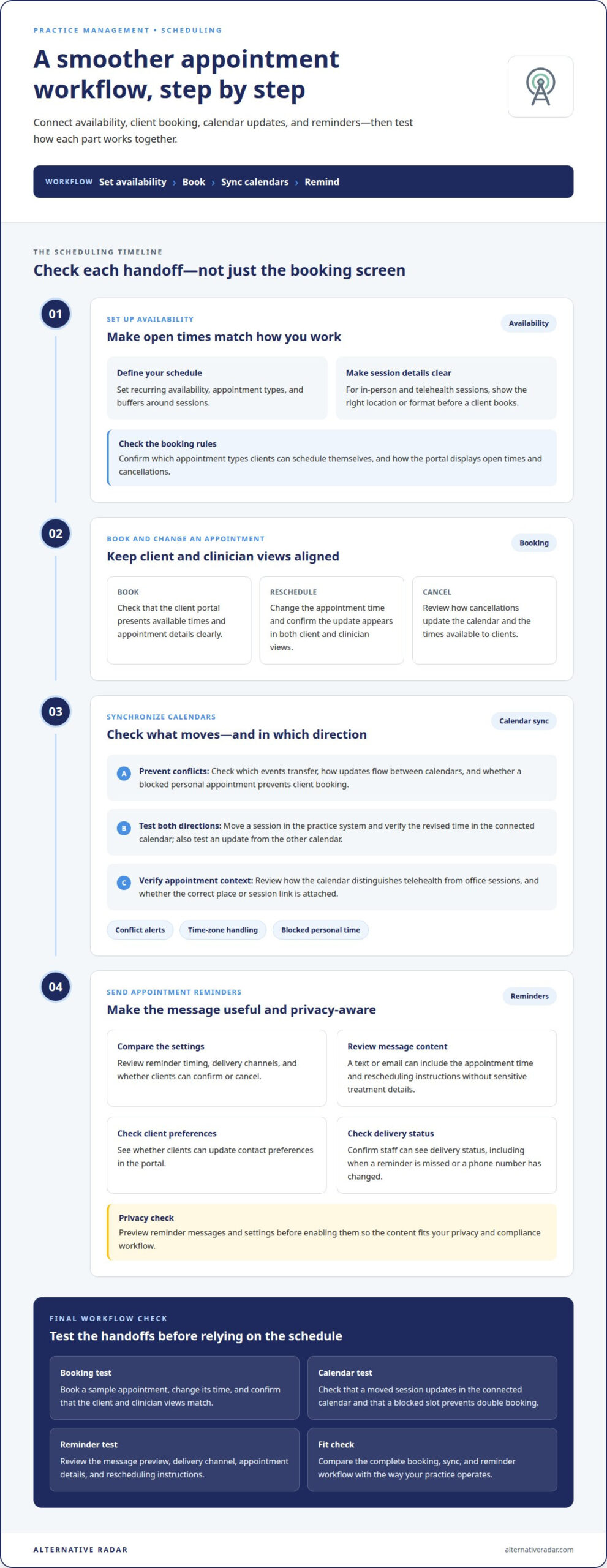
Scheduling works best when availability, booking, and session changes stay connected. Compare how each tool handles a client booking, a reschedule, and a blocked calendar slot.
Availability and Appointment Booking
Set recurring availability, appointment types, and buffers around sessions. Then review how the client portal displays open times and handles cancellations. For example, a private practice offering in-person and telehealth sessions needs clear location and format details before clients book.
Check whether booking rules match your workflow, including which appointments clients can schedule themselves. See how the calendar updates after a cancellation or reschedule. A useful test is to book a sample appointment, change its time, and confirm that the client and clinician views match.
Calendar Synchronization
Calendar sync should reduce double booking without exposing unnecessary clinical details. Compare which events transfer, how changes flow between calendars, and whether a blocked personal appointment prevents client booking. Test an update in both directions, such as moving a session in the practice system and checking the revised time in the connected calendar.
Review how the integrated calendar distinguishes telehealth from office sessions. A clinician working across locations needs the correct place or session link attached to each appointment. Check conflict alerts and time-zone handling if clients book from different locations.
Appointment Reminders
Compare reminder timing, delivery channels, and options for clients to confirm or cancel. A text or email can include the appointment time and rescheduling instructions without sensitive treatment details. Review the message preview and settings before enabling reminders, so the content fits your privacy and compliance workflow.
Check whether clients can update contact preferences in the portal and whether staff can see delivery status. For example, a missed reminder or changed phone number should be visible before the next session. Test the full process: schedule, send a reminder, change the appointment, and confirm that the client receives the updated notice.
Practice management software for therapists
The strongest choice fits your actual workflow, not an idealized one. Map a client journey from first contact through completed treatment documentation. Note where staff re-enter information, switch tools, or delay revenue reporting. Those friction points show which capabilities matter most.
Test templates against representative mental health workflows. For example, create a progress note, treatment plan, and discharge summary. Check whether each template supports your documentation style and keeps records easy to retrieve. Automated fields can reduce repetitive entry, but clinicians still need to review every note for accuracy and context.
Assess automation by following a task from start to finish. If a completed session should update a note, billing status, and report, see which steps happen automatically and which require staff action. Compare the time and corrections involved. Automation helps only when it removes a real bottleneck without obscuring important decisions.
Use reporting to connect clinical operations with practice performance. Check whether reports organize completed sessions, outstanding balances, and revenue by clinician or service. A useful test is how easily you can answer a routine question, such as which claims remain unpaid. Clear reporting supports decisions without replacing clinical judgment.
Set a practical switching threshold. If a workaround happens every week for more than a quarter, consider whether the software still fits. Before migration, map the affected workflow and identify what must transfer, including forms, assessments, and upcoming appointments. This turns a recurring inconvenience into a specific evaluation criterion.
Compare therapist software options through software recommendations and placements, then prioritize the workflow problems that matter most.
For group therapy practices, most practice management software vendors charge per clinician per month, so compare the cost with your staffing model. During a platform migration, verify that forms, assessments, and upcoming appointments will transfer before committing to a new system.
Alternative Radar
Alternative Radar helps readers explore software options after identifying the workflows their practice needs. Its recommendations and comparisons provide a way to assess tools by features and suitability, rather than popularity alone. Sponsored placements and affiliate-linked recommendations also appear on the platform, so weigh your priorities as you consider each option.
Turn to Alternative Radar when you’re narrowing candidates and want a clearer view of how their capabilities differ. Use your shortlist to focus on the functions that matter most, such as billing workflows, records, and scheduling. Contact Alternative Radar if you’d like to discuss its software discovery platform.
Make your next software decision with confidence
Turn your evaluation into a decision you can explain. Before choosing practice management software for therapists, agree on the workflows your practice cannot compromise on and the trade-offs it can accept. A short scorecard keeps the decision consistent: record each option’s fit against your priorities, note unresolved workflow gaps, and compare results with the people who will use the system.
Keep the process focused on practical fit, not feature volume. A tool that matches your team’s working habits may suit you better than one with extra capabilities you won’t use. If you’re still weighing options, Alternative Radar offers software comparisons and recommendations to help you continue your search.
Contact Alternative Radar to discuss your software discovery needs. Take the next step with a clear view of what matters to your practice, and choose at a pace that works for you.
Frequently Asked Questions
When should a group practice switch practice management platforms?
Consider switching when recurring workarounds disrupt routine operations week after week for more than a quarter. Before moving, identify who owns the change, which workflows need improvement, and what data must remain accessible. A small pilot with representative staff can reveal problems before a full rollout. Compare the pilot’s results with the current process, including time spent correcting errors.
What features should therapists look for in practice management software?
Start with the work your team performs most often, then rank features as essential or optional. For example, a clinician may prioritize documentation templates, while an administrator needs clear billing reports. Check whether each role can reach key tasks without unnecessary steps. Also consider whether the system can export records in a usable format if your practice later changes platforms.
What is the best practice management software for therapists in 2026?
There is no single best option for every practice in 2026. The best practice management software for therapists is the one that fits your team’s workflows, scale, and reporting needs. Compare candidates using a realistic scenario, such as reviewing a client record, documenting a session, and generating an operational report. Favor clear workflow fit over a longer feature list.
Which platforms support insurance billing, claims, and eligibility checks?
Look for platforms that explicitly support insurance billing, claim submission and tracking, and eligibility checks. These capabilities can differ, so compare them separately rather than treating “insurance billing” as a single feature. For example, a practice may need claim status visibility but handle eligibility through another system. Focus on the tasks your staff needs to complete inside the platform.
Which therapist software includes telehealth, scheduling, and a client portal?
Choose software that brings telehealth, appointment scheduling, and client portal access together if you want a connected workflow. Compare what happens after a client books: whether session details appear in the right place and the portal shows relevant appointment information. Follow a client journey from booking through a completed telehealth session, noting any manual handoffs between tools.
How much does practice management software for therapists cost?
Costs depend on clinician seats and included functions. Group software is commonly billed per clinician per month; compare subscription scope, processing charges, and setup fees.