

The software license may be free, but self-hosting still has ongoing costs. “Free” depends on what you count: the software alone, or the infrastructure and upkeep as well.
Choosing a tool is only part of the decision. Account for setup, updates, database backups, and uptime, then check whether the tool’s branching logic and integrations suit the forms you plan to build.
This guide explains what self-hosting involves, how branching and integrations shape your options, and how six open source form builders compare. Use the comparison to narrow down tools that match your technical capacity, workflow, and budget before committing to a setup.
Key Takeaways
- Plan for hosting upkeep as well as setup: updates, database backups, and uptime all affect the ongoing workload.
- Use answer-based branching to guide people through relevant questions, and variables to carry response details into later steps.
- Map your forms’ destinations and workflows before choosing integrations, so you can compare tools against the connections you actually need.
- Compare six builders by licensing, hosting demands, logic features, and integration options to find the best fit for your team.
Self-hosting requirements and maintenance
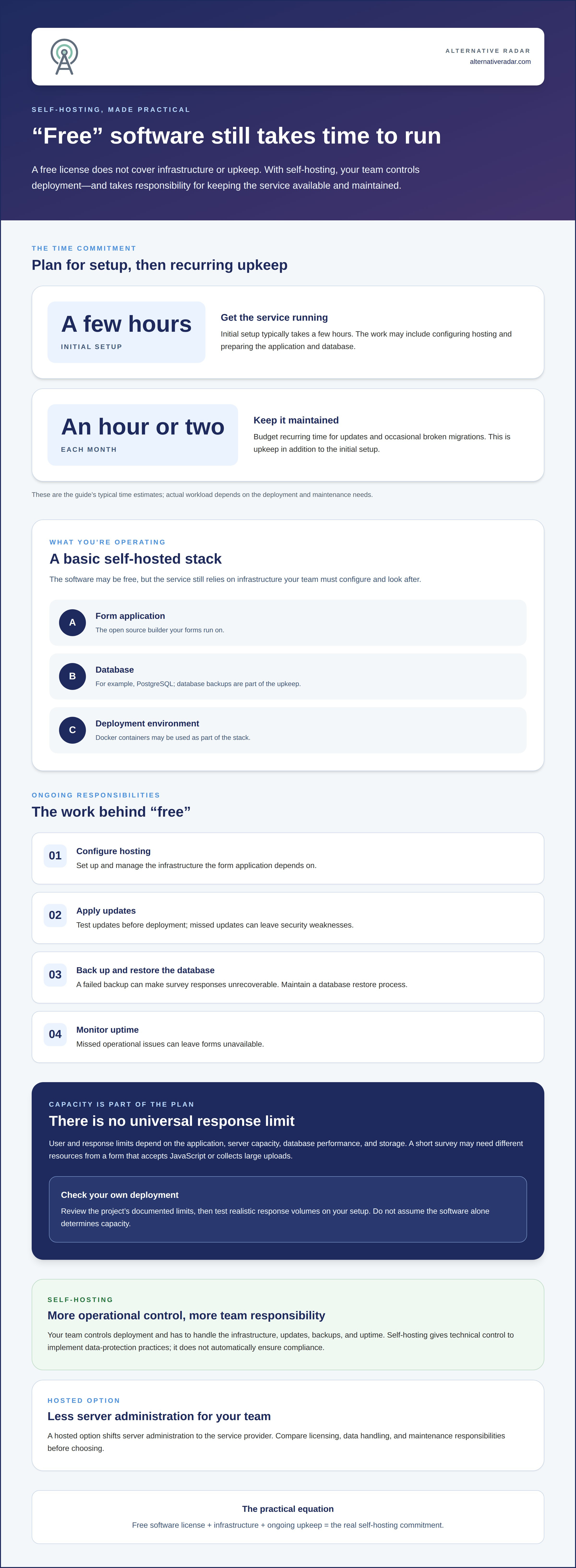
Yes, you can self-host an open source form builder, but free software still requires infrastructure and upkeep. Key risks include missed updates, unavailable forms, data loss, and response limits determined by server capacity.
Licensing and Hosting Choices
Start by reviewing the project’s license and deployment options in its GitHub repository. Under the AGPL, modified versions offered to others over a network must publish changes under the same license. Self-hosting gives your team control over deployment, while a hosted option shifts server administration to the service provider. Compare each option’s license, data handling, and maintenance responsibilities before choosing.
Infrastructure and Hosting Costs
A basic self-hosted stack may use a form application, a database such as PostgreSQL, and Docker containers. Budget beyond the server: someone must configure hosting, apply updates, back up the database, and monitor uptime. Initial setup typically takes a few hours, followed by an hour or two each month for updates and occasional broken migrations.
Self-Hosting Risks and Limitations
Self-hosting makes your team responsible for operations. A failed backup can leave survey responses unrecoverable, while an unpatched application can have security weaknesses. Test updates before deployment and maintain a database restore process. Self-hosting does not automatically ensure compliance; it gives your organization technical control to implement data-protection practices.
User and response limits depend on the application, server capacity, database performance, and storage. A form that accepts JavaScript or collects large uploads may need different resources than a short survey. Check the project’s documented limits, then test realistic response volumes on your own deployment. Hosted plans may have separate usage limits, but reduce the infrastructure work your team handles.
Answer-based branching logic and variables
Branching lets a form respond to each submission instead of showing every question to every respondent. Map the paths before building, then test each outcome.
Conditional Form Paths
Set a condition on a question, then route each answer to the next relevant step. For example, a support form can send “billing” responses to billing details and “technical issue” responses to troubleshooting questions. This keeps unrelated questions out of each respondent’s path.
Different outcomes can lead to different completion pages. A qualified lead might see a booking option, while another respondent sees a general thank-you message. If the platform supports URL redirection, send each outcome to the right destination, such as a Google Calendar booking page. Confirm that each redirect matches its answer path.
Variables and Smart Features
Variables store an answer for use later in the form. For example, a respondent’s selected service can appear in a follow-up question or personalized confirmation. This can make a conversational form feel more relevant without asking for the same detail twice.
Some platforms also use answers for lead scoring. Assign internal values to criteria such as project fit, then use the resulting score to guide follow-up. Treat the score as a sorting aid, not a substitute for reviewing the submission. Compare how each platform handles variables, scoring, and analytics.
Before publishing, test every branch with representative answers. Check that required questions appear, skipped paths don’t create missing data, and each ending leads to the intended next step. Review the form again after edits, since a changed question or condition can affect an existing route. Compare platforms such as Heyform by testing these workflows in the version you plan to use, rather than assuming every builder handles logic the same way.
For a wider tool shortlist, explore software comparisons alongside your feature tests.
Integrations and automation tools
Integrations move form data into the tools used for follow-up. Map each field to its destination before selecting a builder, using examples such as name, email, and requested service.
Connect forms to business tools
List the systems that receive submissions, such as a CRM, spreadsheet, or email platform. Then match each form field to its destination field. For example, a “company” answer shouldn’t map to a CRM’s “job title” field. Check whether the builder offers native integrations, templates, or a custom connection. Also consider how conditional questions affect the data collected: respondents may follow different paths and submit different fields.
Use webhooks and APIs
Webhooks send an event to another system after an action, such as a completed submission. An API lets a developer connect systems through defined requests and responses. Together, they can send form data to an internal application when a ready-made integration doesn’t fit. Review which fields are sent, how the receiving system expects them, and what happens if delivery fails. Test with sample submissions before routing live responses.
Plan CRM workflows and automation
A CRM integration can create a contact or update an existing record after someone submits a form. A webhook can also trigger a separate workflow, such as notifying a sales channel or creating a task. Define the trigger, required fields, and next action first. For example, route a demo request to a sales queue and a support request to a service workflow.
Keep the data flow focused. Collect only the fields needed for the workflow, and use consistent labels across forms and destination tools. Test a complete path, including conditional questions, duplicate contacts, and missing optional answers. Compare platforms by integration setup, field mapping, error handling, and the developer effort required for custom connections. A builder with fewer native integrations may still fit if its API supports your workflow.
Comparison of six open source form builders
Compare six candidates against the same form, workflow, and hosting requirements. Formbricks, HeyForm, LimeSurvey, Form.io, OhMyForm, and Budibase offer a starting shortlist, but you’ll still need to review each project’s current license and documentation.
Builder Comparison Criteria
Test each application with the same sample form: a contact request containing name, email, and a conditional follow-up. Compare question types, branching, integrations, export options, and how responses reach your database. Then review the deployment instructions and the maintenance work your team can support.
For each candidate, record whether its license fits your planned use, whether your server setup meets its requirements, and whether the connections you need work. A Zapier connection matters only if it supports your workflow and data mapping. Compare practical fit, not feature counts alone.
Privacy and Security
Self-hosting doesn’t automatically ensure GDPR compliance. It gives your organization technical control to implement data-protection practices. Your organization still needs to manage access, retention, backups, and the handling of collected fields.
For Formbricks or LimeSurvey, as with any candidate, review the project’s license, security documentation, and data flows. Identify where submissions are stored, who can access them, and whether integrations send data outside your environment. A hosted deployment changes who manages the infrastructure, so compare its data practices with your requirements.
Use a small test deployment to assess each option consistently. Create the same form, submit sample responses, export the results, and test a key integration. Record setup effort, database access, available documentation, and any gaps that require developer time. This reveals trade-offs a feature checklist can miss.
The best fit depends on your team’s priorities. Form.io or Budibase may suit an evaluation where application flexibility matters, while HeyForm or OhMyForm may belong on a shortlist focused on form creation. Treat these as starting points, then verify the current license and capabilities in each project’s documentation. Keep only candidates that meet your actual workflow and hosting needs.
Use software comparison resources to explore options before settling on your shortlist.
Alternative Radar
Alternative Radar helps you compare software options as you narrow down a form-building shortlist. Its platform presents product features, pricing, and pros and cons, helping you weigh hosting needs, integrations, and workflow fit.
Use these comparisons to explore alternatives and understand the trade-offs between tools. Affiliate-linked software recommendations can help you discover options that match your priorities, while sponsored placements and programmatic display advertising support the platform.
Once you’ve identified what matters most, compare the relevant software details before deciding which direction suits your team. For questions about Alternative Radar, contact Alternative Radar.
Choose the next step with confidence
Before committing, define what a successful form workflow needs to accomplish for your team. This gives your evaluation a practical filter: judge each open source form builder against your actual use case, rather than an abstract feature checklist. Keep the decision focused on who will maintain the setup and how the collected information will be used.
If you’re still exploring software options, Alternative Radar helps readers discover and compare products through software recommendations. The platform also includes sponsored software placements and programmatic display advertising, so use product details and comparisons to guide your assessment.
Bring your questions about software discovery or comparison to the team. Contact Alternative Radar to continue the conversation, and move forward with a shortlist that fits your priorities.
Frequently Asked Questions
Can I self-host a form builder for free?
Yes, you can run software with an open-source license on infrastructure you control, but that doesn’t make the full setup cost-free. If you already have suitable server capacity, you may avoid renting additional hosting. You’ll still need someone to manage deployment and maintenance. Compare the license terms and operational effort alongside the software’s purchase price, which may be zero.
What is a self-hosted survey system?
A self-hosted survey system is an application your organization runs on its own server or cloud environment. Your team decides how it is configured and who can access collected responses. For example, a research group might deploy a survey application alongside its existing internal tools. This approach offers control over deployment, while making the organization responsible for keeping the system available and managed.
Which open-source form builder can score and qualify leads?
Choose an open source form builder that can assign values to answers and make the resulting score available for follow-up. For example, a request matching your target service could receive a higher internal score than a general inquiry. Check whether the score can be saved with the submission and passed to your CRM. Test the complete workflow before relying on it.
What are the best open-source form builders in 2026?
There isn’t one best choice for every team. This guide compares Formbricks, HeyForm, LimeSurvey, Form.io, OhMyForm, and Budibase. Narrow the list by matching each application to your form type, deployment approach, and workflow. A team building a simple intake form may value ease of use, while a team connecting forms to internal software may prioritize customization.
Which open-source form builders are self-hosted and free?
Formbricks, HeyForm, LimeSurvey, Form.io, OhMyForm, and Budibase are candidates to evaluate for open-source use and self-hosting. “Free” can refer to software access, not the infrastructure or staff time needed to operate it. Before choosing, compare the license, deployment instructions, and features available in the version you plan to run.
How do popular open-source form builders compare in features and usability?
Compare candidates using one test form rather than relying on product labels. Add the same fields, conditional path, and destination workflow in each application. Then assess how easily a teammate can edit the form, export submissions, and connect required tools such as Zapier. The most usable option is the one that supports your workflow without adding unnecessary complexity.