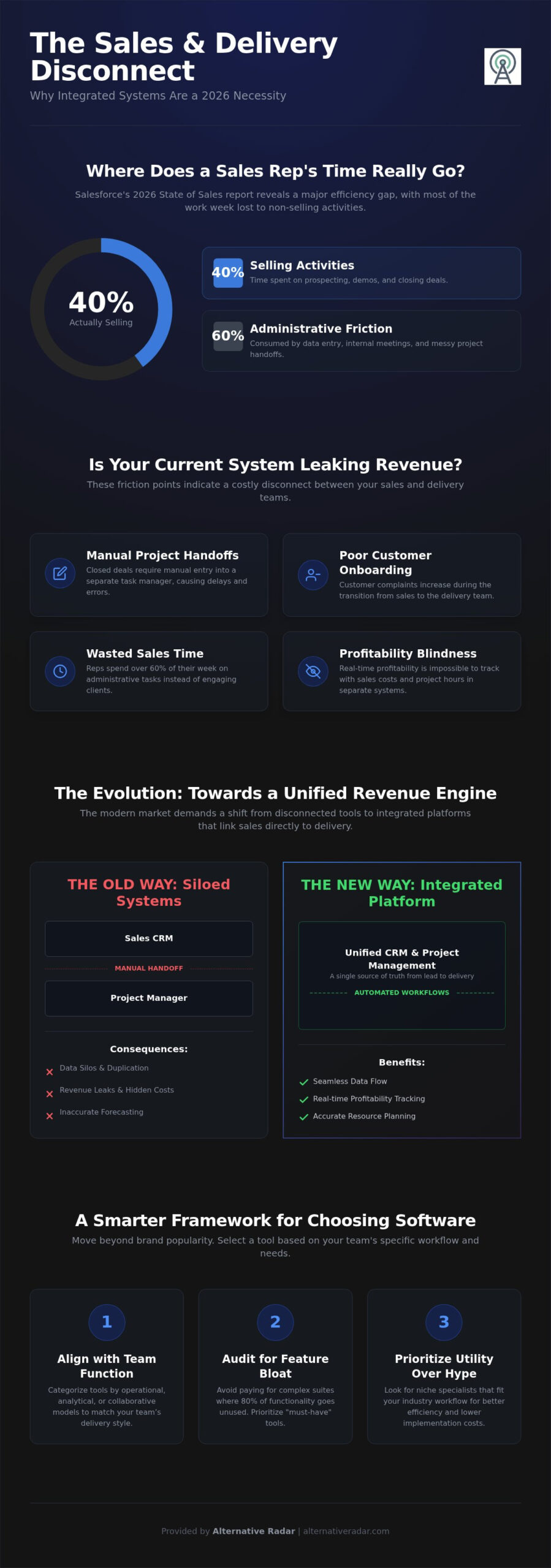
Salesforce’s 2026 State of Sales report reveals that sales representatives spend only 40% of their workweek actually selling. The rest of that time is often swallowed by administrative friction and the messy handoff between closing a deal and starting a project. You likely feel the pain of data silos where your sales team and delivery team use different languages, leading to hidden implementation costs and lost revenue. Selecting a crm with project management features shouldn’t mean settling for feature bloat or expensive add-ons that your team won’t use.
We’ve done the heavy lifting of testing and vetting the top platforms to help you stop following market leaders and start choosing based on utility. This guide provides a curated comparison of the best tools for 2026, from Scoro’s integrated pro plans starting at $71 per user to the accessible CRM-to-project automation in Zoho’s bundles. You’ll gain a clear understanding of SaaS versus open-source licensing and a framework to justify your software spend. It’s time to move toward a unified revenue engine that connects your sales pipeline directly to your project delivery.
Key Takeaways
- Understand why the 2026 digital economy requires a shift from siloed sales tools to integrated platforms that prevent revenue leaks during project handoffs.
- Access a curated list of over 20 solutions, including market leaders and open-source alternatives, specifically evaluated for their crm with project management features.
- Learn to categorize tools by operational, analytical, and collaborative models to ensure your software choice aligns with your team’s delivery style.
- Use our structured audit framework to identify feature bloat and prioritize the “must-have” tools that actually drive productivity.
- Discover how to look beyond brand popularity to find niche specialists that offer better efficiency and lower implementation costs for your specific industry.
Navigating the CRM Market in 2026: Why You Need a Master List
The definition of Customer Relationship Management (CRM) has expanded far beyond its origins as a digital Rolodex. In 2026, a crm with project management features is no longer a luxury; it’s a functional requirement for businesses where the sale is just the beginning of a long-term delivery process. Many organizations currently suffer from “feature bloat,” paying for complex suites where 80% of the functionality remains untouched. This waste isn’t just a budget issue. It creates friction that slows down your response time and confuses your staff. Static lists of “popular” software are no longer enough. You need context-driven discovery that matches your specific licensing needs and team size.
Alternative Radar acts as your digital scout in this crowded market. We’ve filtered the noise to provide a list that prioritizes utility over marketing budgets. This guide provides a framework for choosing a tool that fits your specific workflow rather than forcing your team to adapt to a rigid system. We focus on the intersection of sales and delivery, ensuring your data flows without manual intervention.
The Evolution of CRM: From Data Storage to AI Execution
Modern systems have transitioned from passive databases to autonomous agents. These agents don’t just store contact info; they execute follow-ups and trigger project workflows the moment a deal closes. For businesses leveraging programmatic display advertising, having clean, integrated data is vital to ensure that marketing spend translates into manageable project volume. 2026 marks the decline of the “Generalist Giant” as companies realize that a tool built for everyone often serves no one well. Specialized platforms now offer native crm with project management features that handle specific industry workflows out of the box.
Signs You Need a New CRM Solution
If your sales team uses one platform while your delivery team lives in another, you have a data silo. This disconnect leads to “forecasting blindness,” where you can’t accurately predict resource needs because the pipeline isn’t visible to the project managers. It’s time to audit your current stack if you notice these friction points:
- Closed-won deals require manual entry into a separate task manager or spreadsheet.
- Sales reps spend more than 60% of their workweek on administrative data entry instead of selling.
- Customer complaints increase during the transition from the sales rep to the onboarding team.
- You can’t see the real-time profitability of a client because sales costs and project hours are tracked in different systems.
When your system stops scaling with your lead volume, the cost of sticking with the status quo becomes higher than the cost of migration. Efficiency-driven teams in 2026 are moving toward unified engines that bridge the gap between “the promise” of the sale and “the proof” of the delivery.
Categorizing CRM Software by Business Function and PM Integration
Choosing the right software isn’t about finding the most popular brand; it’s about matching the tool to your specific operational rhythm. In 2026, the market has fractured into specialized categories. Segmenting your options based on project complexity and team size is the first step toward efficiency. A small agency needs high-velocity tasking, while a global firm requires deep governance and audit trails. You must decide if your priority is lead volume, data mining, or team communication before committing to a license.
Vertical CRMs have also surged in popularity. These platforms offer built-in industry templates for specific workflows, such as legal case management or construction milestones. Instead of building a system from scratch, you can explore vetted alternatives that already speak your industry’s language. This saves weeks of implementation time and reduces the hidden costs of customization.
Operational CRM: The Sales and Marketing Engine
Operational systems prioritize the “front-office” experience. They excel at lead automation, contact management, and helpdesk ticketing. However, a modern crm with project management features in this category now includes “post-sale” automation. This means a closed deal automatically triggers a project board with pre-assigned tasks. Many modern platforms in this category are designed for this high-speed handoff, providing integrated solutions that streamline the transition from sales to project execution. A crm with project management features in the operational category eliminates the friction between “signing” and “doing.” These systems ensure that sales promises are immediately visible to the delivery team without manual data entry.
Analytical CRM: Data-Driven Decision Making
Analytical models focus on the “back-office” data mining. They identify patterns in customer behavior, predict churn, and calculate the real-time ROI of your delivery efforts. Mid-to-large enterprises prioritize these capabilities to justify software spend across multiple departments. If you’re looking for an alternative to standard generalist tools, focus on how well the platform handles customer state intelligence. Using a CRM project management guide can help you understand how to leverage these insights to optimize your project delivery schedules. These tools ensure that every project milestone is backed by hard data rather than intuition.
The Ultimate CRM List: 20+ Solutions Categorized for 2026
Finding a crm with project management features requires looking past the glossy homepages of the biggest brands. You need to understand what is CRM in the context of your specific licensing model and delivery needs. We’ve categorized these solutions into three distinct tiers: SaaS Giants, Open Source Disruptors, and Agile SMB tools. Pricing usually falls into three buckets: per-user monthly fees, flat-fee tiers, or free tiers for early-stage teams. Use this list as a high-quality filter to narrow your search from hundreds of tools down to the few that actually fit your workflow.
The SaaS Giants: Salesforce, HubSpot, and Microsoft Dynamics
Salesforce remains the ecosystem leader. Its Agentforce platform now automates project tasking based on real-time deal progress. This eliminates the manual handoff that often stalls new client onboarding. HubSpot dominates inbound marketing. Its “Projects” tool has matured significantly to handle complex onboarding checklists, making it a favorite for service-based agencies. Microsoft Dynamics 365 is the logical path for teams already paying for the Office 365 stack. It offers native integration with Microsoft Project, which is essential for heavy industrial or construction firms needing deep governance. These tools offer high reliability but often come with high implementation costs and steep learning curves.
Open Source and Self-Hosted Disruptors
Many businesses now prioritize data sovereignty and privacy. If you want full control over your database, an open source CRM software comparison reveals that Odoo, SuiteCRM, and Vtiger are the top contenders. Odoo is particularly powerful because its modular structure allows you to add project management, accounting, and inventory as your business grows. These platforms provide deep PM modules for free or at a fraction of SaaS costs. However, you must account for the technical overhead of self-hosting and internal maintenance. They are the best choice for organizations with internal IT resources who want to avoid per-user licensing fees.
Agile Tools for Startups and SMBs
Monday.com ($12 per seat for Sales CRM) has successfully bridged the gap from task manager to full-featured CRM. It uses a visual interface that helps sales teams see project status without leaving their lead view. ClickUp follows a “one app to replace them all” philosophy. This is ideal for startups wanting to avoid tool sprawl by combining docs, goals, and sales in one place. Zoho CRM ($14 per user) remains the most feature-dense option for the price. While the base CRM is strong, finding a crm with project management features in the Zoho ecosystem often works best when using the Zoho One bundle ($37 per user) to unlock the full Projects module. These agile tools are designed for fast setup and intuitive daily use.
- Market Leaders: Best for high support needs and complex ecosystems.
- Open Source: Best for data sovereignty and avoiding “per-user” price hikes.
- Agile Specialists: Best for fast-moving teams who value UI and fast adoption.
How to Evaluate Your CRM List: A Decision-Making Framework
Having a list of potential tools is only the first step. To find the right crm with project management features, you must apply a rigorous evaluation framework that goes beyond comparing feature checkboxes. Start by auditing your current workflow. Ask your sales team how they communicate with project delivery today. If the answer involves manual emails or Slack messages to hand off a client, your current process is leaking revenue. A unified system should automate this transition, turning a signed contract into a structured project board without human intervention.
Next, define your “Must-Have” versus “Nice-to-Have” features. A basic task list is not the same as a robust project engine. Determine if you need Gantt charts, time tracking, or resource allocation directly within your sales interface. Many businesses overpay for enterprise-grade PM tools when a simple Kanban board integrated into their CRM would suffice. Conversely, don’t sacrifice delivery quality for a cheaper CRM that lacks the depth your project managers require to hit deadlines.
Finally, calculate the Total Cost of Ownership (TCO). The sticker price of a license is often just the tip of the iceberg. Account for implementation fees, data migration costs, and the time required for staff training. The best crm with project management features is the one your team actually uses. If the interface is too complex, your sales reps will revert to spreadsheets, and your project data will become obsolete. Run a two-week pilot with a small cross-functional team to test for user adoption before committing to an annual contract.
Integration Check: Will it Talk to Your Tech Stack?
Connectivity is the backbone of efficiency. Ensure the CRM offers a robust API or pre-built connectors for tools like Zapier and Make. Your CRM data should feed seamlessly into your popular open source business software ecosystem to maintain a single source of truth. Test the mobile app functionality as well. Your remote sales team and field project managers need real-time access to client history and task updates while on the move. If the integration feels clunky during the trial, it will likely fail during full-scale operations.
Future-Proofing: Scalability and Data Portability
Your software choice must be able to handle 10x your current lead and project volume. Evaluate the vendor’s roadmap for AI and automation updates in 2026 to ensure they are keeping pace with “agentic technology” trends. Perform a “Lock-in” test: ask how easy it is to export your data in a clean format if you decide to switch providers in three years. Avoid vendors that make data portability difficult. You can compare transparent software alternatives that prioritize user control and data sovereignty to ensure your business remains agile as it grows.
Finding the Right CRM Alternative with Alternative Radar
Choosing a “Market Leader” often means paying for a brand name rather than a functional tool. If your goal is to find a crm with project management features that actually improves your team’s velocity, popularity is a poor metric. Alternative Radar acts as your digital scout in a crowded market. We’ve done the hard work of testing and filtering so you can skip the marketing hype. We focus on utility and performance-based results. This ensures you select a platform that fits your specific sales-to-delivery workflow rather than forcing your business to adapt to a generic system.
Objective comparison is the only way to validate your choice. Most software directories are cluttered with sponsored placements that prioritize the highest bidder. We provide a high-quality filter for information. By looking at vetted alternatives, you avoid the trap of feature bloat and high implementation costs. Our curated lists help you identify the specific tools that bridge the gap between sales pipelines and project tasks. It’s about finding the right fit for your business model, not just the most famous logo.
Why We Prioritize Transparency
Our commitment to objectivity stems from our Dutch-owned parent company, Madunet. We maintain a neutral advisor approach to ensure that every recommendation is based on logic and user needs. We don’t just show you the premium SaaS options. We actively showcase free and open-source alternatives to give you a complete view of the market. Our rankings incorporate user-driven data and technical performance metrics. This transparency empowers you to make smarter choices that protect your resources and time. We believe in providing value through clarity, helping you look beyond the surface-level marketing of the industry giants.
Ready to Switch? Take the Next Step
Software transitions are rarely isolated events. If you are overhauling your entire stack, check out our slack alternatives guide to streamline your team’s communication alongside your new CRM. We also offer deep dives into specific categories to help you refine your search further. Don’t let indecision stall your productivity or drain your budget. Use our comparison tools to find the crm with project management features that aligns with your 2026 growth strategy. Find your perfect CRM alternative on Alternative Radar today and take control of your software ecosystem.
Future-Proof Your Business with the Right CRM Strategy
Selecting a crm with project management features is a strategic investment in your team’s long-term efficiency. You’ve learned that the most popular software isn’t always the best fit for your specific sales-to-delivery workflow. By auditing your current handoff process and calculating the total cost of ownership, you can avoid the trap of feature bloat and hidden implementation fees. Whether you choose a SaaS giant or an agile open-source alternative, prioritize data portability and user adoption to ensure your system scales alongside your growth.
Alternative Radar acts as your digital scout, providing a high-quality filter for the crowded software market. We remove the marketing hype and deliver objective, performance-based data to help you make smarter choices. Our experts at the Madunet media team have curated comparisons across 500+ software categories to save you time and resources. Stop following the crowd and start building a unified revenue engine that works for you. Explore the most objective CRM comparisons on Alternative Radar
Frequently Asked Questions
What is the best CRM for a small business with a limited budget in 2026?
ClickUp and Zoho CRM are the top choices for businesses prioritizing cost efficiency. ClickUp offers an Unlimited plan at $7 per user per month, providing a low barrier to entry for teams needing basic task tracking. Zoho CRM starts at $14 per user, but many small businesses find better value in the Zoho One bundle at $37, which unlocks full project and marketing automation capabilities in a single license.
What is the difference between a SaaS CRM and an open-source CRM?
SaaS CRMs are hosted by the vendor and accessed via a monthly subscription. They offer the fastest setup and automatic updates but can become expensive as your team grows. Open-source CRMs like SuiteCRM or Odoo provide the source code for you to host on your own servers. This model offers superior data sovereignty and lower licensing costs, though it requires internal technical resources for maintenance and security.
How much should a CRM with project management cost per user in 2026?
Expect to pay between $12 and $30 per user for a standard crm with project management features. Entry-level options like monday.com’s Sales CRM plan start at $12 per seat with a three-seat minimum. Specialized or high-performance tools like Scoro or HubSpot’s Professional tier are priced higher, often ranging from $71 to $90 per user, depending on the depth of automation and reporting you require.
Can I use a CRM for marketing automation as well as sales and projects?
Yes, most modern platforms are designed to handle the entire customer lifecycle. Tools like HubSpot and Zoho allow you to run email campaigns that feed directly into your sales pipeline. Once a deal is won, the system can automatically trigger a project template. This “all-in-one” approach is the most efficient way to reduce data silos and ensure your delivery team understands the context of every sale.
Is Salesforce still the best CRM for large enterprises with project needs?
Salesforce remains a leader for large organizations due to its massive integration ecosystem and the introduction of Agentforce for autonomous tasking. However, it’s no longer the only option. Microsoft Dynamics 365 is a strong alternative for enterprises already using the Office 365 stack, as it offers native project governance. The best choice depends on whether you value a massive third-party marketplace or deep integration with existing Microsoft tools.
How long does it typically take to implement a new CRM system?
Small teams using agile tools like Pipedrive or ClickUp can often complete implementation within two weeks. For mid-sized to large organizations, the process usually takes three to six months. This timeline accounts for cleaning legacy data, mapping complex crm with project management features to your specific workflows, and conducting staff training to ensure high user adoption across the company.
What are the risks of using a free CRM tool for project management?
The biggest risks are data limits and lack of automation. Free tiers often restrict the number of contacts you can store or the number of active projects you can manage. You’ll likely miss out on critical efficiency tools like automated task assignments or custom reporting. Additionally, free plans rarely offer the robust security features or priority support that businesses need when managing sensitive client data.
Do I need a CRM if I only have a few dozen clients?
You need a CRM if you intend to scale your business without losing quality. While spreadsheets can track a few dozen names, they can’t provide “customer state intelligence” or automated reminders. A CRM creates a professional audit trail of every interaction, ensuring your team doesn’t miss follow-ups. It also provides the forecasting data you need to know when it’s time to hire more staff or increase your project capacity.