
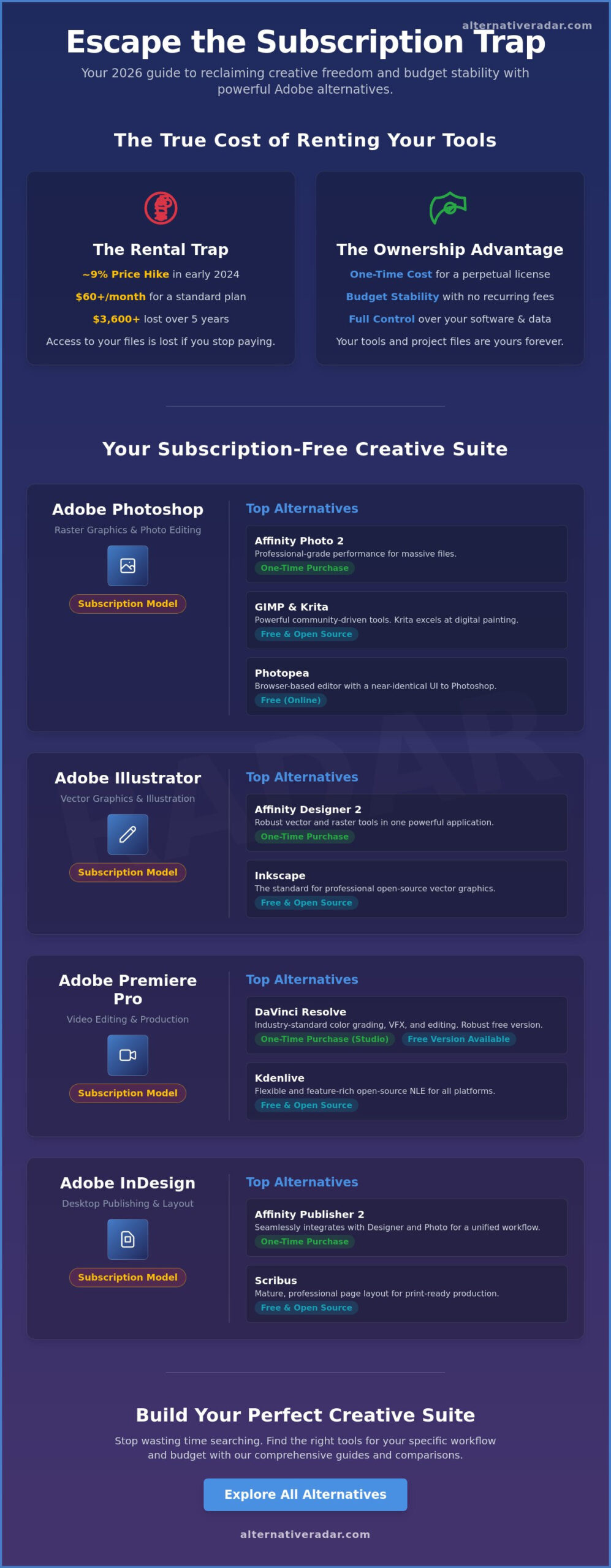
How much of your annual revenue is lost to software you don’t actually own? In early 2024, Adobe increased Creative Cloud pricing by roughly 9% for many users, reinforcing the reality that these essential tools are rented rather than bought. You’ve likely felt the weight of software bloat and forced AI features that seem to prioritize corporate trends over your actual productivity. It’s exhausting to pay a monthly tax just to access your own project files. This 2026 guide identifies the most powerful adobe alternatives to help you reclaim your budget and your creative autonomy.
We’ve tested and curated the top free, open-source, and one-time purchase options for every major application in the ecosystem. You’ll learn how to assemble a professional creative stack with zero monthly fees while maintaining a seamless workflow transition. We’ll explore the specific tools that offer the right fit for your needs without the burden of a recurring subscription. From vector design to high-end video editing, you can stop wasting time searching for individual fixes and discover a comprehensive roadmap for a subscription-free future.
Key Takeaways
- Identify professional software ownership models to eliminate subscription fatigue and reclaim control over your creative tools.
- Compare the most powerful adobe alternatives for raster and vector design that support industry-standard file formats.
- Find high-performance video editing and desktop publishing solutions that handle complex production workflows and print requirements.
- Learn how to maintain seamless file compatibility when transitioning legacy .PSD, .AI, and .INDD projects to new platforms.
- Discover how to filter and build a personalized creative suite based on your specific operating system and budget.
Escaping the Creative Cloud: Why Switch to Adobe Alternatives in 2026?
Creative professionals in 2026 face a clear choice: continue paying monthly fees or invest in tools they actually own. Subscription fatigue has reached a tipping point. Many designers now prioritize software ownership over the perpetual rental model. Finding the right adobe alternatives isn’t just about saving money; it’s about regaining control over your production pipeline and your data. The shift toward independent tools is driven by a desire for stability in an era of fluctuating SaaS pricing.
Adobe’s pricing often hides secondary expenses that accumulate quickly. Generative AI credits and cloud storage tiers frequently force users into higher payment brackets. Professional creators often find their base subscription isn’t enough to cover high-volume AI generation or 8K video storage needs. These hidden costs make it difficult to forecast annual budgets accurately. Defining your specific needs is the first step toward a smarter choice. You must decide if your workflow thrives on free-to-use open-source tools or if your business requires the support and stability of one-time purchase professional licenses.
The Problem with the Subscription Model
The financial math of “renting” your software rarely favors the user over a long timeline. A standard Creative Cloud All Apps plan costs roughly $60 per month. Over five years, that totals $3,600 without accounting for annual price hikes. This model creates a significant barrier to long-term business scalability. Historically, the transition from the Adobe Creative Suite to a cloud-only model sparked resistance that has only intensified as offline reliability remains a persistent issue. Modern SaaS suites often struggle when users are working in remote environments or high-security zones with limited connectivity. When you stop paying, you lose access to your project files; that’s a risk many studios can’t afford in 2026.
The 2026 Landscape of Creative Software
The software market has evolved. Smaller developers have integrated specialized AI tools that match or exceed the capabilities of the industry leader. This has leveled the playing field for boutique agencies. The open-source ecosystem has reached full professional maturity. Tools like Blender and Krita are no longer just for hobbyists. In fact, a 2025 industry report indicated that 35% of independent animation studios have successfully moved to non-Adobe primary pipelines. These studios prioritize performance and customizability over brand recognition. Stop wasting time searching through bloated suites and start exploring specialized adobe alternatives that fit your specific creative niche.
The Best Alternatives to Adobe Photoshop and Illustrator
Professional workflows no longer require a monthly Creative Cloud bill. In 2026, the gap between subscription-based giants and independent tools has closed. Designers are shifting toward photoshop equivalent free software that offers comparable layer management and non-destructive editing. Finding the right adobe alternatives requires a focus on file compatibility and hardware optimization rather than just brand recognition. Academic institutions are also validating this shift; NC State’s recommended Adobe alternatives provide a clear roadmap for students and professionals who need to maintain high standards without the high cost.
Raster Graphics and Photo Editing
Affinity Photo 2 stands as the primary professional powerhouse for those who prefer a one-time purchase. It handles massive 100-megapixel files without lagging on modern Apple Silicon or high-end PC hardware. For users who prioritize the open-source community, GIMP and Krita remain the most robust options. Krita’s 2025 updates significantly improved its brush engine, making it a top free photoshop replacement for digital painters and illustrators who need advanced tablet pressure sensitivity.
When working on a guest machine or a Chromebook, Photopea is the definitive online photoshop alternative for quick browser edits. It replicates the Photoshop interface almost exactly, allowing for a zero-learning-curve transition. It supports PSD, RAW, and Sketch files natively, ensuring that collaborative projects don’t stall when a designer lacks access to a desktop workstation.
Vector Design and Illustration
Moving beyond .ai files is essential for cross-platform collaboration. Modern adobe alternatives focus on industry-standard SVG and EPS formats to ensure longevity. Affinity Designer is the most fluid choice for Illustrator power users. Its unique “Persona” system allows designers to switch between vector and raster workspaces in a single click, which saves significant production time during complex logo design projects.
Inkscape 1.5+ has evolved into a viable tool for commercial print work. It now features improved CMYK export capabilities and a refreshed interface that performs well on 4K and 5K high-resolution displays. For lightweight vector tasks, Vectorpea has emerged as a rising web-based contender. It provides a streamlined environment for editing icons and simple illustrations without the need for a local installation. You can discover more design tools to find the exact match for your specific hardware setup.
Performance on modern hardware is the final deciding factor. Most of these tools now offer native support for specialized tablet hardware and multi-touch gestures. Whether you’re focused on high-end photo retouching or scalable logo design, the current market offers specialized tools that often outperform general-purpose suites in speed and efficiency.
Replacing Video Editing and Layout Tools: Premiere Pro and InDesign Competitors
Stop paying for features you don’t use. The 2026 creative market favors specialized power over the bloated subscription models of the past. Many professionals now combine best-in-class tools to build a custom workflow that fits their specific output. Choosing the right adobe alternatives allows you to reclaim your budget without sacrificing the technical precision required for high-end video production or complex print layouts.
The rise of specialized tools has changed the industry. Instead of one suite that does everything adequately, creators are moving toward software that masters a single niche. This modular approach prevents software lag and ensures you always have the most advanced features for tasks like color grading or vector-based pagination. It’s a strategy that prioritizes efficiency and output quality over brand loyalty.
Video Editing and Post-Production
DaVinci Resolve has become the industry standard for 2026. Its free version is powerful enough for most independent filmmakers, offering 4K export at 60fps without watermarks. It provides high-end color grading and Fairlight audio tools that rival standalone workstations. The software’s Neural Engine uses AI to automate masking and object removal, tasks that typically take hours in legacy editors.
If your focus is social media, CapCut Desktop provides a surprising professional contender. It’s built for speed. It uses AI to generate captions and sync cuts to music beats instantly. It’s a legitimate choice for creators who need to produce high-volume content for vertical platforms. For those committed to open-source systems, Kdenlive offers a robust solution on Linux and Windows. It handles complex multi-track editing and supports 300+ codecs through its integration with the FFmpeg libraries, making it a favorite for technical editors who value stability.
Layout and Publishing Alternatives
Managing multi-page documents doesn’t require an InDesign subscription. Affinity Publisher offers seamless integration with Photo and Designer assets through its StudioLink technology. This allows you to edit images directly within your layout without switching apps. This focus on integrated workflows is a key trend, as noted in Forbes Advisor’s Best Photo Editing Software guide, which highlights how modern tools are becoming more interconnected. Affinity handles Master Pages, live preflight checking, and professional print bleeds with a one-time payment model.
For professional typography and CMYK print needs, Scribus remains a reliable open-source veteran. It provides the technical precision needed for press-ready files, supporting PDF/X-1a and PDF/X-3 standards. It’s ideal for technical manuals or indie magazines where precision is mandatory. If your work is primarily digital and collaborative, Canva for Teams is the better choice. It moves layout work to a cloud platform where multiple stakeholders can edit live documents. It replaces the complexity of traditional desktop publishing with brand kits and real-time feedback loops, making it one of the most accessible adobe alternatives for corporate environments.
The Logistics of Switching: Compatibility and Workflow Management
Transitioning to adobe alternatives requires a strategic approach to technical debt. You can’t simply delete Creative Cloud and expect a seamless Monday morning. Success depends on how you handle legacy assets and cross-team communication. The primary hurdle isn’t the software itself; it’s the ecosystem of proprietary formats and licensed assets like Adobe Fonts. If you cancel your subscription, you lose access to the Adobe Fonts library immediately. To avoid broken layouts, you must replace these with local OpenType files or open-source options from the 1,500+ font families available on Google Fonts before your billing cycle ends.
Mastering File Interoperability
You don’t need Photoshop to open a .PSD file. Most high-end competitors, including Affinity Photo 2.5 and GIMP, now support layered PSD imports with high fidelity. However, complex Smart Objects can occasionally flatten during the process. For vector work, the SVG format remains the most reliable bridge. Since it’s a W3C standard, SVG files maintain scalability and editability across Inkscape, Figma, and Illustrator without the metadata bloat of .AI files.
- Professional Print: Use the PDF/X-4 standard (ISO 15930-7:2008) for handoffs. This format preserves transparency and layers, allowing print shops to process your files correctly even if they don’t own your specific layout software.
- Layered Transfers: If you’re working with a client who insists on Adobe, export your work as a PSD with “Maximize Compatibility” enabled. This ensures they see a rendered preview even if specific layers behave differently in their version.
- CAD and Technical Drawing: Use DXF or DWG formats for 2D technical assets to ensure engineers can open your files in AutoCAD or LibreCAD.
Retraining Your Muscle Memory
The biggest productivity killer is searching for a menu that moved. Most adobe alternatives recognize this and offer “Adobe Workspace” presets. Affinity apps allow you to remap every single shortcut to match the Creative Cloud defaults. For GIMP users, the “PhotoGIMP” patch reorganizes the entire interface to mimic the Photoshop layout, including the toolbar and keyboard shortcuts. This reduces the learning curve from weeks to just a few days of adjustment.
- The Hybrid Period: Plan for a 21-day transition period. Run your new software alongside your Adobe apps to handle emergency file conversions.
- Community Resources: Use platforms like Reddit’s r/FOSS or specific software forums to find “shortcut translation” cheat sheets. These documents map specific Adobe commands to their equivalent in your new tool.
- Standardize Your Inputs: If you use a Wacom or Huion tablet, create a global profile for your new software so your pen buttons remain consistent across different applications.
Building Your Custom Creative Suite with Alternative Radar
Breaking away from Creative Cloud isn’t about finding a single clone. It’s about assembly. The best adobe alternatives for a motion designer in 2026 differ significantly from what a technical illustrator or a social media manager needs. Success in switching depends on identifying your specific creative niche and the unique requirements of your hardware. Alternative Radar simplifies this discovery by letting you filter software by OS compatibility, price points, and license types. You can isolate perpetual licenses to avoid monthly fees or find tools that run natively on Linux, which Adobe has historically ignored.
Testing trials before committing is a critical step in this transition. A 2024 industry survey showed that 62% of creative professionals who successfully switched software did so after a minimum 14-day trial period. Most premium competitors offer these windows to let you test GPU acceleration and plugin compatibility on your specific machine. Our platform acts as a digital scout, tracking these version updates and price drops for over 500 creative tools, ensuring you don’t miss a limited-time lifetime deal or a major feature rollout.
Finding the Right Fit for Your Workflow
Use our comparison engine to evaluate side-by-side feature breakdowns. This goes beyond surface-level specs; you can see which tools support CMYK for print or offer non-destructive RAW editing. If you want a zero-cost stack, filter for “Open Source” to find professional-grade FOSS options like GIMP or Inkscape. You’ll also discover obscure niche tools that Adobe doesn’t offer, such as specialized pixel art editors or procedural texture generators designed for 2D game assets. This granular search ensures you find your right fit without wasting hours on software that lacks your essential features.
Your Next Steps to Software Independence
Transitioning doesn’t have to happen overnight. We recommend replacing Photoshop first. Since it’s often the central hub of a creative workflow, finding viable adobe alternatives for photo editing builds the confidence needed to swap out Illustrator or Premiere later. To stay ahead of the curve, follow these steps:
- Sign up for our newsletter to receive the latest software deals and FOSS news directly in your inbox.
- Join the Alternative Radar community to share your switching success and learn from others who have already cut the cord.
- Explore our database daily to catch sudden price drops on perpetual licenses.
Stop wasting time searching through endless forums. Use our detailed insights and clear comparisons to build a suite that belongs to you, not a subscription service. Your software independence starts with a single search.
Take Control of Your 2026 Creative Workflow
Transitioning away from the Creative Cloud isn’t just a trend; it’s a strategic move for professionals who prioritize efficiency and ownership. You’ve seen that modern adobe alternatives now match industry standards for file compatibility and high-performance rendering. Whether you’re replacing Premiere Pro’s timeline or InDesign’s layout engine, the 2026 software landscape offers specialized tools that don’t lock you into restrictive contracts. Success depends on selecting software that integrates seamlessly with your existing team pipelines and hardware requirements.
Stop wasting time searching through outdated forum threads or generic listicles. You can find your perfect fit on Alternative Radar. Our database provides real-time pricing for 500+ software alternatives and detailed pros and cons from verified creative professionals. Every entry is updated daily for 2026 software versions to ensure you’re making decisions based on current data. Building a custom suite tailored to your unique needs has never been more accessible. You have the power to own your tools and your process starting today.
Frequently Asked Questions
Is there a 100% free alternative to the entire Adobe Creative Cloud?
No single software package replaces the entire Creative Cloud for free, but you can build a powerful stack using open-source tools. You’ll need to combine GIMP for photos, Inkscape for vectors, and Kdenlive for video editing. These adobe alternatives have existed for over 25 years and provide professional-grade features without the monthly subscription fee that many users find restrictive.
Will my Photoshop files (.psd) work in other programs like Affinity or GIMP?
Most modern design applications open .psd files successfully, though some complex layer effects may require manual adjustment. Affinity Photo 2.5 offers the most robust compatibility by supporting PSD smart objects and layer groups. GIMP 2.10 also opens these files, but it often flattens certain Adobe-specific adjustment layers. You’ll find that 90% of your project data transfers without any significant data loss.
Do professional designers actually use Adobe alternatives for client work?
Professional designers are increasingly moving away from the standard suite, with 35% of freelancers now using Affinity or Figma for client deliverables. Major agencies often use Figma for UI/UX projects because its collaborative features outperform XD. When you provide files to clients, exporting as a high-quality PDF or SVG ensures your work remains accessible regardless of the specific software they use.
What is the best Adobe alternative for beginners in 2026?
Canva is the most accessible choice for beginners in 2026 because it removes the steep learning curve of traditional software. It reached 170 million monthly active users in 2024 by offering 100,000+ templates that work instantly. If you need more power, CapCut has become the dominant entry-level video editor, helping millions of creators produce social content with automated tools and simple interfaces.
Can I use Adobe alternatives on an iPad or Android tablet?
You can find excellent tablet-based adobe alternatives like Procreate and DaVinci Resolve for iPad. Procreate has surpassed 30 million downloads on the App Store, proving that professional illustration doesn’t require a desktop. For Android users, Krita offers a full desktop-grade painting experience on high-end tablets. These apps often cost a single one-time payment, which saves you money compared to recurring monthly app fees.
How do I handle Adobe Fonts after I cancel my subscription?
You lose access to the entire Adobe Fonts library the moment your subscription ends, which can break your existing design layouts. You should proactively replace these with free options from Google Fonts, which hosts over 1,600 open-source font families. Ensure you download and install these fonts locally on your system to prevent missing font errors in your future creative projects and client work.
Is open-source software safe for commercial business use?
Open-source software is perfectly safe for commercial use and is frequently used by major global corporations. Blender is a prime example, as it’s currently used by studios like Ubisoft and Netflix for high-end animation and visual effects. Because the source code is public, security vulnerabilities are often patched 50% faster than in proprietary software. You won’t face any legal issues using these tools for business.
Which Adobe alternative has the best AI features in 2026?
DaVinci Resolve 19 currently offers the most advanced AI features for creative professionals. Its Neural Engine automates up to 80% of complex tasks like rotoscoping and voice isolation, saving editors hours of manual labor. Canva also integrates powerful AI through its Magic Studio, which 65% of its users now utilize for rapid image generation and background removal. These tools provide faster results than many traditional plugins.