
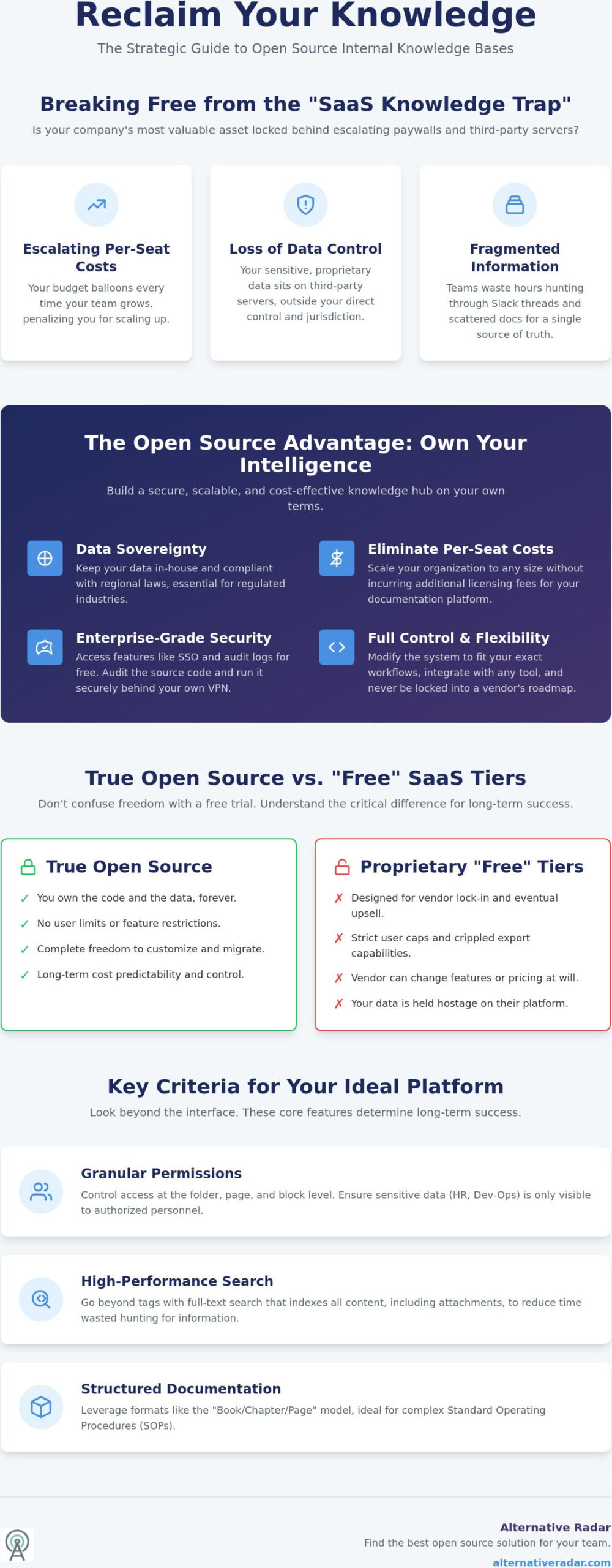
Your company’s most valuable asset, its collective intelligence, is likely locked behind a per-seat paywall that grows more expensive every time you hire a new team member. It’s frustrating to watch your documentation budget balloon while your sensitive data sits on third-party servers you don’t actually control. You’ve likely experienced the daily friction of hunting through Slack threads and scattered Google Docs just to find a single, up-to-date SOP. Finding the right internal knowledge base software open source solution allows you to reclaim data sovereignty and build a high-velocity “single source of truth” that scales without the licensing headache.
You deserve a system that fits your specific developer workflows rather than forcing you to adapt to a vendor’s rigid structure. We’ve done the heavy lifting by testing and comparing the most robust self-hosted platforms available in 2026. This guide provides a clear look at how these tools handle everything from AI-powered search to enterprise-grade permissions. You’ll discover which platforms offer the best balance of feature density and ease of maintenance, helping you move from fragmented information to a streamlined, secure repository for your entire organization.
Key Takeaways
- Reclaim data sovereignty and eliminate rising per-seat SaaS costs by moving your documentation to a self-hosted model.
- Identify the best internal knowledge base software open source solution for your team size using our objective comparison of enterprise-grade permissions and search capabilities.
- Streamline your organizational hierarchy by leveraging structured formats like the “Book/Chapter/Page” model, which is ideal for complex standard operating procedures.
- Calculate the true cost of ownership for self-hosting versus managed deployments to ensure your technical resources aren’t overextended by maintenance requirements.
- Follow a proven migration roadmap to transition from legacy tools while preventing the content decay that causes most internal documentation projects to fail.
What Is Internal Knowledge Base Software and Why Go Open Source?
An internal knowledge base (IKB) is a private, digital library designed to house an organization’s collective intelligence. Unlike a public help center, an IKB stores sensitive information such as standard operating procedures (SOPs), internal technical documentation, and proprietary onboarding materials. It acts as the backbone of your operations, ensuring that every team member has access to the same verified information without needing to ping a colleague for help. It’s the difference between a team that guesses and a team that executes with precision.
In 2026, many organizations are experiencing “SaaS Fatigue,” a state of exhaustion caused by rising subscription costs and the loss of control over company data. Moving toward an internal knowledge base software open source solution addresses this by providing a platform that you own entirely. This transition allows you to move away from fragmented documentation stored in Slack or Google Drive and into a centralized, searchable repository that resides on your own infrastructure. By removing the per-seat licensing model, you can scale your documentation efforts without worrying about the next invoice.
Security is the most compelling reason to choose open source. Proprietary tools often gate essential security features like Single Sign-On (SSO) or advanced audit logs behind expensive “Enterprise” tiers. Open-source solutions give you these tools for free, allowing you to secure your intellectual property according to your own standards. You can audit the source code, run the software behind a VPN, and ensure that your most valuable company secrets never sit on a third-party server. This level of transparency is impossible with closed-source vendors.
The Strategic Advantage of Data Sovereignty
Controlling your database is critical for companies in regulated sectors like fintech or healthcare where data residency is a legal requirement. Data sovereignty ensures your information stays subject to the laws of your specific jurisdiction rather than a vendor’s home country. Beyond compliance, there’s a clear financial incentive. By hosting your own platform, you avoid the compounding costs of per-user monthly fees. This shift is part of a larger trend toward popular open source business software 2026, where smart teams prioritize long-term efficiency over temporary convenience.
Open Source vs. Free Tiers of Paid Software
Don’t confuse true open-source software with the “Free” tiers of SaaS products. Proprietary free versions are often designed to create vendor lock-in by restricting user counts or export capabilities. Once you’re committed, the vendor can raise prices or remove features at will. True open-source tools provide the full code, giving you the freedom to migrate or modify the system as needed. Regarding legal frameworks, the AGPL license requires that any modifications made to the software’s code must be made public if the software is used to provide a service over a network.
Key Criteria for Evaluating Internal Documentation Tools
Choosing the right platform requires looking beyond the interface. While aesthetic appeal matters, the underlying architecture determines whether your documentation becomes a “single source of truth” or a neglected digital graveyard. You must prioritize permission-based access control. Sensitive departmental data, such as HR payroll processes or secure dev-ops credentials, should never be visible to the entire company. A robust system allows for granular permissions at the folder, page, and even block level to ensure that only authorized personnel can view or edit specific content.
Search functionality is your next priority. In a massive repository, tag-based navigation eventually fails. You need high-performance full-text search that indexes the content of every document, including attachments. Effective search reduces the time employees waste hunting for information, which is a primary driver for adopting internal knowledge base software open source solutions. Before committing, analyze how the tool integrates with your current communication stack. If your team lives in Slack or Microsoft Teams, your knowledge base should ideally push updates or allow for quick queries directly within those channels.
Evaluating the trade-off between “Technical Debt” and “Financial Debt” is essential for long-term sustainability. Proprietary SaaS tools represent financial debt; they are predictable but expensive monthly liabilities that scale poorly with headcount. Open-source tools represent technical debt; they require server maintenance, security patches, and manual updates. However, following open source principles often leads to better long-term flexibility and community-driven security improvements. If you’re looking for a curated list of tools that balance these needs, you can explore our software comparison guides to see which fits your technical capacity.
User Authentication and Security
For teams exceeding 20 people, LDAP and Single Sign-On (SSO) support are non-negotiable requirements. Manually managing users is both a security risk and a significant administrative burden. Your internal knowledge management system must also provide detailed audit logs. You need to know exactly who accessed what information and when they made changes. Ensure the software supports Multi-Factor Authentication (MFA) within its core code rather than as a paid plugin to maintain a high security posture without hidden costs.
Editor Experience: Markdown vs. WYSIWYG
The writing experience dictates organizational adoption rates. Developer-heavy teams often prefer Markdown-based tools because it mirrors their coding environment and allows for seamless version control. Conversely, non-technical departments like HR or Finance require a visual “What You See Is What You Get” (WYSIWYG) editor. Choosing a hybrid internal knowledge base software open source tool that supports both input methods ensures that every department contributes to the ecosystem without a steep learning curve. This inclusivity prevents documentation silos and keeps your knowledge base current across all business units.
Top Open Source Internal Knowledge Base Tools for 2026
Selecting the right internal knowledge base software open source platform depends heavily on your team’s technical literacy and organizational structure. While massive corporations might still lean on MediaWiki for its unmatched ability to handle millions of pages and high-complexity taxonomies, lean startups often find its interface too cumbersome. Instead, modern teams prioritize design and ease of use to encourage adoption. Whether you’re managing a small engineering group or a multi-departmental enterprise, the goal remains the same: reducing information silos and ensuring your team can find answers quickly. These tools also integrate effectively with various slack alternatives, allowing for a seamless flow of information across your preferred communication stack.
Best for Structured SOPs: BookStack
BookStack stands out for its deliberate simplicity and intuitive organizational model. It uses a “Library” metaphor—Books, Chapters, and Pages—that mimics physical documentation. It’s perfect for standard operating procedures (SOPs) because it provides a familiar hierarchy that requires almost zero training for new hires. Beyond its organization, BookStack includes built-in drawing tools and a robust image manager, making it easy to create visual guides without leaving the editor. For IT teams, the installation is straightforward; it’s highly optimized for Docker, allowing you to deploy a production-ready instance in minutes.
Best for Modern Teams: Outline
If your team is accustomed to the sleek, block-based interface of Notion, Outline is the premier open-source alternative. It focuses on real-time collaborative editing and a fast, minimal UI that gets out of the way. One distinctive feature is its strict requirement for an external OIDC (OpenID Connect) provider. While some might see this as a setup hurdle, it’s actually a strategic security choice that ensures your internal knowledge remains protected by your existing identity management system. This makes it a top contender for teams that prioritize a modern user experience without sacrificing enterprise-grade security standards.
The Developer Choice: Wiki.js
Wiki.js is the most versatile internal knowledge base software open source tool for technical organizations. Its standout feature is “Git Sync,” which allows you to bidirectionally sync your documentation with a Git repository. This provides developers with a familiar version control workflow and serves as an automated off-site backup. The platform supports an extensive range of storage backends, including PostgreSQL, MySQL, and MariaDB, giving you full control over your data stack. Its modular architecture is fundamentally future-proof because it allows you to toggle specific features on or off as your organization’s needs evolve, keeping the interface clean and the performance high.
Deployment Strategies: Self-Hosted vs. Managed Open Source
Deciding where your internal knowledge base software open source instance lives is as critical as the software choice itself. You must weigh the “True Cost of Ownership” (TCO) against your internal technical capacity. While the source code is free, the infrastructure isn’t. Self-hosting requires a continuous investment in server resources, security monitoring, and manual software updates. To simplify this lifecycle, most modern teams rely on Docker containers. Using Docker allows you to package the application with all its dependencies, ensuring it runs identically on a local dev machine or a production cloud server without compatibility issues.
The biggest objection to self-hosting is the risk of service interruptions. Ensuring zero-downtime during updates is a significant hurdle for smaller IT teams. To solve this, you should adopt a blue-green deployment strategy or use container orchestration tools. By spinning up a new version of your wiki alongside the old one and switching traffic only after the new instance is verified, you ensure your team’s “single source of truth” remains accessible 24/7. This level of reliability is essential when your documentation serves as the backbone of your daily operations. To ensure your team stays informed when these internal systems face downtime, implementing a monitoring and status page solution like StatusPulse can provide real-time visibility into your infrastructure’s health.
When to Self-Host on Private Infrastructure
Private infrastructure is the logical choice for high-security industries like FinTech and HealthTech. When your documentation contains proprietary algorithms, secure network maps, or sensitive processing workflows, keeping that data within your own virtual private cloud (VPC) is a non-negotiable requirement. For a 100+ person team, a virtual private server with 2-4 vCPUs and 8GB of RAM typically provides sufficient headroom for high-concurrency search and editing. However, you must implement automated daily backups and a documented disaster recovery plan. If your server fails, your team shouldn’t lose years of collective intelligence. For more deployment insights, compare enterprise software infrastructure options to see what fits your budget.
The Case for Managed Open Source Hosting
If your organization doesn’t have a dedicated DevOps engineer, managed open-source hosting offers a smart middle ground. You get the benefits of data portability and open-source licensing without the sysadmin headache. Many vendors provide one-click installs, managed security patches, and automated scaling for a flat monthly fee. This approach allows your team to focus on content creation rather than server maintenance. It’s a strategic way to deploy internal knowledge base software open source while maintaining high uptime and professional-grade security. If you’re still exploring your options, check out our complete guide to finding software alternatives for your specific tech stack to ensure a perfect fit.
Implementing Your Knowledge Base: Culture Over Code
Technology provides the framework, but human habits provide the value. Industry research indicates that 70% of knowledge bases fail not because of technical limitations, but due to “Content Decay.” This occurs when information becomes obsolete, unverified, or impossible to find, leading employees to revert to asking questions in Slack. To prevent this, you must treat your internal knowledge base software open source deployment as a living project rather than a one-time setup. Transitioning to a “Documentation First” culture is essential; if a process isn’t documented in the wiki, it shouldn’t be considered a finalized process.
Success requires a human element. Adopting the “Knowledge Champion” model ensures that documentation remains accurate over time. Assign specific owners to different departments or sections within your hierarchy. These champions are responsible for verifying that their sections are current and relevant. They act as the first line of defense against information rot, ensuring that new hires aren’t learning outdated procedures that could lead to operational errors or security vulnerabilities.
Migration Strategies from Legacy Systems
Avoid the temptation to “lift and shift” every document from Google Docs or Confluence. Use the migration as a mandatory pruning phase. Identify high-value SOPs and technical guides for immediate transfer while archiving obsolete files that no longer serve the business. Most internal knowledge base software open source tools provide scripts or plugins for importing Markdown, HTML, and Word files. When mapping permissions, replicate your organizational chart within the new hierarchy to ensure that sensitive data remains restricted to the correct departments from day one.
Maintaining Engagement and Accuracy
Retention depends on consistency. Set up automated reminders within your platform to prompt authors to review their articles every six months. You can also gamify the process by recognizing top contributors during team meetings or using “verified” badges for highly accurate documentation. These small incentives drive the high-velocity participation needed to keep the system useful. If you’re looking to expand your self-hosted ecosystem further, you can discover more open source CRM software comparisons to find the best tools to round out your business stack.
Future-Proof Your Team’s Intelligence
Transitioning to an internal knowledge base software open source platform is a strategic move that pays dividends in data security and long-term cost efficiency. You’ve seen how tools like BookStack and Outline provide the structural integrity needed for complex SOPs while maintaining a modern user experience. By prioritizing data sovereignty and establishing a “Knowledge Champion” model, you protect your company’s intellectual property from both vendor lock-in and internal content decay. The right deployment strategy ensures your documentation remains a high-velocity asset rather than a technical burden.
Making the right choice requires more than just looking at a feature list. You need to understand how these tools fit into the 2026 tech landscape. We provide an objective analysis of open-source versus proprietary licenses across detailed comparisons of 500+ software tools. Explore the best open-source alternatives for your business on Alternative Radar to find the exact configuration your team needs to scale effectively. Start reclaiming your documentation today. With the right foundation, your team’s collective knowledge becomes a permanent asset rather than a scattered liability.
Frequently Asked Questions
Is open-source knowledge base software actually free for businesses?
Yes, the source code for these platforms is free to use under various open-source licenses, but you must account for infrastructure and maintenance costs. While you eliminate per-user subscription fees, you’ll still pay for server hosting, security certificates, and storage. Some developers also offer paid “Enterprise” editions that include advanced features like priority support or specialized plugins not found in the community versions.
How do I migrate my existing documentation from Confluence to an open-source tool?
Migration usually involves exporting your Confluence data as HTML or Markdown and using an import script provided by your new platform. Tools like BookStack and Wiki.js have specific documentation for handling Confluence exports to minimize formatting loss. It’s often best to perform a pilot migration with a single space to verify that internal links and media attachments transfer correctly before moving your entire library.
Which open-source knowledge base has the best mobile experience for remote teams?
Outline offers the most refined mobile experience because its interface is built with a mobile-first, responsive design. It functions as a Progressive Web App (PWA), which allows remote employees to access, search, and edit documents from any smartphone browser with high speed. This responsiveness ensures that field technicians or traveling executives can retrieve critical SOPs without the layout breaking or the navigation becoming unusable.
Can I use an open-source knowledge base for both internal and external documentation?
You can certainly manage both internal and external content within a single instance by using granular permission settings. Most platforms allow you to designate specific folders or “books” as public-facing while keeping the rest of the repository locked behind an employee login. This dual-purpose setup is efficient for maintaining product manuals for customers alongside the private internal processes used to build those products.
Do I need a dedicated developer to maintain a self-hosted wiki?
How does open-source knowledge base software handle data backups?
Backup procedures are typically handled at the database and file system level, often using automated scripts that push data to S3-compatible cloud storage. Some modern tools also offer “Git Sync” features, which automatically push your documentation changes to a private GitHub or GitLab repository. This creates a redundant, version-controlled copy of your entire knowledge base that can be restored quickly in the event of a primary server failure.
What is the best open-source alternative to Notion for internal docs?
Outline is widely considered the best alternative for teams that enjoy Notion’s block-based editor and minimalist aesthetic. It provides a similar “slash command” writing experience and real-time collaboration features without the proprietary restrictions. For teams that prioritize a fast, modern UI and want to avoid the complexity of traditional wikis, Outline provides the most comparable experience to current SaaS leaders.
Is self-hosting a knowledge base more secure than using the cloud?
Self-hosting is significantly more secure for organizations that need to keep sensitive intellectual property off third-party servers. By deploying internal knowledge base software open source on your own private infrastructure, you can wrap the entire system in your corporate VPN and firewall. This setup ensures that your documentation is never exposed to the public internet, providing a level of data sovereignty that most cloud-based SaaS providers cannot match.