
Is your team’s productivity being throttled by a subscription bill? While Asana remains a dominant force, many small teams find themselves trapped by restrictive user caps and high monthly costs for basic collaboration tools. You shouldn’t have to sacrifice workflow efficiency just to stay within a tight budget. Finding the right free asana alternatives in 2026 is no longer about settling for less; it’s about identifying which “free-forever” plan actually aligns with your specific operational needs.
We’ve done the heavy lifting so you don’t have to. In this guide, we compare the top-rated project management tools that offer genuine value without a price tag. You’ll discover which platforms provide unlimited users, where you can find the most generous automation limits, and how to leverage modern AI features without upgrading to a premium tier. From ClickUp’s unlimited task structure to Trello’s streamlined board system, we provide a clear, objective breakdown of the 2026 software landscape to help you make a smarter, faster choice for your team.
Key Takeaways
- Identify the shift in 2026 freemium models to distinguish between restrictive trial versions and genuine, feature-rich project management solutions.
- Evaluate the top 5 free asana alternatives using specific metrics for user limits, storage capacity, and task visualization.
- Consider open-source or self-hosted platforms to maintain total control over your data and avoid future subscription price increases.
- Use the “Three-User Rule” to test plan scalability and verify data portability before committing your team’s workflow to a new tool.
- Streamline your search by using Alternative Radar’s objective comparison filters to find a tool that matches your team’s unique technical requirements.
Navigating the 2026 Landscape of Free Asana Alternatives
Asana has long defined the standard for task management, but by 2026, many users are feeling the weight of the “Asana Tax.” This isn’t a literal government levy; it’s the cumulative cost of upgrading to access features that modern teams consider fundamental, such as advanced reporting or custom fields. For a small agency or a growing startup, these monthly per-user fees can quickly spiral into a significant overhead. A genuine free Asana alternative is a tool providing task, timeline, and collaboration features without mandatory licensing fees.
The software market has bifurcated. On one side, you have cloud-based SaaS providers offering “freemium” tiers designed to convert you into a paying customer. On the other, self-hosted open-source solutions provide total control but require your own server infrastructure. To navigate these choices effectively, it helps to consult a detailed Comparison of project management software to see how feature sets differ across licensing models. Choosing between a managed cloud service and a self-hosted platform depends entirely on your team’s technical resources and privacy requirements.
Why Teams Are Outgrowing Asana’s Free Tier
The “Personal” plan offered by Asana serves individual users well, but it often stumbles when applied to team dynamics. The most common pain point is the restriction on dashboards and automation. In 2026, manual task updates are an efficiency killer. Legacy platforms often gate their most powerful workflow triggers behind high-tier paywalls, making it difficult for teams to scale without a credit card. When basic reporting is locked away, project managers lose the visibility they need to stay on schedule.
Additionally, the rise of generative AI has changed expectations. While Asana offers robust AI capabilities, they’re frequently bundled into premium packages. Teams now seek free Asana alternatives that include native AI assistance for task summaries or document drafting as part of the base experience. If you’re forced to pay a premium just to use modern efficiency tools, the “free” plan isn’t actually serving your business.
The 2026 Standard for Free Project Management
What should you expect for zero dollars today? The bar has moved significantly. A competitive free plan in 2026 must include more than just a simple to-do list. To maintain productivity, your chosen tool should provide:
- Unlimited tasks and projects to prevent workflow interruptions.
- Basic Gantt or Timeline views, which were once considered “premium” but are now standard for planning.
- Full mobile accessibility for distributed or hybrid teams.
- A baseline of AI credits for automated sorting or content generation.
Selecting the right platform requires a strategic approach to feature analysis. For a deeper dive into the selection process, read our guide on Finding the Best Alternative to Popular Software in 2026: The Complete Guide. Understanding these standards ensures you don’t trade one set of limitations for another when you switch platforms.
Top 5 Free Asana Alternatives for Collaborative Teams
Finding a tool that doesn’t lock your entire team out after the third invite is the primary challenge in 2026. Many platforms market themselves as free but actually function as restricted trials for solo users. We’ve identified five free asana alternatives that offer genuine utility for collaborative environments without requiring an immediate budget allocation. These tools prioritize accessibility, ensuring that small teams can maintain momentum without hitting a paywall during their first week of operation.
ClickUp: The “Everything” App with a Generous Free Tier
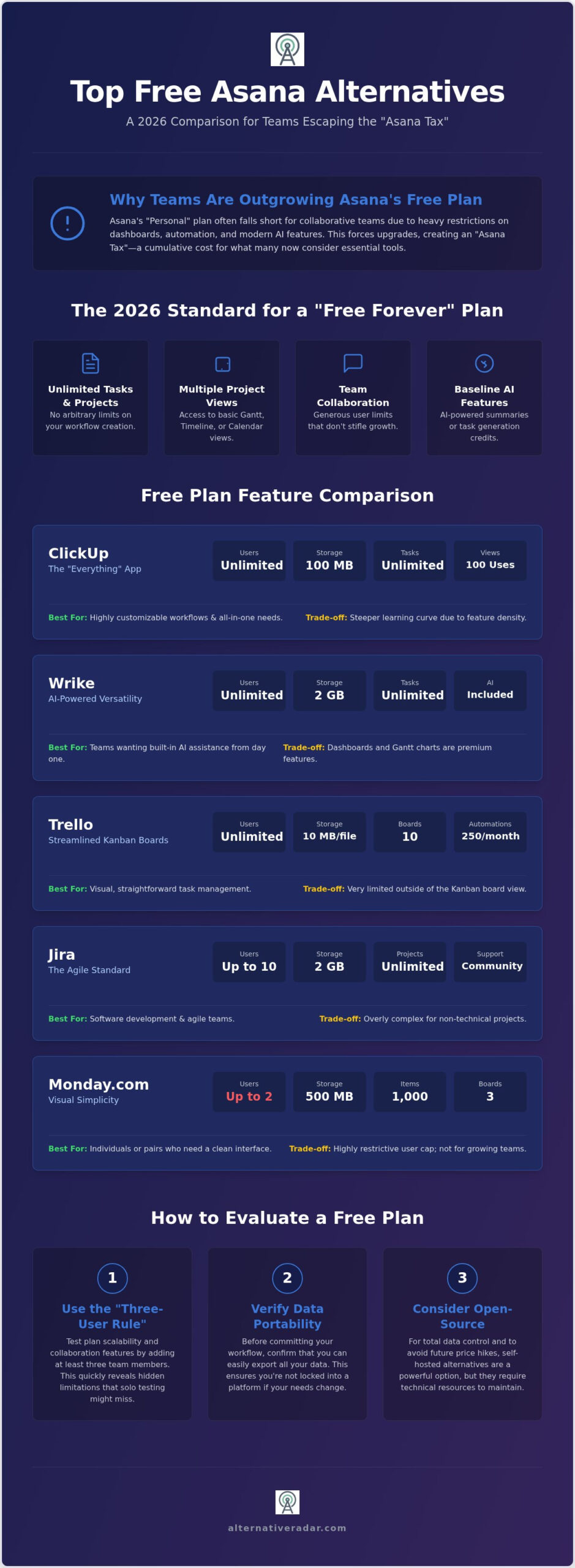
ClickUp remains a top contender because it doesn’t cap your user count. You can bring your entire team on board for zero cost, which is a rarity among SaaS leaders. The “Free Forever” plan includes unlimited tasks and 100MB of storage. By July 2026, ClickUp has optimized its interface to handle the complexity that once slowed down new users. While you’re limited to 100 monthly uses of advanced views like Gantt and Timeline, the core list and board views remain unrestricted. The primary trade-off is the learning curve; the high level of customizability requires an initial time investment to set up your ideal workflow.
Monday.com: Best for Visual Simplicity
If your team prioritizes a clean, intuitive interface over deep feature density, Monday.com is the logical choice. However, the free tier is strictly for small operations. It limits you to two users and 200 items. This makes it an excellent choice for partnerships or solo founders who need a polished “Board” view similar to Asana’s. You get 500MB of storage, but you’ll miss out on automations and integrations. It’s a specialized tool for those who value aesthetics and ease of use over raw power.
Trello: The King of Kanban Simplicity
Trello continues to dominate the Kanban space by offering unlimited users and cards on its free plan. It’s the go-to for teams that want to start moving tasks immediately without a complex onboarding process. You can manage up to 10 boards per workspace. While it lacks native Gantt charts or custom fields in the free version, the 2026 “Power-Up” ecosystem allows for essential integrations that bridge some of these gaps. Automation is capped at 250 runs per month, which is sufficient for most lightweight workflows.
Notion and Jira: Specialized Powerhouse Options
Notion is the ideal choice for documentation-heavy teams. The free plan allows for unlimited pages and blocks for individuals, with up to 10 guests for collaboration. It’s perfect for building a shared knowledge base alongside your tasks. Conversely, Jira holds a 42.09% market share for a reason. Its free tier supports up to 10 users and provides the most robust agile reporting features available for zero cost. To see how these limits fluctuate in real-time, you can use Alternative Radar to monitor current software licensing trends.
Mobile performance across these tools has reached parity in 2026. Each offers native iOS and Android apps that sync instantly. ClickUp and Trello lead in mobile task creation speed, while Monday.com provides the most readable high-level project overviews on smaller screens. Choosing between them depends on whether you value user capacity, visual clarity, or deep technical reporting.
Open Source and Self-Hosted Alternatives to Asana
Cloud-based SaaS tools are convenient, but they often change their terms or raise prices without warning. For teams prioritizing data sovereignty and long-term cost stability, open-source software represents the ultimate hedge. These free asana alternatives allow you to host the application on your own servers; this effectively removes user caps and feature gates that typically plague freemium models. While you trade convenience for maintenance, the reward is a system that grows with your team without increasing your monthly burn rate. To see how these fit into a broader corporate strategy, consult our Popular Open Source Business Software 2026: The Strategic Enterprise Guide.
Self-hosting requires technical expertise. You’ll need to manage updates, security protocols, and regular backups. However, for many organizations, this is a small price to pay for the “Total Freedom” of never receiving a surprise subscription bill. It empowers your IT department to customize the environment to your exact specifications rather than waiting for a third-party developer to release a requested feature.
Taiga: The Agile Scout’s Choice
Taiga is a standout among free asana alternatives for teams who find Asana too generic. It excels in Scrum and Kanban workflows, making it a favorite for software development projects. The community edition is free to download and install on your own infrastructure. Unlike many SaaS tools, Taiga includes built-in issue tracking and wiki features by default. This integration eliminates the need for multiple disconnected apps; it streamlines your team’s internal documentation and task management into a single, cohesive environment designed for high-velocity output.
OpenProject: Enterprise Features for Zero Licensing Fees
OpenProject offers a level of depth that rivals Asana’s high-tier enterprise plans. It includes robust portfolio management and resource planning tools that are rarely found in the free tiers of cloud-based competitors. For businesses looking to bridge the gap between project management and client relations, reviewing an Open Source CRM Software Comparison: The Best Alternatives in 2026 can help create a fully integrated, license-free stack. The 2026 Community Edition provides all core project management functions. While some advanced security features are reserved for the paid version, the base platform remains a powerful choice for teams that need heavy-duty planning without the heavy-duty price tag.
Selection Criteria: How to Evaluate a Free Plan in 2026
Selecting a project management tool based solely on a zero-dollar price tag is a common mistake that leads to workflow fragmentation. To find sustainable free asana alternatives, you must look beyond the initial signup. We recommend applying the “Three-User Rule”: if the platform’s core features feel restrictive or cluttered when just three team members are active, the plan is likely a glorified trial rather than a long-term solution. Scalability must be baked into the free tier to ensure your team doesn’t outgrow the software within months.
Data portability is another critical factor often overlooked during the honeymoon phase. You need to verify how easily you can extract your information if the provider changes their terms. A tool that makes it difficult to export your tasks, attachments, and comments is a “data trap.” Ensure the platform supports standard export formats like CSV or JSON. Additionally, examine the security policies. Free cloud providers sometimes offset costs by utilizing metadata; prioritize tools that maintain clear, professional-grade privacy standards even on non-paid tiers.
Integration capabilities determine whether your tool becomes a productivity hub or an isolated island. Check if the free version allows connections to essential services like Slack, Google Drive, or Zapier. Many providers limit the number of active integrations to push users toward a paid upgrade. Before committing, you can compare feature-by-feature breakdowns on Alternative Radar to see which tools offer the most open ecosystems.
The Hidden Costs of “Free” Software
While you aren’t paying a monthly subscription, you are paying in time. Complex tools that require extensive manual configuration can drain hours from your workweek. In 2026, the real cost of free software is often measured in administrative overhead. You must also watch for the “Feature Cliff.” This occurs when a platform allows you to build a complex project only to reveal that the final, essential step, such as generating a report or sharing a link, is locked behind a paywall.
2026 Feature Parity Checklist
To ensure your chosen tool can actually replace Asana, use this checklist to verify essential 2026 functionality. When evaluating free asana alternatives, these three points serve as your primary filter for quality:
- Gantt Charts: Many plans hide timeline views. Verify they are accessible for at least one active project.
- AI Assistance: A modern tool should include basic AI credits for summarizing task threads or drafting descriptions.
- Guest Access: Can you invite clients or external contractors to specific boards without them counting against your user limit?
Finding Your Perfect Match with Alternative Radar
The software market in 2026 moves at a high velocity. Feature sets that are standard today might be gated tomorrow, and a plan that feels generous now could be restricted by next quarter. At Alternative Radar, we act as your digital scout, providing the real-time data you need to find free asana alternatives that actually stick. Adopting a new project management tool isn’t a permanent marriage; it’s a strategic partnership. You must stay agile, acknowledging that the tool serving your team in 2026 might not be the right fit for your 2028 goals.
We recommend a “Pilot Program” approach to any software transition. Instead of moving your entire operation at once, test your highest-priority workflows in a controlled environment. This objective method prevents the sunk-cost fallacy from keeping you tied to a platform that doesn’t deliver. By focusing on utility and precision, you can ensure your team remains productive without being burdened by unnecessary subscription costs.
Leveraging Comparison Tools for Smarter Decisions
Our platform provides granular insight pages that strip away marketing hype. We categorize software by licensing and technical capabilities, allowing you to filter results based on your team’s specific constraints. To build a truly cohesive digital workspace, you should also consider your communication stack. You can find The Best Slack Alternatives for 2026: A Complete Team Communication Guide to ensure your chat and task tools integrate seamlessly. We maintain neutrality through programmatic transparency, ensuring that our comparisons are driven by data rather than external partnerships.
Next Steps: From Discovery to Implementation
Moving from a legacy system like Asana to a new platform requires a structured plan. Don’t let the transition process become a project in itself. Follow these three steps to implement your new workflow quickly:
- Step 1: Audit your current Asana usage. Identify which features you actually use daily. If you don’t use custom fields or advanced reporting, you have a wider range of free asana alternatives to choose from.
- Step 2: Sign up for 2 to 3 free trials. Use our scouted list to pick the tools that match your team size. Don’t overcomplicate this; pick the ones that align with your technical expertise.
- Step 3: Run a 1-week sprint. Move a single, low-stakes project into the new tool. Test the mobile app, check the notification settings, and verify that the automation limits meet your needs.
For small teams under 10 members, ClickUp offers the most robust feature set for zero cost. If you’re a solo founder or a duo, Monday.com provides a superior visual experience that minimizes onboarding time. For those with technical resources, OpenProject remains the gold standard for enterprise-level control without licensing fees. Choose the path that maximizes your efficiency today while keeping your options open for tomorrow.
Take Control of Your Team’s Workflow in 2026
Choosing the right project management tool requires a strategic balance between feature depth and budget constraints. You’ve seen that free asana alternatives like ClickUp and Jira offer robust capabilities for teams, while open-source platforms provide the ultimate hedge against future price hikes. The key is to prioritize data portability and scalability so your workflow remains uninterrupted as you grow. Remember to apply the “Three-User Rule” and run a short pilot program before committing your entire department to a new system.
Don’t let rising software costs dictate your team’s potential. Our platform provides a neutral, advisor-driven perspective to help you cut through the marketing noise. We offer detailed insights on 500+ tools, with data updated daily to reflect 2026 market shifts. To find your next productivity powerhouse and build a more efficient tech stack, explore more objective software comparisons on Alternative Radar. You have the power to choose tools that work for you rather than just following the market leaders. Start your search today and empower your team with the right resources.
Frequently Asked Questions
Is there a truly free alternative to Asana for large teams?
ClickUp is the most prominent cloud-based option for large teams because it doesn’t cap user counts on its free tier. Most other SaaS providers limit you to 2 or 10 members. If you need a solution for hundreds of users without a subscription, self-hosted platforms like OpenProject or Taiga are the only way to avoid per-user licensing fees entirely. These tools provide the infrastructure you need to scale without financial friction.
Can I import my Asana projects into these free alternatives easily?
Most modern project management tools provide dedicated migration wizards to pull data directly from Asana via API or CSV export. ClickUp and Monday.com offer one-click importers that map your tasks, assignees, and due dates automatically. You should always verify if custom fields and attachments carry over. These specific data points are sometimes restricted during the import process on non-paid plans, requiring manual adjustment after the migration is complete.
Do free project management tools include Gantt charts in 2026?
Gantt charts are no longer strictly a premium feature, but they often come with usage caps. In 2026, many free asana alternatives like ClickUp allow limited uses of timeline or Gantt views per month. If you require unrestricted access to complex scheduling, open-source tools like OpenProject include Gantt functionality by default. This avoids the monthly view limits found in cloud-based freemium models and keeps your long-term planning accessible at all times.
What is the best open-source Asana alternative for developers?
Taiga is widely considered the best open-source choice for development teams due to its native support for Scrum and Kanban. It provides built-in issue tracking and a wiki, which are essential for technical documentation. Developers also favor it because the community edition can be self-hosted. This allows for deep integration with existing CI/CD pipelines without external data dependencies, giving your technical team total control over their environment.
Are free project management apps secure enough for business data?
Most reputable free tools use the same AES-256 encryption and TLS protocols as their paid counterparts to protect data in transit and at rest. The primary security difference lies in administrative controls like Single Sign-On (SSO) or advanced audit logs, which are typically gated. If your business handles highly sensitive information, a self-hosted open-source solution provides the highest level of security by keeping all data within your own controlled infrastructure.
How do these free tools make money if they don’t charge me?
These platforms operate on a freemium model where the free tier acts as a high-quality lead generator for their paid enterprise plans. They monetize by upselling advanced features, higher storage limits, or automation credits to growing teams. Some providers also generate revenue through programmatic advertising or affiliate-linked recommendations. This strategy ensures the base product remains accessible to small users while funding the development of more complex, paid features.
Does ClickUp really offer more for free than Asana?
ClickUp generally provides a more feature-rich free tier than Asana, specifically regarding user capacity and visualization. While Asana limits its free plan to basic list and board views with a strict user cap, ClickUp allows unlimited users and provides limited access to Gantt and Mind Maps. For teams that need high-level planning tools without an immediate upgrade, ClickUp is one of the most robust free asana alternatives available in the current market.
Which free tool has the best mobile app in 2026?
Trello maintains the most efficient mobile experience for quick task updates and Kanban management due to its low-friction interface. If you need a more visual overview of project health on the go, Monday.com’s 2026 mobile update offers superior readability for complex boards. Both apps provide reliable offline sync and push notifications. This ensures your team stays aligned regardless of their physical location or device, maintaining productivity outside of the traditional office environment.