Photoshop was never built for the web, yet designers spent two decades forcing it to behave like a UI tool. If you’re struggling with performance lag on high-resolution projects or feeling the weight of monthly subscription fatigue, you’re likely ready for a change. Finding a specialized photoshop alternative for web design isn’t just about cutting costs; it’s about adopting a workflow that handles components and prototyping natively. You need a tool that works at the speed of your ideas, not one that requires a dozen plugins just to export a clean SVG.
We’ve done the heavy lifting to scout the market and filter out the marketing hype. You’ll discover how the 2026 landscape has shifted, from Figma’s dominant collaborative features to the disruptive “free for everyone” model of the Affinity suite. This comparison focuses on efficiency and developer collaboration, ensuring you select a platform that minimizes friction and maximizes your output. It’s time to stop paying for legacy features you don’t use and start using a toolkit designed for the modern internet.
Key Takeaways
- Modern web design requires a shift from static raster layers to dynamic, vector-based component systems that align with actual CSS development.
- Prioritize tools with native prototyping and global symbols to ensure your designs remain consistent across multiple screen sizes and resolutions.
- Selecting a dedicated photoshop alternative for web design reduces performance lag and eliminates the need for expensive, third-party handoff plugins.
- Evaluate the trade-offs between subscription-based leaders like Figma and one-time fee hybrids like Affinity Designer to optimize your software budget.
- Streamline your transition by mapping existing Photoshop shortcuts to your new toolkit and auditing which legacy files truly require migration.
Why Designers are Moving Away from Photoshop for Web Design in 2026
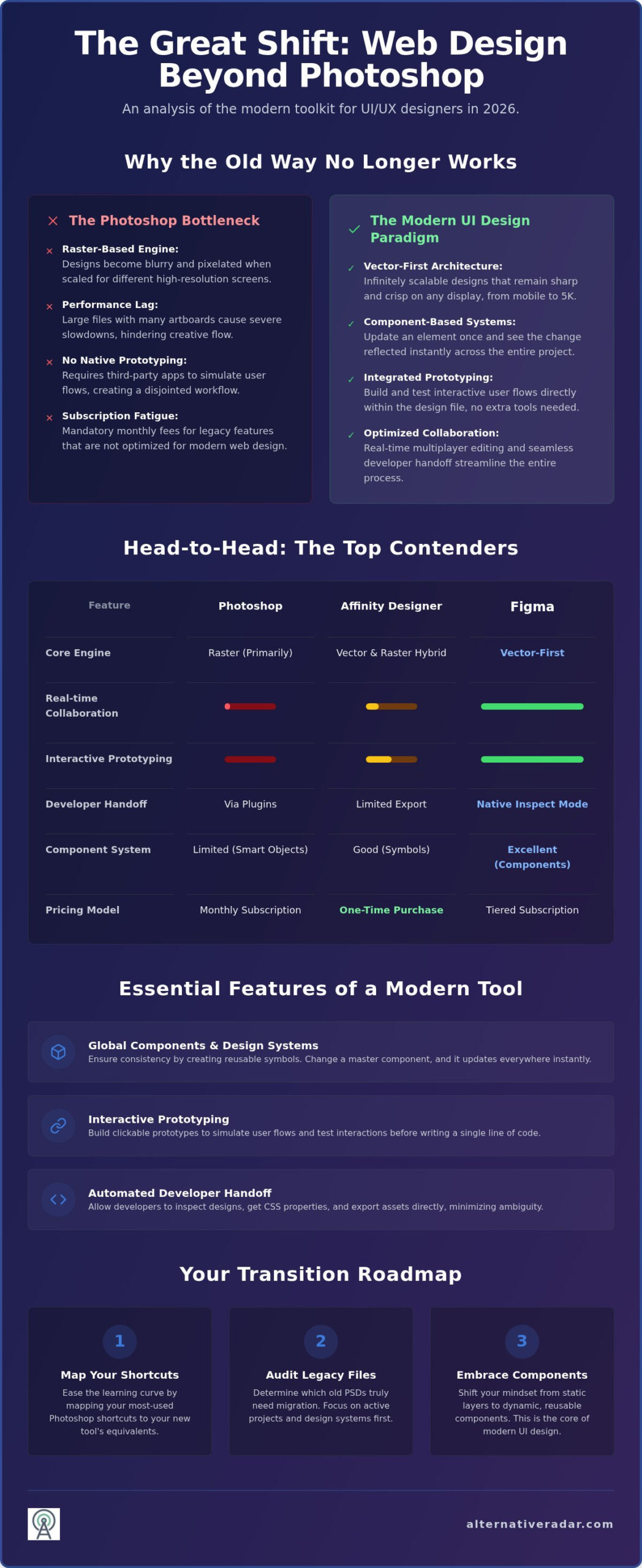
For decades, Photoshop was the default choice for digital design by sheer lack of competition. But the web isn’t a static canvas anymore. It’s a collection of fluid, interactive components. Using a raster editor for modern UI is like building a skyscraper with a paintbrush. It’s fundamentally the wrong tool for the scale and complexity of today’s responsive projects. As we move through 2026, the industry has realized that “good enough” is no longer acceptable for high-velocity production cycles.
The friction begins with performance. Managing 50 or more artboards in a single PSD file often results in severe system lag, even on high-end workstations. High-resolution web projects require speed and agility. When your software stutters every time you move a layer or toggle a group, your productivity dies. Then there’s the Adobe Creative Cloud subscription model. Many professionals are tired of the “rented software” treadmill and the rising costs associated with it. This subscription fatigue is a primary driver for teams seeking a more cost-effective photoshop alternative for web design that offers specialized features without the heavy monthly tax.
The Limitations of Raster Editing for UI/UX
Photoshop relies on pixels. While this is perfect for photography, it fails in a world of varying screen densities. When you scale a raster image, it loses clarity. Vectors, however, stay crisp on 4K and Retina displays. You can explore a comprehensive list of graphics editors to see how different engines handle these data types. Beyond scalability, Photoshop lacks native prototyping. You can’t easily link screens or simulate user flows without jumping into another application. This creates massive file size bloat and slows down real-time collaboration between team members.
The Rise of Specialized Design Ecosystems
Modern workflows prioritize “Design Systems” over individual page layouts. You need to update a primary brand color once and see that change reflected across 200 screens instantly. Photoshop doesn’t handle global components or symbols with the necessary grace. Newer tools focus on developer handoff, allowing engineers to inspect CSS properties directly from the design file. This eliminates the guesswork for front-end teams and reduces the need for manual redlining. A “UI-first” design philosophy is a vector-driven approach to digital interfaces that prioritizes component reusability and interactive logic over static image manipulation. This shift makes finding a dedicated photoshop alternative for web design a necessity for any team that values speed and precision in their delivery.
Essential Features for a Modern Web Design Alternative
Static image editors struggle to meet the demands of a high-density digital world. A viable photoshop alternative for web design must utilize a vector-based architecture. Pixels are fixed, but vectors are mathematical, ensuring your layouts remain sharp on everything from a smartphone to a 5K monitor. Modern workflows also rely on component-based design. If you change a button’s primary color in one library, it should update across every screen in the project instantly. This global synchronization saves hours of manual labor and prevents the visual drift common in older file formats.
Efficiency also depends on how you validate and share your work. Top-tier modern web design tools now include built-in prototyping. Instead of explaining how a menu should slide, you can animate it directly within the app. This allows for immediate user flow testing before a single line of code is written. Once the design is approved, developer handoff features allow engineers to inspect spacing, typography, and hex codes without needing a separate documentation file. This direct inspection reduces implementation errors and speeds up the sprint cycle.
Key features to look for include:
- Vector-first architecture for resolution independence across all devices.
- Global components to maintain design consistency through symbols.
- Interactive prototyping to simulate user experiences without external apps.
- Automated handoff for seamless and accurate developer collaboration.
Collaboration and Cloud Integration
Distributed teams can’t wait for file uploads or “v2_final” attachments. Real-time multi-player editing lets multiple designers and stakeholders edit the same document simultaneously. This transparency eliminates bottlenecks and ensures everyone works from the latest source of truth. Version control systems built into the cloud allow you to roll back changes with a click, providing a safety net that local PSD management simply doesn’t offer.
Compatibility with Legacy Photoshop Files
Transitioning shouldn’t mean starting from zero. High import fidelity for PSD files is essential for professionals with years of archived assets. Your new tool must handle layered files while offering modern export options. While Photoshop excels at PNGs, a specialized photoshop alternative for web design prioritizes SVG and WebP to keep site speeds fast. Integrating raster assets into a vector tool lets you maintain your creative history while upgrading your technical capabilities. If you’re overwhelmed by the options, you can compare specialized design stacks to find the right fit for your specific team.
The Top Photoshop Alternatives for Web Design: A Comparative Analysis
As your digital scout, Alternative Radar has vetted the current market to identify which platforms actually deliver on their efficiency promises. Choosing the right photoshop alternative for web design requires balancing cost, collaboration, and technical features. While Photoshop excels at image manipulation, the tools below focus on the unique demands of digital interfaces. We’ve utilized a data-driven comparison of leading platforms to categorize these tools by their specific utility for your workflow.
UI-Focused Tools: Figma and Penpot
Figma remains the industry standard for collaborative UI/UX design. Its pricing structure as of August 2026 ranges from a free Starter plan to enterprise tiers at $90 per seat monthly. The platform’s strength lies in its extensive ecosystem of community plugins and its robust component logic. However, for teams prioritizing privacy or open-source values, Penpot has emerged as a formidable competitor. Unlike many proprietary tools, Penpot uses SVG as its native file format. This creates a 1:1 relationship between design assets and production code, making it a favorite among developers. It provides the same real-time multi-player editing as Figma but without the constraints of vendor lock-in.
The Creative Powerhouses: Affinity and Sketch
Affinity Designer offers a unique advantage through its “Personas” system. You can switch between raster and vector workspaces instantly without leaving the application. Following Canva’s acquisition, the core Affinity application is now free to use, though AI-powered features require a Canva Pro subscription at $144 annually. This hybrid approach makes it the best professional-grade option for designers who still need heavy image editing alongside their vector layouts. Sketch continues to serve the Mac-only ecosystem, maintaining a loyal base through its refined performance and recent updates to its cloud collaboration features. For those looking to escape the Adobe model, these tools often provide a lower long-term cost than a standard Creative Cloud subscription.
For quick edits without the need for a full installation, Photopea serves as a reliable utility. It’s a browser-based tool that handles PSD files with high fidelity. While it lacks the deep prototyping features found in Figma, it’s ideal for extracting assets or making minor adjustments on the fly. It’s free to use with ads, or $5 per month for a premium experience. Whether you need an open-source framework like Penpot or a hybrid powerhouse like Affinity, there is now a specialized photoshop alternative for web design for every specific project requirement.
Transitioning Workflows: How to Switch Without Losing Productivity
Switching your primary design tool doesn’t have to stall your current projects. The key to a successful transition is a structured audit of your existing project load. Don’t waste time migrating every legacy PSD file. Instead, archive completed work and only move active projects or core brand assets into your new photoshop alternative for web design. This prevents your new workspace from becoming cluttered with outdated layers and non-essential data.
Mastering the new shortcut paradigm is the next hurdle. While the muscle memory for “Cmd+J” or “Cmd+T” is deep, most modern UI tools allow you to remap shortcuts or use familiar patterns. Spend your first few days mapping Photoshop habits to the new interface. Once you’re comfortable, focus on setting up your first Design System. Define your grids, typography scales, and color variables early. This foundational work ensures that as you build new screens, you’re utilizing the efficiency of the tool rather than fighting against it.
The PSD Migration Checklist
When you move complex files, the “PSD fidelity gap” is where most errors occur. Smart objects and complex layer effects don’t always translate perfectly into vector environments. Use specialized conversion tools to turn raster layers into clean vector components where possible. You must also verify color profile consistency. Photoshop often defaults to various color spaces, but web design requires a strict sRGB or P3 workflow. Double check that your new tool’s canvas settings match your intended output to avoid dull or shifted colors in production.
- Audit layers: Flatten non-essential groups before importing to reduce file weight.
- Rebuild Smart Objects: Convert these into native components or symbols for better scalability.
- Check Gradients: Raster-based gradients may need to be redrawn as CSS-friendly vector gradients.
- Verify Assets: Ensure all linked images are correctly embedded or relinked in the new environment.
Bridging the Knowledge Gap
You don’t need to start from scratch. Most UI tools share 80% of the same core logic as Photoshop. The primary difference is the shift from a “layer-first” mindset to a “component-first” workflow. To speed up your learning curve, leverage free community resources and video tutorials specifically designed for “Photoshop switchers.” You can also use Alternative Radar to compare specific feature sets and shortcut maps before you commit to a full migration. Onboard your development team early by showing them the new handoff process, as their feedback on asset exports and CSS inspection will be critical to your long-term success. Before you finalize your move, explore curated software comparisons to ensure your chosen stack meets your team’s specific technical requirements.
Finding Your Ideal Design Stack with Alternative Radar
Identifying a photoshop alternative for web design is the first step toward a more efficient workflow, but it shouldn’t be the last. Alternative Radar acts as your digital scout, navigating the dense SaaS market to find tools that prioritize utility over brand name. We provide a centralized hub for comparing free, open-source, and premium options side-by-side. This allows you to evaluate whether a specialized UI tool or a broader design suite fits your specific project needs. Transparency in pricing and technical specifications allows you to make logic-based decisions rather than following market trends blindly. We’ve done the hard work of searching and testing so you can focus on the creative process.
Our platform functions as a high-quality filter for information. We categorize items using clear technical labels and licensing classifications, ensuring the language remains accessible to both freelancers and professional buyers. By focusing on precision and utility, we help you avoid the bloat of traditional software suites. You can quickly compare features, pros, and cons to find the exact tool that fits your current hardware and future goals.
Curating Your Professional Toolkit
Your creative workflow likely requires more than just a vector editor. You might still need high-end image manipulation for assets that a dedicated UI tool can’t handle. Check out our guide to the best free alternatives to photoshop for non-UI tasks like advanced photo retouching or complex raster effects. Managing the business side of a design agency is equally important for long-term growth. We offer a detailed open source crm software comparison to help you track client projects and leads without recurring monthly fees. Our platform features comparison filters that let you find tools based on your specific OS requirements and licensing preferences. This ensures your chosen stack is compatible with your hardware and your budget.
Stay Ahead of the Curve
The software landscape moves at a high velocity. We monitor how programmatic display advertising influences software discovery, helping you separate genuine innovation from aggressive marketing campaigns. By joining the Alternative Radar community, you get access to the latest software audits and performance benchmarks. We specialize in discovering high-value, specialized tools that market leaders often overlook. This commitment to objective research keeps your creative stack lean and your production speeds high. Don’t let software limitations dictate your creative output. Ready to upgrade your workflow? Explore our full directory of design alternatives today.
Modernize Your Creative Workflow
The transition from raster-based legacy tools to specialized UI platforms is no longer optional for teams that value speed and precision. You’ve seen how a dedicated photoshop alternative for web design eliminates performance bottlenecks and bridges the gap between design and development. By adopting a component-first mindset, you ensure your projects remain scalable and consistent across all digital environments. Whether you choose a collaborative cloud leader or an open-source powerhouse, the goal is to spend less time fighting your software and more time building better user experiences.
Selecting the right tool requires an objective look at your specific technical needs and budget constraints. We’ve vetted the market to provide detailed pros and cons for every major platform, including comprehensive open-source and free lists updated for 2026 industry standards. Find the perfect Photoshop alternative for your workflow on Alternative Radar and take control of your creative stack. It’s time to leave the limitations of the past behind and build for the future with confidence.
Frequently Asked Questions
Can I open PSD files in Figma or Affinity Designer?
Yes, both platforms support PSD imports with varying degrees of fidelity. Affinity Designer maintains high compatibility with layered Photoshop files, making it an excellent photoshop alternative for web design when you need to preserve complex raster effects. Figma also allows PSD imports, but it often requires manual cleanup to ensure layers translate into optimized vector components suitable for UI development.
Is there a free Photoshop alternative that works in the browser?
Photopea is the most capable browser-based option for designers who need a familiar interface without an installation. It supports PSD, Sketch, and XD files natively and is free to use with ad support. While it lacks the deep prototyping features of dedicated UI tools, it’s an efficient utility for quick asset edits and file conversions on any operating system.
What is the best open-source alternative to Photoshop for web design?
Penpot is the leading open-source choice for modern web design because it uses SVG as its native file format. This creates a transparent workflow between designers and developers that proprietary tools can’t always match. For traditional raster editing and image manipulation, GIMP 3.2.4 remains the standard open-source utility for professionals who require deep photo editing capabilities without licensing fees.
Do I need a vector-based tool for web design or is raster still okay?
Vector-based tools are essential for modern web design to ensure crisp rendering on high-resolution 4K and Retina displays. Raster editors like Photoshop are still useful for photo retouching, but they fail to provide the scalability needed for responsive layouts. Using a vector-first photoshop alternative for web design allows you to export clean SVGs and manage design systems that adapt to any screen size.
How do Photoshop alternatives handle developer handoff?
Modern alternatives like Figma and Penpot include native inspection panels that allow developers to extract CSS, spacing, and assets directly. This eliminates the need for manual redlining or third-party plugins that were often required in older Photoshop workflows. Developers can click any element to see exact hex codes and dimensions, which significantly reduces implementation errors during the coding phase.
Can I use Affinity Designer as a one-time purchase replacement for Photoshop?
As of 2026, the core Affinity Designer application is free to use for all users following its integration into the Canva ecosystem. While the professional-grade vector and raster tools are accessible without a purchase, advanced AI-powered features require a Canva Pro subscription at $144 annually. This model provides a high-value entry point for designers who want to escape the traditional Adobe subscription treadmill.
What happened to Adobe XD in the 2026 design landscape?
Adobe XD has largely been phased out or moved to maintenance mode as Adobe shifted its focus toward Figma and Adobe Express. Most design teams have migrated to more robust collaborative environments that offer better version control and component management. If you’re still using XD, transitioning to a more active ecosystem is recommended to ensure long-term compatibility with modern browser standards.
Are web-based design tools as fast as desktop applications?
Modern web-based tools utilize technologies like WebAssembly and WebGL to deliver performance that rivals native desktop applications. Figma and Penpot handle complex design files with hundreds of artboards without the significant lag often found in traditional raster editors. While desktop apps still have an edge in offline access, the speed of browser-based collaboration has made them the preferred choice for distributed design teams.