
The Creative Cloud is no longer a mandatory tax for digital professionals. In 2026, the most efficient workflow isn’t found in a single bloated subscription, but in an unbundled toolkit of specialized apps. Finding a professional free adobe illustrator alternative is the first step toward breaking free from rising monthly fees and forced cloud integrations that drain your system resources. You’ve likely realized that paying for a suite of tools you rarely use is an outdated way to work.
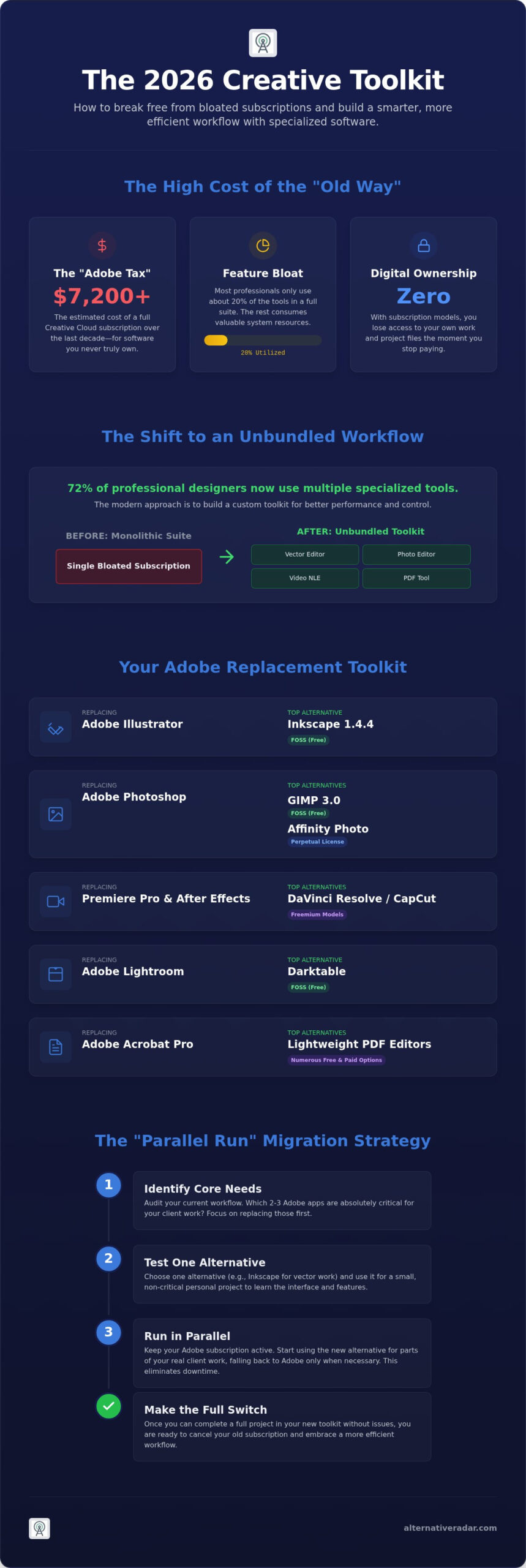
We’ve tested every option to show you how to replace Adobe apps with powerful open-source or one-time purchase software. This guide provides a clear roadmap for transitioning to a leaner creative environment without sacrificing quality. Research shows that 72% of professional designers now use multiple SVG editors to handle different tasks, moving away from monolithic software suites. We’ll compare the latest AI-integrated tools like Vectr and desktop options like Inkscape 1.4.4 to help you build a smarter toolkit. It’s time to stop following market leaders and start choosing the software that actually fits your specific workflow needs.
Key Takeaways
- Calculate the real cost of the “Adobe Tax” and learn why unbundling your apps leads to a more efficient, resource-light workflow.
- Discover a professional free adobe illustrator alternative like Inkscape to maintain high-quality vector output without the monthly subscription fee.
- Explore high-performance video editing with DaVinci Resolve and CapCut to replace Premiere Pro and After Effects for professional results.
- Transition your photo and document management to specialized tools like Darktable and lightweight PDF editors for better system performance.
- Master the “Parallel Run” migration strategy to switch software suites without interrupting your active client projects or productivity.
Why 2026 is the Year to Ditch the Adobe Subscription Model
The “Adobe Tax” has reached a breaking point for many creative professionals. If you’ve maintained a full Creative Cloud subscription for the last decade, you’ve likely paid over $7,200 for software you’ll never actually own. This financial drain is compounded by significant feature bloat. Most designers only utilize about 20% of the tools available in these massive suites; the rest is often background noise that consumes system resources. In 2026, the shift toward a modular, unbundled workflow is no longer just a cost-saving measure. It’s a strategic move for better performance and data sovereignty.
Finding a high-quality free adobe illustrator alternative is often the catalyst for this change. Instead of relying on a single vendor, pros are building custom toolkits where each piece of software is chosen for its specific utility. This approach prevents you from being locked into an ecosystem that forces unwanted cloud integrations or automatic AI training on your private project files. Niche software has surpassed Adobe in specific workflows by focusing on speed and precision rather than trying to be everything for everyone.
The Problem with Creative Cloud in 2026
Subscription fatigue has moved from a minor annoyance to a genuine business risk. When you stop paying, you lose access to your working files. This lack of digital ownership is unacceptable for many agencies today. Additionally, mandatory cloud features often compromise privacy and slow down local rendering by hogging CPU cycles. Because of these factors, finding the best alternative to popular software has become a professional necessity for anyone looking to secure their digital assets and maintain control over their production environment.
The Licensing Revolution: SaaS vs. Perpetual vs. FOSS
The market has responded to subscription fatigue by reviving the “one-time purchase” or perpetual license model. Brands like Serif have seen massive growth by offering professional tools without recurring fees. On the other side, Free and Open Source Software (FOSS) has matured significantly. Tools like Inkscape 1.4.4 provide a robust free adobe illustrator alternative that is safe for enterprise use because it respects user privacy and data standards. When evaluating these options, consult a comparison of vector graphics editors to ensure the technical specifications meet your specific production requirements. Understanding the difference between “Source Available” and true “Open Source” is critical for ensuring long-term project stability and legal compliance within your organization.
Professional Design: Top Alternatives for Photoshop, Illustrator, and InDesign
Replacing the core Adobe design triumvirate requires a shift in how you view software licensing. The 2026 creative market has moved toward specialized tools that excel in specific niches rather than trying to replicate the entire Creative Cloud. You don’t need a single suite to produce professional-grade work; you need a focused set of tools that communicate effectively with one another. By selecting software based on functional utility, you can eliminate the subscription burden while actually improving your rendering speeds and file portability.
Raster Graphics and Photo Editing
The release of GIMP 3.0 has fundamentally changed the open-source landscape. It finally provides the modern, single-window UI and non-destructive editing features that professionals have demanded for years. With its advanced AI plugin support, GIMP handles complex masking and generative fill tasks that were previously exclusive to paid software. If you prefer a one-time purchase model, Affinity Photo remains the industry standard Photoshop alternative. It offers superior performance on modern hardware, managing massive RAW files without the lag often seen in cloud-heavy applications. For a deeper look at your options, check our deep dive into the best free alternatives to photoshop.
Vector Illustration and Layout
Inkscape 1.4.4 has solidified its position as the leading free adobe illustrator alternative for 2026. This SVG-native editor provides professional-grade node editing and path operations that rival Illustrator’s core features. It’s particularly effective for web designers who need clean, lightweight code. For designers who need a browser-based option, Vectorpea offers a familiar interface for quick, account-free edits on any machine. If you’re looking for a more integrated experience, Affinity Designer allows you to switch between vector and raster workspaces within a single document. This “Persona” system eliminates the friction of moving assets between separate apps for shading or texturing.
Desktop Publishing and the Canva Factor
Moving away from InDesign is now easier thanks to Serif Affinity Publisher and the open-source Scribus. Affinity Publisher has gained significant ground in the publishing industry by allowing users to edit images and vector assets directly within the layout through its StudioLink technology. Scribus remains the go-to for professionals who require a completely free, CMYK-ready tool for high-end print production. However, for high-volume marketing assets, browser-based tools like Canva have become a professional necessity. While they don’t replace deep vector design, they excel at collaborative speed and template management for social media teams.
If you’re still weighing your options, explore our latest software comparisons at Alternative Radar to find your ideal match. Selecting the right tool depends entirely on whether you prioritize open-source flexibility or a polished, one-time purchase experience.
Motion and Sound: Replacing Premiere Pro, After Effects, and Audition
The transition from Adobe’s video suite to independent alternatives is driven by a need for stability and specialized performance. While Premiere Pro remains a legacy standard, its reliance on a subscription model has pushed many editors toward DaVinci Resolve. This shift isn’t just about cost. It’s about performance. On 2026 hardware, DaVinci Resolve’s GPU-accelerated engine consistently outperforms Premiere in 8K playback and complex color grading tasks. For those who prioritize speed for social media, CapCut Desktop has become a professional necessity. It streamlines the “rough cut to export” pipeline by automating repetitive tasks that take hours in traditional editors.
Just as you might seek a free adobe illustrator alternative for your vector work, finding a standalone motion graphics tool like Cavalry provides a more specialized experience than a bloated all-in-one suite. Cavalry offers procedural animation capabilities that far exceed After Effects for data visualization and generative art. For high-end visual effects, Fusion is now integrated directly into DaVinci Resolve. This node-based workflow is more logical for complex compositing than the layer-based approach used by Adobe, allowing for more efficient project management in professional environments.
Video Editing and Color Grading
DaVinci Resolve’s free tier is essentially a full-featured studio, lacking only a few high-end AI tools and specific hardware acceleration found in the Studio version. In 2026, AI-driven scene removal and auto-captioning are standard features that significantly reduce manual labor. If you require a completely open-source solution, Kdenlive is the leading choice. It is lightweight and highly stable on Linux and Windows, making it ideal for editors who want a tool that respects their system resources and privacy without forced cloud check-ins.
Audio Engineering and Podcasting
Reaper has solidified its position as the ultimate Digital Audio Workstation (DAW) for professionals who value customization over marketing hype. It’s incredibly efficient, with a tiny installation footprint that belies its massive power. For those focused on simple podcasting or voice-over work, Audacity remains the go-to FOSS option. The 2026 updates have finally introduced non-destructive editing and improved privacy controls, addressing long-standing community concerns. Using popular open source business software for your media asset management ensures that your audio and video libraries remain organized and accessible across different platforms without proprietary lock-in.
Building a modular media suite allows you to pick the best-in-class tool for each specific task. This approach ensures you aren’t paying for features you don’t use while gaining the specialized power of tools like Resolve or Reaper. It’s a smarter way to work that prioritizes your time and your hardware’s efficiency.
Document and Photo Management: Alternatives for Acrobat and Lightroom
The administrative side of a creative business is often where the “Adobe Tax” hides most effectively. While many designers start their unbundling journey by searching for a free adobe illustrator alternative to secure their vector assets, the real savings often come from replacing high-cost document management tools like Acrobat Pro. In 2026, paying a monthly fee just to sign a PDF or organize a photo library is an avoidable efficiency drain. You can maintain a professional photography and document workflow using tools that prioritize local performance and data ownership.
Professional Photography Workflows
Lightroom’s dominance in the photography market is being challenged by tools that offer superior color science and faster tethering. Capture One has become the preferred choice for high-end studio photographers who value its precise color editor and reliable hardware integration. For those seeking a powerful, open-source RAW developer, Darktable provides a robust alternative. It uses a non-destructive editing pipeline and supports over 600 camera models. Managing large libraries doesn’t require a subscription either. DigiKam allows you to handle metadata, tagging, and folder organization for hundreds of thousands of images without cloud-based lock-in.
PDF Editing and Document Standards
The “Pro PDF Trap” is the belief that you need Acrobat for basic editing, signing, and compression. In reality, browser-based editors handle 90% of these tasks with better speed. For local editing, PDF24 and LibreOffice Draw are hidden gems. LibreOffice Draw allows you to manipulate PDF text and layouts as if they were standard vector objects. If you need a universal document viewer with advanced annotation features, Okular is the standard for 2026. It supports everything from PDFs to EPubs and allows for complex document markups without a premium account.
Security and digital signatures have also moved toward open standards. You don’t need Adobe Sign to verify professional contracts; many open-source tools now support legally binding signatures that comply with international regulations. Just as a free adobe illustrator alternative like Inkscape provides professional vector output, these document tools ensure your business remains compliant and efficient. To build a completely independent toolkit, explore the curated software recommendations at Alternative Radar. Transitioning your document management to these specialized tools eliminates the final hurdle in unbundling the Creative Cloud.
The Migration Blueprint: How to Switch Without Losing Productivity
Unbundling the Creative Cloud requires more than just canceling a subscription; it demands a systematic migration strategy. Start by auditing your actual tool usage. Most professionals realize they only utilize a small fraction of the Adobe suite, making a free adobe illustrator alternative like Inkscape a logical starting point for vector tasks. By identifying which apps are essential for your daily output, you can prioritize which replacements to master first. This audit prevents you from overcomplicating your new toolkit with tools you don’t actually need.
The “Parallel Run” strategy is the most effective way to switch without risking client deadlines. Maintain your Adobe subscription for one final billing cycle while committing to complete one new project entirely within your chosen alternatives. This creates a safety net where you can fall back on legacy tools if you hit a technical wall, while simultaneously building the muscle memory needed for your new workflow. Most modern alternatives offer shortcut mapping presets that mimic Adobe’s layout, which significantly reduces the time spent searching for familiar commands.
Ensuring File Interoperability
Handling legacy files is the primary concern for most designers. While .AI and .PSD are proprietary formats, tools like Affinity Photo and Designer use advanced import engines to preserve layers, blend modes, and editable text. For vector handoffs, the SVG standard has become the universal language of 2026. When preparing files for print, the PDF/X-4 standard ensures that your layouts remain consistent regardless of the software used to create them. As you reorganize your digital infrastructure, refer to our open source crm software comparison to ensure your client management tools are as efficient as your design stack.
Building Your Modular Creative Suite
A streamlined workflow in 2026 centers on your “Big Three”: photo editing, vector design, and layout. Integrating these with a self-hosted cloud like Nextcloud allows for seamless collaboration without the privacy concerns of forced cloud syncing. Because these alternatives often use fewer system resources, you may find that your current hardware performs better than it did under the weight of the Creative Cloud. Finalize your transition by verifying that your new software supports your specific hardware acceleration needs, such as Metal or OpenCL, to maximize rendering speeds. This modular approach ensures your creative suite is built for your specific needs rather than a corporate bundle.
Build Your Independent Creative Future
Unbundling the Creative Cloud is a strategic decision that prioritizes your financial freedom and hardware efficiency. By replacing the “Adobe Tax” with a modular toolkit, you gain ownership over your project files and eliminate the bloat of unused features. Transitioning to a professional free adobe illustrator alternative like Inkscape or a high-performance editor like DaVinci Resolve ensures your production quality stays high while your costs drop. You don’t have to follow market leaders when specialized tools offer better utility for your specific workflow.
Making smarter choices requires clear, objective information. Our Digital Scout team has already done the heavy lifting by testing these tools against real-world production standards. You can explore the full directory of software alternatives on Alternative Radar to compare 500+ software tools side-by-side. Every review is updated for 2026 software trends to ensure your transition is seamless and logic-driven. It’s time to take control of your creative environment and build a workflow that truly belongs to you.
Frequently Asked Questions
Is there a 100% free equivalent to the entire Adobe Creative Cloud?
No single application replaces the entire suite, but a combination of specialized open-source tools can cover every function. You must build a modular toolkit using software like GIMP for photos, Inkscape for vectors, and DaVinci Resolve for video. This unbundled approach requires more initial setup but eliminates monthly fees while giving you full ownership over your software environment.
Can I open Adobe Photoshop (.psd) files in GIMP or Affinity Photo?
Yes, GIMP 3.0 and Affinity Photo both feature robust .psd import engines that preserve layers, masks, and most blend modes. You may encounter issues with proprietary Adobe smart objects or specific live filters, which often require rasterization before they appear correctly in non-Adobe software. For standard layering and editing, the transition is usually seamless.
Are Adobe alternatives powerful enough for professional print work?
Professional print production is fully supported by modern alternatives that handle CMYK color spaces and bleed settings with precision. Tools like Scribus and Affinity Publisher are industry standards for layout, while Inkscape 1.4.4 manages the SVG-to-PDF/X-4 pipeline effectively. These tools ensure your files meet the technical requirements of high-end commercial printers.
Does Affinity Photo have AI features like Adobe’s Generative Fill?
Affinity has integrated several AI-powered features in its 2026 updates that focus on local hardware acceleration rather than cloud processing. While it lacks the exact cloud-based Generative Fill found in Photoshop, its AI selection brushes and object removal tools provide professional results. These features work entirely on your local GPU, which protects your privacy and works without an internet connection.
What is the best Adobe alternative for iPad users in 2026?
iPad users should prioritize the Affinity Suite and Procreate for a professional workflow. These applications are built specifically for the iPadOS architecture and offer a more fluid experience than ported desktop software. They provide desktop-grade features that rival the mobile versions of Illustrator and Photoshop, making them the primary choice for mobile designers.
How do I handle Adobe Fonts and Typekit when I cancel my subscription?
You lose access to the Adobe Fonts library immediately after your subscription ends. To avoid broken layouts in your project files, replace these with open-source options from Google Fonts or Font Squirrel before you cancel. Always verify your licensing agreements to ensure you have the permanent right to use specific typefaces in your existing commercial projects.
Is DaVinci Resolve really better than Premiere Pro for video editing?
DaVinci Resolve is widely considered superior for color grading and GPU-based system stability. While Premiere Pro has a massive plugin ecosystem, Resolve’s node-based workflow and integrated Fusion engine offer a more streamlined experience for high-end post-production. The choice often depends on whether you prefer a layer-based or node-based editing philosophy.
Can I use open-source software like Inkscape for commercial client projects?
Yes, you can use any open-source tool for commercial work without legal restrictions or royalty obligations. Using a free adobe illustrator alternative like Inkscape allows you to create and sell designs to clients under a GPL license. This is a safe and professional choice that protects your business from the licensing audits often associated with proprietary software suites.