Stop paying for a Creative Cloud subscription that drains your budget before you even click a tool. In 2026, the average cost for basic editing software remains around $7 per month, yet subscription fatigue is driving more creators to seek independence from Adobe. You probably recognize the frustration of paying for unused features or watching a browser tool crash during a high-res export. Finding free photo editing software like photoshop shouldn’t force you to tolerate steep learning curves or lose compatibility with professional PSD formats.
We’ve tested the market to identify zero-cost alternatives that actually support a professional workflow. This comparison bypasses the hype to focus on tools that provide a familiar UI and the power to execute complex edits without system lag. We’ll examine how the GIMP 3.2.4 release compares to browser-based leaders like Photopea and specialized creative engines like Krita 5.3.3. By the end of this guide, you’ll know exactly which platform matches your technical needs and hardware capabilities. We act as your digital scout, filtering through the noise so you can get back to creating.
Key Takeaways
- Identify the non-negotiable features like non-destructive editing and advanced masking that separate professional tools from basic filters.
- Select the ideal free photo editing software like photoshop by evaluating the trade-offs between browser-based convenience and local open-source power.
- Align your choice with your specific output, prioritizing RAW handling for photography or AI-driven generative tools for social media design.
- Reduce the learning curve by remapping muscle memory through custom shortcut configurations and importing legacy Photoshop brush libraries.
- Regain control over your creative assets by moving away from “rented” software models toward platforms that prioritize professional file compatibility.
Breaking the Subscription Cycle: Why Free Photoshop Alternatives Are Better in 2026
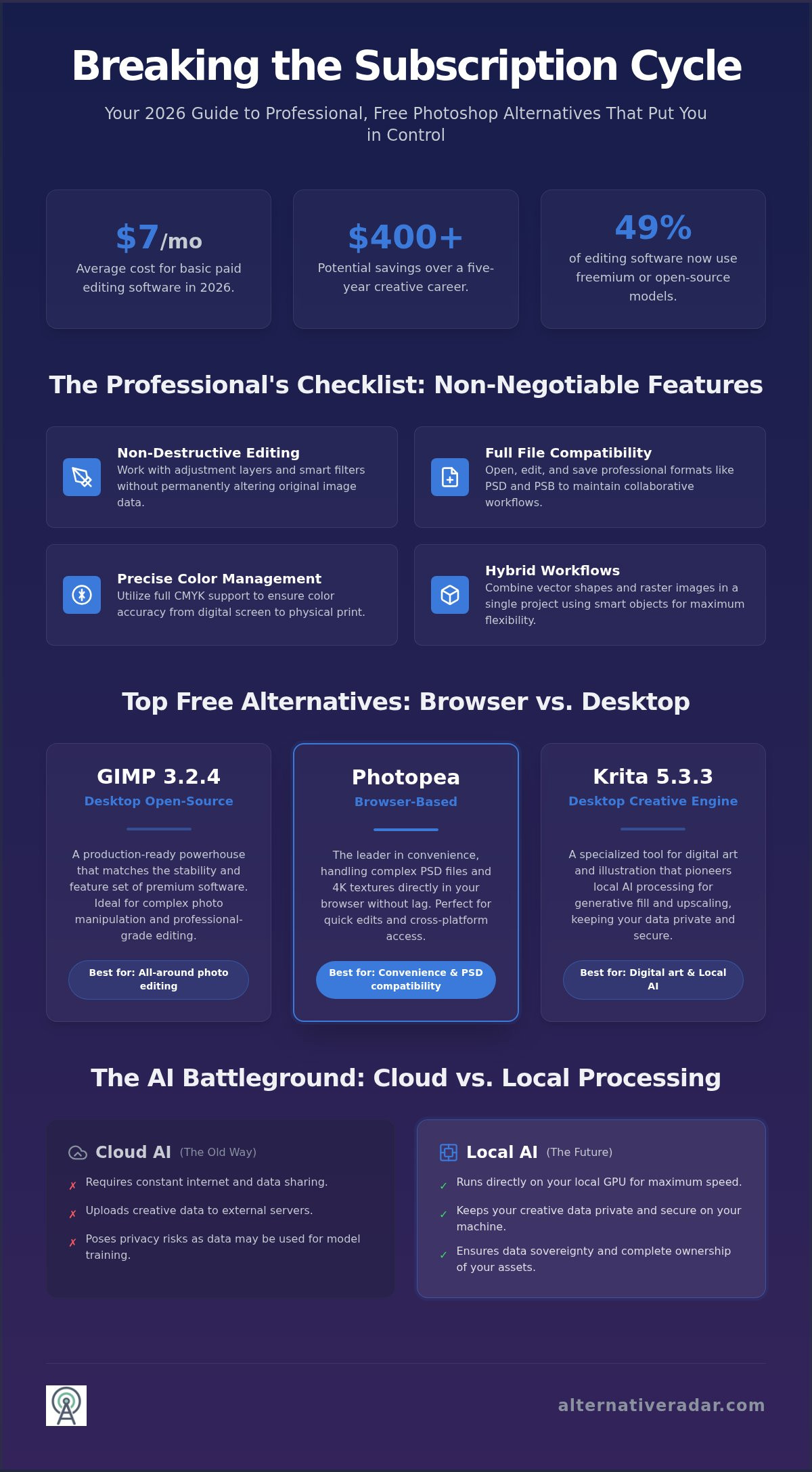
Subscription fatigue isn’t just a buzzword; it’s a financial reality for creators in 2026. Adobe’s “rented software” model means if you stop paying, you lose access to your own work. This dilemma has pushed a significant portion of the market toward alternatives. Roughly 49% of photo editing software options now utilize a freemium or open-source model, allowing users to bypass these recurring costs. This year marks a turning point because the technical gap has finally closed. Open-source development has accelerated. Browser-based engines like Photopea can now handle 4K textures and complex PSD files without the lag that plagued earlier web tools. We act as your digital scout, identifying the moments when these free tools actually outperform the industry leaders in efficiency.
The Cost of Creative Cloud vs. The Power of Free
Switching to a non-subscription model offers substantial long-term savings. When you consider that the average cost for basic editing software is around $7 per month, the cumulative savings over a five-year career exceed $400. The old myth that “free” means “unprofessional” has crumbled. In April 2026, the release of GIMP 3.2.4 demonstrated that open-source tools can match the stability and feature set of premium counterparts. These platforms are no longer just hobbies; they are production-ready environments. Modern open-source creative suites provide a professional-grade environment that prioritizes user ownership over recurring corporate revenue.
Switching is about more than just money. It’s about data sovereignty. Using a tool you own allows you to maintain permanent access to your source files without a corporate gatekeeper. We’ve seen a surge in users migrating to these platforms to escape the “locked-in” feeling of the Creative Cloud ecosystem.
The Role of Local AI in Modern Alternatives
AI is the latest battleground for free photo editing software like photoshop. While Adobe pushes cloud-based AI that requires constant connectivity and data sharing, free alternatives are shifting toward local AI processing. Tools like Krita 5.3.3 now integrate generative fill and AI upscaling that runs directly on your GPU. This provides a clear privacy advantage. Your creative data stays on your machine rather than being uploaded to a server to train external models. Alternative Radar prioritizes tools with transparent AI policies because we believe your data belongs to you. Choosing a tool with local AI ensures you maintain speed and security without the hidden cost of data harvesting. This shift toward decentralized intelligence makes 2026 the year professional editors can finally ditch the cloud.
Core Features of a True Photoshop Equivalent
Demand more from your software than just basic filters. Transitioning to free photo editing software like photoshop requires a robust architecture that supports high-stakes production. Non-destructive editing remains the non-negotiable standard for professionals. If an editor cannot handle adjustment layers or smart filters without permanently altering pixels, it fails as a viable replacement. Professional workflows rely on the ability to roll back changes at any stage of the design process, ensuring that your original data remains intact while you experiment with complex compositions.
Compatibility shouldn’t be a barrier to your productivity. A true equivalent must support PSD and PSB file formats to ensure legacy projects remain accessible. This technical bridge allows you to collaborate with teams still using Adobe products without losing layer data or masking precision. Additionally, professional output requires precise color management. Tools that offer full CMYK support enable you to produce print-ready designs that maintain color accuracy from screen to press. Without these core technical foundations, a tool is merely a toy, not a professional asset.
Vector and Raster Hybrid Workflows
Handling vector shapes within a raster environment is a critical efficiency driver. This hybrid approach allows scalable logos and UI elements to coexist with detailed textures in a single file. Leading alternatives now manage smart objects with high precision, allowing you to embed files that update across multiple layouts automatically. This saves hours of manual labor during large-scale revisions. For a deeper dive into which specific tools handle these complex hierarchies best, see our guide on Best Free Alternatives to Photoshop in 2026.
Plugin Ecosystems and Customization
The strength of an editor often lies in its community. Active ecosystems provide a constant stream of brushes, gradients, and scripts that extend core functionality. In 2026, Python and Script-Fu have effectively replaced Photoshop Actions for automating repetitive tasks. This extensibility is where free editors now close the AI gap that previously favored premium software. Recent updates to GIMP 3.2.4 and Krita 5.3.3 include sophisticated AI plugins for background removal and texture generation that run locally on your machine. You can browse our curated reviews at alternativeradar.com to find the most stable plugin configurations for your specific hardware and operating system.
Top 5 Free Alternatives: Browser vs. Desktop Software
Identifying free photo editing software like photoshop requires looking past “freemium” traps that hide professional layers and masking behind a paywall. Many competitors suggest tools like Canva or Pixlr, but these platforms often lack the granular control required for high-end production. We’ve vetted these tools based on their ability to handle production-heavy tasks without requiring a credit card or a monthly subscription. As your digital scout, Alternative Radar has tested each of these for stability and feature parity in 2026.
- Alternative Radar: This is your essential discovery hub. Before committing to a download, use this platform to compare the latest 2026 version stability, licensing classifications, and AI plugin compatibility across the entire open-source landscape.
- Photopea: The undisputed king of browser-based clones. It mirrors the Adobe interface so closely that your muscle memory remains intact. It’s ad-supported, but all professional features remain accessible for free.
- GIMP: The open-source powerhouse with a massive 2026 UI overhaul. Version 3.2.4, published on April 17, 2026, finally brings the modernized, single-window experience users have demanded for years, alongside high-bit-depth processing.
- Krita: Illustrators are abandoning Photoshop for Krita 5.3.3. Released on July 29, 2026, its brush engine is specifically tuned for digital painting and concept art, outperforming Photoshop’s native painting tools.
- Darktable: The professional alternative for RAW photo processing. The August 27, 2026 release of version 5.6.1 offers refined non-destructive workflow management for photographers who need an alternative to Camera Raw.
- Glimpse: A cleaner fork of traditional open-source engines. It provides a streamlined UI for users who find the advanced menus of GIMP 3.2.4 too dense for their daily needs.
Browser-Based Convenience: Photopea and Beyond
Choose a browser editor like Photopea when you need to work across different machines without the friction of a full installation. It’s perfect for quick PSD edits or social media assets. However, browser tools have inherent limitations. They rely heavily on your system’s RAM and browser cache, which can cause lag or crashes on high-res files exceeding 500MB. Check out our Guide to Finding the Best Alternative to Popular Software for more selection tips on managing web-based creative caches.
Desktop Powerhouses: GIMP and Krita
GIMP 3.2.4 offers local performance that rivals Photoshop’s engine, especially for heavy photo manipulation and batch processing. Krita’s brush engine remains superior for digital artists, while GIMP excels at technical editing and design. GIMP requires a standard desktop installation with significant disk space, whereas Krita offers a more flexible dual-release strategy with stable and preview versions available for testing.
Matching Tools to Workflow: Retouching to Digital Art
A single tool rarely satisfies every creative niche. When searching for free photo editing software like photoshop, your specific output dictates the best choice. Photographers require deep RAW handling and non-destructive filters to preserve image data throughout the editing process. Social media marketers prioritize speed, often leaning on templates and AI generative tools to meet high-velocity posting schedules. Meanwhile, web designers demand pixel-perfect accuracy and CSS export features to bridge the gap between design and development. Digital illustrators have the most specialized needs; they focus almost entirely on pressure sensitivity and brush stabilizers to replicate a traditional media feel. Krita remains the clear leader for these artists, offering a dedicated workspace that handles tablet input more fluidly than general-purpose editors.
Photo Retouching and Restoration
Professional retouching depends on the precision of healing brushes and content-aware fills. While GIMP offers powerful cloning tools, Darktable acts as a superior Lightroom/Photoshop hybrid for those managing high-volume RAW libraries. It allows for complex color grading and lens corrections that are mathematically non-destructive, ensuring your original pixels remain untouched. For organizations looking to scale these workflows across teams, our Open Source Business Software Guide provides a roadmap for enterprise-ready creative toolkits. Choosing the right engine ensures that restoration projects maintain archival quality without the overhead of proprietary licenses.
UI/UX and Web Graphics
Efficiency in web design is measured by how quickly an asset moves from the canvas to the code. Photopea remains the fastest way to slice a PSD for developers because it runs in the browser and handles layer styles with extreme accuracy. When evaluating free photo editing software like photoshop for web use, SVG export quality is a critical differentiator. GIMP and Photopea both offer robust path-to-SVG conversions, but Photopea’s ability to generate CSS snippets directly from layer properties gives it an edge for high-velocity design teams. These features allow you to maintain asset integrity across different screen resolutions without manual recalculations.
Finding the right fit requires testing these tools against your actual daily tasks. You can explore our full comparison database to see which editor provides the specific export formats your development stack requires. Don’t settle for a general-purpose tool if your workflow demands specialized precision.
Switching Without Struggle: Transitioning to a New Editor
The biggest hurdle to adopting free photo editing software like photoshop isn’t a lack of features; it’s the friction of re-learning years of muscle memory. When you’ve spent a decade using specific keybindings, a new interface can feel like an obstacle to your productivity. However, modern open-source engines are designed with this transition in mind. By following a structured migration plan, you can minimize downtime and maintain your professional output without the frustration of searching through unfamiliar menus. We’ve mapped out the essential steps to ensure your move away from Adobe is efficient and permanent.
- Step 1: Remap your muscle memory. Don’t try to learn a new language from scratch. Most top-tier alternatives allow you to import or manually configure shortcut schemes that mirror Photoshop’s default keys.
- Step 2: Import your creative assets. You don’t have to abandon your curated brush library. GIMP 3.2.4 and Krita 5.3.3 both support the import of .ABR brush files and custom gradients, allowing you to bring your signature style into your new workspace.
- Step 3: Bridge the gap with UI patches. Projects like PhotoGIMP provide a specific patch for the GIMP engine that reorganizes the toolbox, icons, and keyboard shortcuts to match the Adobe layout exactly.
- Step 4: Audit your legacy library. Use Photopea as a bridge for complex .PSD files that might contain proprietary Adobe features. Once opened, you can simplify layers and export them into formats that your new desktop editor handles with 100% accuracy.
Shortcut Mapping and UI Customization
Customizing your workspace is the fastest way to feel at home in a new program. In Krita 5.3.3, you can switch the entire workspace theme to a “Photoshop Compatible” mode in the settings menu. GIMP 3.2.4 offers a similar level of flexibility, allowing you to dock and group tools into a single-window mode that eliminates the cluttered look of older versions. Essential “Photoshop-to-Alternative” cheat sheets are widely available to help you remap commands like `Ctrl+J` for layer duplication or `Ctrl+T` for transformations. UI familiarity reduces the cost of switching by allowing you to focus on your creative work rather than the technicalities of the software’s architecture.
The Hybrid Approach: Using Multiple Free Tools
You don’t have to find one single tool that does everything. A professional pipeline in 2026 often involves using GIMP for technical photo manipulation and Krita for specialized digital painting or texture work. Managing files between these editors is seamless if you use high-bit-depth TIFFs or the OpenRaster (.ora) format to preserve layer data. If your creative work is part of a larger marketing strategy, you can find more workflow optimizations in our 2026 Programmatic Advertising Guide. Adopting a multi-tool strategy ensures you always have the best engine for the specific task at hand, maximizing your efficiency across the entire production cycle.
Take Control of Your Creative Stack
The transition to free photo editing software like photoshop is no longer a compromise on quality; it’s a strategic move for professional efficiency. By prioritizing tools that offer non-destructive editing and robust PSD compatibility, you eliminate the financial burden of subscription fatigue without sacrificing your creative output. Whether you choose the browser-based speed of Photopea or the local power of GIMP 3.2.4, you’re gaining ownership over your tools and your data. The technical gap has closed, leaving room for a workflow that prioritizes your needs over corporate recurring revenue.
Since 2012, our tech experts have provided objective, data-driven software comparisons to help you navigate these transitions with confidence. We verify every open-source and free-to-use classification so you can focus on building your portfolio instead of managing licenses. Stop renting your creativity and start building a toolkit that belongs to you. Explore all professional software alternatives on Alternative Radar today to find the exact match for your hardware and artistic goals. Your next masterpiece doesn’t require a monthly fee.
Frequently Asked Questions
Is GIMP really as good as Photoshop in 2026?
GIMP 3.2.4 is a production-ready tool for technical editing and photo manipulation. While Photoshop still leads in specific cloud-based AI integration, GIMP’s 2026 UI overhaul and high-bit-depth processing satisfy most professional requirements. It excels in non-destructive workflows and scriptability. The “best” tool depends on whether you prioritize Adobe’s proprietary ecosystem or open-source independence. It’s a reliable choice for those seeking professional results without a monthly bill.
Can I open my Photoshop PSD files in these free alternatives?
Yes, most professional-grade alternatives like Photopea and GIMP provide robust support for PSD and PSB files. Photopea is particularly effective at maintaining complex layer styles and folders directly in the browser. While some proprietary Adobe features like specific Smart Filters may require flattening before export, you can generally transition legacy projects without losing your primary layer data or masking. This ensures your project history remains accessible across different platforms.
Which free photo editor has the best AI features?
Krita 5.3.3 currently offers the most sophisticated local AI integration for artists. It includes generative fill and upscaling plugins that run on your own hardware, ensuring complete data privacy. Photopea also provides impressive web-based AI tools for background removal and object cloning. These features allow you to execute complex edits in free photo editing software like photoshop without sending your data to external servers or paying for additional credits.
Is there a free online Photoshop alternative that doesn’t require a download?
Photopea is the leading browser-based editor that requires no installation or account creation. It mirrors the Photoshop interface and supports professional formats like PSD, XCF, and RAW. It’s an ideal choice for users on restricted systems or those who need to perform quick edits on different machines. Just be aware that performance depends on your browser’s RAM allocation and hardware acceleration for heavy files exceeding 500MB. It’s the most convenient web-based option.
What is the best free alternative to Photoshop for iPad or tablets?
Krita is the most powerful free option for tablets, especially those running Android or Windows-based systems. For iPad users, the options are more limited due to App Store restrictions, but web-based tools like Photopea remain accessible through Safari. These platforms support pressure sensitivity and stylus input, making them viable for mobile digital illustration and on-the-go retouching. They provide a professional experience without the subscription costs associated with mobile versions of premium software.
Are these free tools safe to download and use for business?
Verified open-source projects like GIMP and Darktable are highly secure for enterprise use. Because their source code is public, it undergoes constant auditing by the global developer community. We recommend downloading only from official project domains to avoid repackaged versions containing malware. These tools help businesses eliminate “rented” software costs while maintaining professional security standards and data sovereignty. They are trusted by organizations that prioritize transparency and long-term file access.
Do any free photo editors support CMYK for professional printing?
GIMP 3.2.4 and Krita 5.3.3 both provide professional CMYK support through ICC color profiles. This allows you to soft-proof your designs and ensure color accuracy before sending files to a commercial printer. While some older open-source versions required plugins for CMYK, the 2026 stable releases include these features natively. This makes them suitable for preparing print-ready brochures, posters, and marketing materials. It’s an essential feature for designers working in professional print production.
Can I use Photoshop brushes (.ABR) in GIMP or Krita?
You can import .ABR brush files directly into both GIMP and Krita without third-party converters. This ensures you don’t lose your custom creative toolkit when switching to free photo editing software like photoshop. Simply copy your brush files into the respective “brushes” folder in the software’s preferences directory. Both engines accurately replicate the pressure and tilt settings of original Photoshop brushes, allowing you to maintain your signature style across different platforms.