Paying $839.88 every single year just to maintain access to your own design files isn’t an industry standard; it’s a subscription tax. Searching for the best photoshop alternative often stems from the frustration of Adobe’s rising costs and the heavy hardware demands of their latest AI features. It’s exhausting to manage a monthly bill for tools that feel cluttered with features you never use. We’ve already done the testing so you can focus on your work.
Finding a replacement doesn’t mean sacrificing professional power or the ability to handle complex PSD files. You can reclaim your workflow with tools that offer one-time purchases or even high-end free licenses that match industry standards. We’ve acted as your digital scout, testing the latest 2026 releases to identify which software actually delivers on seamless import/export and modern AI-assisted editing. This guide compares the top professional and free picks to help you make an objective, efficiency-driven choice for your creative toolkit.
Key Takeaways
- Eliminate recurring costs by switching to professional-grade one-time purchase software or high-performance free tools.
- Identify the best photoshop alternative for your specific creative niche, whether you focus on high-end photography or digital illustration.
- Compare the latest 2026 updates for Affinity and GIMP to determine which tool fits your current professional workflow requirements.
- Discover why specialized tools like Krita or Penpot offer better performance for niche tasks than bloated all-in-one software suites.
- Streamline your transition with a guide on exporting custom assets and mapping familiar shortcuts to your new creative platform.
Why Search for a Photoshop Alternative in 2026?
The creative industry is moving away from the “all-in-one” software model that defined the last decade. In 2026, professionals are prioritizing specialized, high-performance tools that don’t weigh down their systems with unnecessary background processes. This shift is driven by a need for speed and a growing resistance to the subscription tax that has become synonymous with Adobe. Finding the best photoshop alternative isn’t just about saving money; it’s about building a leaner, more efficient creative stack.
The Problem with the Creative Cloud Monopoly
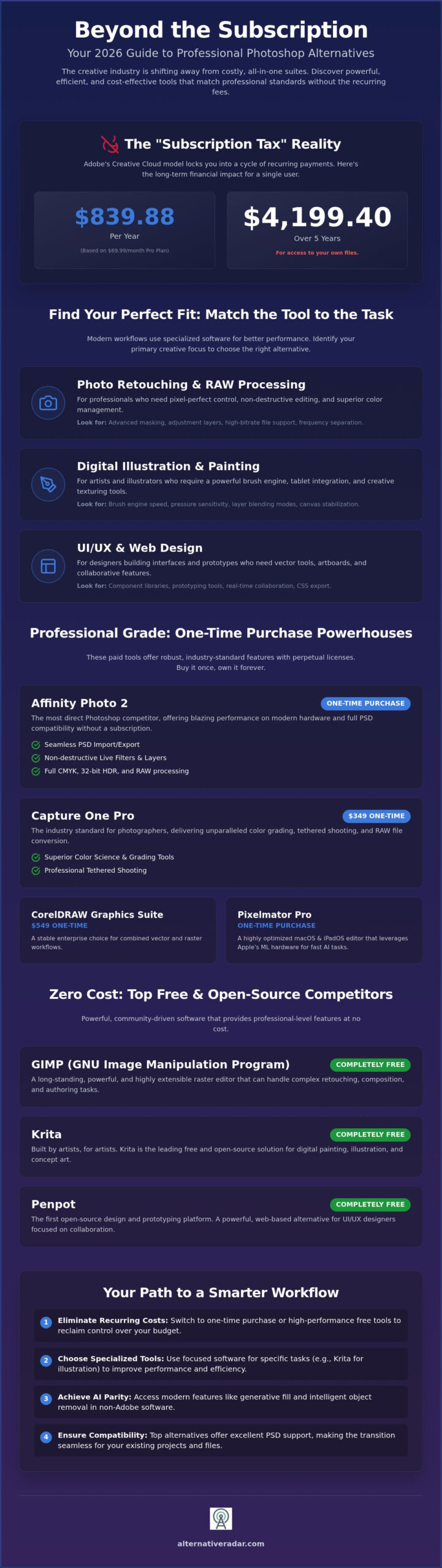
The financial impact of a long-term Adobe commitment is staggering when viewed through a five-year lens. With the Adobe Creative Cloud Pro plan costing $69.99 per month as of July 2026, a single user spends $839.88 annually. Over five years, that totals $4,199.40. For many independent creators, this recurring expense provides diminishing returns, especially when proprietary formats like .PSD act as a digital cage that makes switching difficult.
2026 is the year of the Independent Creator software stack. Developers are now prioritizing interoperability, allowing you to move files between different programs without losing layer data or effects. You no longer have to pay for a massive suite of 20+ apps when you only use one or two. By choosing a perpetual license or a high-quality free tool, you reclaim control over your overhead and your data.
Defining Your Editing Needs
Before selecting a tool, you must distinguish between your primary tasks. One tool rarely does everything perfectly. Raster editors excel at pixel manipulation, while vector tools are necessary for scalable logos. If you spend your day retouching portraits, you need advanced raw processing and frequency separation. If you’re designing social media templates, you need artboards and quick export options.
- Photo Retouching: Look for non-destructive adjustment layers and advanced masking.
- Digital Illustration: Prioritize brush engine speed and tablet pressure sensitivity.
- UI/UX Design: Focus on symbol libraries and collaborative features.
Non-Adobe tools have officially reached AI feature parity. You can now access generative fill and intelligent object removal in software that doesn’t require a high-end workstation. Many of these modern raster editors are even web-based, offering hardware independence for creators on the move. Identifying your specific must-have features allows you to select a best photoshop alternative that actually enhances your productivity instead of slowing it down with bloat.
Professional Grade: The Best Paid Photoshop Alternatives
Professional workflows require stability and specific feature sets that many entry-level tools lack. If you’re moving away from Adobe, you need a best photoshop alternative that handles high-bitrate files and complex layer structures without crashing. While Adobe remains the market leader, 2026 has seen significant shifts in pricing and licensing models for its top competitors. These tools provide the precision required for commercial work without the aggressive subscription tax.
Affinity Photo: The Professional Standard
Following its 2025 relaunch as a single application, Affinity Photo remains the most direct competitor to Photoshop. It offers full PSD support, allowing you to import and export files without losing layer integrity. Benchmarks on modern silicon show that Affinity often outpaces Photoshop in rendering complex 32-bit HDR documents. Its interface is designed for efficiency, supporting CMYK workflows and live filters that don’t require destructive editing. It’s a powerful way to compare software options before committing to a new ecosystem.
Specialized Tools for Photographers
For those who prioritize image quality over graphic design, Capture One Pro is the definitive choice. It implemented a 6% price increase in June 2026, bringing the perpetual license to $349, but its tethered shooting and color grading capabilities remain superior to Lightroom. If your work involves heavy noise reduction, DxO PhotoLab leads the market with its DeepPRIME technology. Meanwhile, Skylum Luminar Neo focuses on AI-first retouching, automating complex tasks like sky replacement and skin smoothing with a single click. These tools target specific photography needs rather than trying to be a jack-of-all-trades.
Enterprise users often turn to CorelDRAW Graphics Suite 2026. It offers a one-time purchase price of $549, providing a stable environment for vector and raster work. For macOS and iPadOS users, Pixelmator Pro is a highly optimized choice. It leverages Apple’s machine learning hardware to perform object removal and image upscaling faster than almost any other tool in its class. These professional options prove that you don’t need a monthly subscription to maintain a high-level creative output. Choosing the right tool depends on whether you value deep technical control or AI-assisted speed.
Zero Cost: Top Free and Open-Source Competitors
Professional grade software doesn’t always require a financial investment. In 2026, the open-source community has closed the gap with Adobe by integrating advanced AI features and modern hardware support. If you’re looking for the best photoshop alternative that costs nothing, you no longer have to settle for limited tools. These platforms offer deep technical capabilities that rival high-end paid suites, provided you’re willing to navigate a slightly different user experience.
GIMP in 2026: Overcoming the Learning Curve
GIMP version 3.2.4, released on April 17, 2026, represents a major turning point for the veteran editor. It finally introduces stable non-destructive editing and a refreshed UI that feels much closer to modern industry standards. You can now apply filters and adjustments as layers rather than permanently altering your pixels. GIMP stands as the premier open-source raster editor for Linux and Windows users seeking professional-grade power without a price tag. Its community plugin ecosystem allows you to add specialized AI tools for object removal and upscaling, effectively matching Adobe’s generative features through open-source modules.
Photopea: Editing in the Cloud
For creators who need a best photoshop alternative without the hassle of installation, Photopea is the definitive browser-based solution. It functions as a near-perfect clone of the Photoshop interface, making it an ideal choice for quick edits on Chromebooks or public terminals. It handles complex PSD files with multiple smart objects and layer masks with surprising fluidity. Direct integration with Dropbox, Google Drive, and OneDrive ensures that your workflow remains connected to your primary storage. It’s an efficiency-driven tool for those who prioritize immediate access over local hardware processing.
Digital painters and illustrators should focus their attention on Krita. Version 5.3.3, released on July 29, 2026, continues to dominate the free market with its superior brush engine and tablet support. It even includes Wayland HDR support for Linux users, placing it at the forefront of display technology. If your work is strictly focused on RAW photo development, Darktable offers an open-source answer to specialized color grading and lens correction. It provides a non-destructive environment for high-volume photography workflows that GIMP isn’t designed to handle. Between these tools and the relaunched free Affinity suite, the “free” software landscape has never been more competitive or capable.
Feature Match: Finding Your Specific Tool
Selecting the best photoshop alternative requires looking past general feature lists to focus on your specific professional output. A tool that excels at portrait retouching often fails at vector-based logo design. By identifying your primary creative niche, you can choose a software stack that eliminates technical friction and unnecessary overhead. You don’t need a clone; you need a specialist that understands your daily requirements.
- Digital Artists: Krita 5.3.3 remains the gold standard for painters. Its brush engines and tablet pressure sensitivity outperform standard raster editors. The July 29, 2026, update further refined its stabilizer features for professional illustrators.
- UI/UX Designers: The industry has moved toward Figma and the open-source Penpot. These tools prioritize prototyping and collaborative handoffs over pixel-level manipulation.
- Social Media Managers: Speed is everything. While Canva increased its team pricing by 300% and moved to a per-user model, its Magic Studio still offers faster template-based workflows than traditional desktop editors.
- Print Professionals: Accuracy matters. CorelDRAW Graphics Suite 2026 provides the necessary bleed management and CMYK stability for physical production. It remains a legacy powerhouse for enterprise users who cannot risk color shifts.
The AI Factor: Generative Tools Outside Adobe
Generative AI is no longer exclusive to Adobe’s Firefly ecosystem. Open-source editors now integrate Stable Diffusion directly, allowing for local image generation without recurring cloud costs or hardware limitations. When you find software alternatives, consider the ethical implications of the AI models. Adobe uses its stock library for training, but many independent rivals are moving toward licensed datasets to ensure commercial safety for their users. This prevents the legal risks often associated with scraped data used in earlier generative models.
Workflow Interoperability
Your editor doesn’t exist in a vacuum. It must play nicely with other tools like DaVinci Resolve for video work or various 3D rendering suites. Most modern rivals now offer robust cloud sync and asset management to keep fonts and brushes consistent across devices. Affinity’s relaunch as a free application in October 2025 has made it much easier for teams to collaborate without managing individual license seats. This move toward open standards means you can manage your creative assets across different software ecosystems without the “locked-in” effect of proprietary formats. Choosing the best photoshop alternative in 2026 means prioritizing a tool that fits into your existing pipeline rather than forcing you to rebuild it from scratch.
Making the Switch: How to Migrate Your Workflow
Transitioning to the best photoshop alternative requires more than just a new installation; it demands a structured migration of your creative assets. You don’t want to lose years of custom brushes and color palettes during the move. Most modern editors support the direct import of .ABR (brushes) and .ASE (swatches) files, ensuring your tactile tools remain available. While custom actions usually require manual rebuilding as macros or scripts, the time investment is a small price for long-term subscription freedom.
Shortcuts are the foundation of professional speed. Tools like Affinity and GIMP offer “Photoshop-style” keyboard presets that map familiar commands to their interface. This reduces the cognitive load of switching and keeps your muscle memory intact. We recommend a hybrid workflow during the first 30 days. Keep your Adobe subscription active for one final month to handle legacy project revisions while you move new production tasks into your chosen alternative.
Managing Your Legacy PSD Library
File fidelity remains a primary concern for professionals with deep archives. While Affinity Photo offers the most accurate reproduction of layer effects and blending modes, smart objects can occasionally rasterize during import in less advanced tools. If you have thousands of files, consider batch converting them to high-quality TIFFs or open-source formats to ensure long-term accessibility. You can use Alternative Radar to find niche file converters that handle bulk migrations with minimal data loss.
Final Verdict: Which Tool Wins in 2026?
The 2026 creative landscape offers clear winners based on your specific needs. For the average professional, Affinity Photo is the definitive choice. Its relaunch as a free application in October 2025 removed the final barrier to entry, providing a high-end experience without the “subscription tax.” It manages complex PSD files better than any other contender and supports modern hardware acceleration on both desktop and mobile platforms.
For students and hobbyists, GIMP 3.2.4 or Krita 5.3.3 provide the best value. These open-source veterans have finally modernized their interfaces to compete with commercial suites. If you’re looking for a no-cost solution that doesn’t compromise on power, explore our guide to the best free alternatives to photoshop for a deeper dive into specialized open-source tools. Reclaiming your creative independence is a logical choice that pays dividends in both workflow efficiency and financial savings.
Reclaim Your Creative Independence
The transition from a bloated, all-in-one suite to a specialized creative stack is the most efficient move you can make in 2026. You’ve seen that the best photoshop alternative isn’t a single product; it’s the tool that aligns with your specific professional requirements. Whether you choose the high-end precision of Capture One or the community-driven power of Krita, you’re no longer tethered to a recurring subscription tax that doesn’t scale with your needs.
Choosing the right software requires clarity and objective data. We’ve acted as your digital scout, filtering through the noise to find tools that offer genuine feature parity and seamless file migration. If you’re ready to refine your workflow further, you can find your perfect software match on Alternative Radar. Our platform provides expert-curated lists updated for 2026 and objective comparisons of 500+ software tools, prioritizing user suitability over vendor bias. Take control of your toolkit today; your creative output deserves a platform that values your time and resources as much as you do.
Frequently Asked Questions
Is there a free Photoshop alternative that is actually as good?
Yes, but the right choice depends on your specific creative requirements. GIMP 3.2.4 handles general retouching with professional precision, while Krita 5.3.3 remains the industry standard for digital illustration. The October 2025 relaunch of the Affinity suite as a free application provides the most comprehensive feature parity for commercial users. These tools match Adobe’s performance for standard workflows without the recurring financial burden of a monthly subscription.
Can I open and edit PSD files in Affinity Photo or GIMP?
Both applications provide robust support for importing and exporting PSD files to ensure workflow continuity. Affinity Photo maintains high fidelity for complex layer effects and live filters, while GIMP 3.2.4 handles most standard layer structures and masks effectively. You can collaborate with Adobe users by exporting your work back to the PSD format, though proprietary cloud-linked smart objects may occasionally require rasterization before you transfer the files.
What is the best Photoshop alternative for Mac users?
Pixelmator Pro is the most optimized best photoshop alternative for the macOS ecosystem. It utilizes Apple’s Metal graphics technology and Neural Engine to perform tasks like object removal and image upscaling with high efficiency. Unlike cross-platform tools, its interface follows Apple’s native design language to provide a seamless user experience. It offers a one-time purchase model that avoids the long-term costs associated with recurring monthly creative fees.
Are there any online Photoshop alternatives that dont require installation?
Photopea is the leading browser-based editor that requires zero local installation. It mirrors the Photoshop interface closely, making it an efficient choice for quick edits on any device with a stable web connection. It supports complex PSD files and integrates directly with cloud storage providers like Google Drive and Dropbox. This hardware-independent approach allows you to perform professional-grade raster editing on Chromebooks or public terminals without compromising on layer control.
Does GIMP support Photoshops Generative Fill features?
GIMP doesn’t include a native Generative Fill tool out of the box, but it supports AI capabilities through its community plugin ecosystem. You can integrate Stable Diffusion modules to perform image generation and intelligent object removal directly within the interface. These open-source solutions provide a similar outcome to Adobe’s Firefly without the subscription requirement, though they often rely on your local GPU power rather than external cloud servers.
Which Photoshop alternative is best for digital painting?
Krita 5.3.3 is widely considered the superior choice for digital painters and illustrators. Its dedicated brush engine, stabilizer settings, and support for tablet pressure sensitivity exceed the capabilities of general-purpose raster editors. The July 29, 2026, update introduced advanced HDR support for Linux users, ensuring that artists can work with the widest dynamic range possible on modern displays. It remains a free, open-source project supported by a global creative community.
How do I transfer my Adobe brushes to a different program?
You can transfer your brushes by exporting them from Photoshop as .ABR files and importing them into your new software. Most professional-grade alternatives, including Affinity Photo and GIMP, recognize this format natively. Simply locate the brush panel in your new application and select the import option to load your assets. This process ensures that your custom textures and stroke settings remain consistent, allowing you to maintain your artistic style across platforms.
Is a one-time purchase software better than a subscription in 2026?
Choosing a one-time purchase is often the best photoshop alternative for long-term financial efficiency. While subscriptions provide frequent cloud updates, the cumulative cost over several years can exceed $4,000 for a single professional user. Perpetual licenses, such as the $349 Pro version of Capture One, offer professional stability without the risk of losing access to your files if a payment fails. It’s a matter of balancing initial investment against operational costs.