
A paid plan isn’t always the fix for a free tool that’s getting in your way. To decide when to switch from free to paid software, start with the problem, not the upgrade prompt. A recurring limit may be costing you time, but a higher tier makes sense only if it solves that specific issue.
Free-plan caps can interrupt important work, while feature lists and pricing models can make upgrades hard to compare. A plan that looks like a fit can also bring migration, training, or lock-in risks. It’s worth pausing to weigh those trade-offs before paying.
Use this checklist to identify limitations that repeatedly affect your work, weigh an upgrade’s benefits against its full cost and switching effort, and decide whether to upgrade, stay free, or explore another tool. Compare plan limits, pricing, features, and trade-offs before committing. Alternative Radar brings free, open-source, and premium software alternatives together so you can compare options when your current tool or its paid tier doesn’t fit.
Key Takeaways
- Separate recurring workflow blockers from minor frustrations, then use your own records to estimate their impact.
- Compare an upgrade’s full value with its cost, plan limits, and the effort required to switch.
- When deciding when to switch from free to paid software, compare staying free, upgrading, and moving to another tool.
- Test a paid plan with a real workflow and set clear success criteria before expanding its use.
- Reassess your choice when team size, workflows, usage, or risk changes.
When free software stops fitting: identify the real problem first
Free software can be the right choice as long as it reliably handles the work you need it to do. An upgrade makes sense when a recurring constraint creates a measurable cost, such as repeated delays, manual workarounds, errors, or tasks your team can’t complete. That’s the practical answer to when to switch from free to paid software: when a paid plan solves a persistent problem better than staying put or choosing another tool.
A feature preference is something you’d like to have; a recurring operational blocker is something that repeatedly prevents work from getting done. Common signals include hitting storage caps or usage ceilings, being unable to complete a key workflow, lacking controls your team needs, or needing support included in a paid plan. Limits and plan features vary by product, so review the current details for the specific software you use.
Which free-plan limits are genuine upgrade signals?
Separate hard limits from occasional friction. A storage cap that regularly blocks file uploads is different from running low once during an unusual project. Apply the same test to user limits, export restrictions, automation allowances, and other usage ceilings: does the limit repeatedly affect ordinary work, or did it matter only in an exceptional case?
For a representative work cycle, record each interruption, the task affected, and the workaround used. Note whether it adds manual steps, increases the chance of error, delays work, or leaves a task incomplete. Then sort missing features into two groups: capabilities required to complete important tasks, and conveniences that would make those tasks nicer or faster. Prioritize requirements that block work.
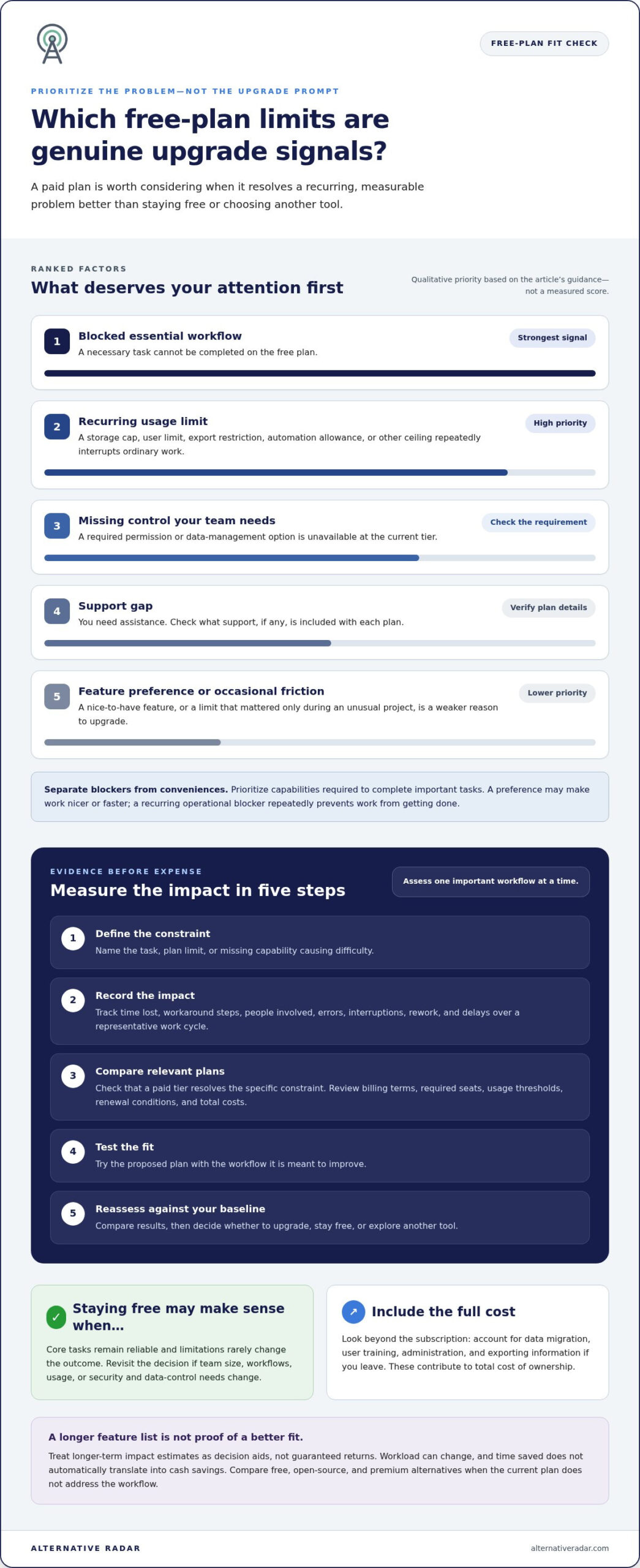
- Blocked workflow: A necessary task can’t be completed in the free plan.
- Recurring limit: A usage cap repeatedly interrupts ordinary work.
- Missing control: A needed permission or data-management option isn’t available at your current tier.
- Support gap: You need assistance, but first review what support, if any, each plan includes.
When is staying on the free plan still sensible?
Stay free if core tasks remain reliable and limitations rarely change the outcome. Don’t upgrade just because a trial is ending, a competitor promotes a feature, or a new capability sounds appealing. A paid tier is useful only if it meets a real requirement.
Keep an eye on what may change. A larger team, a new workflow, or different security and data-control needs could make today’s free plan less suitable. Also compare licensing, not just features. Free and paid describe pricing, but usage rights depend on the terms. The overview of software license agreements explains key licensing concepts. Revisit the provider’s current terms and plan limits as your needs evolve.
Checklist to Measure the Value of Paid Software
Use evidence, not an upgrade prompt, to decide when to switch from free to paid software. Assess one important workflow at a time, then compare the value of removing its constraint with the full cost of doing so.
- Define the constraint: Name the task, plan limit, or missing capability that’s causing difficulty.
- Measure the impact: Track time lost, workaround steps, errors, interruptions, and delayed work.
- Compare relevant plans: Check whether a paid tier actually resolves the constraint, then review its terms and total costs.
- Test the fit: Try the proposed plan with the workflow it’s meant to improve.
- Reassess: Compare the results with your baseline and decide whether to upgrade, stay free, or explore another tool.
An upgrade is valuable only if it improves a specific workflow enough to justify its measurable cost. A longer feature list alone doesn’t make a plan a better fit.
How can you calculate the practical cost of staying free?
Keep a simple log over a representative period, such as a typical work cycle. For each workaround, note the task, time spent, people involved, interruptions, and any rework or delay. Include recurring manual steps and collaboration friction, not just moments when work stops completely.
Use the pattern in your records to estimate the impact over a longer period. Label assumptions clearly: workload may change, and time saved doesn’t automatically translate into cash savings. Treat the estimate as a decision aid, not a guaranteed return. If several people are affected, record their effort separately so the impact isn’t hidden in a team-wide average.
What should a paid-plan comparison include?
Start with the specific workflow. Compare only the limits and features that affect it, then review current provider information for billing terms, required seats, usage thresholds, and renewal conditions. A plan can solve today’s blocker yet become a poor fit if your team or usage grows.
Look beyond the subscription. Include the effort to move data, train users, administer the plan, and export information if you leave. These direct and indirect costs form part of the total cost of ownership (TCO). Compare that total with the impact you measured, and revisit the calculation if your assumptions change.
If the current provider’s upgrade doesn’t address the workflow, compare free, open-source, and premium alternatives by features, pricing, and trade-offs. Explore software alternatives to broaden the comparison before deciding.
Free vs. paid software: compare upgrading, switching, and staying put
There isn’t one best route for every software problem. The answer to when to switch from free to paid software depends on whether the current tool’s paid tier fixes the constraint, whether another tool fits better, and whether the change is worth the effort. Compare these three paths against the workflow you need to support.
| Decision factor | Stay free | Upgrade with current provider | Switch tools |
|---|---|---|---|
| Workflow fit | Suitable if core tasks work reliably. | Strong if the needed capability is in the paid tier. | Useful if the current product can’t meet an essential requirement. |
| Total cost | No subscription, but workarounds may take effort. | Subscription plus any added seats or usage charges. | New plan costs plus migration and transition effort. |
| Collaboration | Check whether current sharing fits the team. | Confirm user limits and collaboration features. | Include setup, administration, and handover. |
| Support | Review what help is included. | Compare support terms for the specific tier. | Review support terms for the alternative. |
| Data control | Check access, export, and usage terms. | Confirm whether controls change by tier. | Assess data portability and new licensing terms. |
| Migration effort | Little change to current processes. | Check what settings and integrations carry over. | Plan data transfer, retraining, and workflow changes. |
Use the table to frame the decision, not to assume that paid means more reliable, secure, or suitable. Features, support, data controls, and licensing differ by product and plan, so review the current terms. Open-source software is another distinct option: the license governs permitted use, while hosting and maintenance arrangements can vary. It isn’t simply another name for free hosted software.
When should you upgrade with the same provider?
Upgrade when the required capability is available in a tier that fits your needs and keeping the existing product reduces transition friction. Before deciding, confirm whether settings, integrations, and user workflows remain intact between plans. Compare the full terms and costs with other options; familiarity alone doesn’t make the upgrade the best fit.
When is a different free or paid tool a better fit?
Consider switching if the current provider’s paid tier still misses an essential requirement. Compare data portability, integrations, licensing, access controls, and administration needs, not just headline features. For a team, account for who will manage the new tool and how work will be handed over. A useful decision lens is Harvard Business Review’s A Leader’s Framework for Decision Making: match the approach to the problem rather than defaulting to one path.
Reduce risk before moving from free to paid software
A plan may look right in a feature comparison and still disrupt daily work. Before deciding when to switch from free to paid software, run a limited trial or pilot with a real workflow. Test the task the free plan blocks, not a demo scenario that avoids the problem.
Set success criteria before the pilot begins. Decide whether the task must be completed reliably, whether workarounds should decrease, or whether a team process needs to work from start to finish. Clear criteria make it easier to distinguish a useful upgrade from a polished interface that doesn’t solve the original issue.
How do you test a paid plan before committing?
Choose one representative task and record how it works now, including time, manual steps, and friction. Repeat it during the test using the same inputs where practical. Involve the people who will use the software, and note setup effort, confusing steps, unmet requirements, and differences in the result.
Before starting, review the provider’s current information for trial length, billing start date, renewal terms, and cancellation steps. Confirm whether the trial requires payment details and what happens to data or access if it ends. Trial conditions can differ across products and plans.
How can you make a software switch reversible?
Plan an exit before moving anything. Check how to export essential data, save a copy where appropriate, and document the current workflow, settings, integrations, and access roles. Review the new plan’s billing and cancellation terms, along with any changes to who can view or manage data.
For a team rollout, keep the pilot limited while you verify the new workflow. Set a decision point: continue only if the agreed criteria are met; otherwise, pause and return to the previous process where practical. Assign an owner to review adoption, user access, and recurring charges after the change.
Take extra care with sensitive or business-critical information. Review the software provider’s documentation and your organization’s applicable requirements before importing data or changing access. Don’t treat a paid plan as automatically more secure or suitable; confirm that its documented controls meet your needs.
Use the pilot notes to decide whether the upgrade works, needs more testing, or should be ruled out. If a different tool may fit better, compare software alternatives before committing to a wider migration.
Choose the right next step, and compare software that fits
Make the choice that fits your evidence and current requirements, not the one that sounds most advanced. Stay free if core work remains reliable and limitations rarely affect results. Upgrade if the current provider’s paid plan resolves a recurring blocker on acceptable terms. Switch if neither the free tier nor the upgrade meets an essential need. That’s a practical way to decide when to switch from free to paid software without treating paid software as the default destination.
Keep the decision open to review. A change in team size, workflow, usage, or risk can make a tool that once fit less suitable. You don’t need to restart the entire evaluation each time; a short decision record gives you a useful baseline.
What should your software decision record include?
Capture the problem, who it affects, the measured impact, the options reviewed, and the decision date. Add the total-cost assumptions you used, such as expected seats, usage, onboarding, or migration effort. Finish with the conditions that would trigger another review, such as a new team workflow or a limit becoming a regular obstacle.
Keep it brief enough to update. A compact record helps colleagues understand why you stayed, upgraded, or switched, and makes the next comparison faster.
How can you find alternatives without defaulting to the most popular tool?
Start with the work the software must support. Search and compare options using the same criteria: required workflow, licensing preference, operating platform, integrations, and budget constraints. Then evaluate features, pricing, and pros and cons against your needs, rather than ranking tools by name recognition or the length of their feature lists.
Include free, open-source, and premium options in the comparison where they match your requirements. Review current provider information for plan limits, pricing, and licensing terms, since these details can change. If an upgrade doesn’t solve the problem, a different product may fit better, even if it’s less familiar.
A focused discovery process keeps the decision tied to your actual use case. Alternative Radar brings free, open-source, and premium options together, with comparisons covering features, pricing, and pros and cons.
Compare software alternatives on Alternative Radar to find options that fit your current needs.
Make your next software decision with confidence
The right choice isn’t always a paid plan. Stay with free software if it meets current needs; upgrade when a recurring limitation has a clear impact and the paid tier resolves it. If it doesn’t, compare other options instead. That’s a practical way to decide when to switch from free to paid software.
Before committing, weigh the full cost and effort, test the option against a real workflow, and check whether it fits your team’s requirements. Revisit the decision as your usage, workflows, or risk changes. A tool that fits today may not fit forever, and paying more doesn’t automatically mean getting a better match.
Alternative Radar brings free, open-source, and premium software options together to help you compare features, pricing, pros, and cons. Compare software alternatives by features, pricing, and fit to find options suited to your needs. With clear criteria and a side-by-side view, you can make a measured choice and move forward confidently.
Frequently Asked Questions
When should I switch from free to paid software?
Switch when a recurring free-plan limitation disrupts important work and a paid plan addresses that specific problem at an acceptable total cost. Track how often the limitation interrupts a task, the workarounds it creates, and any errors or delays that follow. Then compare those effects with subscription, onboarding, and migration effort. If the blocker is occasional or the upgrade doesn’t resolve it, staying free or comparing another tool may be the better choice.
Is paid software always better than free software?
No. Paid software isn’t automatically more reliable, secure, or suitable. A free plan can be a better fit when it handles your core tasks and its limits rarely affect results. Compare the specific features, licensing terms, support, data controls, and costs that matter to your use case. Free, open-source, and paid options can each fit different needs, so judge them against your workflow rather than their price label.
How do I know if a free software plan is limiting my work?
Look for repeated interruptions, not just features you’d like to try. Keep a brief log of tasks blocked by storage or usage limits, manual workarounds, collaboration friction, errors, and delayed work. Note how often each issue occurs and who it affects. A limitation is a stronger upgrade signal when it repeatedly prevents an important task or adds enough effort to change the outcome.
Can I switch from a free plan to a paid plan without losing data?
It depends on the provider’s plan rules and how the change is handled. Before upgrading, review the provider’s documentation for data retention, storage limits, access changes, and whether your existing settings or integrations carry over. Export or back up important information where practical, and confirm what happens if you later downgrade or cancel. Don’t assume every product handles data the same way.
How much should I spend on paid software?
Set a budget based on your usage and the problem the software needs to solve, rather than choosing a plan by its feature count. Include subscription charges, required seats, usage-based fees, onboarding, migration, and administration effort. Compare that total with the impact of staying free, using your own records. Review current pricing and billing terms, since plan costs and conditions can change.
Should I upgrade or switch to a different software provider?
Upgrade if the current provider’s paid tier includes the capability you need and fits your budget, workflow, and data requirements. Consider switching if the upgrade still misses an essential requirement or another product offers a closer fit. Compare features, licensing, integrations, data portability, support terms, and migration effort side by side. A different free or open-source option may also be worth evaluating.
What should I check before starting a free software trial?
Choose a real workflow to test and decide in advance what a successful result looks like. Review the trial duration, whether payment details are required, when billing begins, renewal terms, cancellation steps, and what happens to your data or access when the trial ends. Involve likely users and record setup effort, friction, and unmet needs. Review the provider’s current information before starting.