
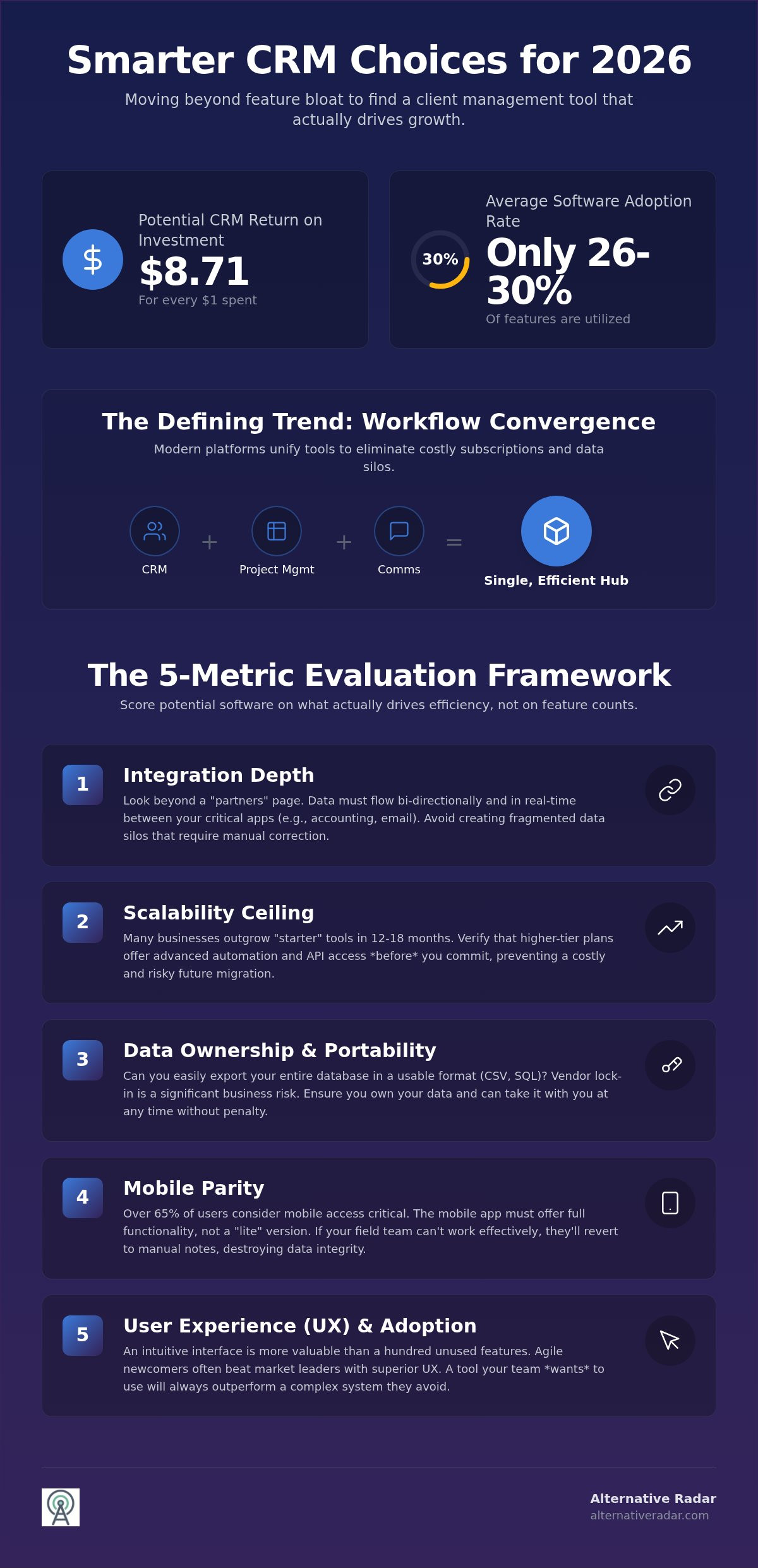
The most expensive CRM on the market is often the one that costs you the most in wasted time and underutilized features. While the industry giants dominate the headlines, our client management software reviews for 2026 reveal that the most efficient tools are often found beyond the traditional market leaders. You’re likely tired of paying for feature bloat while worrying that a software migration might lead to critical data loss. It’s a valid concern, especially when research shows that average software adoption rates still hover between 26% and 30% despite a potential ROI of $8.71 for every dollar spent.
We’ve done the heavy lifting to provide you with objective insights and a clear framework for choosing a platform that actually scales with your business. This article analyzes verified software options, separates essential features from expensive distractions, and gives you the confidence to select a tool you won’t outgrow in twelve months. Whether you need AI-driven automation or simple, no-code workflows, we’ll help you find the perfect fit for your specific business model.
Key Takeaways
- Identify tools that leverage “Workflow Convergence” to unify your CRM, project management, and internal communications into a single, efficient hub.
- Access objective client management software reviews to discover emerging “Radar Picks” that provide premium functionality at mid-market price points.
- Evaluate potential software using a scalability framework that prioritizes integration depth over brand recognition to prevent platform fatigue and frequent migrations.
- Execute a secure software transition by utilizing a three-step data audit and a parallel pilot phase to ensure zero data loss during the move.
- Navigate the crowded 2026 software market more efficiently by using centralized comparison filters to isolate tools based on your specific licensing and feature needs.
Beyond the Hype: What Real Client Management Looks Like in 2026
Modern client management is no longer a luxury for large corporations; it has become the operational backbone for any business that values efficiency. At its core, client management software acts as a centralized hub for tracking every interaction, data point, and internal workflow. This year marks the era of “Workflow Convergence,” where the traditional lines between Customer relationship management (CRM), project management, and team communication have finally dissolved. You don’t need three separate subscriptions to manage a single client anymore. A unified platform captures the entire lifecycle from the first handshake to the final invoice.
If you’re still relying on manual spreadsheets, you’re paying a hidden tax on your business growth. Static cells can’t alert you when a lead goes cold or predict which client is likely to churn. They are silent productivity killers that demand hours of manual entry. The shift from manual data entry to automated insights is the defining trend of 2026. AI-driven tracking now captures sentiment and identifies opportunities without a single keystroke from your sales team. This automation allows you to focus on strategy instead of administrative maintenance.
The Core Components of Modern Client Software
A functional tool must do more than store names; it needs to provide a living history of your business relationships. When you evaluate options, look for these three pillars:
- Centralized Contact Database: This is your source of truth. It stores preferences, purchase history, and behavioral data in one accessible location that every team member can view.
- Automated Communication Logs: Manual logging is dead. Modern systems sync with your email and calendar to track every touchpoint automatically, ensuring no detail is lost in a cluttered inbox.
- Pipeline Visualization: You need to see where every deal stands in real-time. Drag-and-drop interfaces allow you to move leads through stages with total clarity, making your revenue predictable.
Why ‘Popular’ Doesn’t Always Mean ‘Best’
Market share doesn’t guarantee a good fit for your specific business model. Many enterprise-grade tools suffer from extreme feature bloat, forcing you to navigate complex menus for simple tasks. You end up paying for high-tier modules that your team will never touch. This is why reading objective client management software reviews is critical before signing a contract. Agile newcomers often outpace market leaders by focusing on superior user experience (UX) and specialized workflows tailored for smaller teams. A tool that fits your current team size and grows with you is far more valuable than a famous brand name that requires a six-month learning curve. Finding that “hidden gem” can save you thousands in annual subscription costs while actually increasing your team’s daily output.
The Evaluation Framework: 5 Metrics That Actually Matter
Most client management software reviews focus on the sheer volume of features. This is a distraction. A tool with 50 features you never use is a liability, not an asset. To find a platform that actually drives efficiency, you need a weighted framework that scores software based on your specific operational reality. Don’t let a slick interface mask a weak foundation. Instead, evaluate every potential tool against these five critical metrics.
Integration depth is your first priority. It’s not enough for a tool to have a “partners” page; you need to know if data flows bi-directionally in real-time. If your CRM doesn’t play well with your accounting or email marketing stack, you’ll end up with fragmented data silos. Scalability is equally vital. Many businesses outgrow “starter” tools within 12 to 18 months, leading to expensive and risky migrations. Look for a “scalability ceiling” by checking if the platform offers advanced automation or API access in higher tiers before you commit.
Data ownership and portability are often overlooked until it’s too late. Ensure the vendor allows you to export your entire database in a clean, usable format like CSV or SQL. Vendor lock-in is a significant business risk. Mobile parity is another non-negotiable factor. Research indicates that over 65% of small team users consider mobile access critical for their operations. If the mobile app is just a “lite” version of the desktop site, your field team will likely revert to manual notes, destroying your data integrity.
Finally, consider the user adoption rate. The most powerful software in the world is worthless if your team finds it too complex to use. A steep learning curve leads to the 26% to 30% adoption rates common in the industry. Adopting a customer-centric approach requires a tool that your team actually enjoys opening every morning. You can use our centralized comparison hub to filter tools by these specific usability metrics.
Assessing Integration and API Flexibility
Native integrations are always superior to third-party connectors like Zapier. While connectors are useful for simple tasks, they often introduce latency and additional monthly costs. For teams that need total control over their data architecture or want to build custom features, exploring an open source CRM software comparison is a logical next step. Open-source options provide the API flexibility required for deep, custom tech stacks without the restrictions of proprietary licensing.
Hidden Costs: Pricing Beyond the Per-User Fee
The sticker price is rarely your final cost. Many vendors use “feature gating,” where essential tools like bulk emailing or advanced reporting are locked behind a premium tier. Watch out for mandatory onboarding fees that can add thousands to your initial investment. Storage limits also act as a hidden tax; as your business grows, you may find yourself paying tiered “success taxes” just to keep your historical client data accessible. Always calculate your total cost of ownership over a 24-month period rather than looking at the monthly per-user rate.
Top-Rated Client Management Software: Reviews for Every Business Model
Finding the right tool requires looking past the heavy marketing budgets of industry giants. While names like Salesforce or HubSpot dominate the search results, our client management software reviews for 2026 highlight a shift toward specialized, high-utility platforms that offer better value for specific business models. You don’t always need an enterprise-grade engine when a streamlined, agile tool can achieve the same results at a fraction of the cost.
The “All-Rounder” champions like Pipedrive and Zoho CRM continue to set the standard for balancing power with simplicity. Pipedrive’s Essential plan starts at $14 per user per month when billed annually, providing a low-friction entry point for teams focused on visual sales pipelines. Similarly, Zoho CRM’s Standard plan at $14 per user per month annually offers robust features that cater to businesses needing a solid, all-purpose foundation without the complexity of a custom-built system. These platforms remain reliable choices because they’ve maintained high performance while resisting the urge to over-complicate their interfaces.
For those seeking “Radar Picks”—emerging tools that offer premium features at mid-market prices—options like Nutshell and Freshsales are gaining significant traction. Nutshell’s Foundation plan sits at just $13 per user per month annually, while Freshsales offers a Growth plan for $9 per user per month annually. These tools provide the AI-driven insights and automation typically reserved for high-tier enterprise plans, making them ideal for growing teams that need to punch above their weight class without overextending their budget.
The Best General-Purpose CRM Tools
Efficiency in general-purpose tools is defined by how quickly your team can move from a lead to a closed deal. High-quality platforms prioritize visual pipeline interfaces that reduce cognitive load and keep your sales team focused on the next action. When choosing the right CRM system, focus on how the software handles sales automation and contact management without cluttering the workspace. If your team relies heavily on real-time collaboration alongside your CRM, you might also want to explore the best Slack alternatives for 2026 to ensure your communication stack is as efficient as your client management tool.
Industry-Specific Solutions: When to Go Niche
Vertical specialists are built to solve the unique pain points of specific sectors. Marketing agencies, for example, often require built-in project management and time-tracking features that general CRMs lack. Tools like FirmFlow, priced at $348 per year for a 5-person firm, cater specifically to professional services needing secure client portals. Using a niche solution reduces the need for expensive custom coding and ensures that your workflows for law, accounting, or consulting are supported natively. This “out-of-the-box” suitability often leads to higher adoption rates and faster ROI than a generic tool that requires extensive modification.
Avoiding the ‘Migration Trap’: How to Switch Software Safely
Choosing a new platform based on client management software reviews is only half the battle. The real risk lies in the implementation phase, where poor planning leads to the “Migration Trap.” This happens when businesses rush the transition, resulting in corrupted data, lost history, and a frustrated workforce. To avoid these pitfalls, you must treat migration as a structured project rather than a simple data export. A successful transition ensures your new tool is an asset from day one, not a source of technical debt.
Start with a rigorous 3-step data audit. First, identify your active records that require immediate migration. Second, move historical data that you rarely access but must keep for compliance into a low-cost archive. Third, delete the “noise,” such as duplicates, incomplete entries, and leads that haven’t engaged in over 24 months. Mapping your custom fields is the next technical hurdle. Every unique data point in your current system needs a specific destination in the new one. If you fail to map these accurately, you’ll lose the nuanced insights that make your client relationships unique.
Cleaning Your Data Before the Move
Data hygiene is the mandatory process of auditing and refining your records to ensure they are accurate and standardized before they enter a new system. This step is critical because most modern CRMs charge based on contact volume or storage tiers. By removing duplicates and outdated information now, you can often qualify for a lower subscription tier, saving your business money immediately. Standardize your naming conventions for tags and categories during this phase. If one team uses “Lead” and another uses “Prospect,” your reporting will be fractured. Fix these inconsistencies in your spreadsheet before the final import.
The ‘Soft Launch’ Strategy
Never turn off your legacy software on the same day you launch the new one. Instead, run a “Parallel Pilot” by selecting a small, agile team to test the new platform for at least one week. This group acts as your digital scouts, identifying workflow bottlenecks and gathering feedback that you can address before the full-company rollout. Once the pilot team is comfortable, set a hard “sunset date” for the old system to prevent employees from retreating to familiar but inefficient habits. Training your team on the “why” behind the switch is the best way to overcome internal resistance and ensure long-term adoption.
If you’re still in the selection phase, you can compare vetted software alternatives to find the tool that offers the most straightforward migration path for your current data structure. While client management software reviews often highlight ease of use, your ultimate success depends on how well you prepare your team and your data for the change.
Finding Your Perfect Match on Alternative Radar
Selecting the right platform shouldn’t feel like a gamble. While other sites might overwhelm you with a directory of every tool ever built, our client management software reviews focus on precision and utility. We’ve developed a centralized comparison engine that allows you to filter options by the metrics that actually impact your bottom line: specific feature sets, transparent pricing, and licensing classifications. This navigational approach ensures you don’t waste time on enterprise-grade tools that are too complex or “budget” options that lack essential scalability.
Objectivity is our primary driver. As a Dutch-owned platform owned by Madunet, we leverage over a decade of media experience to act as a neutral advisor. We prioritize transparency in our software rankings because we value your resources. Our reviews highlight detailed pros and cons for every listed product, including free and open-source competitors that market leaders often ignore. We don’t rely on marketing hype; we rely on logic and data to help you make a smarter choice for your specific business model.
Why Alternative Radar is Your Digital Scout
Think of us as your digital scout. We’ve already done the heavy lifting of searching, testing, and comparing so you don’t have to. Our mission is to uncover “hidden gem” software that provides premium functionality without the “brand name” tax. By focusing on suitability over market share, we empower you to find tools that integrate seamlessly into your existing tech stack. If you’re ready to look beyond the obvious choices, you can learn more in our guide to finding the best alternative to popular software in 2026. We provide the clarity you need to move from broad discovery to a specific, confident decision.
Join the Informed Community
The software market moves fast, and staying updated on new releases and emerging trends is essential for maintaining a competitive edge. We use programmatic insights to identify niche business tools that are gaining traction before they become mainstream. This proactive approach helps you adopt efficient workflows while your competitors are still struggling with feature-bloated legacy systems. Your next step is simple: browse our curated review categories to isolate the tools that meet your specific requirements. Stop following the market leaders and start leading with a software stack that is built for your growth. Explore our latest client management software reviews today and find the fit that actually scales with your team.
Building Your Competitive Edge in 2026
Success in the modern market requires a tool that fits your workflow, not one that forces you to change it. You’ve learned that “Workflow Convergence” is the new standard; where CRM, communication, and project management live in a single hub. You also understand that a secure migration depends on rigorous data hygiene and a parallel pilot phase. Moving away from feature-bloated giants toward agile alternatives is no longer a risk. It’s a strategic move for long-term productivity.
Alternative Radar acts as your digital scout, providing objective client management software reviews that prioritize your specific business needs. Our Dutch-owned platform leverages expert insights from the Madunet media team to deliver data-driven comparisons of niche and open-source alternatives. We’ve done the hard work of filtering the market so you can focus on building relationships. Start comparing the best client management alternatives on Alternative Radar today. You now possess the framework and the confidence to choose a tool that scales with your ambition.
Frequently Asked Questions
What is the difference between CRM and client management software?
CRM systems prioritize the sales pipeline and closing deals, while client management software manages the entire relationship from onboarding to long-term retention. A CRM is often the engine for your sales team to track leads. Client management tools are the broader infrastructure that ensures your service delivery and customer success teams have the data they need after the contract is signed.
Is there a completely free client management software that is actually good?
Yes, many reputable providers offer functional free tiers, though they usually limit the number of users or contacts. Options like HubSpot or Zoho provide solid entry points for startups. You should scrutinize client management software reviews to see which features are gated behind paywalls. Often, essential automation or advanced reporting requires a paid subscription as your business grows.
How long does it typically take to implement a new client management system?
Implementation usually takes between two weeks and three months depending on your data complexity. A small team with clean spreadsheets can often go live in 14 days. However, larger organizations requiring custom API integrations or extensive staff training should prepare for a 90-day window. Rushing this process often leads to the migration trap where data is imported incorrectly or team adoption fails.
Can I integrate my client management software with my email and calendar?
Most modern platforms offer native bi-directional sync with Google Workspace and Microsoft 365. This is a non-negotiable feature for efficiency. It ensures that every sent email and scheduled meeting appears in the client’s history automatically. When reading client management software reviews, always verify if these integrations are native or if they require expensive third-party connectors to function.
What are the risks of using open-source client management software?
The main risks include the lack of dedicated technical support and the burden of self-hosting. You won’t have a corporate help desk to call if the system crashes. Your team is responsible for security patches, server uptime, and data backups. While open-source offers total data ownership and customization, it requires a higher level of internal technical expertise to maintain safely over time.
How often should I review my software stack for potential alternatives?
You should audit your software stack every 18 to 24 months to ensure it still aligns with your goals. The SaaS market evolves rapidly. New tools frequently enter the market with superior user experiences or lower pricing. Regular reviews prevent you from overpaying for legacy tools that no longer serve your team’s current workflow or team size.
Do I need a separate project management tool if I have a good CRM?
It depends on the complexity of your deliverables, but many modern tools now combine both functions into a single hub. If your team handles simple service tasks, a unified platform is usually more efficient. However, if you manage large-scale construction or software development projects with complex dependencies, a specialized project management tool might still be a necessary addition to your stack.
What features are absolutely essential for a small business client manager?
Small businesses must have a centralized contact database, automated activity logging, and a visual sales pipeline. These three features provide the most immediate impact on productivity by reducing manual admin work. Reliable mobile access is another non-negotiable, as it allows your team to update records and view client history while away from their desks.