
Why does your “free” collaboration tool feel like a tax on your computer’s RAM and your team’s privacy? If you’re tired of software bloat and the hidden costs of the Microsoft 365 ecosystem, you aren’t alone. Many organizations now realize that the default choice often leads to slower workflows and unnecessary complexity when inviting external guests. Finding high-quality free microsoft teams alternatives is no longer just about saving money; it’s about reclaiming your team’s digital efficiency and hardware performance.
We agree that a communication tool should empower your workflow, not hinder it with restrictive message histories or enterprise-level price tags for basic features. You deserve a platform that offers a generous free-forever plan without the constant pressure to upgrade. This guide promises to cut through the marketing fluff to reveal the most reliable and feature-rich options available in 2026. We’ll compare everything from Slack’s current 90-day history limits to the total data sovereignty offered by self-hosted solutions like Mattermost and Rocket.Chat. You’ll discover exactly which tool fits your specific team size and technical requirements so you can reduce your monthly SaaS overhead immediately.
Key Takeaways
- Understand the technical reasons behind Teams’ resource drain and how switching to a lighter client preserves your hardware’s lifespan.
- Compare the 2026 feature sets of popular free microsoft teams alternatives to find the best balance between integration depth and message history.
- Explore how self-hosting with Mattermost or Rocket.Chat eliminates ecosystem lock-in while providing enterprise-grade security for zero licensing fees.
- Identify the “true cost” of freemium models by analyzing storage caps and AI-assistant availability across different platforms.
- Master a step-by-step transition plan to audit your existing channels and safely export your data without losing institutional knowledge.
Why Teams Isn’t Always the Answer for Modern Collaboration
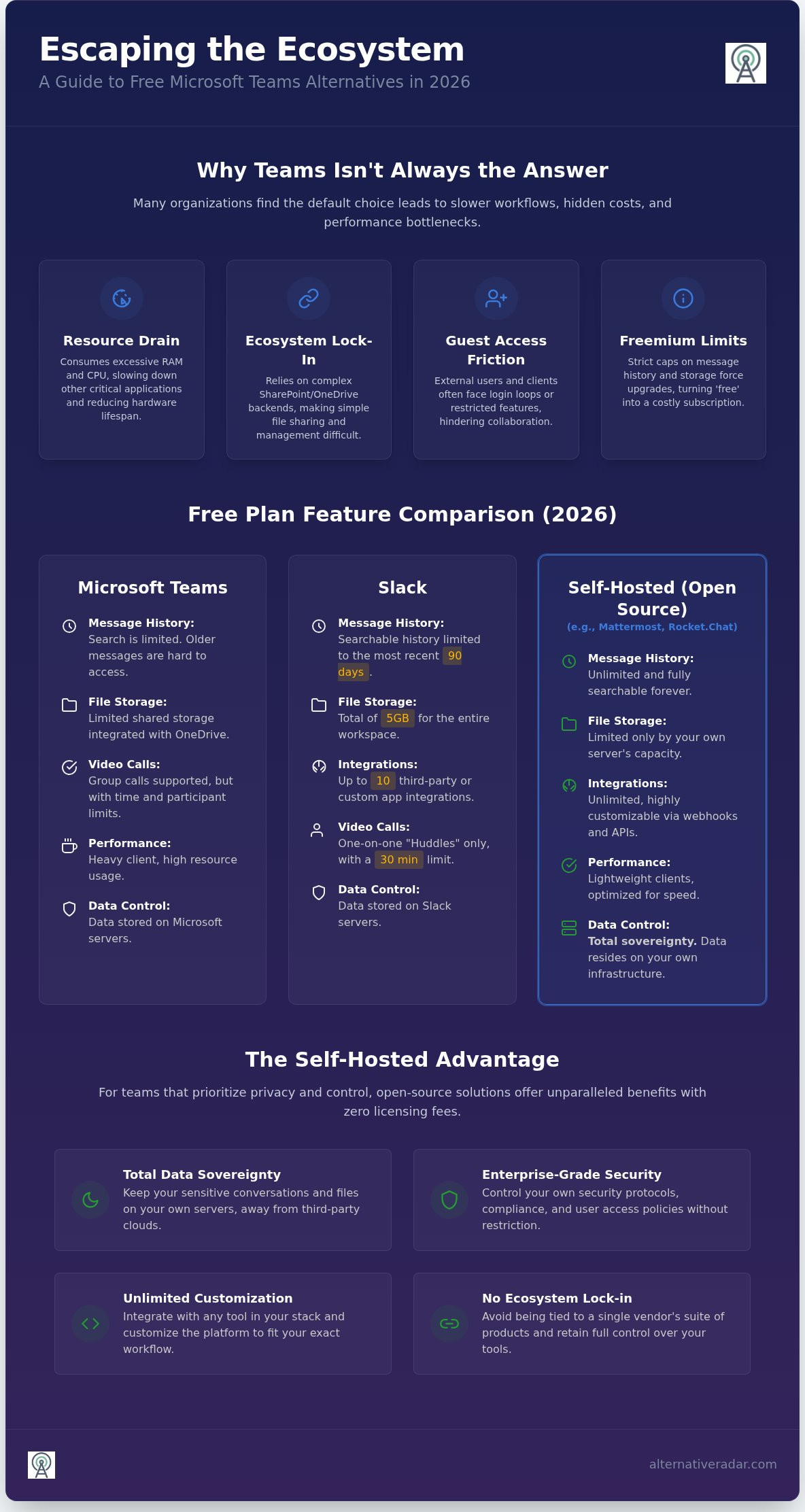
Microsoft Teams remains a dominant force in corporate environments, but its “all-in-one” philosophy often results in a bloated user experience. For many organizations, the desktop client acts as a significant resource drain, consuming excessive RAM and CPU cycles even on mid-range hardware. This technical overhead frequently slows down other critical applications, turning a supposed productivity tool into a performance bottleneck that frustrates employees.
Managing files within Teams introduces another layer of friction. Because the platform relies on SharePoint and OneDrive backends, simple file sharing often requires navigating complex permission structures and nested folders. This ecosystem lock-in makes it difficult to maintain a clean digital workspace without constant maintenance. Additionally, inviting external guests remains a persistent pain point. Non-Microsoft users frequently encounter login loops or restricted feature sets, making collaborative meetings with clients or freelancers unnecessarily difficult. By 2026, lean startups are increasingly rejecting these bundled suites in favor of “best-of-breed” free microsoft teams alternatives that prioritize speed and accessibility over feature bloat.
The Hidden Costs of ‘Free’ Microsoft 365 Tiers
The basic version of Teams often feels like a restricted trial rather than a complete solution. Users frequently encounter strict caps on message history and limited shared file storage, which forces a choice between losing institutional knowledge or paying for a premium subscription. As your team grows, the administrative complexity increases exponentially. Without a dedicated IT department, managing Microsoft’s “free” tiers becomes a time-consuming chore that distracts from your core business goals. These hidden management costs often outweigh the initial savings of a zero-dollar license.
Performance and User Experience Gaps
Speed is a primary differentiator when evaluating free microsoft teams alternatives. Dedicated chat applications often feel significantly “snappier” because they aren’t carrying the weight of a full office suite. This performance gap is most visible on mobile devices, where remote teams need quick access to conversations without long loading screens or battery-draining background processes.
- Interface Complexity: Teams’ UI often buries essential features under multiple menus, which hinders rapid adoption for new hires.
- Learning Curve: Employees often require specific training just to navigate the file tabs, channel structures, and integrated apps correctly.
- Hardware Longevity: Lighter apps put less strain on older devices, effectively extending the life of your team’s existing hardware and reducing e-waste.
Choosing a tool with a better UI doesn’t just improve team morale; it directly impacts how quickly your team can communicate and execute. Moving away from a monolithic system allows you to build a stack that actually fits your specific workflow requirements.
Top Free SaaS Alternatives: Slack, Discord, and Beyond
While self-hosting offers total control, SaaS platforms provide the fastest path to deployment. These free microsoft teams alternatives require zero server maintenance, making them ideal for small teams that need to start communicating immediately without technical friction. By choosing a cloud-hosted tool, you trade some data sovereignty for polished interfaces and seamless mobile synchronization.
Slack vs. Teams: Comparing the Free Tiers
Slack remains the industry benchmark for user experience and third-party integrations. However, its free tier comes with specific constraints that your team must manage. As of August 2026, searchable message and file history is limited to the most recent 90 days. It’s critical to note that messages older than one year may be permanently deleted, which can be a dealbreaker for teams relying on long-term documentation.
Integration is where Slack typically beats Teams in terms of “snappiness.” The free version allows up to 10 third-party or custom app integrations and provides a total of 5GB of shared file storage. While it supports unlimited users, group video calls (Huddles) are restricted to one-on-one sessions with a 30-minute time limit. If these restrictions feel too tight for your workflow, you should browse The Best Slack Alternatives for 2026 to see how other platforms handle history caps.
Discord for Business: A Lean Powerhouse?
Discord has successfully transitioned from a gaming utility into a professional powerhouse, boasting roughly 200 million monthly active users as of mid-2026. Its primary advantage is high-bitrate audio and low-latency screen sharing, which often outperforms the sometimes-laggy video experience in Teams. The free plan is exceptionally generous, supporting video calls for up to 25 participants and offering an increased file upload limit of 20MB.
- Stages and Channels: Use “Stages” for structured presentations and standard channels for persistent text chat.
- Presence: The “Always-On” voice channels allow team members to hop in and out of conversations without the formality of a scheduled meeting.
- Permissions: Managing privacy requires a more hands-on approach to server roles, but it offers granular control over who can access specific data.
For teams seeking even more specialized features, Pumble and Chanty offer distinct paths. Pumble has gained traction by offering a highly generous free-forever plan that addresses the history limits found in Slack. Meanwhile, Chanty focuses on a task-oriented interface, making it a strong choice for non-technical teams that need to turn messages into actionable items quickly. You can explore more niche comparisons at Alternative Radar to find the exact fit for your team’s size.
Privacy and Control: Open Source Microsoft Teams Alternatives
While SaaS tools like Slack prioritize convenience, they often lock your communication data behind proprietary walls. Open-source free microsoft teams alternatives provide a different path by giving you complete ownership of the server. This model eliminates the risk of sudden policy changes or data harvesting by big-tech providers. For organizations that value transparency, these tools allow you to audit the code and control exactly where your information lives.
Rocket.Chat stands out as one of the most feature-complete options. Its self-hosted “Starter” tier supports up to 50 users and includes end-to-end encryption as a core feature. If your team exceeds that limit, Mattermost offers an even more scalable self-hosted version. The Mattermost “Starter” tier provides unlimited users, channels, and message history, making it a favorite for technical teams that need enterprise-grade functionality without the per-user licensing fees. Other niche options like Element use the Matrix protocol for decentralized security, while Nextcloud Talk integrates chat directly into your existing self-hosted cloud storage.
Why Self-Hosting Might Be Your Best Free Option
Data sovereignty is no longer just a preference; it’s a legal necessity for many. Firms in the legal, financial, and medical sectors must comply with strict regulations like GDPR or the NIS2 directive. By self-hosting, you ensure that sensitive client conversations never leave your controlled infrastructure. This approach also breaks the “per-seat” pricing model that makes scaling so expensive in the Microsoft ecosystem. You can learn more about these strategies in our Open Source Business Software 2026 Guide.
The Technical Trade-off: Setup vs. Savings
The “true cost” of these free tools is the technical expertise required to run them. You’ll need to manage server patching, security updates, and regular backups to keep the system reliable. While the software itself is free, you’ll still pay for the underlying server infrastructure. For teams without a dedicated developer or IT manager, the learning curve can be steep. Many small businesses find a middle ground by using managed hosting services, which offer the privacy of open source with the ease of a SaaS deployment.
Evaluating the ‘True Cost’ of Free Software in 2026
A zero dollar license fee doesn’t always mean a tool is cost-free. In 2026, the “AI Tax” has become the primary way SaaS providers monetize their platforms. While many free microsoft teams alternatives offer basic chat and video, they often lock advanced productivity features like automated meeting summaries and real-time transcriptions behind a paywall. If your team relies on these efficiencies, the hidden cost of manual note-taking can quickly outpace a monthly subscription fee.
Storage caps represent another significant hurdle. Slack’s free tier currently limits shared workspace storage to 5GB, while Discord restricts individual file uploads to 20MB. For teams frequently sharing high-resolution assets or large datasets, these limits are hit within weeks. Once you reach these ceilings, you’re forced into a “delete or pay” cycle that disrupts historical data access. Security features follow a similar pattern; many providers treat Single Sign-On (SSO) and advanced multi-factor authentication as enterprise-only luxuries. This forces small teams to choose between budget constraints and modern security standards.
AI Integration in Free Tiers
The privacy implications of free AI tools deserve careful scrutiny. Many platforms use data from free-tier users to train their large language models unless you specifically opt out. This creates a conflict for businesses handling sensitive client information. When evaluating alternatives, look for tools that offer local AI processing or strict data-exclusion policies even on their zero-cost plans. Currently, open-source models like those compatible with Rocket.Chat provide the best “Free AI” value by allowing you to integrate your own private AI instances without the subscription tax.
Scalability: What Happens When Your Team Grows?
Switching fatigue is a real productivity killer. Moving your entire team to a new platform every time you outgrow a free tier wastes hundreds of man-hours. You should prioritize tools that offer a graceful “graduation” path. Some platforms, like Mattermost, allow you to start with a self-hosted free version and move to a managed service as your technical needs evolve. This continuity prevents the data loss and retraining costs associated with jumping between disparate systems.
Building a cohesive tech stack requires looking beyond just communication. If you’re also evaluating your sales pipeline tools, you might find similar value in our Best CRM Software Comparison. To avoid costly migrations later, explore our detailed software evaluations and find a tool that scales alongside your business objectives without forcing an immediate upgrade.
Step-by-Step: How to Transition Away from Microsoft Teams
Transitioning from a complex ecosystem like Microsoft 365 isn’t just about installing a new app. It requires a structured migration plan to ensure your data remains intact and your team stays productive. Many organizations fail during this phase because they try to move every legacy file and channel without auditing their actual utility first. By following a logical roadmap, you can adopt free microsoft teams alternatives without the typical friction associated with enterprise software shifts.
Start by auditing your current usage. Microsoft Teams often accumulates “ghost channels” and redundant file versions that don’t need to move. Identify which features your team actually relies on daily. Is it the persistent chat, the video conferencing, or specific app integrations? Once you’ve narrowed down the essentials, begin the data export process. Since Microsoft doesn’t provide a “one-click” export for entire workspaces, you’ll need to download critical chat logs and move files from SharePoint to your new storage solution manually.
Technical Migration Checklist
A successful move depends on technical alignment between the old system and the new one. Use this checklist to ensure nothing breaks during the switch:
- Channel Mapping: Recreate your Teams channel structure in the new tool to maintain familiar communication flows.
- File Migration: Move active project documents from OneDrive or SharePoint to your new platform’s storage or a neutral cloud provider.
- Integration Setup: Connect your primary business tools, such as your calendar or CRM, to maintain your existing automated workflows.
Winning Over Your Team
Technical success doesn’t guarantee user adoption. You must demonstrate that the new tool solves the specific “bloat” and performance issues they faced in Teams. Highlight immediate benefits like faster message loading, intuitive notifications, and a cleaner mobile experience. Empowerment comes from clarity, so provide your team with the “why” behind the move, focusing on efficiency and reduced software fatigue.
Introduce a one-week “Beta” period where you run the new tool alongside Teams. This allows your team to validate the workflow in a low-pressure environment before you officially shut down the old channels. To streamline this process, create a “Quick Start” guide that covers basic actions like starting a thread or joining a call. If you’re still weighing your options, use Alternative Radar to find your perfect fit today based on your team’s specific technical requirements.
Reclaim Your Team’s Productivity in 2026
Moving away from the Microsoft ecosystem is a strategic decision that prioritizes hardware longevity and team agility. You’ve seen that the best free microsoft teams alternatives aren’t just clones; they’re specialized tools that solve specific friction points like storage caps and high resource consumption. Whether you choose the integration-heavy path of Slack or the total data sovereignty of a self-hosted Mattermost instance, the goal remains the same: a leaner, faster workflow.
The “true cost” of free software often hides in AI limitations or manual maintenance requirements. By auditing your actual needs and following a structured migration plan, you can eliminate software bloat without losing critical data. Don’t let your communication tool dictate your hardware budget or your privacy standards. You have the power to build a better tech stack that respects your resources.
Alternative Radar acts as your digital scout, providing objective, commission-transparent reviews and detailed technical comparisons. As an independently owned and operated platform, we prioritize your utility over big-tech partnerships. Explore the full Radar of Software Alternatives to find the exact tool that fits your team’s unique profile today. Start your transition with confidence and reclaim your digital efficiency.
Frequently Asked Questions
Is there a completely free version of Microsoft Teams in 2026?
Yes, Microsoft offers a free version, but it carries significant technical limitations and hardware overhead. Users often face restricted message history and lower file storage caps compared to paid tiers. This version is designed to lead you into the broader Microsoft 365 ecosystem. If you want to avoid software bloat and performance bottlenecks, exploring free microsoft teams alternatives is a more efficient choice for mid-range hardware.
Can I use Slack as a free alternative to Microsoft Teams for a large team?
You can use Slack for a team of any size, as the free plan supports unlimited users. However, you’ll encounter a strict message history limit of 90 days. For large teams, this often results in a rapid loss of searchable data and institutional knowledge. While the interface is polished and fast, the 5GB shared storage limit and restriction to 10 integrations might hinder complex workflows in larger organizations.
Which free Teams alternative is best for video conferencing?
Google Chat is currently the strongest contender for free video conferencing. Through its integration with Google Meet, it allows up to 100 participants to meet for a maximum of 60 minutes. If your team prioritizes low-latency screen sharing and high-bitrate audio over participant count, Discord is a superior option. Discord supports up to 25 participants in video calls with a more intuitive interface for spontaneous collaboration.
What is the best open-source alternative to Microsoft Teams?
Mattermost is the best choice for teams requiring unlimited users and message history without licensing fees. It provides enterprise-grade self-hosting and full data sovereignty. Rocket.Chat is a strong runner-up, especially for smaller teams under 50 members, as it offers end-to-end encryption and a highly feature-complete interface. Both tools allow you to break free from proprietary ecosystem lock-in by maintaining your own server infrastructure.
Can I keep my Microsoft 365 files if I switch to a different chat tool?
Yes, your files remain stored in SharePoint or OneDrive regardless of which chat tool you use. However, you’ll lose the native integration that allows you to edit documents directly within the chat interface. Most free microsoft teams alternatives allow you to link these existing storage accounts via third-party integrations. This keeps your data accessible while providing a lighter, more responsive communication environment for your daily discussions.
Are free communication tools secure enough for sensitive business data?
Security depends on the platform’s licensing and deployment model. While SaaS tools are generally safe for standard business use, they often collect metadata for service improvements. For highly sensitive data, open-source, self-hosted options like Rocket.Chat or Mattermost are superior. These tools provide complete data control and end-to-end encryption, ensuring that your communication remains private and compliant with regulations like GDPR or the NIS2 directive.
Does Discord work well for professional business communication?
Discord has become a lean powerhouse for professional teams that value speed and high-quality voice communication. It’s particularly effective for remote teams using “always-on” voice channels for spontaneous collaboration. While it lacks the formal project management features of Teams, its low-latency screen sharing and organized channel structure make it a viable, high-performance alternative. You’ll need to manage server roles carefully to maintain a professional environment.
How do I move my chat history from Teams to another platform?
There is no native “one-click” migration tool to move chat history from Teams to other platforms. You must manually export your data or use third-party APIs to extract logs. Most teams prioritize migrating active project files and starting fresh with a clean message history. If long-term retention is critical, self-hosted tools like Mattermost offer more robust import tools for technical users willing to handle JSON or CSV file transfers.