Paying a monthly fee to access your own creative files isn’t a professional necessity; it’s a recurring tax that many artists are choosing to stop paying. You likely feel the weight of the Adobe ecosystem, especially with recent concerns over invasive AI training terms and inconsistent performance on older hardware. It’s frustrating when your iPad feels capable, but your software demands a constant connection to a credit card. Finding a reliable photoshop alternative for ipad means reclaiming your budget while maintaining the professional features you actually need.
You deserve a tool that respects your ownership and your hardware. We’ve tested the most capable iPad-native editors to help you optimize your mobile workflow without sacrificing precision. This comparison covers everything from the $12.99 one-time purchase of Procreate to professional suites like Affinity Photo 2 and capable free alternatives. You’ll discover which apps maintain full Apple Pencil pressure and tilt sensitivity, ensuring your transition away from the Creative Cloud is seamless. We’ll break down the licensing models, performance benchmarks for older iPads, and high-resolution export capabilities to help you make a smarter choice for your 2026 creative toolkit.
Key Takeaways
- Stop the drain of recurring fees by switching to one-time purchase models that can save you thousands over a decade of creative work.
- Find the ideal photoshop alternative for ipad that prioritizes local processing on M-series chips to protect your privacy and avoid invasive AI training terms.
- Determine whether a touch-native powerhouse like Procreate or a browser-based clone like Photopea best fits your current project requirements.
- Use our hardware-specific assessment to match professional software with your iPad Pro, Air, or base model for optimal performance.
- Master the transition to a non-Adobe workflow with our step-by-step decision matrix focused on professional output and file compatibility.
Why Creatives are Abandoning Adobe on iPad in 2026
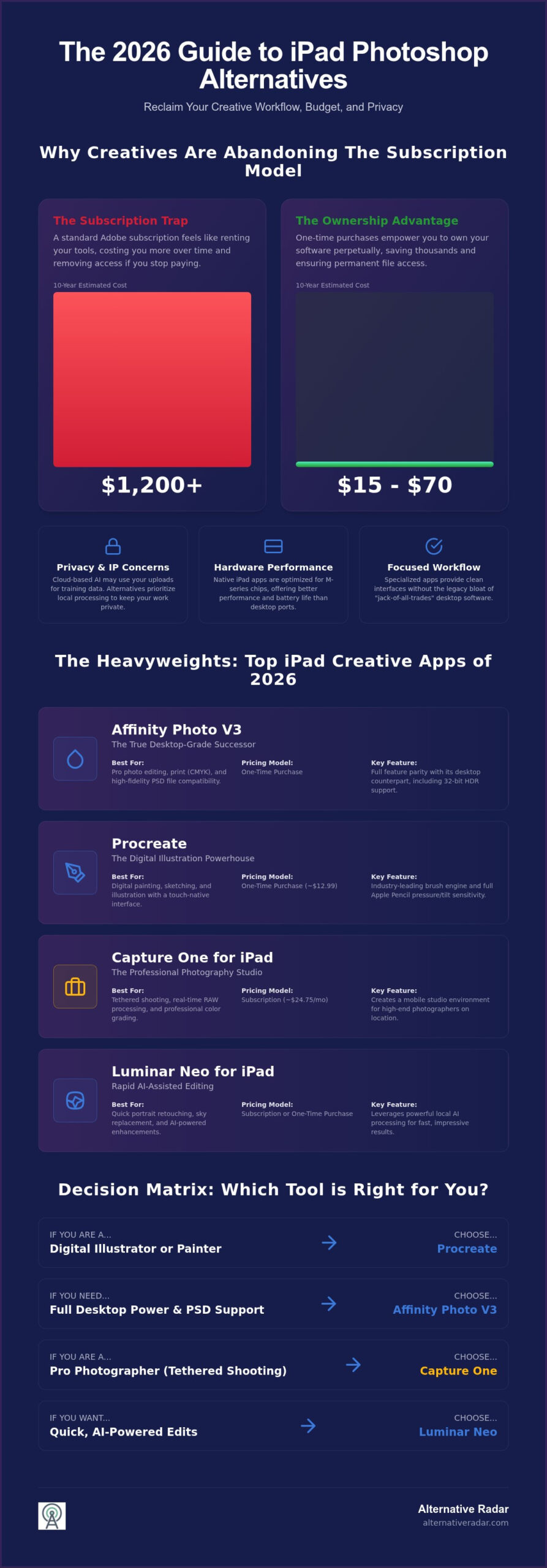
The professional creative market reached a clear tipping point in early 2026. Designers and illustrators no longer view the Creative Cloud as the mandatory standard for mobile production. The search for a photoshop alternative for ipad has intensified because the subscription model feels increasingly like a tax rather than a service. When you calculate the long-term costs, the numbers are difficult to ignore. A standard iPad Photoshop subscription costs roughly $120 annually. Over a decade, you spend $1,200 for software access that disappears the moment you stop paying. In contrast, industry leaders like Procreate and Affinity Photo 2 offer perpetual licenses for a fraction of that cost, allowing you to own your tools outright.
The Problem with Mobile Creative Cloud Subscriptions
Adobe’s model creates a psychological barrier where artists feel they are renting their own portfolio. If the subscription lapses, your ability to edit your native files often vanishes with it. Many modern developers have found ways to offer professional-grade features without these recurring bills. Some free tools successfully monetize through programmatic display advertising, providing high-end functionality at no cost to the user. This shift empowers independent designers to build a professional toolkit without the weight of permanent overhead.
Performance and Local Processing in 2026
Modern iPads featuring M3 and M4 chips possess more raw power than many desktop workstations. Native apps are built specifically for iPadOS and these silicon architectures, allowing them to run cooler and more efficiently than desktop ports. This efficiency is critical for mobile workflows where battery life and thermal throttling are constant concerns. Native apps also prioritize local AI processing, which has become the new professional standard for two reasons:
- IP Protection: Local processing ensures that client intellectual property never leaves the device.
- Privacy: Unlike cloud-based AI that may use your uploads for training data, local engines keep your work private.
Designers are also moving away from “jack-of-all-trades” software. A photoshop alternative for ipad often succeeds by doing one specific task perfectly. Whether it’s high-resolution RAW photo editing or precision digital painting, specialized apps provide a cleaner interface without the legacy bloat of a thirty-year-old desktop ecosystem. Choosing a “Lite” professional app built for touch is often more productive than struggling with a complex desktop port on a smaller screen.
The Heavyweights: Professional-Grade iPad Photo Editors
When you require a photoshop alternative for ipad that mirrors the full desktop experience, the market in 2026 offers several high-performance candidates. These aren’t just companion apps; they are standalone engines capable of handling complex production files. While Adobe continues to push cloud-centric workflows, these heavyweights focus on leveraging the local power of your iPad hardware to deliver professional results without the lag or the lock-in. Choosing the right tool depends on whether your priority is print production, RAW development, or AI-assisted retouching.
Affinity Photo V3: The True Desktop Successor
Affinity Photo V3 remains the most significant threat to Adobe’s dominance. It maintains full feature parity with its desktop counterpart, including 32-bit HDR support and professional CMYK color spaces for print. One of its greatest strengths is its PSD fidelity. Unlike basic editors that flatten files upon import, Affinity handles complex Adobe smart objects and layer effects with precision. This allows you to move files between platforms without losing editability. The 2026 version continues the brand’s commitment to a one-time purchase model, which stands in stark contrast to the rising costs found elsewhere in the industry.
Specialized Photography Tools for iPad
For high-end photographers, Capture One for iPad is the definitive choice for tethered shooting. It provides a mobile studio environment where you can grade colors and process RAW files in real-time. However, users should note the pricing trend; Capture One implemented a 6% price increase in June 2026, bringing annual plans to approximately $24.75 per month. If you prefer to avoid these hikes, Luminar Neo for iPad offers a compelling alternative by leveraging local AI for rapid portrait retouching and sky replacement without requiring a cloud connection.
If you are looking for a specific engine style, ArtStudio Pro is the dark horse of the category. It features a powerful brush engine that feels remarkably similar to Photoshop’s legacy system, making it an excellent bridge for long-time Adobe users. Pixelmator Photo rounds out the list with best-in-class AI-driven photo enhancement, perfect for those who need to process large batches of images quickly. You can explore more detailed software comparisons to see how these tools stack up against your specific hardware limitations. These professional tools prove that you can maintain industry standards while choosing a more sustainable licensing model.
Digital Painting and Illustration: Specialized iPad Tools
Illustrators often find that a general-purpose photoshop alternative for ipad lacks the specialized brush dynamics required for professional drawing. While Photoshop excels at manipulation, it can feel heavy and unintuitive when used with an Apple Pencil. In 2026, the market has split into highly specialized tools that prioritize stroke feel, vector precision, and animation integration. These apps don’t just mimic desktop features; they redefine the mobile drawing experience by focusing on touch-first ergonomics and hardware acceleration.
Procreate: Beyond Just Digital Sketching
Procreate remains the industry standard for a reason. Its $12.99 one-time purchase price is a defiant stance against the subscription trend. The 2026 brush engine updates have introduced sophisticated 3D model painting and advanced animation features, allowing you to move directly from a 2D sketch to a textured 3D asset. It maintains high productivity by staying out of the artist’s way. You can easily export your work to other adobe alternatives to finish your layout or prep files for print. Its integration with Procreate Dreams ensures that your static illustrations can become motion assets without leaving the ecosystem.
Open Source and Professional Illustration
Krita on iPad has matured into a powerhouse for those who need desktop-class features in a mobile format. It brings a robust layer system and professional masking tools that were previously exclusive to high-end workstations. You can learn more about how these tools fit into a broader tech stack in our guide on popular open source business software 2026. While Adobe Fresco is now free, many professional comic artists and concept designers still switch to Clip Studio Paint. Despite its $4.89 monthly subscription for iPad users, Clip Studio’s specialized tools for paneling, perspective rulers, and vector-based line correction offer a level of control that Photoshop cannot match.
Graphic designers who need vector precision should look toward Linearity Curve, formerly known as Vectornator. It provides a professional vector environment that is far more capable than Photoshop’s limited path tools. By combining a photoshop alternative for ipad like Procreate for textures with Linearity Curve for clean branding, you can build a complete mobile agency toolkit. This modular approach allows you to pick the best engine for each specific task rather than relying on a single, bloated application.
Cloud and Browser-Based Photoshop Alternatives for iPad
Browser-based tools are often dismissed as “lite” versions, but modern WebKit performance on iPadOS has changed this perception. If you need a photoshop alternative for ipad that requires zero storage space and offers immediate access to legacy PSD files, the browser is your most efficient path. These platforms are particularly useful for users who jump between an iPad and other devices like a Chromebook or a PC. You don’t have to worry about version mismatches or cloud syncing delays because the environment is consistent across every tab. This approach is ideal for professionals who manage multiple devices and want to avoid the friction of constant app updates and local cache management.
Photopea stands out as the most faithful recreation of the Photoshop interface, offering a familiar layout that requires almost no learning curve. It handles layers, masks, and smart objects with surprising fluidity, even when dealing with complex multi-layered compositions. For social media managers, Pixlr offers a more streamlined, AI-enhanced experience that prioritizes speed over deep raster manipulation. It includes one-click background removal and automated resizing for various platforms. Canva remains the leader for template-driven design, while SumoPaint provides a robust asset library for those who need quick access to stock elements and community-driven brushes in 2026.
The Power of Photopea for iPad Remote Work
Photopea is essentially a zero-installation powerhouse for remote work. You can open professional Adobe files directly from the iPad’s Files.app, make precise edits using familiar keyboard shortcuts, and export them back without ever downloading a dedicated application. This makes it a top best free alternatives to photoshop pick for freelancers who work on public hardware or simply want to keep their iPad storage lean. On base-model iPads with limited 64GB or 128GB capacity, running your editor in a browser tab preserves valuable space for high-resolution project assets and video files.
AI-First Mobile Editors and Privacy
The 2026 shift toward generative AI has created a new divide between cloud-based and local processing. While browser tools like Pixlr use cloud-based AI for speed and complex transformations, this often comes with a trade-off in data security and privacy. Professional users must evaluate whether their client contracts allow for cloud-based processing of sensitive assets, as many enterprise agreements now mandate local-only workflows. Local AI processing remains the gold standard for privacy, but for social media content and non-sensitive web graphics, the convenience of browser-integrated AI tools is unmatched. Choosing the right photoshop alternative for ipad requires balancing these privacy needs with your required output quality and project deadlines.
You can compare professional creative software options on Alternative Radar to find the best fit for your specific privacy requirements and hardware limitations. Browser tools are no longer just backups; they’re legitimate, high-velocity components of a modern mobile workflow that empower you to work from anywhere.
The Decision Matrix: Choosing Your iPad Creative Suite
Selecting the right photoshop alternative for ipad requires more than a simple feature comparison. You need a logical framework that accounts for your specific hardware limitations and professional output requirements. A tool that works perfectly for a social media manager might fail a print production artist who needs precise CMYK color management. To build an efficient mobile workflow, follow this five-step audit before committing to a new software ecosystem.
- Step 1: Identify your primary output. If you produce work for print, you need CMYK support and bleed settings found in Affinity Photo V3. For web and social content, RGB-focused tools like Pixlr or Canva are faster.
- Step 2: Evaluate your iPad hardware. RAM is the primary bottleneck. M-series iPad Pro models can handle hundreds of layers in Procreate, while base-model iPads might limit you to fewer than twenty at high resolutions.
- Step 3: Determine your budget. Decide if you want the total ownership of a one-time payment or the low entry cost of a “subscription-lite” model like Clip Studio Paint.
- Step 4: Audit client file requirements. If your clients demand layered PSD files with editable smart objects, your choice narrows to Affinity or Photopea.
- Step 5: Test with a real-world project. Don’t just doodle. Open a complex client file and attempt a full edit to see where the interface or performance might break.
Best iPad Picks by Professional Persona
Efficiency comes from matching the tool to the task. Social media managers should prioritize Pixlr or Canva to leverage speed and templates. Professional print designers will find the most utility in Affinity Photo V3 due to its desktop-class typography and color tools. Digital illustrators should look toward Procreate for its superior brush feel or Krita for its robust open-source feature set. Matching your persona to the right photoshop alternative for ipad ensures you aren’t fighting the software’s intended logic.
Tips for a Smooth Migration from Adobe
Transitioning away from the Creative Cloud doesn’t mean losing your curated assets. Most professional iPad apps allow you to import your existing Adobe brushes (.ABR) and swatches directly through the Files app. Spend an hour customizing your toolbars and shortcut gestures to mimic your classic Photoshop layout; this reduces the muscle memory friction during the first week of use. You can find a specific alternative to almost every Adobe utility to ensure your entire mobile suite remains cohesive and subscription-free. By organizing your workspace early, you’ll maintain professional velocity without the Adobe overhead.
Reclaiming Your Creative Autonomy in 2026
Moving away from a subscription-heavy ecosystem is more than just a financial decision; it’s a commitment to professional efficiency and data privacy. By matching your specific output requirements to a dedicated photoshop alternative for ipad, you eliminate the technical bloat of desktop ports and the recurring cost of rented software. Whether you prioritize the print-ready precision of Affinity Photo V3 or the zero-installation flexibility of Photopea, the 2026 market offers a tool that respects both your budget and your hardware.
The right choice depends on your specific workflow, from tethered photography to high-resolution digital painting. You can find your perfect software match on Alternative Radar. We provide objective comparisons of more than 500 creative tools, all updated for the latest 2026 iPadOS industry standards. Our expert-curated pros and cons help you bypass the marketing hype to find the exact utility you need. Take control of your mobile studio today and invest in tools that empower your long-term creative growth.
Frequently Asked Questions
What is the best free alternative to Photoshop for iPad beginners?
Adobe Fresco is the best free entry point for beginners. Adobe made Fresco completely free in late 2024, including all premium features. It offers a familiar interface and excellent Apple Pencil integration. For those who want a browser-based experience without installation, Photopea provides a full Photoshop-style layout for free, though it’s supported by programmatic display advertising. Both options allow beginners to learn layer-based editing without financial risk.
Can Affinity Photo for iPad open and edit Photoshop PSD files?
Yes, Affinity Photo V3 offers high-fidelity support for PSD files. It can open, edit, and export Adobe Photoshop documents while maintaining layer structures, blend modes, and even some smart objects. This makes it a primary photoshop alternative for ipad for professionals who need to collaborate with desktop-based teams. It ensures that your mobile edits remain compatible with industry-standard workflows without requiring an active Creative Cloud subscription.
Is Procreate a real Photoshop alternative for iPad users?
Procreate is a specialized alternative focused on digital painting and illustration rather than heavy photo manipulation. While it lacks Photoshop’s advanced vector tools and complex CMYK management, its $12.99 one-time purchase price makes it the most popular choice for artists. If your workflow involves creating original artwork from scratch, it’s an industry-leading replacement. However, for deep photo retouching, Affinity Photo remains the more direct functional equivalent.
Are there any iPad Photoshop alternatives with generative AI like Firefly?
Luminar Neo and Pixelmator Photo are the leading alternatives that leverage generative AI for iPad users. These apps use local and cloud-based engines to perform complex sky replacements, portrait retouching, and object removal. While they don’t use Adobe’s Firefly engine, they provide similar enhancements. Many professionals prefer these tools because they often prioritize local processing on M-series chips, which better protects client privacy and intellectual property.
Do I need an iPad Pro to run professional Photoshop alternatives?
You don’t strictly need an iPad Pro, but hardware limitations will affect your project scale. Professional apps like Affinity Photo and Procreate run on the iPad Air and the base-model iPad, but the amount of available RAM determines your maximum layer count and canvas size. An M2 or M4 iPad Pro is recommended for high-resolution print work or complex multi-layered compositions to ensure the software doesn’t lag or crash during intensive tasks.
Is Photopea safe to use for professional client work on iPad?
Photopea is safe for professional use as it processes files locally in your browser’s memory. Your data isn’t uploaded to a server for editing, which is a critical security feature for client confidentiality. It is a highly effective photoshop alternative for ipad when you’re working on public hardware or need to avoid software installation. Just ensure you save your progress frequently to the Files app, as browser tabs can refresh and lose unsaved data.
Can I buy a Photoshop-like iPad app with a one-time payment?
Yes, Affinity Photo V3 and Procreate are the most prominent one-time purchase options. Procreate costs $12.99, and Affinity Photo 2 was verified at $21.99 in 2026. These applications allow you to own your tools outright, avoiding the “Adobe tax” of recurring monthly fees. This model is becoming increasingly popular among independent creatives who want to maintain their software access even during months when they aren’t taking on active client projects.
Does GIMP work on iPad in 2026?
GIMP does not have a native iPadOS application in 2026. Because GIMP is built on the X11 windowing system, it hasn’t been ported directly to Apple’s mobile ecosystem. Users looking for an open-source experience should use Krita for iPad instead. Krita provides a desktop-class interface and professional illustration tools that are optimized for the iPad’s touch interface and Apple Pencil, making it the superior open-source choice for tablet users.