
Why are you still paying a monthly per-user fee for a database that locks your own customer data behind a digital paywall? It is a common frustration for growing teams to realize their “free” software plan is actually a demo designed to force an expensive upgrade as soon as they hit a small contact limit. Finding the best freeware crm shouldn’t feel like navigating a minefield of hidden limits and feature bloat. You want a system that works for you, not a subscription that dictates your workflow.
We agree that messy spreadsheets and data silos are holding your productivity back. You need a centralized database and automated follow-ups that offer scalability without immediate costs. This article promises to reveal the top-rated freeware and open-source CRM tools that provide professional features without the monthly subscription fees. We have done the scouting work for you, filtering out the hype to focus on utility and data ownership.
In the following sections, we provide a direct comparison of ten exceptional tools, highlighting their licensing types and core strengths. You will discover which platforms offer the best balance of power and price to help you make a smarter choice for your business operations in 2026.
Key Takeaways
- Distinguish between true freeware and restrictive freemium models to ensure your team avoids unexpected subscription paywalls as you scale.
- Identify the critical features required for 2026, including visual deal pipelines and automated lead management, to replace inefficient manual processes.
- Evaluate the market’s best freeware crm options based on your specific needs for either collaborative flexibility or enterprise-grade open-source control.
- Implement a structured transition by auditing your existing data and mapping sales stages before migrating from spreadsheets to your new system.
Freeware vs. Freemium CRM: Understanding the Cost of Free
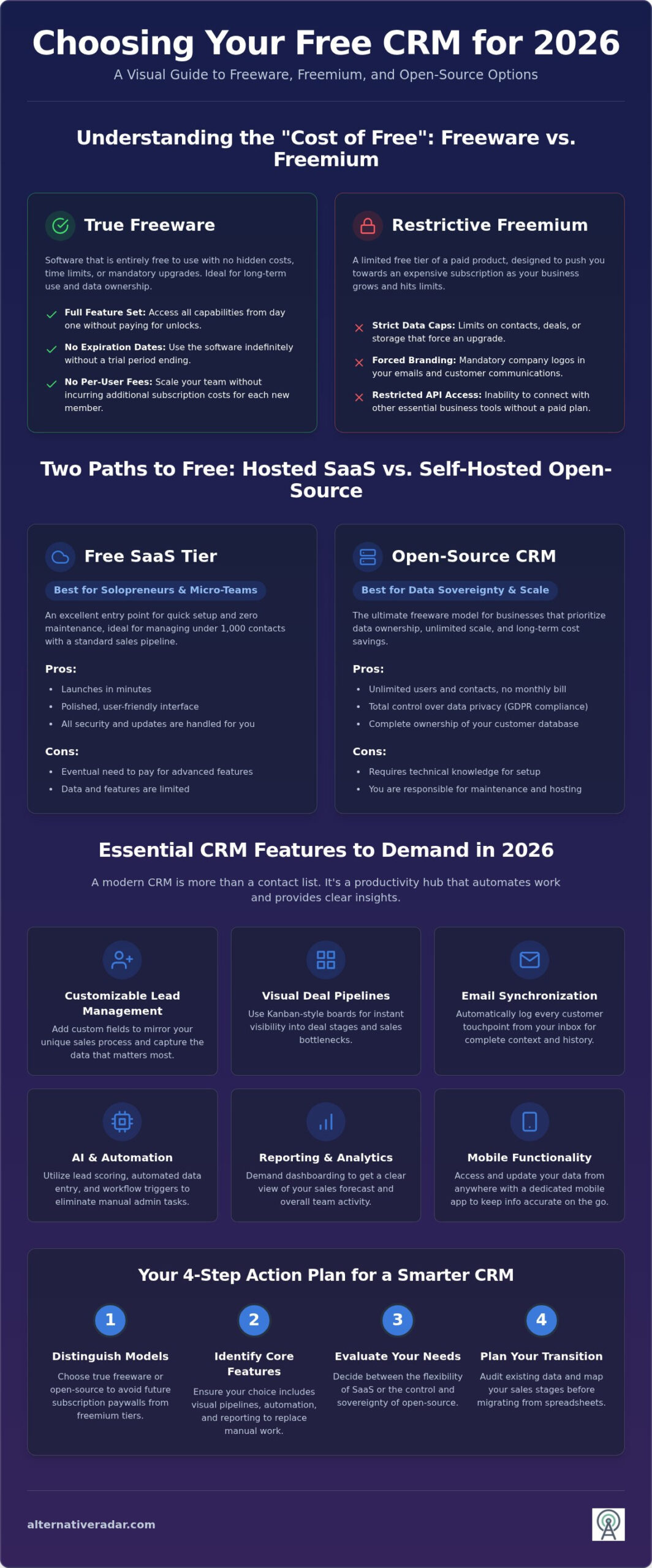
Searching for the best freeware crm often leads to a confusing mix of licensing models. It’s vital to distinguish between freeware and freemium before committing your data to a platform. Freeware refers to software that is entirely free to use without expiration dates or per-user fees. Once you install or access it, the full feature set remains available without a ticking clock. Freemium, conversely, is a tiered service model. It offers a functional but restricted version of a premium product, strategically designed to nudge you toward a paid upgrade as your business grows. Finding the best freeware crm for your specific workflow requires understanding these technical distinctions.
Proprietary SaaS providers often hide the true cost of their free tiers. These plans frequently include:
- Strict data caps: Limits on the number of contacts or deals you can store in the database.
- Forced branding: Mandatory logos or tags in your customer communications that can look unprofessional.
- Restricted API access: Blocks that prevent you from syncing data with other essential business tools.
These limitations create a glass ceiling that forces an expensive transition just as your sales momentum picks up. Open-source CRM stands as the primary alternative to these traps, offering the flexibility of professional software without the recurring overhead.
When to Choose a Free SaaS Tier
Cloud-based free tiers serve as an excellent entry point for solopreneurs and micro-teams. If you’re looking for a system that requires zero maintenance and can be launched in minutes, a SaaS freemium model is often the right choice. These platforms excel at managing standard sales pipelines where you have fewer than 1,000 contacts. They offer a polished user interface and handle all security updates automatically. This path allows you to focus on selling rather than managing infrastructure, provided you’re comfortable with the eventual need to pay for advanced features.
The Power of Open-Source CRM for Sovereignty
Open-source solutions represent the ultimate form of freeware for businesses that prioritize data ownership. By hosting the software on your own servers, you gain unlimited users and contacts without ever receiving a monthly bill. This model provides total control over data privacy, making it easier to maintain GDPR compliance without relying on a third party’s security protocols. You own the database entirely. However, this sovereignty requires a tradeoff. You’ll need basic technical knowledge to manage the installation or a budget for a hosting partner to handle the backend. For teams that want to scale without financial friction, the initial setup effort pays dividends in long-term independence.
Essential Features to Demand in a Free CRM in 2026
A basic digital rolodex is no longer enough to stay competitive. By 2026, the best freeware crm options must serve as active productivity hubs that eliminate data silos and manual errors. You should expect a suite of core tools that work together to streamline your workflow. When evaluating your options, prioritize these four pillars:
- Customizable Lead Management: The ability to add custom fields ensures the database mirrors your unique sales process.
- Visual Pipelines: Kanban-style boards provide instant visibility into deal health and bottlenecked stages.
- Email Synchronization: Native integration with your inbox logs every touchpoint automatically for better context.
- Mobile Functionality: A dedicated app keeps your data accurate while you are meeting clients in the field.
These features form the foundation of a reliable system. Without them, you will likely find yourself returning to messy spreadsheets within months. Efficiency depends on having your data organized and accessible from any device.
AI and Automation: The New Standard
Automation is now the primary differentiator for sales efficiency. Finding the best freeware crm requires a focus on future-proof technology, specifically local AI models that assist with lead scoring. These tools analyze contact behavior to identify which prospects are most likely to convert. Automated data entry is also essential; it removes the “admin tax” that often slows down high-performing teams. Workflow triggers are non-negotiable in 2026. Your CRM should be smart enough to send follow-up reminders or update deal stages based on specific actions without manual intervention.
Reporting and Analytics Capabilities
You cannot manage what you do not measure. Demand basic dashboarding that provides a clear view of your sales forecast and team activity. This level of transparency helps you spot trends and identify where deals are stalling. Accountability improves when everyone can see the same performance metrics in real-time. High-quality reporting ensures you aren’t just collecting data but actually using it to drive revenue.
Finally, ensure your data is never “locked in.” Professional freeware allows for easy exporting so you maintain complete ownership of your information. If you’re unsure which feature set aligns with your team’s specific size, you can compare specific CRM capabilities on Alternative Radar to find the right fit. This scouting process ensures you don’t waste time on tools that lack these modern essentials.
The 10 Best Freeware and Open Source CRM Picks
Selecting the right platform requires matching your team’s technical capacity with your specific operational needs. The best freeware crm options in 2026 generally fall into two categories: cloud-based SaaS tiers for speed and self-hosted open-source software for total control. We have scouted the market to identify the most reliable tools that deliver professional functionality without a subscription bill.
- Bitrix24: This is the best all-in-one free tier for collaboration. It integrates task management, internal chat, and document storage directly into the CRM. It’s ideal for teams that want a unified digital workspace.
- SuiteCRM: Known as the gold standard for open-source enterprise power, this tool provides deep customization options. It allows you to model complex sales cycles that proprietary free tiers often block.
- Odoo Community Edition: This version is best for businesses needing modular growth. You can start with basic lead management and eventually integrate other open-source modules for inventory or accounting.
- Vtiger: It offers a balanced approach by combining sales automation with customer support features. The open-source version is particularly effective for teams that need to manage the entire customer lifecycle in one place.
Top Picks for SaaS Free Tiers
Cloud-based options offer the fastest path to organization. HubSpot CRM remains a top choice because it provides the most user-friendly interface for beginners. It’s designed for those who want to start tracking deals immediately without a steep learning curve. Zoho CRM is the logical pick for businesses already operating within the Zoho ecosystem, as it syncs seamlessly with their other productivity tools. For lead-focused small teams, Freshsales offers excellent visual pipeline tracking that helps prioritize high-value prospects without unnecessary clutter.
Top Picks for Self-Hosted Freeware
If you prioritize data sovereignty and want to avoid the “admin tax” of per-user fees, self-hosting is the best freeware crm strategy. EspoCRM is a lightweight and fast option that focuses on a clean, responsive interface. It’s highly customizable, making it a favorite for niche service businesses. CiviCRM is the undisputed leader for non-profits and NGOs, featuring specialized tools for donor tracking and grant management. For those in regulated industries like finance or healthcare, YetiForce provides advanced security features and rigorous activity logging to help maintain compliance while managing client relationships.
Selection Guide: Which Free Tool Fits Your Team?
Finding the best freeware crm depends entirely on your team’s operational structure and technical appetite. A tool that empowers a solo consultant might frustrate a five person sales team or a tech-heavy enterprise. You must match the software’s delivery model to your internal resources to ensure long term adoption. Don’t simply choose the most popular name; choose the one that aligns with your specific workflow.
- The Solopreneur Path: Efficiency is your primary goal. You should prioritize cloud-based SaaS options that require zero maintenance. Look for high automation levels to handle repetitive tasks so you can focus on closing deals.
- The Small Sales Team: Visibility and collaboration are non-negotiable. Your choice should offer shared pipelines and activity tracking so everyone stays informed. SaaS tiers are usually best here unless you have dedicated IT support.
- The Tech-Savvy Enterprise: If you have the infrastructure, self-hosted open-source tools offer the most power. These prioritize deep customization and total data ownership, allowing you to build a system that fits your exact requirements.
For a deeper dive into technical specifications and licensing details, consult our open source crm software comparison. This resource helps you filter options based on your team’s unique needs.
Evaluating the Learning Curve
User interface and experience often matter more than a long list of features. If a system is too complex, your team won’t use it consistently, leading to data gaps. Focus on the “time-to-value” metric. How quickly can your team import contacts and start tracking deals? Most popular freeware options provide extensive training resources, including video tutorials and community forums. Leverage these during your trial period to see if the software feels intuitive. Speed of adoption is a key indicator of the best freeware crm for your specific culture.
Scalability: Planning for the Future
A free tool is only valuable if it doesn’t become a bottleneck as you grow. You need to know if the software offers an easy migration path, whether that’s moving from a free tier to a paid plan or transitioning from a self-hosted setup to the cloud. Avoid tools that lock your data in proprietary formats. Check the best crm brands for scalability to see how different platforms handle increasing contact volumes and user seats. Planning for your 2027 needs today prevents a painful software migration later. You can explore curated software alternatives on Alternative Radar to find a platform that supports your long-term vision.
Implementation and Next Steps: Moving Beyond Spreadsheets
Moving away from manual spreadsheets is the most significant step you can take toward professional efficiency. However, even the best freeware crm will fail to deliver results if the initial setup is rushed or disorganized. Success depends on a structured transition that prioritizes data quality over speed. You must prepare your environment before inviting your team to the new platform.
Start by auditing your current data. Messy spreadsheets lead to a messy database, often referred to as “garbage in, garbage out.” Clean your lists by removing inactive contacts and standardizing address formats. Once your data is clean, map your sales process. Define exactly what happens at each stage of a deal, from the initial prospect to the final signature. Defining these stages before you touch the software prevents configuration errors later. Finally, pilot the tool with a single team or a specific project. This identifies friction points before they impact the entire organization. To maximize your savings, leverage popular open source business software 2026 to build a full free office stack that integrates with your new CRM.
Data Import and Migration Tips
Most platforms accept CSV files for bulk contact uploads. Use this method to save time, but always perform a dry run with a handful of records first to ensure fields map correctly. Checking for duplicate records is critical during this transition. Many professional tools have built-in deduplication features to help you merge identical contacts. Once the data is imported, set up basic integrations with your email provider. This ensures every outgoing message is logged automatically, providing a complete history of customer interactions without manual data entry.
Training and Team Adoption
Software is only as good as the data your team enters into it. Create a simple “how-to” guide that mirrors your specific internal workflow rather than relying on generic vendor documentation. This guide should explain exactly when and how to update a lead’s status. Encourage daily usage by making the CRM the “single source of truth” for all customer interactions. If a deal isn’t in the system, it doesn’t exist. This habit ensures data accuracy and helps you identify the best freeware crm features that truly drive your revenue. As you optimize your sales stack, explore more alternative to popular tools to streamline your entire office operations.
Optimizing Your Sales Workflow for 2026 and Beyond
You now have the roadmap to eliminate expensive subscription fees while professionalizing your lead management. Selecting the best freeware crm isn’t just about saving money; it’s about reclaiming ownership of your customer data and building a scalable foundation. Remember that the distinction between a restrictive freemium plan and a powerful open-source solution is the key to long term growth. Successful implementation starts with a thorough data audit and a clear map of your sales stages to ensure your team actually adopts the new tool.
Alternative Radar acts as your digital scout. We provide unbiased software comparisons and expert insights into open-source licensing to help you bypass market hype. Our platform offers daily updates on the tech landscape so you stay informed without the manual effort of searching. Find the perfect CRM alternative on Alternative Radar and take the next step toward a more efficient office. It’s time to empower your business with tools that prioritize your productivity over their monthly recurring revenue.
Frequently Asked Questions
Is there a truly free CRM with no limits?
Truly free software exists mainly in the open-source sector. Options like SuiteCRM or EspoCRM don’t impose artificial limits on users or contacts because you host the software on your own hardware. In contrast, cloud-based free tiers almost always include caps on records or features to drive paid upgrades. You must decide if you prefer the unlimited nature of self-hosted freeware or the maintenance-free convenience of limited SaaS plans.
How do free CRM providers make money?
Providers typically monetize free software through a freemium model. They offer a functional entry-level product and charge for premium features, extra storage, or priority support. Some companies also generate revenue through marketplace integrations or consulting services. Information platforms like Alternative Radar support their operations through programmatic display advertising and affiliate-linked software recommendations. This ensures users can access neutral comparisons and expert insights without paying a direct subscription fee for the research.
Can I migrate my data from a free CRM to a paid one later?
Data migration is possible if the software supports standard export formats like CSV or SQL. Most professional systems include these tools to help you move to a paid tier or a different platform as your needs evolve. This flexibility is a hallmark of the best freeware crm because it prevents vendor lock-in. Always test the export functionality before committing your entire database to a new tool to ensure your information remains accessible.
What is the best open-source CRM for small businesses?
SuiteCRM remains the top choice for small businesses that need enterprise-level functionality without a price tag. It offers robust automation and reporting tools that rival expensive proprietary systems. If your team prefers a faster, more modern interface, EspoCRM is a lightweight alternative that is easy to customize. Both options provide the scalability required for growth, provided you have the technical resources to manage the hosting and security of your own database.
Do free CRMs include email marketing features?
Most free plans provide basic email tools like inbox synchronization and simple templates. Advanced marketing automation, such as complex drip sequences or mass email blasts, is usually reserved for paid tiers. For example, Bitrix24 includes some marketing tools in its free version, but you might face limits on the number of monthly emails you can send. Integrating a separate, specialized marketing tool is often the most efficient way to scale your outreach campaigns.
Is my data safe in a free or freeware CRM?
Security is a shared responsibility between the provider and the user. SaaS companies invest heavily in encryption and server protection, but you are subject to their specific data handling policies. Self-hosted freeware gives you total control over privacy and compliance, which is a major advantage for regulated industries. However, you must manage your own backups and firewall settings. Your data is only as safe as the infrastructure and security protocols you implement.
Do I need a developer to set up an open-source CRM?
A developer isn’t strictly necessary for basic installations. Many modern web hosts offer automated installers that handle the technical heavy lifting for open-source software. You can often get a system running by following standard documentation or community guides. If you need to build custom modules or connect the CRM to complex external APIs, professional help becomes more valuable. Most small businesses can manage the initial setup and basic configuration without external technical support.