
Choosing the most famous filter doesn’t guarantee the smoothest movie night. While Clearplay is a household name, your hardware setup often dictates which clearplay alternatives actually work. You’ve likely dealt with technical glitches during playback or realized your favorite streaming app isn’t supported on your Smart TV. It’s frustrating to pay a monthly subscription only to find the software crashes right when you’re settling in with the family.
This guide identifies the most reliable software to help you filter profanity, nudity, and violence without the technical headaches. You’ll discover how to achieve a seamless, glitch-free viewing experience while finding a solution that fits your specific budget. We’ve already done the hard work of testing these filters so you don’t have to. Our goal is to provide clarity so you can make a smarter choice for your home.
We’ll compare the top software and extensions for 2026, including a deep dive into platform compatibility and cost. Whether you need VidAngel’s extensive service support or the community-driven simplicity of free tools like Skipit, you’ll find the exact match for your streaming habits here.
Key Takeaways
- Identify whether a browser extension or a cloud-based app suits your specific hardware setup to ensure a glitch-free viewing experience.
- Compare the top clearplay alternatives like VidAngel and Enjoy Movies Your Way to find the best balance between monthly cost and platform compatibility.
- Pinpoint which filters support major services like Disney+ and Netflix so you can avoid software that lacks coverage for your existing subscriptions.
- Evaluate advanced customization features such as “Tag Mode” to gain granular control over specific content triggers beyond standard parental controls.
- Discover free, open-source tools that provide reliable filtering for casual viewing without the burden of an additional monthly subscription.
Why Look for Clearplay Alternatives in 2026?
Streaming filters have evolved from simple hardware modifications into sophisticated digital overlays. These tools perform three primary tasks: muting profanity, skipping specific scenes, and removing visual gore. While Clearplay pioneered this space, many users now search for clearplay alternatives due to persistent technical limitations. Legacy software often struggles with browser-only constraints or reported “buggy” performance that disrupts the viewing experience. In a market where users expect seamless integration, a 3.6-star experience is no longer the gold standard.
Standard Parental controls provided by Netflix or Disney+ are often insufficient for precise household needs. These built-in profiles work on an all-or-nothing basis; they block entire movies based on broad age ratings rather than allowing you to keep the film while removing specific offensive elements. You don’t want to lose access to a great story just because of a few unnecessary lines of dialogue or a single violent scene. Modern clearplay alternatives fill this gap by providing surgical precision.
The Legal Landscape of Content Filtering
The legal foundation for these tools rests on the Family Movie Act of 2005. This legislation ensures that technology used to skip or mute content for private, in-home viewing does not violate copyright laws. Content filtering for private, in-home use is a legally protected activity under the Family Movie Act of 2005. While some services have faced litigation for how they source or re-stream their content, the act of filtering itself remains a right for the end user. Most modern tools stay untouched by lawsuits because they act as a transparent layer over your existing, legal streaming subscriptions.
Core Features to Demand in a Modern Filter
A modern filter must offer more than just a “skip” button. You should look for software that provides real-time profanity muting, which keeps the scene intact while silencing the audio. Platform stability is equally vital; poor software often causes audio desync, where the voices no longer match the actors’ lips. We’ve identified several key markers of a high-quality tool:
- Customizable sensitivity: The ability to adjust filters for different family members based on age or personal triggers.
- Tag diversity: A choice between community-driven tags, which offer fast updates for new releases, and professional edits for high accuracy.
- Device flexibility: Support that extends beyond a Chrome browser to include Smart TVs and streaming sticks.
The shift toward community-driven filtering is a major trend in 2026. Instead of waiting for a company to manually edit a film, open-source models allow users to create and share their own filter “maps.” This ensures that even niche titles or brand-new releases have filtering options available almost immediately.
Streaming Filter Technology: Extensions vs. Cloud-Based Apps
Understanding the underlying technology is the first step in selecting clearplay alternatives that actually fit your lifestyle. Most tools fall into two categories: browser extensions that act as an overlay or cloud-based apps that re-stream content. Your choice dictates whether you’re stuck at a desk or lounging on the couch. Each method handles data differently, impacting both the ease of setup and the final video quality.
How Browser Extensions Work
Extensions like Skipit or Enjoy Movies Your Way function by injecting code into the web player on Chrome or Edge. They rely on community-sourced timestamps to know exactly when to mute or skip a specific scene. While these tools are easy to install, they’re typically restricted to PC or laptop viewing. You can’t simply install a Chrome extension on a Roku or a built-in Smart TV app. This limitation often frustrates families who want a traditional living room experience.
Security is a factor here. Giving an extension permission to read and change data on your streaming sites requires trust. When Protecting Kids Online, parents should verify that these extensions have a clear privacy policy. Most reliable extensions only track the movie’s progress to trigger filters, but you should always check the permissions before clicking “Add to Chrome.”
The Cloud-Streaming Model Explained
Cloud-based services like VidAngel use a fundamentally different approach. Instead of an overlay, they verify your existing Netflix or Amazon credentials and re-stream the movie through their own servers. This allows for superior profanity muting because the audio is processed before it reaches your screen. You won’t hear those awkward half-syllables common in browser-based mutes where the software struggles to keep up with the live player.
This model is currently the most effective way to get native app integration on devices like Apple TV, Fire Stick, and Roku. It provides a seamless experience where the filter feels like a built-in feature of your television. However, this re-streaming method is technically complex and has historically led to legal tension with studios. While the technology is more robust, it requires a stable high-speed internet connection to avoid issues.
Performance remains a concern for some users. Because browser extensions are lightweight, they rarely cause buffering. Cloud-based apps add an extra step to the data’s journey. If your internet speed is borderline, you might see a slight resolution drop or increased buffering as the filtered stream loads. You can evaluate your options on Alternative Radar to see which technology matches your home’s bandwidth and hardware setup.
Top Clearplay Alternatives: VidAngel, Enjoy, and Skipit
Selecting the right software requires balancing platform compatibility with the precision of the filters. While some users prefer professionally edited tags, others value the speed of community-driven updates. We’ve identified three primary clearplay alternatives that lead the market in 2026, each catering to a different hardware setup and budget.
VidAngel: Features and Platform Restrictions
VidAngel remains the most robust choice for users who want a native app experience on devices like Apple TV or Roku. It provides high-quality, professionally edited filters for services like Amazon Prime, Apple TV+, Peacock, and Paramount+. However, it’s vital to understand the content gaps. Due to past legal settlements, VidAngel cannot filter content from Disney or Warner Bros (HBO Max) directly. If your library is centered on these studios, you’ll need a different tool. Despite these blackouts, it stays a top contender because of its superior audio muting and stable interface. Understanding these trade-offs is a key part of finding the best alternative to popular software for your specific home theater setup.
Enjoy Movies Your Way: The Hidden Gem
Enjoy Movies Your Way offers a level of flexibility that Clearplay lacks. Its standout feature is “Tag Mode,” which empowers users to create their own filter maps or adjust existing ones in real time. Unlike VidAngel, this tool works via a browser extension, which allows it to bypass studio-specific blackouts. This means you can filter Disney+ and Hulu content without issue. The user interface is modern and faster than Clearplay’s legacy system, though it requires a PC or laptop connected to your TV to work effectively. It’s the ideal choice for parents who want granular control over exactly what is muted or skipped.
Skipit: The Free Alternative for Netflix
If you’re looking for clearplay alternatives that don’t add to your monthly bills, Skipit is the primary choice for Netflix purists. It operates on a community-powered model where users share timestamps for popular shows. There is a significant technical trade-off: Skipit only handles visual scene skipping. It doesn’t currently offer profanity muting, so the audio remains untouched even when the video jumps. Installation is straightforward through the Chrome Web Store, making it a low-barrier option for casual viewers who only need to skip graphic violence or adult scenes in major Netflix releases.
The accuracy of these tools depends on their tagging source. Professional editors at VidAngel provide the most consistent experience, while the crowdsourced models of Skipit and Enjoy offer faster coverage for brand-new releases. Your choice should depend on whether you value the “set it and forget it” reliability of professional tags or the immediate availability of community maps.
Platform Compatibility: Which Filter Works with Your Service?
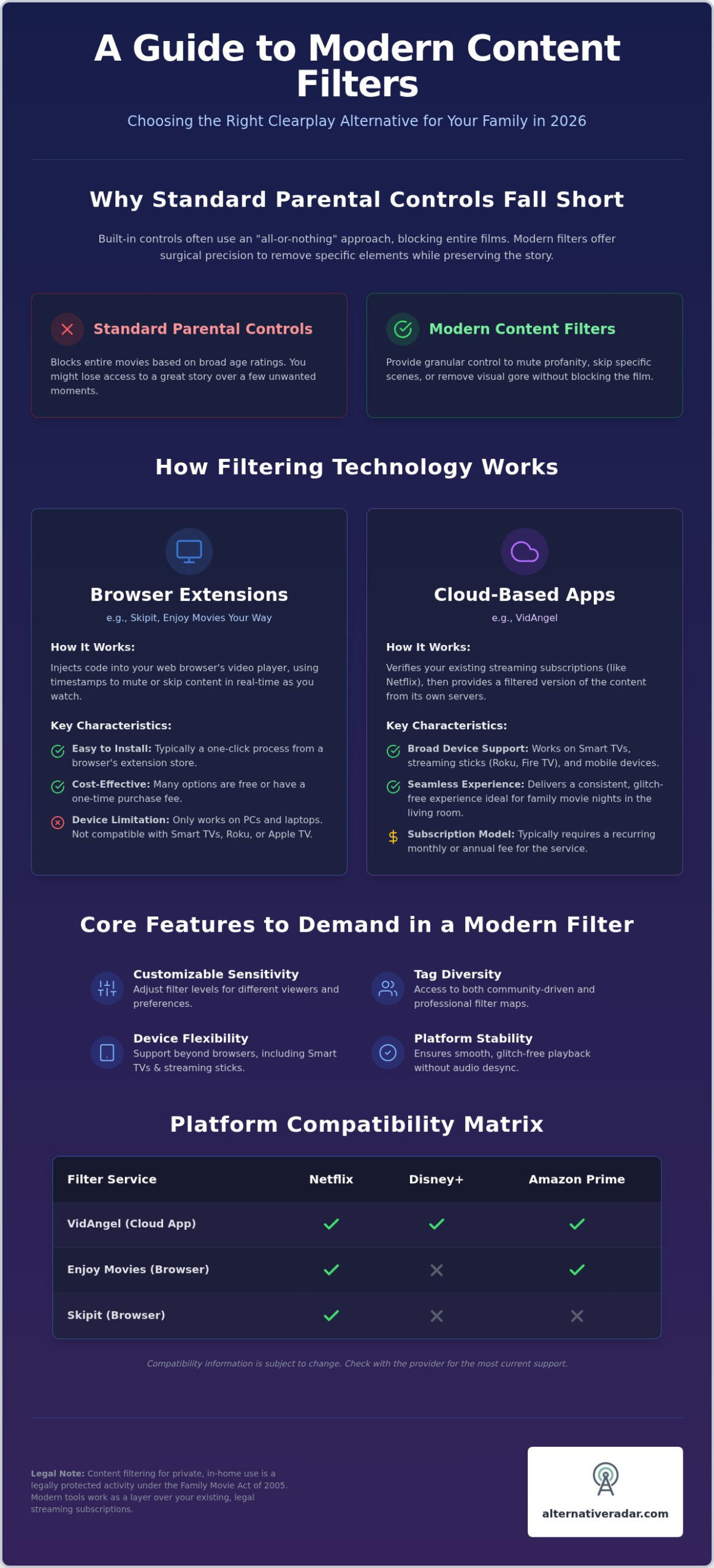
Your choice of clearplay alternatives often depends on which library you want to clean up. Netflix remains the most widely supported platform; almost every filtering tool on the market interacts with its player effectively. However, the landscape changes quickly when you move to studio-specific apps. Disney+ presents a unique challenge. Due to ongoing legal restrictions, VidAngel does not support Disney content, making Enjoy Movies Your Way the most viable alternative for Marvel or Pixar fans. For Amazon Prime Video, VidAngel generally outperforms Clearplay in terms of audio-sync stability and filter granularity. HBO Max and other Warner Bros properties are similarly restricted on cloud-based apps, often forcing users back to browser extensions for reliable filtering.
Filtering on Smart TVs and Streaming Sticks
If you primarily watch on a Roku, Apple TV, or Fire Stick, your options narrow significantly. VidAngel is the clear leader for these devices because its cloud-based model works through a dedicated app. Browser-based tools like Skipit or Enjoy are effectively locked out of native Smart TV environments and mobile apps. You can overcome this by connecting a laptop to your TV via HDMI or casting a filtered browser tab, but this adds a layer of technical friction that many families find frustrating. For a true “lean back” experience on a TV, a cloud-based app is almost always the superior choice.
Hardware vs. Software: Making the Right Choice
The era of physical hardware filters, such as the legacy Clearplay DVD players, has largely ended. In 2026, the industry has transitioned entirely to software-based solutions that reside in the cloud or your browser. Modern streaming filters require either a Chromium-based browser for extension support or a dedicated cloud-compatible app for native streaming stick integration. This shift ensures faster updates for new releases and better compatibility with 4K streaming standards. While hardware once provided the most stable experience, modern software now offers better precision without the need for bulky extra devices.
Before you commit to a subscription, verify that your specific combination of hardware and streaming service is supported. You can compare detailed compatibility charts on Alternative Radar to find the exact match for your home theater setup. This scout-like approach prevents you from paying for a service that doesn’t actually work on your primary screen.
Final Verdict: Choosing Your Perfect Viewing Solution
Finding the right clearplay alternatives requires matching your hardware to your viewing habits. There is no single winner for every household, but the market has matured enough to offer specialized solutions for different needs. If your family maintains multiple subscriptions across Amazon Prime, Apple TV+, and Peacock, VidAngel is the most reliable overall choice due to its native app support and professional-grade audio muting. For those who prioritize budget and primarily stick to Netflix, Skipit offers a functional, free-to-use experience without the burden of a recurring subscription.
Before you select a tool, run through this final compatibility checklist:
- Platform: Does it support Disney+ or HBO Max if those are your primary services?
- Price: Are you comfortable with a premium subscription, or do you require a free-to-use extension?
- Device: Will you watch on a native Smart TV app or a laptop browser?
If you demand the highest level of customization and want to filter Disney+ content, Enjoy Movies Your Way stands out as the most flexible software alternative. It bridges the gap between professional editing and user-controlled “Tag Mode” features that Clearplay currently lacks.
Next Steps for a Safer Cinema Experience
Setting up your first filter usually takes under five minutes. Most extensions require a simple click in the Chrome Web Store, while cloud-based apps involve linking your existing streaming credentials through a secure verification process. If you experience audio desync, the most effective fix is refreshing the player or checking if your browser hardware acceleration is enabled. For users who value the transparency of community-driven tools, exploring popular open source business software provides deeper insight into how community-led development ensures long-term utility and rapid updates.
Alternative Radar Recommendation
Alternative Radar views the current market as a shift toward specialized utility. We recommend starting with a free trial of a premium service like VidAngel or Enjoy Movies Your Way to test the stability on your specific home network and hardware setup. Don’t settle for a glitchy interface when better-engineered clearplay alternatives are readily available. Our role is to act as your digital scout, identifying the tools that respect both your time and your resources. You can find more software alternatives on Alternative Radar to continue optimizing your digital experience and make smarter software choices.
Streamline Your Family Cinema Setup
The landscape of content filtering has shifted toward specialized software that prioritizes your specific hardware and streaming subscriptions. Choosing the right clearplay alternatives depends on whether you value the native app integration of cloud-based services like VidAngel or the granular control of browser extensions like Enjoy Movies Your Way. You don’t have to settle for glitchy playback or limited platform support when better-engineered tools exist for 2026 standards.
By matching your filter to your primary viewing device, you ensure a seamless experience that respects your family’s time and budget. Our digital scouts have already done the testing to provide you with objective, data-driven comparisons that simplify this decision. Each recommendation is curated to help you navigate legal blackouts and technical compatibility hurdles with ease. Take control of your media library today and build a viewing environment that aligns with your household values.
Explore all software alternatives on Alternative Radar to find your perfect match. Your ideal, worry-free movie night is just a few clicks away.
Frequently Asked Questions
Is content filtering like Clearplay or VidAngel legal?
Content filtering for personal, in-home use is legally protected under the Family Movie Act of 2005. This law allows viewers to skip or mute content in movies without violating copyright. While some companies have faced litigation over how they source or re-stream content, the act of a consumer filtering a legally owned or subscribed stream remains protected. You can use these tools confidently as long as you maintain valid subscriptions.
Does VidAngel work with Disney+ and Warner Bros movies?
VidAngel doesn’t currently support content from Disney or Warner Bros properties, including HBO Max. This is a result of previous legal settlements that restrict how the service interacts with those specific studios. If you need to filter these platforms, you should look at browser-based clearplay alternatives like Enjoy Movies Your Way. These extensions operate as an overlay on the official player, allowing them to function where cloud-based apps are restricted.
Are there any free alternatives to Clearplay?
Skipit and Enjoy Movies Your Way are the primary free options available in 2026. Skipit is a community-powered Chrome extension that focuses on skipping visual triggers, though it lacks audio muting features. Enjoy Movies Your Way offers a robust free tier for its browser extension that supports major platforms like Netflix and Hulu. These clearplay alternatives provide a cost-effective entry point for families who want to test filtering without a monthly subscription.
Can I use these filtering services on my Smart TV?
Compatibility depends on the technology used by the service. VidAngel offers native apps for Roku, Apple TV, and Fire Stick, making it the most convenient choice for traditional TV viewing. Browser extensions like Skipit or Enjoy don’t work natively on Smart TV apps. To use those on a big screen, you must connect a laptop via HDMI or cast a filtered browser tab from a computer to your television for a complete experience.
What is the difference between scene skipping and profanity muting?
Scene skipping entirely removes a segment of video and audio from the playback, essentially jumping the player forward past a specific timestamp. Profanity muting is more surgical; it keeps the video track playing while silencing only the specific offensive words in the audio. Most premium filters allow you to choose which method you prefer for different categories, such as skipping graphic violence while only muting mild language to keep the story flow intact.
Do these filters work on rented or purchased movies (like on Amazon)?
Most major filtering services support movies rented or purchased through Amazon Prime Video. VidAngel and Clearplay both allow you to link your Amazon account to apply filters to your personal digital library. This is particularly useful for new releases that aren’t yet available on subscription-based streaming platforms. Always verify that a specific title has been tagged or mapped by the filtering community before you finalize your rental or purchase to ensure coverage.
Will a content filter slow down my internet connection?
Browser extensions generally have no impact on your internet speed because they’re lightweight overlays. Cloud-based services like VidAngel might require slightly more bandwidth because the video is being processed through their servers before reaching your device. If your connection meets the standard requirements for 4K streaming, you won’t notice a difference. Users with borderline speeds should prioritize browser-based tools to ensure the highest resolution and minimal buffering during your family movie night.
Can I create my own custom filters with these tools?
Customization is a core feature of modern tools like Enjoy Movies Your Way. Their Tag Mode allows you to identify specific scenes or words for filtering and share those maps with other users. While VidAngel and Clearplay rely more on professional editors, they still offer granular categories where you can toggle specific triggers on or off. This ensures the viewing experience is tailored to your family’s unique sensitivity levels rather than a generic rating system.