
Most community leaders are still treating their platforms like digital filing cabinets, even though 56% of modern tools now use AI to moderate and engage members automatically. It’s frustrating to watch participation rates stall while you’re buried in manual data entry across disconnected tools. You know your community has value, but proving that ROI to stakeholders feels impossible without a unified view of member behavior. Choosing the right community management software is no longer about finding a place to host a forum; it’s about building an engagement infrastructure that scales.
This guide will show you how to evaluate and select the ideal platform to automate your workflows and drive genuine member activity. We’ve done the heavy lifting by filtering the market’s top options through a lens of utility and precision. You’ll discover which platforms offer the best automated renewal flows, how to navigate the 2026 privacy landscape, and which tools actually deliver on the promise of a self-sustaining digital ecosystem. We provide the clarity you need to stop following market leaders and start choosing the tool that fits your specific goals.
Key Takeaways
- Shift from static member databases to proactive engagement engines that prioritize automated workflows and real-time interaction.
- Use a strategic auditing framework to distinguish between essential core features and experimental tools before selecting your next community management software.
- Evaluate the trade-offs between SaaS for rapid deployment and open-source architectures for maximum data sovereignty and long-term customization.
- Match platform capabilities to your specific community niche, prioritizing certification tools for professional associations or feedback loops for brand communities.
- Focus on building a scalable digital ecosystem that identifies community advocates and automates renewal flows to prove clear ROI to stakeholders.
Beyond the Member List: The Evolution of Community Management Software
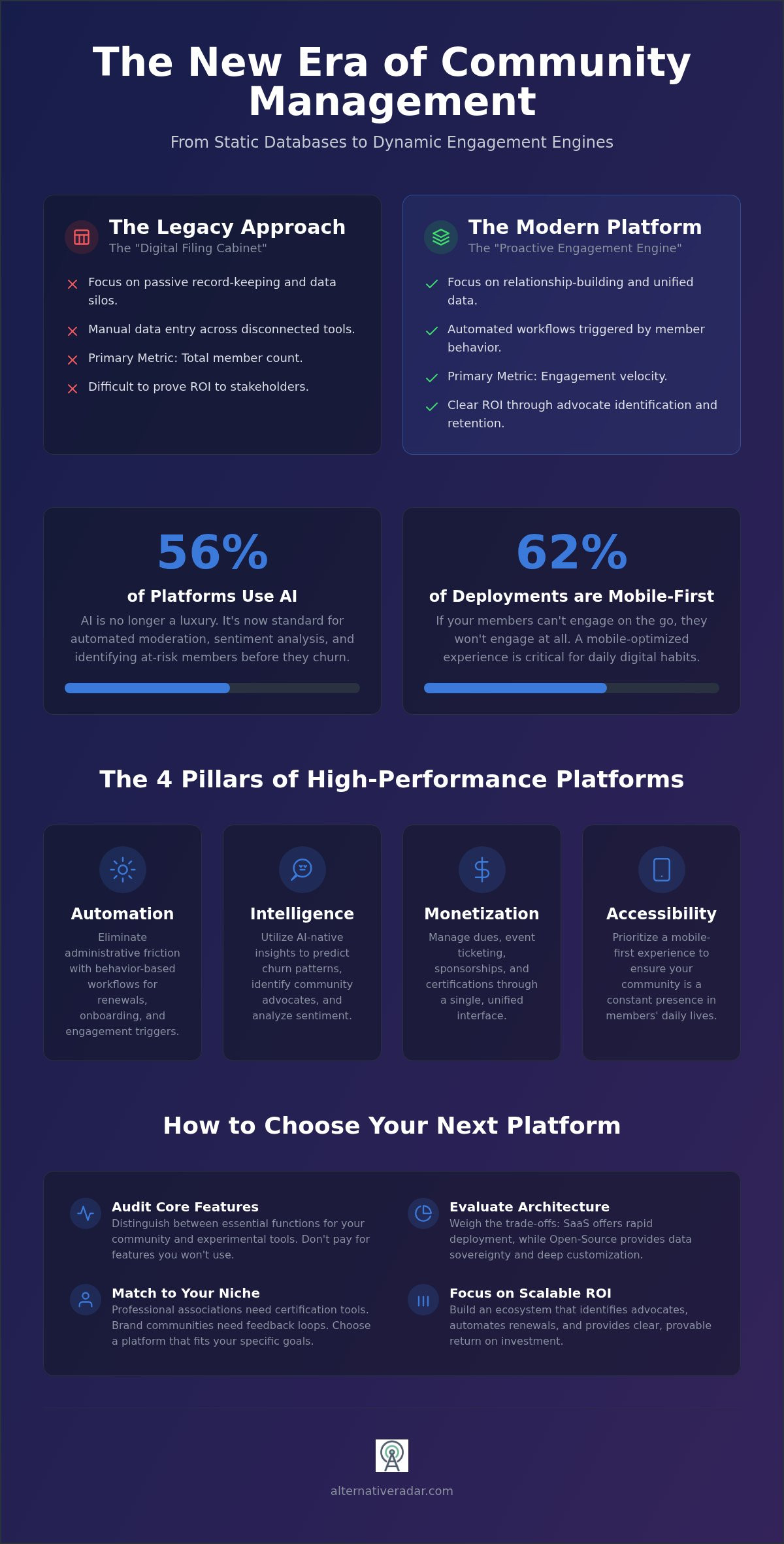
For decades, organizations viewed an online community as a static list of names and email addresses. This legacy approach focused on record-keeping rather than relationship-building. In 2026, the market has shifted toward community management software that acts as a proactive engagement engine. It’s no longer sufficient to simply host a forum; you must orchestrate a real-time hub where data flows seamlessly between member actions and administrative responses.
The core problem for most growing organizations is the persistence of data silos. When your event data lives in one tool and your discussion threads live in another, you lose the ability to see a unified member journey. This fragmentation makes it impossible to identify your most valuable contributors or predict who might churn. Modern platforms solve this by centralizing every touchpoint into a single source of truth, moving away from retention as a passive goal and toward contribution as an active requirement.
The Death of the Traditional AMS
Legacy Association Management Systems (AMS) are failing because they were built for accounting, not interaction. These systems excel at processing checks but struggle to facilitate the high-frequency exchanges modern members expect. We’re seeing a transition from record-keeping to experience-building, where the software’s value is measured by the quality of the user experience it facilitates.
Successful communities in 2026 have moved away from member count as their primary metric. Instead, they focus on engagement velocity. This metric tracks how quickly and frequently members move from passive consumption to active contribution. If your software doesn’t help you visualize this speed, you’re flying blind. You need tools that prioritize the velocity of human connection over the volume of a database.
Engagement Infrastructure vs. Simple Social Tools
Many startups and small groups begin on Slack or Discord. While these are excellent for real-time chat, they often lack the depth required for professional organizations or brand-led ecosystems. They don’t provide the structured data needed to prove ROI to stakeholders or manage complex membership tiers. They also fail to integrate the administrative workflows that keep a community healthy over the long term.
Professional community management software bridges this gap by integrating a functional CRM directly into the social experience. This allows you to track certifications, attendance, and dues without jumping between tabs. Engagement Infrastructure is a unified system for learning, events, and dues that transforms a simple chat room into a scalable business asset.
The Four Pillars of High-Performance Community Platforms
Selecting the best community software in 2026 requires looking past basic chat features. High-performance community management software rests on four fundamental pillars that drive efficiency and growth. These core areas ensure your platform acts as a functional asset rather than a simple communication tool.
- Automation: Moving beyond manual email blasts and renewal reminders to trigger behavior-based workflows.
- Intelligence: Utilizing AI to predict churn patterns and identify your most active community advocates.
- Monetization: Managing dues, event ticketing, and sponsorships through a single, unified interface.
- Accessibility: Prioritizing a mobile-first experience, as mobile-optimized platforms now account for 62% of new deployments.
Automation eliminates the friction of administrative tasks. Instead of chasing members for dues, the software triggers workflows based on specific behavior. If your members can’t engage on the go, they won’t engage at all. This shift ensures your community remains a constant presence in their daily digital habits.
AI-Native Insights and Moderation
AI integration is no longer a luxury. Currently, 56% of community management software platforms utilize AI for moderation and sentiment analysis. These AI agents handle routine FAQs and flag toxic content before it reaches your members. This is vital for maintaining a healthy environment without increasing headcount.
Predictive analytics identify “at-risk” members by tracking declining engagement patterns. This allows managers to intervene with personalized outreach before a member officially churns. Automated curation also ensures that members see content tailored to their specific interests, which directly fuels the engagement velocity needed for growth. These tools act as a digital scout, finding the information your members need before they even ask for it.
Unified Revenue Management
Revenue shouldn’t be an afterthought managed in a separate spreadsheet. Modern systems integrate dues, event ticketing, and sponsorship management into one interface. This streamlines non-dues revenue through built-in marketplaces where members can purchase resources or digital products. For professional groups, automating the entire lifecycle of certifications (CPD/CPE) is a major efficiency win that reduces administrative overhead.
If you’re comparing how these systems handle financial data and member records, checking an open source crm software comparison can help you decide between a specialized community tool or a broader CRM integration. The 2026 regulatory environment, including updated CCPA requirements for data processing, makes integrated revenue management more complex. High-performance platforms now include mandatory risk assessments for automated decision-making. You can explore our curated comparisons to see which platforms prioritize these compliance and efficiency features.
SaaS vs. Open Source: Choosing Your Technical Architecture
Selecting the right community management software requires a fundamental decision between two distinct architectures: Software-as-a-Service (SaaS) or open-source frameworks. This choice dictates your long-term operational costs, your level of data control, and the speed at which you can deploy new features. While SaaS platforms dominate the market for their ease of use, a growing segment of privacy-conscious organizations is returning to self-hosted solutions to maintain absolute data sovereignty.
Evaluating the total cost of ownership (TCO) is essential before committing to either path. SaaS costs are predictable, typically involving monthly fees that scale with your member count or feature requirements. Conversely, open-source tools often have no licensing fees but require significant investment in hosting, security, and developer hours. In 2026, compliance is a non-negotiable factor. With the California Consumer Privacy Act (CCPA) updates effective January 1, 2026, businesses must now conduct mandatory privacy risk assessments for significant data activities. Your architecture must support these rigorous audits and the new consent requirements for minors under 16.
When to Choose Managed SaaS Solutions
Managed SaaS is the logical choice for trade associations and commercial brands that prioritize speed over deep technical customization. These platforms offer “hands-off” maintenance, meaning the provider handles security patches, server uptime, and feature updates. This allows your team to focus on engagement velocity rather than troubleshooting database errors. Most leading SaaS Online Community Software Solutions provide out-of-the-box integrations with 20 or more legacy Association Management Systems (AMS), ensuring your member data remains synchronized across your entire tech stack.
If your organization needs a lightweight, communication-heavy tool rather than a full-scale engagement engine, you might explore the best Slack alternatives for team-centric SaaS options. These tools provide immediate deployment but often lack the robust monetization and certification features found in dedicated community platforms. SaaS is about efficiency; it trades a degree of flexibility for a shorter time-to-market and reduced internal overhead.
The Rise of Self-Hosted Community Hubs
Privacy-first organizations are increasingly moving toward open-source frameworks to avoid vendor lock-in and ensure data residency. By self-hosting your community hub, you retain full ownership of every member interaction and transaction record. This is particularly valuable for organizations operating in highly regulated industries where third-party data processing poses a significant risk. You can find architectural inspiration for these setups by reviewing popular open source business software that integrates with community tools.
The trade-off for this flexibility is the requirement for internal developer resources. You must be prepared to manage the infrastructure and ensure the platform scales as your member base grows. Open source allows you to build a completely bespoke user journey, but it demands a proactive approach to security and compliance. For those who value customization and long-term cost efficiency over immediate convenience, the open-source route offers a level of platform independence that SaaS cannot match.
A Strategic Framework for Evaluating Your Next Platform
Selecting community management software shouldn’t rely on a salesperson’s demo. You need a repeatable framework to filter out noise and focus on utility. This five-step process ensures your choice aligns with actual member behavior rather than market hype.
- Audit current friction points: Identify exactly where members stop engaging. Is it a complex sign-on process or a cluttered interface?
- Categorize features: Distinguish between “Must-Haves” like AI-driven sentiment analysis and “Nice-to-Haves” like custom profile badges.
- Assess technical compatibility: Verify if the platform integrates with your current stack without requiring custom middleware.
- Test the mobile UX: Since mobile-optimized platforms account for 62% of new deployments, the mobile experience must be as robust as the desktop version.
- Execute a pilot program: Launch a small, controlled group to measure the actual engagement lift before committing to a full migration.
This systematic approach prevents you from being swayed by “feature bloat” that doesn’t serve your community’s specific goals. It forces a focus on the infrastructure that actually drives engagement velocity. You can compare platform integration capabilities to see which tools best fit your existing tech stack before you start your pilot.
The Integration Audit: AMS, CRM, and Beyond
Bi-directional data sync is a non-negotiable requirement for efficiency. If your platform only receives data but doesn’t push interaction history back to your CRM, you’ve created a “Data Island.” This forces staff into manual data entry, which is the primary cause of administrative burnout. Evaluate the API documentation and native connector libraries during the trial phase. A platform with a “closed” ecosystem will eventually limit your ability to scale your digital ecosystem as your needs evolve.
Member Experience (MX) as a Competitive Advantage
Feature density is often the enemy of engagement. If a member can’t find the “Join Event” button within three seconds, they likely won’t attend. Simple, intuitive navigation always outperforms a platform cluttered with unused tools. Frictionless onboarding, supported by Single Sign-On (SSO), removes the primary barrier to entry for professional members who are already managing multiple logins. A frictionless member experience directly correlates to higher long-term retention by reducing the cognitive load required to participate.
Finding the Right Alternative for Your Specific Niche
Selecting the right community management software requires matching the platform’s core architecture to your specific organizational goals. A “one size fits all” approach often leads to expensive feature bloat or critical functionality gaps. You must prioritize the tools that solve your niche-specific friction points and drive your desired outcomes.
- Professional Associations: These groups require robust learning management systems and automated certification tracking. The platform must handle complex membership tiers and dues renewals without manual intervention.
- Brand Communities: Success here depends on high-velocity feedback loops and advocacy tools. Look for platforms that integrate directly with product development roadmaps and loyalty programs to turn members into co-creators.
- Non-Profits: These organizations prioritize donor management and advocacy mobilization. The software must facilitate secure fundraising and peer-to-peer networking to drive mission-critical outcomes and volunteer coordination.
Alternative Radar simplifies this discovery process by acting as a high-quality filter for information. We categorize tools based on technical labels and licensing classifications, ensuring you find a match that fits your budget and your operational needs. This objective analysis helps you avoid the “Data Island” trap by focusing on interoperability and long-term scalability.
Scaling from Small Groups to Enterprise Ecosystems
Your choice must allow for tiered growth in member count without forcing a total migration later. Enterprise-level requirements often include multi-chapter management and granular global permissions. If your community spans multiple regions, your software must support localized content delivery and data residency compliance. For organizations outgrowing their current tools, finding the best alternative to popular software provides a roadmap for migrating to a more scalable architecture that grows with your ecosystem.
Making the Final Decision: The Alternative Radar Approach
Alternative Radar acts as your digital scout by filtering the market through a lens of utility and precision. We don’t just list providers; we categorize them by licensing models, technical requirements, and functional suitability. Before you commit to a long-term contract, use our comparison tools to evaluate the objective pros and cons of each platform. This data-driven approach ensures you select a tool based on logic rather than marketing hype. Explore our full list of community management alternatives to find the platform that fits your specific digital ecosystem and drives measurable ROI.
Future-Proofing Your Digital Ecosystem
The transition from record-keeping to experience-building is the defining shift for 2026. Successful organizations are moving away from static databases and toward community management software that prioritizes engagement velocity and automated workflows. Whether you choose the rapid deployment of SaaS or the data sovereignty of open-source frameworks, your platform must act as a functional asset that scales with your member base. Efficiency now depends on your ability to integrate AI-driven moderation and predictive analytics into a unified member journey.
Stop following market leaders and start selecting tools based on your specific niche requirements. Alternative Radar acts as your digital scout, providing the clarity you need to make smarter technical choices. We offer objective comparisons across more than 100 software categories, featuring detailed pros, cons, and pricing insights without the marketing hype. Discover the best community management alternatives on Alternative Radar and build a community infrastructure that delivers measurable ROI. You’re now equipped to move beyond manual entry and focus on what matters: genuine human connection.
Frequently Asked Questions
What is the difference between a CRM and community management software?
A CRM primarily tracks transactional data and lead status for sales teams, whereas community management software focuses on facilitating peer-to-peer interaction and engagement velocity. While a CRM helps you sell to a customer, community platforms help you build a long-term relationship with a member. Modern platforms bridge this gap by including built-in CRM functionality that tracks behavioral data alongside traditional contact records. This ensures you aren’t managing your community in a data silo.
Can I use community software to manage both online and offline events?
Most high-performance platforms are designed to handle hybrid event models. They provide integrated tools for digital ticketing, event RSVPs, and mobile check-in apps for physical gatherings. In 2026, mobile-first deployment is the industry standard, allowing members to access event schedules and networking tools from their phones while attending in person. This unified approach ensures that attendance data for both online webinars and offline meetups is captured in a single, comprehensive member profile.
Is open-source community software secure enough for sensitive member data?
Open-source frameworks are highly secure if your organization has the internal resources to manage regular patches and server maintenance. These solutions offer superior data sovereignty, which is essential for meeting the 2026 CCPA requirements regarding privacy risk assessments. By self-hosting, you maintain absolute control over sensitive member information. However, you must conduct annual cybersecurity audits to ensure your infrastructure remains compliant with evolving global privacy regulations and data processing standards.
How long does it typically take to migrate to a new community platform?
A typical migration takes between 4 and 12 weeks, depending on the complexity of your data and the number of required integrations. The process involves auditing existing member records, mapping data fields to the new system, and testing bi-directional syncs. Rushing this timeline often leads to broken workflows or lost interaction history. It is best to run a pilot program for at least 14 days to ensure the member experience is frictionless before the full launch.
Do I need a separate email marketing tool if I have community software?
You likely won’t need a separate tool for community-specific communication like renewal reminders or discussion digests. Most community management software includes robust automation engines for behavior-based emails. However, if you are running complex, multi-channel marketing campaigns for non-members, a dedicated email platform might still be necessary. The goal is to use the community tool for everything happening inside your digital ecosystem to keep all engagement data centralized and actionable.
What are the most important AI features to look for in 2026?
Look for AI agents that handle routine moderation and FAQs to reduce administrative overhead. Predictive analytics are also vital; they identify “at-risk” members by spotting declining engagement patterns before churn occurs. Additionally, AI-driven content curation is essential in 2026 for delivering personalized feeds to individual members. These features ensure your platform remains an active engagement engine rather than a passive database, keeping members connected through highly relevant and tailored interactions.
How does community management software help with member retention?
The software boosts retention by automating engagement flows that keep members active without manual intervention. It identifies advocates who drive value and flags members who haven’t logged in recently for personalized outreach. By providing a frictionless login experience and intuitive mobile navigation, you remove the barriers that cause members to drift away. High retention is a direct result of using behavioral data to create a more relevant and rewarding member journey over time.
Can community platforms integrate with my existing accounting software?
Most professional platforms offer native connectors or API access to sync with popular accounting tools like QuickBooks and Xero. This bi-directional data flow ensures that dues payments and event revenue are recorded automatically without manual entry. Integrating these systems eliminates the “Data Island” trap and reduces the risk of financial errors. Always check the platform’s integration library to confirm it supports the specific financial stack your organization uses to maintain operational efficiency.