
What if the automated support system you invested in is actually driving your customers straight to your competitors? It’s a common reality for businesses that prioritize cost-cutting over user experience. You’ve likely felt the frustration of abandoned carts caused by slow response times or the high overhead of constant agent turnover. Finding the best live chat software for websites shouldn’t mean choosing between a rigid, unhelpful bot and an expensive, overextended support team.
We understand that you need a solution that integrates with your existing CRM and scales alongside your growth. This guide offers an objective comparison of the top AI-driven and human-hybrid tools available in 2026. You’ll discover how to reduce ticket volumes through intelligent automation while maintaining the personal touch that closes sales. We’ve done the scouting and testing to filter out the bloated legacy options; our analysis focuses on the technical precision and utility required to turn your chat window into a high-performance conversion engine.
Key Takeaways
- Learn why static chat widgets are obsolete and how to transition to an integrated lead-generation hub.
- Evaluate AI-native versus human-hybrid models to find the best live chat software for websites that matches your conversion goals.
- Identify the critical integration requirements that prevent technical debt and ensure seamless data flow with your CRM.
- Master a deployment strategy that uses pilot testing and documentation audits to minimize friction during software transitions.
Beyond the Widget: The Strategic Role of Live Chat in 2026
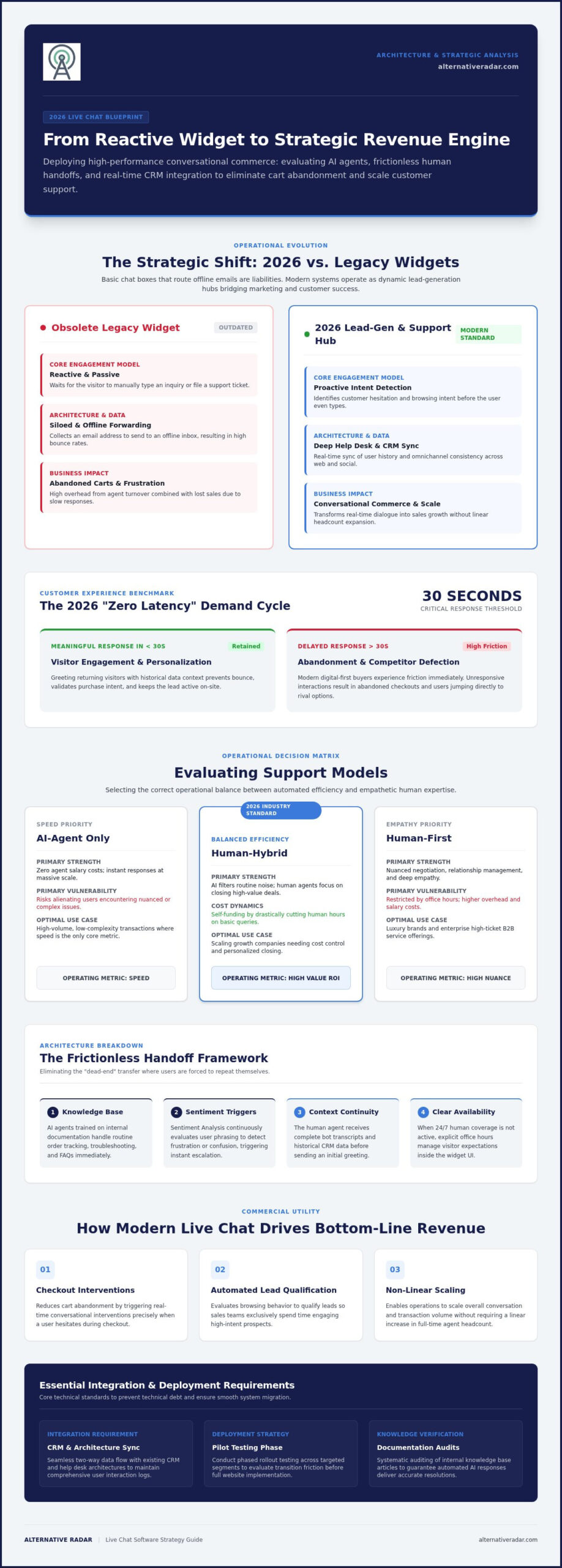
In 2026, a chat box that merely sends an email to an offline support team is a liability. Modern live chat has evolved into an integrated lead-generation and automation hub that functions as the digital front door of your business. Basic widgets are now obsolete because they fail to meet the high expectations of a digital-first economy. Instead of waiting for a user to report a problem, the most effective systems now bridge the gap between marketing and customer success by identifying intent before a user even types a word.
The strategic shift involves moving from reactive support to proactive engagement. This transition requires a deep integration with your broader help desk and customer support software architecture. By syncing real-time data across these platforms, businesses can ensure that every interaction is informed by the user’s history and current behavior, turning a simple support tool into a comprehensive productivity engine.
The Evolution of Customer Expectations
Users now operate on a “Zero Latency” demand cycle. If your team or bot doesn’t provide a meaningful response in under 30 seconds, the user will likely bounce to a competitor. The best live chat software for websites solves this by using historical data to greet returning visitors with personalized context. This level of personalization at scale is no longer a luxury; it’s a baseline requirement. Your chat system must also maintain omnichannel consistency, ensuring a conversation started on your homepage remains fluid if the user moves to social messaging or email later in the day.
Live Chat as a Revenue Driver
When used correctly, chat software is one of your most potent sales tools. It reduces cart abandonment by offering timely interventions when a user hesitates on a checkout page. Automated workflows can qualify leads based on their browsing behavior, ensuring your sales team only spends time on high-intent prospects. This efficiency allows your business to scale without a linear increase in headcount. Conversational Commerce is a 2026 business necessity that transforms real-time dialogue into measurable sales growth.
Choosing the best live chat software for websites means looking for a tool that prioritizes these outcomes over simple message exchange. It’s about finding a platform that acts as a silent partner in your growth strategy, filtering noise and highlighting the opportunities that matter most to your bottom line.
Choosing Your Support Model: AI-Agent vs. Human-First
Selecting the right operational model is the most consequential decision you’ll make when deploying chat. The AI-Only model suits high-volume, low-complexity businesses where speed is the primary metric. It eliminates agent salaries but risks alienating customers with complex needs. Conversely, the Human-First model remains essential for luxury brands and high-ticket B2B services where nuanced negotiation and empathy are critical. While humans provide depth, they’re limited by office hours and higher operational costs. Finding the best live chat software for websites requires balancing these two forces to match your specific conversion goals.
The hybrid approach has emerged as the 2026 industry standard. It uses AI to filter noise and humans to close high-value deals. According to a Forbes Advisor evaluation of live chat software, the most effective platforms are those that balance these two forces without creating user friction. When you compare subscription fees against the cost of a full-time support team, the best live chat software for websites often pays for itself by reducing the need for human intervention on routine tasks.
When to Trust the AI Agent
AI agents excel at handling repetitive queries such as order tracking, basic troubleshooting, and general FAQs. For these tools to be effective, you must train them on a robust internal knowledge base. Modern bots also utilize Sentiment Analysis to detect when a user is becoming frustrated. If the bot senses anger or confusion, it can immediately escalate the conversation. This proactive filtering ensures your humans only handle inquiries that actually require their expertise.
The “Frictionless Handoff” Framework
The biggest failure in chat deployment is the “dead-end” transfer where a user has to repeat their story to a human agent. A frictionless handoff requires contextual continuity. The agent should receive the full bot transcript and any relevant customer data before they say hello. If you don’t have 24/7 human coverage, you must set clear office hours within the widget to manage expectations. If you’re unsure which model fits your traffic volume, you can explore curated software alternatives to see how different tools handle these transitions.
Efficiency comes from matching the tool’s capabilities to your specific support documentation and sales cycle. Don’t buy a human-first tool if you lack the staff to man it, and don’t rely solely on AI if your product requires deep technical consultation. Focus on the model that allows your business to scale without sacrificing the user experience.
The Best Live Chat Software for Websites: 2026 Top Picks
Selecting the best live chat software for websites requires a clear understanding of your technical requirements and team size. We’ve categorized the market into two distinct groups: the “Legacy Leaders” who offer massive feature sets but often come with high price tags, and the “AI-Native Challengers” who prioritize automation and speed. While legacy tools provide deep historical data, newer platforms focus on immediate resolution through generative AI. Your choice should depend on whether you value established stability or cutting-edge automation.
Our selection criteria focus on three pillars: ease of use, bot sophistication, and pricing transparency. It’s vital to ensure your chosen tool integrates seamlessly with open source CRM software to maintain a unified customer record. Additionally, you must verify that any automated agent complies with FTC guidance on customer data privacy in AI systems. This prevents your business from facing regulatory risks while trying to improve efficiency and response times.
Best for E-commerce and Retail
For businesses on Shopify, Magento, or WooCommerce, the priority is reducing friction during the checkout process. Look for tools that offer live cart viewing, which allows agents to see exactly what a customer has in their basket in real-time. This visibility enables proactive product recommendations that feel helpful rather than intrusive. Industry case studies show that retail brands implementing these targeted interventions have successfully reduced bounce rates by up to 40% on high-traffic product pages.
Best for SaaS and Technical Support
SaaS providers need tools that handle more than just text. The best live chat software for websites in this category includes native screen sharing and bug reporting features. These tools should integrate with your internal communication stack, such as various Slack alternatives, to alert developers the moment a critical issue is reported. This ensures multi-tier support workflows remain fast and organized, preventing technical debt from piling up in separate silos.
Best Free and Open-Source Options
Startups often require self-hosted solutions for maximum data control and lower initial costs. While free versions are attractive, they frequently come with hidden limitations on chat history or the number of active agents. Open-source options provide the flexibility to customize the widget’s appearance and functionality without being locked into a proprietary ecosystem. These tools are ideal for teams that have the technical capacity to manage their own server infrastructure and want to avoid the “feature tax” common in enterprise-level platforms.
Critical Selection Criteria: Integration, Privacy, and Scalability
Finding the best live chat software for websites isn’t just about looking at a feature list. It’s about how the tool survives in your specific technical ecosystem. Many platforms impose an “Integration Tax”, which refers to the hidden costs in development time and broken data flows caused by tools that don’t natively support your existing tech stack. If your chat data lives in a silo away from your CRM, you lose the ability to track the full customer journey. Efficiency dictates that you prioritize solutions with deep, pre-built hooks into your primary databases.
Scalability is equally vital. You must ask if the software can handle a 10x spike in traffic during a seasonal promotion or a viral marketing event without crashing. A tool that works for 100 visitors a day might fail when 1,000 users try to connect simultaneously. Performance also extends to mobile responsiveness. The widget shouldn’t just fit on a smaller screen; it must remain lightweight to avoid slowing down mobile page load speeds. Finally, ensure the tool offers deep customization. A chat window that looks like a generic third-party add-on erodes trust, so choose a platform that allows you to match the design to your brand identity perfectly.
Privacy and Compliance in 2026
Data sovereignty is no longer optional. With evolving GDPR and CCPA regulations, you need to know exactly where your chat logs are stored. Many businesses now require specific data residency options to keep customer information within certain geographical borders. Security should include end-to-end encryption for sensitive data, especially if you handle personal identifiers or financial information. You should also have the power to define chat log retention policies. Keeping data longer than necessary creates a liability, so look for tools that allow for automated purging once a case is resolved.
Reporting and Analytics
Vanity metrics like First Response Time (FRT) can be misleading if they don’t lead to actual answers. While responding in under 30 seconds is great, the Resolution Rate is the metric that truly defines success. Your analytics dashboard should also track chat-to-conversion attribution, showing exactly which conversations led to a sale. Integrating heatmaps into your analysis can help identify specific friction points where users abandon the chat window before finishing their inquiry. To ensure you aren’t overpaying for bloated features, you can compare efficient chat alternatives that prioritize these critical data points.
Transitioning: From Selection to Deployment
Even the best live chat software for websites will fail to deliver ROI if the deployment process is rushed. Successful implementation begins with a thorough audit of your current support documentation. If your internal knowledge base is outdated, your AI agents will provide inaccurate answers that frustrate users. Before going live, ensure your team understands the new interface and the specific triggers that hand a conversation from a bot to a human. This preparation prevents the “dead-end” experiences that lead to abandoned sessions.
Pilot testing is a non-negotiable step in the transition. Rather than launching the widget across your entire domain, run the software on a single low-traffic page first. This allows you to monitor how the script affects page load speeds and mobile rendering without risking your primary conversion funnels. Use this period to review chat transcripts daily. Identifying where the bot fails to understand intent allows you to optimize your workflows before scaling to your high-value product pages.
The 48-Hour Implementation Checklist
- Step 1: Install the script and verify mobile rendering. Check for layout shifts that could negatively impact your mobile user experience.
- Step 2: Sync the software with your CRM list. Ensure that user data flows bi-directionally so agents have full context for every interaction.
- Step 3: Configure automated triggers. Set the software to engage users based on specific behaviors, such as spending more than 60 seconds on a pricing page or showing exit intent.
Measuring Success in Month One
Once the software is fully deployed, focus on comparing your Customer Satisfaction (CSAT) scores against your previous benchmarks. Don’t just look at the volume of chats; analyze the resolution rate of your automated flows. If users are frequently asking for a human immediately, your bot’s logic needs refinement. Identifying these “dead ends” early allows you to fix friction points before they impact your monthly revenue.
By the end of the first month, you’ll have enough data to determine if your current plan meets your needs. If your traffic volume is consistently hitting your account limits, it’s time to upgrade. Choosing the best live chat software for websites is an ongoing process of optimization. Stay focused on the metrics that drive efficiency and empower your team to provide faster, more accurate support.
Optimize Your Conversational Strategy for 2026
Success in digital support now depends on your ability to bridge the gap between automated speed and human empathy. You’ve learned that a modern chat solution is more than a widget; it’s an integrated hub that requires deep CRM connectivity and strict adherence to data privacy standards. Deploying the best live chat software for websites starts with a commitment to efficiency, from auditing your knowledge base to running rigorous pilot tests. By prioritizing resolution rates over simple response times, you position your business to scale without sacrificing user trust.
Don’t let market hype or legacy pricing structures dictate your tech stack. We’ve done the heavy lifting by filtering through bloated options to find the tools that actually drive revenue. Find the perfect live chat alternative for your business on Alternative Radar. Our platform provides objective comparisons of 50+ chat providers through efficiency-first software scouting and no-fluff technical breakdowns. Take control of your support infrastructure and choose a tool that empowers your team to deliver frictionless customer experiences.
Frequently Asked Questions
What is the difference between live chat and a chatbot?
Live chat involves real-time communication between a human agent and a website visitor. Chatbots use pre-programmed logic or artificial intelligence to provide automated responses without human intervention. Most modern platforms now offer a hybrid model. This allows a bot to handle initial triage and routine questions while reserving human agents for complex issues. It’s a choice between manual expertise and automated scalability for your specific traffic needs.
Does live chat software slow down website loading speeds?
It can if the script is heavy or synchronous. High-quality software uses asynchronous loading, which means the chat widget loads only after the main content of your page is visible. This prevents the tool from blocking other critical page elements. To maintain high performance, you should always audit your site’s speed after installation. The best live chat software for websites is optimized to have a negligible impact on your Core Web Vitals.
How much does live chat software typically cost in 2026?
Pricing is generally tiered based on agent seats, feature sets, or monthly conversation volume. Many providers have moved toward an “AI-per-resolution” model where you pay based on successful automated outcomes. While basic plans might start at a low monthly fee, enterprise solutions with deep integrations and advanced security often require custom quotes. It’s important to compare the total cost of ownership against the potential increase in your website’s conversion rates.
Can I use live chat on a mobile app as well as a website?
Yes, most professional providers offer dedicated SDKs for iOS and Android. This allows you to embed the same chat experience directly into your mobile application. Using a single platform for both channels ensures that your support team can manage all inquiries from one unified dashboard. This consistency is vital for maintaining a professional brand image and ensuring that customer data isn’t fragmented across different communication silos during the support process.
Is it possible to integrate live chat with my existing CRM?
Integration is a standard feature for top-tier tools. Connecting your chat software to your CRM allows for automatic lead creation and keeps a permanent record of all interactions within the customer’s profile. This ensures that your sales and support teams always have the necessary context for follow-ups. When searching for the best live chat software for websites, prioritize those that offer native hooks for your specific CRM to avoid expensive custom development.
What happens if a customer messages when my team is offline?
You have several options depending on your software configuration. You can set the widget to display an offline form that sends an email directly to your team. Alternatively, an AI bot can handle the inquiry by searching your knowledge base or scheduling a follow-up call. Most modern systems also allow you to set specific office hours. This ensures that customers receive clear expectations about when they will hear back from a human.
Do I need a developer to install live chat software?
Generally, no. Most platforms provide a simple JavaScript snippet that you can copy and paste into your website’s header or footer. If you use a CMS like WordPress or Shopify, you can often use a dedicated plugin for a one-click installation. However, you might need a developer for advanced technical customizations. This includes setting up complex data passing between the chat widget and your internal backend systems for a more personalized user experience.
Are there any free live chat options that are actually good?
Several providers offer “forever free” plans that are suitable for startups with low traffic volumes. These plans typically include basic messaging features but limit your chat history and the number of active agents. While these options are excellent for testing the waters, they often lack advanced automation and deep integration capabilities. You should evaluate whether the limitations of a free plan will eventually hinder your ability to provide efficient support as your business grows.