
What if the best way to understand remote productivity was to track fewer clicks, not more? When teams work across locations, it can be harder to spot uneven workloads, stalled tasks, and recurring blockers. That makes productivity tracking software for remote teams appealing, but activity data can be mistaken for meaningful progress, and opaque monitoring can damage trust.
The goal isn’t to watch people work. It’s to see whether work is moving forward and where the team needs support. The right tool depends on your workflows, the outcomes you need to measure, and the privacy controls your team expects.
This guide explains how to compare software by workflow fit, measurement features, privacy controls, and pricing. You’ll also learn how to set a baseline before rollout, explain what data is collected and why, and assess whether the change improved results. The aim is practical: use transparent metrics to improve processes, not to judge people by how active they appear online.
Key Takeaways
- Set clear goals for productivity tracking software for remote teams, and distinguish useful team visibility from intrusive individual surveillance.
- Compare outcome, workflow, workload, and time metrics, then choose features that answer real questions without encouraging performative activity.
- Use a measured rollout: establish a baseline, pilot the tool, explain what it collects, and review results against your goals.
- Evaluate options by workflow fit, integrations, privacy controls, usability, and plan limits rather than relying on a universal ranking.
- Check current features, pricing, and privacy terms with vendors, and verify the requirements that apply to your team’s locations.
Why productivity tracking software for remote teams needs clear goals
Remote work can make it harder to notice uneven workloads, stalled tasks, or recurring blockers. Productivity tracking software for remote teams can provide useful visibility, but only when the team agrees on what to measure and how the information will be used. These tools can show work patterns and outcomes. They don’t improve performance by themselves, and a dashboard full of activity data can’t explain why a project is late.
Start with a specific question: Are approvals holding up delivery? Are assignments distributed unevenly? Are project timelines realistic? Then choose measures that can help answer it. Team-level visibility focuses on shared processes and progress. Individual surveillance, such as continuous screen monitoring, focuses on watching people. For background on the broader tool category and its controversies, see this overview of employee monitoring software.
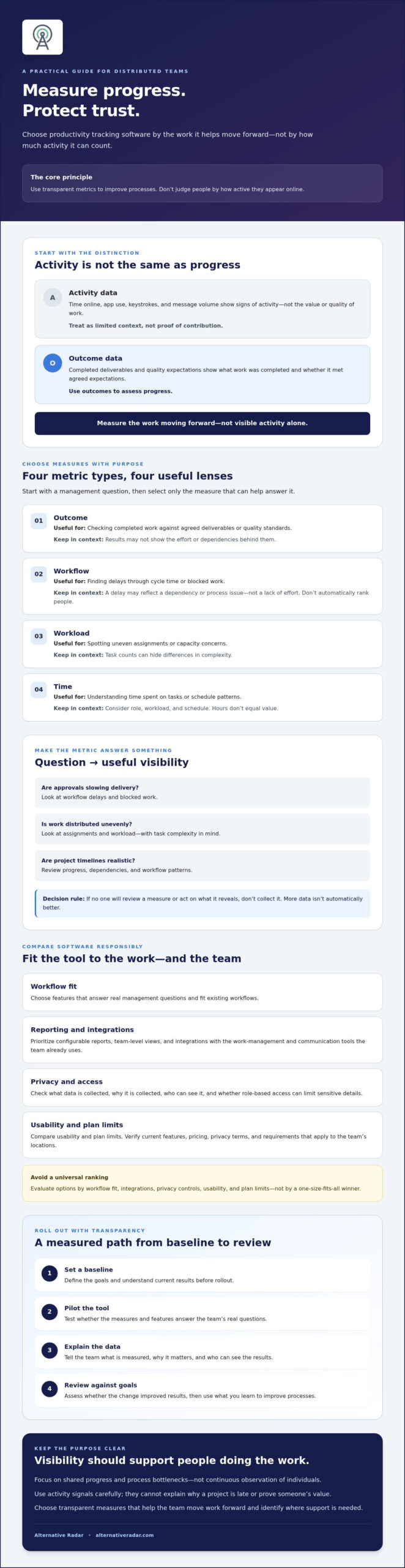
Activity data shows signs of work, such as time online or app use. Outcome data shows what work was completed and whether it met agreed expectations. Use outcomes to assess progress, and treat activity as limited context, not proof of value.
What should remote-team productivity tracking measure?
Start with outcomes: completed deliverables, quality expectations, or agreed service levels. Add workflow indicators, such as cycle time or blocked work, when they help explain progress or reveal a process problem. A delayed task may reflect a dependency, not a lack of effort.
Hours online, keystrokes, and message volume are weak proxies. They count visible activity, not the value or quality of someone’s work. A useful metric should connect to a team result.
When does tracking help rather than distract?
Tie every metric to a management question: Are approvals slowing delivery? Is work distributed unevenly? Are commitments realistic? If no one will review a measure or act on what it reveals, don’t collect it. More data isn’t automatically better.
Explain what’s measured, why it matters, and who can see the results. Clear expectations help distributed teams understand how progress is assessed. They also give managers a basis for improving workflows rather than judging online presence.
Which metrics and features matter in remote productivity tracking software?
Choose measures that clarify how work is progressing, not features that simply make more activity visible. The right productivity tracking software for remote teams should fit existing workflows, answer specific management questions, and make it clear what data is collected. Start with the metric, then assess whether the software can report it responsibly.
How do outcome metrics compare with activity metrics?
Completed deliverables and quality indicators are useful when work has clear outputs. Workflow measures can reveal bottlenecks, while workload and time data provide context. None should be treated as a standalone ranking of individual performance. Harvard Business School research supports focusing on results and team cohesion rather than using activity as a proxy for performance.
| Metric type | Useful for | Limitation |
|---|---|---|
| Outcome | Checking completed work against agreed deliverables or quality standards | May miss the effort or dependencies behind a result |
| Workflow | Finding delays through measures such as cycle time or blocked tasks | Needs process context; don’t use it to rank people automatically |
| Workload | Spotting uneven assignments or capacity concerns | Task counts can hide differences in complexity |
| Time | Understanding time spent on tasks or schedule patterns | Needs role, workload, and schedule context; hours don’t equal value |
Online hours, keystrokes, and message volume are activity signals, not reliable measures of contribution. Interpret time data alongside the work and the person’s schedule.
Which software features support responsible measurement?
Prioritize configurable reports, team-level views, and integrations with the work-management and communication tools your team already uses. These features can show progress in context without making the dashboard the goal. Role-based access can help limit who sees sensitive details. Check that employees can see what’s collected and understand why.
Separate useful visibility from intrusive monitoring. Continuous screenshots or keystroke logging may capture activity, but they don’t establish whether work is valuable. Include privacy controls, access permissions, data retention, and reporting options in your comparison. Verify vendor claims about storage, retention, and privacy directly before choosing a tool.
Rule of thumb: Select the smallest set of metrics that answers defined questions. If a measure won’t inform a decision, leave it out. To compare options by features, pricing, pros, and cons, explore software comparison resources.
Does productivity tracking software improve remote-team performance or create surveillance?
More tracking doesn’t automatically mean more productivity. A team-level report might reveal that work regularly stalls while waiting for approvals, giving managers a chance to fix the process. But if the same tool rewards constant availability, employees may feel pressure to appear active instead of focusing on useful work. The difference depends on the purpose of measurement, how much data is collected, and what decisions follow.
Comparisons can also mislead. A target that suits one role may not fit another, and a complex assignment can take longer than several routine tasks. Individual scores may overlook collaboration, mentoring, and behind-the-scenes work that helps the team deliver. Treat metrics as prompts for discussion, not as a complete account of someone’s contribution.
Metrics are signals for investigation, not complete measures of contribution. Use them to ask what’s affecting progress, then consider the context before drawing conclusions.
How can teams avoid turning metrics into surveillance?
Be specific and transparent before using productivity tracking software for remote teams. Tell employees what the tool collects, who can access it, and how the information will inform decisions. Prefer aggregated or team-level reporting when individual detail isn’t needed. Set clear limits on monitoring and review each data point periodically. If it no longer serves a defined purpose, stop collecting it.
What are the trade-offs of tracking individual productivity?
Individual workload visibility can help a manager spot when someone has too many assignments or may need support. It becomes less useful when a score is treated as a verdict. Roles differ, project complexity varies, and valuable contributions such as helping a colleague may not appear in tracking data.
Keep individual reporting tied to a clear support or capacity-planning need. Don’t default to employee rankings or assume a high activity score means strong performance. Invite employees to flag missing context and explain how the data reflects, or fails to reflect, their work.
Trust also depends on appropriate safeguards. Check access, retention, and monitoring settings with the vendor, and consult qualified legal or employment advisers about the privacy and workplace obligations that apply in your jurisdictions. Requirements can vary by location, so don’t rely on a general software description as compliance advice.
How to implement productivity tracking software and measure results
A useful rollout tests a defined improvement, not whether a team can generate more data. Before adopting productivity tracking software for remote teams, decide what change you expect and how you’ll tell whether it happened. Choose a measurement window and success criteria that fit the work cycle. A team delivering projects in stages may need a different review period from one handling ongoing service requests.
How should a team set a baseline before implementation?
Choose a small set of existing indicators linked to the goal, such as delivery predictability or time lost to blocked work. Document each metric’s definition, data source, and collection limits before rollout. Select a pre-implementation period that reflects a normal work cycle, and note context that could affect comparisons, including workload, staffing, seasonality, and process changes.
Use this sequence to keep implementation and evaluation grounded:
- Define the goal. State the team problem to address, such as unclear workloads or recurring delays.
- Capture the baseline. Record relevant existing measures and the conditions under which they were collected.
- Select a pilot. Choose a representative workflow where the tool can be assessed against the goal.
- Communicate the rollout. Explain the purpose, what data will be collected, who can access it, and how it will be used.
- Review the results. Compare the pilot with the baseline, gather employee feedback, then decide whether to adopt, adjust, or stop.
How can a remote team run a fair software pilot?
Choose a pilot workflow that reflects the team’s real work, not an unusually easy or busy period. Set a review date and agree in advance what would count as useful progress, what concerns would require changes, and who will assess the findings. Tell participants how to raise issues with usability, data accuracy, trust, or time spent on reporting.
Compare similar work periods. If the pilot includes a staffing change, a seasonal spike, or a revised process, record it before interpreting the numbers. A change in delivery time may have more than one cause. Review employee comments alongside quantitative trends, and ask whether the tool helped uncover a problem or added reporting work without improving decisions.
Keep success criteria specific to the workflow rather than applying a universal benchmark. If the data points in the right direction but employees report that the process is burdensome or unclear, investigate before expanding use. To compare software options and their features, explore productivity software comparisons.
How to compare productivity tracking software for your remote team
The best productivity tracking software for remote teams is the one that fits your actual workflows, not the one with the longest feature list. Match requirements to team size, work type, collaboration patterns, and reporting needs. A small team tracking shared project milestones may need different capabilities from a larger team coordinating recurring work across roles.
Build a simple decision matrix. Mark each requirement as essential, useful, or optional, then compare each candidate against the same criteria:
- Workflow fit: Does the tool reflect how work is assigned, completed, and reviewed?
- Metrics: Can it report the agreed outcomes or workflow indicators your team needs, without defaulting to activity surveillance?
- Integrations: Does it connect with the work-management and communication tools the team already uses?
- Privacy and access: Can you control who sees individual or team data, and are collection and retention practices clear?
- Usability: Can employees understand reports and use the software without creating unnecessary administrative work?
- Plan limits: Check user or team limits, feature availability, reporting restrictions, and any other conditions that affect the plan’s suitability.
Free, open-source, and premium options can each suit different needs. Compare their capabilities and limitations rather than assuming a particular licensing model is automatically better. Remove any option that misses an essential workflow or privacy requirement before comparing optional features.
What should teams verify before choosing a tool?
Confirm current features, plan limits, integrations, and pricing directly with each vendor. Ask how data access, retention, exports, and account deletion work. Check whether employees can understand the reports and flag information that’s inaccurate or missing context. Treat vendor descriptions as a starting point, not a substitute for checking the details that matter to your team.
How can readers shortlist tools without overbuying?
Keep the shortlist focused. Use Alternative Radar’s feature, pricing, pros, and cons comparisons as a discovery starting point, then verify current details with vendors. Its resources can also help you explore software alternatives and comparison criteria. If communication tools are part of your requirements, review Slack alternatives for team communication.
Compare for fit, not for a universal winner. A clear set of essentials makes it easier to avoid paying for features your team won’t use or adopting monitoring practices it doesn’t need.
Choose a tool that helps your team move forward
Choose productivity tracking software for remote teams based on the work you need to understand, not the volume of data a tool can collect. Start with clear goals, prioritize outcomes over online activity, and select only metrics that answer useful questions. A baseline and focused pilot can help you judge whether the software improves visibility and delivery without adding unnecessary reporting or undermining trust.
Before committing, compare workflow fit, integrations, privacy controls, usability, and plan limits. Verify current features and terms with vendors, and consider employee feedback alongside the numbers. The right fit depends on your team’s work and collaboration patterns, not a universal ranking.
Alternative Radar compares software features, pricing, pros, and cons, with free, open-source, and premium alternatives to explore. Compare software options for your team’s needs and use the comparison as a starting point for your own checks.
Measure what matters, communicate openly, and adjust when the evidence points to a better approach. With clear goals and a thoughtful rollout, your team can build visibility while keeping trust at the center.
Frequently Asked Questions
What is productivity tracking software for remote teams?
Productivity tracking software for remote teams helps organizations observe agreed work patterns, progress, and outcomes across distributed employees. Depending on the tool, it may report completed tasks, time records, workload, or app activity. Its purpose should be to answer a defined team question, such as where work is getting blocked. It isn’t automatically a measure of individual value, and continuous monitoring isn’t required for every team.
Does productivity tracking software actually improve productivity?
Not by itself. Software can make workloads or recurring bottlenecks easier to see, but improvement depends on how managers use that information. If the data leads to clearer priorities or fixes to a slow workflow, it may support better results. If it rewards constant online activity, it can distract people from focused work. Set a goal, establish a baseline, and review results alongside employee feedback.
Is productivity tracking software for remote teams legal?
It depends on where employees work, what information is collected, how it’s used, and the applicable privacy and employment requirements. Rules may differ across jurisdictions, so don’t assume one policy works for every location. Before rollout, document the monitoring methods and purpose, check relevant local requirements, and consult a qualified legal or employment adviser. Verify vendor privacy controls too, since selecting software doesn’t establish compliance.
What metrics should remote teams use to measure productivity?
Start with outcomes tied to the work, such as completed deliverables, quality standards, or agreed service levels. Add workflow measures like cycle time or blocked tasks if they help identify process issues. Workload and time data can offer context, but interpret them carefully. Online hours, keystrokes, and message counts show activity, not necessarily value. Choose measures that answer a specific management question, rather than collecting every available metric.
How do you measure productivity after implementing new software?
Record a baseline before rollout using a small set of indicators linked to the change you want to assess. After implementation, compare similar work periods and note changes in staffing, workload, seasonality, or processes that could affect results. Review quantitative trends alongside employee feedback on accuracy, usability, and trust. Decide in advance when to evaluate the pilot and what evidence would support adopting, adjusting, or stopping the tool.
Can productivity tracking software monitor employees without them knowing?
Some tools may offer monitoring functions that aren’t immediately visible to employees, but whether hidden monitoring is permitted depends on the relevant jurisdiction and circumstances. Don’t assume a feature’s availability makes its use appropriate. Check the software’s collection settings and applicable obligations, and consult a qualified adviser. A transparent approach should explain what information is collected, who can access it, and how it will be used.
How should a team choose between time tracking and outcome tracking?
Choose outcome tracking when work has clear deliverables or quality expectations, and time tracking when hours are directly relevant to planning or understanding task effort. Some teams may need both, but time needs context such as role, schedule, and workload. Neither measure should stand alone as a performance verdict. Start with the decision you need to make, then choose the simplest metric that provides useful evidence without encouraging performative activity.