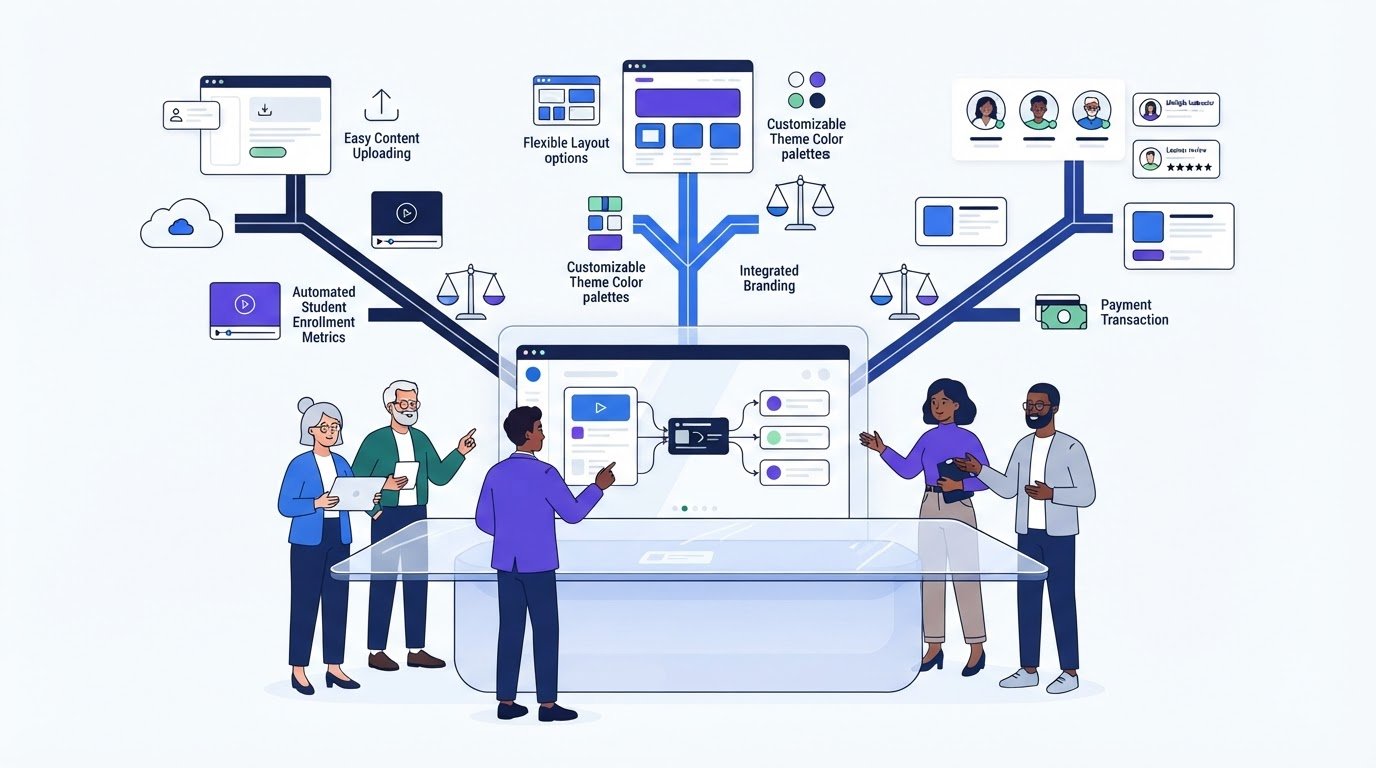
The platform with the longest feature list may be the wrong choice for your course. Online course creation platforms range from hosted tools to WordPress plugins and marketplaces, and each offers a different balance of control, selling options, and setup work.
If platform comparisons leave you sorting through features without knowing which ones fit your workflow, you’re not alone. The right choice depends on how you plan to create lessons, deliver them to learners, and make sales, not on how many tools a platform advertises.
This guide compares the main platform models and explains how their selling approaches affect your control, audience, and day-to-day course workflow. You’ll learn which capabilities matter for different course formats, then build a manageable shortlist based on your goals. We’ll also cover details that affect fit, including plan limits, transaction terms, and current pricing, so you know what to examine before committing.
Key Takeaways
- Separate course creation, hosting, delivery, and sales functions to compare what platforms actually do, not just what they’re called.
- Choose essential features based on your course format, learner interaction needs, and available setup time.
- Compare hosted platforms, WordPress LMS plugins, and marketplaces by control, setup responsibility, audience discovery, and sales flexibility.
- Shortlist online course creation platforms by defining learner needs, must-haves, acceptable trade-offs, and operating constraints before comparing brands.
- Use Alternative Radar’s comparisons and detailed insights to explore software options, then review current features, pricing, transaction terms, and plan limits before deciding.
What Are Online Course Platforms and What Do They Do?
An online course creation platform is software that helps an instructor organize learning materials, publish a course, manage learner access, and, depending on the product, sell enrollment. These functions may sit in one system or be split across separate tools. That distinction matters: a product called a “course platform” might focus on lesson delivery, while another may also include authoring, payments, or a marketplace where learners can find courses.
Compare the work each product handles, not just its label. Course creation means designing and arranging lessons. Hosting means storing course materials online. Delivery covers enrollment and learner access. Sales tools help present and sell a course, while additional business features may support marketing or community engagement. Products combine these functions in different ways, so check which steps your course workflow would involve.
Course creation software, LMS, and marketplaces: what is the difference?
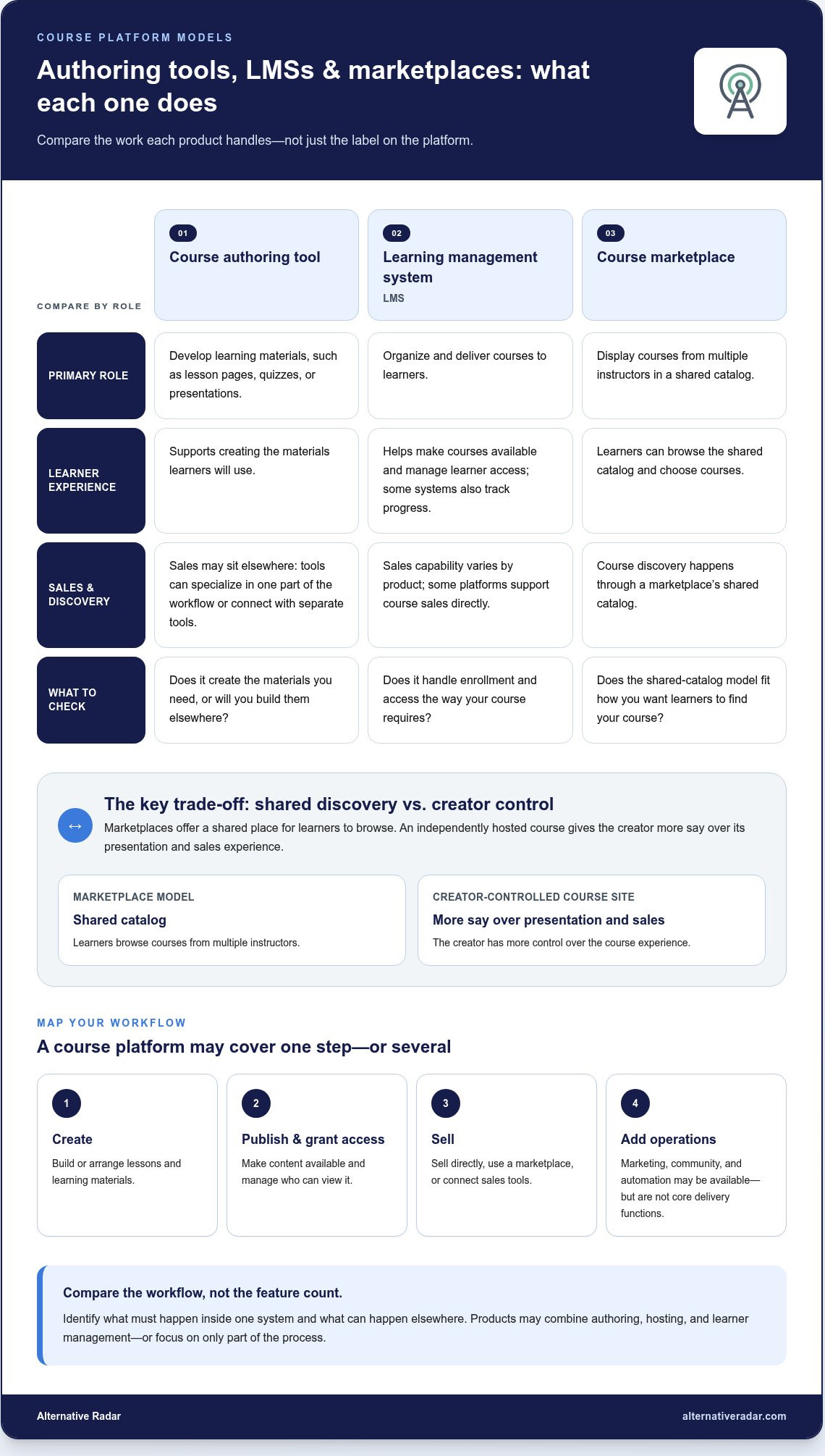
Course authoring tools help creators develop learning materials, such as lesson pages, quizzes, or presentations. Learning management systems (LMSs) organize and deliver courses to learners, and may include tools to manage enrollment or track progress. Course marketplaces display courses from multiple instructors in a shared catalog, where learners can browse and choose what to take.
Some providers combine authoring, course hosting, and learner management. Others specialize in one part of the workflow or connect with separate tools. Marketplaces differ from creator-controlled course sites: learners may discover courses while browsing a shared catalog, while an independently hosted course gives the creator more say over its presentation and sales experience. That creates a reach-versus-control trade-off. For a broad view of marketplace-style providers, see Wikipedia’s List of MOOC Providers.
What can a course platform handle from creation to delivery?
Map a course’s journey before comparing tools. A typical workflow starts with organizing lessons into a structure learners can follow, then publishing materials online. The creator needs a way to enroll learners or otherwise grant access, and the platform needs to deliver that access. The exact steps depend on the product and how the course is sold.
- Creation: Build or arrange lessons and learning materials. Some platforms include authoring tools; others focus on hosting materials created elsewhere.
- Publishing and access: Make course content available and control who can view it. Enrollment and access-management options vary by product.
- Sales: Some products support course sales directly; others rely on a marketplace or connected sales tools.
- Additional operations: Marketing, community, automation, and business-management features may be available, but they aren’t core delivery functions and shouldn’t be assumed.
Use this workflow to identify what must happen inside one system and what can happen elsewhere. That gives you a clearer basis for comparing online course creation platforms and helps prevent optional extras from obscuring the capabilities your learners actually need.
Which Features Matter Most When Building an Online Course?
Start with the learning experience you want to create, not the longest feature list. A video course with self-check quizzes has different needs from a text-based reference course or a live cohort with assignments. Your available setup time matters too. A highly configurable system may offer more control, but can also take more work to build and maintain.
Keep the essentials tied to learning: choose must-have features for creating, organizing, accessing, and completing your course. Treat marketing, community, and automation tools as optional unless your model depends on them. This makes it easier to compare online course creation platforms by practical fit rather than feature count.
Match course format to content and learner interaction
List the materials and activities your course requires. Video-led lessons need a reliable way to publish and play video. Text-based instruction needs readable lesson pages and clear navigation. Downloadable resources need a straightforward way for learners to access files. If your course blends formats, consider how learners will move between them.
Then define the interaction level. A self-paced course may need little more than organized lessons and access management. Add quizzes for knowledge checks, assignments when learners need to submit work, or discussions and live sessions when peer or instructor interaction is central. Each added activity affects both the learner experience and your workload.
Review the course from a learner’s perspective. Can someone find the next lesson without guesswork? Are video captions, image descriptions, and keyboard navigation supported where needed? Test access on the devices your learners are likely to use, and confirm that the platform’s accessibility and mobile features suit your course rather than assuming they work the same across products.
Evaluate sales, payments, and growth capabilities
Keep selling requirements separate from teaching requirements. Decide whether you need a built-in checkout, recurring subscriptions, or an external sales tool connected to the course. If you’ll promote lessons through email, determine whether the platform handles the messages you need or whether you’ll use a separate service. Review analytics separately from core lesson delivery, too: enrollment and learner activity reports may be useful, but aren’t essential for every course.
Think about growth in terms of your likely next step. You may start with one course and later add memberships, more learners, or additional instructors. Look for plan limits that could affect that transition, such as caps on products, contacts, or users. Review transaction terms and payment availability as part of the cost comparison. Pricing structures and included capabilities can change, so use current terms when assessing options.
To keep the evaluation focused, score each platform against a short requirements list: essential content formats, required learner interactions, setup effort, sales model, and non-negotiable access needs. Mark each item as required, useful, or unnecessary. This makes trade-offs visible and helps prevent attractive extras from distracting you from a workflow constraint.
For a broader starting point, compare software options with Alternative Radar. Its clear comparisons and detailed insights bring alternatives together to help you explore your options.
Hosted Platform, WordPress LMS, or Marketplace: Compare the Trade-Offs
These models solve different problems. A hosted platform bundles course tools into a managed service. A WordPress learning management system (LMS) plugin adds course functions to a site you manage. A marketplace lists courses alongside offerings from other instructors. The labels can overlap, so compare who handles setup, where learners find courses, and how much control you retain.
| Model | Control | Setup responsibility | Audience discovery | Sales flexibility |
|---|---|---|---|---|
| Hosted platform, such as Teachable | Moderate; use the provider’s tools and configuration options. | The provider manages the hosted service; you set up your course within it. | You generally bring or build your audience. | Depends on available sales tools, integrations, and plan terms. |
| WordPress LMS plugin, such as LearnDash | Higher control over your site and configuration. | You manage WordPress, hosting, the plugin, and connected tools. | You’re responsible for attracting learners to your site. | Depends on your site setup and chosen integrations. |
| Course marketplace, such as Udemy | Less control over the sales environment and presentation. | The marketplace provides the listing and course environment; you prepare and maintain course content. | Marketplace browsing may help learners discover courses, but does not guarantee visibility or sales. | Subject to marketplace rules and commercial terms. |
Hosted all-in-one platforms versus WordPress LMS plugins
A hosted platform can reduce the number of systems you assemble because course delivery and hosting are part of the service. The trade-off is that your setup depends on its tools, plan limits, and integrations. A WordPress plugin such as LearnDash gives you more direct control over your site, but you take on more responsibility for hosting, site maintenance, and connecting the wider workflow. If software ownership and control are central to your decision, this open-source business software comparison offers a related perspective.
Course marketplaces versus selling through your own platform
A marketplace can put your course in a shared catalog where learners are already browsing. That potential discovery comes with less control over branding, customer relationships, and commercial rules. Selling through your own hosted site or WordPress setup gives you more control over presentation, but you’re responsible for directing prospective learners there. Compare how each model handles learner information, promotion, pricing options, and revenue terms before deciding which trade-off suits your business.
These examples represent different models, not interchangeable products. A hosted platform may include some features also found in a plugin-based setup, while marketplaces set their own participation terms. Features, integrations, plan limits, payment availability, and marketplace conditions can change. Review current product information before committing, then compare each option against the control and setup responsibilities you’re prepared to manage. That’s a more useful way to narrow online course creation platforms than choosing by category name alone.
How to Shortlist Online Course Creation Platforms for Your Needs
Build your shortlist from the course outward, not from a ranked list of brands. Start with who you’re teaching and how they’ll learn. Then compare online course creation platforms against the same requirements, including the work you’re willing to manage and the flexibility you may need later.
- Describe your learners and course format. Note whether lessons are video-led, text-based, downloadable, or blended, and whether learners need quizzes, assignments, live sessions, or discussion.
- Map the learner journey. Record how learners will enroll, access lessons, move through content, and receive updates. Include the devices and access needs your course must support.
- Rank each requirement. Mark capabilities as essential, useful, or unnecessary. Keep delivery needs separate from optional marketing, community, and automation features.
- Set operating limits. Decide how much setup, technical control, and ongoing administration you can take on. Also list non-negotiable constraints, such as a preferred sales workflow or a need to connect existing tools.
- Choose a small shortlist. Include options that meet your essentials, then note where each requires a trade-off. Don’t keep a candidate just because it offers more features.
Build a requirements checklist before comparing providers
Put the details in one comparison sheet: course format, interaction needs, learner access, enrollment workflow, setup effort, and ongoing maintenance. Add a column for evidence and record when you reviewed each product’s information. This keeps comparisons consistent and helps distinguish a confirmed capability from an assumption or a feature that depends on a specific plan.
Test the shortlist against real workflows and future changes
Use the same sample course for every candidate. Try creating a lesson, granting learner access, completing a test enrollment and payment flow, and updating course content. Note where the process is clear, where it adds steps, and where it requires another tool.
Then assess portability before committing. Review information about content exports, migration options, account terms, and what happens to course materials and learner information if you leave. Don’t assume that a move will preserve every layout, activity, or record. Identify what you could export, what might need rebuilding, and how much disruption your course could tolerate.
For a broader framework for evaluating alternatives, use this complete guide to finding software alternatives. It can help you compare options systematically without treating a popular brand as the default choice.
As you explore options, compare software options on Alternative Radar and use the comparisons to organize your research around your requirements.
Find and Compare Course Platform Options with Alternative Radar
Your shortlist should reflect how you’ll teach, sell, and manage your course, not simply which platform appears most often in rankings. Alternative Radar helps people discover and compare software, apps, and digital-product alternatives through clear comparisons and detailed insights. Use it as a research resource to bring options together and reduce separate searches, then assess each candidate against your own requirements.
Use comparison to find a platform that fits your priorities
Return to your checklist as you explore. Compare each option against the same criteria: course format, learner access, setup effort, sales flexibility, and the amount of control you want to retain. A feature matters if it supports your workflow. If your course doesn’t need live sessions, for example, a platform’s live-learning tools shouldn’t outweigh a weakness in a capability you rely on every day.
Consider free, open-source, and premium software options as you research. These approaches offer different trade-offs, but the category alone doesn’t establish fit. Consider how a product handles your required tasks, what compromises come with its model, and whether it fits your operating constraints. Use comparisons to focus your research, not as a guarantee that one option will suit every creator.
Keep product claims distinct from your own evaluation. Product information describes features and terms; comparison resources help organize options and highlight differences. For important requirements, review current product details to understand how a capability works and whether it applies to the plan or setup you’re considering. That extra step turns a promising match into a better-informed candidate.
Take the next step with a focused shortlist
Narrow your research to a few candidates that meet your essential requirements. Then revisit the exact workflow you’ll use, from preparing lessons to giving learners access and updating course materials. Compare the same tasks across each option so the differences are practical, not just promotional.
Before you commit, review current features, plan limits, payment availability, transaction terms, and account conditions. Review export and migration information too, especially if you want the option to move your course later. Details can change, so use current product information for the final decision.
A focused shortlist won’t remove every trade-off, but it gives you a clear basis for choosing. You’ll know which requirements each option meets, what compromises you’re accepting, and what details still need review. Explore software alternatives with Alternative Radar to continue your research.
Make Your Next Platform Decision with Purpose
Your course will evolve as you learn what works for your learners. Treat your platform choice as a practical decision for the course you’re building now, and keep a record of the needs and trade-offs that shaped it. That gives you a useful baseline to revisit when your content, teaching approach, or business model changes.
Use your shortlist to guide the final review, not to chase a perfect tool. Compare the details that matter to your workflow and make sure the current terms match your expectations before committing. A focused choice can help you move from research to course creation with fewer open questions.
Alternative Radar brings together clear comparisons and detailed insights, with free, open-source, and premium alternatives across its software coverage. Use that perspective to evaluate online course creation platforms against your own priorities, not someone else’s ranking.
Explore software alternatives with Alternative Radar to compare options and continue your research with a clearer sense of what matters to you.
Frequently Asked Questions
Is an online course platform the same as a learning management system?
Often, but the terms aren’t used consistently. A learning management system (LMS) typically focuses on organizing learner access, course delivery, and administration, while course creation software may help build lessons and materials. One product can combine these jobs, so compare its actual workflow rather than relying on its label. For example, a tool might host lessons and track enrollments but leave content authoring or payment processing to separate services.
Can I sell an online course without building my own website?
Yes. A course marketplace can let you list a course within its existing catalog, while a hosted platform may provide a place to present and sell courses without building a separate website. Each route has different trade-offs. A marketplace can offer browsing opportunities but limits your control over branding and sales conditions. A hosted service may give you more control over presentation, but you’ll still need a way to attract prospective learners.
How much do online course creation platforms cost?
Costs vary by product, plan, and how you use the service. Compare the subscription price with transaction terms and usage limits, such as caps on learners, courses, or contacts. Also account for tools you may need outside the platform, such as payment processing or email services. Estimate your likely use and review current product details, since plan inclusions and terms can change.
What happens if I want to move my course to another platform?
Migration can involve more than copying lesson files. Review whether you can export videos, text, downloads, quizzes, learner records, and enrollment details, and whether the new platform can use those materials. Connected services may need to be set up again. Product terms can also determine what data you can take with you. Make a record of what matters before choosing, and don’t assume every item will transfer in its original form.
Can I create an online course without technical skills?
Yes, a hosted course tool can reduce the technical setup involved by providing a managed place to arrange and deliver lessons. The work still depends on your course. Uploading recorded videos may be straightforward, while custom layouts, external integrations, or complex learner workflows can require more configuration. Before committing, try building a sample lesson and previewing it as a learner. That practical test can reveal whether the setup feels manageable.
Do online course platforms support live classes as well as recorded lessons?
Some support live learning, while others focus mainly on on-demand lessons or rely on integrations for sessions. Live classes also need a workflow for scheduling, sharing access details, and connecting the session to course materials. If you plan to teach live, review product information for supported session formats and integration requirements. Test the learner experience, too, including how attendees find the session and any follow-up resources.
Is a free online course platform enough to launch a course?
It can be enough if its current limits fit your launch plan. Test a real course workflow, including publishing a lesson, enrolling a learner, and handling a sale if you plan to charge. Review limits that could affect branding, course volume, usage, or payment options. Then consider what happens as enrollment or your course catalog grows. A free plan can be a useful starting point, but make sure its terms suit both launch and next steps.