Most “free” editors are high-stakes traps designed to hold your finished project hostage behind a watermark until you pay a fee. You’ve likely spent hours perfecting a timeline only to find that the export button adds a giant logo over your 4K footage. It’s a frustrating waste of resources that kills your productivity and forces you back to the drawing board.
Finding legitimate free video editing software no watermark shouldn’t require hours of trial and error. You deserve a tool that respects your time and delivers high-quality results without hidden costs or sudden software crashes. This guide identifies professional-grade editors that are truly free to use, focusing on export quality, system stability, and ease of use for YouTube or social media creators.
We’ll analyze the 2026 landscape, comparing powerhouses like DaVinci Resolve 20 and VSDC 9.3 against open-source alternatives like Kdenlive 26.04.1 to help you find the perfect fit for your hardware and skill level.
Key Takeaways
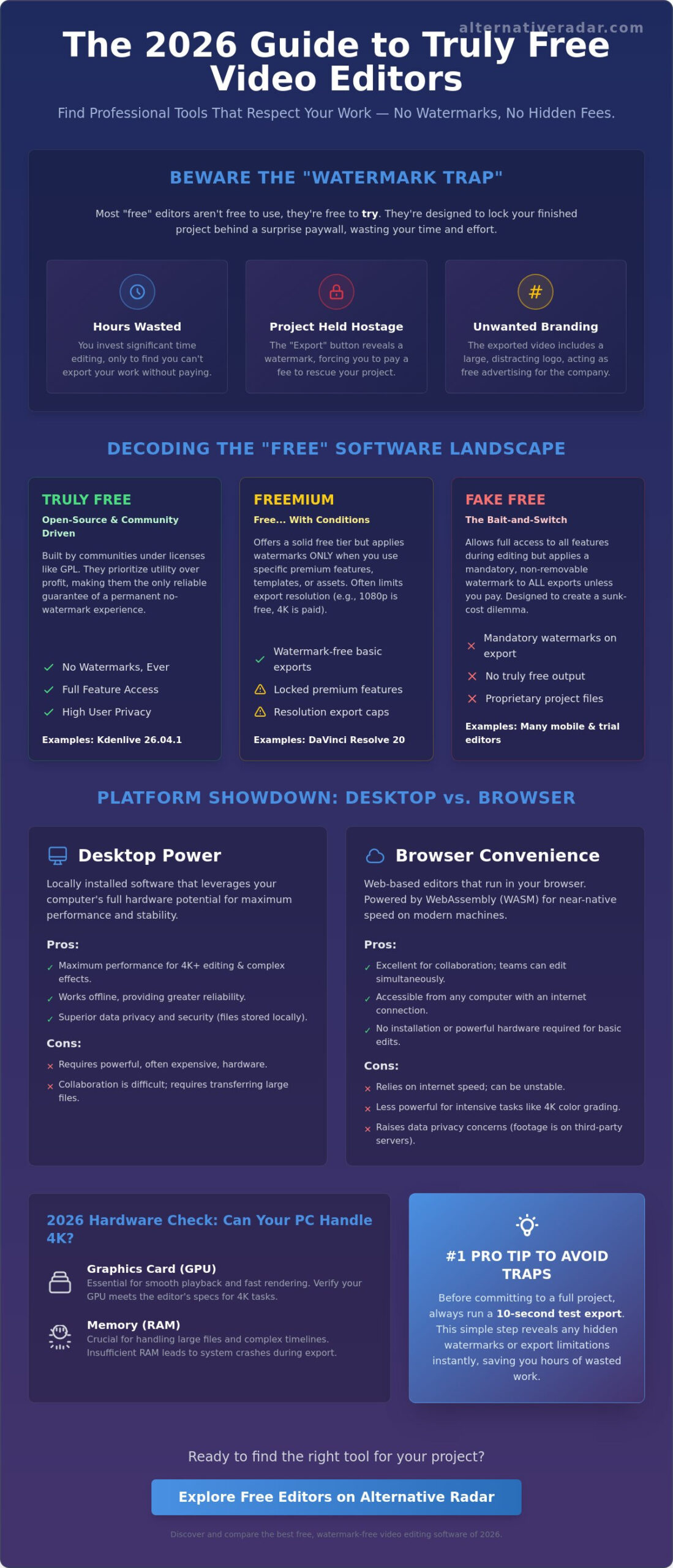
- Distinguish between “Truly Free” open-source licenses and “Freemium” models that apply watermarks only when using specific premium assets or templates.
- Compare the efficiency of modern browser-based WebAssembly (WASM) editors against the high-performance stability of local desktop installations.
- Select the most suitable free video editing software no watermark based on your specific output needs, ranging from professional color grading to AI-driven social media clips.
- Verify your hardware specifications against 2026 benchmarks to ensure your GPU and RAM can handle intensive 4K export tasks without system failure.
- Recognize “Fake Free” tactics like the export-preview trick to avoid software that locks your project files into proprietary, paid ecosystems.
The “Watermark Trap”: Why Finding Truly Free Video Editors is Harder in 2026
In 2026, the definition of “free” has shifted from a binary state to a complex spectrum of licensing. Most developers no longer offer entirely unrestricted tools; instead, they use watermarks as a psychological conversion tactic. They understand that once you’ve invested hours into a timeline, you’re more likely to pay a fee than start over in a different program. Finding legitimate free video editing software no watermark requires looking past marketing labels and scrutinizing the export settings before you begin your first cut.
Watermarks serve three strategic purposes for software companies. They act as free advertising when you share your content, they help offset the rising server costs of cloud-based rendering, and they provide a friction point that nudges users toward a subscription. You can consult a comprehensive list of video editing software to see how different licenses categorize these tools, but the trend is clear: resolution is the new gatekeeper. While 720p was the standard “free” tier in previous years, 2026 sees 1080p and 4K exports as the primary battleground for paid licensing.
A new challenge for users is the rise of cloud-based “export credits.” Some browser-based editors allow you to edit for free but charge a “credit” for each watermark-free render. This model targets efficiency, forcing creators to choose between a monthly fee or a limited output volume. To maintain your productivity and budget, you must distinguish between software that is free to try and software that is truly free to use.
The Freemium Export Bait-and-Switch
Many modern tools allow full access to high-end features like motion tracking or AI masking but lock the “Export” or “Save” button behind a paywall. This creates a sunk-cost dilemma for beginners. You’ve already done the hard work, so the $10 or $20 upgrade fee feels like a small price to rescue your project. Always check the export limitations of free video editing software no watermark by running a 10-second test render before you commit to a full edit. This simple step saves hours of wasted effort on “trial” software that was never intended to be free.
Open Source vs. Ad-Supported Models
Open-source software remains the only reliable guarantee of a permanent no-watermark experience. Tools built under the GPL license are community-driven, meaning they don’t have corporate stakeholders demanding conversion metrics. They prioritize utility over profit. In contrast, ad-supported tools like CapCut trade features for data. They offer professional-grade effects for free because their business model relies on ecosystem lock-in and user data. Both models can provide high-quality results, but your choice should depend on whether you value privacy or a trend-driven feature set.
Choosing Your Platform: Browser-Based Convenience vs. Desktop Power
Deciding where to edit your video is the first step in optimizing your creative workflow. In 2026, the technological gap between browser applications and installed software has narrowed significantly due to WebAssembly (WASM). This technology allows web browsers to execute complex code at near-native speeds, enabling browser-based editors to handle 1080p timelines with surprising fluidity. However, despite these advancements, the choice between a browser and a desktop environment remains a trade-off between immediate convenience and raw processing power.
Browser editors excel in collaborative environments. Because your project files live in the cloud, multiple team members can review or edit a timeline simultaneously without transferring massive files. If you’re searching for comparisons of web-based tools, you’ll find that these platforms prioritize speed and social media integration. Conversely, professional non-linear editors (NLEs) still require local installation to access your computer’s full hardware potential. A browser cannot yet match the deep system integration needed for real-time 4K playback or complex 3D compositing.
Privacy and file management also dictate this choice. Working in the cloud means trusting a third party with your raw footage and finished exports. For creators handling sensitive data or high-bitrate files, local storage offers superior security and faster access speeds. Industry benchmarks for 2026 emphasize that hardware-bound software remains the standard for high-stakes production where data integrity and rendering speed are paramount.
When to Use a Web-Based Editor
Web-based platforms are ideal for creators prioritizing turnaround time over technical depth. These tools are perfect for assembling quick social media clips, TikToks, or basic YouTube intros where pre-made templates and stock libraries are essential. Tools like Clipchamp or Canva provide an accessible entry point into free video editing software no watermark without requiring a high-end machine. The trade-off is a lack of precision. You’ll find significant limitations when attempting advanced color grading or managing complex multi-track audio sessions that exceed five or six layers.
The Case for Desktop Software
Desktop software is the necessary choice for serious hobbyists and professionals. Local installation allows for offline editing, which is crucial if you travel or work in areas with unstable internet. More importantly, desktop tools utilize GPU acceleration to reduce rendering times from hours to minutes. If you work with high-bitrate codecs or RAW footage, a browser-based tool will likely stutter or crash. Professional-grade free video editing software no watermark like DaVinci Resolve or Kdenlive provides the granular control over frame rates and bitrates that modern 4K delivery requires.
The Best Free Video Editing Software with No Watermark (2026 Roundup)
Selecting the right tool depends on your specific output requirements and hardware capabilities. While previous sections highlighted the infrastructure of editing, this roundup focuses on the actual software performance in 2026. This authoritative roundup of free video editors reinforces that you don’t need a subscription to achieve professional results. Whether you’re a YouTuber or a social media manager, these tools provide high-quality exports without the intrusive branding that plagues most trial software.
Beyond the major players, several specialized tools have gained traction. ActivePresenter remains a high-utility choice for screen recording and educational content; it combines recording with a functional non-linear editor. For those with older hardware, Olive Video Editor is a lightweight newcomer that prioritizes playback speed over a bloated feature set. If you need a Windows-specific powerhouse, VSDC 9.3 supports 4K and 8K exports and currently serves over 5 million users worldwide. For a truly tailored choice, use a comparison platform to filter these options by your specific hardware specs.
Best for Professionals: DaVinci Resolve
DaVinci Resolve 20, released in May 2025, is the industry standard for color correction and finishing. It’s the same software used in Hollywood productions, and the free version offers 90% of the Studio features. You get full 3840×2160 (Ultra HD) exports at up to 60fps without watermarks. The learning curve is steep, but the investment pays off in total creative control. It’s a high-performance tool, but it requires a dedicated GPU to run effectively. If your laptop lacks a powerful graphics card, you’ll experience significant lag during the rendering process.
Best for Social Media: CapCut Desktop
CapCut Desktop is the most efficient choice for social media creators. It leverages AI-driven effects like auto-captions, background removal, and trending transitions that sync directly with current video trends. The “no watermark” status is reliable for standard exports, but you must manually delete the default end-clip template in your timeline before rendering. Be aware that using certain premium templates or effects may trigger a watermark unless you upgrade to the Pro plan. It’s a fast, navigational tool, though users should consider the privacy trade-offs inherent in software affiliated with TikTok.
Best Open Source Options: Shotcut and Kdenlive
For users who value privacy and a “no strings attached” experience, open-source veterans are the best fit. Kdenlive 26.04.1 and Shotcut 26.4.30 offer cross-platform stability across Windows, Mac, and Linux. These tools are built by the community, meaning they don’t have corporate agendas or hidden upsells. They support high-bitrate codecs and provide customizable interfaces that let you remove cluttered menus you don’t use. They are the most honest examples of free video editing software no watermark available today, offering a permanent solution for privacy-conscious creators.
Hardware Check: Can Your Computer Run These Pro Tools?
The “hidden cost” of high-end software is often found in your system’s hardware specifications. While you can download professional-grade free video editing software no watermark without a credit card, your machine must possess the raw power to process those files. Heavyweight tools like DaVinci Resolve 20 rely heavily on GPU acceleration to handle real-time playback and effects. If you’re working on a budget laptop with integrated graphics, you’ll likely encounter frequent crashes or a frozen interface during the export process.
Software preference for CPU or GPU rendering varies by platform. Most modern editors now shift the heavy lifting to the Graphics Processing Unit (GPU) to free up the Central Processing Unit (CPU) for background tasks. However, the free version of DaVinci Resolve is limited to a single GPU; it won’t utilize multi-GPU setups unless you upgrade. Additionally, your storage drive acts as a bottleneck. Standard hard drives can’t keep up with the high bitrates of 4K footage. An NVMe SSD is essential to prevent the timeline stuttering that occurs when the software can’t read files fast enough.
To ensure your hardware matches your creative ambitions, you can compare system requirements across top editors before starting a project. This prevents the frustration of discovering your machine is incompatible after you’ve already imported your media.
Minimum Specs for 4K Editing
For 4K editing, a 6-core processor and 8GB of VRAM are non-negotiable. While 8GB of system RAM was sufficient in previous years, 16GB has become the 2026 baseline for stable 4K workflows. Dedicated graphics cards from the Nvidia RTX or AMD Radeon series provide the necessary architecture for hardware encoding. Apple Silicon users have an advantage here; the integrated memory architecture of M2, M3, and M4 chips allows even entry-level Macs to handle 10-bit video with high efficiency, often outperforming equivalent PC setups in mobile editing scenarios.
Optimization Tips for Budget PCs
If your hardware falls short of the ideal specs, you can still produce high-quality content by optimizing your workflow. Use “Proxy Files” to create low-resolution copies of your 4K footage for editing; the software will automatically switch back to the original files during the final export. Regularly clear your cache files to reclaim storage space and maintain software stability. Before launching your editor, close background applications like Chrome or Spotify to ensure every megabyte of RAM is dedicated to your video project. These small adjustments allow you to run free video editing software no watermark on mid-range hardware without sacrificing the final output quality.
Navigating the Software Landscape: How to Spot “Fake Free” Tools
Identifying deceptive software marketing is a critical skill for digital creators. Many platforms promise a “free” experience but use the “Export Preview” trick to monetize your labor. This tactic allows you to edit your entire project without restrictions, only to reveal a watermark once the rendering reaches the final stage. It’s a calculated move designed to exploit the hours you’ve already invested. Legitimate free video editing software no watermark will always be transparent about its limitations before you start your first project. If a website is vague about its export rules, assume a paywall exists.
Another red flag is the use of proprietary file formats. Some editors save your project in a format that can’t be opened by any other software. This locks you into their ecosystem. If the company decides to introduce a subscription fee later, you’ll lose access to your past work unless you pay. Always look for tools that allow you to export XML or EDL files. These are industry-standard formats for moving timelines between different editors. This flexibility ensures your creative work remains your property, regardless of changes in a software’s pricing model.
The Alternative Radar Audit Process
Our team uses a rigorous verification method to ensure the tools we recommend are genuinely accessible. Our “Watermark-Free” criteria are strict; we reject any software that includes logos, timed trials, or credit-based export systems. We also perform deep-system scans on every installer to check for malware and intrusive bloatware that can slow down your OS. This organized approach filters out the marketing hype, providing you with a reliable list of functional tools. For a deeper look at our methodology, see our guide on finding the best alternative to popular software in 2026: the complete guide.
Your Strategic Move
Don’t commit to a long project until you’ve verified the software’s performance on your specific machine. Start with a small 30-second test export using 4K footage to confirm the watermark status and check for render errors. Once you’ve confirmed the tool works, focus on learning its keyboard shortcuts. Most professional editors share similar logic, so building these habits creates transferable skills that will serve you even if you switch platforms later. Choosing the right free video editing software no watermark is about long-term productivity, not just a single project. If you’re managing a team or a business, consult our popular open source business software 2026: the strategic enterprise guide to find scalable solutions that avoid vendor lock-in.
Take Control of Your Creative Workflow
Securing a reliable production environment requires balancing your hardware capacity with transparent licensing. You’ve seen that the most effective free video editing software no watermark isn’t just about avoiding a logo; it’s about finding a tool that handles high-bitrate 4K footage without crashing your system. Whether you prioritize the professional depth of desktop suites or the collaborative speed of browser-based editors, the right choice depends on your specific technical requirements and privacy standards.
Don’t let deceptive marketing or hidden export fees stall your productivity. You can find more high-quality software alternatives on Alternative Radar to streamline your decision-making process. Our database features independent software audits and community-vetted recommendations updated for 2026 technology standards to ensure you never waste time on “fake free” tools. You now have the knowledge to bypass the watermark trap and focus entirely on your content. Start your next project with a tool that works as hard as you do.
Frequently Asked Questions
Is there a completely free video editor with no watermark for Windows 10/11?
Yes, VSDC Free Video Editor and DaVinci Resolve are the top native choices for Windows users. VSDC is a Windows-exclusive tool that supports exports up to 8K resolution, while DaVinci Resolve provides a professional-grade suite for Windows 10 and 11. Open-source options like Shotcut also offer a stable experience on these operating systems without requiring a subscription or account creation.
Can I export 4K video for free without a watermark?
You can export 4K video using DaVinci Resolve 20, VSDC, or open-source tools like Kdenlive. DaVinci Resolve allows for Ultra HD exports at up to 60fps in its free version. Be cautious with browser-based tools like Clipchamp; they often cap free exports at 1080p and require a paid plan for 4K. Always check the export settings before you begin editing to ensure your desired resolution is available.
Why do some “free” editors add a watermark only after I finish the video?
This is a conversion tactic known as the “export trap” designed to monetize your time and effort. Developers allow you to use all features during the editing phase but hide the watermark requirement until the final rendering stage. They rely on the sunk-cost fallacy, hoping you’ll pay a fee rather than starting over in a different program. Always perform a short test export to verify the software’s status.
Does CapCut have a watermark on the desktop version?
CapCut Desktop does not add a watermark to standard exports of your own content, provided you delete the default ending clip in your timeline. However, using premium AI effects, templates, or stock assets may trigger a watermark unless you upgrade to the Pro version. It is a highly efficient tool for social media, but you must actively manage your timeline to ensure a clean final render without unwanted branding.
What is the easiest free video editor for beginners with no watermark?
OpenShot 3.5.1 is widely considered the most accessible free video editing software no watermark for absolute beginners. It features a simple drag-and-drop interface and basic timeline logic that avoids the complexity of professional suites. If you prefer a more modern, trend-focused interface, CapCut Desktop offers a fast learning curve with automated tools that simplify complex tasks like captioning and background removal.
Is DaVinci Resolve actually free or just a trial?
DaVinci Resolve is truly free and does not have a time limit or watermarks on standard projects. It is not a trial version; it is a fully functional editor that offers a vast majority of the features found in the paid Studio version. While advanced AI tools and multi-GPU support are locked, the free version remains the industry standard for creators who need professional color grading and 4K output.
Are there any open-source video editors that are watermark-free?
All major open-source editors, including Kdenlive, Shotcut, and OpenShot, are completely watermark-free. Because these tools are developed by a community under the GPL license, they don’t have corporate incentives to hide features behind paywalls. Using an open-source free video editing software no watermark ensures you have permanent access to all updates and export resolutions without the risk of future monetization or hidden data tracking.
How can I remove a watermark from a video for free?
You cannot cleanly remove a baked-in watermark for free without degrading the video quality. Most “watermark remover” tools simply blur the area or crop the frame, which often ruins the visual composition. The most efficient solution is to re-edit the project in a truly free tool like Shotcut or VSDC. To avoid this problem in the future, always verify the export settings with a 10-second test render before starting a full edit.