
A small firm doesn’t need a sprawling tech stack to keep daily work organized. Legal practice management software brings core tasks such as matter tracking, deadlines, time entry, billing, and document handling into a connected workflow. The right legal tech software for small law firms helps teams manage these tasks without adding unnecessary complexity.
Matter details, client follow-ups, and billable time can easily end up scattered across separate tools. This guide explains what practice management software does and how to assess whether it fits a small firm. It covers matter management, client portals, document automation, and emerging trends, helping you compare features that solve real workflow problems with those that may not be essential.
Key Takeaways
- Practice management software brings routine work such as deadlines, time entry, billing, and documents into more connected workflows.
- Centralize matter details, contacts, and calendars to make it easier for everyone handling a case to stay aligned.
- Use clear intake and client communication workflows to reduce duplicate data entry and missed follow-ups.
- Compare billing, reporting, cloud access, and security features against your firm’s actual needs before choosing a system.
- Document automation can streamline repeatable drafting tasks; learn how to assess its fit with your firm’s existing workflows.
1. What is Legal Practice Management Software?
Legal practice management software organizes the recurring work behind a firm’s matters. It can track deadlines, tasks, contacts, documents, calls, emails, and notes as work happens. Many systems also support time entry, billing workflows, and document generation. The goal is practical: give lawyers a clearer view of their work without juggling disconnected tools.
Small firms may need several types of legal technology, but not every category requires a separate system. Practice management can work alongside legal research, contract tools, billing, client intake, electronic signatures, and document automation. A firm handling repeat client forms, for example, may prioritize document automation, while a team losing track of follow-ups may focus on intake and matter tracking.
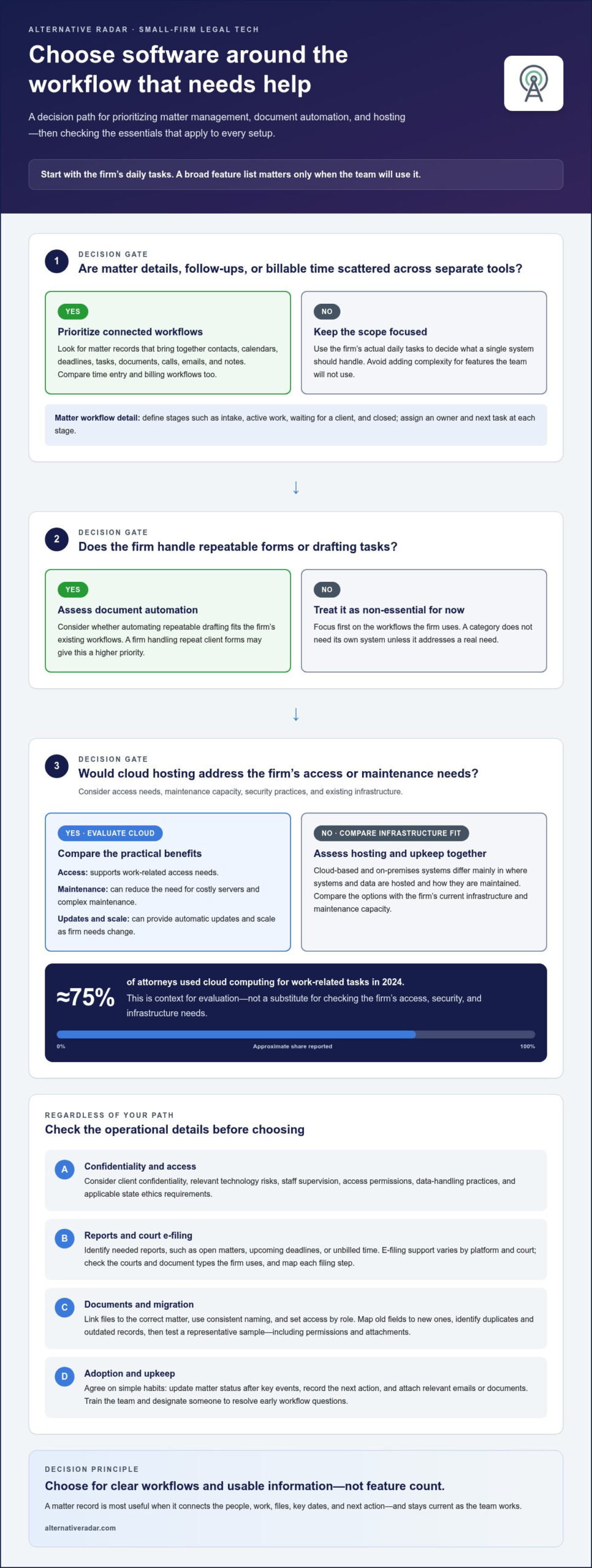
All-in-one systems combine workflows such as matter records, calendars, time tracking, and billing. A connected setup can reduce duplicate data entry, but a broad feature list is useful only if the firm will use it. Compare lawyers’ daily tasks, then identify which a single system could handle without creating a steep learning curve.
Cloud-based and on-premises software differ mainly in where systems and data are hosted, and how they are maintained. Cloud-based practice management software can reduce the need for costly servers and complex maintenance, provide automatic updates, and scale as firm needs change. Approximately 75% of attorneys used cloud computing for work-related tasks in 2024. Choose based on access needs, maintenance capacity, security practices, and the firm’s existing infrastructure.
ABA ethics considerations apply to technology use, not to a software label. Lawyers should consider client confidentiality, understand relevant technology risks, and supervise staff use of systems. Include access permissions and data-handling practices in your evaluation, and account for applicable state ethics requirements.
Integration with United States court e-filing systems varies by platform and court. Some workflows may support a direct connection; others may require exporting documents and filing through a court portal. Compare coverage for the courts and document types your firm uses, and map each filing step before choosing a system.
Reporting matters because separate systems can make firm-wide performance harder to assess. When time, matter status, and billing data sit in different places, staff may need to combine and clean records before acting. Before an upgrade, identify the reports you need, such as open matters, upcoming deadlines, or unbilled time. Then assess whether the system brings those details together in a usable view.
2. Case and matter management
A useful matter record connects the people, work, and files behind a client engagement. For each matter, capture the client, responsible lawyer, status, next action, key dates, and related contacts. Add calls, emails, and notes to the same record as work happens. Choosing legal tech software for small law firms means checking that these details stay connected and easy to update. When two staff members handle a case, both can see the latest information instead of reconstructing the timeline from separate inboxes.
Set up a consistent matter workflow before moving it into software. Define stages such as intake, active work, waiting for a client, and closed. Assign an owner and a next task at each stage. A deadline calendar can show upcoming dates, while task lists clarify who handles each follow-up. Use labels that reflect the firm’s actual work, not categories that look useful but go unused.
Contract management adds structure to agreements and their key events. Store each contract with its related matter, parties, effective date, renewal terms, and responsible reviewer. Set reminders for review or renewal dates and record the next action, such as requesting revised language. These fields help a small firm find agreements and spot upcoming tasks without searching multiple folders.
Document management works best when the matter record provides a clear route to each file. Use consistent naming, group documents by purpose, and link drafts, signed agreements, and correspondence to the correct matter. For example, distinguish a client’s signed engagement letter from an unsigned draft. Set access according to each person’s role, and decide how emails become part of the matter history. This makes retrieval more predictable and reduces duplicate copies.
Data migration needs a plan, not just a transfer. Map old fields to the new system’s fields, then identify duplicate contacts, outdated matters, and inconsistent document names. Move a representative sample and test whether records, permissions, and attachments appear correctly. Schedule the wider migration around the firm’s workload. Train lawyers and staff on the new processes, explain where updates belong, and designate someone to resolve early workflow questions.
Centralized case information is useful only when the team keeps it current. Agree on simple habits: update matter status after a key event, record the next action, and attach relevant emails or documents. The right legal tech software for small law firms should make those routines straightforward, not bury them in extra steps. Compare practice management options by how clearly they support the firm’s processes, rather than by feature count. Explore software comparisons to narrow the field around matter and document workflows.
3. Client communications and portals
Client communication can become fragmented when updates arrive through calls, email, and separate forms. A client portal gives attorneys and clients a shared place for agreed communication and document exchange. For example, a client can submit a requested file through the matter workspace instead of sending it to several staff members. Set expectations for which channel handles urgent messages, routine updates, and document delivery. Clear rules help the team keep communication visible and reduce repeated searches through inboxes.
Portals work best when each message has a clear owner and next step. Route incoming questions to the responsible attorney or staff member, then record the status and follow-up date. A client asking about a draft agreement, for example, should receive an update tied to that task, not a generic response disconnected from the work. Use message history to see what was sent and when. This gives the team a practical view of open client requests without relying on memory.
Client and contact management helps maintain accurate relationships across matters. Keep one contact record for each person, with useful details such as preferred name, role, organization, and communication preference. Link that contact to relevant matters rather than creating a new record each time. If a business client has several contacts, label each person’s role so attorneys know who can provide instructions, receive updates, or supply documents.
Intake software can guide prospective clients through a consistent onboarding process. Start with the information needed to assess a request, then route it for review and record the next action. A defined workflow can reduce repeated manual entry when information moves from an intake form to a client or matter record. It can also make follow-up more consistent by showing which inquiries still need a response. Keep intake questions focused so the form gathers useful details without burdening the person completing it.
A legal CRM combines contact history with intake and relationship workflows. It can help a small firm track where an inquiry came from, who handled the first conversation, and whether the prospective client needs another contact. Use categories that reflect actual work, such as new inquiry, consultation scheduled, or retained. Avoid treating every contact as a client. This distinction helps staff organize communication while keeping prospective-client records separate from active legal matters.
Before adopting a portal, map one client journey from first inquiry through onboarding and ongoing updates. Identify where information is entered more than once, where follow-ups can stall, and which messages need attorney review. Then compare systems based on how they support those steps and connect client records with existing processes. A workable setup should make communication easier to track without creating another manual inbox for attorneys.
4. What are the key trends in legal software that law firms should anticipate?
Billing tools are evolving from invoice preparation toward connected workflows for time capture, billing, and collections. Capture time as work happens, then connect each entry to its matter and billing category. Lawyers who wait 24 hours or more to record time may lose up to 25% of potential billable hours. Legal software can make entries easier to review, but the firm still needs a consistent recording habit.
Small firms should compare time tracking, invoicing, payment status, and accounting workflows together. An industry survey cited in the research found that 87% of firms use legal billing software to address billing-related challenges. A useful system should make it straightforward to review unbilled work, prepare invoices, and identify overdue balances. For example, an administrator could use a billing report to find completed matters with unbilled time before closing them.
Realization and collection reporting show different points in the revenue cycle. The average legal-industry realization rate was 88% in 2024, while the average collection rate was 91% in 2024. Realization compares billed value with the value of work performed; collection tracks how much billed value is paid. Review both alongside time-entry data to see whether issues arise before invoices go out or after clients receive them.
Utilization reports add another view of productivity. The average utilization rate across the legal profession was 37% in 2024, roughly 2.9 billable hours out of an eight-hour workday. The Association of Legal Administrators suggests a 70% minimum utilization rate for effective firms. These benchmarks aren’t a substitute for reviewing a firm’s workload, but they show why accurate calendars and time tracking matter. Compare scheduled work with recorded time to identify gaps, interruptions, or missed entries.
Reporting and automation are becoming more connected. Best Lawyers’ 2025 Legal Outlook Survey found that 63% of surveyed attorneys ranked adopting technology among their priorities for staying competitive; 44% ranked enhancing operational efficiency. For billing, this points toward systems that turn time entries into reviewable invoices and flag outstanding balances. Test whether reports answer concrete questions, such as which matters have unbilled work or which invoices need follow-up.
How much does legal software cost for a small law firm? Pricing depends on factors such as user count, billing model, included features, integrations, and implementation needs. Compare the total cost with the workflows the system replaces, then decide whether the firm needs separate billing and accounting tools or a combined platform.
5. Document automation
Document automation uses templates and matter data to create repeatable legal documents. A firm might prepare an engagement letter by selecting an approved template, then filling client details and matter information into designated fields. The lawyer reviews the resulting document before sending it. This reduces repeated typing while keeping the source template under the firm’s control. Lawyers have reported up to 82% time savings when using document automation for legal documents.
Start with documents that follow a stable structure, such as routine letters, intake forms, or standard agreements. Identify the fields that change between matters, including names, dates, addresses, and defined terms. Then test a sample with varied information to catch misplaced fields, formatting issues, and outdated language. Assign someone to maintain each template so revisions to an approved clause don’t leave older versions in circulation.
Automation should support legal review, not replace it. Build a review step into the workflow for any document that requires attorney judgment. For example, a generated agreement can go to the responsible lawyer when a selected clause or client answer needs attention. Keep a record of the template version and reviewer. This makes it easier to identify how a draft was prepared and which changes still need approval.
Meeting scheduling can also reduce manual coordination. A scheduling workflow can collect preferred times, check availability against an attorney’s calendar, and send a confirmation with meeting details. Define which appointments clients can book, which require staff review, and what information the invitation should include. An initial consultation, for example, might need a matter type and contact details, while a follow-up may need only the existing matter reference.
Workflow automation connects separate steps. A completed intake form could create a review task, notify the assigned staff member, and prompt follow-up when information is missing. A signed engagement letter could trigger a matter-opening checklist, including file creation and assignment of responsibility. Map each trigger to a specific action and owner. This helps prevent duplicate notifications and tasks no one manages.
Before adopting a tool, choose one repeatable workflow and test it from start to finish. Track how often staff correct generated documents, reschedule appointments, or manually re-enter information. Keep the process simple, document who reviews the output, and revise templates when approved language changes. To compare options for document and workflow automation, explore legal software recommendations and assess which features match your firm’s routine tasks.
Alternative Radar: Programmatic display advertising
Alternative Radar helps small law firms discover and compare software options when they’re assessing tools for daily work. Its platform presents software recommendations with information such as features, pricing, and pros and cons, giving firms a way to compare options against their workflows. Sponsored software placements and affiliate-linked recommendations are part of that discovery landscape, so focus on the details that matter to your firm: matter management, client communication, billing, or document automation. Programmatic display advertising is also available for software businesses seeking to reach relevant audiences. Use the comparisons to refine your shortlist and weigh each tool’s practical fit rather than choosing by popularity alone. To explore software recommendations, visit Alternative Radar.
Make your next software decision with a clear shortlist
Turn your firm’s priorities into a focused evaluation. Choose the workflow causing the most friction, define what a better process would look like, and compare tools against that goal. For legal tech software for small law firms, a focused shortlist makes it easier to distinguish essential capabilities from features that won’t change daily work.
Alternative Radar helps users discover and compare software through recommendations, sponsored placements, affiliate links, and display advertising. Explore options, then assess each tool against your firm’s workflows, team needs, and decision criteria. A practical choice starts with what your firm needs to improve, not with the longest feature list.
Explore software options with Alternative Radar and take the next step toward a setup that fits your firm.
Frequently Asked Questions
What is Legal Practice Management Software?
Legal practice management software organizes a firm’s operational work around its matters and clients. It may combine calendars, tasks, time records, documents, and billing workflows. For example, a lawyer reviewing a matter can find upcoming work and related records in one place instead of searching separate applications. Firms can choose an integrated system or connect specialized tools, depending on their existing processes.
What are the key trends in legal software that law firms should anticipate?
Key trends include deeper AI integration, connected systems, stronger security expectations, real-time reporting, and workflows that link related tasks. For a small firm, the practical test is whether a new feature helps staff act on information, not just generate it. An AI research result, for example, is more useful when the lawyer can connect it to a matter and follow through within existing workflows.
What role does data security play in choosing legal software for a firm?
Data security should shape the choice because legal systems may hold confidential client documents, communications, and matter details. The ABA’s 2023 Cybersecurity TechReport found that 29% of respondents said their firm had experienced a security breach. Compare access controls, data handling, backup practices, and incident procedures. Also decide who can view or export sensitive records, then review permissions when staff roles change.
What Is Legal Tech?
Legal tech is technology used to deliver legal services or manage legal work. It includes tools for research, drafting, case administration, billing, intake, and electronic signatures. An attorney might use research software to find relevant decisions, then use a separate platform to prepare a client agreement. The category includes both software designed specifically for legal teams and general-purpose tools adapted to law firm workflows.
What are the best legal practice management software options for small law firms in the United States?
The best option depends on the firm’s practice areas, team size, existing systems, and workflow priorities. Start by listing essential tasks, such as tracking deadlines or managing client records, then compare systems against those requirements. A solo practitioner may value simple administration, while a small team may need shared matter visibility. Evaluate usability, integration needs, data handling, and the work required to move existing records.
What features should small law firms look for in case management software?
Prioritize matter records, deadline and task tracking, contact links, document organization, and searchable activity histories. Shared calendars and role-based access can help teams coordinate without exposing every record to every user. Consider a real workflow, such as opening a matter, assigning responsibility, and recording its next deadline. The software should make each step easy to find and update, rather than adding duplicate administrative work.
Which legal software includes billing, trust accounting, and payment processing?
Some practice management platforms combine billing and payment functions, while firms may use separate accounting software for financial controls. Compare whether a system supports time capture, invoice preparation, payment recording, and the trust-accounting processes your firm requires. These are distinct functions, so review each separately rather than assuming a billing feature also handles trust accounting. Test how financial entries move between systems and how staff reconcile records.
What are the best legal document automation and e-signature tools for small firms?
The best tools fit the documents and approval steps your firm uses most. For automation, compare template controls, reusable fields, document generation, and lawyer review steps. For electronic signatures, assess the signing workflow, status tracking, and how completed documents return to the correct matter. Test a routine document from preparation through signature, checking that names, dates, and approved language appear correctly before expanding use to other templates.