
Your documentation shouldn’t be trapped in a proprietary black box where code blocks break and search queries crawl. Most engineers have felt the frustration of a productivity tool that actually slows down their deployment cycle. You need a system that handles syntax highlighting as reliably as your IDE and scales with your knowledge base. Finding the best note taking app for developers isn’t about finding the prettiest UI; it’s about finding the most resilient architecture for your technical snippets.
We understand that data sovereignty and offline access are non-negotiable in a modern workflow. This guide evaluates the top developer-centric tools of 2026, focusing on Markdown support, Git-based version control, and local-first privacy. You’ll discover how to transform your fragmented notes into a seamless second brain that works as hard as your code. We compare the latest local-first powerhouses like Obsidian 1.13.0 and Logseq’s new database-driven releases against cloud-synced workspaces like Notion 3.5 and Anytype. By the end, you’ll have a clear path to an optimized, searchable, and future-proof documentation stack that eliminates lock-in for good.
Key Takeaways
- Identify why standard document editors fail technical workflows and how graph-based architectures provide superior handling for non-linear code documentation.
- Evaluate the architectural trade-offs between local-first powerhouses like Obsidian and open-source outliners like Logseq to ensure long-term data sovereignty.
- Apply a workflow-first selection framework to determine the best note taking app for developers based on your specific need for IDE integration versus a dedicated second brain.
- Reduce cognitive load and context switching by deploying IDE-integrated solutions that allow you to manage technical snippets directly within VSCode or Neovim.
- Discover decentralized, encrypted alternatives to mainstream cloud workspaces that offer collaborative project tracking without the risks of proprietary lock-in.
The Developer Note-Taking Hierarchy: Why Generic Apps Fail
A developer-first note-taking application serves as a high-fidelity environment for technical documentation rather than a simple repository for quick memos. For engineers, the hierarchy of needs begins with structural integrity and ends with data sovereignty. Generic applications fail because they prioritize visual aesthetics over technical utility, often treating a block of Python code the same way they treat a grocery list. Finding the best note taking app for developers requires moving past basic text editors and into tools that respect the logic of your workflow.
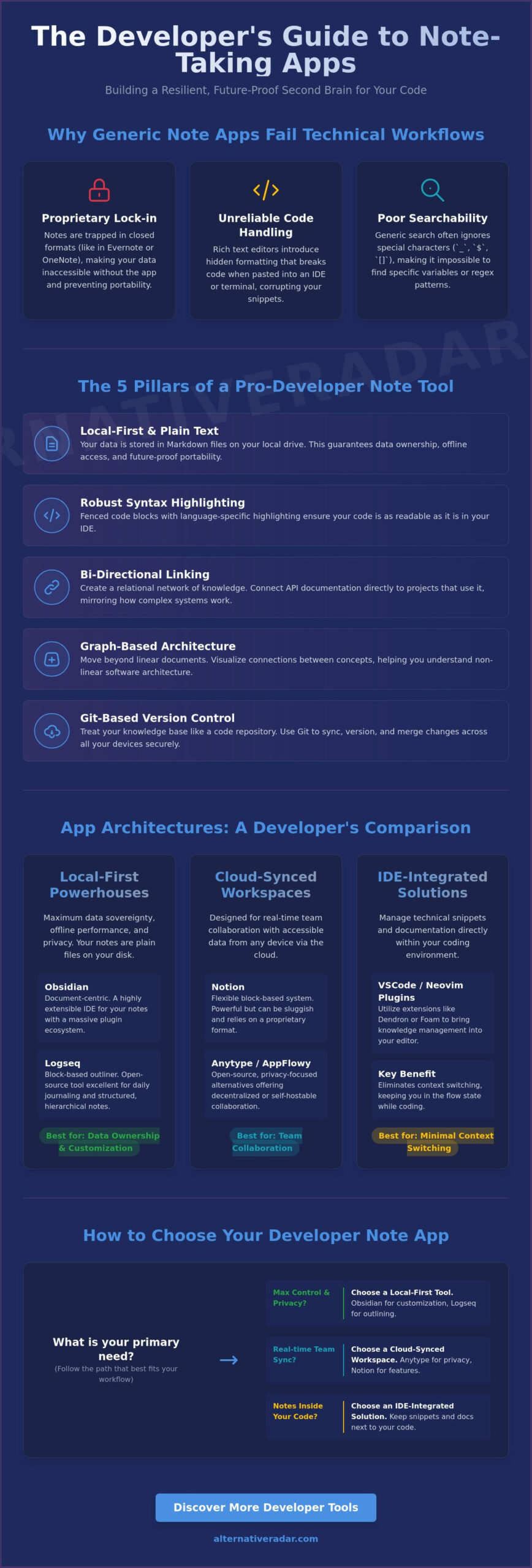
Most software falls into one of three architectural categories: document-based, block-based, or graph-based. Document-based tools like Microsoft Word are linear and static, making them ill-suited for the non-linear nature of software architecture. Block-based platforms like Notion offer more flexibility but can become sluggish as databases grow. Graph-based tools, such as Obsidian, allow you to link concepts through a relational network, mirroring the way complex systems actually function. A comprehensive comparison of note-taking software highlights that while many apps claim to be versatile, only a few provide the granular control required for deep technical work.
The “Plain Text Rule” is a non-negotiable standard for any serious engineer. If your notes are stored in a proprietary format that requires a specific vendor’s license to read, you don’t truly own your data. Portability ensures that your snippets remain accessible in Vim, VS Code, or any future IDE. This is why Markdown has become the industry standard for documentation; it’s lightweight, human-readable, and survives the death of the platform that created it. Choosing the best note taking app for developers means selecting a tool that doesn’t hold your intelligence hostage behind a subscription wall or a closed file type.
The Limitations of Traditional Note Apps
Evernote and OneNote rely on proprietary formats that create immediate friction for developers. Rich text is an anti-pattern for code; it introduces hidden formatting characters that break scripts when you copy and paste them into a terminal. Additionally, generic search engines often ignore special characters like underscores, brackets, or dollar signs. This makes it nearly impossible to find a specific regex pattern or variable name inside a massive knowledge base when you need it most during a debugging session.
Core Features of a Pro-Developer Tool
Utility in a technical context depends on three core pillars. First, you need fenced code blocks with language-specific syntax highlighting to maintain readability. Second, bi-directional linking is essential for building a “Second Brain” where documentation for a specific API naturally connects to the projects using it. Finally, an offline-first architecture ensures that your knowledge remains available during network outages and provides the low-latency editing experience required for fast-paced development. These features transform a simple notebook into a powerful extension of your development environment.
Local-First Powerhouses: Obsidian vs. Logseq
Local-first tools represent the pinnacle of data ownership for technical professionals. They store your files as plain Markdown on your local drive, ensuring your knowledge remains accessible even without an internet connection. This architectural choice improves the developer experience by removing the latency and privacy risks inherent in cloud-only platforms. When searching for the best note taking app for developers, you’ll likely find yourself choosing between the document-centric approach of Obsidian and the block-based logic of Logseq.
In 2026, these local vaults have evolved into more than just text repositories. They now serve as the primary dataset for local Retrieval-Augmented Generation (RAG). By running a local LLM against your private Markdown files, you can query your own technical snippets and documentation without leaking sensitive intellectual property to public clouds. This shift makes local storage a strategic requirement for modern engineering workflows. Version control is the final piece of this puzzle. Both applications support community-developed Git-sync plugins, allowing you to treat your knowledge base like a repository. You can push, pull, and merge changes across devices using your existing GitHub or GitLab infrastructure, creating a familiar and reliable backup system.
Obsidian: Customization and the Plugin Ecosystem
Obsidian functions like an IDE for your thoughts, particularly with the release of version 1.13.0 in May 2026. Its “Canvas” feature allows you to create infinite spatial layouts, which is ideal for mapping out complex microservices or system architectures. Power users leverage the Dataview plugin to treat their notes as a database, writing SQL-like queries to aggregate tasks or project metadata across thousands of files. Obsidian also pairs perfectly with other popular open source business software 2026, ensuring your documentation stack remains interoperable. If you want to refine your workflow further, you can explore more curated software comparisons to find tools that match your specific technical requirements.
Logseq: Privacy-First Knowledge Graphs
Logseq appeals to logical, hierarchical thinkers who prefer an “Outliner” format. Every entry is a block that can be referenced or embedded elsewhere, creating a granular network of information rather than a series of isolated files. Following its April 2026 update, Logseq has focused heavily on database reliability and performance for large graphs. Its daily journal feature encourages rapid, friction-free capture, making it a favorite for those who practice the Zettelkasten method. Since it’s open-source and local-first, you can self-host your graph with zero reliance on third-party servers. If you value transparency and structured logic, Logseq remains a top contender for the best note taking app for developers who want to avoid proprietary bloat.
Cloud-Synced Workspaces: Notion, Anytype, and AppFlowy
While local-first tools offer total control, many engineers require the collaborative features and cross-device availability found in cloud-synced workspaces. These platforms bridge the gap between private documentation and team-wide knowledge sharing. Selecting the best note taking app for developers in this category involves balancing the convenience of real-time synchronization with the potential risks of proprietary lock-in. In 2026, the market has split between established SaaS giants and open-source alternatives that prioritize performance and data sovereignty.
The rise of AI has fundamentally changed how these workspaces function. Over 60% of professionals now report using at least one AI productivity tool daily, and cloud-synced apps have been the fastest to integrate these features. However, the trade-off is often data privacy. For developers working with sensitive internal APIs or proprietary logic, the ability to choose where data is stored and how it is processed by AI models has become a primary decision factor. This has led to a surge in adoption for decentralized platforms that offer a Notion-like experience without the centralized vulnerabilities.
Notion for Developers: Databases and APIs
Notion remains the dominant collaborative hub, having released version 3.5 in May 2026 with a significant focus on its Developer Platform. Its relational databases are ideal for managing bug trackers, sprint retrospectives, or shared snippet libraries. The Notion AI assistant, which became a gated feature for Business plans following a May 2025 pricing change, provides rapid technical summaries and meeting transcriptions. For teams looking to centralize their entire operation, Notion integrates seamlessly with the best Slack alternatives for 2026 to create a unified communication and documentation ecosystem.
The Open-Source Challengers: Anytype and AppFlowy
Anytype and AppFlowy provide the modern workspace experience while returning control to the user. Anytype released version 0.55.0 in June 2026, utilizing a decentralized, peer-to-peer sync protocol that ensures your knowledge graph remains encrypted and private. This makes it a top contender for the best note taking app for developers who want Notion-style blocks without the SaaS privacy trade-offs. AppFlowy, which reached version 0.12.2 in June 2026, stands out for its Rust-based architecture. This technical foundation delivers superior performance and lower memory usage compared to traditional Electron apps, ensuring that your workspace remains responsive even as your technical documentation grows into the thousands of pages.
IDE-Integrated Solutions: Taking Notes Where You Code
Many engineers find that the friction of switching between a browser-based tool and a terminal is the primary killer of productivity. When you’re in the middle of a deep work session, even a five-second transition to a separate app can break your flow. Managing your documentation within your IDE reduces context-switching by keeping your technical snippets and project logic within the same interface as your source code. For these users, the best note taking app for developers isn’t a standalone application at all, but a set of extensions layered onto their primary code editor.
This approach treats your notes exactly like your code. You can use the same keybindings, the same search shortcuts, and the same version control workflows you already use for your day-to-day programming. If you’re looking to optimize your stack further, you can compare specialized developer tools to see which integrations best fit your existing environment. By staying within your editor, you ensure that your documentation remains as current as your last commit.
VSCode as a Note-Taking Powerhouse
VSCode has transformed from a simple editor into a comprehensive knowledge management platform through its massive extension ecosystem. Foam is a standout choice for those who appreciate the bi-directional linking of Obsidian but want to remain inside their editor. It creates a digital garden of Markdown files that you can navigate as a graph. Combining Foam with extensions like “Markdown All in One” for formatting and “Paste Image” for quick screenshots creates a robust documentation engine. By using GitLens, you can track the evolution of your thoughts with the same granularity as your commits, providing a clear history of technical decisions. The Dendron extension offers a more structured, hierarchical approach, which is ideal for managing massive, complex documentation sets that require strict organization.
The CLI Frontier: Org-mode and Beyond
For terminal enthusiasts, the CLI is the only interface that matters. Emacs Org-mode remains a powerful productivity tool in this category, offering a plain-text system for notes, task management, and literate programming. While the learning curve is steep, the long-term efficiency gains are unmatched for those who master its keybindings. VimWiki provides a similar experience for Neovim users, allowing for the creation of a personal wiki that lives entirely within the terminal. These tools prioritize speed and keyboard-driven navigation above all else. While they lack the flashy UI of modern SaaS platforms, they offer a distraction-free environment where your data is never more than a few keystrokes away. Choosing between these options depends on whether you value immediate ease of use or the ultimate efficiency of a customized, code-centric workflow.
Selection Framework: How to Choose Your Alternative
Choosing the best note taking app for developers requires a rigorous evaluation of your specific technical requirements and daily habits. Instead of following market trends, you should audit your current friction points to find a tool that integrates seamlessly with your existing stack. A logical decision framework moves from your primary environment to your privacy needs, ensuring that your knowledge base remains an asset rather than a maintenance burden. Use the following four steps to filter your options and select a documentation system that scales with your career.
- Step 1: Identify your primary workflow. Determine if you prefer an IDE-first approach where notes live alongside your code, or a brain-first approach that uses a dedicated application for high-level architectural thinking and relational linking.
- Step 2: Determine your privacy threshold. Decide if you require a local-first architecture for maximum data sovereignty and offline access, or if the convenience of cloud-sync and real-time mobile availability outweighs the risks of third-party hosting.
- Step 3: Evaluate collaboration needs. Assess whether you are building a personal second brain or a shared knowledge base for an engineering team. Solo developers often favor extensibility, while teams prioritize permission management and shared databases.
- Step 4: Audit your migration path. Review the export capabilities of any potential tool. Ensure you can extract your data in a standard format like Markdown or JSON to avoid the proprietary lock-in that plagues many legacy applications.
Migration Paths and Interoperability
Interoperability is the ultimate insurance policy for your technical documentation. If you decide to switch platforms, tools like Pandoc are essential for converting between Markdown, Org-mode, and HTML without losing structural integrity. Before committing to a new ecosystem, perform a “fire drill” export to verify that your code blocks and links remain functional outside the app. Prioritizing finding the best alternative to popular software before lock-in occurs allows you to maintain a portable knowledge base that isn’t tied to a single vendor’s survival or pricing changes. Always test an app’s ability to handle large attachments and complex folder hierarchies during the trial phase.
Final Recommendation: The 2026 Verdict
The best note taking app for developers depends on your role and your philosophy toward data. For solo developers who value deep customization and relational thinking, Obsidian remains the gold standard due to its massive plugin ecosystem and local-first reliability. If you’re managing a collaborative engineering team, Notion 3.5 offers the most robust database features, though Anytype is a strong contender for those who want Notion-style blocks with decentralized encryption. Minimalists who want zero friction should stick to a VSCode + Git configuration, treating their documentation with the same version-controlled rigor as their production code. Choose the tool that minimizes context-switching and maximizes your long-term ownership of information.
Future-Proof Your Technical Documentation
A resilient documentation system is a strategic investment in your engineering career. You’ve seen that the best note taking app for developers isn’t a one-size-fits-all solution. It’s a calculated choice between local-first sovereignty, collaborative cloud workspaces, or deep IDE integration. Prioritizing Markdown fidelity and avoiding proprietary lock-in ensures your snippets and architectural diagrams remain accessible regardless of platform shifts. Whether you choose the extensibility of Obsidian or the seamless synchronization of Anytype, the goal is to reduce cognitive load and eliminate context-switching.
Alternative Radar provides objective, commission-based research focused on open-source and privacy-first tools updated for 2026 technology standards. We’ve done the heavy lifting of testing these platforms so you can focus on building software. Explore more developer-focused software alternatives on Alternative Radar to find the precise tools that fit your unique environment. Start refining your workflow today to turn your fragmented notes into a powerful, searchable asset.
Frequently Asked Questions
Which note-taking app is best for code snippets?
Obsidian and VSCode are the superior choices for managing code snippets. Obsidian 1.13.0 provides robust syntax highlighting and fenced code blocks that maintain formatting during copy-paste operations. If you prefer staying in your editor, using VSCode with the Foam extension allows you to treat your snippets as a version-controlled repository. Both tools ensure your technical documentation remains readable and functional without the rich-text interference found in generic apps.
Is Obsidian really better than Notion for developers?
The answer depends on whether you prioritize privacy or collaboration. Obsidian is the best note taking app for developers seeking a local-first, offline-ready environment with zero vendor lock-in. It’s faster for searching large knowledge bases. Notion 3.5 is more effective for engineering teams that need shared relational databases, sprint tracking, and integrated AI agents. Obsidian wins on data sovereignty, while Notion wins on team-wide project management.
What is the best open-source alternative to Evernote for programmers?
Logseq and AppFlowy are the strongest open-source contenders in 2026. Logseq offers a privacy-centric outliner format that’s ideal for hierarchical thinkers who want to build a knowledge graph. AppFlowy 0.12.2 provides a high-performance, Rust-based workspace that mimics the Notion experience while allowing for self-hosting. Both tools eliminate the proprietary lock-in and slow performance issues that often drive developers away from legacy platforms like Evernote.
Can I use VSCode as my primary note-taking app?
You can effectively transform VSCode into a powerful documentation hub using extensions like Foam or Dendron. This approach eliminates context-switching and lets you manage your notes with the same Git workflow you use for source code. By using the “Markdown All in One” extension, you get a professional editing experience that rivals dedicated apps. It’s an excellent choice for minimalists who want their documentation to live alongside their codebase.
How do I sync my Markdown notes across multiple devices for free?
The most reliable free method is using Git-based synchronization. You can initialize a private GitHub or GitLab repository for your Markdown vault and use community plugins in Obsidian or Logseq to automate pushes and pulls. This bypasses the $4 to $10 monthly fees charged by official sync services. It also provides a full version history of your notes, which is a significant advantage for tracking technical decisions over time.
Does any note app support LaTeX and Mermaid diagrams natively?
Obsidian and Logseq both provide native support for LaTeX and Mermaid diagrams. You can render complex mathematical formulas and architectural flowcharts directly within your Markdown files using standard syntax. This capability is essential for developers who need to document algorithms or system designs without relying on external image editors. Since the diagrams are stored as text, they remain fully searchable and easy to update as your project evolves.
What is the best note-taking app for Linux users in 2026?
Logseq is frequently cited as the best note taking app for developers on Linux because of its open-source nature and excellent AppImage support. It aligns perfectly with the Linux philosophy of data ownership and transparency. Obsidian is another top-tier choice, offering a stable experience across all major distributions. Both apps ensure that Linux users aren’t treated as second-class citizens, providing feature parity with their Windows and macOS counterparts.
Is AI integration in note apps worth the privacy risk for developers?
AI integration is only worth the risk if you use local-first models that don’t leak intellectual property. Cloud-based AI features in apps like Notion 3.5 send your data to external servers, which may violate your company’s security policies. In 2026, many developers prefer using local Retrieval-Augmented Generation (RAG) within Obsidian. This allows you to query your private notes using a local LLM, gaining the benefits of AI summarization without exposing sensitive code snippets to public clouds.