In 2026, the era of manually toggling between “read” and “write” modes is officially over. If you’re still babysitting your AI agent through every file change, you’re working slower than the developers who have already switched to the best roo code alternatives for AI coding. While Roo Code served as a reliable fork of Cline, the rise of “Orchestrator Agents” has made its manual mode-switching feel like a legacy bottleneck in professional workflows.
You likely appreciate the precision that Roo Code provides, but the constant need for oversight and the limitations of VS Code-only extensions can stall your momentum. It’s frustrating to manage context window limits that lead to code hallucinations when you could be utilizing tools that handle entire repositories autonomously. We understand that your time is better spent shipping features than managing your AI’s permissions.
This guide helps you move beyond these constraints with a direct look at the most powerful AI coding agents available this year. You’ll discover how to achieve faster development cycles and better multi-file editing through more advanced integrations. We compare the latest 2026 updates for Cursor, Claude Code, and top-rated open-source alternatives like Aider to help you find the right fit for your specific workflow.
Key Takeaways
- Learn why the “Manual Mode” bottleneck in Roo Code is slowing down your development and how to upgrade to an autonomous orchestrator agent.
- Compare the best roo code alternatives for AI coding based on their ability to manage complex, multi-file projects without constant supervision.
- Understand the core architectural differences between VS Code extensions, standalone IDEs, and terminal-based agents to choose your ideal setup.
- Follow a clear, step-by-step guide to migrate your existing custom instructions and API keys to a new AI coding platform.
- Access our final comparison of top-rated tools to find the right fit for your specific project size, budget, and privacy requirements.
Evaluating Roo Code: Why Developers are Seeking Alternatives in 2026
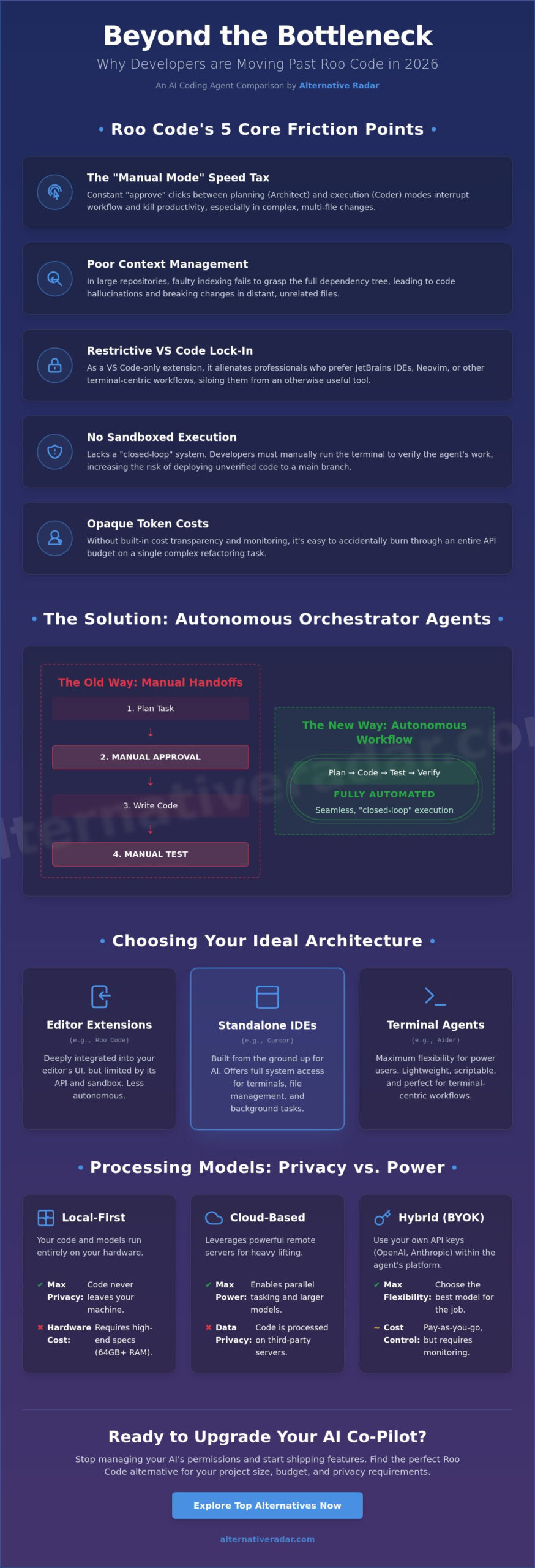
Roo Code established itself as a top-tier open-source tool by forking Cline to provide more granular control over complex tasks. By May 2026, the project has secured over 22,000 GitHub stars, proving its value to the developer community. However, the very features that made it popular, specifically the separation of Architect and Coder modes, have become its primary weakness. Developers are now searching for the best roo code alternatives for AI coding because they want to skip the manual permission prompts that occur every time the agent switches from planning to execution.
The “Manual Mode” bottleneck acts as a speed tax on every feature branch. In Roo Code, you must frequently approve the transition from the planning phase to the implementation phase. While this was a safety feature in 2025, the 2026 standard has shifted toward “Orchestrator Agents” that handle these transitions invisibly. If you’re managing a project with dozens of interlinked files, clicking “approve” every three minutes destroys your flow state. This friction is driving high-velocity teams toward more autonomous solutions.
Context management remains another significant hurdle. In large enterprise repositories, Roo Code’s indexing sometimes fails to capture the full scope of complex dependency trees. This leads to code hallucinations where the agent suggests changes that break existing logic in distant files. Furthermore, the tool’s strict reliance on the VS Code ecosystem alienates a large segment of the market. Many professional developers prefer JetBrains IDEs or terminal-centric workflows, making a VS Code extension feel like a restrictive silo rather than a flexible tool.
The Evolution of AI Coding Agents
The landscape of AI-assisted software development has shifted rapidly from simple autocomplete plugins to fully autonomous agents. In 2026, the demand is for multi-agent orchestration where one AI plans, another writes, and a third runs tests. Roo Code’s single-agent approach often feels underpowered for these modern, multi-step requirements. You can explore how this fits into the wider ecosystem in our popular open source business software 2026 guide for broader context.
Top Friction Points for Current Users
Managing multiple API keys and monitoring token costs has become a full-time chore for Roo Code users. Without built-in cost transparency, it’s easy to burn through a budget on a single complex refactor. Developers also struggle with the lack of sandboxed execution environments. Unlike some competitors that run and test code in isolated containers, Roo Code often requires you to manually run the terminal to verify its work. This lack of a “closed-loop” system increases the risk of deploying unverified code into your main branch.
Open Source vs. Managed Agents: Understanding the Architectures
Choosing between the best roo code alternatives for AI coding requires a clear understanding of how these tools are built. Roo Code operates as an extension within VS Code, which means it’s limited by the editor’s internal API. In contrast, standalone coding platforms are built from the ground up to prioritize AI interactions. This architectural choice dictates whether your AI can access the terminal, manage your file system, or run background tests without your constant intervention. Understanding these differences helps you avoid the manual bottlenecks discussed in our previous section.
Local-first agents appeal to developers who prioritize privacy above all else. These tools run models on your own hardware, ensuring your source code never leaves your machine. However, as of May 2026, running a high-performance local LLM typically requires at least 64GB of unified memory to match the reasoning capabilities of top-tier cloud models. Cloud-based orchestrators solve this by offloading the heavy lifting to remote servers. This allows for parallel tasking, where multiple agents work on different parts of your codebase simultaneously in sandboxed environments to prevent local system corruption.
Hybrid models have emerged as a dominant trend this year. These platforms allow you to “Bring Your Own Key” (BYOK), giving you the flexibility to use models from OpenAI, Anthropic, or Google within a managed interface. This setup provides the best of both worlds: the advanced features of a premium platform and the granular cost control of direct API usage. If you’re looking to optimize your stack, you can explore more efficiency-driven tools in our curated database.
The Rise of Standalone AI IDEs
We’re seeing a massive shift where AI tools are moving from simple extensions to complete “operating systems” for code. Native terminal integration is a standard feature in 2026, allowing agents to execute commands, read error logs, and fix bugs autonomously. A comprehensive review of intelligent assistants highlights that standalone environments often outperform extensions in complex refactoring tasks because they possess deeper access to the IDE’s internal state. This deeper integration allows the AI to understand the relationship between files more effectively than a plugin ever could.
Security and Privacy in AI Coding
Enterprise teams are increasingly cautious about where their data goes. This is why many are moving toward privacy-first tools like Logseq for managing documentation and code notes alongside their development tools. Telemetry remains a concern in free VS Code forks, as some projects may collect usage data to train future models. To mitigate risks, the most advanced alternatives now use sandboxed virtual machines to execute AI-generated commands. This prevents an agent from accidentally deleting your root directory or performing unauthorized network requests during an automated refactor. Developers who apply the same privacy-first philosophy to their personal infrastructure often self-host their media collections using lightweight open-source servers like Navidrome for personal music streaming, avoiding the data tracking that comes with commercial subscription platforms.
The 5 Best Roo Code Alternatives for Faster Development
Identifying the best roo code alternatives for AI coding in 2026 requires looking beyond simple chat interfaces. The market has shifted toward tools that offer deep context indexing and autonomous multi-file editing. While Roo Code provides a solid foundation as a Cline fork, professional workflows now demand agents that can execute parallel tasks and manage complex Git histories without manual mode-switching. We’ve evaluated these options based on their ability to handle large-scale repositories and their integration with modern development stacks.
Recent research into developer productivity and experience indicates that the most effective tools are those that reduce cognitive load by automating repetitive planning phases. In 2026, the leading alternatives have moved away from the “Architect vs. Coder” binary in favor of unified orchestrators. These systems understand the intent behind a prompt and execute the necessary terminal commands, file changes, and test suites in a single, fluid motion. This evolution addresses the primary friction point of Roo Code: the constant need for user approval during routine transitions.
Top Picks for VS Code Enthusiasts
If you prefer staying within the VS Code ecosystem, Kilo Code has emerged as a top-rated choice for stability. It offers a polished extension experience that feels familiar to Roo Code users but features significantly improved context handling for enterprise-grade dependency trees. For those prioritizing privacy, Continue remains the gold standard. It allows for complete “Bring Your Own Key” (BYOK) flexibility and local-first configurations. To streamline your backend workflow, we recommend integrating your chosen agent with Hoppscotch for AI-assisted API development and testing.
Next-Gen Standalone and CLI Platforms
Standalone platforms offer deeper system access than any extension can provide. Cursor remains a dominant force, with its May 2026 v3.3 update introducing advanced “shadow workspace” features that test code changes in the background before showing them to the user. For terminal power users, Aider v0.85.5 is the definitive choice. It operates directly from your CLI and excels at refactoring logic across hundreds of files using a git-centric approach. Finally, Capy provides a unique cloud-based architecture designed for parallel agent execution, allowing you to run multiple debugging and feature-generation tasks simultaneously without taxing your local hardware.
- Cursor: Best for developers wanting a fully integrated, AI-native IDE experience.
- Aider: Best for CLI-centric workflows and complex Git-based refactoring.
- Continue: Best for teams requiring strict privacy and local model support.
- Kilo Code: Best for users who want a more stable, “pro” version of the Roo Code extension.
- Capy: Best for high-velocity teams needing parallel agent orchestration.
How to Transition from Roo Code to a New AI Coding Agent
Switching to the best roo code alternatives for AI coding isn’t just about installing a new binary. It’s a strategic migration of your existing logic and preferences. Many developers make the mistake of starting from scratch, but your time in Roo Code has likely produced valuable custom instructions and persona files that can be reused. To ensure a smooth transition, you should treat the move as a three-stage audit: exporting your logic, configuring the new environment, and benchmarking the results on a non-critical branch.
By May 2026, the process of moving between agents has become more standardized, yet each tool still possesses unique “reasoning logic.” Don’t expect a one-to-one match for every Roo Code feature. Instead, focus on how the new agent handles the “Orchestrator” role that we discussed in previous sections. This allows you to maintain your productivity while shedding the manual mode-switching bottlenecks that likely prompted your search for a replacement.
Step 1: Exporting Your Custom Instructions
Roo Code “Personas” and the `.clinerules` file are your most valuable assets. These files contain your project-specific coding standards, preferred libraries, and architectural constraints. To normalize prompts for cross-agent compatibility, strip away platform-specific commands like “switch to architect mode” and replace them with declarative instructions about your architectural preferences and code style. Most 2026 agents, such as Cursor or Aider, can ingest these instructions directly as system prompts or via a `.cursorrules` or `.aider.conf.yml` file.
Step 2: Setting Up the Environment
Configuring your API keys is the next priority. Whether you use OpenRouter, Anthropic, or a local Ollama setup, ensure your new agent has the correct model routing. Standalone agents often require explicit file-system permissions that a VS Code extension inherits automatically. You’ll also want to verify your Git hooks. Modern agents like Aider v0.85.5 favor auto-committing changes with descriptive messages, so ensure these settings align with your existing workflow to avoid messy commit histories during your first few sessions.
Step 3: Evaluating the Output
Once your environment is ready, run a benchmark task like refactoring a complex React component or updating a set of API endpoints. Compare how the new alternative recalls context across multiple files compared to Roo Code. You’ll quickly identify the “mode” equivalents; for example, Cursor’s “Composer” serves a similar purpose to Roo’s “Architect” but often executes the changes with fewer manual prompts. If you’re still weighing your options, you can compare and explore more AI agents to find the exact feature set you need.
- Audit: Locate all `.clinerules` and persona JSON files in your workspace.
- Normalize: Convert Roo-specific syntax into general markdown instructions.
- Grant: Provide standalone agents with the necessary disk and terminal permissions.
- Test: Use a feature branch to verify the agent’s multi-file editing capabilities.
Finding Your Perfect Fit: The Alternative Radar Verdict
Deciding whether to move on from Roo Code depends on your tolerance for manual oversight. If you prioritize total transparency and fine-grained control over every line of code, Roo Code remains a top-rated open-source choice. However, for those seeking the best roo code alternatives for AI coding to reclaim hours of development time, the shift toward autonomous orchestrators is undeniable. By May 2026, the gap between manual extensions and agentic platforms has widened, making the “Architect vs. Coder” manual toggle feel increasingly outdated.
The long-term outlook for development focuses on agents that operate as teammates rather than just tools. We expect to see deeper integration of multi-agent systems where specialized AI units handle testing, documentation, and feature implementation in parallel. To stay ahead of these trends, it is essential to explore other software alternatives that can optimize your full development stack beyond just the code editor.
The Best Choice for Freelancers
Solo developers often need to balance high performance with manageable costs. For this persona, “Bring Your Own Key” (BYOK) tools are the clear winners. Aider v0.85.5, with its 41,000 GitHub stars, remains the definitive choice for those who live in the terminal and want to avoid high monthly subscriptions. Continue also offers excellent flexibility for solo users who prefer a VS Code extension but want to swap between local models like Ollama and premium APIs. These tools allow you to maximize productivity while maintaining granular control over your token spend.
The Best Choice for Enterprise Teams
Corporate environments require more than just code generation; they need security, sandboxing, and team-wide context sharing. Managed platforms like Cursor and Capy are dominating this space in 2026. Cursor has already surpassed $1 billion in annualized revenue by providing a seamless, AI-native experience for over a million paying developers. Enterprise teams benefit from these platforms’ ability to index massive repositories and run changes in isolated virtual machines. This reduces the risk of breaking production code while accelerating the shipping cycle. Stop wasting time searching through manual configuration files and start coding faster by choosing a tool that fits your team’s specific scale and security requirements.
- Solo Power Users: Choose Aider for terminal-centric, Git-integrated refactoring.
- Privacy Advocates: Stick with Continue for local-first, BYOK flexibility.
- High-Growth Teams: Opt for Cursor or Capy for parallel agent orchestration and native IDE features.
- Open-Source Purists: Stay with Roo Code if you require the specific Cline-fork architecture and manual mode control.
Upgrade Your Workflow for the Orchestrator Era
The 2026 developer landscape has moved past the limitations of manual mode switching. While Roo Code provides precision, the shift toward agentic orchestration means you don’t have to micromanage every file change. By evaluating the best roo code alternatives for AI coding, you can choose between the CLI-first power of Aider or the full-scale integration of a standalone IDE like Cursor. Both paths offer significant speed advantages over legacy extension models that rely on manual approval for routine tasks.
Choosing the right fit involves auditing your existing custom instructions and testing new agents on non-critical branches. Whether you prioritize the privacy of local-first models or the parallel processing power of cloud-based agents, your goal remains the same: shipping better code in less time. Your development environment should empower your creativity, not create administrative friction.
Don’t stop your productivity search here. You can explore more AI software alternatives on Alternative Radar to optimize every layer of your stack. Our platform provides objective comparisons of 500+ developer tools and detailed pros and cons for open-source software, all updated for 2026 technology standards. Stop wasting time with inefficient tools and start building with the next generation of AI assistants.
Frequently Asked Questions
Is Roo Code better than Cursor in 2026?
The choice depends on your preferred environment. Cursor is a standalone, AI-native IDE that provides deeper system integration and automated “Composer” features that outpace Roo Code’s extension-based architecture. While Roo Code offers excellent precision for VS Code users, Cursor has reached over $1 billion in revenue by May 2026 because its orchestrator agents handle multi-file edits with significantly less manual intervention. If you want a seamless, all-in-one experience, Cursor is the more efficient choice.
How much does it cost to run an AI coding agent with Claude 3.5 Sonnet?
Running high-end models like Claude Opus 4.7 currently costs $5 per million input tokens and $25 per million output tokens as of May 2026. For a professional developer using an agentic workflow daily, these API costs typically range from $100 to $200 per month. Many developers prefer managed subscriptions or credit-based models to avoid the unpredictability of direct pay-per-token billing when performing large-scale repository refactors.
Can I use Roo Code alternatives with local LLMs like Llama 3?
Yes, several of the best roo code alternatives for AI coding support local execution via providers like Ollama or LM Studio. Tools such as Continue and Aider are specifically designed to allow “Bring Your Own Key” or local model connections. This is a primary choice for enterprise teams that require 100% data privacy, though you’ll need hardware with at least 64GB of unified memory to match the reasoning speed of cloud-based models.
What is the best free alternative to Roo Code?
Aider and Cline are the top-rated free, open-source options available this year. While you must still cover your own API token costs, the software itself carries no subscription fee. Aider is the definitive choice for terminal-based power users, whereas Cline offers a GUI experience almost identical to Roo Code. These tools empower you to swap between different models and providers without being locked into a specific vendor’s pricing tier.
Does switching coding agents require me to rewrite my code?
Switching agents never requires a code rewrite. AI coding agents are designed to index and interpret your existing codebase regardless of the tool you used previously. The migration process only involves moving your custom instructions and project rules into the new agent’s configuration file, such as a `.cursorrules` or `.aider.conf.yml`. Your source code remains exactly as it is until you authorize the new agent to make specific changes.
How do AI coding agents handle large legacy codebases?
Modern agents use vector indexing and RAG (Retrieval-Augmented Generation) to navigate repositories exceeding 100,000 lines of code. Instead of reading every file at once, the agent creates a semantic map of your project to pull only the relevant context for your current task. This prevents the code hallucinations often seen in older tools and allows the agent to understand complex dependencies across massive, multi-decade legacy systems without crashing the context window.
Is Aider easier to use than Roo Code for beginners?
No, Aider is generally more challenging for beginners because it lacks a graphical user interface. It operates entirely through the terminal, which requires a high level of comfort with command-line workflows and Git. For those new to AI-assisted development, a GUI-based extension like Kilo Code or an AI-native IDE like Cursor is a much better fit. These tools provide visual feedback and familiar file explorers that make the transition smoother.
What happens if I hit my API rate limit during a migration?
If you hit a rate limit, the agent will pause and display a status code from your provider. Most advanced alternatives in 2026 include automatic retry logic that picks up the task exactly where it left off once your limit resets. To maintain productivity during heavy migration tasks, we recommend configuring a secondary provider like OpenRouter as a backup. This ensures your workflow remains uninterrupted even if your primary model hits a temporary ceiling.