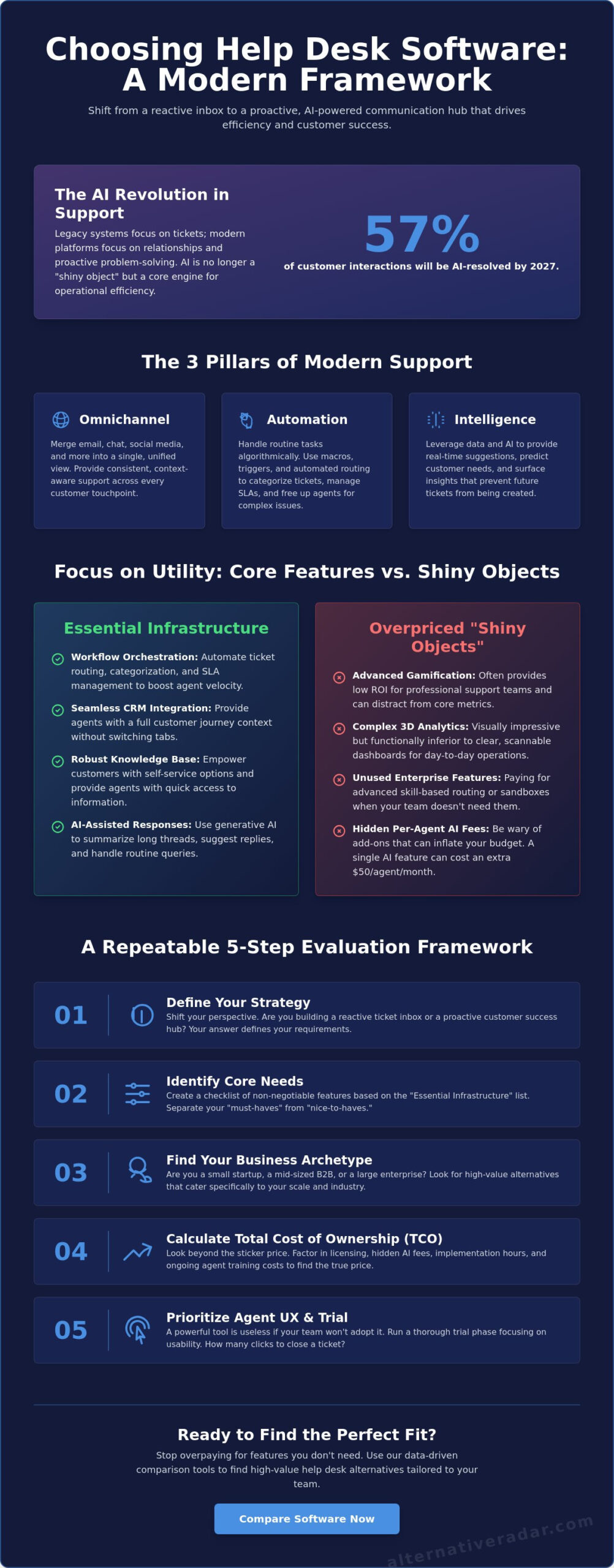
With 57% of customer interactions projected to be resolved entirely by AI by 2027, your support stack is no longer just a place to store tickets. It’s a friction-reduction engine that defines your brand’s operational efficiency. If you’re currently struggling with how to choose a help desk software, you’ve likely encountered a wall of information overload and the legitimate fear of hidden per-agent costs. It’s difficult to maintain a budget when a single AI add-on can increase your monthly spend by $50 per agent.
You deserve a tool that scales seamlessly without triggering team resistance or technical debt. This guide provides a logic-driven framework to help you master the selection process based on your specific team size and support strategy. We’ll move quickly through a clear shortlist of software categories and provide a repeatable evaluation checklist for your procurement team. You’ll gain the confidence to select a platform that prioritizes utility over hype, ensuring your support infrastructure remains a competitive advantage as you grow.
Key Takeaways
- Shift your perspective from a reactive “digital inbox” to a proactive communication hub that prioritizes customer success over simple ticketing.
- Apply a repeatable 5-step framework on how to choose a help desk software to ensure your selection matches your team’s specific technical requirements.
- Distinguish between essential infrastructure and overpriced “shiny objects” to protect your budget from hidden per-agent AI fees.
- Identify your business archetype to discover high-value software alternatives that offer better suitability than the dominant market leaders.
- Focus on agent user experience and the trial phase to ensure high team adoption and a smoother implementation process.
Why Choosing Help Desk Software in 2026 Requires a New Approach
Legacy systems focus on tickets; modern systems focus on relationships. In 2026, the definition of help desk software has expanded far beyond a simple digital inbox. It’s now a centralized communication hub that dictates how efficiently your team can scale. If you’re currently researching how to choose a help desk software, you must look beyond reactive problem-solving. The industry has shifted toward proactive customer success, where the goal isn’t just to close a ticket, but to prevent the next one from ever being created.
Adopting a “one-size-fits-all” approach is a primary driver of wasted SaaS spend. With the global help desk market projected to reach $29.3 billion by 2033 at a 9.4% CAGR, providers are packing platforms with features that many mid-sized teams simply don’t need. To find a tool that actually fits, you must evaluate every option against the three pillars of modern support:
- Omnichannel: A single, unified thread for every customer interaction.
- Automation: Algorithmic handling of routine tasks. The helpdesk automation market is expected to reach $8.14 billion in 2026 alone.
- Intelligence: Using data to provide real-time suggestions to agents and predict customer needs.
The Evolution from Ticketing to Omnichannel Engagement
Merging email, chat, and social media into a single view is now a baseline requirement. Customers expect you to retain their history even if they move from a LinkedIn message to a live chat. A unified view prevents the data fragmentation that kills agent productivity and frustrates users. Understanding these shifts is vital for finding the best alternative to popular software that might still be operating on a legacy, siloed infrastructure. When you see a complete history of touchpoints, your agents can provide personalized support that feels human, even when assisted by AI.
The Hidden Cost of “Free” vs. Premium Solutions
Open-source solutions offer high flexibility, but they often come with high internal maintenance costs. You’ll need to account for server management and the technical debt of custom integrations. Conversely, premium enterprise tiers are notorious for “feature bloat,” where small teams pay for advanced skill-based routing or sandboxes they never use. It’s essential to calculate the Total Cost of Ownership, which we define as the sum of licensing fees, implementation hours, and the ongoing cost of agent training. Avoid paying for an Enterprise license if a Standard or Pro tier covers 90% of your operational needs.
Core Features vs. Shiny Objects: What Your Team Actually Needs
Mastering how to choose a help desk software requires a focus on utility over vanity features. Distinguishing between essential infrastructure and marketing fluff is the most critical step in your decision-making process. Many platforms upsell “shiny objects” like advanced gamification or 3D analytics that offer little ROI for the average support team. Instead, prioritize the agent experience. If your software requires twelve clicks to close a simple ticket, your team’s productivity will plummet regardless of the price. A modern tech stack also relies on interoperability. Your help desk shouldn’t be an island; it must integrate seamlessly with tools like open source CRM software to ensure agents have a full context of the customer’s journey without switching tabs.
Automation and Workflow Orchestration
Automated workflow orchestration is the backbone of a high-velocity team. Macros allow agents to apply pre-written responses and status changes with a single shortcut, while automated triggers handle ticket categorization based on keywords. Effective SLA management keeps your team accountable by flagging tickets that are close to breaching response times. Automated routing reduces “ticket ping-pong” by ensuring the right query goes to the right specialist immediately, preventing the frustration of multiple transfers. If you are struggling to narrow down your options, you can compare vetted software alternatives to see which platforms offer the most intuitive automation builders.
AI-First Support: Beyond Basic Chatbots
By 2026, AI has moved beyond the frustrating, rigid chatbots of the past. 65% of customer service organizations are now using or piloting AI agents to handle routine queries. Generative AI is most effective when it assists human agents by drafting replies or summarizing long email threads. This AI-assisted drafting has been shown to improve first-response times by an average of 37%. Look for platforms offering sentiment analysis to prioritize angry customers automatically. It’s vital to differentiate between “deflection,” where a user finds an answer themselves, and “resolution,” where an AI actually solves the problem.
Self-Service and Knowledge Base Capabilities
Self-service is your most cost-effective support channel. 90% of consumers now expect self-service options, making an integrated knowledge base a non-negotiable feature. This “Shift Left” strategy moves users away from high-cost channels like phone or chat toward low-cost self-resolution. To be effective, your help center must be searchable and SEO-friendly so users can find answers through Google. When considering how to choose a help desk software, evaluate the ease of content creation; if updating an article is difficult, your knowledge base will quickly become obsolete.
Categorizing the Market: Finding the Right Help Desk Archetype
Market leaders like Zendesk and Freshdesk often dominate the conversation, but they aren’t the universal answer for every support team. When researching how to choose a help desk software, you must categorize tools by their archetype rather than their popularity. In 2026, the decision between Cloud/SaaS and On-Premise deployment is no longer just about convenience; it’s about data sovereignty. New regulations, such as the California Privacy Rights Act (CPRA) update effective January 1, 2026, have expanded the definition of sensitive data. Additionally, the FCC proposed rules in March 2026 to ensure sensitive customer data is handled only in U.S.-based contact centers. These legal shifts make your software’s hosting location a strategic priority.
Choosing the wrong archetype leads to “tool fatigue.” Smaller teams often find themselves paying for enterprise-grade features they never configure, while large organizations might outgrow lightweight shared inboxes within months. Understanding how to choose a help desk software based on these archetypes prevents the friction of mid-year migrations. To avoid these pitfalls, evaluate your technical requirements against your team’s actual daily workflow rather than a vendor’s ideal use case.
Enterprise Powerhouses vs. Lightweight Alternatives
Enterprise platforms like Zendesk or Jira Service Management offer deep customization and ITIL compliance, but they carry a “complexity tax.” This tax is paid in the form of long implementation cycles and the need for dedicated administrators. Conversely, lightweight alternatives like Help Scout or Front prioritize a “human-first” shared inbox experience. These are ideal for teams that value speed and simplicity over complex routing logic. You may be over-tooled if:
- Your agents use less than 30% of the available feature set.
- Onboarding a new agent takes more than two weeks.
- You pay for advanced AI add-ons that your volume doesn’t justify.
Open Source and Self-Hosted Options
For highly regulated industries, open source and self-hosted options provide the ultimate level of data control. By hosting the software on your own infrastructure, you eliminate the risks associated with third-party data breaches and ensure full compliance with regional privacy laws. Developers can use popular open source business software as a baseline to build a custom support environment. While this path removes recurring licensing fees, it shifts the cost to internal maintenance. You’ll need a dedicated DevOps resource to handle security patches and server uptime, making this a choice for teams that prioritize autonomy over a managed service experience.
The 5-Step Framework for Evaluating Help Desk Alternatives
Selecting a new platform is a high-stakes decision that impacts your team’s daily productivity and your company’s bottom line. To master how to choose a help desk software, you need an objective methodology that separates vendor marketing from operational reality. This framework moves you through five logical stages to ensure the tool you select today doesn’t become a bottleneck tomorrow. It’s designed for users in search mode who value speed and clarity over flowery descriptions. If you’re ready to begin, find and compare help desk alternatives that prioritize your specific team size and budget.
Step 1: Audit Your Current Communication Friction
Start by identifying exactly where your current system is failing. Are tickets getting lost in Slack threads or buried in a shared Gmail inbox? You must quantify your performance using two primary benchmarks: Time to First Response and Total Resolution Time. Interview your front-line agents to discover their daily frustrations. If they spend more time toggling between tabs than solving problems, your friction is too high. In B2B SaaS, the average agent resolves 47 tickets per day. If your team is significantly below this mark, your software is likely the culprit.
Step 2: Define Your Scalability Ceiling
A tool that works for five agents often breaks when you reach fifty. Evaluate how pricing tiers shift as you add essential features. For example, moving from Zendesk Suite Team ($55/agent) to Suite Growth ($89/agent) is a 61% increase per user just to unlock SLA management and multiple ticket forms. Check for API limits and integration constraints that might prevent you from connecting to your full tech stack. You need to know how to choose a help desk software that remains cost-effective when your ticket volume increases tenfold.
Step 3: Run a High-Velocity Pilot
Never commit to a long-term contract without a 14-day trial using real, anonymized data. A pilot program should test the platform’s core functionality, including the mobile app for remote support teams. Set clear success metrics, such as the time it takes for a new agent to send their first response without assistance. This phase is the most critical part of the journey because it reveals the true user experience for your staff.
Step 4: Secure Stakeholder Buy-in. Implementation fails when agents resist the new tool. Involve them in the final selection process to ensure the interface matches their workflow. A tool that your team hates is a tool that won’t be used correctly.
Step 5: Design Your Exit Strategy. In the SaaS world, lock-in is a significant risk. Before signing, verify how easy it is to export your data. If the tool fails to deliver ROI after six months, you need a clear path to migrate your history and knowledge base to a different provider without losing critical customer context.
Making the Final Call: Deployment and Implementation
The final selection process is where strategy meets execution. When you’ve determined how to choose a help desk software that aligns with your budget, the focus must shift entirely to adoption. The “best” tool on the market is worthless if your agents find the interface cumbersome or the workflows counterintuitive. Your goal is to minimize the time between signing the contract and reaching full operational capacity. Negotiating SaaS contracts in 2026 requires a sharp eye for “AI fatigue” pricing. Many vendors now separate their core ticketing features from advanced AI capabilities, such as the $50 per agent Advanced AI add-on found in some enterprise tiers. Opt for monthly billing during the first quarter if you have any doubts about the tool’s long-term suitability, even if annual plans offer a significant discount.
The “Implementation Gap” and How to Bridge It
The first 30 days are the most volatile period of any software transition. Data migration is often the silent project killer; importing “dirty data” from a legacy system only clutters your new environment. Audit your existing ticket history and knowledge base articles before the move. Only migrate what’s essential for current operations. Setting up basic automation rules, such as auto-responders and priority tagging, before the full rollout ensures that customers don’t feel the friction of your internal change. A phased approach, where you move one department at a time, allows you to troubleshoot technical hitches without disrupting your entire support network.
Continuous Optimization: Your Help Desk is Never “Done”
A help desk is a living infrastructure that requires monthly refinement. Review your analytics to identify “content gaps” in your help center. If customers are still opening tickets for topics already covered in your knowledge base, your searchability or article clarity is the problem. Soliciting direct feedback from your staff is equally important. Agents are the first to notice if a new update has slowed down the ticket-closing process. To stay ahead of market shifts and new regulatory requirements, use the Alternative Radar guide to software discovery.
At Alternative Radar, we act as your digital scout, filtering through marketing hype to provide objective comparisons. We’ve done the heavy lifting of testing and categorization so you can move directly to the evaluation phase. If you’re still undecided, browse our sponsored software placements and affiliate recommendations to find the specific archetype that fits your growth trajectory. Making the right choice now prevents the high cost of a forced migration two years down the line. Compare your final shortlist here to see how they stack up against the 2026 decision-making framework.
Future-Proof Your Customer Support Stack
You now have a logic-driven framework to navigate the complex support market of 2026. Mastering how to choose a help desk software is no longer about chasing the most famous market leader. It’s about aligning your specific communication volume with a platform that prioritizes utility over marketing hype. By auditing your current friction and running high-velocity pilots, you ensure that your chosen tool drives productivity rather than technical debt.
Effective implementation requires a focus on agent adoption and a clear exit strategy to maintain long-term flexibility. Don’t let information overload stall your progress. You can find the best help desk alternatives for your team on Alternative Radar. We provide objective software comparisons and detailed analysis of free, open-source, and premium tools to help you make a smarter choice. Our expert-curated alternatives move you past the legacy market leaders to find the precise fit for your support strategy. Take control of your support infrastructure today and build a system that scales with your growth.
Frequently Asked Questions
What is the difference between help desk software and a service desk?
Help desk software focuses on resolving end-user issues and provides a tactical solution for quick technical fixes. A service desk is a broader, strategic platform often aligned with ITIL frameworks to manage the entire lifecycle of IT services across an organization. While the help desk is reactive, the service desk manages assets, changes, and service requests beyond simple troubleshooting.
How much should help desk software cost per agent in 2026?
Market rates for help desk software in 2026 range from $14 to $115 per agent per month based on your required features. For example, Zoho Desk Standard starts at $14, while Zendesk Suite Professional is $115. Budget an additional $29 to $50 per agent if you require advanced AI add-ons for automated drafting or copilot features.
Can I use a free Slack alternative as a temporary help desk?
You can use a free Slack alternative for internal coordination, but it’s not a viable long-term solution for customer support. These tools lack ticket tracking, SLA management, and the ability to build a public knowledge base. Without a dedicated system, you’ll struggle with data fragmentation and lose the unified customer view necessary for scaling your operations.
Is open-source help desk software secure for enterprise use?
Open-source help desk software is highly secure provided your team maintains regular security patches and server updates. It offers superior data sovereignty, which is critical for compliance with the 2026 CPRA updates. The security risk shifts from the vendor to your internal DevOps team, making it a preferred choice for highly regulated industries that prioritize control over managed convenience.
How long does it typically take to implement new help desk software?
Implementation timelines vary from two weeks for lightweight tools to three months for enterprise powerhouses. A shared inbox platform like Help Scout can be operational in days, whereas complex systems like Jira Service Management require extensive configuration of routing logic and API connections. Most teams reach full operational stability within the first 30 days of deployment.
What are the most important help desk integrations for e-commerce?
The most critical integrations for e-commerce are your CRM, payment processor, and order management system. Agents must see purchase history and shipping status directly within the ticket interface to provide fast resolutions. This connectivity is a primary consideration when researching how to choose a help desk software for a high-volume retail environment.
Do I need a help desk if I only have one support person?
Yes, a single support person needs a help desk to centralize communication and prevent inquiries from being buried in a personal inbox. Even with one agent, a help desk allows you to build a knowledge base that handles routine questions via self-service. This infrastructure ensures your support strategy is ready to scale the moment you hire more staff.
How does AI help in choosing or managing a help desk?
AI assists in managing a help desk by automating ticket categorization and drafting agent responses, which can improve first-response times by 37%. When evaluating how to choose a help desk software, look for AI that offers “resolution” capabilities rather than just simple chatbots. Modern AI agents can now resolve 57% of interactions entirely, significantly reducing the workload on your human staff.