
The most expensive, feature-heavy platform on the market is often the worst choice for a solo operator. With over 83 million people now working in the U.S. freelance economy, the demand for streamlined financial tools has never been higher. You likely started your business for the autonomy, not to spend your weekends buried in manual data entry or fearing a tax season error. Finding the best accounting software for freelancers shouldn’t feel like a second job, yet many users remain trapped in “free” plans with hidden costs or overly complex interfaces they never use.
We agree that your time is better spent earning your average $48 hourly rate than balancing a ledger. This guide cuts through the marketing hype to help you secure a tool that offers automated expense tracking and professional invoices that get you paid faster. You’ll discover the ideal accounting platform for your specific niche through our objective 2026 comparison of features, automation, and scalability. We preview the top alternatives that leverage the latest AI trends and the “One Big Beautiful Bill Act” deductions; this ensures you can generate tax-ready reports with a single click and keep your focus on growth.
Key Takeaways
- Analyze the true cost of manual bookkeeping to reclaim lost billable hours through specialized automation designed for solo operators.
- Evaluate the best accounting software for freelancers using the “10-minute rule” to ensure your weekly financial tasks never interfere with high-value client work.
- Match your software choice to your specific freelance niche, prioritizing visual reporting for creative projects or professional retainer management for technical consulting.
- Future-proof your business by integrating platforms that handle AI-driven tax forecasting and global Web3 payment reconciliation.
Beyond the Spreadsheet: Why Freelancers Need Specialized Accounting in 2026
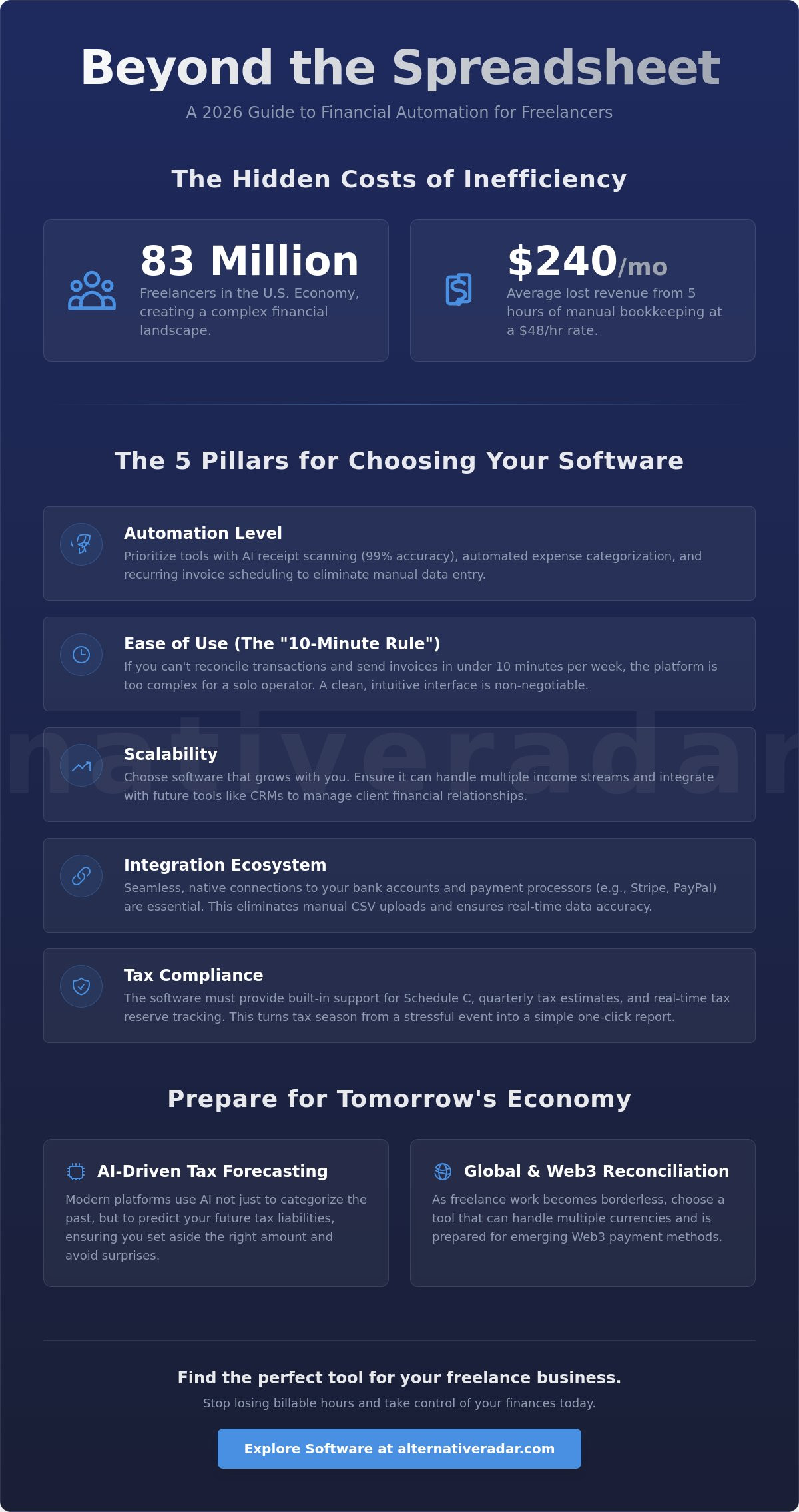
Spreadsheets were the gold standard for years, but they lack the predictive power and automation required in 2026. Modern freelance accounting is no longer just a digital shoebox for receipts; it’s a strategic command center. With 83 million people now participating in the U.S. freelance economy, the complexity of managing multiple income streams and specific tax deductions has grown significantly. Relying on manual data entry means losing valuable billable hours. If the average North American freelancer earns $48 per hour, spending just five hours a month on manual bookkeeping costs $240 in potential revenue. This is why searching for the best accounting software for freelancers is a necessity for business survival rather than a luxury.
The 2026 tax landscape has also become more demanding. New regulations, such as the “One Big Beautiful Bill Act,” have introduced specific deductions for tips and overtime that require precise, real-time tracking. Additionally, the threshold for receiving Form 1099-K remains at $20,000 and 200 transactions, making digital record-keeping essential for compliance. Transitioning from generic tools to a purpose-built Accounting software platform ensures you aren’t just recording the past, but actively managing your future liabilities.
The Evolution of the Solopreneur Tech Stack
Solopreneurs now require tools that communicate within a unified ecosystem. Your financial platform shouldn’t exist in a vacuum. It must integrate seamlessly with your project management tools and slack alternatives to track time and expenses as they occur. We’ve moved past the era of “recording the past.” Modern tools use AI to forecast your tax bill before it’s due, allowing you to set aside reserves accurately. While some “free” software options might seem attractive, they often cost more in manual labor than a paid subscription. A dedicated tool helps you claim the standard mileage rate of $0.70 per mile without digging through old calendar appointments.
Core Benefits of Moving to the Cloud
Cloud-based platforms provide immediate financial visibility that a local spreadsheet cannot match. You can view your profit margins on a per-project basis at any moment, which is vital when 72% of gig workers are prioritizing work-life balance. Manual CSV uploads are a relic of the past. The 2026 industry standard is the automated bank feed, which uses machine learning to categorize transactions instantly. This automation reduces the “fear of tax season” by keeping your books audit-ready year-round. Beyond internal organization, professional, branded documentation builds client trust. Sending a sleek, automated invoice signals that you are an organized professional, which often leads to faster payment cycles.
The 5 Pillars of Freelance Bookkeeping: A Framework for Choosing
Selecting the best accounting software for freelancers requires a structured filter. Most platforms offer similar basic features, but the value lies in how much manual labor they eliminate. You shouldn’t settle for the most popular brand simply because of its market share. Instead, evaluate potential tools against these five essential pillars to ensure they align with your 2026 workflow.
- Automation Level: Look for advanced AI receipt scanning that extracts data with 99% accuracy. Your software should automatically categorize recurring expenses based on your past behavior.
- Ease of Use: Apply the “10-minute rule.” If you can’t reconcile your weekly transactions and send invoices in under ten minutes, the interface is too complex for a solo operator.
- Scalability: Your business will evolve. Ensure the software can eventually integrate with your broader tech stack, such as an open source crm software comparison setup, to bridge the gap between financial data and client relationships.
- Integration Ecosystem: The tool must connect natively to your bank and payment processors like Stripe or PayPal. This eliminates the need for manual CSV uploads.
- Tax Compliance: Built-in support for Schedule C and real-time tax reserve tracking is mandatory. For those working with international clients, the platform should handle VAT/GST calculations automatically.
The U.S. Bureau of Labor Statistics highlights the shifting nature of financial record-keeping as automation replaces traditional clerical tasks. For a freelancer, this shift means you are now the bookkeeper, making efficiency your highest priority. If you’re overwhelmed by options, you can compare vetted software alternatives to find a better fit for your specific needs.
Invoicing and Payment Speed
Cash flow is the lifeblood of any freelance business. Modern platforms now feature “Click-to-Pay” buttons directly on digital invoices. Industry data suggests that providing these immediate payment options can reduce late payments by up to 30 percent. Your software should also handle recurring billing for retainers and send automated late payment reminders so you don’t have to play the role of a debt collector. If you work globally, ensure the tool supports multi-currency reconciliation to avoid manual exchange rate calculations.
Expense Management and Receipt Capture
Manual expense tracking is a significant drain on productivity. In 2026, a high-quality mobile app is a non-negotiable requirement. It should offer “snap-and-forget” receipt capture, where the AI reads the vendor and total immediately. GPS-based mileage tracking is another essential feature. With the 2026 standard mileage rate set at $0.70 per mile, failing to track business travel accurately results in lost deductions. High categorization accuracy ensures your reports are tax-ready without constant human intervention.
The Top 2026 Accounting Software Alternatives for Solopreneurs
The market for financial tools has expanded beyond the traditional giants. Finding the best accounting software for freelancers now involves looking for leaner, more specialized platforms that prioritize speed over unnecessary features. FreshBooks remains a top contender for service-based professionals, with its Lite plan starting at $19 per month. It excels in client communication and time tracking, making it ideal for consultants who need to justify every billable minute. For those on a strict budget, Wave Accounting offers a compelling Starter plan that remains free, though the $19 per month Pro plan is necessary for automated receipt scanning. Wave’s processing fees sit at 2.9 percent plus $0.60 per transaction for most cards, which is a standard baseline for 2026.
Zoho Books has emerged as the most scalable choice following its 2026 update. It bridges the gap between simple ledger tracking and full-scale enterprise resource planning. This scalability is crucial for freelancers who plan to expand into small agencies. To understand the foundational requirements of these systems, you can consult the SBA guide to managing business finances. This resource outlines the essential reporting standards that any reputable software must meet. While Zoho handles the growth, Xero remains the professional choice for those with global clients or complex inventory needs. Its Early plan starts at $25 per month, providing a robust framework for reconciliation across multiple currencies.
QuickBooks Solopreneur, priced at $20 per month or $120 annually, remains the “industry standard” for a specific reason. It offers the deepest integration with tax preparation software and banking institutions. If your primary goal is to minimize friction with your CPA during the April 15 deadline, the Solopreneur tier provides the necessary Schedule C support without the bloat of their higher-tier business plans. However, don’t ignore the alternatives simply because they lack the same name recognition; the right choice depends entirely on your specific transaction volume and service type.
Wave vs. Zoho: The Battle of the Free Plans
Comparing these two requires looking at what you lose in the free tier. Wave’s free plan is excellent for basic invoicing, but you’ll face manual entry for receipts unless you upgrade. Zoho’s free option is often more feature-rich but comes with strict revenue caps that might force an upgrade sooner than expected. Wave’s interface feels more intuitive for non-accountants, whereas Zoho requires a slightly steeper learning curve. Both offer limited support on free tiers, usually restricted to self-service help centers and community forums.
FreshBooks vs. Xero: Service-Based vs. Transaction-Based
FreshBooks wins for consultants because it treats time as the primary currency. Its project-based billing and automated follow-ups ensure you don’t leave money on the table. In contrast, Xero is superior for freelancers selling digital or physical products. It handles inventory and transaction-heavy bank feeds with better precision. From an ROI perspective, FreshBooks often pays for itself through recovered billable hours, while Xero saves money by reducing the time spent on complex reconciliations. Both platforms provide significantly better long-term value than manual spreadsheets by preventing costly tax errors.
Industry-Specific Matches: Picking Software Based on Your Freelance Niche
Generic “best of” lists often fail because they treat a wedding photographer and a cybersecurity consultant as the same business entity. The best accounting software for freelancers is the one that mirrors your specific daily operations. While a creative needs visual project tracking, a consultant requires precise time-to-invoice automation. Identifying these nuances early prevents you from outgrowing your software within the first year of operation.
Creative freelancers should look for platforms that handle project-based billing with ease. If you spend your time in professional creative tools or use the best free alternatives to photoshop, you likely prioritize a clean user interface and professional client-facing documents. Your software must allow you to manage project expenses without losing sight of your overall profit margin. This ensures that a single high-cost asset doesn’t erase the gains from a month-long contract.
Technical consultants and coaches operate on a different financial model. For these professionals, consistent cash flow depends on robust retainer management and calendar integration. The goal is to bill for every minute of advice provided without manual data entry. Providing a dedicated client portal gives your small operation a “big agency” feel, which is essential for maintaining professional authority and justifying higher rates. You can compare specialized software options to see which platform handles your specific niche most efficiently.
E-commerce solopreneurs and global nomads face the highest level of administrative complexity. Inventory management and sales tax automation are mandatory for those selling physical or digital goods across state or national lines. If you are a global nomad, you need a tool that handles multi-currency reconciliation and international payment fees without requiring manual adjustments. This automation is vital for keeping your books clean while you move between tax jurisdictions.
Best for Creatives and Designers
Creatives need to present professional estimates that convert leads into clients. Your accounting tool should be an extension of your brand, offering customizable templates that look as polished as your portfolio. Managing project-based expenses is another critical area; you must be able to see if a specific contract is actually profitable after factoring in stock assets, font licenses, and software subscriptions.
Best for Consultants and Coaches
Automating retainer billing is the most effective way to ensure consistent cash flow. High-quality software for consultants will integrate directly with your scheduling apps to convert appointments into billable entries automatically. This level of automation reduces the “administrative drag” that often prevents coaches from scaling their client list or focusing on high-level strategy sessions.
Future-Proofing Your Finances: Integrating AI and Global Payments
The financial landscape for the 83 million freelance workers in the U.S. is shifting toward high-velocity automation. By 2026, the best accounting software for freelancers has evolved from a simple record-keeping tool into a predictive assistant. These platforms now use AI-driven forecasting to calculate your tax liabilities in real-time. Instead of waiting for the April 15 deadline to discover what you owe, modern tools analyze your income against the 15.3 percent self-employment tax rate and the $16,100 standard deduction for single filers. This allows you to set aside precise reserves for quarterly estimated payments due on April 15, June 16, September 15, and January 15.
Global nomads and tech-savvy solopreneurs also face the challenge of reconciling digital assets. As the global gig economy reaches a projected $674.1 billion in 2026, crypto and Web3 payments are becoming standard. Leading software alternatives now offer native reconciliation for digital wallets, ensuring these transactions appear alongside traditional bank feeds. This level of integration is essential for meeting the 1099-K threshold of $20,000 and 200 transactions. Staying agile with your software choice provides a competitive advantage; you can pivot to tools that support new deductions under the “One Big Beautiful Bill Act,” such as the $25,000 tips deduction, without rebuilding your entire financial history.
How AI is Changing Freelance Bookkeeping
AI-accounting represents a fundamental shift from manual data entry to strategic data oversight. Predictive categorization now handles the bulk of your ledger, often reducing weekly administrative tasks to under five minutes. Anomaly detection acts as a digital auditor, catching duplicate subscriptions or identifying missed business deductions like the $0.70 per mile standard mileage rate. These tools don’t just record what happened; they flag inefficiencies that drain your profit margins. This shift empowers you to act as a CFO rather than a clerk, using high-quality data to drive business decisions.
Setting Up for Success: Implementation Checklist
Transitioning to a modern stack requires a methodical approach to ensure data integrity. Follow this three-step migration process to move from spreadsheets to a dedicated SaaS platform:
- Data Export: Clean your current spreadsheet of duplicate entries and export your 2025 and 2026 transaction history as a CSV file.
- Mapping and Import: Upload your data to the new platform, mapping your custom categories to the software’s tax-ready chart of accounts.
- Bank Integration: Securely connect your primary business accounts and credit cards to establish automated, real-time feeds.
The logical path to selecting your 2026 stack involves prioritizing the “10-minute rule” and niche-specific suitability over brand name recognition. If your current tool feels like a burden rather than a remedy, it is time to switch. Ready to explore more? Find the perfect alternative to your current software on Alternative Radar and reclaim your billable hours.
Building Your 2026 Financial Command Center
The shift toward AI-driven forecasting and automated bank feeds has fundamentally changed how solo operators manage their money. You no longer have to choose between complex enterprise tools or inefficient manual spreadsheets. The best accounting software for freelancers is the one that prioritizes your specific niche; whether that means visual project tracking for designers or robust retainer management for consultants. By applying the “10-minute rule” to your weekly bookkeeping, you ensure your financial stack serves your growth rather than draining your billable hours.
Empower your business with a stack that handles the administrative heavy lifting so you don’t have to. We provide objective, commission-neutral software comparisons and deep dives into the latest 2026 productivity tools to help you filter through the noise. Our expert-vetted alternatives offer the precision you need without the unnecessary bloat of legacy SaaS. Compare the best software alternatives for your business at Alternative Radar and find the tools that fit your unique workflow. Take control of your financial data today and build a more resilient, efficient freelance career.
Frequently Asked Questions
Do I really need accounting software as a solo freelancer?
Yes, because manual spreadsheets fail to track real-time tax liabilities and automate expense categorization. Using a dedicated tool prevents costly errors during the April 15 filing deadline. It also saves an average of five hours monthly, which equates to roughly $240 in recovered billable time for a freelancer earning the North American average of $48 per hour.
What is the best free accounting software for freelancers in 2026?
Wave Accounting remains the top choice for a zero-dollar budget with its Starter plan. While it offers unlimited invoicing, you’ll need the $19 per month Pro plan if you require automated receipt scanning. Zoho Books also offers a free tier, but it’s restricted by revenue caps that may force an early upgrade as your freelance business scales.
Can I switch from QuickBooks to a cheaper alternative easily?
Most modern platforms allow you to import your data via CSV files, making the transition from QuickBooks manageable. You’ll need to export your transaction history and chart of accounts first. The best accounting software for freelancers will offer intuitive mapping tools to ensure your historical data aligns perfectly with their specific ledger structures.
How does accounting software help with Schedule C tax filing?
Specialized software automatically categorizes your business expenses into the specific lines found on a Schedule C form. It tracks essential deductions like the $0.70 per mile standard mileage rate and the new credits introduced by the One Big Beautiful Bill Act. This automation generates a tax-ready report that you can hand directly to your CPA or import into tax preparation software.
Is my financial data safe in cloud-based accounting software?
Reputable cloud-based tools use bank-level 256-bit encryption and multi-factor authentication to protect your sensitive information. They also perform automated daily backups to prevent data loss from local hardware failures. You should verify that your chosen provider complies with modern security standards to ensure the highest level of protection for your financial records.
Does freelance accounting software support international payments and VAT?
Professional-tier plans from Xero and FreshBooks provide robust support for multi-currency transactions and VAT or GST calculations. Xero’s Established plan is particularly effective for managing complex global reconciliations across different tax jurisdictions. These tools automatically apply current exchange rates, which reduces the manual labor involved in international billing and reconciliation.
What is the difference between bookkeeping and accounting software?
Bookkeeping software focuses on the daily recording of transactions, such as snap-and-forget receipt capture and bank feed reconciliation. Accounting software is a broader term that includes high-level financial analysis, tax forecasting, and balance sheet generation. Most best accounting software for freelancers options perform both functions to provide a comprehensive financial overview for solo operators.
Can I use personal banking for my freelance business accounting?
You should avoid mixing personal and business finances to prevent commingling, which complicates tax audits and liability protection. Opening a dedicated business account allows your software to pull a clean, automated bank feed. This separation ensures your financial reports accurately reflect your business profit margins without the need for manual filtering of personal expenses.