While 58% of small businesses now use generative AI to streamline their operations, many creators still hesitate to launch a site because they fear “breaking” the layout or getting lost in technical jargon. You shouldn’t have to understand DNS records or CSS just to share your work with the world. It is common to feel overwhelmed by tools that promise simplicity but deliver complexity, leading to wasted hours and unfinished projects.
Choosing the right website builder for non-technical users in 2026 is about matching a platform’s logic to your specific workflow. You can have a professional, mobile-responsive website live in under a day while maintaining full control over every image and text block. This guide acts as your digital scout, filtering through the noise to provide a direct comparison of the leading no-code tools. We evaluate Wix, Squarespace, and specialized AI builders based on their actual utility and ease of use. You will discover which platform allows you to bypass the learning curve and focus on growing your business instead of troubleshooting code.
Key Takeaways
- Understand how AI-driven generation has shifted the focus from manual coding to visual assembly for 2026.
- Identify your no-code persona to find a website builder for non-technical users that aligns with your specific logic and workflow.
- Evaluate the learning curves of mainstream giants against agile alternatives to ensure your chosen tool remains manageable as you scale.
- Learn why technical factors like site speed and WCAG accessibility standards are now non-negotiable for long-term ownership and SEO.
- Follow a clear transition framework to migrate your existing site to a modern builder while preserving your current search rankings.
The 2026 No-Code Landscape: Why Technical Skills are No Longer Required
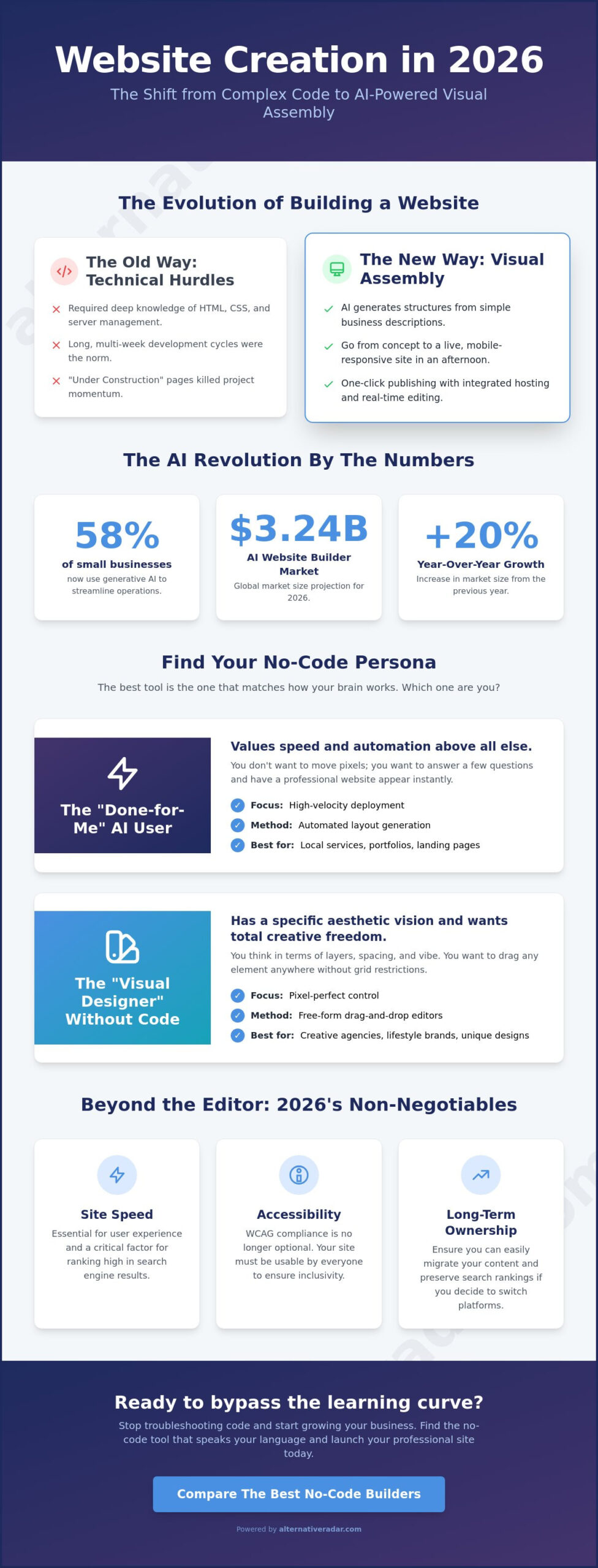
In 2026, the barrier between a business idea and a live website has effectively dissolved. The “old way” of launching a site required a working knowledge of HTML, CSS, and server management. If you didn’t know how to code, you had to hire someone who did. Today, the industry has shifted toward a no-code development platform model where visual assembly replaces manual syntax. This evolution means that a website builder for non-technical users is no longer a limited tool for amateurs; it’s a high-performance engine for professionals.
Stop thinking about code and start thinking about assembly. With the global AI website builder market reaching $3.24 billion in 2026, a 20% increase from the previous year, the focus has moved from “building” to “prompting.” Instead of staring at a blank canvas or a complex grid, you describe your business goals to an algorithm that generates a functional structure in seconds. Professional results are now accessible to anyone with an internet connection. You no longer need to understand the backend to dominate the frontend.
AI-First Design vs. Traditional Drag-and-Drop
Early website builders relied on rigid templates. You spent hours forcing your content into a pre-made box that never quite fit. AI-first design flips this logic. You provide a simple business description, and the system generates initial layouts tailored specifically to your industry. These tools now handle the heavy lifting of generating copy and optimizing images automatically. It’s a massive productivity gain. However, remember that AI is your starting point, not the finish line. It provides the foundation, but your human taste remains the essential filter for brand personality and final polish.
The Death of the “Under Construction” Page
The days of spending weeks in a “development” phase are over. Rapid deployment tools now allow for one-click publishing in minutes. By using a modern website builder for non-technical users, you bypass the need for external hosting, FTP clients, or server configurations. Everything is integrated. Real-time editing ensures that what you see on your screen is exactly what your visitors see on theirs. This efficiency allows you to launch, test, and iterate without technical bottlenecks. You can move from concept to a live, mobile-responsive site in a single afternoon. The technical friction that once killed momentum has been engineered out of the process.
Identifying Your No-Code Persona: Which Builder Logic Fits Your Brain?
Most guides fail because they treat every beginner like a monolith. In reality, the best website builder for non-technical users is the one that matches your specific mental model for design. If a tool feels like a constant struggle, it’s usually because its underlying logic clashes with how your brain organizes information. Finding your “no-code persona” is the most efficient way to avoid wasting weeks on a platform you’ll eventually abandon. Success in 2026 isn’t about learning a tool; it’s about picking a tool that already speaks your language.
Before you commit to a subscription, take a moment to assess your technical comfort zone. Ask yourself if you want to be the architect, the interior designer, or the project manager. When evaluating no-code solutions, you must prioritize your own intuition over market popularity. If you’re still unsure which path to take, you can compare specific software alternatives to see these various interfaces in action before you start a trial.
The “Done-for-Me” AI User
This persona values speed above all else. You likely need a professional presence for a local service business, a personal portfolio, or a simple landing page. You don’t want to move pixels; you want to answer five questions and have a site appear. For this user, the website builder for non-technical users acts as an automated assistant. The focus here is on high-velocity deployment and automated layout generation rather than granular control. If you find endless menus frustrating, this is your category.
The “Visual Designer” Without Code
You have a specific aesthetic vision but no interest in learning CSS. You want the freedom to drag an image anywhere on the screen without being restricted by a rigid grid. This persona is common among creative agencies and lifestyle brands. The logic here is spatial and artistic. You think in terms of “layers” and “vibe” rather than “data” or “containers.” You want a builder that feels like a digital canvas where your only limit is your imagination.
The “Data-Driven” Builder
This user is building something more complex than a static page. You might be launching a job board, a real estate directory, or a content-heavy marketplace. You care more about how information is categorized and filtered than the specific shade of a button. Your logic is structural. You want a powerful Content Management System (CMS) that handles thousands of entries with ease. For you, the builder is a database with a pretty face, and you need a tool that prioritizes organization and scalability over simple drag-and-drop aesthetics.
Top Website Builders for Beginners: Mainstream Giants vs. Agile Alternatives
Wix currently powers 4.3% of all websites and holds a 45% market share among DIY website builders as of March 2026. However, being a market leader doesn’t make it the automatic choice for every project. A website builder for non-technical users should simplify your life, not complicate it with feature bloat. You should focus on finding the best alternative to popular software in 2026 to ensure the tool you pick aligns with your specific goals. While the “Big Three” offer massive ecosystems, leaner contenders often provide better efficiency for specific tasks.
The Ecosystem Leaders: Wix and Squarespace
Wix remains the most versatile platform for those who want total drag-and-drop freedom. Its continuous update model introduced improved SEO controls and the full release of the Wix CLI in early 2026. It’s a powerhouse for integrations. Squarespace, currently on version 7.1, takes a different approach by prioritizing structured design. Recent May 2026 updates like “Mobile Overrides” and “Block Animations” allow for precise visual adjustments without breaking the layout. These platforms handle hosting and security automatically. You trade a bit of platform lock-in for the peace of mind that comes with an all-in-one solution.
The Agile Contenders: Framer and Carrd
Smaller, specialized tools often serve as a better website builder for non-technical users who have specific needs. Framer has set a new standard for high-end animations and a seamless “Figma-to-web” workflow. It’s built for those who want their site to feel like a custom-coded masterpiece without touching a script. On the other end of the spectrum, Carrd is the undisputed king of simplicity. As of June 2026, a Carrd Pro Lite plan costs only $9 per year. Compare that to the Wix Light plan at $17 per month. For a simple landing page or personal portfolio, these agile tools remove the noise and cost of larger platforms.
Open-Source No-Code: The WordPress Evolution
WordPress still powers over 40% of the web, but its reputation for being “too technical” is fading. Visual builders like Elementor have turned WordPress into a legitimate no-code contender. You get the benefit of total site ownership and no monthly licensing fees for the core software. The trade-off is the technical overhead of managing your own updates and security. This choice between a managed ecosystem and an open-source framework is a common theme. You’ll see similar logic applied when conducting an open source crm software comparison for your business backend. Pick the level of maintenance you’re actually willing to perform.
Beyond the Editor: Evaluating SEO, Speed, and Long-Term Ownership
Launching your site is only the first half of the process. A common mistake is assuming that a visually finished page is a high-performing one. In 2026, Google’s search algorithms prioritize Core Web Vitals and mobile responsiveness above almost everything else. If your website builder for non-technical users produces bloated code that takes three seconds to load on a 5G connection, your design won’t matter because no one will see it. You need a platform that manages the technical infrastructure so you can focus on your content.
Ownership is the second critical factor. Many beginners fall into the trap of “platform lock-in,” where your data is trapped inside a proprietary system. Before you commit, you must understand how easy it is to leave. If you plan to scale, you should audit your software stack to ensure your web presence doesn’t become a bottleneck for future growth.
The SEO Checklist for Non-Technical Users
SEO isn’t magic; it’s a set of technical requirements your builder should handle automatically. At a minimum, your platform must allow you to edit custom meta tags and alt text for every image. As of April 2026, meeting WCAG 2.1 Level AA accessibility standards is also a legal benchmark that influences search rankings. Ensure your builder includes these features:
- Automatic Image Compression: The system should shrink file sizes without losing quality to keep loading times fast.
- Built-in SSL Certificates: This is non-negotiable for security and Google trust.
- Mobile-First Rendering: Your site must adjust its layout perfectly for smartphones by default.
Portability: Can You Move Your Site Later?
Hosted platforms like Wix and Squarespace offer convenience but often make it difficult to export your entire site to a new provider. If you want total control, you might look toward “exportable” builders or open-source frameworks. This decision often mirrors how enterprises choose popular open source business software 2025 to maintain flexibility. If you anticipate needing to move your data to a different server in the future, prioritize builders that offer clean code export or standard database formats.
The Real Cost of Growth
Free plans are useful for testing, but they’re rarely viable for professional use. Once you add a custom domain and remove brand watermarks, prices jump. For example, the Wix Light plan starts at $17 per month, while Squarespace’s Basic plan is $16 per month. Don’t just look at the entry price. Calculate the two-year cost of ownership, including add-ons for email marketing, e-commerce transaction fees, and premium app integrations. A tool that seems cheap today might become your most expensive line item as your traffic increases.
Making the Switch: How to Transition to a Modern Website Builder
If you’re currently using a platform that feels like a technical anchor, it’s time to pivot. Transitioning to a new system doesn’t have to mean a total loss of momentum or a drop in search rankings. Choosing a modern website builder for non-technical users is a strategic decision that should unlock growth rather than just providing a visual upgrade. By using Alternative Radar, you can identify the specific niche fit for your industry, ensuring your next choice aligns with your long-term efficiency goals.
The goal of any migration is to minimize downtime while maximizing the user experience. You’ve already learned about the shift toward AI-driven assembly and the importance of matching a builder’s logic to your brain. Now, you must execute the move with precision. A structured transition prevents the “broken” site fear that keeps many business owners stuck on outdated, expensive software.
Auditing Your Current Web Presence
Don’t move blindly. Start by identifying which pages drive your actual traffic and conversions. You shouldn’t waste time migrating low-value content that doesn’t serve your 2026 goals. Create a checklist of essential features you cannot lose, such as contact forms, booking links, or specific e-commerce integrations. Finally, verify that your current domain name can be easily pointed to a new builder. Most modern platforms handle this with a few clicks, but confirming your domain’s “unlock” status early prevents launch-day delays.
The 20-Minute “Trial Run” Strategy
Efficiency beats exhaustive research. Pick your top two contenders and attempt to build the exact same header and hero section in both. This side-by-side test reveals the true “learning curve” of each tool. Pay close attention to the interface: do you prefer the structured sidebar menus of Squarespace or the free-form, on-page editing of Wix? Test the mobile preview immediately. If the builder requires significant manual adjustment to look good on a smartphone, it may not be the right website builder for non-technical users who prioritize speed.
Launching Your MVP in 2026
Adopt a “Launch Now, Perfect Later” mindset to avoid analysis paralysis. You don’t need a 50-page masterpiece to start seeing results. Focus on a Minimum Viable Product (MVP) that clearly communicates your value and functions flawlessly on mobile devices. If you need professional assets but lack a design background, the best free alternatives to photoshop can help you create high-quality images for your new site. Use a reliable comparison tool to finalize your choice and move your business forward with a platform that works for you, not against you.
Take Control of Your Digital Growth
Building a professional site in 2026 is no longer a technical hurdle; it’s a strategic choice. You’ve seen that the best platform isn’t necessarily the one with the most market share, but the one that aligns with your specific no-code persona. Whether you prioritize AI-driven speed or granular visual control, your chosen website builder for non-technical users must also deliver on non-negotiable technical metrics like site speed, accessibility compliance, and data portability. Don’t fall into the trap of platform lock-in. Evaluate the long-term costs and flexibility of your software stack before you commit your resources.
Stop settling for tools that clash with your workflow. You can find the perfect alternative to your current website builder on Alternative Radar. Our platform provides objective, data-driven software comparisons and curated lists of free and open-source alternatives. Trusted by thousands of software seekers globally, we act as your digital scout to help you skip the trial-and-error phase. Your professional website is within reach. Take the first step toward a more efficient and scalable digital presence today.
Frequently Asked Questions
Do I need to buy hosting separately for a no-code website builder?
No, you don’t need to purchase separate hosting when using an all-in-one builder. Platforms like Wix, Squarespace, and Webflow include managed hosting in their monthly subscription fees. This removes the technical burden of configuring servers or managing FTP transfers. It ensures your site remains online without you having to monitor backend infrastructure or security patches.
Can I use my own domain name with a free website builder plan?
Most free plans require you to use a branded subdomain, such as yourname.wixsite.com or yourname.carrd.co. To connect a custom domain like yourbusiness.com, you must upgrade to a paid tier. This is a standard industry practice across almost every website builder for non-technical users. For example, the Wix Light plan at $17 per month or the Squarespace Basic plan at $16 per month are the entry points for using a personal domain.
Is Wix or Squarespace better for a complete beginner in 2026?
The choice depends on your design preference and mental model. Wix offers total drag-and-drop freedom, which is ideal if you want to place elements anywhere on the page without restrictions. Squarespace uses a more structured grid system that prevents design errors by keeping elements aligned. If you want a site that looks professionally polished with minimal effort, Squarespace is often the more efficient choice for beginners.
How much does it typically cost to run a professional website for a small business?
A professional small business site typically costs between $15 and $39 per month for the platform subscription. This includes hosting, security, and the design editor. You should also budget approximately $10 to $20 per year for domain registration. If you require advanced features like e-commerce or specialized booking tools, expect your monthly costs to sit at the higher end of that range, such as the Wix Business plan at $39 per month.
Are AI website builders actually good for SEO?
AI-powered tools are highly effective for search rankings because they automate technical foundations like mobile responsiveness and image optimization. As long as the platform allows you to manually override