
Did you know that 70% of digital transformation initiatives fail to meet their objectives in 2026? It’s a staggering statistic that highlights a systemic issue in modern procurement. Most organizations buy tools based on technical specs but ignore the human element. By refining your software selection criteria for teams to prioritize user buy-in, you can prevent your next investment from becoming expensive “shelfware” that no one actually uses.
You probably recognize the friction of a botched rollout. The productivity dips and the persistent use of unapproved tools are symptoms of a deeper problem. It’s time to shift from a top-down mandate to a collaborative discovery process. This approach values user experience and practical utility as much as technical functionality.
This guide provides a strategic framework to help you master software adoption and ensure your next investment delivers a measurable ROI. We’ll explore how to involve your team early, navigate the rising costs of AI-enabled tools, and build a culture that embraces technological evolution rather than fearing it.
Key Takeaways
- Overcome status quo bias by shifting the internal narrative from a top-down mandate to a collaborative problem-solving exercise.
- Incorporate cross-departmental feedback into your software selection criteria for teams to align technical capabilities with actual user workflows.
- Replace generic feature lists with department-specific benefit maps that clearly demonstrate the efficiency gains over legacy tools.
- Deploy a tiered rollout blueprint using internal champions to facilitate peer-led training and reduce productivity dips during the transition.
- Implement 90-day review cycles and usage-based feedback loops to iterate on workflows and secure long-term software ROI.
The Psychology of Resistance: Why 70% of New Tools Fail to Launch
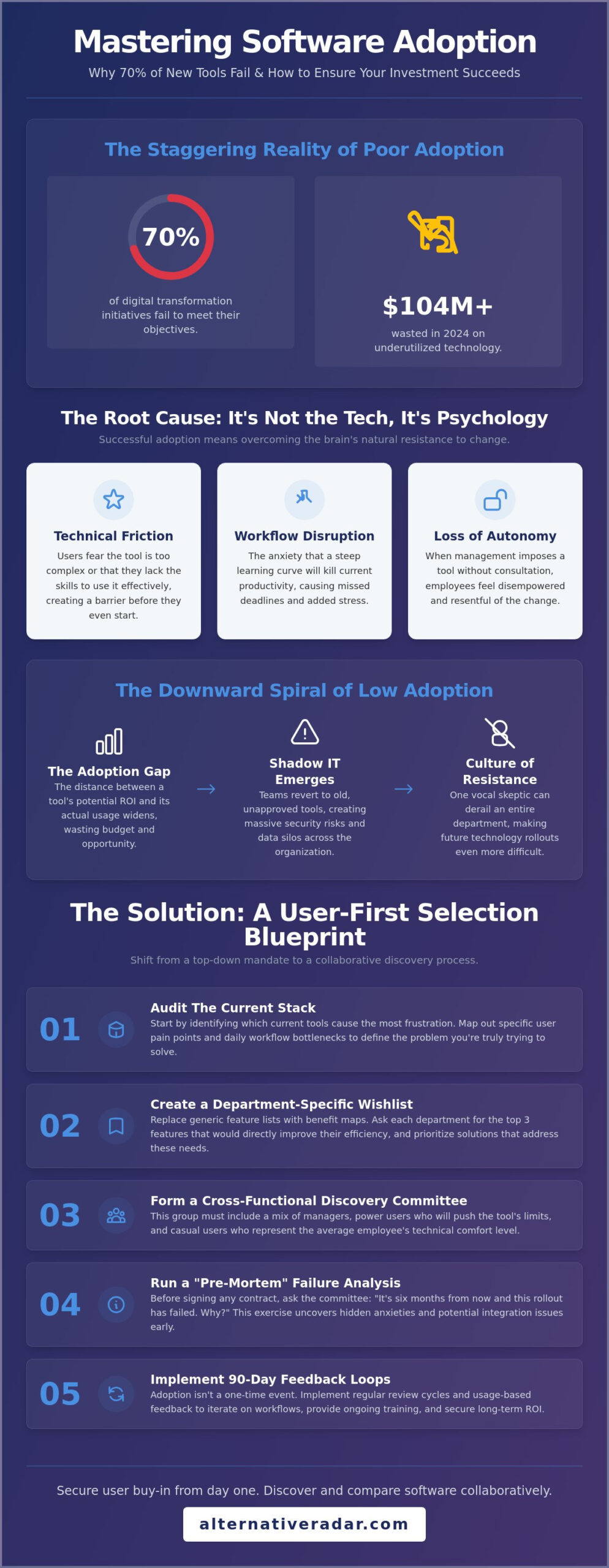
Purchasing a new software license is easy; getting a team to actually use it is where most leaders fail. In 2026, data shows that 70% of digital transformation initiatives fail to meet their objectives. This isn’t usually a failure of the software itself. It’s a failure of buy-in. True team buy-in is the psychological transition from initial skepticism to active advocacy. Without this shift, your investment quickly becomes shelfware. Enterprises wasted over $104 million in 2024 alone on underutilized technology and poor productivity. To avoid this, your software selection criteria for teams must account for the human element from day one.
Resistance often stems from Status Quo Bias. The human brain is wired to prefer a flawed but familiar tool over an optimized new one because the familiar requires less energy. Transitioning to a new platform involves a significant switching cost. This isn’t just the line item in your budget. It’s the cognitive load of unlearning deeply ingrained habits. When users feel the “Technology Acceptance Model” Technology Acceptance Model is ignored, they perceive the new tool as a hurdle rather than a help. This mental friction is the primary driver of adoption failure.
The Three Pillars of Software Resistance
Understanding why employees push back allows you to build better software selection criteria for teams. Resistance typically falls into three categories:
- Technical Friction: Users fear the tool is too complex or that they lack the skills to navigate it effectively.
- Workflow Disruption: There’s a valid anxiety that the learning curve will kill current productivity and cause them to miss deadlines.
- Loss of Autonomy: Employees feel management is imposing a tool without consulting them, leading to a sense of resentment.
Quantifying the Impact of Low Adoption
Low adoption creates an Adoption Gap, which is the distance between the tool’s potential ROI and its actual usage. When this gap persists, shadow IT emerges. Teams will continue using old, unapproved tools or personal accounts to bypass the new system. This doesn’t just waste money; it creates massive security risks and data silos.
You also face the “Toxic Resistance” effect. It only takes one vocal skeptic to derail an entire department’s transition. If the most influential team member refuses to use the software, others will follow suit. This cultural pushback is far harder to fix than a technical bug. Addressing these psychological barriers early ensures that your software serves the team, rather than the team serving the software.
Selection-Led Buy-In: How Collaborative Discovery Prevents Friction
Most software adoption failures happen because the decision was made in a vacuum. When leadership announces a new tool as a finished deal, teams often feel it’s just another task added to their plate. You can eliminate this friction by shifting the narrative from “I found a tool” to “We are solving a problem.” This collaborative approach ensures that the software selection criteria for teams are rooted in operational reality rather than executive assumptions.
Start by establishing a Discovery Committee. This group shouldn’t just include managers; it needs a mix of power users who will push the tool to its limits and casual users who represent the average employee’s technical comfort level. Before committing to a market leader, use an objective platform for finding the best alternative to popular software in 2026. This allows your committee to compare tools based on actual utility rather than brand recognition.
Before any contracts are signed, run a “Pre-Mortem” session. Ask your committee a single question: “It’s six months from now and this software has failed. Why did it happen?” This exercise uncovers hidden anxieties and technical bottlenecks that might not appear on a standard RFP. It forces the team to think critically about integration and daily usage before the investment is made.
The 5-Step Collaborative Selection Process
A structured approach prevents the selection process from becoming chaotic. Follow these steps to build consensus:
- Audit the stack: Identify which current tools are causing the most frustration and why.
- Define the Wishlist: List features that would solve specific daily pain points for each department.
- Shortlist Alternatives: Select three tools that meet your technical and budgetary constraints.
- Sandboxed Pilot: Run a 7-day trial with a small cross-functional group to test real-world workflows.
- Final Review: Compare the pilot results against your original success metrics.
Democratizing the Decision without Losing Control
Collaboration doesn’t mean you need a total consensus, which is often impossible. Use Weighted Voting to give power users more influence over technical specifications while ensuring casual users have a say in the interface and ease of use. This data-driven approach helps leadership make the final call while maintaining transparency. If you’re looking for a neutral starting point for your research, you can explore curated software comparisons to see how different tools stack up against your specific needs.
The final step is communicating the “Why.” When you announce the chosen software, explain exactly how the committee’s feedback influenced the decision. When people see their specific pain points addressed in the software selection criteria for teams, they stop being skeptics and start becoming advocates. This transparency builds the trust necessary for a smooth transition.
Mapping Pain Points to Features: Building the Internal Business Case
A list of technical specifications rarely inspires a team to change their habits. To secure genuine buy-in, you must bridge the gap between what the software does and how it actually improves an employee’s daily life. This means moving beyond a standard feature list and creating a benefit map for each department. When you define your software selection criteria for teams, the primary focus should be the “What’s In It For Me?” (WIIFM) factor. If a developer sees that a tool automates documentation, they’re interested. If a marketer sees it eliminates manual data entry, they’re sold.
Contrast is your most powerful tool in this phase. Compare the limitations of your legacy systems with the specific efficiencies of the new platform. For example, if your current communication hub feels cluttered or expensive, reviewing Slack alternatives can highlight where your current workflow is failing. Don’t just say the new tool is faster. Create a “Time-Saved” projection. If a new integration saves each team member 15 minutes a day, that’s over an hour a week per person. Scaling that across a department of twenty people makes the business case undeniable.
Translating Technical Specs into Team Value
Technical jargon often creates a barrier to adoption. Your job is to translate those specs into tangible outcomes that resonate with different stakeholder levels:
- Automation features: These aren’t just “scripts”; they represent a direct reduction in manual data entry hours.
- Integration capabilities: This means less context switching. Employees won’t have to jump between twenty browser tabs to find a single piece of information.
- Improved UI/UX: A cleaner interface reduces the mental fatigue that builds up during a long workday. It makes the work feel lighter.
Handling the “Our Current Tool is Fine” Objection
The most dangerous competitor to a new software investment is the status quo. Teams often cling to outdated systems because they’ve already mastered the workarounds. You need to expose the hidden opportunity cost of staying with legacy tools. If you’re managing customer relationships through a clunky, manual process, showing an open source crm software comparison can prove that modern alternatives offer better data visibility and security without the complexity.
Use data to show exactly where the current tool causes bottlenecks. Perhaps it’s a lack of mobile access or a failure to comply with 2026 privacy regulations. Acknowledge that a learning curve exists; it’s an honest part of any transition. However, frame it as a one-time investment that leads to long-term ease. When the software selection criteria for teams are built on solving real frustrations, the “current tool is fine” argument usually disappears on its own.
The Rollout Blueprint: From Internal Champions to the Hard Cutover
Planning ends where execution begins. Even if you have nailed the software selection criteria for teams, a disorganized rollout can trigger the same resistance patterns that sink most digital initiatives. Success depends on a structured transition that replaces old habits with new, more efficient ones. This requires more than just a login email. It requires a blueprint for change that prioritizes peer support and clear deadlines.
Implement a tiered training schedule rather than a single, overwhelming session. A four hour webinar is rarely effective. Instead, offer short, role-specific modules that focus on the tasks employees perform daily. During this time, maintain a Friction Log. This is a shared document where team members report specific hurdles or UI frustrations during the first 30 days. Addressing these items quickly prevents small annoyances from turning into systemic rejection.
The Role of the Internal Champion
Identify your Internal Champions early. These aren’t necessarily your most technical staff. Look for individuals with high social influence who others naturally turn to for advice. Give these champions access to the tool 14 days before the general launch. This allows them to debug workflows and build confidence in a low stakes environment. Empower them to run “Office Hours” for their specific departments. Peer-to-peer support is often more effective than centralized IT tickets because it happens in the context of real work.
Executing the Hard Cutover
A “Hard Cutover” is the most effective way to prevent shadow IT and ensure 100% adoption. Set a firm sunset date for the legacy system. On day 31, remove licenses for the old tool entirely. This “Burn the Boats” strategy forces the transition and prevents the team from retreating to familiar but inefficient habits. To make this smoother, set an auto-response on old communication channels or dashboards that redirects users to the new platform. If you are still evaluating your final stack, you can compare software alternatives to find tools with migration features that simplify this cutover process.
Finally, celebrate the first major win achieved using the new tool. Whether it is the first project completed 20% faster or the first automated report generated, publicizing these wins builds the morale needed to sustain the transition. When the team sees tangible proof of the software selection criteria for teams in action, the psychological shift from skepticism to advocacy happens much faster.
Future-Proofing Adoption: Sustaining Momentum with Feedback Loops
The final stage of a successful rollout is the transition from implementation to optimization. Long-term success requires a commitment to continuous feedback loops. You must revisit your original software selection criteria for teams to ensure the tool is actually performing as promised. Establish a formal 90-day review. This isn’t a check-the-box exercise. It’s a data-driven audit to measure the tool against your initial success metrics, such as time saved or the reduction in manual errors mentioned in earlier planning stages.
Software is rarely perfect out of the box. Use the first three months to iterate on the workflow. If the usage data shows that certain features are being ignored, investigate why. It might be a training gap, or it might be that the feature doesn’t fit the team’s reality. Customize the platform based on this feedback. To keep your stack competitive, monitor the market for popular open source business software 2026. These tools often provide the flexibility needed for high-growth teams without the vendor lock-in associated with some proprietary giants.
Rewarding high-adoption departments is an effective way to sustain momentum. When a specific team masters a complex integration or finds a new way to automate a tedious task, highlight their success. This creates a culture of technological agility where employees see new tools as opportunities for professional growth rather than management-imposed burdens.
Measuring Success Beyond Login Rates
High login rates don’t always equal high productivity. You need to track deep usage. Are employees utilizing advanced automation and integrations, or are they sticking to basic functions? Conduct qualitative surveys to gauge sentiment. Sometimes a tool looks good on paper but causes micro-frustrations that burn out staff over time. Compare your current output metrics to the pre-implementation benchmarks you established during the initial audit. This objective data proves the ROI to leadership and validates the software selection criteria for teams used during the procurement process.
When to Pivot: Recognizing a Genuine Mismatch
There’s a critical difference between learning curve resistance and a fundamental tool failure. Resistance is temporary; a mismatch is permanent. If the tool consistently fails to integrate with core systems or requires constant workarounds after 90 days, it might be time to pivot. Sunsetting a tool that isn’t working is better than forcing a team to use a broken process. It shows you value their time more than a sunk cost. Use Alternative Radar to quickly identify a replacement that addresses the specific gaps found during your implementation. This agility prevents your team from falling back into the trap of shadow IT.
Mastering the Long-Term Software Transition
Successful software adoption in 2026 isn’t a matter of chance; it’s a byproduct of a structured, human-centric framework. You have seen how to dismantle the status quo bias by involving users early and translating technical specs into tangible department benefits. Moving from a collaborative discovery committee to a firm, peer-supported cutover ensures that your new tools deliver value rather than sitting as underutilized shelfware.
By refining your software selection criteria for teams to include these psychological and operational layers, you protect both your budget and your productivity. The goal isn’t just to buy better software; it’s to build a culture that is resilient to change. Your team’s ability to adapt is the ultimate competitive advantage.
If you are ready to start your next search with clarity, find the best software alternatives for your team on Alternative Radar. We provide objective, data-driven software comparisons and expert insights into both open-source and premium tools, helping over 100,000 users discover better software every month. Your next successful rollout starts with a smarter comparison.
Frequently Asked Questions
How do I handle a team member who flatly refuses to use a new tool?
Address the root cause of the resistance immediately through a one-on-one meeting. Often, refusal stems from fear of incompetence or perceived workflow disruption. Listen to their specific concerns and offer targeted training or a role as a beta tester to give them a sense of control. If the refusal persists after support is provided, frame the tool as a core job requirement tied to operational efficiency.
What is the ideal timeline for rolling out a new software tool to a mid-sized team?
A standard rollout for a mid-sized team typically spans 30 to 60 days. This include a 14 day pilot phase with internal champions, followed by a phased launch over 30 days. The final 15 days should focus on deep training and troubleshooting before the hard cutover. Rushing this timeline often leads to the high failure rates seen in many digital transformations.
Should I offer incentives or rewards for team members who adopt the tool quickly?
Use recognition based rewards rather than direct financial incentives to foster genuine advocacy. Highlight power users in team meetings or offer professional development credits for those who master advanced features. While small perks can boost initial engagement, the tool’s inherent utility must be the primary driver for long term adoption and measurable ROI.
How do I get buy-in if the new tool actually makes the team’s work more complex initially?
Be transparent about the productivity dip that occurs during the learning phase. Explain that the initial complexity is a one-time investment required to unlock long term automation or better data visibility. When you develop your software selection criteria for teams, ensure you can point to a specific date when the complexity will yield to a simpler, more efficient workflow.
What are the most common mistakes managers make when introducing new software?
The most frequent error is announcing a tool as a done deal without prior consultation. This top down approach ignores the status quo bias and creates immediate resentment. Other mistakes include providing generic training that doesn’t apply to specific roles and failing to set a firm sunset date for legacy systems, which allows shadow IT to flourish.
How can I convince upper management to approve a tool the team actually wants?
Frame the request around ROI, security, and risk mitigation rather than just user preference. Use data from your discovery committee to show how the tool addresses specific bottlenecks or complies with 2026 privacy regulations. Presenting a clear time saved projection helps leadership see the tool as a strategic asset rather than a discretionary expense.
Is it better to roll out a tool to the whole company at once or department by department?
Adopt a department by department approach to contain potential friction and refine the implementation process. Starting with a single, high-impact department allows you to gather usage data and document success stories. You can then use these internal case studies to build momentum and refine the software selection criteria for teams as you scale the rollout.
How do I prevent Tool Fatigue if we are switching software frequently?
Prevent fatigue by implementing a one in, one out policy for your software stack. Every new tool should replace at least one legacy system or consolidate multiple fragmented workflows. Focus on deep integration rather than adding standalone apps. If your portfolio exceeds the 2025 average of 305 applications, prioritize consolidation to reduce the cognitive load on your staff.