
If your team spends more time hunting through Slack threads and spreadsheets than actually delivering results, is your tech stack an asset or a liability? You’re likely dealing with information silos that keep your clients in the dark and make tracking billable hours a constant headache. Finding the best software for managing client work isn’t about chasing the platform with the most features; it’s about finding the one that serves as a single source of truth for your entire lifecycle.
We know the frustration of “all-in-one” tools that require a PhD to configure or force you to change how you operate. This 2026 comparison guide cuts through the marketing hype to help you reclaim your time and resources. You’ll discover how to automate onboarding and improve retention through radical transparency. We’ve vetted the market leaders and niche challengers to show you exactly how they handle real-world client interactions, from the first contact to the final delivery.
Key Takeaways
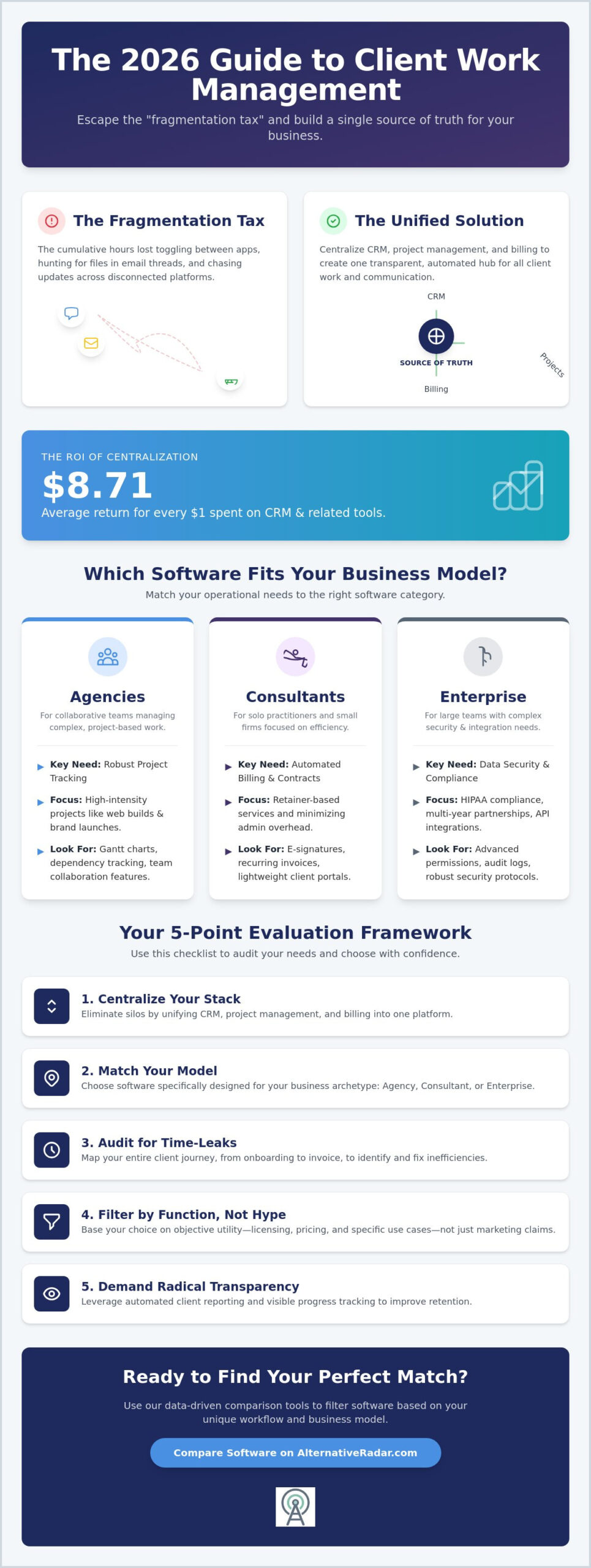
- Eliminate the “fragmentation tax” by centralizing CRM, project management, and billing into a unified source of truth.
- Match your specific business model—Agency, Consultant, or Enterprise—to the software category that best fits your operational lifecycle.
- Compare the best software for managing client work using 2026 performance data to see how market leaders and hidden gems handle real-world delivery.
- Use our 5-point framework to audit time-leakage points and map your client journey from initial onboarding to final invoice.
- Filter software options by licensing, pricing, and specific use cases to ensure your choice is based on objective utility rather than marketing hype.
Beyond Spreadsheets: Why Client Work Management is Non-Negotiable in 2026
Client work management isn’t just a digital filing cabinet. It’s the functional intersection where Customer Relationship Management (CRM), project execution, and billing overlap. In 2026, the best software for managing client work solves the “fragmentation tax.” This tax represents the cumulative hours lost every time a team member toggles between Slack, email, and a project board to find a single attachment. These micro-inefficiencies stall momentum and erode your profit margins.
Efficiency relies on moving from managing static data to managing dynamic relationships. Modern platforms now use AI-driven status reporting to generate updates without manual entry. Some even employ automated client sentiment tracking to flag accounts that might be at risk of churning before a human notices the shift. Finding the best software for managing client work requires shifting your focus from simple data entry to high-level workflow visibility. This transition transforms your team from reactive firefighters into proactive partners who deliver consistent value.
Client Management vs. Traditional CRM: Knowing the Difference
Traditional CRMs focus heavily on the “deal.” They’re designed to move a prospect through the sales pipeline to a closed contract. However, client work management begins where the CRM usually ends: the delivery phase. You’ve outgrown a simple sales tool when your project managers can’t see original contract terms or when your billing team is guessing at billable hours. Using the wrong tool leads to project delays and client churn because the delivery never matches the initial sales promise.
The ROI of Centralized Client Operations
Centralizing operations provides a massive return on investment. Verified data indicates businesses earn an average of $8.71 for every $1 spent on CRM and related management tools. This ROI comes from capturing “hidden” work that usually goes unbilled and eliminating the need for endless status update emails. When transparency is built into the system, you spend less time explaining progress and more time making it. Client Operations is the backbone of scalable service businesses.
Decoding the Client Lifecycle: Which Software Fits Your Business Model?
Selecting the best software for managing client work starts with an honest assessment of your business model. A solo consultant has vastly different requirements than a 50-person agency. While some vendors claim their tool fits every possible scenario, the reality is that deep customization often requires expensive specialists or months of setup. The best software for managing client work for a freelancer is often the worst choice for a large team because it lacks the necessary resource planning and permission levels.
You can generally categorize client-facing businesses into three archetypes. Agencies require robust project tracking and team collaboration features. Consultants value automated billing and contract signing to minimize administrative overhead. Enterprise teams prioritize data security, HIPAA compliance, and complex API integrations. Identifying your archetype early allows you to ignore 70% of the market and focus only on tools designed for your specific scale.
You must also choose between modular and all-in-one software architectures. Modular setups allow you to build a “best-of-breed” stack by connecting specialized tools. All-in-one suites provide a unified experience but may lack the depth found in dedicated apps. You can compare specific software architectures to see which one mirrors your actual workflow before committing to a long-term license.
Project-Based vs. Retainer-Based Workflows
High-intensity projects, such as web builds or brand launches, need tools with strong Gantt charts and dependency tracking. These “one-and-done” workflows rely on clear milestones and hard deadlines. Recurring services like SEO or accounting benefit from automated monthly task generation and persistent client history. If your team is struggling to communicate during these cycles, checking out Slack alternatives can help streamline internal coordination without the noise of a standard chat app.
High-Touch Onboarding vs. Long-Term Collaboration
Some software specializes in the first 30 days of the client relationship. These tools focus on document collection, contract execution, and initial data gathering. Other platforms are designed for multi-year partnerships, offering shared dashboards and persistent client portals. Choosing the right tool depends on whether your relationship is a sprint or a marathon. Effective onboarding prevents project delays, while long-term collaboration tools reduce the number of “status update” emails that clutter your inbox. Focus on platforms that offer a centralized source of truth to ensure no information is lost during the handoff from sales to delivery.
Top-Rated Software Solutions for Managing Client Work in 2026
The 2026 market for the best software for managing client work is split between all-encompassing ecosystems and agile, specialized tools. Choosing correctly depends on whether you value a massive feature set or a frictionless user experience. While 87% of CRM systems are now cloud-based, some organizations require more control over their infrastructure. For those prioritizing data sovereignty and deep customization, reviewing an open source CRM software comparison provides the necessary context for self-hosted alternatives that avoid vendor lock-in.
Identifying the best software for managing client work requires looking past the marketing slogans to the actual utility of the platform. You need a tool that mirrors your delivery process, not one that forces you to reinvent it. Whether you’re looking for the best for automation or the best for client portals, the following performers represent the highest standards of reliability and efficiency based on our 2026 performance data.
The Heavyweights: Teamwork, ClickUp, and HubSpot
Teamwork, ClickUp, and HubSpot remain the dominant enterprise-grade options for 2026. These platforms excel at managing complex client hierarchies where multiple stakeholders need different levels of access. A key 2026 trend is AI-driven resource forecasting. ClickUp, for instance, offers “ClickUp Brain” as a $7 monthly add-on to automate task summaries and workload predictions. Teamwork’s Deliver plan starts at $10.99 per user per month, while HubSpot offers a free CRM for basic tracking. These tools are powerful, but they come with a steep learning curve. If your team isn’t prepared for a multi-week implementation, these feature-dense giants might actually slow you down during the initial rollout.
The Specialized Contenders: Clustdoc, HoneyBook, and Bonsai
The 5-Point Framework for Evaluating Your Next Client Tool
Selecting the best software for managing client work requires a structured methodology rather than a reactive purchase. Most businesses fail because they prioritize flashy features over the friction points that actually stall their growth. This 5-point framework ensures your selection is driven by utility and long-term scalability. Use these steps to filter out the noise and identify the tool that fits your operational architecture.
Step 1: Audit your “Leakage Points.” Identify where you currently lose time or money. This is the “fragmentation tax” discussed earlier. Are you missing billable hours because of manual tracking? Are you losing days to document back-and-forth? Step 2: Map the Client Journey. Trace every touchpoint from initial lead capture to the final invoice. Your software must support this entire path without requiring data to be manually re-entered at every stage. If a tool creates a bottleneck during the handoff from sales to delivery, it is not the right fit.
Step 3: Test the “Client-Side” Experience. High-quality delivery is irrelevant if your client finds the portal confusing. Log in as a test client to see if the interface is intuitive. Step 4: Verify Integration Depth. Ensure the platform talks to your existing accounting and communication tools. A tool that exists in a vacuum only adds more work. Step 5: Calculate the “Total Cost of Ownership” (TCO). Look beyond the monthly subscription. Include setup time, staff training, and mandatory fees. For example, HubSpot Marketing Professional requires a $3,000 onboarding fee in the first year. These “hidden” costs can significantly impact your ROI.
Integration Ecosystem and Data Portability
A robust API is essential for future-proofing your business. Avoid “walled gardens” that make it difficult or expensive to export your data. If you cannot move your information freely, you are a hostage to that vendor’s pricing and roadmap. For organizations seeking maximum flexibility and control over their tech stack, exploring popular open source business software is a smart strategic move. These tools often provide the depth needed for complex integrations without the restrictions of proprietary licenses.
The “Invisible” Feature: Internal Team Adoption
Software implementations usually fail because of people, not technology. If your team finds a tool cumbersome, they will revert to using spreadsheets and private Slack channels. To prevent this, run a “Pilot Test” with a single client before rolling the tool out to your entire roster. Use this checklist for your pilot:
- Can the team complete a standard task without asking for technical support?
- Does the tool reduce the number of internal status meetings?
- Is the client actually using the portal to upload documents?
- Can you generate a project profitability report in under two minutes?
If you want to stop guessing and start comparing based on hard data, access our full comparison engine to see how these tools perform under pressure.
Finding Your Perfect Workflow Match with Alternative Radar
Finding the best software for managing client work shouldn’t feel like a full-time job. Most review sites are cluttered with sponsored content and biased rankings that favor the highest bidder. Alternative Radar acts as your objective scout in this crowded market. We strip away the marketing fluff to focus on utility, licensing, and actual performance. Our comparison engine is built to filter results based on your specific use cases, ensuring you don’t settle for a market leader that doesn’t actually fit your niche. We’ve done the hard work of searching and testing so you can focus on delivery.
The 2026 software market is volatile. Prices fluctuate, and features that were once standard often move behind expensive paywalls. By using a neutral advisor, you gain a high-quality filter that prioritizes your needs over vendor partnerships. Finding the best software for managing client work is about more than just a feature list; it’s about finding a tool that mirrors your specific client lifecycle architecture without forcing you to change your successful habits.
Why Neutrality is Our Primary Feature
We value your time and resources. Our process is designed to be fast-paced and navigational because we know you want answers quickly. We test the software so you don’t have to waste trial periods on tools that look good on paper but fail in production. During our vetting process, we identify “software clones,” which are platforms that simply replicate existing features, and separate them from the genuine innovators that solve real problems like billable hour leakage or complex HIPAA compliance. This efficiency-driven discovery process is central to our brand promise. We prioritize transparency and logic, providing you with the data needed to make an empowered decision.
Your Next Steps: From Discovery to Implementation
Transitioning to a new system requires momentum and a clear plan. Start by using our search bar to compare your current tool against three competitors. This immediate comparison highlights exactly where your current process is leaking time or revenue. To stay ahead of the curve and understand how the landscape is shifting, consult our Finding the Best Alternative guide. It provides a strategic roadmap for navigating the 2026 software landscape and avoiding common pitfalls like “walled garden” ecosystems.
You can also sign up for “Alternative Alerts” to receive updates on your specific industry stack. This ensures you’re the first to know when a new tool disrupts the market or when a legacy platform changes its licensing terms. Don’t let inefficient tools dictate your team’s productivity. Explore our full database of client management alternatives today to find the precise match for your business model.
Optimize Your Client Lifecycle Architecture
The transition from fragmented spreadsheets to a centralized source of truth is no longer optional for growing service businesses. You’ve seen that the best software for managing client work must mirror your specific business archetype, whether you operate as a high-velocity agency or a specialized consultant. By applying our 5-point evaluation framework, you can eliminate the fragmentation tax and stop billable hour leakage before it impacts your bottom line.
Alternative Radar serves as your neutral advisor, prioritizing your operational fit over vendor partnerships. Our database provides objective, data-driven comparisons of over 500 SaaS tools, including comprehensive guides to open-source and privacy-first alternatives. Stop settling for market leaders that force you to change your workflow. It’s time to build a tech stack that works as hard as you do.
Find the best client management software for your specific workflow on Alternative Radar
Take command of your digital operations and start delivering with precision.
Frequently Asked Questions
What is the difference between project management and client management software?
Project management focuses on internal tasks and deadlines, while client management software prioritizes the external relationship and delivery lifecycle. The best software for managing client work bridges these two functions to ensure your team remains productive while clients stay informed. This integration prevents the information silos that often occur when teams use separate tools for internal execution and client communication.
Is there a free software for managing client work for freelancers?
Several platforms offer robust free tiers for solo operators or very small teams. Zoho CRM is free for up to three users, and ClickUp offers a “Free Forever” plan with unlimited tasks. These options allow you to manage basic workflows and initial client interactions without a monthly subscription fee while you scale your business.
How do I migrate my client data from spreadsheets to a new software?
Most platforms provide CSV import tools to map your spreadsheet columns directly to their internal database fields. You’ll need to clean your data first by removing duplicates and standardizing headers in Excel or Google Sheets. Once uploaded, the software’s mapping interface ensures your client contact details and project history transition accurately into the new environment.
Can I use a sales CRM to manage my actual client projects?
You can, but sales CRMs typically lack the features required for complex project delivery. Sales tools are built to manage the pipeline and close deals, not to track task dependencies or monitor billable time. Moving to dedicated management software ensures that the delivery phase of your lifecycle is as organized and transparent as your initial sales process.
What features are essential for a client portal in 2026?
Essential portal features include secure document sharing, automated milestone tracking, and integrated payment gateways. Modern portals also prioritize self-service, allowing clients to access invoices or project updates without needing to email your team. This level of transparency builds trust and significantly reduces the volume of administrative inquiries your staff must handle.
How much should a small agency expect to pay for client management software?
Small agencies should budget between $7 and $15 per user per month for professional-grade tools. ClickUp’s Unlimited plan starts at $7 per user per month, while Teamwork’s Deliver tier is $10.99 per user when billed annually. Be aware of additional costs like the $7 monthly AI add-on for ClickUp or mandatory onboarding fees found in enterprise-level suites.
Does “all-in-one” software always perform better than using multiple specialized tools?
All-in-one software provides a unified source of truth, but specialized tools often offer deeper functionality for specific tasks. Your choice depends on whether you value team-wide simplicity or need best-of-breed features for a particular department. Many businesses now use a core platform for management and connect specialized apps via API to maintain flexibility.
How does AI help in managing client work in 2026?
AI assists by automating status reports and providing predictive analytics for project profitability. In 2026, AI-driven tools also handle “sentiment tracking” to flag accounts that might be at risk based on communication patterns. This allows your team to stop performing manual data entry and start focusing on proactive relationship management that improves retention.