
Why are you paying for a 500-seat digital stadium when you only need a 20-person workshop room? It’s a common frustration for creators and small business owners who find themselves subsidizing enterprise-level features they’ll never use. The reality is that the best webinar platforms for small-scale events aren’t just stripped-down versions of massive broadcast tools. They’re specialized environments built for intimacy, direct interaction, and zero-friction entry.
You likely agree that a complex setup often creates more barriers than benefits for a simple group session. We’ve done the heavy lifting to identify the most efficient, cost-effective tools tailored for intimate audiences and technical simplicity. This guide provides a clear comparison of platforms that prioritize high engagement and transparent pricing for low-volume users. We’ll examine browser-based solutions that eliminate attendee downloads, AI-driven interaction tools, and the most flexible licensing models currently available in 2026. This allows you to make a smarter choice based on utility rather than just following the most expensive market leaders.
Key Takeaways
- Identify why enterprise-level platforms often fail small groups by creating a “ghost town” effect that kills audience intimacy.
- Prioritize essential interactive features like two-way audio and breakout rooms to transform passive broadcasts into high-engagement workshops.
- Compare the top 2026 webinar platforms for small-scale events based on ease of use, friction-less attendee entry, and transparent, tiered pricing.
- Match your specific event profile to the right toolset, ensuring you have the specific whiteboards or CTA buttons required for your goals.
- Discover why specialized alternatives often provide better value and engagement than the mainstream market leaders for niche educators and marketers.
Why Enterprise Webinar Tools Often Fail Small-Scale Events
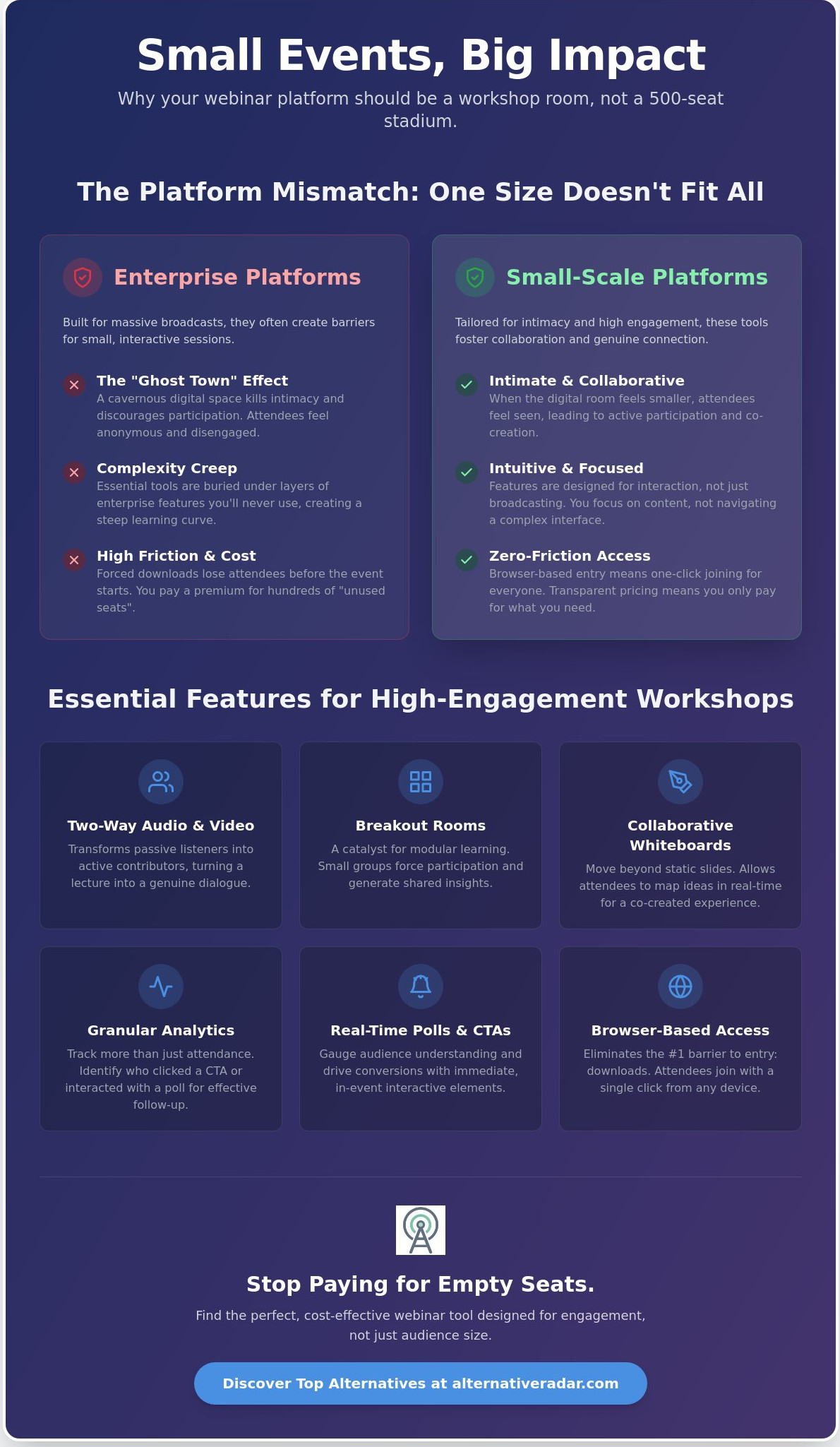
A small-scale event typically involves 10 to 100 participants. These sessions rely on high-frequency interaction and direct engagement. When you force a 20-person workshop into a platform built for 5,000, you trigger the “Ghost Town” effect. The digital environment feels cavernous and cold. This lack of intimacy discourages attendees from speaking up or sharing their screens. It effectively kills the collaborative energy you need for a successful session.
Complexity creep is another major hurdle. You don’t need a 20-page technical manual to host a 15-person product demo. Market leaders often bury essential tools under layers of enterprise settings. This forces you to navigate a product maze instead of focusing on your content. Additionally, standard subscription models frequently hide the cost of “unused seats.” You end up paying a premium for a 500-seat capacity that remains empty. This is an inefficient use of resources that many webinar platforms for small-scale events help you avoid by offering leaner, more transparent pricing tiers.
To understand how these tools stack up against each other, reviewing a comparison of web conferencing software can highlight the vast differences in feature sets and target audiences.
The Psychology of Small-Group Digital Interaction
People behave differently when they feel seen. In a massive broadcast, attendees often default to passive listening or multitasking. They assume their absence wouldn’t be noticed. When the digital “room” feels smaller, the dynamic shifts toward active collaboration. Attendees are more likely to participate in polls and ask questions. The expert-to-audience relationship becomes a partnership rather than a one-way lecture. Your choice of platform directly impacts this social contract. A tool that emphasizes faces and chat over slides fosters a sense of community that large-scale tools simply can’t replicate.
To further strengthen this sense of community, many event organisers provide tangible rewards or branded items; for those looking to add a professional touch, Personalised Glasses Australia offers custom solutions that help make attendees feel like valued members of an exclusive group.
The Technical Overhead Trap
Friction is the enemy of attendance. If your tool requires a desktop app download, you will lose a percentage of your audience before the event starts. Browser-based tools reduce this barrier significantly. They allow for one-click joining, which is critical for maintaining high attendance rates in smaller cohorts. WebRTC is the gold standard for small-scale accessibility. By using these modern protocols, you ensure that your participants can join from any device without technical hurdles. This approach prioritizes the user’s time and removes the overhead that often complicates simple workshops.
Essential Features for Intimate and Small-Scale Webinars
Scale isn’t just about capacity. It’s about the quality of the interaction. While high-volume tools focus on one-to-many broadcasts, effective webinar platforms for small-scale events prioritize multi-directional communication. Two-way audio and video capability is the first essential. It transforms a passive audience into active contributors. In a group of 15, seeing every face creates a level of accountability and connection that a 500-person chat box cannot match. This setup turns a standard lecture into a genuine dialogue.
Breakout rooms act as the catalyst for modular learning. Instead of a one-way lecture, you can divide your 30 attendees into five groups of six. This structure forces every individual to participate. When they return to the main room, they bring shared insights rather than just passive notes. This transition from listener to contributor defines successful small-scale events. When paired with collaborative whiteboarding, these rooms move beyond static slide decks. Participants can map out ideas in real-time, making the session a co-created experience.
Granular engagement analytics go beyond simple attendance logs. In a small workshop, you need to know which specific participants interacted with a whiteboard or clicked a call-to-action button. This level of detail helps you identify your most engaged prospects for post-event outreach. Forbes Advisor’s best webinar software rankings often highlight these reporting capabilities as a key differentiator between basic video tools and professional marketing platforms.
Engagement Tools That Drive Conversion
Real-time polls outperform post-event surveys in small settings. They provide immediate feedback that you can use to pivot your presentation on the fly. If you notice a dip in energy, a quick poll can reignite interest. Hand-raising and “on-stage” features allow you to spotlight participants, giving them a platform to share their specific challenges. This builds the expert-to-audience partnership. Automated follow-ups should then be triggered based on these specific interaction levels, ensuring your lead nurturing is as intimate as the event itself.
Custom Branding on a Budget
A branded waiting room is a critical touchpoint for boutique events. It signals professionalism before the first word is spoken. You don’t need a developer to achieve this. Most modern webinar platforms for small-scale events offer simple logo uploads and color customization. If you feel restricted by the rigid templates of market leaders, you can leverage alternative software to find tools with full white-label options. These specialized platforms often provide better aesthetic control for a fraction of the enterprise cost. To find the right fit for your specific needs, you can compare software alternatives that prioritize design flexibility.
Top 5 Webinar Platforms for Small-Scale Events: Comparison
Selecting the right tool requires a specific filter. We prioritize three metrics: ease of use, small-tier pricing accessibility, and the depth of engagement features. Most enterprise tools fail here because they bundle interactive features behind high-volume paywalls. The following webinar platforms for small-scale events represent the most efficient options available in 2026 for those managing cohorts of 10 to 100 people.
Demio remains the “no-friction” leader for marketing workshops. It eliminates the download barrier, which prevents the attendee drop-off often seen with legacy software. Its interface is purpose-built for interaction, featuring automated handouts and “featured actions” that appear on screen during live sessions. For small business teams, Livestorm provides a superior browser experience. It offers deep CRM integrations and a clean UI that feels like a modern SaaS product rather than a cluttered meeting tool. It’s ideal for recurring workshops where technical setup time must be minimal.
BigMarker is the choice when you need high-end features for a small, elite audience. It bridges the gap between a simple meeting and a high-production broadcast with customizable landing pages. WebinarGeek offers a highly intuitive interface with specialized tools for European compliance, while Zoho Meeting remains the most budget-friendly option for users already integrated into the Zoho ecosystem. Understanding how to choose a webinar platform involves balancing these specific feature sets against your conversion goals.
Planning these events requires tight internal coordination. You can explore Slack alternatives to manage your webinar team communication without the distractions of a bloated chat tool. Compare the technical entry points before committing to a long-term license.
Browser-Based vs. App-Based Winners
Stability in 2026 has plateaued across both types, but user preference has shifted toward accessibility. Small events benefit from “one-click” entrance links because they minimize the friction between the registration confirmation and the live start time. App-based tools often force updates at inconvenient moments, disrupting the flow of an intimate session. Browser-based tools using WebRTC ensure that your participants can join from any device without technical hurdles.
| Platform | Browser-Based | Small Tier Focus | Best Use Case (<50 Attendees) |
|---|---|---|---|
| Demio | Yes | Growth Plan | Marketing & Sales Workshops |
| Livestorm | Yes | Free/Pro | Internal Training & Teams |
| Zoom | Optional | Pro | General Purpose Meetings |
The “Freemium” Factor
Several webinar platforms for small-scale events offer free tiers for 10-20 people. However, the trade-off is usually significant. You often lose custom branding and face strict recording limits that can hinder your content repurposing strategy. For occasional hosts, the pay-as-you-go model is a more viable alternative to a monthly subscription. This allows you to access premium engagement tools without a recurring financial commitment. Evaluate whether your event frequency justifies a subscription or if a credits-based system provides better utility.
How to Choose the Right Tool for Your Specific Event Type
Choosing between webinar platforms for small-scale events depends entirely on your primary objective. A tool that excels at a high-energy sales pitch might fail during a deep-dive technical workshop. You must categorize your event before evaluating feature lists to ensure you don’t overpay for irrelevant capabilities. Selecting a platform based on a generic “best-of” list often leads to complexity that your specific audience doesn’t need.
If you fit the Workshop Profile, your priority is collaboration. You need digital whiteboards and breakout rooms that allow for peer-to-peer interaction. These tools turn a passive lecture into an active lab. Conversely, the Product Demo Profile requires high-fidelity screen sharing and prominent call-to-action (CTA) buttons. Your goal is conversion; the platform must make it easy for a prospect to click and buy without leaving the stream. For Internal Training, the focus shifts to the backend. You need reliable recording functions and seamless integration with Learning Management Systems (LMS) to track employee progress over time.
Assess your own technical skill level honestly. Some platforms offer granular control but require a steep learning curve. If you’re a solo creator or a small team, prioritize “one-click” setups that let you focus on your audience rather than troubleshooting audio drivers. Don’t buy a cockpit if you only intend to fly a drone.
Calculating Cost-Per-Active-Attendee
Flat monthly fees are often misleading for small-scale hosts. If a plan costs $100 for 500 seats but you only host 20 people, your cost-per-attendee is $5. This is an inefficient use of your budget. Instead, estimate your real ROI by tracking engagement metrics like average watch time and poll participation. To calculate the ROI of a webinar tool, divide the total revenue generated from attendee conversions by the cost of the platform subscription for that specific event period. This metric provides a clearer picture of whether a platform is actually profitable for your specific volume.
Integration with Your Existing Stack
Your webinar tool shouldn’t live on an digital island. It must feed data directly into your lead tracking system. Connecting your platform to open source CRM software allows you to monitor the journey of every attendee from registration to sale. You can also automate invitations by using email marketing alternatives that trigger based on user behavior. For small teams, native integrations or Zapier compatibility are essential to reduce manual data entry. If you want to streamline your operations, find the best software alternatives that integrate perfectly with your current workflow.
Beyond the Big Names: Finding Your Perfect Alternative
The most popular software isn’t always the most productive choice for your specific workflow. Market leaders often spend heavily on broad visibility, which forces them to build general-purpose tools that cater to everyone and no one. This results in feature bloat that obscures the interactive tools you actually need. When searching for webinar platforms for small-scale events, you’ll find that specialized alternatives offer a level of surgical precision that enterprise giants can’t match. These platforms are built with specific user intent in mind, whether you are an educator hosting a recurring seminar or a marketer running a high-stakes product demo.
The rise of specialized tools has created a clear divide in the market. Educators now have access to platforms that prioritize persistent digital classrooms and pedagogical tools like shared note-taking. Marketers can choose tools that emphasize lead attribution and real-time sales triggers. By moving away from the “big names,” you gain access to these tailored environments that foster the intimacy and engagement discussed in previous sections. Before committing to a new tool, select your top three picks and conduct a live dry-run. This helps you identify technical friction points that only appear during actual usage.
The Alternative Radar Scouting Method
We evaluate software based on real-world utility rather than marketing spend or brand recognition. Our process involves stripping away the hype to focus on objective comparisons and user-centric data. We prioritize licensing transparency and technical reliability over flashy but unnecessary features. This scouting method ensures you find a tool that respects your time and resources. For example, you might find that popular open source business software provides a more flexible way to manage your event recordings or attendee databases without the recurring costs of proprietary systems. This strategic approach allows you to build a custom stack that supports your specific goals.
Ready to Switch?
Migrating from a large platform to a small-scale specialist requires a structured approach. Use this checklist to ensure a smooth transition:
- Export your data: Download your existing attendee lists and past event recordings before closing your old account.
- Update your links: Replace registration URLs on your website and social media profiles.
- Communicate the value: Tell your recurring attendees that you’re switching to a new platform to provide a more interactive and intimate experience.
- Test the entry: Ensure the “one-click” join links work across different browsers and mobile devices.
Making the switch allows you to reclaim your budget and improve your audience’s experience. If you’re ready to explore more specialized options, you can discover more tools at Alternative Radar. We provide the clarity you need to choose webinar platforms for small-scale events that actually drive results.
Optimize Your Digital Engagement Strategy
Effective small-scale events require a fundamental shift in perspective. You’ve seen how enterprise-level tools often create a “ghost town” effect that kills audience engagement. By prioritizing browser-based accessibility and interactive features like breakout rooms, you can foster the intimacy that larger platforms simply cannot replicate. It is about matching your specific workshop or training profile to a tool that respects your budget and your audience’s time.
Choosing the right webinar platforms for small-scale events doesn’t mean settling for less; it means selecting specialized utility over generic scale. You can find the best alternatives to popular webinar software on Alternative Radar. We provide objective, data-driven comparisons that focus on real-world ROI and functional analysis rather than marketing hype. Our platform acts as your digital scout, filtering through the noise so you can make a smarter choice for your next session. Take control of your digital environment and start building a more connected, interactive community today.
Frequently Asked Questions
What is the best free webinar platform for under 20 participants?
Zoho Meeting is a reliable choice for groups under 20 people. It provides essential features like screen sharing and recording without the high cost of enterprise tiers. For those seeking a non-commercial path, Jitsi Meet offers unlimited participants for free, though it lacks the integrated marketing tools often found in dedicated webinar platforms for small-scale events.
Do attendees need to download software for small-scale webinars?
Most modern platforms use WebRTC technology to run directly in the browser. This means your attendees don’t need to download or install any external software to join. This “one-click” entrance significantly reduces technical friction and helps maintain higher attendance rates for small-group sessions.
How do I ensure high engagement in a small virtual workshop?
Can I host a webinar for free on platforms like YouTube or LinkedIn?
You can host live streams on these platforms for free, but they aren’t true webinar tools. They lack essential features like lead capture forms, breakout rooms, and detailed engagement analytics. While they work for broad broadcasts, they don’t provide the intimate interactive environment required for high-utility workshops.
What is the difference between a virtual meeting and a small-scale webinar?
A virtual meeting is designed for collaborative discussion where everyone has equal control. A small-scale webinar is a structured presentation designed for lead generation or specific training outcomes. Webinars offer tools like registration pages, automated follow-ups, and engagement tracking that standard meeting apps lack.
How much bandwidth is required for a high-quality small-scale webinar in 2026?
A stable connection of at least 3 Mbps for both upload and download is the standard for HD video in 2026. While some platforms can scale down to 1 Mbps, higher speeds ensure that interactive features like screen sharing and multi-user video remain lag-free. Always recommend that hosts use a wired Ethernet connection for maximum stability.
Are there open-source webinar platforms suitable for small businesses?
BigBlueButton is the primary open-source alternative designed specifically for online learning and small-scale workshops. It includes breakout rooms, whiteboards, and poll features. Jitsi Meet is another strong contender; it functions more like a high-quality video bridge than a full-featured marketing platform.
Which webinar tools integrate best with small-business CRMs?
Livestorm and Demio offer the most seamless native integrations with popular small-business CRMs like HubSpot and Pipedrive. These connections allow you to sync attendee data and engagement scores automatically. If you’re comparing different webinar platforms for small-scale events, look for tools with robust Zapier support to automate your post-event lead nurturing.