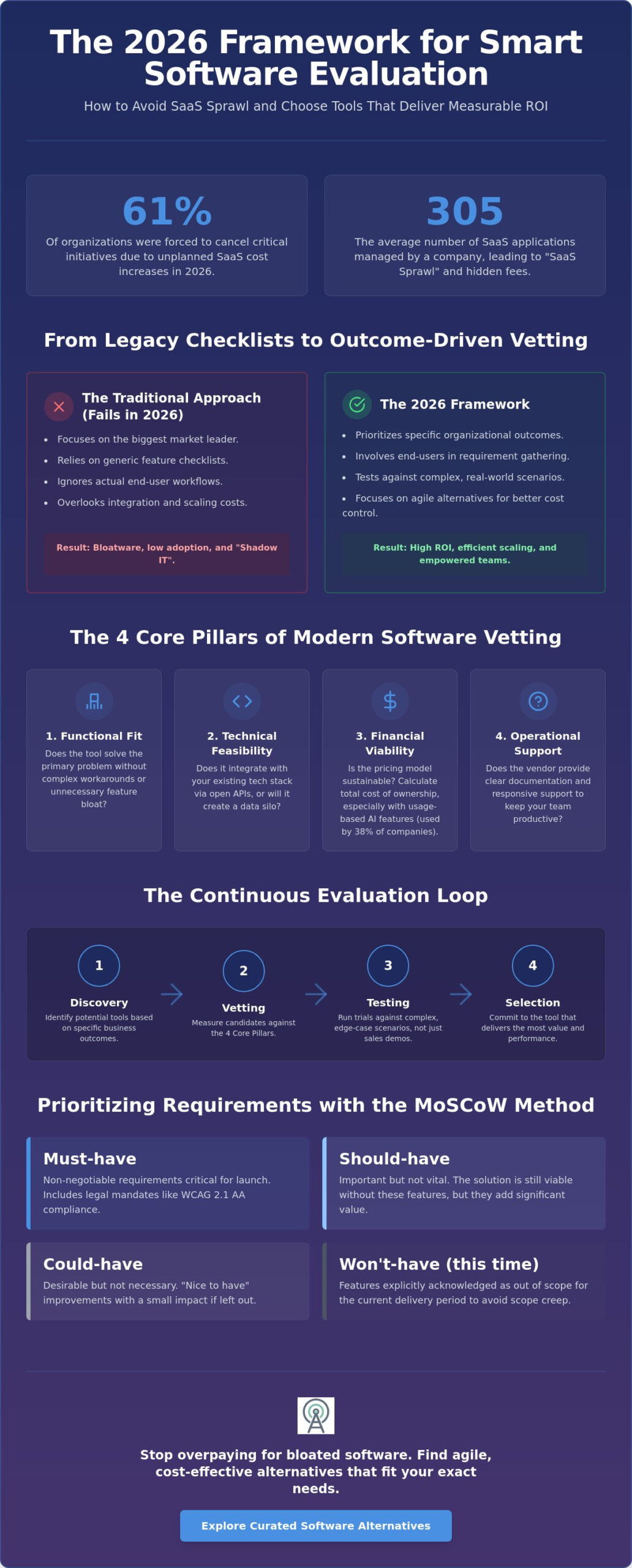
In 2026, 61% of organizations have been forced to cancel critical initiatives due to unplanned SaaS cost increases. When you research how to evaluate software for business, the standard approach of choosing the biggest name in the category often creates more problems than it solves. This strategy frequently results in SaaS sprawl, where companies manage an average of 305 applications while facing hidden integration fees and restrictive vendor lock-in.
You likely feel the pressure to consolidate your tech stack without sacrificing performance or slowing down your team. It’s difficult to justify new investments when existing tools suffer from low adoption and redundant subscriptions. This article introduces a repeatable, risk-mitigation framework to help you select software that scales efficiently. We will show you how to identify agile alternatives to bloated legacy tools and provide a clear vetting checklist to ensure every new subscription delivers a measurable return on investment.
Key Takeaways
- Master a structured 2026 framework on how to evaluate software for business by shifting focus from market leaders to specific organizational outcomes.
- Separate essential functionality from expensive feature bloat by involving actual end-users in the requirement-gathering phase.
- Bypass the “facade of simplicity” by testing vendor platforms against complex edge-case scenarios rather than relying on polished sales demonstrations.
- Implement a repeatable five-step workflow to identify agile alternatives that provide superior privacy and cost control compared to legacy tools.
The Modern Business Software Evaluation Framework
Understanding how to evaluate software for business requires shifting your perspective from simple purchasing to a systematic alignment of technology with specific organizational goals. This process mirrors the structured approach found in the Systems Development Life Cycle (SDLC), ensuring that every tool you add to your stack serves a clear purpose. Rather than treating software as a static product, view it as a dynamic component of your business architecture that must evolve alongside your operations.
Most buyers instinctively look for the market leader, assuming the biggest name is the safest bet. In reality, this often leads to paying for “bloatware” features you’ll never use. Effective evaluation prioritizes your specific use case over market share. If a niche tool solves your primary pain point more efficiently than an enterprise giant, it’s the superior choice for your budget. Our 2026 framework utilizes a continuous “Evaluation Loop” consisting of four distinct stages: Discovery, Vetting, Testing, and Selection. This loop ensures you don’t just pick a tool, but verify its performance before committing to a long-term contract.
Modern infrastructure demands a cloud-native and AI-first mindset. With LangChain’s 2026 report showing that 57% of organizations now have AI agents in production, you can’t afford to ignore how a tool handles automated workflows. A tool that isn’t built for seamless API integration or lacks transparent AI governance will become a liability within 24 months. You aren’t just buying software for today; you’re vetting its ability to survive the next decade of technical shifts.
Why Traditional Evaluation Methods Fail in 2026
Legacy checklists often focus on features that are now standard commoditized offerings. If you’re still evaluating tools based on “basic file sharing” or “user permissions,” you’re wasting time on table stakes. When the evaluation process is too slow or rigid, teams often resort to “Shadow IT,” where employees sign up for their own tools without oversight. This creates security gaps and redundant costs. Adopting a strategy for finding the best alternative to popular software helps reduce initial brand bias and forces you to look at performance data rather than marketing reputation.
The Core Pillars of Software Vetting
Success depends on looking beyond the user interface. Every software candidate must be measured against four critical pillars:
- Functional Fit: Does the tool solve the primary problem without requiring complex workarounds?
- Technical Feasibility: Does it integrate with your existing stack via open APIs, or will it create a data silo?
- Financial Viability: Is the pricing model sustainable? With 38% of companies now using usage-based pricing for AI features, you must calculate the total cost of ownership at scale.
- Operational Support: Does the vendor provide the necessary documentation and support response times to keep your team productive when things break?
Defining Requirements: Beyond the Feature Checklist
Learning how to evaluate software for business requires a shift from passive feature-checking to active requirement weighting. Most procurement failures stem from a “more is better” philosophy that prioritizes a long list of functionalities over actual business impact. When you ignore the distinction between essential tools and expensive bloat, you risk investing in a platform that your team will eventually abandon. A successful vetting process starts by identifying the specific outcomes your organization needs to achieve within its unique technical environment.
Effective requirement gathering must involve the people who will use the tool daily. End-user adoption is the primary metric of success, yet it is often overlooked during the executive sign-off. Mapping out the user journey within the software helps identify potential friction points before you sign a contract. If a tool requires ten clicks to perform a task that currently takes two, it will fail regardless of its technical capabilities. You can browse curated software alternatives to see how different platforms prioritize user flow over sheer feature density.
The MoSCoW Method for Software Prioritization
Adopting a systematic approach to software evaluation ensures that your budget focuses on high-impact areas. The MoSCoW method categorizes requirements into four distinct levels of priority:
- Must-have: Non-negotiable requirements. In 2026, this includes legal mandates like WCAG 2.1 Level AA compliance for public entities or FINRA gift limit tracking ($300 limit as of March 2026).
- Should-have: Important features that are not vital for the initial 90-day rollout but are necessary for long-term scaling.
- Could-have: “Nice-to-have” features that provide incremental value if the budget allows without adding complexity.
- Won’t-have: Features that add unnecessary cost or technical debt. Explicitly excluding these prevents scope creep.
Modern Cost Architectures: AI and API Pricing
The 2026 software landscape has introduced complex variable costs that traditional checklists ignore. With 38% of companies now incorporating usage-based elements into their pricing, you must evaluate “hidden” expenses such as AI token consumption and API egress fees. These costs can balloon as your data grows, turning a seemingly affordable subscription into a financial burden. For example, an open source crm software comparison often reveals fixed-cost advantages over proprietary SaaS models that charge premium fees for every integrated data point. Assess these architectural costs early to ensure your pricing model remains sustainable as you scale.
Avoiding the ‘Facade of Simplicity’ in Technical Vetting
A sleek user interface often masks technical rigidity. When you learn how to evaluate software for business, you must look past the polished demo. Sales teams curate these environments to showcase “happy paths” where everything works perfectly. You should challenge the vendor with your specific edge-case scenarios instead. If their solution requires extensive custom coding for a standard business process, their “out-of-the-box” claim is likely a marketing exaggeration.
Request access to technical documentation before the second meeting. This is a critical step in how to evaluate software for business because it exposes the tool’s underlying logic. If the documentation is gated behind a paywall or consists of thin, surface-level articles, the software is likely difficult to customize or integrate. Additionally, audit the vendor’s release notes for the last 12 months. This reveals their innovation velocity. You want to see a consistent rhythm of new features and security enhancements. A list consisting only of minor bug fixes suggests a stagnant product that may not scale with your future needs.
Integrations and Ecosystem Interoperability
Ecosystem interoperability is about more than just a logo on a partner page. Verify if integrations are “native” or rely entirely on third-party middleware like Zapier. While middleware is useful, native integrations usually offer better data mapping and lower latency. Test the API responsiveness yourself or have a developer review the documentation for clarity and depth; for specialized fintech requirements, you can read more about how high-performance banking aggregation APIs are structured. Finally, check for vendor lock-in. Ensure you can export your data in a standard, machine-readable format like JSON or CSV. If the vendor makes data retrieval difficult, they are holding your business growth hostage.
Security, Compliance, and Data Sovereignty
Security and compliance are non-negotiable in the 2026 landscape. As of April 24, 2026, public entities with a population of 50,000 or more must comply with WCAG 2.1 Level AA. Beyond accessibility, audit the vendor for SOC 2 Type II and ISO 27001 certifications. For industries handling sensitive data, ensure they offer HIPAA or GDPR Data Processing Agreements. Evaluate data residency options to confirm information stays within your required jurisdiction. A reliable vendor will provide a clear history of security disclosures and demonstrate rapid patch response times to known vulnerabilities. Don’t accept verbal promises; demand to see the latest third-party penetration test results from within the last 12 months.
The 5-Step Strategic Evaluation Workflow
A structured workflow prevents the “analysis paralysis” that often plagues growing companies. To master how to evaluate software for business, you need a sequence that moves from broad discovery to specific, data-backed selection. This five-step process provides a repeatable blueprint for SMBs to vet tools without hiring expensive external consultants. It focuses on efficiency, ensuring you spend your time testing the tools that actually matter rather than sitting through endless generic sales calls.
The process moves through five distinct phases: Market Scanning, the Request for Information (RFI), the Hands-On Sandbox, Stakeholder Consensus, and Final Negotiation. By following this order, you eliminate non-viable vendors early and reserve your deepest technical scrutiny for the final two or three candidates. This approach treats software selection as a series of logical gates rather than a single, overwhelming decision.
Step 1 & 2: Filtering the Noise
Start with Market Scanning and Alternative Mapping. Use curated resources like popular open source business software 2026 to identify cost-effective alternatives that might offer more transparency than market leaders. Limit your initial shortlist to 3-5 vendors. Any more than this leads to evaluation fatigue and blurred comparisons. For each vendor, draft a single sentence defining the core problem they must solve. If you can’t articulate this, the tool isn’t a priority for your current budget cycle.
Once you have a shortlist, issue a targeted Request for Information (RFI). This isn’t a 50-page document; it’s a specific set of questions regarding the “Must-Haves” identified in your previous MoSCoW analysis. If a vendor cannot confirm support for WCAG 2.1 Level AA or provide a recent SOC 2 Type II report in writing, eliminate them immediately. This step acts as a high-velocity filter, leaving you with only the most viable candidates for deep-dive testing.
Step 3 & 4: Proving the Value
Move from the “Sales Demo” to the “Driver’s Seat.” Demand a sandbox environment where your team can use anonymized data to simulate real-world conditions. This is where you run a “Stress Test” on your most complex workflows. If the software stutters when handling your peak data loads or requires excessive manual entry for a standard report, it’s a technical mismatch. You can research software alternatives to see which tools offer the most flexible sandbox environments for your specific industry.
During the Proof of Concept (PoC) phase, collect qualitative feedback from your power users. These are the individuals who will use the tool daily. Their adoption determines your ultimate return on investment. If their feedback indicates that the interface is counter-intuitive or slows down their productivity, the “safe” brand name won’t save the project from failure. Achieve stakeholder consensus by presenting a direct comparison of how each tool performed during the stress test.
Step 5: Final Negotiation and SLA Review
The final step involves finalizing the Service Level Agreement (SLA) and negotiating terms. With Gartner projecting global software spending to increase by 15.1% in 2026, protecting your budget is essential. Review the SLA for uptime guarantees and data export policies. Ensure the contract includes clear pathways for scaling or downgrading seats as your business needs change. Don’t sign until you have a transparent understanding of the total cost of ownership, including the usage-based AI costs and API fees discussed earlier.
Closing the Gap: Why Alternatives Often Outperform Leaders
Market leaders often rely on their reputation rather than their current innovation velocity. When you learn how to evaluate software for business, you quickly realize that the “safest” choice is frequently the most expensive failure. Niche-focused providers offer an “Agility Advantage” because they lack the technical debt of legacy giants. These smaller vendors iterate faster, providing specialized features that address specific industry pain points—such as how PropAlly streamlines compliance for property investors—without the unnecessary bloat of general-purpose tools.
Consider the communication sector. While enterprise platforms dominate headlines, many slack alternatives offer superior privacy controls and predictable cost structures that better suit growing teams. Similarly, for non-design-centric businesses, the ROI of using the best free alternatives to photoshop far exceeds the value of a high-priced subscription with features your staff will never touch. Alternative Radar acts as your digital scout in this discovery phase, filtering the noise to find tools that prioritize utility over market share.
The Total Cost of Ownership (TCO) Comparison
A true TCO calculation must include the “Hidden Cost of Complexity.” Market leaders often require specialized consultants or extensive internal training just to manage basic operations. In contrast, many alternatives leverage community-driven support and intuitive interfaces that reduce the time spent “unlearning” old, rigid systems. As 61% of organizations have recently cut projects due to unplanned SaaS costs, choosing a tool with a transparent financial model is a strategic necessity. Factor in the long-term expense of training new hires on a complex platform versus a streamlined alternative.
Making the Final Decision
Objectivity is the antidote to sales pressure. Use a weighted scoring matrix to rank your candidates based on the MoSCoW priorities established earlier. This removes emotional bias and ensures the final selection aligns with your 2026 business goals. Before the contract is signed, prepare a comprehensive migration plan. This should outline data transfer protocols and user training schedules to prevent productivity dips during the transition. Once you understand how to evaluate software for business through this lens, you can move forward with confidence. Discover your next software solution on Alternative Radar and start building a more efficient tech stack today.
Secure Your Strategic Advantage
Mastering how to evaluate software for business means prioritizing outcome-based results over brand reputation. By implementing a weighted scoring matrix and challenging vendors with edge-case stress tests, you eliminate the risk of budget-draining bloatware. The 2026 landscape rewards companies that favor interoperability and transparent pricing models over the false security of legacy market leaders. This strategic shift ensures your team remains agile while competitors struggle with redundant subscriptions and low adoption rates.
You don’t have to navigate this complex discovery phase alone. Alternative Radar acts as your digital scout, providing expert comparisons of over 1,000 business tools and unbiased reviews of both open-source and premium software. Our platform is designed specifically for efficiency-driven discovery, helping you filter the noise to find the exact technical fit for your team’s unique workflows without the marketing hype.
Find the perfect software alternative for your team on Alternative Radar. Take control of your technology investments today and build a scalable stack that empowers your employees to do their best work.
Frequently Asked Questions
What is the most important factor when evaluating business software?
Strategic alignment with your specific business outcomes is the most critical factor. While features are important, a tool that doesn’t solve a primary pain point becomes expensive shelfware. Focus on the outcome-based evaluation mentioned in our framework. This ensures the software actually improves your bottom line rather than just adding another icon to your dashboard.
How long should a software evaluation process take for a medium-sized business?
A thorough evaluation for a medium-sized business typically takes between four and eight weeks. This timeframe allows for market scanning, RFI filtering, and a hands-on sandbox phase. Rushing this process leads to overlooked integration costs. Taking longer than eight weeks often results in analysis paralysis and delayed productivity gains.
Is free or open-source software safe for enterprise-level business use?
Open-source software is safe for enterprise use provided it adheres to modern security and compliance standards. In 2026, you must verify that any open-source candidate has a recent SOC 2 Type II report or ISO 27001 certification. Many enterprises prefer open-source for its transparency and lack of vendor lock-in. It often provides a more flexible foundation for custom integrations.
How do I convince my team to switch from a market leader to an alternative tool?
Emphasize how the new tool reduces daily friction for the end-users. Teams usually resist change because they fear a steep learning curve or lost productivity. Show them exactly how the alternative eliminates redundant steps in their current workflow. Use the qualitative feedback gathered during your sandbox testing to prove the tool’s practical benefits over the legacy market leader.
What are the red flags to look for during a software sales demo?
Red flags include gated documentation, evasive answers about API capabilities, and a refusal to provide a sandbox environment. If a salesperson focuses entirely on a happy path demo and ignores your specific edge cases, the product is likely rigid. High-pressure sales tactics that push for a signature before you’ve completed technical vetting suggest the vendor is hiding implementation complexities.
Should I prioritize features or ease of use during the evaluation?
Prioritize ease of use because high employee adoption is the only way to achieve a positive return on investment. A feature-rich tool that nobody uses is a total loss. When you research how to evaluate software for business, you’ll find that intuitive interfaces reduce training costs and Shadow IT risks. Choose the tool that solves the must-have requirements with the least amount of user friction.
How often should a business re-evaluate its current software stack?
Businesses should re-evaluate their software stack at least once a year or six months before a major contract renewal. This frequency helps identify SaaS sprawl and redundant subscriptions that drain budgets. Regular audits ensure your tools still align with your evolving business goals. It also allows you to capitalize on newer, more agile alternatives that may have entered the market since your last purchase.
What is a Proof of Concept (PoC) and do I really need one?
A Proof of Concept is a limited-scale trial designed to verify that a tool can perform a specific, high-risk task within your technical environment. You definitely need one for core infrastructure or complex integrations. A PoC prevents you from signing a long-term contract for software that technically can’t handle your data volume or specific security requirements. It’s your final layer of risk mitigation.