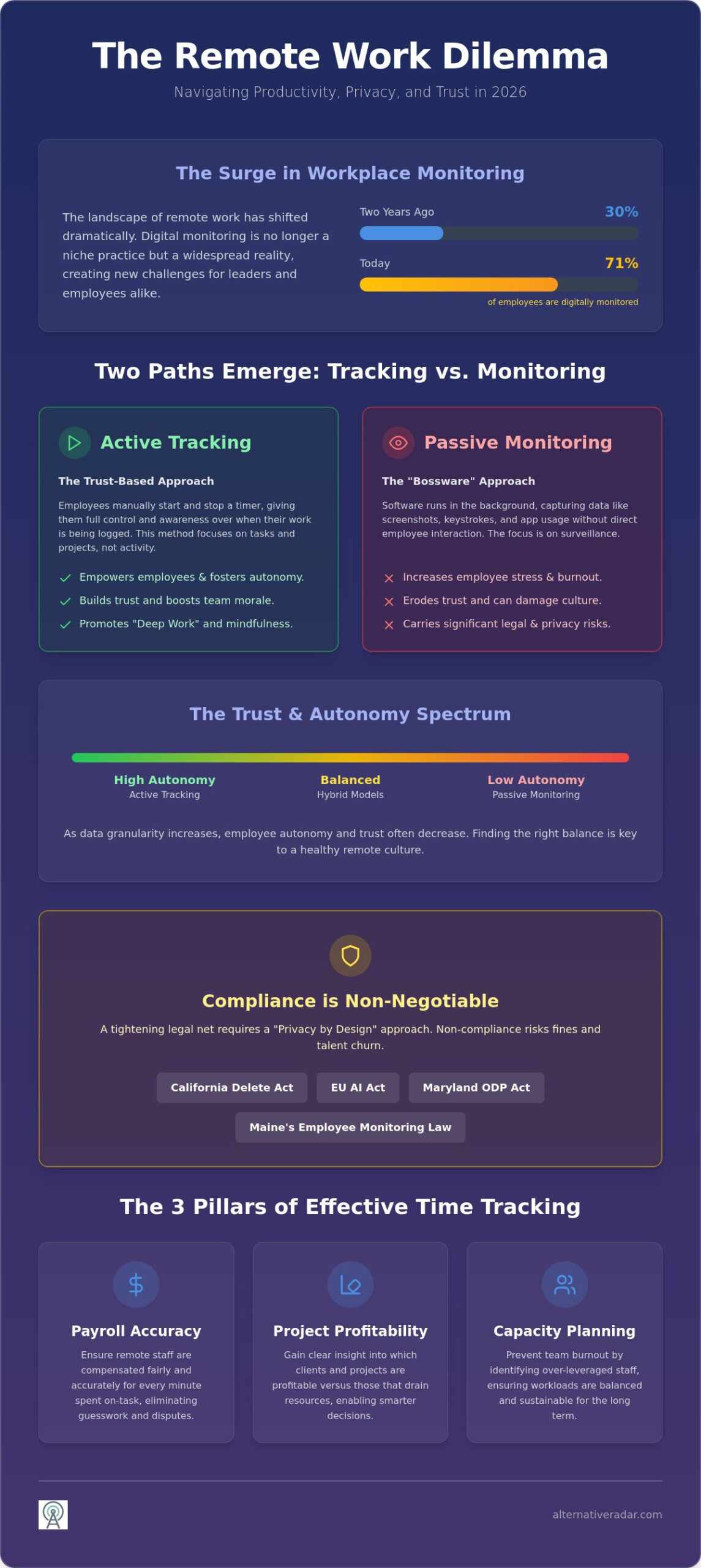
71% of employees are now digitally monitored, a significant increase from just 30% two years ago. This rapid adoption has created a friction point for managers who need to find the right time tracking software for remote employees without damaging team morale. You likely recognize the frustration of inaccurate billing and the visibility gap that remote work creates, yet you want to avoid the pitfalls of invasive surveillance that drive away top talent.
It’s a valid concern. Balancing operational efficiency with employee privacy is the primary challenge for leadership in 2026. This guide simplifies that process by comparing the most effective tools for streamlining payroll and improving resource allocation. We evaluate the leading platforms based on their automation capabilities and compliance with new privacy standards like the California Delete Act and the EU AI Act. You’ll discover how to implement a system that prioritizes transparency and logic over digital micromanagement, allowing you to make a data-driven choice for your team’s unique needs.
Key Takeaways
- Bridge the remote visibility gap by adopting non-linear tracking methods that align with the 2026 shift toward asynchronous work.
- Differentiate between user-initiated active tracking and system-initiated passive monitoring to protect employee trust and morale.
- Evaluate the top time tracking software for remote employees using a curated comparison of industry leaders and high-potential challengers.
- Streamline your tech stack by integrating time data with the “Golden Trio” of communication, project management, and invoicing tools.
- Implement a rollout strategy that frames time tracking as a resource protection initiative to ensure team buy-in and prevent resentment.
The Remote Visibility Gap: Why Time Tracking is Essential in 2026
Remote work is no longer a temporary experiment; it’s the standard for global business. However, distributed teams often face a visibility gap where managers lose sight of project progress and individual workloads. Time-tracking software acts as the essential bridge between isolated workers and the company’s broader objectives. In 2026, the shift toward asynchronous work means we can’t rely on the traditional 9-to-5 clock-in. We need non-linear tracking that captures value regardless of when the work happens.
Effective tracking rests on three critical pillars. First, payroll accuracy ensures remote staff are compensated fairly for every minute spent on task. Second, project profitability allows leaders to see which clients or tasks are draining resources. Third, capacity planning prevents team burnout by identifying who is over-leveraged before they hit a breaking point. Without these insights, you’re managing in the dark.
Navigating this requires awareness of a tightening legal net. The California Delete Act now grants employees the right to delete “exhaust data,” while the EU AI Act bans certain types of invasive workplace surveillance. Choosing the right time tracking software for remote employees isn’t just about productivity; it’s about staying compliant with modern labor protections. You need tools that respect privacy while providing the data necessary for growth.
Beyond the Clock: Tracking as a Project Management Asset
Tracking serves as a vital project management asset. By analyzing historical data, you can build more accurate future project estimates and avoid the common planning fallacy. Time Intelligence is the strategic use of duration data to optimize team performance. This approach helps you distinguish between billable hours that generate revenue and the internal operational costs that keep the business running. When you see exactly where the hours go, you can reallocate resources to higher-value tasks instantly.
The Cost of Inaction: How “Guess-timation” Hurts Remote Teams
Relying on “guess-timation” or manual timesheets leads to significant financial leakage. Human error and memory lapses often lead to under-reported billable time or inflated project costs. Beyond simple math, there’s the “context switching” tax. Using time tracking software for remote employees reveals how many times staff are interrupted by meetings or notifications, highlighting productivity killers that otherwise go unnoticed. This objective data is your best tool for justifying remote work policies to stakeholders who might still favor traditional office mandates.
Tracking vs. Monitoring: Navigating the Privacy-Trust Spectrum
Distinguishing between active and passive methods is the first step toward a healthy remote culture. Active tracking requires the employee to manually start a timer, giving them control over when they are “on the clock.” Passive monitoring, often called “bossware,” runs in the background to capture screenshots, keystrokes, or application usage. The psychological impact of these choices is documented. According to the APA’s 2023 Work in America survey, workers who feel monitored are significantly more likely to experience burnout and high stress levels than those who aren’t.
The “Trust Matrix” helps you balance data granularity with employee autonomy. If you require second-by-second data, you’ll inevitably sacrifice trust. In 2026, the legal stakes are higher than ever. Laws like the Maryland Online Data Privacy Act (MODPA) and Maine’s Employee Monitoring Law mandate strict data minimization and prohibit tracking on personal devices. Implementing time tracking software for remote employees now requires a “Privacy by Design” approach to avoid legal exposure and talent churn. You can’t just install a tracker and hope for the best; you must align your tech choice with your culture.
The Case for Active Time Tracking
Active tracking empowers employees to manage their own productivity. When a user clicks “start,” they enter a state of mindfulness regarding their tasks, which naturally fosters “Deep Work.” Tools like Toggl Track and Harvest are industry standards for this model. They prioritize the user’s intent over system-level surveillance, making them ideal for creative or high-trust environments where output matters more than activity pings. This method treats the employee as a professional partner rather than a monitored asset.
When (and How) to Use Monitoring Features
Monitoring features aren’t always negative; they’re sometimes necessary for high-security industries or strict compliance requirements. If you must use these features, transparency is your best defense against resentment. Establish a “Surveillance Disclosure” policy that explicitly states what data is collected and why. Instead of intrusive screenshots, consider using activity heatmaps or anonymized data aggregates. These provide the visibility you need without making your team feel like they’re under a microscope. Explore our curated software comparisons to find the right balance for your team’s specific needs.
Top Time Tracking Software for Remote Employees: 2026 Comparison
Selecting the right time tracking software for remote employees requires a shift from simple stopwatches to intelligent data analysis. In 2026, the most effective platforms leverage AI-automated categorization to sort work activities without manual input. These tools now include predictive burnout alerts that flag when a team member’s workload exceeds sustainable limits. We’ve scouted the market to filter the essential tools based on utility, cost, and specialized use cases, ensuring you choose a system that fits your specific workflow.
The All-Rounders: Hubstaff and Toggl Track
Hubstaff and Toggl Track represent two distinct philosophies in the remote work space. Hubstaff, starting at $7 per user monthly, excels in fleet management and visibility. Its GPS and geofencing capabilities are ideal for hybrid teams or mobile remote workers who move between locations. It provides a high-resolution view of activity levels that suits high-accountability environments. Conversely, Toggl Track targets teams that prioritize a minimalist design and rapid adoption. With paid plans starting at $10 per user monthly, Toggl focuses on user-controlled timers and frictionless browser extensions. It’s the superior choice for non-technical teams who want to track time without a steep learning curve or invasive background monitoring.
The Invoicing Powerhouses: Harvest and FreshBooks
For agencies and freelancers, the transition from a tracked hour to a paid invoice must be seamless. Harvest, priced at $10.80 per user monthly, specializes in this pipeline by integrating directly with major billing and accounting tools. It provides project budget tracking and “burn rate” visualizations that show exactly how much of a budget remains in real-time. For many small teams, these platforms function as a lightweight open source CRM, allowing you to manage client relationships alongside billable hours. This integration eliminates the administrative burden of manual data entry and reduces the risk of billing errors.
The Privacy-First Alternatives: ActivityWatch and Kimai
Organizations that prioritize data sovereignty often find mainstream SaaS products limiting. ActivityWatch offers a powerful, open-source, and local-first automated tracker that records activity without sending sensitive data to a third-party server. It’s an ideal tool for developers or privacy-conscious firms that want to audit their own productivity. Similarly, Kimai provides a self-hosted environment that gives enterprise security teams total control over their database. These platforms serve as the ultimate alternative to standard cloud-based trackers. By choosing self-hosted or open-source solutions, you ensure that your team’s “exhaust data” remains within your own security perimeter, fulfilling the strictest 2026 compliance requirements.
Integration Ecosystem: Connecting Time Data to Your Tech Stack
Standalone software creates a productivity silo. It requires manual context switching, which drains mental energy and leads to “time leaks” where small tasks go unrecorded. To maximize the ROI of time tracking software for remote employees, you must integrate it directly into the tools your team already uses. We categorize this as the “Golden Trio” of connectivity: Communication, Project Management, and Invoicing. By synchronizing these three layers, you transform raw duration data into actionable business intelligence that drives better decision-making.
Don’t settle for limited native integrations. Tools like Zapier and Make act as the essential glue between modern trackers and obscure legacy software. If your team uses a proprietary database or an older CRM, these automation platforms bridge the gap without requiring expensive custom development. In 2026, the most resilient platforms offer robust API access. This allows your internal developers to pull custom reports that align with your specific organizational KPIs. If your chosen software doesn’t play well with others, it’s a liability that will eventually lead to data fragmentation and administrative bloat.
Communication: Tracking Within the Workflow
Friction kills adoption. Integrating your tracker with Slack alternatives ensures that employees don’t have to leave their conversation to log a task. Look for the “Status Sync” feature. It automatically updates a user’s availability status based on their active timers. This prevents unnecessary interruptions during “Deep Work” sessions by letting colleagues know someone is currently focused. Pair this with calendar integrations to implement “Time-Blocking,” which turns your schedule into a visual map of resource allocation rather than just a list of meetings.
Project Management: From Task to Timesheet
High-performing teams integrate their time tracking software for remote employees directly into task cards in platforms like Jira and Asana. This “One-Click” tracking eliminates the need for employees to remember specific project codes when they switch focus. This granular data is particularly valuable when managing complex digital operations like programmatic display advertising. By tracking the exact time spent on optimizing automated media buying campaigns, you can calculate the true labor cost versus your actual ad spend. This level of detail is essential for accurate project resource allocation and understanding your real margins.
Explore our comprehensive software directory to find tools that offer the best native integrations for your current tech stack.
Implementation Strategy: How to Roll Out Tracking Without a Mutiny
Implementing time tracking software for remote employees often meets resistance because it’s framed as a surveillance tool. To ensure a successful rollout, you must pivot the narrative. Position the initiative as “Resource Protection” rather than a “Performance Police” action. The goal isn’t to watch your team work; it’s to protect them from scope creep, meeting bloat, and the invisible labor that leads to burnout. When employees see that accurate data leads to more realistic deadlines and balanced workloads, the “mutiny” dissolves into cooperation.
Establish clear “Rules of Engagement” before the first timer starts. Explicitly define what data is collected and, more importantly, what is strictly off-limits. In 2026, the trend has shifted toward “Incentivized Accuracy” over “Punitive Monitoring.” This means rewarding teams for consistent logging that helps the company bid on projects more accurately, rather than punishing those with lower activity pings. Start with a “Trial and Feedback” phase. Give your team 30 days to test the tool and report back on its impact on their workflow. This collaborative approach ensures the software fits your culture instead of forcing the culture to fit the software.
The Transparency Framework
Transparency is the antidote to resentment. A clear internal statement sets the tone for the entire implementation. Consider this sample for your rollout: “We’re using [Tool Name] to identify project bottlenecks and ensure everyone’s workload is sustainable. We value your privacy; therefore, we have disabled all screenshot and keystroke logging features.” This clarity builds immediate trust. Furthermore, use the software to enforce the “Right to Disconnect.” By analyzing active hours, managers can identify who is working late and intervene to protect their personal time. In 2026, a tracker should be a shield that prevents overwork, not a sword that demands more of it. You may even allow teams to disable tracking during “Deep Work” sessions to prioritize output over minute-by-minute activity logs.
Protecting personal time is not just about productivity; it’s about preserving the quality of home life, as unchecked professional stress can lead to relationship challenges that De Relatiespecialist helps parents navigate through specialized therapy and support.
To further support a healthy personal life, individuals can use Ask Jenna to gain AI-driven insights into their digital interactions, helping them make more informed emotional decisions in their relationships.
Measuring Success Beyond Total Hours
Shift your management focus from total hours logged to “Project Velocity” and “Output Consistency.” High hours don’t always equate to high value. Use the data from your time tracking software for remote employees to identify “Meeting Bloat.” If the data shows your senior developers are losing 15 hours a week to non-essential calls, you have the evidence needed to eliminate those meetings. Empower your team by giving them access to their own productivity dashboards. This encourages “Self-Correction,” where employees can see their own focus trends and adjust their habits without a manager’s intervention. Success in a remote environment is measured by results; time data is simply the map that helps you get there more efficiently.
Maximizing Remote Productivity Through Strategic Selection
Selecting the right time tracking software for remote employees is no longer a matter of simple oversight; it’s a strategic move to optimize your most valuable resource. By prioritizing transparency and choosing tools that integrate seamlessly with your existing tech stack, you eliminate administrative friction. You protect your culture from the erosion of trust while gaining the insights needed for accurate billing and capacity planning. Whether you opt for an all-rounder like Hubstaff or a privacy-first open-source alternative like ActivityWatch, the goal remains the same. You need data-driven clarity that empowers your team rather than monitoring them.
We’ve done the heavy lifting of testing these tools against 2026 remote work standards so you can make an informed decision quickly. Find the perfect time tracking alternative for your team on Alternative Radar. Our platform offers an objective comparison of 50+ tracking tools and specialized privacy-first software rankings to ensure your choice aligns with both legal requirements and company values. Take the next step toward a more transparent, efficient, and accountable remote environment today. You have the tools to build a culture where productivity and trust exist in total balance.
Frequently Asked Questions
Is time tracking for remote employees legal in 2026?
Yes, it is legal, but you must comply with strict state and international regulations. As of 2026, the California Delete Act and Maryland’s MODPA require transparency and data minimization. Maine’s law specifically prohibits tracking on personal devices and mandates annual written notice. In the EU, the AI Act bans emotion recognition and certain types of invasive workplace surveillance. Always provide written notice of monitoring systems to remain compliant and maintain trust.
What is the best free time tracking software for small remote teams?
Toggl Track and Clockify remain the top choices for free tiers. Toggl offers a robust free plan for small teams, while Clockify provides a free version with optional screenshot capabilities. If you need unlimited users without a subscription fee, Trackpilots is a viable 2026 alternative that includes screenshots. These tools allow small teams to implement time tracking software for remote employees without an initial financial commitment.
How do I prevent employees from “gaming” the time tracking system?
Focus on results rather than activity pings to prevent system gaming. When you prioritize project velocity and output consistency, the incentive to use mouse jigglers or fake activity disappears. Use automated tools like Rize or ActivityWatch that categorize work based on active window titles. This reduces the burden of manual logging and provides a more accurate reflection of actual work performed compared to manual entry.
Can time tracking software help with remote employee burnout?
Yes, modern tools use predictive analytics to flag potential burnout before it happens. By monitoring capacity planning data, managers can see when a team member’s workload consistently exceeds sustainable limits or when they lack focus blocks. Systems that offer burnout alerts help leadership reallocate tasks effectively, ensuring that time tracking software for remote employees serves as a protective resource rather than a pressure tactic.
Do I really need screenshots and keystroke logging for remote work?
For most industries, screenshots and keystroke logging are unnecessary and often counterproductive. Research from the APA highlights that invasive monitoring increases worker stress and burnout. Unless you operate in a high-security sector with specific compliance mandates, privacy-first tools like Rize, which doesn’t use screenshots, are more effective. They provide the visibility you need without damaging the essential trust between distributed team members.
Which time tracking tools integrate best with Slack and Microsoft Teams?
Toggl Track and Hubstaff offer some of the most seamless integrations for these platforms. They feature status sync capabilities that automatically update your Slack or Teams availability when a timer is active. This reduces context switching and informs colleagues when you are in a deep focus session. These integrations ensure that time data flows directly into your communication channels, keeping the entire distributed team aligned without manual updates.
Is there an open-source alternative to Hubstaff or Time Doctor?
ActivityWatch and Kimai are the leading open-source alternatives to mainstream SaaS products. ActivityWatch is a local-first, automated tracker that keeps your data on your own machine for maximum privacy. Kimai is a web-based, self-hosted solution that gives your IT department complete control over the database. These options are ideal for organizations that require high data sovereignty and want to avoid the limitations of standard cloud-based trackers.
How much does remote employee time tracking software typically cost per user?
Costs vary based on features, but most paid plans fall between $4 and $18 per user monthly. For example, Clockify starts at $4.99, while Hubstaff and TMetric begin around $7. Mid-range options like Harvest and Toggl Track cost approximately $10 to $11. Premium, automated tools like Rize sit at the higher end at $18 per user. Some location-based services like Connecteam start at a flat rate of $29 monthly for the entire team.