The average person now manages roughly 12 separate subscriptions and often underestimates their monthly digital spend by 250%. For many professionals, the Adobe Creative Cloud suite has become a primary source of this financial friction, leading to a massive wave of subscription fatigue throughout 2026. You’ve likely felt the frustration of rising monthly costs and software bloat that slows down your high-resolution editing, making it harder to maintain a productive and profitable studio.
Finding the best photoshop alternative for photographers isn’t just about cutting costs; it’s about reclaiming your technical efficiency. You deserve a professional-grade workflow that matches Photoshop’s power without the recurring monthly drain on your resources. This guide identifies the specific software that offers a one-time purchase or an affordable professional suite while maintaining industry-standard color management and high-end performance.
We’ll explore how a strategic pairing of specialized RAW processors and layer-based editors can provide a seamless RAW-to-retouching experience. From the disruptive shift of the free Affinity suite to high-performance AI-integrated tools, we’ve analyzed the current landscape to help you build a workflow that prioritizes your results over a software company’s recurring revenue.
Key Takeaways
- Implement the “Power Couple” workflow by pairing a dedicated RAW processor with a layer-based editor to achieve professional speed and precision.
- Leverage 2026’s advanced AI capabilities in independent software, including generative fill and instant subject masking, to maintain high-velocity retouching standards.
- Identify the best photoshop alternative for photographers by evaluating specific licensing models that offer one-time purchases or free professional-grade suites.
- Execute a seamless transition from Adobe by auditing your current toolset and exporting critical assets like custom brushes, presets, and action sets.
Beyond the Subscription: Why Photographers are Leaving Adobe in 2026
Subscription fatigue has reached a breaking point for professional studios in 2026. What began as a convenient way to access updates has evolved into a permanent financial burden. Many photographers now realize they’ve spent years paying for “rented” access to their own creative tools without ever reaching a point of ownership. This realization drives the current surge in professionals seeking the best photoshop alternative for photographers, as they look to decouple their creative output from a recurring monthly bill.
The modern photography landscape requires more than just basic editing. A viable alternative in 2026 must match the advanced AI-driven generative features that have become industry standards. Whether it’s automated subject masking or generative fill, the expectation for high-velocity tools is higher than ever. For those exploring the broader market, this comprehensive comparison of raster graphics editors highlights the sheer volume of professional tools now available outside the Adobe ecosystem. The shift isn’t just about saving money; it’s about finding specialized software that performs better than an “all-in-one” suite burdened by decades of legacy code.
The Cost of Renting vs. Owning Your Creative Tools
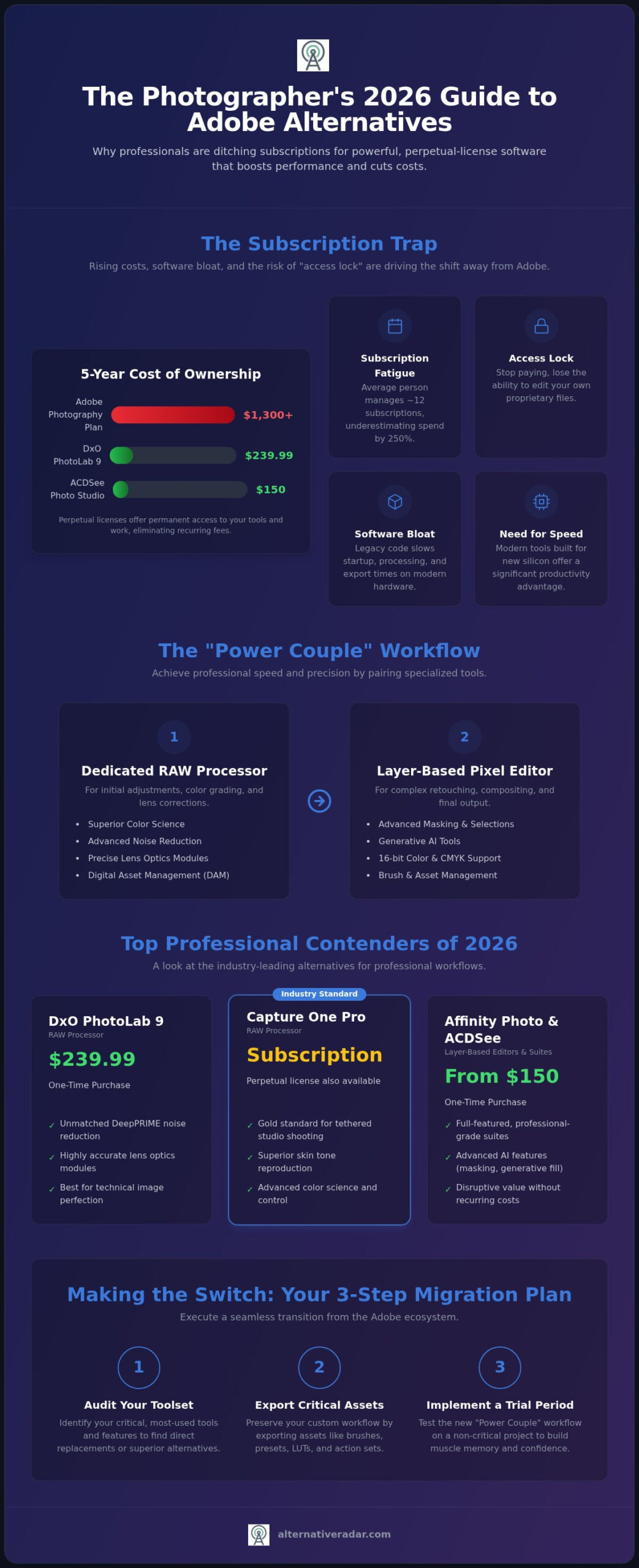
The financial math of the subscription model rarely favors the user over the long term. At 2026 rates, an Adobe Photography Plan with 1TB of storage costs roughly $264 per year. Over five years, you’ll spend over $1,300. In contrast, professional perpetual licenses like ACDSee Photo Studio Ultimate 2026 cost approximately $150, while DxO PhotoLab 9 sits at $239.99. Beyond the initial price, the “access lock” problem remains the biggest risk. When you stop paying a subscription, you often lose the ability to edit your proprietary files. Perpetual licenses ensure you maintain archival access to your work forever, regardless of your current budget.
Performance and Bloat: The Need for Speed
Legacy software often struggles with the efficiency demands of 2026 hardware. Many long-standing applications carry significant code bloat that impacts startup times and export speeds on modern silicon. Contemporary alternatives are frequently built from the ground up to leverage latest-generation processors. This results in a more responsive interface and faster rendering for high-resolution RAW files. Photographers are increasingly prioritizing these “built-for-silicon” tools because they value their time. If a specialized editor can shave seconds off every export, the cumulative productivity gain becomes a significant competitive advantage for a busy studio.
The Professional Contenders: RAW Processing and Layer-Based Editing
Choosing the best photoshop alternative for photographers requires a clear understanding of the two distinct stages of modern digital imaging: Digital Asset Management (DAM) and pixel-level retouching. Photoshop often attempts to be both, which leads to the software bloat discussed previously. Professional workflows in 2026 favor the “Power Couple” approach. This involves using a specialized RAW developer for initial color grading and lens correction, then moving to a dedicated layer-based editor for complex retouching.
High-end output demands strict technical standards. Any professional contender must support 16-bit color depth to prevent banding and offer full CMYK support for print-ready deliverables. While many casual apps fail these tests, several industry leaders now rival or exceed Adobe’s performance. You can find detailed reviews of these best Photoshop alternatives to see how they rank across various hardware configurations. Success in this transition depends on maintaining these professional standards without compromise.
The Best RAW Developers for Pro Workflows
Capture One Pro remains the gold standard for studio photographers who require reliable tethered shooting and superior skin tone reproduction. As of July 2026, version 16.8.3 offers the most advanced color science in the industry. For those focused on technical perfection, DxO PhotoLab 9.9 provides unmatched noise reduction through its DeepPRIME technology and highly accurate lens optics modules. While Capture One has moved toward a subscription model, DxO continues to offer a perpetual license for $239.99. If you need a more budget-friendly entry point, Serif’s Affinity Photo acts as a capable RAW developer, though it truly shines in the retouching phase.
Layer-Based Retouching: Matching the PSD Workflow
Affinity Photo has become the primary challenger for high-end retouching because it handles complex masking and high-frequency separation with zero lag. Since Canva made the Affinity suite free in 2026, it’s become the most accessible professional tool on the market. For macOS-centric studios, Pixelmator Pro offers a streamlined, high-performance environment that leverages Apple Silicon to its fullest potential. Both tools prioritize PSD compatibility, allowing you to import and export layered files without data loss. Before committing to a new suite, you can compare specific feature sets to ensure the software matches your unique retouching requirements.
The AI Revolution: Automated Retouching and Generative Tools
AI is no longer a niche feature; it’s the core of the modern studio. 92% of professional photographers now integrate AI tools into their daily operations to maintain a competitive edge. While Adobe’s Firefly often dominates the conversation, independent developers have spent 2026 refining specialized tools that prioritize speed and privacy. The best photoshop alternative for photographers must now provide advanced generative capabilities that function without a mandatory cloud connection or high monthly fees.
Modern AI-driven masking has reached a state of near-perfection. Tools can now identify subjects, skies, and backgrounds instantly, allowing for complex local adjustments in seconds. This shift toward “Assisted Editing” empowers you to maintain creative control while the software handles the tedious pixel-mapping. This comprehensive guide to Photoshop alternatives details how these independent engines compare to Adobe’s proprietary Sensei and Firefly technologies.
Privacy and ethics have become central to software selection in 2026. Many professionals avoid cloud-based generation because it risks exposing proprietary client assets to external servers. Local AI processing ensures your hardware does the heavy lifting, keeping your data secure and your workflow independent of internet stability. These tools offer a level of autonomy that subscription-based cloud services simply can’t match.
Generative AI in the Independent Sector
Luminar Neo leads the market in AI-based lighting and atmospheric adjustments, allowing you to relight a scene or add volumetric fog with a single slider. For technical restoration, Topaz Photo AI serves as the benchmark for sharpening and upscaling, often integrated as a plugin within other professional suites. Local AI is the 2026 standard for professional privacy.
Automating the Boring Stuff: Culling and Batching
AI has revolutionized the “time-to-delivery” for high-volume wedding and event photographers. Modern culling software uses AI to identify “blinkers,” out-of-focus shots, and poor compositions during the initial import. Smart presets now adapt to the specific lighting conditions of each individual frame rather than applying a static filter. Finding the best photoshop alternative for photographers involves selecting tools that automate these repetitive tasks to maximize your billable hours.
Open-Source and Specialized Solutions for Niche Workflows
Open-source software has evolved significantly by 2026. While many professionals initially dismiss free tools, specialized workflows often benefit from the modular nature of community-driven projects. For those with specific technical needs, the best photoshop alternative for photographers might actually be a combination of several free, highly-focused applications rather than a single paid suite. Finding the best photoshop alternative for photographers often involves looking beyond the most marketed names to find tools that solve specific architectural or scientific imaging challenges.
The “learning tax” remains the primary hurdle for open-source adoption. These tools don’t try to clone the Adobe interface; they follow their own logic. If you’re willing to invest the time to master a new UI, you can eliminate software costs entirely while maintaining professional standards. This approach is particularly effective for studios that require highly customized tools or those operating on Linux-based systems where mainstream support is often limited.
The Open-Source Powerhouse: GIMP and Darktable
GIMP has undergone a major transformation in recent years. In 2026, it finally offers robust high-bit depth support and a refined non-destructive editing workflow that rivals commercial competitors. It’s no longer just a basic editor; it’s a toolkit for those who need pixel-level control without a price tag. Darktable serves as the open-source answer to Lightroom, providing a powerful RAW processing engine that handles complex metadata and tethered shooting. These tools rely on a community-driven support model. You won’t find a corporate helpdesk, but you’ll find thousands of user-generated scripts and plugins that extend the software’s functionality far beyond its base installation.
Specialized and Online Utility Tools
Niche photography requires niche tools. While Photoshop is a generalist, applications dedicated to astrophotography or macro-stacking often provide better results for those specific disciplines. Landscape and product photographers frequently turn to specialized stacking software to achieve infinite depth of field or to clear noise from night skies. These tools focus on doing one thing perfectly rather than attempting to manage an entire workflow.
For social media managers and photographers on the move, browser-based editors like Photopea have become indispensable. These platforms allow you to perform quick edits on any machine without a local installation. They even support PSD files, making them a perfect bridge for collaborative projects. If you’re looking for a cost-free entry point into professional editing, check out this guide on the Best free alternatives to Photoshop in 2026.
The right tool depends on your specific output requirements. Don’t let a brand name dictate your workflow efficiency. If you’re ready to move beyond the mainstream, explore our detailed software comparisons to find the exact match for your niche.
The Exit Strategy: How to Successfully Migrate Your Photography Workflow
Leaving a software ecosystem you’ve used for years requires a structured approach to ensure you don’t lose access to your creative history. The best photoshop alternative for photographers is only effective if your transition is seamless and your data remains intact. By following a systematic migration framework, you can move from a subscription-based model to a perpetual or free license without interrupting your client delivery schedule. This process protects your studio from the “access lock” issues discussed in previous sections.
Transitioning isn’t just about changing apps; it’s about shifting your entire technical foundation. You must ensure that every asset, from brushes to high-resolution archives, remains accessible in a post-Adobe environment. A well-executed exit strategy allows you to reclaim your software budget while maintaining the high-end output your clients expect.
Step 1: Audit and Asset Export
Start by identifying which specific Photoshop features are non-negotiable for your editing style. If you rely on specialized third-party plugins, verify their compatibility with your intended replacement software first. You must convert proprietary Adobe formats to universal standards like TIFF or DNG to maintain long-term archival access across different platforms. Clean up your current Digital Asset Management system by deleting rejected shots and finalizing metadata tags before you begin the export process. Export your custom brushes as ABR files and save your most critical presets, as many modern editors can import these assets directly.
Step 2: The Parallel Test Drive
Setting up your new “Power Couple” pairing, such as Capture One for RAW processing and Affinity Photo for retouching, is just the beginning. Run a parallel workflow for at least 30 days before canceling your Creative Cloud subscription. During this period, process every new shoot in both environments to identify where your speed drops or where the interface feels counterintuitive. Use this time to recreate your most-used actions and macros manually in the new software. This overlapping phase minimizes downtime and ensures you’re fully proficient before your subscription access officially expires.
Finding Your Perfect Match
The best photoshop alternative for photographers depends on your specific professional requirements and technical skill. For pro-tier users who need tethering and high-end color science, the combination of Capture One and Affinity Photo remains the industry benchmark in 2026. Enthusiast-tier users or those focused on rapid social media delivery might find that a single application like Luminar Neo or the free Affinity suite provides more than enough power. Regardless of your choice, prioritizing software ownership ensures your studio remains profitable and independent of recurring monthly fees. You can find your perfect software match on Alternative Radar by comparing the latest licensing models and technical specifications today.
Take Control of Your Creative Infrastructure
Transitioning away from a subscription-heavy ecosystem isn’t just about reducing your overhead; it’s about building a faster, more private creative environment. You’ve seen how the “Power Couple” approach of pairing specialized RAW processors with dedicated editors can outperform legacy software that is burdened by decades of code bloat. By mastering the 2026 AI landscape and following a structured migration plan, you can finally reclaim ownership of your tools and your proprietary files.
Selecting the best photoshop alternative for photographers requires a precise match for your specific studio needs. Whether you prioritize open-source flexibility or high-end studio tethering, the right combination of tools exists to elevate your output and protect your long-term archival access. Don’t let market dominance dictate your technical limitations when specialized alternatives offer superior performance.
Ready to finalize your new setup? Explore the full directory of Photoshop alternatives on Alternative Radar. Our platform provides objective, expert-led software comparisons and detailed pros and cons for every professional editor. You can filter by license type, including free, open-source, and paid options, to ensure your choice aligns with your business model. Start building your high-velocity workflow today and experience the freedom of a studio that isn’t tethered to a monthly bill.
Frequently Asked Questions
Is there a real one-time purchase alternative to Photoshop for pros?
Yes, several professional editors offer perpetual licenses or are now entirely free. ACDSee Photo Studio Ultimate 2026 provides a perpetual license for approximately $150; while Serif’s Affinity Photo became free in 2026 following its acquisition by Canva. These options allow you to own your software outright and avoid the recurring costs associated with the Adobe ecosystem.
Can I open my old .PSD files in Affinity Photo or GIMP?
Both Affinity Photo and GIMP support the import and export of .PSD files. While most layer structures and masks remain intact, proprietary Adobe features like Smart Objects or specific Live Filters may require rasterization to appear correctly. If you’re looking for the best photoshop alternative for photographers that maintains file compatibility, Affinity Photo offers the most consistent results with complex Adobe documents.
What is the best Photoshop alternative for RAW photo processing?
Capture One Pro 16.8.3 and DxO PhotoLab 9.9 are the leading professional RAW processors. Capture One is preferred by studio photographers for its industry-standard tethering and color science; while DxO PhotoLab offers superior technical noise reduction through DeepPRIME technology. Both applications provide specialized engines that often surpass the base RAW development capabilities found in standard all-in-one editors.
Does any free software have AI features like Photoshop’s Generative Fill?
Yes, the 2026 landscape features several free tools with integrated AI capabilities. The Affinity suite now includes advanced AI masking and object removal; while open-source tools like GIMP and Krita support stable diffusion plugins for generative fill and expansion. These tools provide professional-grade “assisted editing” features that rival Adobe’s Firefly without requiring a paid subscription.
Is GIMP actually good enough for professional photography in 2026?
GIMP is a viable tool for professional photographers who prioritize open-source flexibility and technical control. The 2026 version includes essential high-bit depth support and non-destructive editing workflows that were previously missing. While the interface requires a significant learning period, its ability to handle complex retouching tasks makes it a powerful asset for studios operating on Linux or limited budgets.
How do I move my Lightroom catalog to a different software?
You can move your Lightroom catalog by exporting your metadata to XMP sidecar files. Professional alternatives like Capture One Pro offer dedicated “Import Catalog” tools that translate your existing star ratings, color tags, and basic adjustments. Specific proprietary edits like local masks may not transfer perfectly, so you should finalize active projects before initiating the migration.
Which alternative software is best for high-end skin retouching?
Affinity Photo is widely considered the best photoshop alternative for photographers focused on high-end skin retouching. It supports advanced frequency separation and 16-bit color depth, which are critical for maintaining smooth gradients and skin textures. For macOS users, Pixelmator Pro offers highly optimized performance on Apple Silicon, providing responsive tools for detailed portrait work and complex masking.
Are there any online Photoshop alternatives that support RAW files?
Photopea is the most prominent browser-based editor that supports RAW file imports. It offers a familiar layer-based interface that functions on any machine without a local installation. While online tools are excellent for quick social media edits or emergency retouching, they generally lack the high-velocity batch processing and deep color management found in dedicated desktop software.