The most powerful digital painting tool in 2026 isn’t the one you’re currently paying for every month. Many professional illustrators have reached a breaking point with subscription fatigue, especially when the tools they rely on feel more like a rental than an asset. You want a photoshop alternative for drawing that doesn’t just mimic features, but actually delivers zero-latency brush strokes and full PSD compatibility. It’s difficult to switch when you’re worried about re-learning every shortcut or losing tablet pressure sensitivity, but the market has shifted in your favor.
We’ve done the heavy lifting by testing the latest software releases to find the most efficient tools for your studio. You’ll discover how the recent move to make the Affinity 3.0 suite free has disrupted the industry and which open-source engines now rival premium suites. This article breaks down the eight best options to help you build a professional, zero-cost workflow without sacrificing the technical precision your art demands. We’ve prioritized software that handles complex brush engines and high-resolution canvases as smoothly as any paid industry leader.
Key Takeaways
- Eliminate subscription fatigue by identifying professional-grade tools that offer a zero-cost workflow without compromising on power.
- Select the best photoshop alternative for drawing by comparing brush engines, tablet pressure sensitivity, and PSD file compatibility.
- Optimize your digital painting process using advanced features like brush stabilization and customizable pressure curves found in modern free suites.
- Maintain productivity during your transition by remapping software interfaces and importing legacy .abr brush assets into new environments.
- Utilize expert curation to expand your creative toolkit with specialized alternatives for 3D modeling, video editing, and graphic design.
Why Digital Illustrators are Leaving the Adobe Subscription Model in 2026
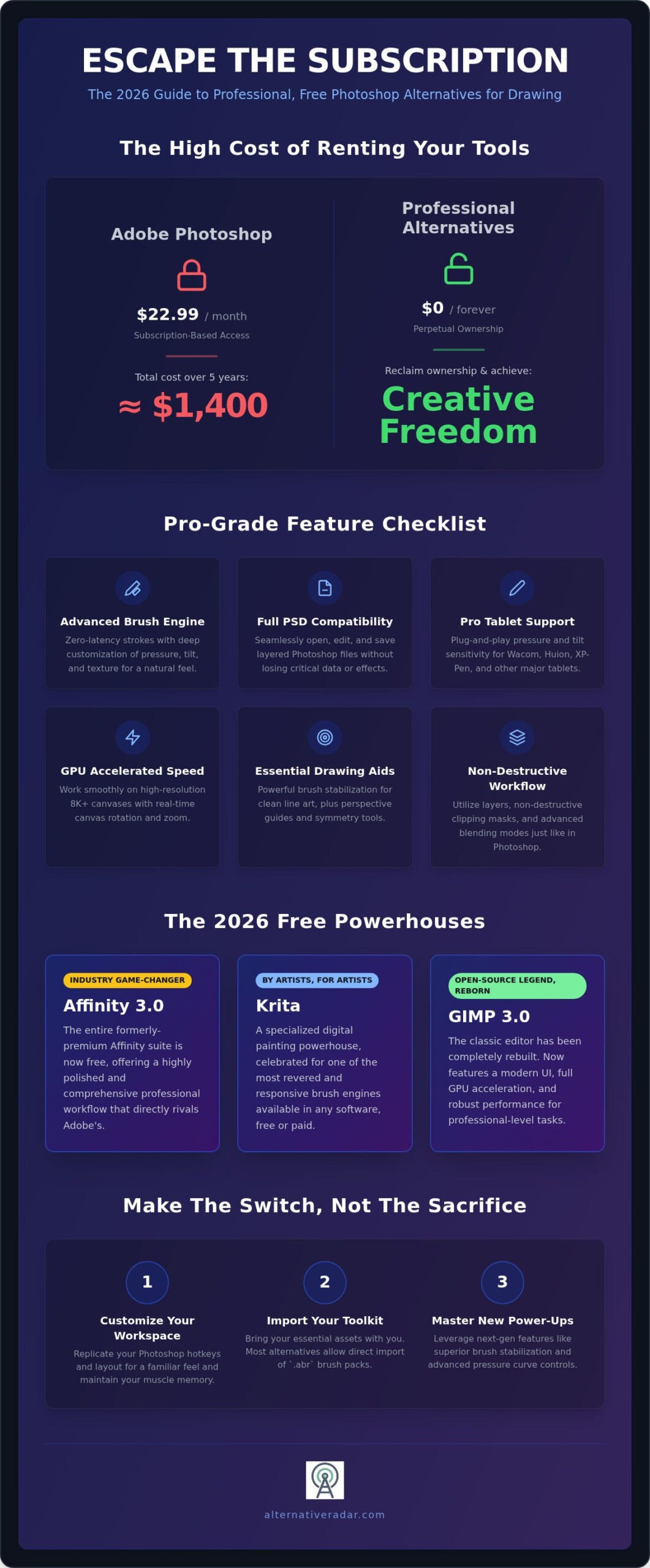
The financial math for creative professionals has changed. In 2026, Adobe’s single-app plan for Photoshop costs $22.99 per month, which totals nearly $1,400 over a five-year period. For freelance artists and students, this recurring overhead is often difficult to justify when high-performance alternatives offer the same utility for zero cost. Switching to a free photoshop alternative for drawing isn’t just a budget move; it’s a strategic decision to reclaim ownership of your creative pipeline. When you stop renting your software, you eliminate the risk of losing access to your files if a subscription payment fails or prices increase unexpectedly.
A true drawing alternative must offer more than basic photo filters. Illustrators require sophisticated brush engines that prioritize stroke physics, pressure curves, and texture synthesis. You can consult a comprehensive list of raster graphics editors to see how the landscape has branched into specialized tools. While Photoshop remains a powerful generalist, modern free software has been rebuilt from the ground up to serve the specific needs of concept artists and painters. This specialization is why 2026 has become a turning point for the industry.
Subscription fatigue and the freedom of open-source
Recurring costs create a glass ceiling for emerging talent. Open-source development has evolved into a professional standard, driven by global communities rather than corporate quarterly goals. This shift follows the broader market trend seen in popular open source business software 2026, where transparency and user-first roadmaps provide a more stable environment for long-term projects. When you choose open-source, you’re investing in a tool that won’t be discontinued or locked behind a higher paywall next year. It’s about the freedom to customize your workspace and maintain a permanent archive of your work without a middleman.
The performance leap in 2026 drawing engines
Technical limitations that once plagued free software have been solved through aggressive optimization. Tools like Krita and the latest GIMP 3.0 stable releases now feature full GPU acceleration, allowing for seamless work on 8K canvases. The latency issues that used to frustrate digital painters are gone. Modern free engines handle high-resolution files with the same fluidity as premium suites, thanks to improved memory management. Additionally, the rise of universal tablet drivers means that Wacom, Huion, and XP-Pen devices now offer plug-and-play pressure sensitivity and tilt support across all major free platforms. You get professional-grade hardware response without the professional-grade price tag.
Alternative Radar acts as your digital scout in this evolving market. We’ve verified these performance claims to ensure you’re choosing a tool that meets 2026 production standards. The goal is efficiency: finding the right tool that lets you focus on your art rather than your software bill.
Essential Features for a Drawing-Focused Photoshop Replacement
Many general image editors claim to be a photoshop alternative for drawing, but most lack the specialized architecture required for professional illustration. A true replacement must prioritize the physical experience of the digital stroke over simple pixel manipulation. This means evaluating brush engines that allow for deep customization of tip shapes, grain textures, and pressure curves to match your unique hand movements. If the engine can’t simulate the drag of a pencil or the flow of a loaded brush, it isn’t an illustrator’s tool.
High-speed canvas manipulation is equally critical for a productive workflow. You shouldn’t experience performance lag when rotating or mirroring your canvas to find the perfect angle for a stroke. Professional drawing suites also include these core capabilities:
- Brush stabilization and smoothing for clean, confident line art without hand tremors.
- Non-destructive clipping masks to manage complex shading and highlights without affecting base layers.
- Advanced blending modes that mimic traditional pigment mixing and light interaction.
The technical side of digital strokes
Modern drawing engines compensate for hardware jitter by using weighted smoothing algorithms that predict your intended path. Pressure Sensitivity is the software’s ability to translate the physical force applied to your tablet stylus into varying line thickness or opacity. While 8-bit color was once the standard, 16-bit color depth is now necessary for professional digital painting to prevent banding in smooth gradients. These technical foundations ensure that your digital work retains its quality when scaled or printed at large formats.
File compatibility and workflow integration
Switching tools shouldn’t mean losing your project history. A viable photoshop alternative for drawing must maintain .PSD integrity, preserving layers, groups, and editable text fields. You’ll also need robust export options, specifically the ability to toggle between CMYK for print production and RGB for web display. Finding the right alternative to Photoshop requires rigorous testing of how these files behave when shared with clients or other software in your pipeline.
It’s best to verify these technical specs before committing to a new project. You can explore our curated software comparisons to see which tools currently lead the market in tablet driver stability and export accuracy. Choosing the right engine today prevents technical bottlenecks tomorrow.
The Top Free Photoshop Alternatives for Drawing: 2026 Comparison
Selecting the right photoshop alternative for drawing depends on your specific output requirements. While several tools offer basic editing, only a few provide the specialized brush engines and tablet optimization required for professional illustration. Our team at Alternative Radar has tested these platforms against 2026 hardware standards to ensure they handle high-pressure workflows without the lag associated with older open-source builds.
Krita remains the primary recommendation for concept artists and painters due to its dedicated focus on the digital canvas. However, other tools serve niche needs effectively:
- GIMP 3.0: The April 2026 stable release (v3.2.4) finally delivers a modernized, single-window UI and significantly improved tablet driver support, making it a viable general-purpose tool.
- Photopea: This is the most efficient zero-install option. It runs directly in your browser and provides the best environment for quick PSD sketching when you’re away from your primary workstation.
- Medibang Paint: If your workflow centers on comic or manga production, Medibang offers specialized perspective grids and pre-loaded screentones that save hours of manual labor.
Deep dive into Krita for professionals
Krita has evolved into the most recommended of the best free alternatives to photoshop for serious artists. Its “Wrap-around” mode is a standout feature, allowing you to create seamless textures by tiling the canvas in real-time as you paint. Beyond static illustration, Krita includes a robust animation timeline. This allows you to transition into 2D frame-by-frame work within the same interface, using the same professional brush sets you’ve already customized. It’s a unified studio environment that rivals paid suites in both depth and performance.
AI-driven assistants in 2026 free software
The integration of AI in 2026 has moved beyond simple filters to become a genuine productivity aid. Many free tools now offer Stable Diffusion plugins that allow you to generate background sketches or lighting references directly on a layer. AI-assisted coloring tools have also become standard; they can “flat” a complex piece of line art in seconds, identifying boundaries with high precision. AI upscaling allows artists to maintain high-speed performance on smaller canvases while generating crisp, high-resolution final exports for print. These features don’t replace the artist but instead remove the repetitive technical hurdles that stall creative momentum.
As your digital scout, we’ve verified that these tools maintain PSD compatibility while offering these modern features. You can explore our broader comparisons to find the specific photoshop alternative for drawing that fits your hardware configuration and artistic style.
How to Switch from Photoshop to Free Drawing Software Productively
Switching to a photoshop alternative for drawing doesn’t have to result in lost productivity. The biggest hurdle isn’t the software’s capability, but your own muscle memory. You’ve spent years training your hand to react to specific Adobe layouts. To overcome this, you must prioritize UI customization before starting your first professional project in a new environment. Efficiency comes from a workspace that feels familiar, even if the underlying code has changed.
A structured approach prevents the frustration that leads many artists to crawl back to a subscription. By following a systematic 7-day transition plan, you can migrate your entire studio workflow without missing a deadline. This process starts with remapping your physical tools and ends with a fully synchronized asset library.
Remapping muscle memory and shortcuts
Most professional-grade tools like Krita allow you to import Photoshop shortcut schemes with a single click. However, manual refinement is often better for long-term speed. Focus on synchronizing the “Big Three” across your suite: Brush (B), Eraser (E), and Move (V). If these core keys don’t align, your workflow will stutter. You should configure your tablet express keys at the driver level rather than the software level to maintain consistency across different apps. This creates a “Universal Creative Layout” that works whether you’re in an open-source painter or a browser-based sketch tool. Set up distinct workspaces for sketching, inking, and painting to reduce visual clutter and mimic the Adobe experience.
Asset and file migration strategies
Moving your digital library requires a systematic approach to organization. You can apply the same logic found in an open source CRM software comparison to your art assets; it’s about data integrity and accessibility. Organize your files by project type and ensure your .abr brush packs are converted to the native formats of your new software to preserve texture dynamics. While many 2026 tools handle .abr files natively, some complex dual-brushes may require manual adjustment to match their original Photoshop behavior. Since you’re moving away from Adobe Creative Cloud, consider localized NAS setups or encrypted cloud alternatives to maintain control over your version history.
- Day 1: Map your primary shortcuts and tablet buttons.
- Day 2: Import and test your top 10 essential brush presets.
- Day 3: Recreate a past sketch to calibrate brush stabilization settings.
- Day 4: Test PSD export and import cycles with a collaborator.
- Day 5-7: Complete a low-stakes project to identify and fix technical bottlenecks.
Ready to finalize your transition? You can compare the latest software benchmarks on our platform to ensure your chosen tool handles your specific tablet hardware with zero latency. Taking the time to calibrate your tools now ensures a seamless professional workflow for years to come.
Building Your Professional Creative Suite with Alternative Radar
Identifying the right photoshop alternative for drawing is just the first step in reclaiming your creative independence. Alternative Radar functions as your digital scout, helping you navigate a market that is often clouded by corporate marketing and subscription-locked ecosystems. We provide the technical clarity needed to move from a single tool to a fully integrated, zero-cost production pipeline. By focusing on utility and precision, we empower you to build a studio that is defined by your talent rather than your software budget.
Our curation methodology for 2026
Our 2026 curation process relies on rigorous performance benchmarks. We don’t just list features; we measure specific metrics like tablet input latency on high-resolution canvases and memory efficiency during multi-layered PSD exports. Community support acts as our primary indicator for software longevity. If a tool lacks an active developer base or clear documentation, it doesn’t make our list. This ensures that the software you choose today will remain viable for professional work in the future. We also prioritize transparency in software licensing and user privacy. In an era where many premium suites have integrated invasive telemetry, we highlight tools that keep your creative assets strictly on your local machine.
Your creative needs likely extend beyond digital painting. While finding a photoshop alternative for drawing solves your immediate line art and coloring needs, a professional studio requires a broader toolkit. Alternative Radar helps you identify efficient replacements for 3D modeling, vector design, and video post-production. By treating your software selection as a modular suite, you can swap out individual components as new, more efficient tools emerge in the landscape. This objective approach allows you to make decisions based on utility rather than brand loyalty.
Joining the community of smart software choosers
Joining our community means gaining access to a high-quality filter for software information. Our search tools are designed for professionals who value their time and need immediate answers to technical compatibility questions. You can stay ahead of 2026 software trends by using Alternative Radar as your primary resource for discovery and comparison. We’ve already done the hard work of searching and testing so you don’t have to spend your work hours troubleshooting drivers or file formats.
Start building your professional creative suite today by exploring our full directory of curated alternatives. Reclaim your workflow and eliminate unnecessary overhead by downloading your first verified tool now. Whether you’re a freelance illustrator or a concept artist in a major studio, the move to more efficient, cost-effective software starts with a single, smarter choice.
Future-Proof Your Digital Studio
Transitioning to a professional-grade photoshop alternative for drawing is a strategic move to eliminate recurring overhead while maintaining high industry standards. We’ve identified the most capable engines for 2026, focusing on GPU acceleration and seamless tablet driver integration. By remapping your muscle memory and synchronizing your asset library, you can move away from subscription-locked ecosystems without sacrificing a single day of productivity. The technical barriers that once favored market leaders have vanished, leaving room for more efficient, community-driven tools.
Alternative Radar provides objective, efficiency-driven software reviews tested for 2026 hardware and tablet compatibility. Our no-hype comparison framework ensures you find the specific tool that fits your unique technical requirements and production workflow. Take the next step in optimizing your production pipeline and reclaiming your creative independence. Explore the full directory of Photoshop alternatives on Alternative Radar to build your free creative suite today. You have the talent; now choose the tools that respect your resources and your time.
Frequently Asked Questions
Is Krita better than Photoshop for digital drawing in 2026?
Krita is superior for dedicated illustration because its architecture focuses on brush physics rather than photo manipulation. While Photoshop remains a powerful generalist tool, Krita offers specialized features like the wrap-around texture mode and a frame-by-frame animation timeline. Professional concept artists often prefer Krita’s brush engine because it provides a more natural tactile response during high-resolution painting sessions.
Can I open .PSD files in free software like GIMP or Krita?
You can open and export .PSD files in both GIMP and Krita with high layer integrity. Most standard layers, groups, and blending modes transfer without issues. You should be aware that proprietary Adobe features like Smart Objects or specific adjustment layers may flatten upon import. For most drawing workflows, the compatibility is sufficient for professional client hand-offs.
Do free Photoshop alternatives support Wacom and Huion tablets?
Modern free software provides full support for Wacom, Huion, and XP-Pen hardware via universal tablet drivers. You’ll have access to pressure sensitivity, tilt support, and programmable express keys. Most tools now use the Windows Ink or WinTab API to ensure plug-and-play compatibility. This eliminates the technical hurdles that previously made open-source software difficult for tablet users to adopt.
What is the best free Photoshop alternative for Mac users who draw?
Krita is the most efficient choice for macOS because it is optimized for Apple Silicon and high-density Retina displays. It provides a more stable experience for digital painters compared to GIMP on the Mac platform. If you need a photoshop alternative for drawing on a Mac, Krita’s native performance ensures low latency even when working on complex, multi-layered canvases.
Can I use my Photoshop brushes (.ABR) in GIMP or Krita?
Both GIMP and Krita allow you to import .ABR files directly into your brush library. While standard stamp and texture brushes work perfectly, some complex Adobe-specific dynamics might require manual adjustment. You can usually replicate these effects by tweaking the pressure curves within the local brush settings. This allows you to maintain your established artistic style while transitioning to a free suite.
Are there any free online drawing tools that support layers and pressure?
Photopea is the leading browser-based photoshop alternative for drawing with full layer support and tablet pressure sensitivity. It functions as a zero-install environment that mirrors the Adobe UI closely. For collaborative sketching, platforms like Magma also provide professional-grade pressure support. These tools are ideal for quick edits or sketching when you don’t have access to your primary desktop workstation.
Is GIMP 3.0 powerful enough for professional illustration?
The stable release of GIMP 3.2.4 in April 2026 solidified its place as a professional tool. It now features full GPU acceleration and a modernized, non-destructive editing workflow. While it remains a general-purpose editor, the improved tablet support and single-window interface make it a reliable choice for illustrators. It handles high-resolution files with significantly better memory management than previous versions.
How do I fix tablet pressure sensitivity in open-source software?
Most pressure issues are solved by matching the software’s input API with your tablet driver. Navigate to the preferences menu and toggle between Windows Ink and WinTab to see which provides the best response. You should also ensure that your tablet’s specific driver is updated to the latest 2026 version. Restarting the software after changing these settings usually restores full pressure and tilt functionality.